8 Best AI Fashion Video Generators for Ecommerce (2026 Compared)
Compare 8 AI fashion video generators with pricing, features, and test criteria. Turn apparel photos into model videos, fashion ads, and social clips.
An AI fashion video generator turns apparel product photos into model-led video content — try-on clips, product showcases, TikTok and Reels ads, and social-ready short videos — without a full production shoot. The winning workflow is product image to AI model try-on to motion to ad-ready short video, while keeping the garment recognizable.
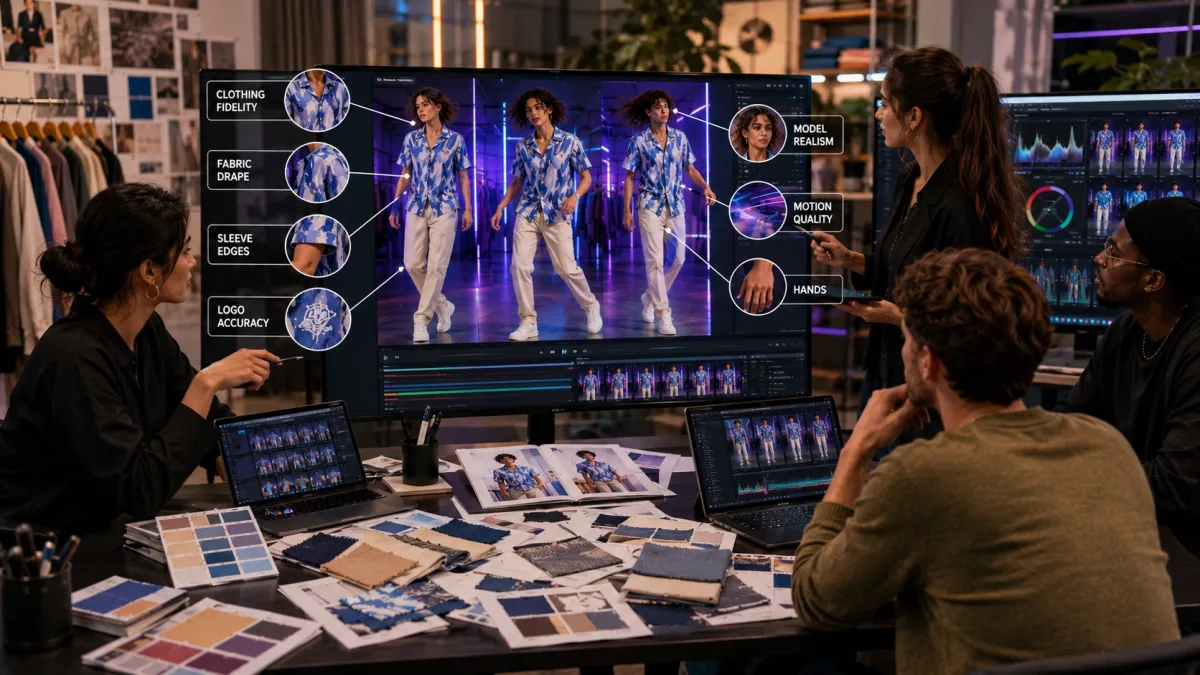
This guide compares 8 AI fashion video generators by what matters most for ecommerce video production: clothing fidelity, model realism, motion quality, pricing, free-tier limits, and ad readiness.
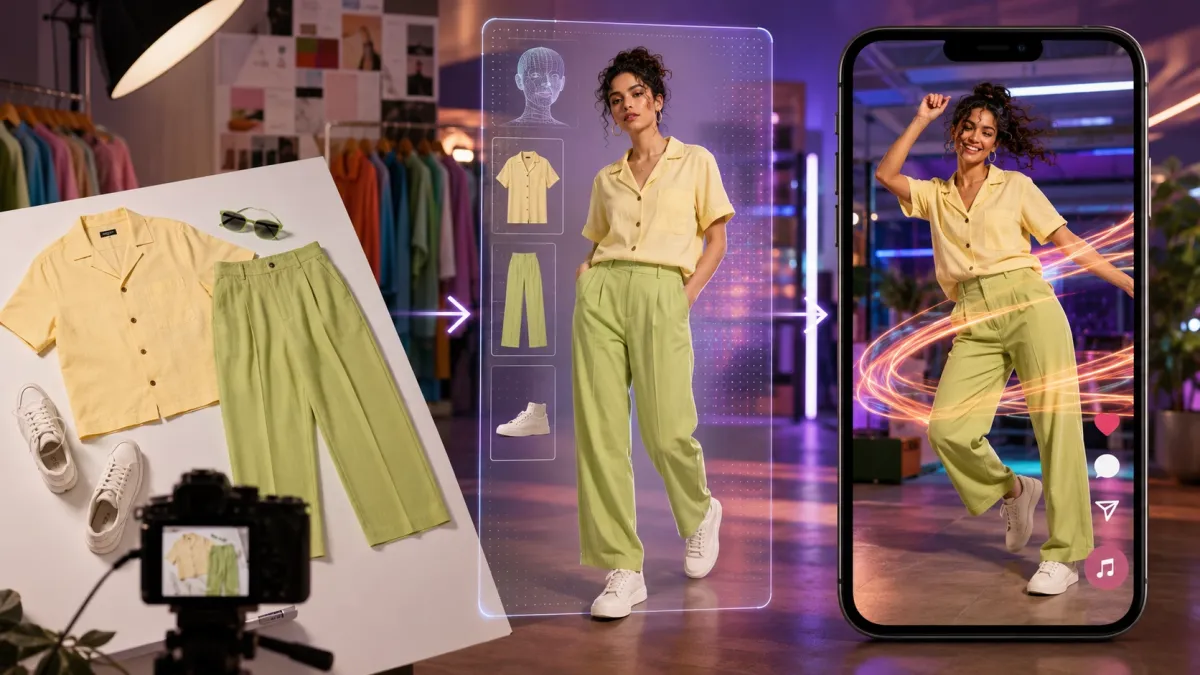
What Is an AI Fashion Video Generator?
An AI fashion video generator is a tool that creates video content for clothing, accessories, and fashion products. Unlike a general text-to-video tool, it is built around fashion inputs: apparel images, flat-lay photos, mannequin photos, on-model images, AI model photos, virtual try-on outputs, or product catalog assets.
A useful fashion video workflow can include several related tasks:
- Apparel image to video: animate a flat-lay, mannequin, catalog, or on-model product image.
- AI virtual try-on: place a garment on a model or create a model-wearing product visual from a garment image.
- Model video generation: turn a model or try-on image into a short clip with walking, posing, runway motion, or other movement.
- Fashion product ads: produce TikTok, Reels, Shorts, Shopify, marketplace, or paid-social creative from product visuals.
- Motion templates: apply short-form movement patterns — walks, poses, turns, or beat-synced motion — that feel native to social platforms.
- Video editing and publishing: add captions, hooks, music, platform ratios, and final packaging after the AI clip is created.
“AI video generator” alone is too broad for fashion sellers. A tool can make impressive scenes and still fail the ecommerce job if it changes a print, warps a logo, or creates a clip that does not show the product clearly.
Why Fashion Sellers Need AI Fashion Video Generators
Fashion ecommerce has a content math problem. New drops need product photos, try-on visuals, short videos, paid-social variants, and marketplace assets. Traditional production works for hero campaigns but is too slow and expensive for every SKU, colorway, and ad test. A Shopify store, TikTok Shop seller, cross-border merchant, or agency may have product photos long before it has models, studio time, or a video team.
The core constraints driving adoption: model and studio costs that do not scale per SKU, sample and shipping delays, short-form content fatigue across TikTok and Reels, high SKU velocity requiring content for frequent drops, editing bottlenecks on small teams, and testing pressure from ad buyers who need multiple hooks and visual angles.
How We Evaluated the Best AI Fashion Video Generator Tools
We evaluated each tool from the position of a fashion seller with real products to launch. Our question: can the tool move from product image to usable video without losing the product?
| Factor | Why it matters |
|---|---|
| Clothing fidelity | Garment shape, color, fabric, print, logo, and silhouette must remain close enough for product use. |
| Model realism | Body, face, pose, hands, skin tone, and proportions need to look believable. |
| Motion quality | Walking, posing, turning, and camera motion should not break limbs or fabric behavior. |
| Input flexibility | Teams may start from a flat-lay, mannequin photo, on-model shot, or AI-generated image. |
| Ad readiness | Output should be usable for TikTok, Reels, Shorts, TikTok Shop, Shopify, and paid social. |
| Batch speed | Sellers need throughput for launches, catalog coverage, and creative testing. |
| Cost control | A cheap generation is not cheap if most outputs require retries or manual repair. |
Best AI Fashion Video Generator Tools Compared
| Tool | Best for | Starting price | Free tier | Input type | Motion style |
|---|---|---|---|---|---|
| Fashion Beat | Model + apparel to fashion videos | Free (PixVerse credits) | Yes | 1 model image + up to 2 apparel images | Built-in motion templates + custom video reference |
| PicCopilot Fashion Reels | Product photo to fashion reels | From $5.99/mo | Free plan available | Product photos | AI avatar try-on reels |
| WearView | Template-driven fashion video | From $29/mo | Limited | Product shots, model shots, or AI images | Catwalk, walkthrough, 360 spin, custom animation |
| Modelia | AI fashion models + catalog visuals | From $12/mo | 20 free credits/mo | Flat-lay, mannequin, model images | Pose variation, image-to-video |
| Pixelcut | Lightweight product video | From $12.99/mo | Free plan available | Text prompts or uploaded images | General image-to-video |
| ClothMotion | Fashion image animation + try-on | Credit-based | Free credits for new users | Text or images | TikTok Shop templates, model-based |
| RAWSHOT | Fashion production systems | Custom pricing | Free trial | Product, model, catalog assets | Preset-driven shoots, reels, PDP motion |
| Kling AI | Cinematic fabric motion | From $6.99/mo | 66 free credits/day | Text, images, or video | Cinematic motion, fabric physics |
1. Fashion Beat: Best AI Fashion Video Generator for Apparel Motion and Social Content
Best for: TikTok Shop sellers, Shopify fashion stores, cross-border apparel teams, and ad buyers who need model-wearing-product videos from assets they already have. Pricing: free with PixVerse credits.
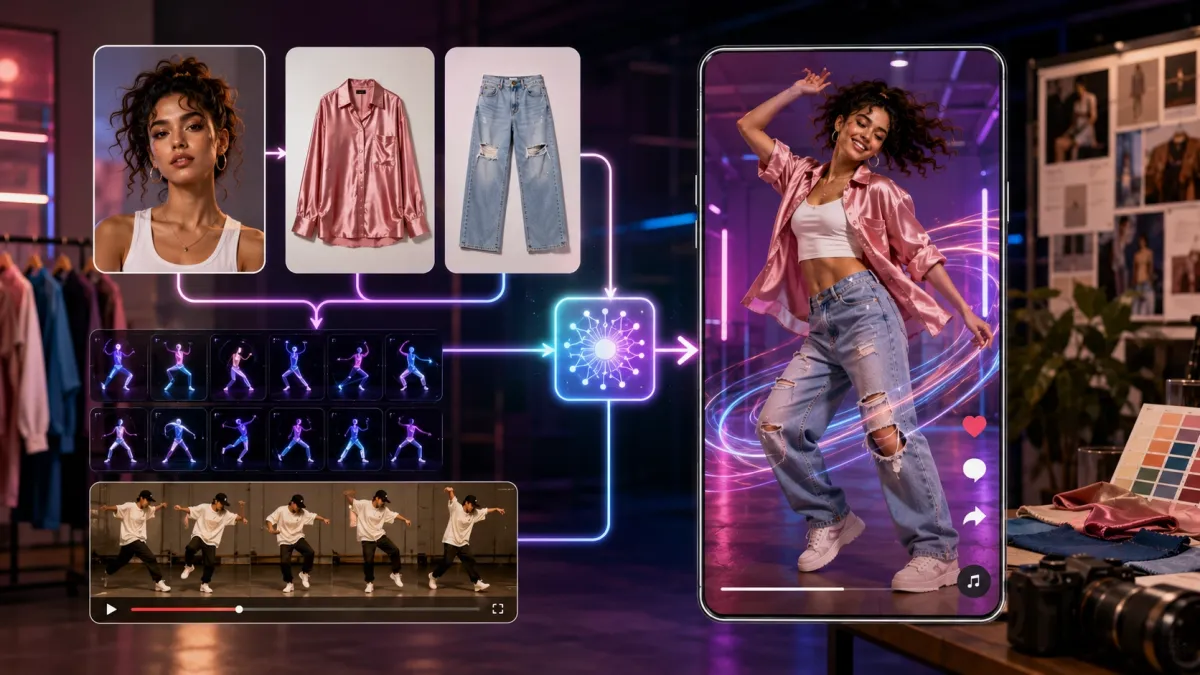
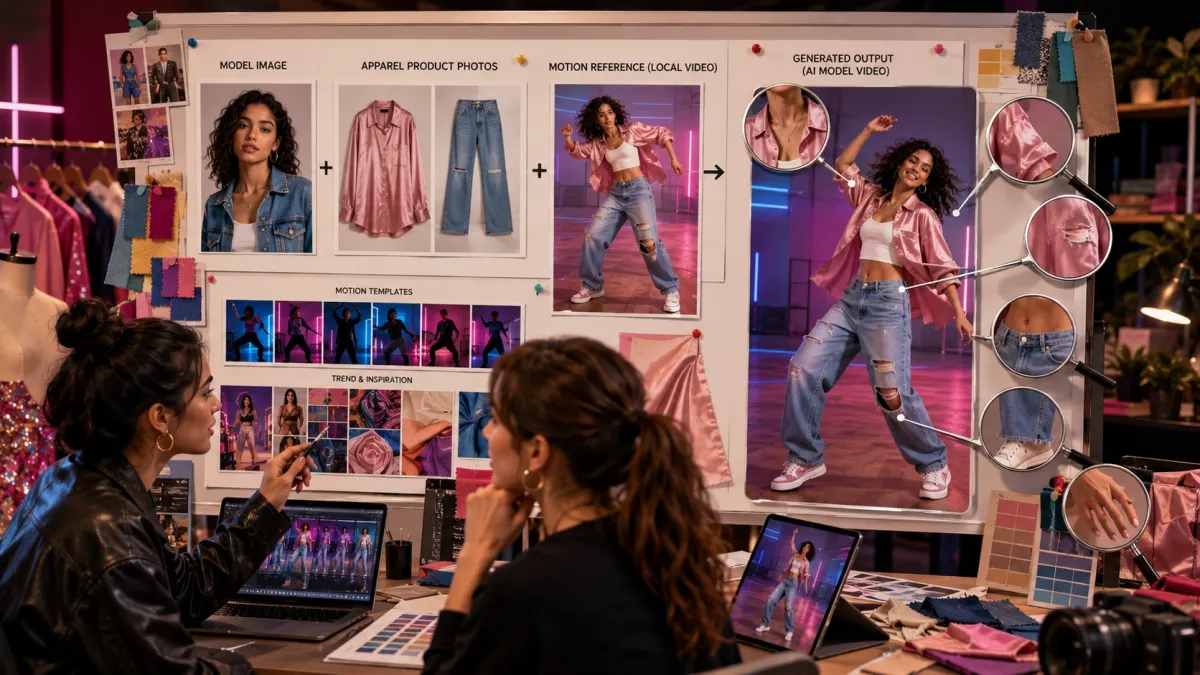
Fashion Beat is a PixVerse Mini App that turns a model image and apparel product images into short-form fashion video. Upload one clear front-facing model photo and up to two clothing product images, then choose from built-in motion templates or upload any reference video under 30 seconds. The tool generates an AI outfit image and a motion video in one workflow.
The built-in template library covers multiple motion styles — including rhythm-synced movement, model walks, pose transitions, and beat-driven effects. The local upload option extends this further: any short reference video with a clear human subject can serve as the motion source, making Fashion Beat flexible for runway-style walks, lifestyle showcases, product reveals, or social-native clips.
Fashion Beat starts from ecommerce assets instead of blank text prompts, which keeps the garment as the visual anchor. The tradeoff is that more energetic motion raises the quality bar — check hands, sleeves, hems, waistlines, and logo stability before publishing. For everyday ecommerce testing, its value is speed, workflow focus, and the variety of motion options within a single tool.
2. PicCopilot Fashion Reels: Best for AI Fashion Product Reels
Best for: fashion brands and retailers that want product photos turned into model try-on video reels. Pricing: free plan available; Pro from $5.99/mo unlocks Fashion Reels.
PicCopilot Fashion Reels focuses on fashion video rather than broad AI video generation. The launch announcement describes a tool that transforms product photos into model try-on videos for fashion retailers, with AI avatars, built-in music, and commercial licensing.
PicCopilot feels more like a product-photo-to-reel system than a motion-reference generator. That makes it useful for brands that want polished product display content without building a full shoot. Test it with flat-lay apparel, mannequin photos, and catalog product shots to compare whether the output works better for PDP content, brand reels, or paid-social hooks.
3. WearView: Best AI Fashion Video Generator for Template-Driven Production
Best for: brands that already have fashion images and want to animate them quickly for launches, PDPs, and social content. Pricing: from $29/mo.
WearView positions its AI fashion video generator around uploading fashion images, choosing a motion template — catwalk, walkthrough, 360 spin, or custom animation — and creating videos for clothing brands, online stores, and marketplaces. Users can start from product shots, model shots, or AI-generated images.
WearView is a strong candidate for quick apparel image-to-video tests, especially when the input already shows the garment on a body. Test carefully with product-only flat-lays, complex prints, metallic logos, lace, and structured outerwear — those are the cases where tools can drift. Check export rules, watermarking, commercial use, and retry rate across five to ten SKUs before scaling.
4. Modelia: Best for AI Fashion Models and Catalog Visuals
Best for: brands that need AI model photos, flat-lay-to-model visuals, pose variation, and catalog imagery before video. Pricing: from $12/mo; 20 free monthly credits.
Modelia is strongest when the job begins with fashion imagery rather than video distribution. The Modelia homepage describes tools for flat-lay to model, mannequin to model, pose changes, accessories on models, virtual try-on, and image-to-video — all without photoshoots. It also offers a Shopify app for direct product page integration.
Modelia is more of an AI fashion model and catalog visual system than a dedicated video generator. That makes it valuable when the first bottleneck is “we do not have usable model images for this SKU.” Once a strong model visual exists, a motion tool can handle the next step. If the goal is clean PDP imagery, Modelia may be more useful than a motion-heavy tool.
5. Pixelcut: Best for Lightweight Product Video
Best for: creators and small ecommerce teams that need a simple image-to-video tool alongside product photo editing features. Pricing: from $12.99/mo; free plan available.
Pixelcut is not a fashion-specific try-on generator, but it is useful in the broader ecommerce creative stack. Its AI video generator supports text-to-video, image-to-video, multiple AI models, and flexible aspect ratios for TikTok and YouTube. The value is flexibility and low-friction creative workflow for product visuals, simple animations, and social-ready assets. For jobs that require accurate garment fitting, virtual try-on, or fashion-specific motion reference, choose a dedicated fashion video tool instead.
6. ClothMotion: Best for Fashion Image Animation and Virtual Try-On Clips
Best for: sellers testing clothing videos, virtual try-on clips, and TikTok Shop content with script-led templates. Pricing: credit-based; free credits for new users.
ClothMotion is a specialized AI fashion video generator that creates clothing videos and virtual try-on clips from text or images, with TikTok Shop relevance, script libraries, multiple video models, and mainstream ratios. The script library angle is practical — many fashion operators struggle less with “make a video” and more with “what should this video say or show first?”
ClothMotion is worth testing when you want a fashion-specific image animation workflow. Pay close attention to model tier, watermark rules for free users, output duration, and whether the tool can repeat a visual style across multiple SKUs. For larger catalog workflows, check batch behavior, API access, and account-level controls.
7. RAWSHOT: Best AI Fashion Video Generator for Production Systems
Best for: fashion teams that need a broader production system for model visuals, product videos, PDP motion, and catalog-scale creative. Pricing: custom; free trial available.
RAWSHOT is positioned as a broader AI fashion production system rather than a single image-to-video tool. It highlights product videos, marketing videos, social media videos, Shorts, commercials, UGCs, lighting presets, synthetic models, project management, and API access.
RAWSHOT is most interesting for teams that think in shoots, catalogs, and production systems — same model family, same lighting, same style language across an entire capsule collection. If the team only needs a fast free test for one post, it may feel heavier than necessary. If the team needs repeatable, brand-consistent fashion visuals at volume, RAWSHOT deserves a closer look.
8. Kling AI, Runway, and CapCut: General AI Video Tools for Fashion Workflows
Best for: cinematic motion tests, editorial concepts, and final video editing and packaging. Pricing: Kling from $6.99/mo (free tier available); Runway from $15/mo; CapCut free.
Kling AI and Runway are general AI video generators that can produce strong motion, camera moves, and visual concepts for fashion. Kling AI is particularly strong for realistic fabric movement and texture rendering. The watch-out for both is product accuracy — a general AI video model may make a garment look stylish while quietly changing the product, which is a serious problem for ecommerce ads.
CapCut belongs in the workflow after generation. It handles captions, hooks, pacing, text overlays, music, platform formatting, and creator-style edits. For many teams, the best stack is not one tool: generate the fashion-specific clip in a dedicated fashion workflow, then finish with CapCut for platform-native packaging.
How to Choose the Best AI Fashion Video Generator for Your Workflow
The right choice depends on the fashion job. Use this table as a routing guide.
| If you need to… | Best fit |
|---|---|
| Turn model + clothing images into fashion videos | Fashion Beat |
| Create fashion reels from product photos | PicCopilot Fashion Reels |
| Animate existing apparel images with templates | WearView |
| Generate AI model or catalog visuals first | Modelia |
| Make lightweight ecommerce creative assets | Pixelcut |
| Test fashion image animation or virtual try-on clips | ClothMotion |
| Build repeatable fashion production visuals at scale | RAWSHOT |
| Edit captions, hooks, pacing, and exports | CapCut |
| Test cinematic motion or broader AI video | Kling AI / Runway |
For ecommerce sellers, the best AI fashion video generator is usually the one closest to the product workflow. Choose by garment accuracy, speed to usable output, and whether the workflow fits your launch calendar — not only by cinematic quality.
Testing Framework for Fashion Video Tools
Before choosing a paid plan or building a repeatable workflow, test each tool with a small but realistic product set. Include one simple item, one patterned item, one structured item, one dark garment, one light garment, and one piece with a logo or printed detail.
| Test item | What to check |
|---|---|
| Clothing fidelity | Color, pattern, logo, cut, silhouette, fabric texture, and garment identity |
| Body realism | Proportions, hands, face, posture, skin tone, foot contact, and pose stability |
| Motion stability | Whether walking, posing, turning, or camera motion stays natural |
| Product sellability | Whether the product is visible, attractive, and credible enough for PDP or ads |
| Retry cost | How many generations are needed to get one usable clip |
| Social readiness | Whether the output fits TikTok, Reels, Shorts, TikTok Shop, and paid social |
| Rights and review | Whether commercial use, likeness, product claims, and platform policy checks are clear |
Do Not Confuse These Fashion AI Tool Types
Fashion video can overlap with other creator formats, but the production brief still matters: compare AI music video generators when the track is the creative starting point, and text-to-video AI generators when the idea begins as a scene prompt rather than a garment asset.
Product pages and tool demos often use overlapping labels. These terms are related, but they are not the same job.
| Tool type | What it mainly does | When to use it |
|---|---|---|
| AI fashion model photo generator | Creates model photos or replaces models in fashion imagery | Catalog photos, product pages, lookbooks |
| AI virtual try-on | Places garments on a model or shopper image | Fit visualization, product display, on-model visuals |
| AI fashion video generator | Turns fashion images or model visuals into video | Product videos, fashion reels, ad creatives |
| AI motion video generator | Applies a motion template or reference video to a subject | Social-native movement, creator clips, ad tests |
| AI video editor | Adds captions, cuts, music, hooks, and final packaging | Finishing and publishing |
Fashion Beat spans the middle of this map: it uses fashion inputs (model + apparel images), creates a model-wearing-product output, and adds motion from templates or custom reference video for short-form content.
Free AI Fashion Video Generator Options: What to Expect
Many sellers want a free way to test before paying. That is reasonable — fashion video generation involves retries, and no seller wants to commit before seeing how a real garment behaves.
Free access is best used for evaluation:
- Test whether the tool understands your garment input.
- Check whether watermarks appear on free exports.
- Compare one simple item and one difficult item.
- Review commercial-use terms before using outputs in ads.
- Track how many retries are needed for one publishable clip.
- Confirm whether higher resolution, batch generation, or watermark removal requires a paid plan.
Do not judge by the free label alone. A free clip that changes the product may cost more in review time than a paid workflow that produces a more reliable first draft.
Input Checklist: How to Get Better AI Fashion Videos
Most bad AI fashion videos start with weak inputs. The quality ceiling depends heavily on the model image, clothing image, and motion reference you provide.
For Fashion Beat and similar workflows, prepare inputs like this:
- Use a clear front-facing model image.
- Keep the model visible from at least the upper body, with limbs and body outline easy to read.
- Avoid group photos, heavy occlusion, extreme poses, and confusing reflections.
- Use clean apparel images where the product is the main subject.
- Avoid heavy text overlays, watermarks, cluttered backgrounds, and low-resolution screenshots.
- If uploading a reference motion video, use a person as the primary focus and keep the motion clear.
- Keep reference videos within 30 seconds for the motion mimic workflow.
- Prefer motions that match the garment: smooth walks for structured jackets, gentle turns for dresses, and less extreme movement for detailed prints or logos.
- Generate multiple variants before choosing the best one for publishing.
After generation, check the output before it becomes an ad:
- Neckline, collar, and shoulder alignment.
- Sleeve length, cuffs, and arm edges.
- Waistline, belt, zipper, and button placement.
- Skirt hem, trouser shape, pocket position, and fabric drape.
- Logo, print, embroidery, and graphic text.
- Hand shape, facial stability, body proportions, and foot contact.
- Whether the video still sells the product clearly in the first two seconds.
Final Verdict: The Best AI Fashion Video Generator Depends on the Fashion Job
The best AI fashion video generator depends on what your team is trying to ship.
If you need apparel product images plus a model turned into short-form fashion video, Fashion Beat is the strongest first tool to test. Its workflow matches the real ecommerce need: use a model image, add one or two apparel images, choose from built-in motion templates or upload your own reference video, and generate fashion content for social and ad testing.
If you need product photos turned into fashion reels, PicCopilot Fashion Reels is a relevant comparison. If you need AI model photos and catalog visuals, Modelia is more directly aligned. If you need template-driven fashion video from existing images, WearView is worth testing. If you need repeatable fashion production visuals, RAWSHOT is worth a closer look. If you need final captions, hooks, and exports, CapCut is a companion tool. If you need cinematic AI video with strong fabric rendering, Kling AI can help, but check garment accuracy carefully.
For fashion sellers, the category is no longer just about making a nice AI model image. The more valuable workflow is product image to try-on to motion to ad creative. That is where AI fashion video tools become practical for launches, testing, and everyday ecommerce production.
FAQ
What is the best AI fashion video generator?
The best AI fashion video generator depends on your workflow. For model plus apparel images turned into short-form fashion videos with multiple motion options, Fashion Beat is the best first test. For product-photo-to-reel workflows, PicCopilot Fashion Reels is relevant. For catalog model imagery, Modelia may be a better fit. For template-driven apparel animation, try WearView.
Can AI turn clothing images into model videos?
Yes. Fashion-specific tools can use clothing images, model images, virtual try-on workflows, or image-to-video generation to create model-led fashion clips. The output still needs human review because clothing details, logos, prints, fit, and motion can change during generation.
How does Fashion Beat work?
Fashion Beat lets users upload 1 clear front-facing model image and up to 2 apparel product images, then choose from built-in motion templates or upload a custom reference video. The workflow generates an AI outfit image and turns it into a motion video for short-form fashion content. Built-in templates cover multiple motion styles, and the local upload option supports any short reference video with a clear human subject. Fashion Beat is available as part of PixVerse Mini Apps.
What images should I upload for better AI fashion videos?
Use clear, high-resolution images with good lighting, visible subjects, minimal background clutter, and no heavy text overlays or watermarks. For garments, use clean product images where the clothing is easy to read. For model images, avoid extreme poses, group shots, and occluded limbs.
Is an AI fashion video generator good for TikTok Shop?
Yes, it can be useful for TikTok Shop because sellers need frequent short-form product content. The best outputs show the garment clearly, keep motion natural, and feel native to social feeds. Always review product accuracy before publishing a TikTok Shop ad or listing video.
Can AI fashion videos replace real model shoots?
AI fashion videos can reduce the need for some routine content, especially social tests, product variants, launch teasers, and lightweight ad creative. They should not replace all real shoots. Hero campaigns, luxury creative, fit-sensitive garments, regulated claims, and high-value brand launches still benefit from professional production and human review.
Which tool is best for fashion ads?
For fashion ads built from model and apparel images, start with Fashion Beat. For product-photo-led fashion reels, compare PicCopilot. For finishing captions, hooks, and exports, use CapCut after generation. For broader cinematic ad concepts, test Kling AI but check garment accuracy carefully.
Is there a free AI fashion video generator?
Several tools offer free access: Fashion Beat provides free credits through PixVerse, PicCopilot has a free plan, Kling AI offers 66 daily credits, and ClothMotion gives free credits to new users. Test with real products and track usable output rate, watermark rules, export rights, and retry cost before relying on any free tier for campaign production.
What should I check before publishing AI fashion videos?
Check garment color, pattern, logo, fabric behavior, neckline, sleeves, hem, waistline, hands, face, body proportions, product visibility, captions, claims, platform policy, and commercial rights. If the video misrepresents the product, regenerate or edit before using it in ads.