Best AI Video Ad Generators 2026: PixVerse, Creatify, HeyGen
Compare PixVerse, Creatify, Arcads, HeyGen, Synthesia, Runway and more by product ads, UGC creatives, commercials, spokesperson videos, and testing.
The best AI video generator for ads depends on the campaign format. A TikTok UGC test, a product-image-to-video ad, a cinematic brand commercial, a spokesperson explainer, and an Amazon listing video all need different inputs, controls, and review standards.
There is no single best tool for every ad, especially now that 63% of video marketers have already used AI video tools to help create or edit marketing videos. Product-first campaigns need clean product handling, UGC ads need hooks and believable delivery, cinematic commercials need visual control, and spokesperson videos need strong avatar and voice workflows. This guide compares the strongest options by use case so you can choose the right tool for the ad you actually need to ship.
Try One Product Ad Prompt Before You Compare Tools
If you need to test prompt-led and image-led campaign concepts before choosing an ad format, the PixVerse AI video generation platform provides a flexible workspace for rapid creative iteration.
Before choosing a tool, try the same product-ad idea in several AI video ad generators. The prompts below use a fictional World Cup watch-party product so you can compare product accuracy, motion quality, captions, audio, and overall ad pacing without relying on licensed team marks or real match footage.
Part 1: Image generation prompt
Create a vertical 9:16 photorealistic advertising image for a fictional product called Stadium-in-a-Box Smart Projector. Show a compact matte white smart projector with a clean glass lens, a soft blue power light, and a simple product label on a low coffee table in the foreground. The setting is a modern apartment living room at night during a football watch party. Five fictional fans in neutral, non-branded clothing are gathering around the room with snacks and drinks. A large blank wall behind them is lit by the projector and shows an abstract football pitch glow, soft crowd silhouettes, and stadium-style lighting, but no real players, no official team logos, no broadcast footage, and no readable third-party brand marks. Make the product sharp, realistic, and clearly visible. Use warm cinematic commercial lighting, shallow depth of field, realistic hands and faces, clean composition, and leave space near the top for ad captions. High-resolution product advertising style, energetic but rights-safe.
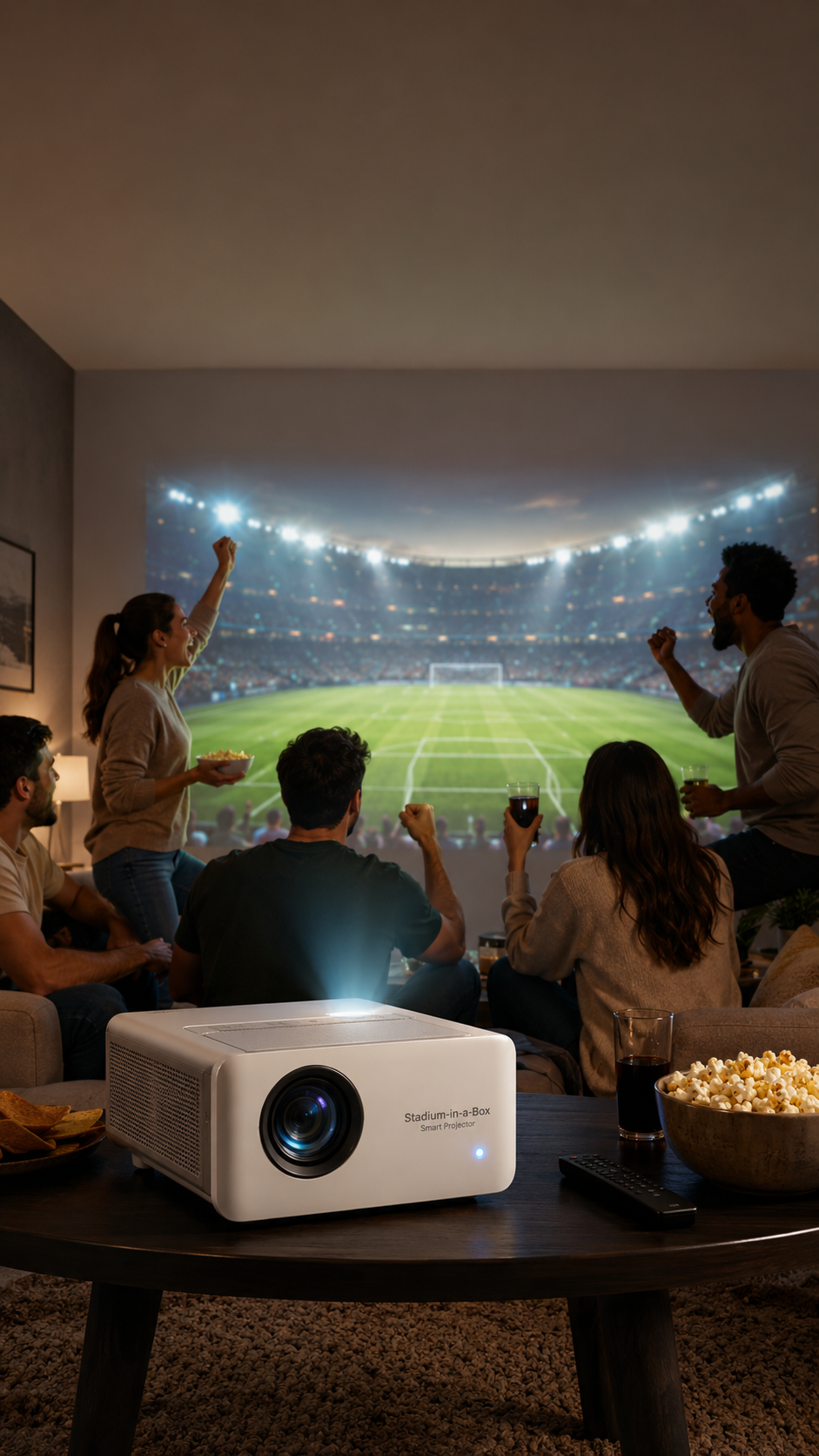
Part 2: Image-to-video prompt
Using the generated image as the main reference, create a 15-second vertical 9:16 product video ad for Stadium-in-a-Box Smart Projector. Keep the projector shape, color, lens, blue power light, and label consistent across every shot. 0-3 seconds: friends enter a dim living room before kickoff, one person places the smart projector on the coffee table, and the camera makes a slow handheld push-in toward the product. 3-6 seconds: the projector turns on with a soft startup chime, a bright beam fills the wall, and the room begins to feel like a stadium watch party with green pitch light and moving crowd shadows. 6-10 seconds: cut between a close-up of the lens, a wide shot of the huge wall-sized screen, and fans reacting as captions appear: “120-inch match night,” “Built-in speakers,” “Quick setup.” 10-13 seconds: a fictional goal moment happens off screen, the crowd sound rises, friends cheer, snacks shake slightly on the table, and the projector remains clearly visible in the foreground. 13-15 seconds: finish on a clean product hero shot with the projected stadium glow behind it and the CTA text: “Bring the big-match feeling home.” Use realistic physics, smooth camera movement, commercial lighting, natural fan reactions, subtle crowd audio, a kickoff whistle, a projector chime, and upbeat sports-ad energy. Do not include official team logos, real player likenesses, broadcast footage, club names, national team marks, or copyrighted scoreboard graphics.
Prompt tip: keep the product description, aspect ratio, length, scene, captions, and CTA consistent across tools. Then change only one variable at a time, such as the opening shot, audio mood, or product close-up, so the comparison is actually useful.
Best AI Video Generators for Ads by Use Case
| Ad scenario | Best fit | Why it fits |
|---|---|---|
| Product marketing and e-commerce ads | PixVerse Ad Master, Creatify, GoCrazyAI | Starts from product imagery, URLs, or selling points and turns them into campaign-ready ad variants |
| UGC-style performance ads | Creatify, Arcads, ShotUGC | Built around hooks, creator-style delivery, AI actors, scripts, and social pacing |
| Cinematic commercials and brand films | PixVerse V6, Runway, Veo-style tools | Better suited to polished scenes, campaign b-roll, camera language, and premium visual concepts |
| Spokesperson and corporate ads | HeyGen, Synthesia, Arcads-style avatar tools | Useful when a person or avatar needs to explain a product, offer, feature, or training message |
| Platform-specific social ads | PixVerse Ad Master, Creatify, CapCut-style editors | TikTok, Reels, Meta, YouTube, and Amazon need different ratios, hooks, captions, and pacing |
| Bulk creative testing | PixVerse API, ad-specialist tools | Teams need many hooks, CTAs, scenes, and aspect ratios without rebuilding every video manually |
Best AI Product Video Generators for Product Marketing and E-commerce Ads
For apparel-specific product ads, Fashion Beat is worth considering when the brief needs a garment image and a model-led motion treatment instead of a general product video.
Product marketing searches usually come from teams with a concrete asset: a product photo, product page, Amazon listing, Shopify URL, or a small set of selling points. They need usable ad variants, not a blank cinematic prompt box.
PixVerse Ad Master: Best for Product-to-Video Ads
PixVerse Ad Master is built for e-commerce and product marketing. Upload a product image, add a product name and selling points, then generate a short commercial with scenes, voiceover, captions, and music.
Choose PixVerse Ad Master when the brief starts with a product image and the goal is a finished ad, not a manually directed scene. It is especially useful for SKU coverage, marketplace videos, product demos, and fast paid social variants.
- Best for: Product ads, SKU coverage, marketplace videos, and product-first social creatives.
- Core ability: Turns a product image and selling points into a short ad with scenes, captions, voiceover, and music.
- Watch out for: Complex storyboards, avatar-led UGC, or highly controlled cinematic scenes may need a different workflow.
- Pricing note: Check current PixVerse pricing before scaling large batches.
Ad Master Example
Step 1: upload one product photo.
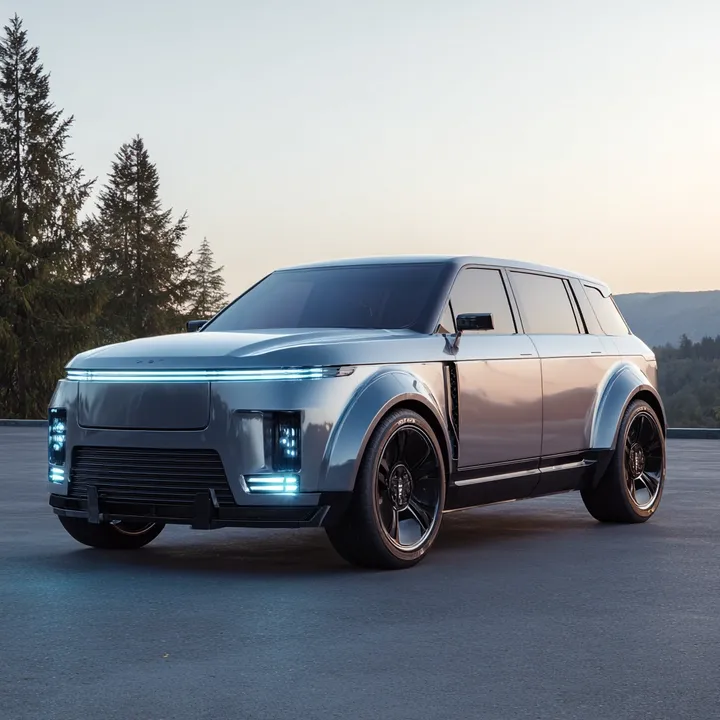
Step 2: add simple product copy. For this test, the product name was “Electric SUV,” and the selling points were aerodynamic body, full LED headlights, and panoramic glass roof.
Step 3: generate the ad.
Verdict: choose Ad Master when the goal is product coverage, not manual directing. It is strongest when the input is clean, the product is clear, and the team needs many usable ad variants quickly.
How to Make a World Cup Product Ad with PixVerse Ad Master
A World Cup campaign does not need licensed team logos, real player likenesses, or match footage to feel relevant. For product-first sports ads, the stronger angle is usually the viewing moment: fans gathering at home, a watch party getting louder, and the product making the experience feel bigger.
Example product: a smart projector for match night.
A smart projector is a natural AI football ad example because the product benefit is directly tied to match-night behavior. The ad can show a living room turning into a stadium-like viewing space, with brighter scale, crowd sound, match-night lighting, and a clear product reveal.
What to upload: product image, product name, selling points.
For PixVerse Ad Master, start with a clean front-facing projector image, then add a short product name and concrete selling points. Useful details include screen size, portability, brightness, speaker quality, low-latency mode, easy setup, and whether the projector works well for apartments, dorm rooms, or family watch parties.
Ad angle: turn your living room into a stadium.
The ad should stay original and rights-safe. Use fictional fans, neutral shirts, generic football visuals, and a stadium-like atmosphere instead of official marks or real teams. The hook can be simple: “Bring the big-match feeling home.”
Prompt / product copy example.
Product name: Stadium-in-a-Box Smart Projector. Selling points: 120-inch home viewing, bright 1080p picture, built-in speakers, quick setup, low-latency sports mode. Create a 9:16 product ad for a football watch party. Show friends entering a small living room, the projector turning on, the wall becoming a huge stadium-like screen, crowd sound rising, snacks on the table, and a clean product close-up with captions.
For more football and World Cup-style product ad examples, see the AI football ad generator prompt guide.
When to use Ad Master vs V6 vs C1.
| Use case | Best PixVerse product | Why |
|---|---|---|
| Product-first World Cup ad | PixVerse Ad Master | Starts from the product image and selling points |
| Cinematic football ad | PixVerse V6 | Better for directed scenes and brand visuals |
| Action-heavy sports ad | PixVerse C1 | Better for motion, contact, and VFX-style action |
| Prompt testing | Seedance 2.0 Fast | Useful for testing several hooks before polishing a final version |
Publishing checklist for sports-themed ads.
Before publishing a World Cup or football-themed product ad, confirm commercial-use rights, avoid protected logos or real player likenesses unless you have permission, export the right ratio for the placement, keep the product visible early, and make sure captions explain the product benefit without overloading the scene.
Creatify: Best for URL-to-Video Product Ads
Creatify is useful when the team wants to turn a product URL, script, or existing assets into ad variations without starting from a blank video prompt. It fits D2C brands that need a faster path from product page to short social creative.
- Best for: D2C product ads, URL-to-video workflows, and fast creative variations.
- Core ability: Converts product pages and campaign inputs into video creative.
- Watch out for: It is less suited to highly controlled cinematic scene direction.
- Pricing note: Check current plan limits before scaling paid campaigns.
HeyGen AI Video Ads Generator: Best for Product Ads With a Presenter
HeyGen AI Video Ads Generator fits product ads that need a person, avatar, or presenter-led explanation. It can be useful when the product needs a direct pitch, demo-style explanation, or localized message rather than only product b-roll.
- Best for: Product promos, avatar-led social ads, and localized product messages.
- Core ability: Uses product URL, image, or script inputs for ad-oriented videos.
- Watch out for: It is not the cleanest fit for product-only motion scenes where an avatar is unnecessary.
- Pricing note: Review export, avatar, and brand-control limits before publishing.
GoCrazyAI: Best for Fast Multi-Format Product Ads
GoCrazyAI is positioned around fast product and marketing ad generation from product photos or prompts. It can help teams explore different platform formats quickly, especially when they need many short concepts for TikTok, Reels, YouTube, or Meta.
- Best for: Fast product ad drafts, short social concepts, and multi-format testing.
- Core ability: Turns product photos or text prompts into short ad creatives.
- Watch out for: It is less suitable for deep brand storytelling or high-control commercial sequences.
- Pricing note: Multi-model output can vary, so test before using at volume.
Best AI Video Generators for UGC-Style Performance Ads
UGC ad searches are usually about speed, hooks, social pacing, and creator-style delivery. The viewer should feel like they are watching a creator testimonial, product reaction, or short recommendation, not a polished brand trailer.
Creatify: Best for D2C UGC-Style Ad Variations
Creatify also belongs in the UGC category because many product ads need a creator-style pitch, not just a product showcase. It is a good fit when the brief is “make several direct-response angles from this product page.”
Use it for D2C UGC-style variants, hook testing, and product-page-to-ad workflows. It is less appropriate when the brand needs a cinematic film or very custom camera language.
Arcads: Best for AI Actor UGC Ads
Arcads is a better match when the ad depends on an AI actor or testimonial-style delivery. It fits campaigns where the script, hook, facial delivery, and native social feel matter more than complex product motion.
Use Arcads when the creative idea is a person delivering a product claim, objection, comparison, or short testimonial. It is not the natural choice for product catalog automation or cinematic product scenes.
ShotUGC: Best for Multi-Shot UGC Ad Scripts
ShotUGC is useful when a campaign needs a more structured UGC ad with actor selection, script sections, multiple shots, and platform ratios. It fits brands that want a hook, body, and CTA sequence rather than a single talking-head clip.
Use ShotUGC for multi-shot UGC ads, actor-led scripts, and platform variants such as 9:16, 1:1, and 16:9. It is less useful when the brief is product-only visuals or a cinematic brand trailer.
Higgsfield: Best for Social-Ready Visual Concepts
Higgsfield is relevant for marketers exploring social-ready product visuals and ad concepts from product inputs. It fits short-form creative exploration, lifestyle ideas, and product-driven visual hooks.
Use Higgsfield for social-ready product concepts, lifestyle visuals, and short-form visual hooks. It still needs creative review, especially if the campaign depends on product accuracy, claims, or consistent catalog output.
Best AI Commercial Video Generators for Cinematic Ads and Brand Films
Some ad searches use the phrase “commercial video generator” because the buyer wants a polished visual spot: a 5-second pre-roll, a product mood film, a launch teaser, or premium campaign b-roll. This is a different job from UGC.
PixVerse V6 for Directed Brand Visuals
PixVerse V6 is the better fit when the ad needs a specific shot, scene, style, or transition. The PixVerse Platform Docs list V6 support for text-to-video, image-to-video, transition, extension, reference-to-video, native audio, and up to 1080p generation for clips up to 15 seconds.
Choose PixVerse V6 when the ad brief is more about scene direction than automated ad assembly. It fits brand visuals, hero ads, controlled social clips, and concept tests where the camera, subject, mood, and motion need to be specified.
- Best for: Brand visuals, hero ads, controlled social clips, and product mood scenes.
- Core ability: Prompt-based scene, camera, transition, and image-to-video control.
- Watch out for: It is not a one-click UGC avatar tool.
- Pricing note: Model, duration, and resolution affect usage cost.
Example prompt:
A young woman wearing a light blue gingham shirt dress stands in a photography studio with a dark blue backdrop, holding a brown leather handbag. The camera starts on a medium full shot, then slowly pushes in to frame her upper body before cutting to an extreme close-up of the fabric texture and buttons. The scene transitions to a beach with blue sky and ocean waves, where the same model walks as her dress flows in the wind. Photorealistic, vertical 9:16 format.
Verdict: use V6 when the creative idea matters as much as the product. It fits brand campaigns, fashion visuals, hero clips, and A/B tests where the hook, framing, and visual world need to be controlled.
Runway Gen-4: Best for Cinematic Ad B-Roll and VFX-Style Scenes
Runway Gen-4 is a strong comparison point for cinematic paid social, campaign b-roll, animation, and VFX-style scenes. It is useful when the ad team needs polished visual material that will later be edited with captions, product cards, or campaign packaging.
Use it for cinematic paid social, premium b-roll, and VFX-style ad scenes. It is less suitable when the team wants one-click product ad packaging or UGC avatar delivery.
Google Veo-Style Tools: Best for High-Realism Commercial Concepts
Veo-style tools fit commercial concepts where realism, motion, and polished visual language matter. They are useful for teams exploring premium ad ideas, but access, pricing, and workflow availability can vary depending on where the model is available.
Use this route for high-realism commercial concepts, polished product mood films, and YouTube-first creative. It is less appropriate for fast product catalog ads or UGC-style social delivery.
Sora-Style Tools: Best for Storytelling and Creative Concepting
Sora-style tools fit early creative exploration, surreal ideas, and storytelling-led video concepts. They are less predictable as direct ad production tools unless the team has a clear review workflow for rights, brand fit, and output control.
Use Sora-style tools for story-led ad concepts, mood boards, campaign ideation, and imaginative scene exploration. Avoid relying on them alone for strict product accuracy or regulated ad claims.
Best AI Spokesperson Video Generators for Corporate Ads
Spokesperson tools answer a different intent: the ad needs a person explaining the product, offer, feature, or onboarding message. These tools work well for SaaS explainers, localized messages, training-style ads, and B2B landing page videos.
HeyGen: Best for Avatar-Led Product and Social Ads
HeyGen is a strong fit when the ad needs a presenter, product explanation, or localized message. It can work for product promos, feature explainers, and social ads where the human-facing delivery is the core asset.
Use HeyGen for product promos, avatar-led ads, social messages, and localized explainers. It is less useful when the campaign does not need a person on screen.
Synthesia: Best for Corporate Explainers and Training-Style Ads
Synthesia is better for business communication, corporate explainers, onboarding, training-style content, and B2B product videos. It is strongest when the viewer needs a clear human presenter and structured message.
Use Synthesia for corporate videos, explainer ads, training content, and B2B product messages. It is not the best fit for lifestyle product ads, UGC-native TikTok pacing, or cinematic commercial scenes.
Arcads: Best for Direct-Response Spokesperson Ads
Arcads also fits this section when the spokesperson should feel closer to a creator testimonial than a corporate presenter. It is useful for direct-response scripts, short offers, and social ads where the delivery style should feel native to the feed.
Use Arcads for direct-response spokesperson ads, testimonial-style hooks, and short social scripts. For formal enterprise explainers or product-only visuals, Synthesia, HeyGen, or a product-video generator may be a cleaner fit.
Platform Cheat Sheet for AI Video Ads
The right tool also depends on where the ad will run. TikTok and Reels usually reward fast hooks, captions, and native-feeling pacing, while YouTube pre-roll needs a stronger first five seconds and a clearer story arc.
- TikTok: Use 9:16, fast hooks, captions, and UGC-style pacing. Creatify, Arcads, and ShotUGC fit this style well.
- Instagram Reels: Use 9:16 with a more polished product-plus-lifestyle look. PixVerse V6 and Ad Master are useful when visual quality matters.
- Meta Feed: Use 1:1 or 4:5 with a clear offer and CTA. Product ad generators and URL-to-video tools are usually efficient here.
- YouTube Shorts: Use 9:16 for demos, story-led clips, and short visual hooks. PixVerse V6 and Runway-style tools can help when the ad needs stronger visuals.
- YouTube pre-roll: Use 16:9 and make the first five seconds count. Runway, PixVerse V6, and Veo-style tools fit more cinematic concepts.
- Amazon and marketplace listings: Prioritize accuracy, product clarity, and simple demos. Product-first ad generators are usually better than avatar tools.
- SaaS landing pages: Use 16:9 or embedded square video with a clear feature explanation. HeyGen and Synthesia work well when a presenter helps build trust.
AI Video Ad Testing Workflow
Do not treat an AI-generated ad as a finished answer. Treat it as a faster way to create testable variations. Start with one product or offer, then change only one major variable at a time.
- Prepare the product URL, product image, or brand asset.
- Write three to five angles and two CTA options before generating video.
- Generate multiple drafts instead of one “final” version.
- Change one visual variable at a time, such as the first scene, product shot, avatar, or camera move.
- Export the correct placement format: 9:16, 1:1, 4:5, or 16:9.
- Test by hook, CTA, first scene, avatar, or format.
- Keep the winner and regenerate close variants instead of starting over.
Product Photo Checklist Before Generating an Ad
Product-first ad tools perform better when the input is simple and specific. Use a clean image where the shape, label, and material are visible. If possible, separate the product from a busy background so the model can preserve it more clearly.
Add real selling points before generation. “Premium quality” is too vague; material, feature, benefit, audience, and offer are more useful. Decide the platform before generating, because a TikTok hook, Amazon listing video, and YouTube pre-roll should not use the same pacing. Keep claims reviewable so the final ad can survive platform and legal review.
Common Mistakes and Fixes
If the ad looks generic, add more product material, use case, audience, and offer detail before generating. If the product looks wrong, go back to the input image and use a cleaner, better-lit asset.
If one video is being used everywhere, regenerate by platform ratio and pacing instead of forcing the same creative into every placement. If UGC ads feel fake, shorten the script and make the first line sound like a real objection or discovery, not a brand slogan.
Testing also needs discipline. If results do not teach you anything, you probably changed too many variables at once. Test one major variable at a time: hook, CTA, first scene, avatar, or format. If generation costs rise too quickly, test low-cost drafts first and only upscale or polish winners.
Publishing Checklist
Before publishing, confirm commercial-use rights for the tool and plan you used. Paid campaigns need clear usage permissions, especially when avatars, voices, music, product imagery, or third-party brand assets are involved.
Export the correct aspect ratio for the placement, add captions for muted viewing, and show the product early enough for the viewer to understand the offer. Keep a test log of hooks, CTAs, audience, placement, and result notes. Before bulk generation, check pricing again because model, duration, resolution, and volume can change cost.
Free AI Video Ad Generator: When It Helps and When It Does Not
A free AI video ad generator is useful for testing whether a tool understands your product image, offer, hook, aspect ratio, and visual style. It is not a full campaign system by itself. Free plans often limit credits, queue speed, export quality, watermark removal, brand controls, voiceover, music, or commercial-use permissions.
For ads, the safest workflow is to use free access for creative validation, then move winning concepts into the plan or credit setup that supports clean exports, usage rights, and repeatable variant generation. This is especially important for ecommerce, app installs, lead generation, regulated categories, and client campaigns where the final asset must pass platform policy and legal review.
Frequently Asked Questions
What is the best AI video ad generator for product ads?
PixVerse Ad Master is the clearest fit for product ads because it starts from a product image and selling points. Use it for e-commerce videos, marketplace listings, SKU coverage, and paid social variants where speed matters more than manual shot control.
What is the best AI video generator for product marketing?
For product marketing, choose a tool that starts from product images, URLs, or product claims rather than a blank prompt. PixVerse Ad Master is a strong fit for product image-to-video ads. PixVerse V6 is better when the product needs a cinematic scene, lifestyle context, or stronger brand visual direction.
To turn this approach into a product ad, try ad master.
What is the best AI video ad generator for UGC ads?
Creatify and Arcads are strong choices for UGC-style ads because they focus on scripts, hooks, avatars, and short-form social pacing. Use them when the ad should feel like a creator testimonial rather than a polished brand film.
What is the best AI commercial video generator?
For commercial-style visuals, use PixVerse V6, Runway, or Veo-style tools depending on access and creative needs. PixVerse V6 is a good fit when you need short branded clips, product mood scenes, camera direction, native audio, and controlled image-to-video or text-to-video output.
Should I use PixVerse Ad Master or PixVerse V6?
Use Ad Master when you want a finished product ad from simple inputs. Use PixVerse V6 when you need to direct the scene, camera, mood, motion, or visual style. Many teams use both: Ad Master for volume, V6 for hero creatives.
What is the best AI football ad generator for product ads?
For product-first football ads, PixVerse Ad Master is a strong fit because it starts from a product image, product name, and selling points. Use it for match-night products such as projectors, speakers, snacks, sports accessories, fan gear, or home entertainment devices.
Can I make World Cup product ads with AI?
Yes. Keep the concept original by using fictional fans, neutral football visuals, and generic match-night settings instead of official logos, real players, club marks, or broadcast footage. This keeps the ad focused on the product benefit while reducing rights and brand-safety risk.
Should I use Ad Master or V6 for football ads?
Use Ad Master when the product is the center of the campaign and you want a packaged product ad quickly. Use PixVerse V6 when the ad needs a more cinematic football scene, a controlled camera move, or a hero visual that will be edited into a larger campaign.
Can I use AI-generated video ads for paid campaigns?
Yes, but check each tool’s commercial-use terms before publishing. For PixVerse, review the current app and platform terms, then export campaign-ready files without relying on claims from old pricing or feature screenshots.
Is there a free AI video ad generator?
Some tools offer free trials or limited starter usage, but free plans usually restrict credits, resolution, watermark removal, export volume, or commercial use. Treat free plans as testing environments, not full campaign infrastructure.
Can I use a free AI video generator for paid ads?
Use a free AI video generator to test the concept, but do not assume the free export is ready for paid media. Our free AI video generator guide compares credit limits, watermark rules, and open-source options if you need a broader free shortlist first. Before launch, confirm commercial-use rights, watermark removal, music and voice rights, product-claim accuracy, export resolution, and platform policy compliance. For PixVerse workflows, also check the current account rules and pricing before generating ad variants at scale.
What format should I use for TikTok and Instagram ads?
Use 9:16 vertical video, captions, a fast opening hook, and visible product context in the first seconds. For TikTok, UGC pacing often works well. For Instagram Reels, polished product-plus-lifestyle visuals can also perform well.
Can I generate AI video ads in bulk?
Yes. For PixVerse workflows, the PixVerse API can support programmatic generation for text-to-video and image-to-video jobs, including model, aspect ratio, duration, resolution, and webhook-based retrieval. Check the current PixVerse model pricing before planning large batches.
What are the best online AI video generators for creating ad creatives and how do they compare?
Compare tools by campaign job. PixVerse Ad Master fits product image-to-video ads, PixVerse V6 fits branded visuals and cinematic clips, Creatify and Arcads fit UGC-style ads, HeyGen and Synthesia fit spokesperson videos, and Runway or Veo-style tools fit cinematic campaign concepts. The best option is the one that matches the ad format you need to test this week.
How should I A/B test AI video ads?
Do not test ten changes at once. Start with 3-5 hooks, keep the product and offer stable, then test CTA, opening scene, avatar, or format. Keep the winner and regenerate close variants instead of starting from scratch every time.
Final Recommendation
If your goal is fast product advertising, start with PixVerse Ad Master. If the campaign needs a stronger visual idea, use PixVerse V6. If the brief is UGC, compare Creatify, Arcads, and ShotUGC-style tools. If it is a spokesperson video, compare HeyGen and Synthesia. The right stack is usually two tools: one for volume, one for the creative layer your ads depend on.
Teams that need to plan product-focused creative beyond a single clip can start in the PixVerse Marketing Hub.