GPT Image 2.6 vs Nano Banana Pro: Features, Output Formats and Per-Image Cost Compared
Compare GPT Image 2.6 and Nano Banana Pro on formats, editing, reference images, resolution, and estimated per-image cost.
GPT Image 2.6 and Nano Banana Pro are two frontier image generators with different strengths: GPT Image 2.6, released by OpenAI on November 4, 2026, adds GIF and SVG output, while Nano Banana Pro is Google’s premium reasoning model for complex image tasks. Nano Banana Pro costs $0.134 per image at 1K and 2K resolution, and GPT Image 2.6 is priced by token, which works out to roughly $0.025 to $0.107 per image at 1K and 2K depending on quality (estimated at output-token rates).
This comparison covers architecture, text rendering, iterative editing and cost, then shows how a chosen still image carries into video.
Key Takeaways
- No single model leads across every workflow in 2026: Nano Banana Pro is Google’s premium reasoning model for complex instructions and text, while GPT Image 2.6 adds GIF and SVG output.
- Nano Banana Pro costs $0.134 per image at 1K and 2K and $0.24 per image at 4K.
- GPT Image 2.6 comes to about $0.025 to $0.053 per 1024×1024 image and $0.050 to $0.107 per 2048×2048 image, depending on quality.
- GPT image models accept up to 16 input images in the API, while Nano Banana Pro accepts up to 14 reference images.
Which model leads in 2026?
The GPT Image 2.6 vs Nano Banana Pro contest ends in a split decision, because the two generators have different operational strengths. Nano Banana Pro is Google’s premium image model for complex instructions and high-fidelity text, while GPT Image 2.6 adds animated GIF and SVG output and ships as two API variants. Choosing the wrong one for a specific pipeline can mean rework for production teams.
Is Nano Banana Pro the same as Gemini 3 Pro Image?
Yes. Google Nano Banana Pro is the name Google uses for Gemini 3 Pro Image, a model from Google DeepMind. It is the premium choice for complex visual tasks, using advanced reasoning (“Thinking”) to follow complex instructions, maintain brand consistency and render high-fidelity text. That reasoning-first design suits creators who want compositional precision in Nano Banana Pro image generation.
Nano Banana Pro launched as Gemini 3 Pro Image Preview on November 20, 2025, and the generally available version followed on May 28, 2026. Google’s lineup also includes Nano Banana 2.1, its high-efficiency workhorse model for image generation and conversational editing, so this article compares GPT Image 2.6 with Nano Banana Pro, Google’s premium model. Once a still is chosen, PixVerse, an AI video platform building frontier video intelligence products, extends still images like these into motion through image-to-video.
How does GPT Image 2.6 compare on release timing and behavior?
OpenAI released GPT Image 2.6 (branded ChatGPT Images 2.6) on November 4, 2026, in ChatGPT, Codex and the API. In the GPT Image 2.6 comparison, the model stands out for GIF and SVG output, a complexity setting that controls how much planning it does before rendering, and two API variants: gpt-image-2.6-flare and gpt-image-2.6-sunburst. The release generates images 50% faster than before, and GIF output is a meaningful edge for teams shipping animated assets. The AI image generator comparison 2026 landscape now rewards matching model behavior to downstream needs rather than chasing a single winner.
| Criterion | Nano Banana Pro | GPT Image 2.6 |
|---|---|---|
| Vendor positioning | Premium model for complex visual tasks | Two variants: Flare for fast iteration, Sunburst for detailed work |
| Planning control | “Thinking” reasoning, on by default | Complexity setting: low, medium or high |
| Output formats | Still images | Still images, plus GIF and SVG |
| Release date | November 20, 2025 (preview); generally available May 28, 2026 | November 4, 2026 |
For creators building an AI image to video workflow, the still-image choice shapes motion quality downstream. The most reliable way to choose is to run both models on the same reference prompt, the method PixVerse applied in its same-prompt comparison of earlier GPT Image and Nano Banana releases. Keeping the same source image across tests makes model and motion differences easier to judge.
How do their architectures differ?
The architectural divide between GPT Image 2.6 vs Nano Banana Pro comes down to foundation models and output philosophy. Google Nano Banana Pro builds on Gemini 3 and generates images at 1K, 2K and 4K, while GPT Image 2.6 takes a different route with two API variants, each tuned for a different kind of work.
What foundation model powers each generator?
Nano Banana Pro is built on Gemini 3, Google DeepMind’s multimodal model family, with built-in 1K, 2K and 4K output. GPT Image 2.6 operates through two distinct models in the API rather than a single unified model. Flare can generate images in as little as six seconds when quality is set to low, which suits fast iteration and interactive editing. Sunburst brings higher-quality generation and greater consistency across edits at medium or high quality, which suits detailed compositions and visual work.
How do output formats differ between the two?
Format support reveals another gap. GPT Image 2.6 adds GIF output (2 to 16 frames) and SVG output alongside raster formats such as PNG and WebP. Nano Banana Pro focuses on still raster output at up to 4K, and Google’s documentation does not list GIF or SVG output. For creators feeding images into an AI image to video workflow, this matters because PixVerse’s video generation is powered by proprietary video foundation models, so source image fidelity directly shapes downstream video quality.
| Capability | Nano Banana Pro | GPT Image 2.6 |
|---|---|---|
| Foundation model | Gemini 3 Pro Image (built on Gemini 3) | Two API variants (Flare, Sunburst) |
| Output resolution | 1K, 2K and 4K | Custom sizes on both variants, up to 3840 px per edge and 8,294,400 total pixels (4K) |
| Output formats | Still raster images | PNG, WebP, SVG, GIF |
| Editing focus | Complex instructions and brand consistency | Flare: fast edits; Sunburst: detail and consistency across edits |
The GPT Image 2.6 comparison shows a multi-format, multi-variant approach, while Nano Banana Pro pursues a single reasoning-driven model with 1K, 2K and 4K output. Neither architecture is universally superior: the right choice depends on whether creators prioritize format flexibility and variant choice or a single premium model for complex instructions.
Which model renders text better?
Both vendors position their models for legible in-image text. The difference lies in how each handles complex layouts and how much control the user has.
Nano Banana Pro lists advanced text rendering among its features and is built for professional asset production. GPT Image 2.6 instead gives users a complexity setting: higher complexity can help with dense text, complex layouts and relationships between elements, while lower complexity suits focused edits such as changing a background or a sign. Flare also improves layout quality for posters, product imagery and other professional visuals. Creators who need predictable output get an explicit control in the complexity setting, and those who want a model that reasons through the prompt by default get that from Nano Banana Pro’s Thinking mode.
Which model handles dense text and posters?
Neither vendor publishes a head-to-head text-rendering benchmark, so the useful question is which controls each model gives you. Nano Banana Pro reasons through the prompt by default, which helps when a layout combines headlines, labels and supporting copy. GPT Image 2.6 Sunburst with complexity set to high is the setting built for dense text and complex layouts, and Flare covers quick poster iterations. GPT image models can still struggle with precise text placement and clarity, so proofread every word and test dense layouts on both models before committing a pipeline.
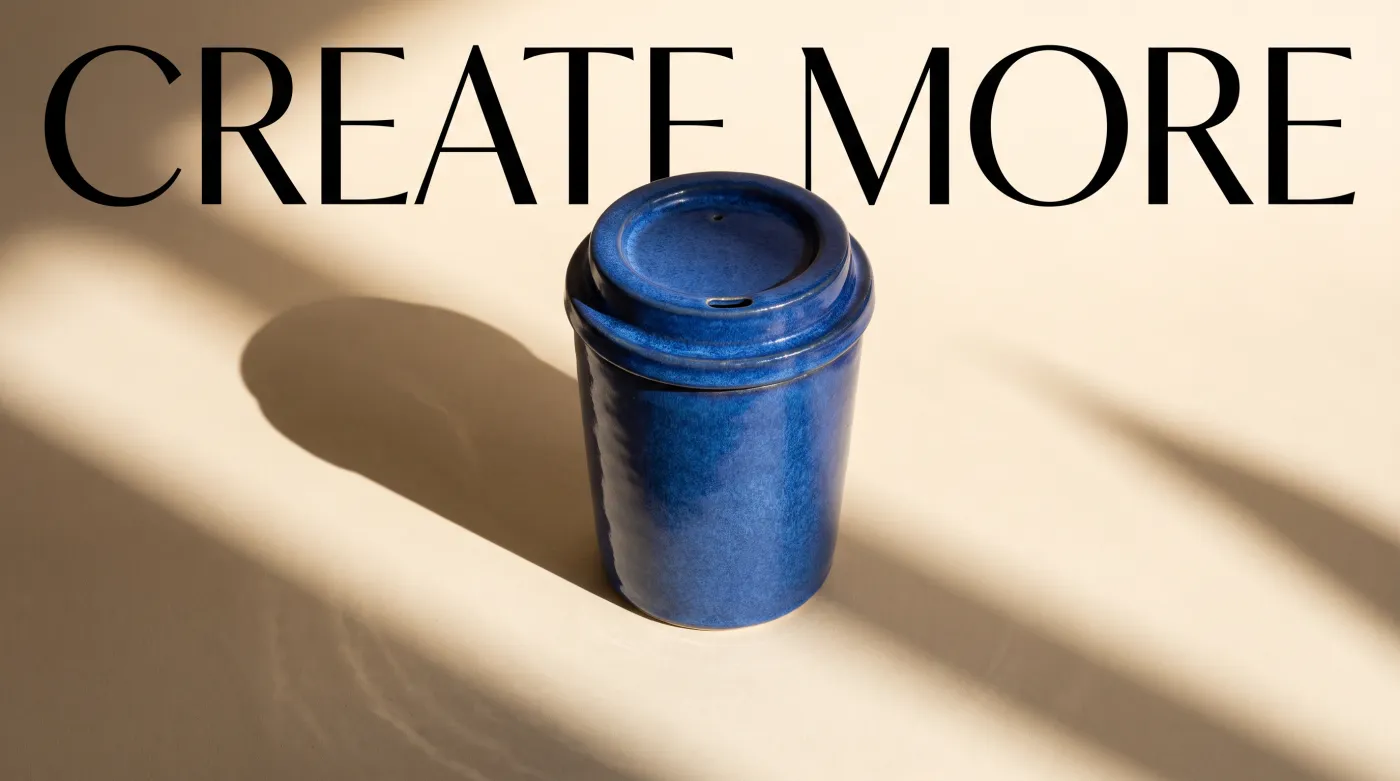
Sample poster generated with Nano Banana Pro on PixVerse using the requested headline “CREATE MORE.” This is a single-model example, not a GPT Image 2.6 comparison.
| Criterion | Google Nano Banana Pro | GPT Image 2.6 |
|---|---|---|
| Text rendering | Advanced text rendering; positioned for high-fidelity text | Improved layout quality for posters and product imagery (Flare) |
| Prompt handling | Reasoning (“Thinking”) on by default | Complexity setting (low, medium, high; default high) |
| Dense text and posters | Reasoning-first layout handling; test long text blocks | Sunburst at high complexity for dense text and complex layouts |
| Complex instructions | Reasoning to follow complex instructions | Medium or high complexity for scenes with many elements or constraints |
How does text rendering affect an AI image to video workflow?
Text quality in source images carries into the video. Comparing the generated clip with the original image shows whether the subject and visible details remain recognizable, so text-heavy stills should render cleanly before motion generation begins. The source image anchors the subject, framing and visible details of the clip, which makes text accuracy a priority at the image stage. PixVerse also offers a Lip Sync tool for voice, sync and sound.
How do they handle iterative editing?
Iterative editing separates production-ready image models from one-shot generators. PixVerse approaches this through its Character tool, which targets consistent characters in video workflows. That capability matters when a single campaign asset must survive dozens of revisions without drifting.
The two image models take different paths on reference handling. For GPT image models you can provide up to 16 images, while Nano Banana Pro accepts up to 14 reference images in total, including up to 6 high-fidelity object images and up to 5 character images. More reference images give editors tighter control over complex scenes, while fewer images demand cleaner prompts, so the reference-image ceiling is one practical filter for teams weighing GPT Image 2.6 vs Nano Banana Pro.
Which model keeps details across multi-step edits?
Both vendors build for consistency across edits. Sunburst is tuned for greater consistency across edits at medium or high quality, and Nano Banana Pro is positioned for brand consistency, with up to 5 character images per request to keep a character stable. GPT Image 2.6 also supports markup-guided edits in the API, where a transparent annotation layer marks the area to change. Neither vendor publishes a multi-step edit comparison, so run the same multi-pass edit chain on both models and check whether logos, faces and product details survive each pass. For creators who iterate heavily on a single asset, consistency across edits prevents the slow degradation that ruins brand visuals.
How does PixVerse fit into an iterative image-to-video workflow?
Editing consistency matters just as much once the image starts to move. A marketer who refines a product hero image through several passes needs the same identity intact when the asset moves into motion, and PixVerse’s Character tool is built for consistent characters across generated shots.
What are the real costs per image?
Nano Banana Pro image generation is priced per image: $0.134 per image at both 1K and 2K resolution and $0.24 per image at 4K (based on $120 per 1M image output tokens). The GPT Image 2.6 comparison reveals a different pricing structure: GPT Image 2.6 is billed by token, at $30 per 1M image output tokens for both Flare and Sunburst, so the cost per image depends on image size and quality setting. The GPT Image 2.6 figures below are estimated from OpenAI’s published cost calculator. They cover output tokens only and exclude input tokens such as the prompt and reference images.
Which model offers the lowest per-image cost?
GPT Image 2.6 has the lower estimated per-image cost at 1K. For a 1024×1024 image, the estimate is about $0.025 at low quality, $0.043 at medium and $0.053 at high, all below Nano Banana Pro’s $0.134, which makes GPT Image 2.6 the lower-cost option for high-volume generation at 1K. Nano Banana Pro holds its price steady from 1K to 2K, which simplifies budgeting for teams that need mixed-resolution outputs. Nano Banana 2.1 is listed at about $0.034 per 1K image for teams that want a lower-cost Google option.
Does higher resolution change the cost gap?
The cost gap narrows at 2K but does not disappear. For a 2048×2048 image, GPT Image 2.6 comes to about $0.050 at low quality, $0.088 at medium and $0.107 at high, against Nano Banana Pro’s $0.134, so at high quality GPT Image 2.6 is about 20% below Nano Banana Pro’s price. At 4K, Nano Banana Pro costs $0.24, while a 3840×2160 GPT Image 2.6 image comes to about $0.047 (low), $0.086 (medium) and $0.100 (high); these sizes are not identical, since Google describes its 4K output as roughly 16 megapixels and 3840×2160 is about 8.3 megapixels. Token rates alone do not predict cost per image either: GPT Image 2.6 uses more output tokens than GPT Image 2.5 at low and medium quality (up to 4.2 times as many), and the same number at high quality.
| Model and quality | 1K (1024×1024) | 2K (2048×2048) |
|---|---|---|
| Nano Banana Pro | $0.134 | $0.134 |
| GPT Image 2.6, low quality | about $0.025 | about $0.050 |
| GPT Image 2.6, medium quality | about $0.043 | about $0.088 |
| GPT Image 2.6, high quality | about $0.053 | about $0.107 |
For creators routing images into an AI image to video workflow, per-image cost multiplies quickly across source images. Generating 100 images at 1K costs about $13.40 with Nano Banana Pro ($0.134 each) and roughly $2.50 to $5.30 with GPT Image 2.6 from low to high quality. On the video side, PixVerse offers its API for teams that want to automate generation. Teams scaling AI image generator comparison 2026 evaluations should weigh these per-image costs against output quality needs. The Google Nano Banana Pro price reflects its positioning as a premium reasoning model, while GPT Image 2.6 lets teams trade cost against detail through its quality setting.
How do you turn images into video?
PixVerse transforms static images into motion through its AI image to video workflow. The platform accepts product photos, portraits, illustrations or concept frames and animates them based on user direction: creators upload a visual, describe the movement they want, and compare the generated takes. PixVerse offers near real-time generation, which supports rapid iteration from a single still frame to a polished clip.
What core tools does PixVerse provide for image animation?
The platform’s Text & Image to Video capability serves as the primary entry point. A designer uploads a static asset and describes one main action and the camera move that should reveal it. The source image anchors the subject, framing, light and visible details of the resulting clip, so a good still gives the motion a strong starting point.
PixVerse also lets teams compare takes across models. Its model lineup includes PixVerse V6, Seedance 2.5, Seedance 2 and MiniMax H3, each with a different look and different settings. A team can generate several versions from the same image and compare subject consistency, pacing and the ending frame before choosing the take that suits the placement.
How does PixVerse handle complex motion direction?
The platform’s Agent lets creators work through conversation. A creator describes what should change, refines the motion, and keeps direction in context rather than adjusting technical parameters, a faster, more natural way to turn creative intent into video.
Speed is a core strength. Near real-time generation keeps creative momentum flowing from concept to reviewable draft, and combined with conversational input it makes image-to-video accessible to solo creators and production studios alike.
Which image models feed into the best video results?
The quality of the source image directly affects the final video, because a detailed, well-composed still gives the model more visual structure to follow. Creators evaluating an AI image generator comparison 2026 should prioritize models that deliver accurate text rendering and consistent character details, since those attributes carry through to the video stage, where inconsistencies in the source frame can show up as visible differences during movement.
Which model suits creative workflows best?
Creative workflows demand different strengths depending on the asset type, and neither vendor publishes a head-to-head benchmark of GPT Image 2.6 against Nano Banana Pro. What the documentation does show is a difference in design: Nano Banana Pro reasons through every prompt by default, while GPT Image 2.6 lets teams choose the variant, quality and complexity for each job. Matching those controls to the asset type, then testing on your own prompts, is the practical way to decide.
Beyond the image stage, PixVerse’s AI image to video workflow converts static generations into motion content for creators, teams and enterprises, and PixVerse serves creators in 177+ countries.
Which model handles complex compositions better?
Google Nano Banana Pro is the model to test first when prompts require precise spatial arrangements, because Google built it for complex instructions through reasoning, which can benefit creators building storyboards or product mockups. GPT Image 2.6 can take on scenes with many elements as well: medium or high complexity is the setting for prompts with many elements or constraints, though higher complexity can add latency and unwanted changes. GPT image models may also struggle to place elements precisely in layout-sensitive compositions, so check spatial results on both.
Which model produces more realistic images?
No head-to-head photorealism comparison of GPT Image 2.6 and Nano Banana Pro is available from either vendor. GPT Image 2.6’s release focuses on GIF and SVG output, a complexity control and faster generation, while Nano Banana Pro focuses on reasoning and high-fidelity output. Marketers who need authentic product photography should run their own prompts through both models before choosing.
| Workflow Need | Recommended Model | Key Strength |
|---|---|---|
| Precise layouts, spatial control | Nano Banana Pro | Compositional precision and reasoning |
| Posters and dense text | Test both: Nano Banana Pro, or GPT Image 2.6 Sunburst at high complexity | Text-heavy layouts |
| Animated GIFs and SVG graphics | GPT Image 2.6 | GIF and SVG output |
| AI image to video workflow | PixVerse | Image-to-video in one platform |
The AI image generator comparison 2026 landscape rewards matching the model to the task, and PixVerse extends any static generation into video, narrowing the gap between image creation and motion delivery.
What is the final verdict for creators?
The verdict splits by workflow. Neither model leads every task: Nano Banana Pro is Google’s premium reasoning model, while GPT Image 2.6 adds GIF and SVG output and the Flare and Sunburst variants, so the deciding factors become cost, output format and downstream needs.
Google Nano Banana Pro image generation costs $0.134 per image at 1K or 2K resolution and $0.24 at 4K. GPT Image 2.6 comes to about $0.025 to $0.053 at 1024×1024 and $0.050 to $0.107 at 2048×2048, depending on quality. Creators producing high-volume static assets see a lower per-image cost with GPT Image 2.6, particularly at low and medium quality.
| Criterion | PixVerse | Nano Banana Pro | GPT Image 2.6 |
|---|---|---|---|
| Primary output | Video (text-to-video and image-to-video) | Still images (1K, 2K, 4K) | Still images, GIF and SVG |
| Cost at 1K | Platform credits, shown in PixVerse before generation | $0.134 per image | About $0.025 to $0.053 per image, by quality |
| Video workflow | Native image-to-video | Requires a separate video tool | Requires a separate video tool (GIF output only) |
Which model fits an AI image to video workflow?
PixVerse is the only option of the three that generates video. PixVerse is a full-stack AI media generation platform with APIs, and its developer tools extend into video workflows and applications. Nano Banana Pro and GPT Image 2.6 are image models, and GPT Image 2.6’s animation output is limited to GIF.
What about production teams?
PixVerse offers enterprise-ready AI video foundation models and solutions, along with APIs for scalable deployments. It also lists GPT Image 2.5 among its AI Image Models, so teams can keep image generation and video generation in one platform instead of stitching together separate vendors.
FAQ
Which model delivers better image quality?
Neither model is shown to lead across the board, and neither vendor publishes a head-to-head benchmark of GPT Image 2.6 against Nano Banana Pro. Nano Banana Pro is built for complex instructions, spatial control and high-fidelity text through default reasoning, while GPT Image 2.6 gives teams a complexity setting and two variants to tune detail and speed. Run the same prompts through both models for your own use case.
How much does each model cost per image?
Nano Banana Pro costs $0.134 per image at 1K and 2K and $0.24 at 4K. GPT Image 2.6 is billed by token and comes to about $0.025 to $0.053 per 1024×1024 image and $0.050 to $0.107 per 2048×2048 image depending on quality (input tokens are billed separately).
What output formats does GPT Image 2.6 support that Nano Banana Pro does not?
GPT Image 2.6 adds GIF and SVG output in the OpenAI API, a meaningful edge for teams shipping animated assets or editable vector graphics. Google’s documentation for Nano Banana Pro does not list either format.
When was GPT Image 2.6 released?
GPT Image 2.6 was released on November 4, 2026, in ChatGPT, Codex and the API. Nano Banana Pro launched earlier, as Gemini 3 Pro Image Preview on November 20, 2025, and became generally available on May 28, 2026.
How many reference images does each model accept?
The OpenAI image edit API accepts up to 16 images for GPT image models, and Nano Banana Pro accepts up to 14 reference images in total.
Conclusion
GPT Image 2.6 and Nano Banana Pro are both strong choices in 2026, and the better one depends on the job. Nano Banana Pro is Google’s premium reasoning model and is a good first test for complex instructions, spatial control and text-heavy layouts. GPT Image 2.6 offers GIF and SVG output, Flare and Sunburst variants, a complexity setting and a lower estimated per-image cost at 1K and 2K. Compare both on your own prompts, then take the approved still into the PixVerse image-to-video workflow to turn it into motion.