How to Create Consistent Characters With AI: PixVerse V6 Guide
Create consistent characters in AI video on PixVerse V6: reference images, prompts, multi-shot, and image-to-video for stable faces across clips.
Consistent character AI refers to the workflow of maintaining identical facial features, body types, and wardrobe choices across multiple separate video generations. Because AI video models lack memory of earlier clips and treat every generation as a fresh start, learning how to create consistent characters with AI relies on strategic anchors rather than a single “magic prompt.” To prevent character drift before blaming the model, you must anchor your generations using three core elements: detailed written character sheets, precise reference images, and a strictly fixed keyword order.
What You Will Learn in This Guide:
In this breakdown, we explore the workflows needed to maintain character stability. Here is what we cover:
- Common pitfalls: What usually breaks during generation and how to fix drift.
- Prompting best practices: The prompt habits and physical detail recording techniques I rely on daily.
- The PixVerse V6 advantage: A field-style test comparing common industry pain points to how PixVerse V6 resolves them.
- Step-by-step PixVerse workflow: Concrete steps to lock in your character identity on the platform.
- Prompt examples and analysis: Real-world prompts paired with short output notes.
- Resource management: How to think about credits and choosing the right generation modes.
Understanding AI Character Consistency: Why Character Drift Happens
The Reality of True Consistency In AI video generation, consistency means your audience instantly recognizes the same subject moving from shot A to shot B. Core identity markers—hair color, jawline, apparent age, and wardrobe—must remain strictly within a recognizable range. A minor visual drift feels to the viewer like a sudden recast; a major drift completely breaks narrative immersion.
Why Diffusion Models Fail the Consistency Test Text-to-video diffusion models rebuild your subject from scratch in every single frame. If you swap adjectives between prompts or switch models mid-project, you are essentially inviting a stranger into your scene. Relying on text alone is the weakest anchor. To lock in an identity, you must rely on the stronger gravity of reference stills combined with meticulously repeated text blocks.
The Pre-Generation Blueprint Before you hit generate, you must establish a baseline. Document one tight paragraph detailing facial features and hair, one specific line for the default outfit, and one line for physical build. Save this in a dedicated note file. This master document is your foundational blueprint for creating consistent characters with AI. Camera angles, lighting, and environments will change per scene, but this identity block never alters unless you intentionally script a wardrobe change.
The Prompting Framework for Stable AI Characters
Before you even open the generation interface, you need strict prompt discipline. Professional workflows rely on four non-negotiable habits to prevent hallucination and maintain control:
-
Prioritize Identity Over Action (Fixed Order): Master the character description first, then build the scene. Always lead your prompt with the subject’s identity, followed by their action, the environment, and finally, stylistic or technical parameters (like camera angle and lighting).
-
Lock Your Vocabulary: Consistency requires identical phrasing. If you establish your character’s hair as “shoulder-length dark brown,” never casually swap it to “brunette” in the next clip. The AI treats these as distinct visual tokens.
-
Exploit Negative Prompts: Whenever the UI allows, explicitly list what must not appear. Ban the wrong age bracket, forbid “glasses” if the character doesn’t wear them, and include phrases like “duplicate faces” to keep the frame clean.
-
Build and Duplicate Templates: Stop writing prompts from memory. Save your most successful, stable prompt as a master text template. Duplicate it for every new generation, leaving the core identity block completely untouched, and place your edits only in the scene-specific action lines.
Why Standard Workflows Fail at Character Consistency
For a complementary tool-level overview of locks, references, multi-shot workflows, and production habits, see the AI video generator with character consistency guide.
We put several leading text-to-video stacks to the test to see if they could maintain a single lead character across multiple shots. Despite our best efforts with prompt engineering, we hit the same technical walls repeatedly.
The following table summarizes the four primary friction points we encountered:
| The Pain Point | The Visual Result |
|---|---|
| Duration Caps | Identity warps at every seam because we are forced to stitch short clips together. |
| Text-Only Limits | Facial geometry (eye spacing, nose shape) shifts constantly without a visual anchor. |
| Broken Continuity | Cutting from wide to close-up feels like we have recast the actor in similar clothes. |
| Workflow Friction | Low prompt limits and disconnected audio make complex storytelling nearly impossible. |
The Turning Point: Why We Moved to PixVerse
We realized we did not need “better prompts”—we needed a more intelligent video engine. We developed PixVerse V6 because we kept running into those same bottlenecks everywhere we tested. We built a workflow where identity is baked into the generation process from the first frame, rather than something we have to wrestle out of the model shot by shot to keep a face consistent.
We moved the same test project to PixVerse V6. Below we map how product capabilities line up with each issue above. Details match what we publish in the V6 review and internal product notes.
-
Short clips and stitch seams → One generation can run longer (up to about fifteen seconds) at up to 1080p, with common aspect ratios from 16:9 through 9:16. Fewer forced cuts means fewer places for grade and face geometry to reset between files.
-
Text-only identity drift → Text-to-video and image-to-video sit in the same flow. The same identity paragraph plus a clear portrait as the starting frame gave us a face that stayed in range across jobs better than text alone.
-
Isolated takes and weak cross-shot logic → Built-in multi-shot lets you describe several beats or angles in one job when the scene needs more than one angle, so the world and wardrobe do not reset the way they do when you glue separate exports.
-
Cramped prompts → A large prompt budget means the character block and the scene block can live in one field with less juggling between a notes app and the UI.
-
Audio split from picture → Native audio ships in the same render, so ambience and performance can be described in one pass instead of chasing sync in another tool.
-
Expression-led stories → The model is tuned for believable motion on fabric, weight, and faces, which matters when the story is carried by close performance, not only by a wide establishing shot.
-
Iteration cost → Web supports preview and off-peak style modes when we want cheaper passes before we spend credits on a full-length render.
That experience is why the steps below are written around PixVerse V6, even though the habits in the earlier sections apply anywhere.
How to Generate Character-Consistent Video with PixVerse V6
-
Sign in to your PixVerse account.
-
Go to the Video section in the creation panel.
-
Select PixVerse V6 from the model list.
-
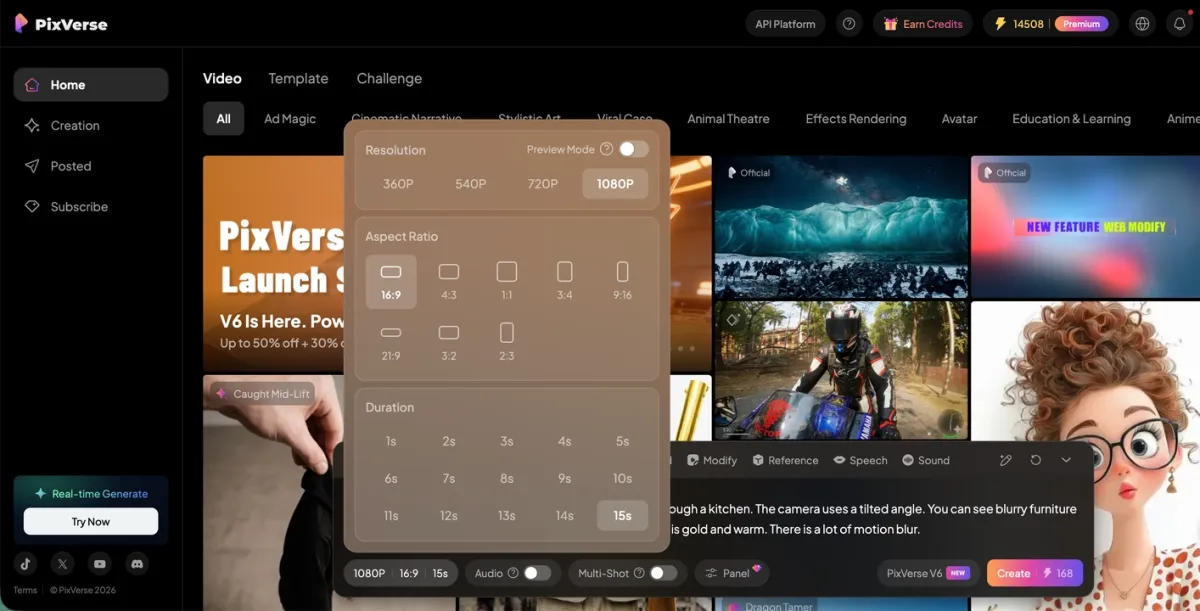
Set your parameters: duration, aspect ratio, resolution, and whether you want audio on. Adjust motion strength or similar controls if the UI offers them and the first take feels too wild.
-
Enter your prompt — describe the character and the scene. If you already have a portrait you like, upload it as the starting frame for image to video. If the product exposes multi-shot or per-shot fields, you can describe more than one angle in one job; repeating the same core look lines usually helps the model stay aligned.
-
Click Generate and review the result.
If text-only runs still drift on the face, a single clear reference still tends to stabilize identity more than tweaking adjectives.
Actionable Prompts for AI Character Consistency
Prompts below are in English; PixVerse V6 accepts natural-language prompts in other languages as well—localized versions of this article show the same three scenarios translated. The examples match internal V6 runs used for facial performance and dance tests. Sample video exports are included for each scenario below.
Emotional close-up at a window
Prompt:
A young woman stands by a window, looking through the glass at the world outside. Her eyes are slightly red. The camera slowly pushes in. Her breathing is slightly fast. She bites her lip. Her eyes glisten with tears. Her body trembles with emotion.
What we saw: Identity stayed stable when the same master still led image-to-video. Eye ratio and jaw stayed within a believable range across two reruns. Without the still, a pure text rerun produced a softer jaw and different eyelid fold. Motion was calm, so consistent character ai quality was limited by reference discipline, not by motion blur.
Sad expression with a fan
Prompt:
A girl furrows her brow, deeply sad. Tears slowly roll from both eyes. She hides the lower half of her face with a folding fan, only her eyes visible.
What we saw: Partial face occlusion is a stress test. The model held eye region identity when the fan position matched between attempts. When we changed only the fan color in the prompt, cheek shading shifted slightly. Lesson: keep accessory wording identical across clips if the accessory is a recognition cue.
Dance with a face finish
Prompt:
Low angle camera tilting upward as a woman in traditional Chinese dress performs classical dance. The camera moves into a close-up of her face. She smiles and winks at the lens.
What we saw: Large body motion plus a face finish is where multi-shot helps: one generation can hold wardrobe and hair across beats before the close. We still compared brow shape before and after the wink. Minor asymmetry appeared on one run; acceptable for social, not for hero poster work.
FAQ
What is consistent character AI?
Any pipeline that keeps visual identity stable across generations, usually with a text block plus references.
How to create consistent characters with AI without a big budget?
Use daily credits to validate reference plus fixed text before you scale length or resolution.
Is PixVerse V6 the best ai for consistent characters for every project?
It is a strong default for short video with multi-shot and audio. Static-only pipelines may stay in image tools. Match the tool to the deliverable.
How do daily credits, free access, and pricing fit into a consistent character workflow?
New accounts usually receive daily credits you can spend in the video creator. Use them to rehearse reference stills and fixed prompt blocks before you raise duration or resolution. Top-tier output without limits at zero cost is not realistic. Check live pricing and credit costs in the app—shown next to actions such as Create—before you promise delivery dates to a client.
Conclusion
True character consistency isn’t the result of a magic prompt; it’s an engineered workflow. At PixVerse, we treat the Image-to-Video pipeline as the non-negotiable foundation for locking in identity from wide shots to extreme close-ups. Stop treating prompts as lottery tickets and start using them as rigid structural blueprints. By validating your shots in preview modes and troubleshooting camera logic before ever altering your master character sheet, you completely eliminate the guesswork. We believe character consistency shouldn’t be a gamble—it must be a predictable, scalable system.