How Does AI Video Generation Work? A Practical Guide
Learn how AI video generation turns text and images into motion, from diffusion models and temporal consistency to choosing the right workflow.
Introduction
AI video generation turns a written idea, an image, or a short reference clip into moving visual content. Instead of animating every frame by hand, creators describe a scene and guide a model toward the subject, composition, motion, and mood they need. The result can be a fast concept, a social clip, a product visual, or one part of a larger narrative.
The technology is powerful, but it is not magic. A useful workflow starts with knowing how models interpret a prompt, why movement can drift from one frame to the next, and which kind of tool matches the job. This guide explains the essentials and shows how to apply them in practice.
How AI Video Generation Turns Ideas Into Motion
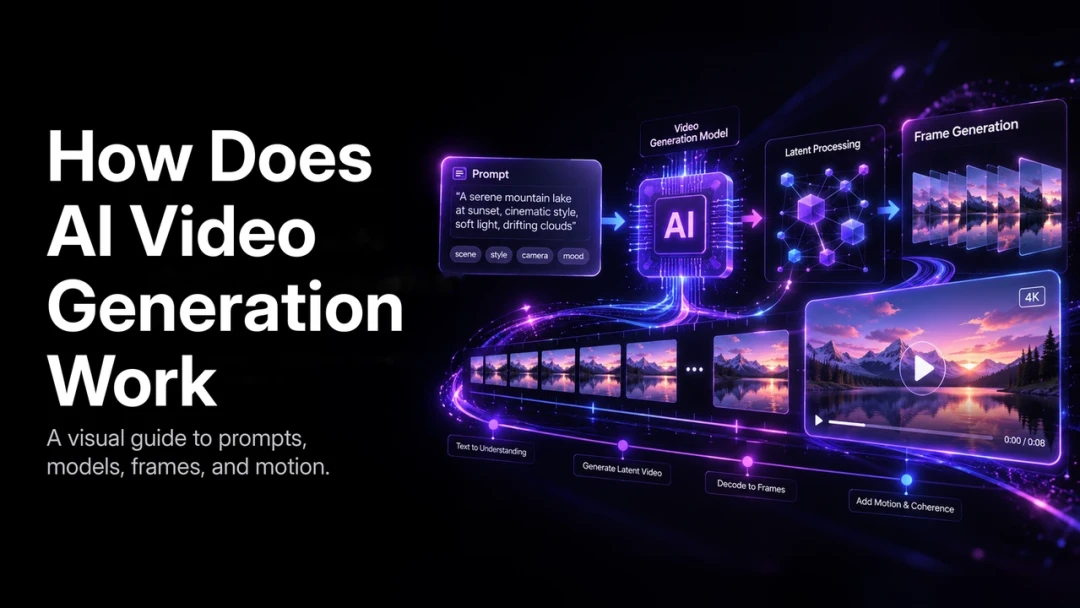
An AI video model connects three kinds of information: language, appearance, and time. A text prompt supplies the intent. Reference images or clips can establish visual details. The model then predicts a sequence of frames that makes the subject and action appear continuous.
For example, a prompt such as “a ceramic mug on a rainy cafe table, slow push-in, warm window light” gives the model a subject, setting, atmosphere, and camera direction. Specific instructions reduce ambiguity, but they do not guarantee a perfect first output. Generation is iterative: creators assess a result, clarify the prompt or reference, and produce the next version.
The role of diffusion models
Many modern text-to-video systems use diffusion. They begin with visual noise and gradually remove that noise while following the prompt. Across repeated denoising steps, the system shapes color, objects, lighting, and motion into a coherent clip.
Unlike an older frame-by-frame animation workflow, a video model has to reason about the clip as a sequence. It needs to preserve what a subject looks like while predicting where it moves next. That temporal reasoning is a major reason current AI video can create more convincing camera movement and action than earlier systems.
Why prompts affect the result
Prompts are directions, not production scripts. A model can infer missing details, but it may infer something different from what the creator intended. Strong prompts normally describe:
- The main subject and any essential visual references
- The action and its speed
- The setting, time of day, and lighting
- Camera framing or movement
- The desired style and aspect ratio
Start with the story beat that matters most. Add detail only when it improves control. A long list of disconnected adjectives can make a result less predictable rather than more specific.
Why Motion Consistency Is Difficult
Every video frame must connect to the one before it. If a face changes shape, a garment changes color, or an object changes position without a reason, the viewer notices immediately. These issues are usually called temporal inconsistency or visual drift.
Motion also needs believable cause and effect. When a person turns, the body, clothing, shadows, and camera perspective should change together. Models have improved at this coordination, but longer sequences, crowded scenes, rapid camera moves, and detailed interactions still require careful direction and review.
Practical ways to reduce drift
Creators can improve consistency before they generate rather than trying to repair it only after export.
- Use a character or product reference when identity matters.
- Keep the subject, wardrobe, environment, and lighting stable between related shots.
- Generate one clear shot at a time, then build an edit from the approved shots.
- Avoid changing style, lens language, and subject description at the same time.
- Review at full playback speed; a still image can hide a motion issue.
On PixVerse, text-to-video and image-to-video workflows give creators different starting points. Text is useful for open-ended ideation; an image reference is often the better choice when a specific product, character, or look must carry through the scene.
Which Type of AI Video Tool Fits Your Project?
AI video tools tend to serve three broad use cases. The right choice depends on the required output, not on the most eye-catching demo.
| Workflow | Best suited to | Main trade-off |
|---|---|---|
| Cinematic generation | Brand films, creative shorts, visual concepts | Requires more prompt and shot-direction work |
| Avatar-led video | Training, explainers, presenter formats | Less freedom for visual storytelling |
| Template-led production | Repeatable social or campaign content | More limited customization |
Cinematic workflows prioritize framing, atmosphere, and movement. Avatar workflows make sense when a speaking presenter carries the message. Templates are efficient when the structure is already known and the team needs many variations. A project can combine these approaches, but each individual scene should have a clear purpose.
A Simple Production Workflow
The most reliable way to use AI video is to treat it as a short production cycle.
- Define the audience, message, duration, and delivery format.
- Break the concept into a few visual beats instead of one long description.
- Choose text-to-video for exploration or image-to-video for visual continuity.
- Generate and approve each key shot before moving to the next.
- Assemble the strongest shots, then add sound, titles, captions, and a final review.
This approach is useful for a solo creator testing a concept and for a team building a repeatable content pipeline. It separates creative choices from technical iteration, so feedback remains concrete: change the camera height, preserve the character reference, or slow the action.
What to Expect From AI Video Today
AI video makes visual experimentation faster, but it does not remove the need for editorial judgment. The strongest results have a clear subject, a focused action, and a deliberate cut between scenes. Complex multi-character stories, exact product details, and long continuous action benefit from references, shot planning, and more review time.
The most productive question is not whether AI can replace every production task. It is where it helps a creator move from an idea to a testable visual direction faster. With a good prompt, a consistent reference, and a disciplined review process, AI video can become a practical part of that process.
FAQ
What is the core technology behind AI video generation?
Modern systems commonly use diffusion-based models that refine noise into frames guided by a text prompt, image, or video reference. They also model how those frames should relate over time.
Why do AI videos sometimes look inconsistent?
The model must preserve identity, setting, lighting, and movement across many frames. Ambiguous prompts, long unbroken scenes, and missing references make that task harder.
Is text-to-video or image-to-video better?
Text-to-video is a strong starting point for new concepts. Image-to-video is usually more useful when the visual identity of a person, product, or setting needs to remain recognizable.
Conclusion
AI video generation combines language understanding, visual synthesis, and temporal prediction to turn an idea into motion. The best outcomes come from clear direction, sensible shot planning, and an iterative workflow. Start with one focused scene, learn what the model responds to, and build from there.
For a deeper technical overview, see the Video Diffusion Models survey and the Hugging Face Diffusers documentation. For hands-on workflows, continue with our guides to turning a script into video, adding audio to AI video, and building long-form AI video.