Midjourney May 2026 Update: V8.1, Pricing & Video
See the Midjourney May 2026 update: V8.1 changes, current version status, pricing, video generation, pros and cons, and PixVerse workflow tips.
What is the Midjourney May 2026 update? As of May 2026, Midjourney’s biggest recent update is V8.1, released on April 30, 2026. It adds faster generation, HD 2K image output, improved prompt adherence, and Raw mode options. Midjourney also supports image-to-video generation: a still image can become a 5-second video and can be extended up to 21 seconds.
Midjourney remains one of the strongest AI image generators for artistic quality, cinematic style, and premium-looking concept visuals. The practical question in 2026 is whether the new V8.1 update, paid pricing, and video features make it the right tool for your workflow.
| Search question | Short answer |
|---|---|
| Midjourney update May 2026 | V8.1 is the key update: faster generation, better prompt reading, HD 2K images, and Raw mode |
| Midjourney current version 2026 | V7 is the current default version; V8.1 is the latest V8 alpha/update available to eligible users |
| Midjourney pricing 2026 | Monthly plans are Basic $10, Standard $30, Pro $60, and Mega $120 |
| Does Midjourney make videos? | Yes. It can animate images into 5-second videos and extend them up to 21 seconds |
| Midjourney V6 release 2026 | V6 was released in December 2023, not in 2026; V7 and V8.1 are the newer 2025-2026 versions |
| Best PixVerse fit | Use Midjourney for source images, then PixVerse when you need fuller image-to-video, text-to-video, audio, or 1080p/4K video workflows |
Is Midjourney Worth It After the May 2026 Update?
Midjourney is worth it in 2026 if image quality matters more than the lowest possible price. Its biggest advantage is still the look: images often feel refined, atmospheric, and ready for creative direction with fewer weak outputs than many casual tools.
It is best for:
- Professional visual creators
- Concept art and moodboards
- Marketing visuals and campaign ideation
- Social creators who value style quality
- Users who are comfortable refining prompts
It is not ideal for:
- Users who need a free AI image generator
- Beginners who dislike prompt learning
- Teams that need built-in brand governance
- Creators who need a complete video production workflow rather than short image-to-video clips
This review focuses on five practical factors: the May 2026 V8.1 update, current version status, pricing, image quality, and workflow fit for creators who may later turn still images into video.
What Is Midjourney?
Midjourney is an AI image generator that turns text prompts into images. It is especially known for stylized art direction, cinematic lighting, fashion-like compositions, fantasy scenes, product concepts, and editorial visuals.
Unlike some general-purpose AI tools, Midjourney is built primarily around image generation rather than document editing, chat, or full creative-suite production. That focus is why many users still choose it for high-impact visuals. It is also why you may need a separate workflow if your final deliverable is video, animation, or an ad sequence.
If your decision is specifically between OpenAI-style layout precision and Google-style photorealism, our GPT Image 2 vs Nano Banana 2 comparison is the closer head-to-head test.
Midjourney May 2026 Update: What Changed?
Midjourney’s 2026 update cycle has moved beyond the original V8 Alpha context. According to the official Midjourney version documentation, V8.1 was released on April 30, 2026. It is described as Midjourney’s fastest model so far, with standard jobs rendering about 4-5 times faster than earlier versions, better prompt reading, stronger small-detail retention, HD 2K image support, and Raw mode options.
That matters because many searches for “midjourney update may 2026” or “midjourney current version 2026” are not looking for a generic review. They want to know what changed, which model is current, and whether the latest version is good enough to pay for now.
V8.1 Image Quality
V8.1 is strongest when the brief benefits from mood, lighting, and composition. In our testing, prompts for cinematic portraits, fantasy environments, product concepts, and fashion visuals produced the clearest value. The images often needed fewer retries to look polished.
HD 2K Output
V8.1 supports HD 2K image output. Higher-resolution source images help when you need crisp details for social posts, campaign layouts, thumbnails, or later image-to-video work. They can also cost more GPU time, so creators should treat HD output as a finishing option rather than the default for every rough draft.
Raw Mode and Prompt Control
Raw mode is useful when you want less of the default Midjourney aesthetic and more direct control over the prompt. It can help with product images, grounded lighting, and source frames that need to stay consistent when animated later.
What Is the Current Midjourney Version in 2026?
The official version documentation says the current default Midjourney version is V7. V8.1 is the latest V8 update, but it is not the same thing as the default model for every user. To use V8.1, users need to unlock a Global V7/V8 Personalization Profile.
| Version | Release timing | Status in 2026 | Why it matters |
|---|---|---|---|
| V8.1 | April 30, 2026 | Latest V8 update | Faster generation, HD 2K images, Raw options, better prompt adherence |
| V8.0 Alpha | March 17, 2026 | Still available for a limited time | Earlier V8 alpha with more constraints |
| V7 | April 3, 2025; default from June 17, 2025 | Current default version | Strong general-purpose image generation, Draft Mode, Omni Reference |
| V6.1 | July 30, 2024 | Older version | Improved detail and speed over V6 |
| V6 | December 20, 2023 | Older version | Not a 2026 release; still important in older search queries |
Midjourney Pricing 2026: Plans, GPU Time, and Video Costs
Midjourney is a paid product. The official Midjourney plan comparison lists four main monthly tiers:
| Plan | Monthly price | Fast GPU time | Video resolution | Best for |
|---|---|---|---|---|
| Basic | $10 | 3.3 hr/month | SD | Light users testing Midjourney |
| Standard | $30 | 15 hr/month | SD & HD | Regular creators who need more generation time |
| Pro | $60 | 30 hr/month | SD & HD | Professionals who need heavier usage and Stealth Mode |
| Mega | $120 | 60 hr/month | SD & HD | High-volume teams and production workflows |
Standard and higher plans include Relax Mode for unlimited slower image generation. Pro and Mega include unlimited SD video generations in Relax Mode, and Stealth Mode is available only on Pro and Mega. If you only need a few images per month, the Basic plan may be enough. If you generate daily or want more practical video access, Standard or Pro is usually the better starting point.
Image Quality Test: Prompts and Results
We reviewed Midjourney through practical creator use cases rather than abstract benchmark scores. The goal was to judge whether the tool helps a creator move from idea to usable visual quickly.
| Test prompt type | Result quality | Notes |
|---|---|---|
| Cinematic portrait | Excellent | Strong lighting, skin texture, and atmosphere |
| Product concept | Strong | Good composition, but text and exact branding need review |
| Fantasy environment | Excellent | Rich detail and depth, especially in wide scenes |
| Marketing visual | Strong | Useful for moodboards and campaign exploration |
| Consistent character | Mixed | Better with careful prompts, but still needs iteration |
The biggest strength is still art direction. Midjourney often understands the feeling of a prompt: camera angle, color mood, lighting, texture, and visual genre. The biggest weakness is production precision. Text, exact logos, small repeated details, and strict multi-image consistency can still require manual correction.
If your priority is editing one selected part of an image rather than generating a new image from scratch, compare AI inpainting tools, including Midjourney Vary Region and reference-led region editors.
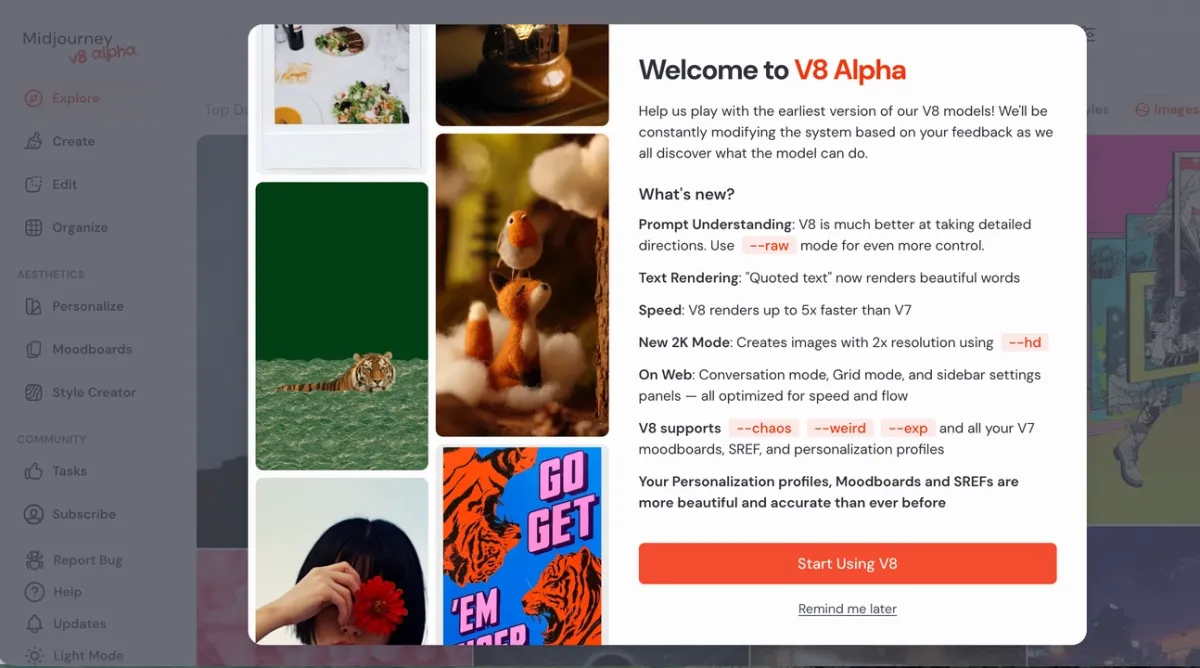
Ease of Use: Web App vs Discord
Midjourney is easier to use than it used to be, especially through the web interface. The web app makes it simpler to browse generations, adjust settings, and manage visual references. Discord still matters for many longtime users, but beginners usually find the web app more approachable.
The learning curve is mostly about prompt language. You need to learn how to describe composition, lens style, lighting, material, mood, and negative constraints. If you enjoy visual direction, that learning curve can be part of the creative process. If you want a tool that behaves like a guided template editor, Midjourney may feel less direct.
How to Create Better Images with Midjourney V8.1
Step 1: Start in the Web App
Use the Midjourney web interface when available for your account. It is easier to review outputs, adjust settings, and keep a visual workflow organized than starting only from chat commands.
Step 2: Use Raw Mode for Controlled Results
Turn on Raw Mode or add --style raw when you want more direct prompt following. This is useful for product concepts, realistic scenes, and source images that you plan to animate later.
Step 3: Reserve HD for Final Candidates
Use HD 2K output when an image is close to final. It gives you a cleaner source file, but it can increase generation cost. For early exploration, generate faster drafts first, then spend more on the strongest options.
Midjourney Pros and Cons
| Pros | Cons |
|---|---|
| Excellent artistic quality | Paid only |
| Strong cinematic lighting and style | Prompt learning curve |
| Useful web app for browsing and iteration | Video is image-driven and shorter than full production workflows |
| HD 2K output for sharper source images | Exact text and logos can fail |
| Good fit for concept art and visual ideation | Consistent characters still need careful setup |
The short version: Midjourney is a premium image-first creative tool. It gives you strong visuals and now supports image-to-video, but you may still need other tools for copy, layout, longer video production, audio, editing, and final delivery.
Midjourney vs DALL-E, Adobe Firefly, Stable Diffusion, and Ideogram
| Tool | Best for | Where Midjourney is stronger | Where the alternative may be better |
|---|---|---|---|
| Midjourney | Artistic and cinematic image generation | Visual style, mood, composition | Not the cheapest or most controlled option |
| DALL-E | General image generation inside a broader AI assistant | More distinctive art direction | Easier conversational editing |
| Adobe Firefly | Brand-safe creative work in Adobe workflows | More stylized cinematic output | Better fit for Adobe users and commercial design systems |
| Stable Diffusion | Open model workflows and customization | Faster premium-looking results for many users | More control for technical users |
| Ideogram | Typography and graphic-style outputs | Richer cinematic and artistic style | Often better for text-heavy image concepts |
Choose Midjourney if you care most about image polish. Choose another tool if you need lower cost, deeper technical control, built-in editing, or more reliable text rendering.
Who Should Use Midjourney?
Midjourney is a strong choice for creators who need premium visual direction. Designers can use it for moodboards, concept frames, and campaign exploration. Marketers can use it for ad concepts, thumbnails, and social visuals. Filmmakers and video creators can use it to design scenes before moving into an image-to-video workflow.
The tool is especially valuable when the final visual needs to feel cinematic or editorial. If your prompt includes mood, lighting, lens language, art direction, or environment detail, Midjourney is often a good fit.
Who Should Skip Midjourney?
Skip Midjourney if you need a free tool, a simple beginner interface, or exact production assets with guaranteed text accuracy. It may also be too limited as a standalone tool if your final output is a longer video campaign, multi-shot ad, or audio-driven production. Midjourney can design strong source frames and short image-to-video clips, but you may need a separate AI video generator for broader motion control, text-to-video, audio, upscaling, and multi-shot workflows.
Can Midjourney Make Videos?
Yes. Midjourney supports image-to-video generation in 2026. According to the official Midjourney video documentation, users can animate generated or uploaded images into videos. Video generations start at 5 seconds, and users can extend a video up to four times until it reaches 21 seconds.
The important nuance: Midjourney video is still closely tied to image animation. If your goal is broader short-form video, ads, cinematic motion, dialogue, native audio, or multi-shot storytelling, a dedicated AI video workflow can still be useful.
How to Animate Midjourney Images with PixVerse
To turn Midjourney art into a fuller video workflow, use PixVerse. PixVerse V6 launched on March 30, 2026, with upgrades for camera work, character performance, multi-shot video, and native audio. This makes it a practical companion when Midjourney creates the source image but the final deliverable needs more controlled motion, higher-resolution video output, audio, or a longer production pipeline.
PixVerse is a comprehensive AI video creation platform that goes beyond simple image-to-video conversion. Key V6 upgrades include:
- 15-second 1080p clips in a single pass, reducing the need to stitch shorter segments
- Native multi-shot engine that maintains consistent lighting, environment, and subject identity across camera angles
- Integrated audio synthesis with dialogue, lip-sync, and ambient sound generated alongside the video
- Over 20 cinematic lens parameters including focal length, depth of field, and chromatic aberration
- Multi-image character reference for stronger identity lock across shots
For a full breakdown, see the PixVerse V6 AI video generator review.
Note: PixVerse offers 30-60 daily free credits for iteration, making it approachable for new creators. The free tier includes a watermark and is for personal, non-commercial use. Midjourney requires a separate paid subscription.
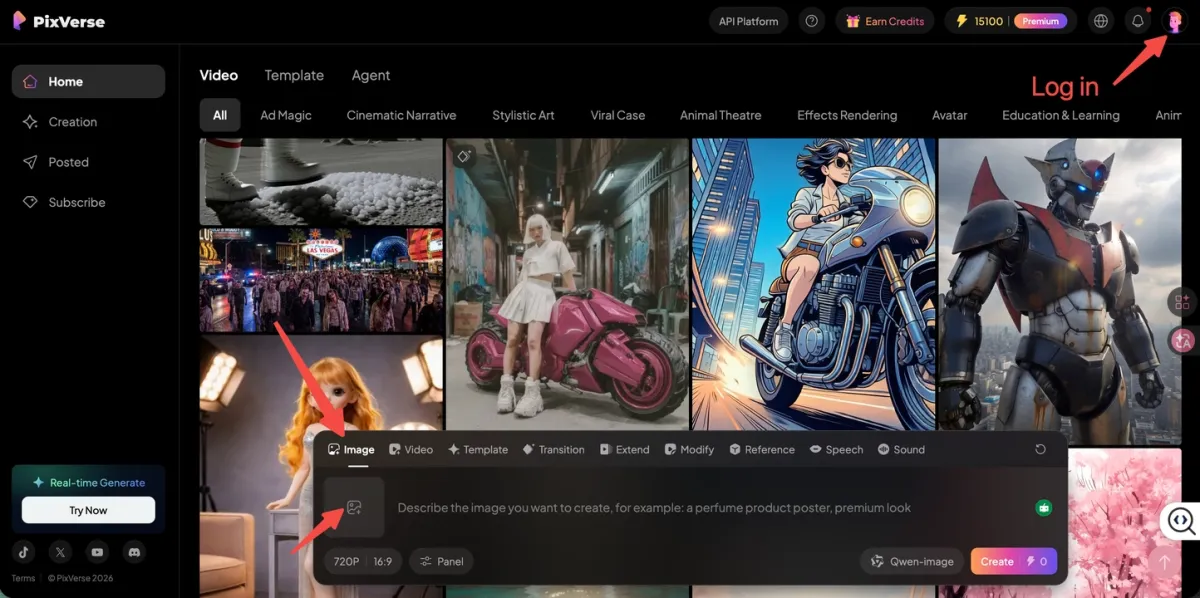
Step 1: Upload Your Midjourney Art via the Image Tab
Select the Image tab on the far left of the floating bar. Upload the Midjourney image you want to animate. A high-resolution source frame gives PixVerse more detail to preserve during motion.
Step 2: Use the Reference Tab for Character Consistency
To reduce “character melting,” open the Reference tab in the center of the bar. Upload the same Midjourney character image here. That gives the model a visual anchor so face and body stay consistent across the motion sequence.
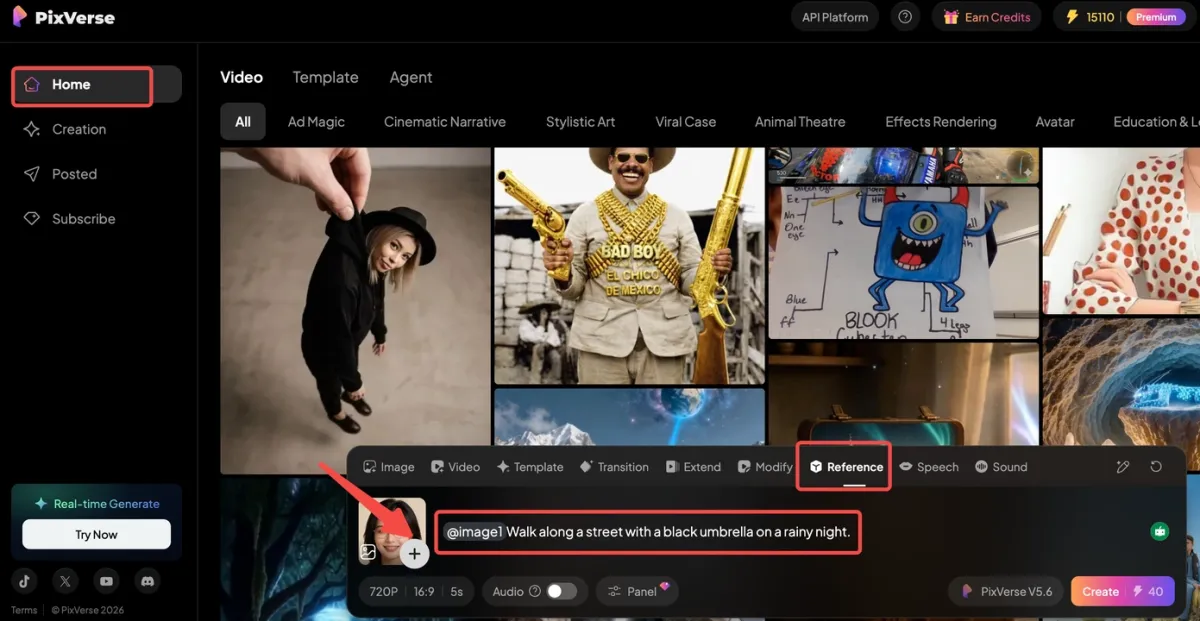
Step 3: Describe Motion in the Modify Tab
Switch to the Modify tab to add director-style instructions. In the text box, describe how you want the scene to move. You can use the @ symbol to call specific modes or selection tools for tighter control.
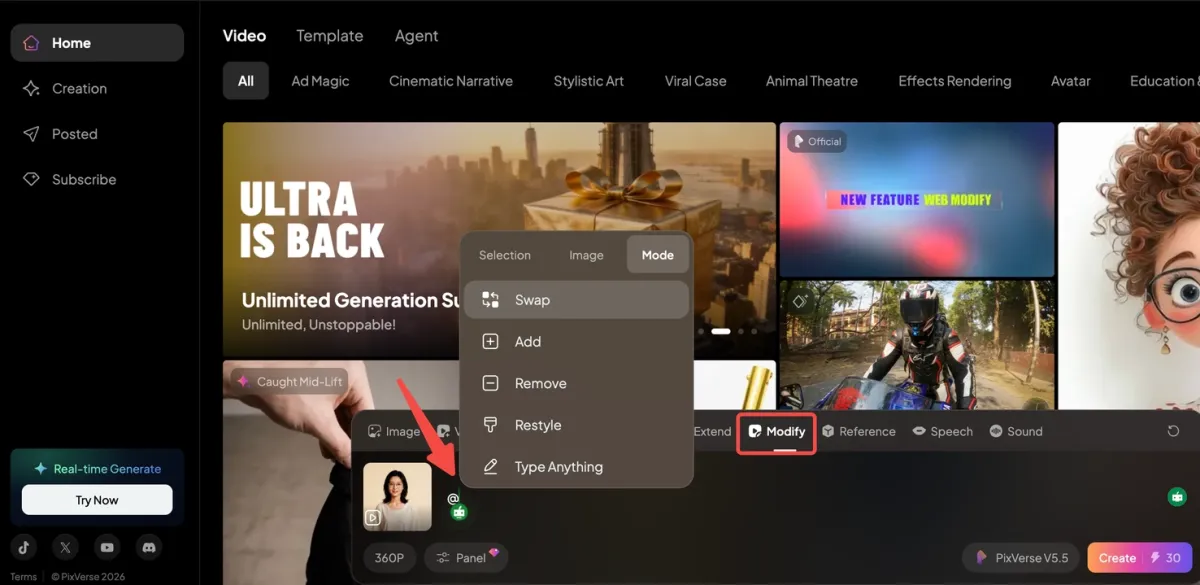
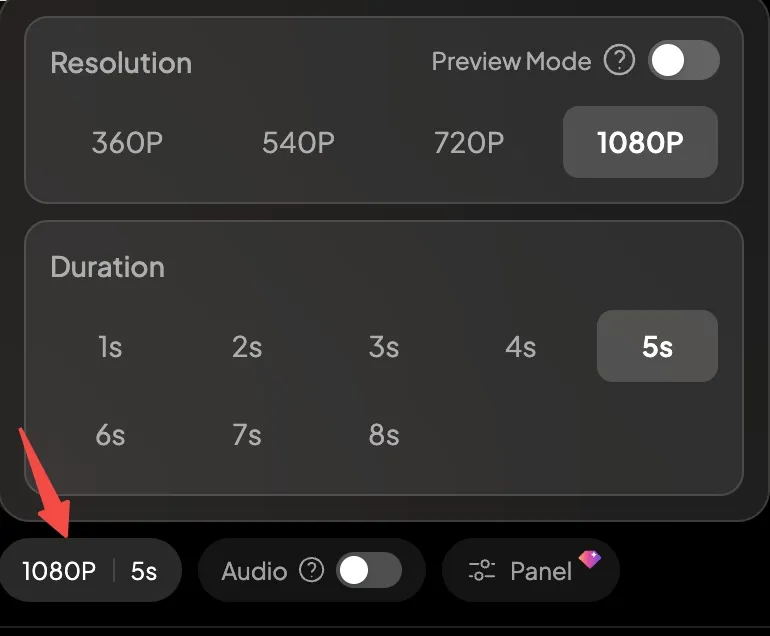
Step 4: Set Resolution and Click Create
Select your resolution on the left of the bar (for example, 1080p for base projects). Check the credit cost next to the purple Create button on the far right. Click it to start generation. A cinematic result is often ready in about a minute.
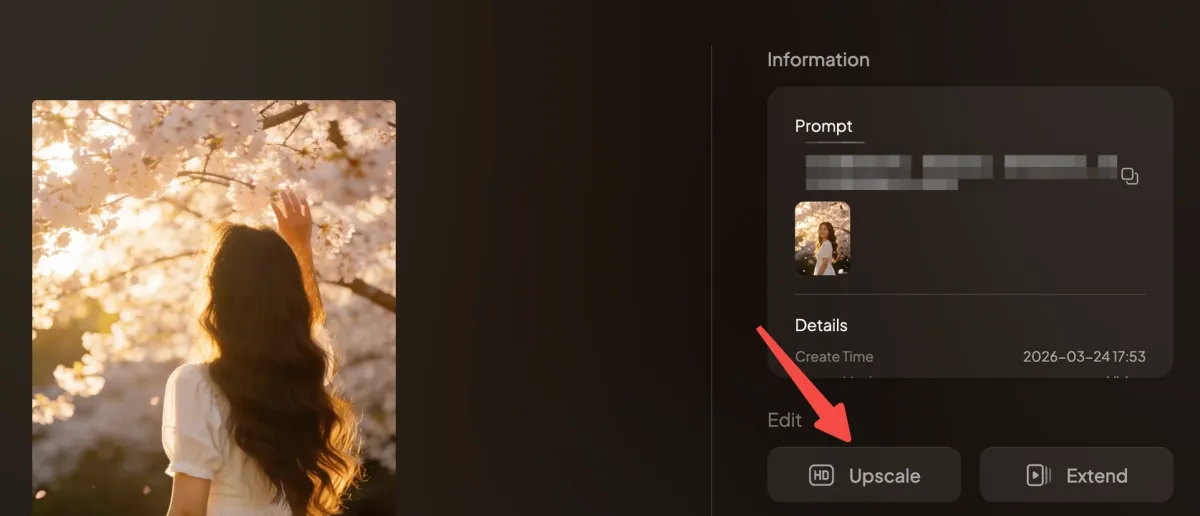
Note: To upscale a video to 4K in PixVerse, create a base video (up to 1080p), open its detail page, and click Upscale.
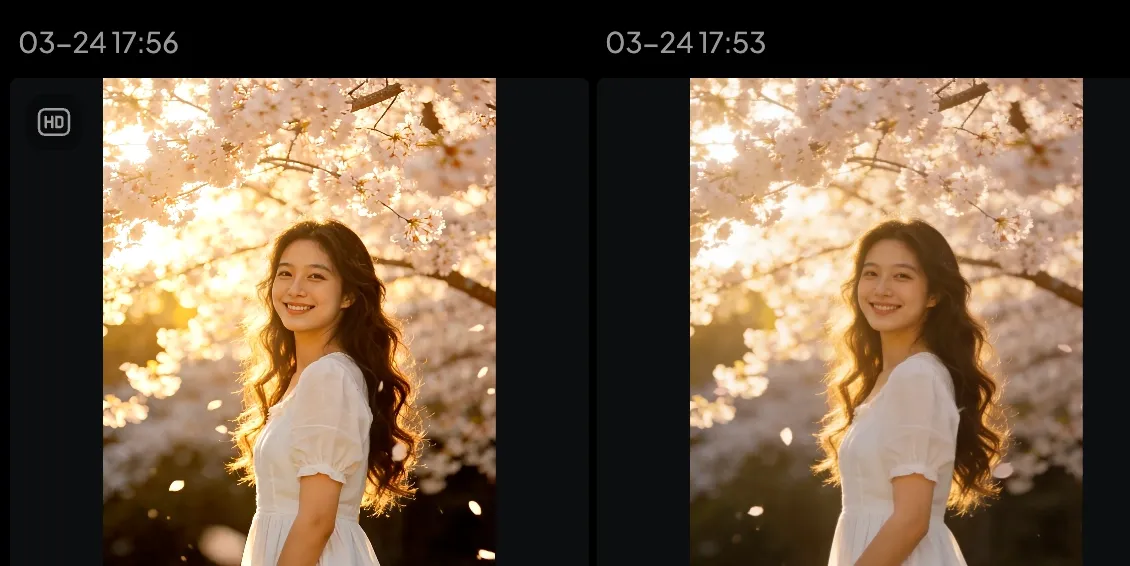
Confirm the required credits and wait for the process to finish. You will then get a downloadable 4K version.
FAQ
What is the Midjourney update in May 2026?
The main Midjourney May 2026 update is V8.1, released on April 30, 2026. It brings faster generation, better prompt understanding, stronger small-detail retention, HD 2K image support, and Raw mode options.
What is the current Midjourney version in 2026?
The official Midjourney version documentation lists V7 as the current default version. V8.1 is the latest V8 update, but it requires a Global V7/V8 Personalization Profile and may not be the default for every user.
How much does Midjourney cost in 2026?
Midjourney has four main monthly plans: Basic at $10, Standard at $30, Pro at $60, and Mega at $120. Standard and higher plans include Relax Mode for unlimited slower image generation, while Pro and Mega add stronger privacy and higher-volume workflow options.
Does Midjourney have video generation?
Yes. Midjourney can animate generated or uploaded images into videos. Video generations start at 5 seconds and can be extended up to 21 seconds. For longer, audio-driven, text-to-video, or multi-shot video workflows, many creators still use a dedicated AI video generator.
Was Midjourney V6 released in 2026?
No. Midjourney V6 was released on December 20, 2023, and was the default model for part of 2024. In 2026, the more relevant versions are V7 as the current default and V8.1 as the latest V8 update.
Is Midjourney worth it in 2026?
Yes, Midjourney is worth it if you need high-quality artistic images and can justify a paid subscription. It is less compelling for casual users who only need occasional images or beginners who want a free, template-like tool.
Does Midjourney have a free plan?
Midjourney is primarily a paid tool. Its official plan comparison lists Basic, Standard, Pro, and Mega subscriptions, starting at $10 per month. Check the official pricing page before buying because plan details can change.
What is new in Midjourney V8.1?
Midjourney V8.1 adds newer 2026 model improvements, including faster standard jobs, stronger prompt reading, better small-detail retention, HD 2K image support, and Raw mode options according to Midjourney’s official version documentation. These updates are most useful for creators who need sharper source images and more controlled prompt results.
Is Midjourney better than DALL-E or Adobe Firefly?
Midjourney is often stronger for cinematic and artistic image style. DALL-E may feel easier inside a conversational workflow, while Adobe Firefly can be a better fit for Adobe-based commercial design workflows. The best choice depends on your output needs.
Can Midjourney animate images?
Yes. Midjourney can animate images into short videos. If you want a broader production workflow with text-to-video, audio, 1080p/4K delivery, or more controlled multi-shot motion, use an image-to-video tool such as PixVerse. Upload the image, describe the motion, generate the clip, and upscale when needed.
Do I need Raw Mode for every Midjourney image?
No. Use Raw Mode when you want tighter prompt control or a less stylized default look. It is especially useful for product concepts, realistic lighting, and source frames that you plan to animate in PixVerse.
Conclusion
Midjourney remains one of the most capable AI image generators in 2026, especially for creators who care about style, lighting, and cinematic composition. The tradeoff is that it is paid, prompt-driven, and not a complete production workflow by itself.
If your goal is premium still imagery, Midjourney is still easy to recommend. If your goal is short-form video, ads, or cinematic motion, the strongest workflow is to use Midjourney for source frames and PixVerse to animate them into finished video.