GPT Image 2 vs Nano Banana 2: Best AI Image Model in 2026
Compare GPT Image 2 vs Nano Banana 2 for AI image generation, same-prompt tests, text rendering, photorealism, API pricing, ecommerce, and video workflows.
Some AI image model comparisons are really spec sheets in disguise. This one is a routing problem: GPT Image 2 and Nano Banana 2 can both make polished images, but they fail in different places.
Direct answer: choose GPT Image 2 when the image depends on readable text, ordered panels, diagrams, UI-like layouts, or exact placement. Choose Nano Banana 2 when the image depends on photorealism, skin, materials, cinematic light, or a product hero that should feel camera-shot. For broader searches like best AI image model 2026, AI image generator comparison, or GPT Image 2 vs Nano Banana 2 benchmark, the same rule applies: the best model changes by asset type.
On PixVerse, the practical workflow is simple: run the same prompt in both models, keep the output that needs fewer edits, then use the approved still as a starting point for image-to-video, social variants, or campaign assets.
If your real task is not choosing a base image model but editing one selected part of an existing image, compare AI inpainting tools instead.
If you already know you want to use OpenAI’s image model, start with the GPT Image 2 prompt guide for 80 copy-ready prompts, prompt formulas, review notes, and image-to-video workflow examples.
Quick Verdict: GPT Image 2 vs Nano Banana 2
Start with GPT Image 2 for designed communication: readable copy, labeled diagrams, UI-like layouts, comic panels, ordered steps, and exact object placement. Start with Nano Banana 2 for photo-led visuals: natural skin, cinematic light, material detail, reflections, product surfaces, and campaign hero shots. Use both when the brief mixes the two.
| If your AI image generator task needs… | Start with | Why |
|---|---|---|
| Readable text, labels, UI, diagrams, or panels | GPT Image 2 | Better structure, hierarchy, and prompt adherence in design-led outputs |
| Portraits, product realism, lighting, or material detail | Nano Banana 2 | More photographic finish and stronger visual atmosphere |
| Ecommerce images with both product realism and text callouts | Test both | Nano Banana 2 may win the product hero, while GPT Image 2 may win callouts and launch graphics |
| A still image that later becomes video | Test both in PixVerse | Choose the cleanest still, then animate it in a PixVerse image-to-video workflow |
Same-Prompt Scorecard
| Round | Test | Winner | What decided it |
|---|---|---|---|
| 1 | Comic storyboard | GPT Image 2 | Cleaner 2x3 panel structure, stronger caption handling, better sequence control |
| 2 | Educational infographic | GPT Image 2 | More usable labels, stronger hierarchy, clearer five-step explanation |
| 3 | Human portrait | Nano Banana 2 | More candid action, stronger setting, better photographic context |
| 4 | Character headshot | Nano Banana 2 | More realistic studio finish and skin/material detail |
| 5 | Impossible architecture | Nano Banana 2 | More believable reflection, facade, and architectural mood |
| 6 | Product photography | Split decision | GPT Image 2 won headline impact; Nano Banana 2 won product realism |
Practical verdict: GPT Image 2 behaves more like a layout-aware design assistant. Nano Banana 2 behaves more like a fast visual photographer. The strongest workflow is to use the same prompt in both, then choose based on whether the asset needs precision or realism.
We tested six identical prompts in the same PixVerse workspace with comparable generation settings. We did not tune prompts per model; the point was to see which model understands the same brief faster.
GPT Image 2 vs Nano Banana 2: Same-Prompt Test Results
Round 1: Comic Storyboard — GPT Image 2 Wins on Layout Control
What we are testing: The ultimate prompt adherence challenge. Six panels, one consistent character, a logical narrative arc, readable text captions, and uniform visual style. This is where most image models start to reveal their limits.
Prompt:
A 2x3 grid comic strip telling the story of a golden retriever’s chaotic Monday morning. Panel 1: Dog sleeping peacefully in a luxurious dog bed, alarm clock shows 6:00 AM, title “MONDAYS.” Panel 2: Dog has stolen owner’s coffee mug, running through the kitchen, coffee spilling mid-air. Panel 3: Dog wearing a tiny necktie, sitting at a laptop, looking confused at spreadsheets. Panel 4: Dog on a video call, other participants are cats, one cat is sharing their screen. Panel 5: Dog sneaking away from desk with a shoe in its mouth. Panel 6: Dog back in bed at 6:01 AM — it was all a dream. Clean comic book style with soft colors, consistent character design across all panels, each panel has a thin black border, small captions below each panel describing the action.
GPT Image 2 result:
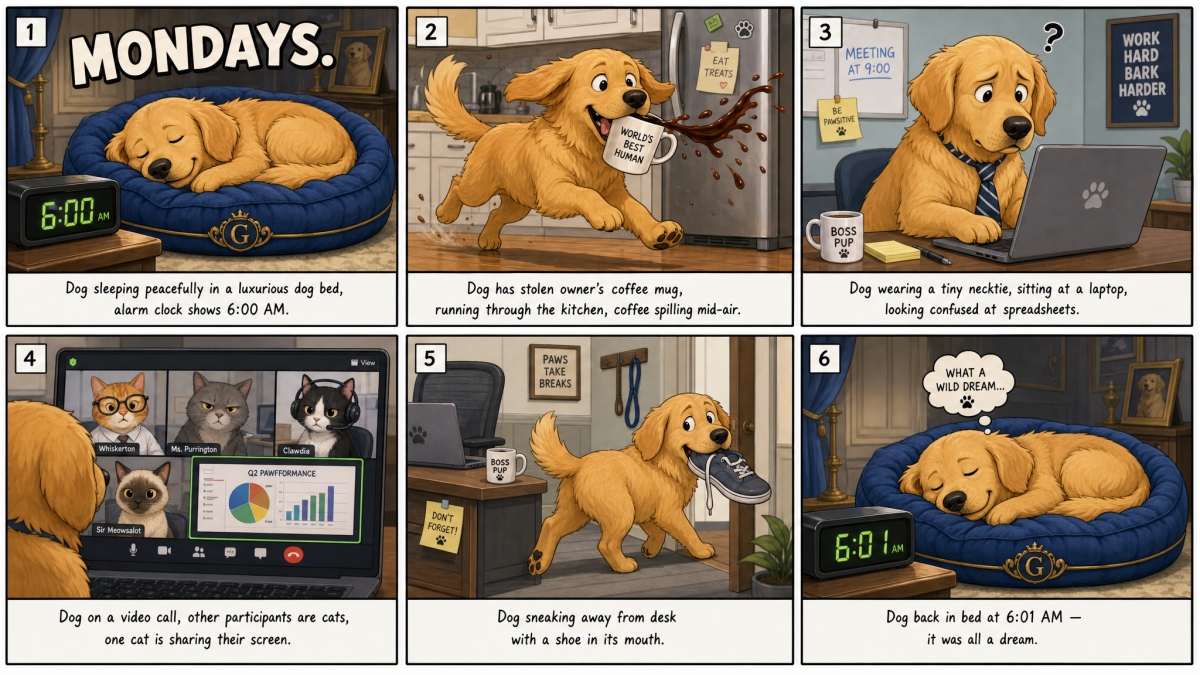
GPT Image 2 follows the requested 2x3 comic structure almost perfectly. The six-panel layout is clean, the panel numbers are preserved, and the story beats map closely to the prompt: sleeping dog, coffee theft, laptop confusion, cat video call, shoe escape, and dream reset. Text is also stronger than expected. “MONDAYS.” is spelled correctly, the clock reads 6:00 AM and 6:01 AM in the right panels, and the captions are mostly coherent.
The biggest weakness is that the model becomes a little too literal with captions. It reproduces prompt-like sentences under each panel instead of writing natural comic captions, so the result feels more like a storyboard sheet than a polished newspaper-style comic. Still, for a prompt adherence test, this is a very strong output. It would work well as a social post, blog illustration, or visual storytelling example with only light cleanup.
Nano Banana 2 result:
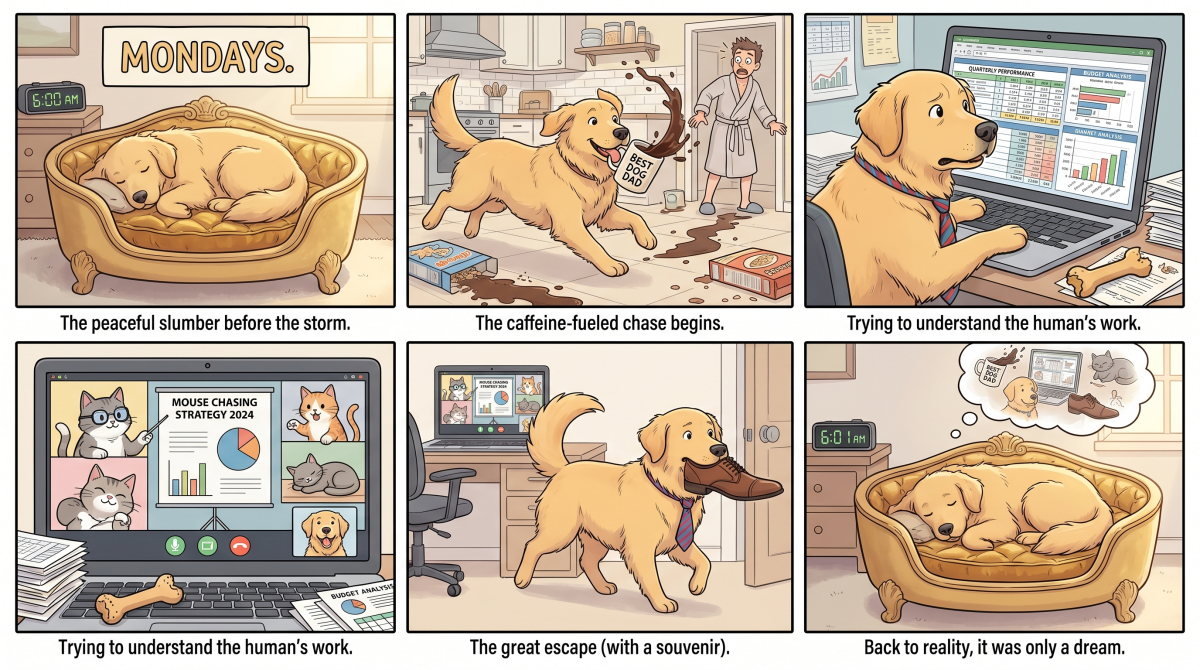
Nano Banana 2 produces a warmer and more visually charming comic. The dog has a softer personality, the colors feel more cohesive, and the panels have a friendlier hand-drawn style. The storytelling is clear enough at a glance, especially in the coffee spill, laptop, and shoe scenes.
However, it is less faithful to the exact prompt. The first panel does not show the original title placement as precisely, the video-call panel repeats a caption from the laptop scene instead of describing the cat meeting, and the ending is more loosely interpreted. The text is readable, but the structure is less disciplined. This version is more emotionally appealing, while GPT Image 2 is more accurate to the requested layout and sequence.
Verdict: GPT Image 2 wins this round for prompt adherence, panel structure, and text handling. Nano Banana 2 creates the more charming illustration, but GPT Image 2 better satisfies the practical requirement: a controlled multi-panel comic from a complex prompt.
Round 2: Educational Infographic — GPT Image 2 Wins on Text Accuracy
What we are testing: This is the “text and structure” stress test. Can the model generate readable text, maintain logical flow across a multi-step diagram, and produce something you would actually use in a blog post or presentation?
Prompt:
A clean, modern educational infographic titled “How Wi-Fi Actually Works” on a white background. Show a visual 5-step process with numbered icons: 1) A router emitting radio waves (illustrated as colorful concentric circles), 2) Waves passing through a wall (cross-section view), 3) A laptop antenna receiving the signal, 4) Binary data packets visualized as tiny glowing cubes traveling along the wave, 5) A cat video loading on the screen. Include small labels in English for each step. Style: flat vector illustration with soft shadows, friendly pastel color palette, suitable for a tech blog header image.
GPT Image 2 result:
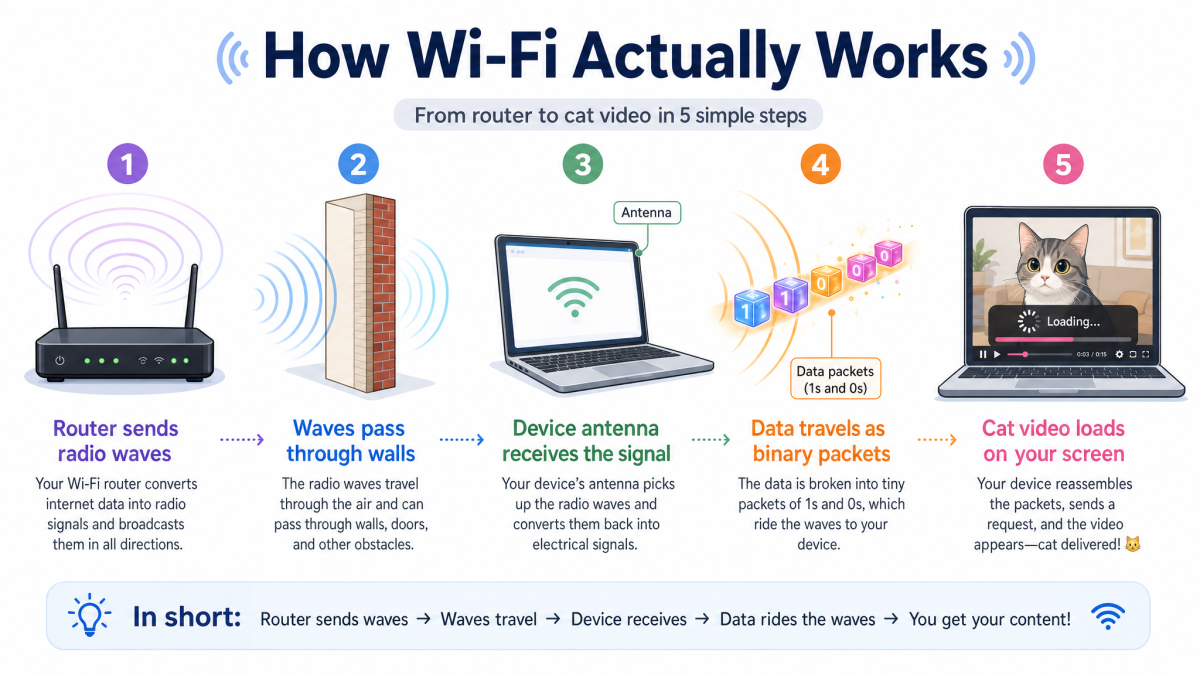
GPT Image 2 creates a more publication-ready infographic. The title is spelled correctly, the 5-step sequence is clear, and the labels closely match the prompt: router sends radio waves, waves pass through walls, device antenna receives the signal, data travels as binary packets, and the cat video loads. The extra “In short” strip at the bottom is a useful addition because it summarizes the process without cluttering the main diagram.
There are still small issues. The “Data packets (1s and 0s)” label is slightly dense for a general audience, and the laptop icon appears twice in a way that could be simplified. But the spelling, hierarchy, and visual flow are strong. This is the kind of result that could be used in an educational blog with minor editing.
Nano Banana 2 result:
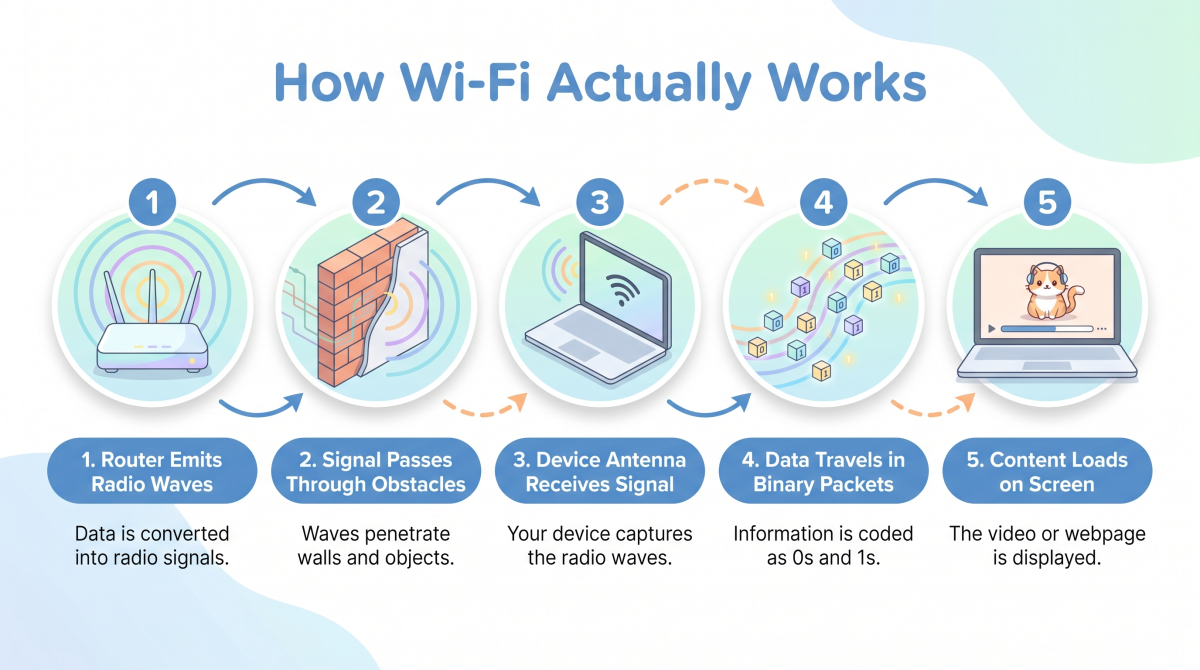
Nano Banana 2 produces a cleaner, softer-looking design with pleasant pastel colors and rounded icon containers. It is visually accessible and easier to scan quickly. The five steps are present, and the broad explanation is accurate enough for a beginner audience.
The trade-off is information depth. It drops the cat-video specificity into a generic “content loads on screen” step, and the technical explanation is thinner. It also makes the wall step more decorative than explanatory. For a slide deck or beginner-friendly social graphic, Nano Banana 2 works well. For an SEO blog image where labels and explanation matter, GPT Image 2 is more useful.
Verdict: GPT Image 2 wins for text accuracy and instructional value. Nano Banana 2 wins on visual softness, but it simplifies the prompt more aggressively.
Round 3: Human Portrait — Nano Banana 2 Wins on Realism
What we are testing: The gold standard of AI image generation — can it produce a portrait that feels like a photograph rather than a render? Skin pores, micro-expressions, natural light interaction, and emotional depth.
Prompt:
A candid street photograph of a 70-year-old Japanese fisherman sitting on a weathered wooden dock at golden hour. He wears a faded indigo work jacket and a towel draped around his neck. Deep laugh lines around his eyes as he smiles slightly while mending a fishing net. Background: blurred harbor with small boats, warm orange sunlight backlighting wisps of gray hair. Shot on 85mm lens, shallow depth of field, natural film grain, Fujifilm X-T5 color science. No retouching, authentic skin pores and texture visible.
GPT Image 2 result:
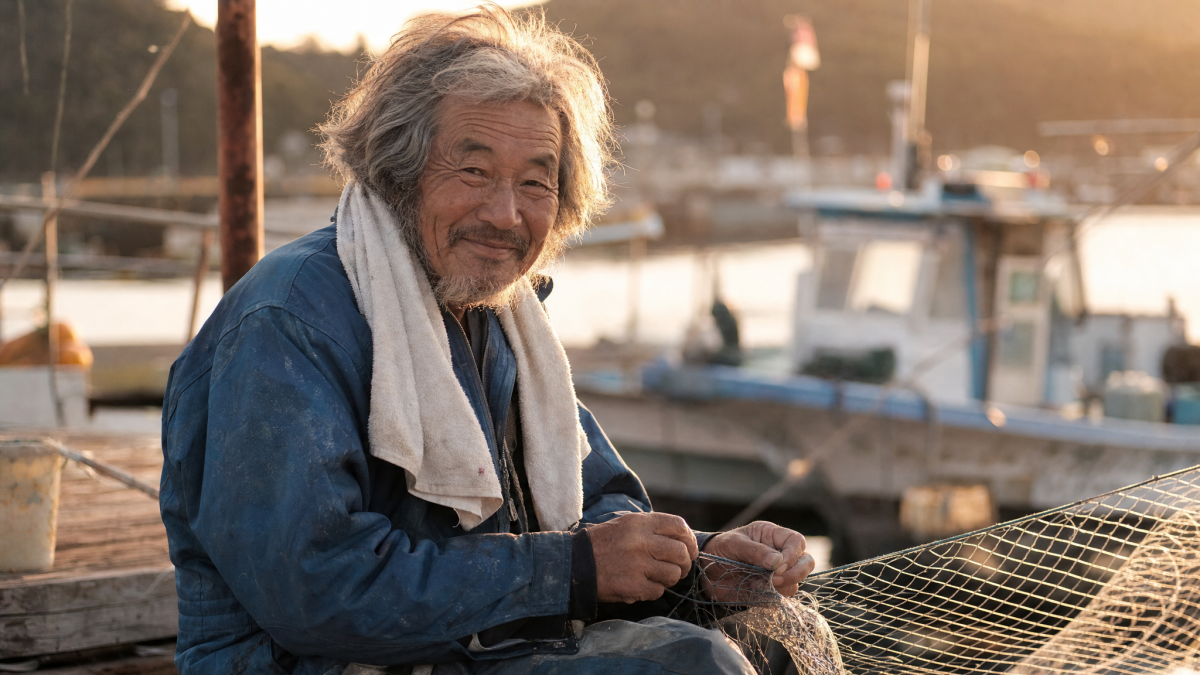
GPT Image 2 produces a very strong documentary-style portrait. The older fisherman, weathered dock, faded work jacket, towel, fishing net, and harbor background all align with the prompt. The face is expressive and believable, with convincing laugh lines, uneven gray hair, and warm backlighting that creates a lived-in, candid feeling.
The main issue is that the image feels slightly posed. The subject looks directly into the camera, which reduces the “street photograph” spontaneity and makes it closer to a travel portrait than an observed candid moment. Still, the skin texture, fabric wear, and golden-hour atmosphere are excellent. This would work well for editorial content, human-interest storytelling, or a model realism benchmark.
Nano Banana 2 result:
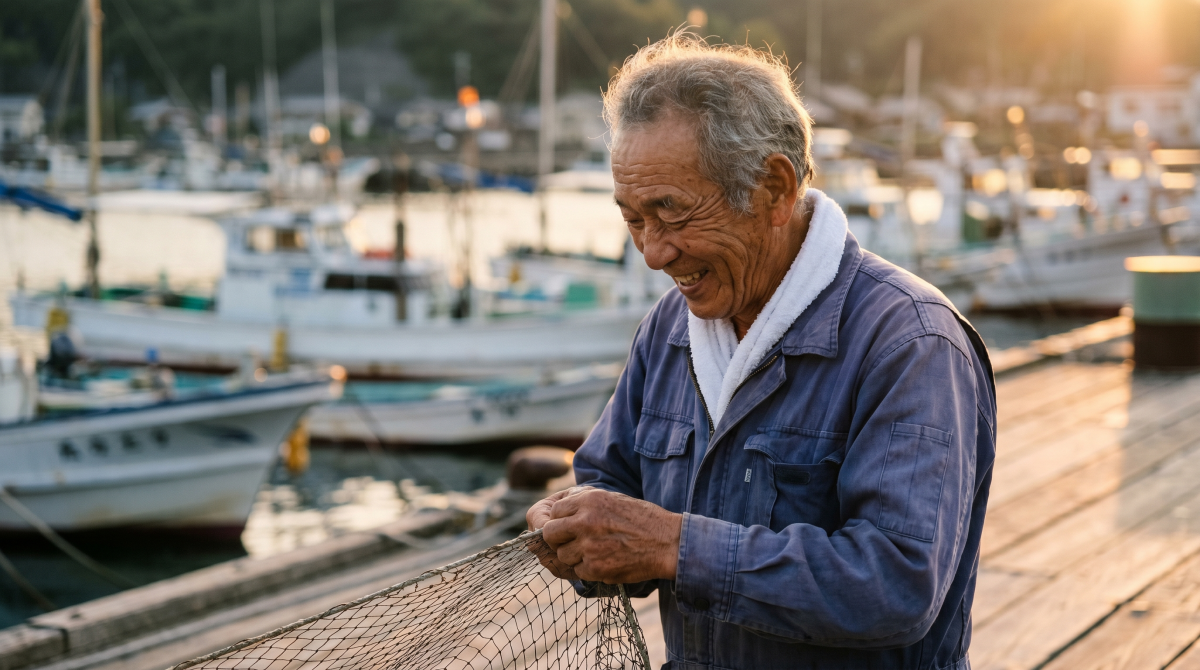
Nano Banana 2 is more faithful to the action in the prompt. The fisherman is actively mending the net, the harbor setting is clearer, and the side-profile smile feels more naturally captured. The lighting is cinematic without looking overly staged, and the background boats create a strong sense of place.
The skin texture is slightly smoother than GPT Image 2’s version, but the overall scene is more complete. The hands interacting with the net also make the image more useful for the prompt’s intended story. For a “photorealistic human portrait” test, Nano Banana 2 has the edge because it balances realism, action, and environmental context better.
Verdict: Nano Banana 2 wins by a narrow margin. GPT Image 2 gives the stronger face-forward portrait, but Nano Banana 2 better captures the candid work moment described in the prompt.
Round 4: Character Headshot — Nano Banana 2 Wins on Photographic Finish
What we are testing: Can the model understand an ogre-like character archetype (here, a pop-culture-inspired green ogre), transpose it into a corporate portrait context, and produce a polished executive headshot without relying on text overlays?
Prompt:
A professional corporate executive portrait of a large, friendly green-skinned ogre with distinctive trumpet-shaped ears. He is wearing a high-end, perfectly tailored navy blue suit, a crisp white dress shirt, and a silk burgundy tie. Professional studio lighting with a neutral gray background. He has a warm, confident smile showing a hint of teeth. The skin texture is high-detail but polished. Shot in the style of a Fortune 500 executive headshot, cinematic lighting.
GPT Image 2 result:
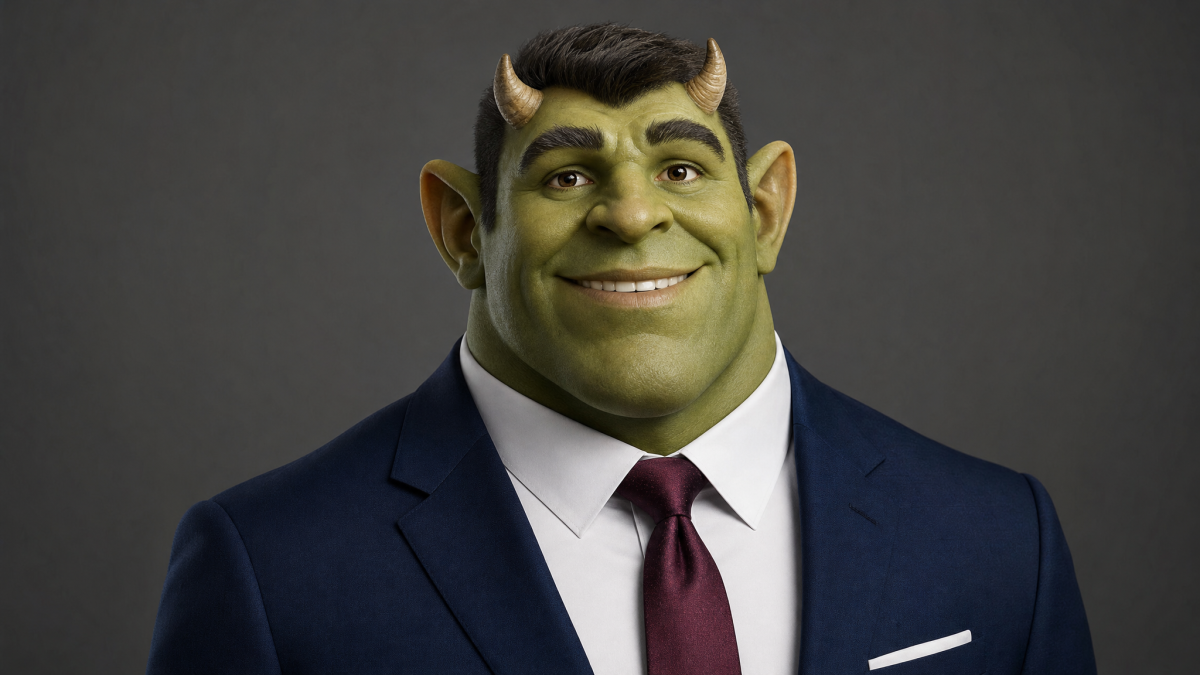
GPT Image 2 creates a friendly executive portrait with strong facial expressiveness. The suit, white shirt, and burgundy tie all match the prompt, and the gray studio background fits the corporate headshot brief. The character reads as approachable rather than monstrous, which helps the image work for the “friendly ogre” concept.
The main mismatch is the ear shape. The prompt asks for distinctive trumpet-shaped ears, but this output emphasizes small horns and more human-like ears. It also introduces a hairstyle even though the prompt does not require one. As a polished portrait, it is strong; as an exact ogre-specification match, it misses a few identifying details.
Nano Banana 2 result:
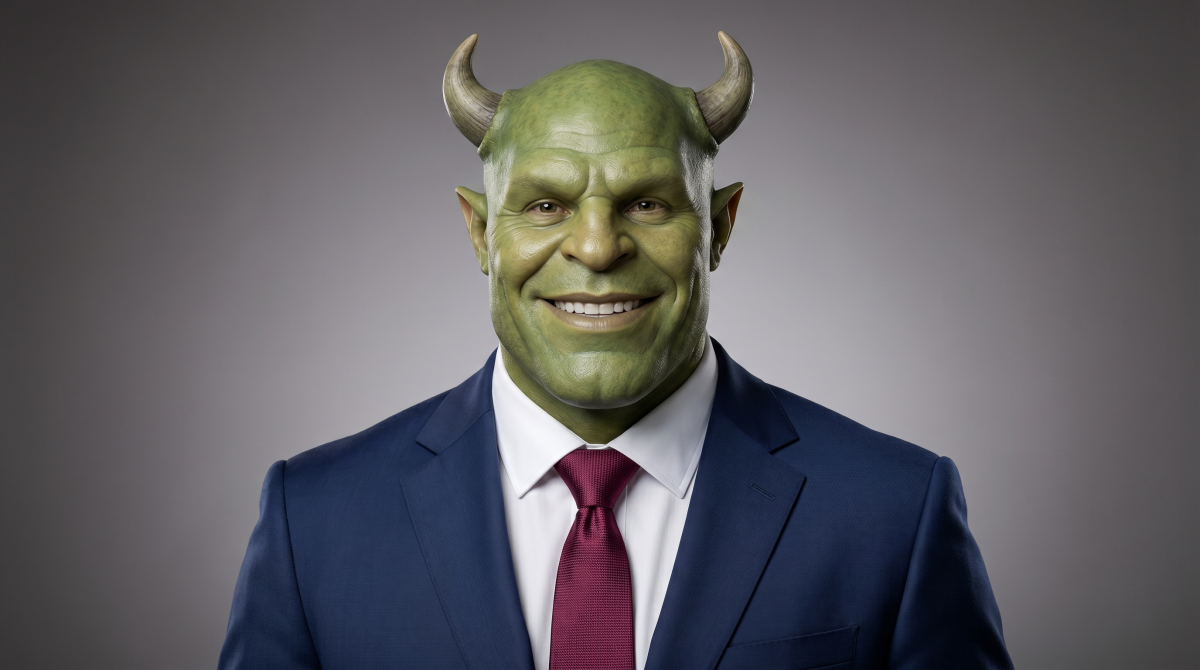
Nano Banana 2 produces a more realistic studio portrait. The skin texture has better pore-level detail, the suit fabric looks more natural, and the face has a stronger photographic finish. The subject also feels more like a real actor in prosthetic makeup rather than a digital illustration, which fits the executive-headshot use case well.
It still does not fully satisfy the trumpet-shaped ear requirement — both outputs lean into horns rather than the exact ear silhouette. But Nano Banana 2 better delivers the “Fortune 500 executive headshot” look. If the goal is a believable corporate portrait for a humorous article or social post, this version is more immediately usable.
Verdict: Nano Banana 2 wins for photographic realism and executive portrait quality. GPT Image 2 wins on warmth and personality, but Nano Banana 2 better executes the intended use case.
Round 5: Impossible Architecture — Nano Banana 2 Wins on Usable Realism
What we are testing: Spatial reasoning under geometric complexity. The prompt describes a building that cannot exist — the model must infer consistent 3D geometry, render realistic reflections of that geometry, and maintain architectural believability despite the impossibility.
Prompt:
An award-winning architectural photograph of a building that could not exist in reality: a 30-story residential tower where each floor is rotated exactly 3 degrees clockwise from the floor below it, creating a gentle spiral. The building is made entirely of white concrete and floor-to-ceiling glass. It stands alone on a calm reflecting pool in a misty Nordic landscape at dawn. The reflection in the water shows the spiral clearly. Tiny warm lights glow from about 40% of the apartments. A single person in a red coat walks along the pool edge for scale. Photographed with a tilt-shift lens, architectural photography.
GPT Image 2 result:
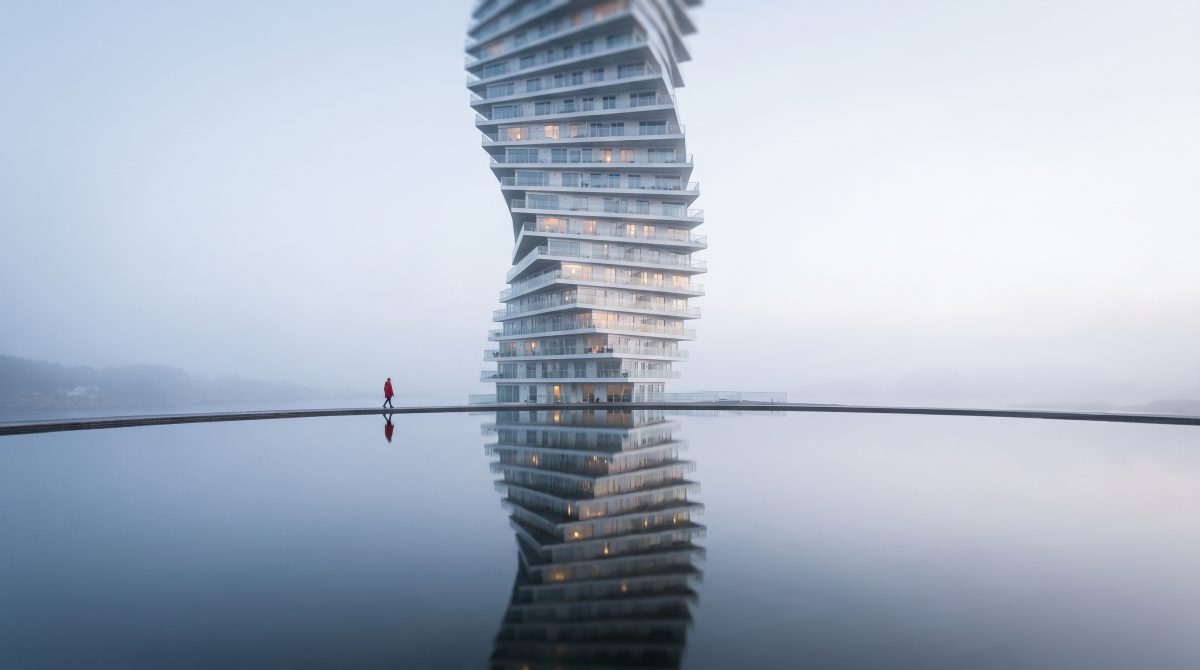
GPT Image 2 clearly understands the idea of a twisting tower. The upper floors rotate dramatically, the reflecting pool is present, and the red-coated person gives the scene useful scale. The misty Nordic mood is also effective, with a cold, quiet atmosphere that fits the prompt.
The weakness is structural consistency. The top half of the building twists more aggressively than the bottom, creating a sculptural tower rather than a steady 3-degree rotation across all 30 floors. The water reflection also does not fully mirror the tower’s spiral; it becomes more abstract and slightly blurred. As a concept-art image, it is striking. As architectural visualization, it is less precise.
Nano Banana 2 result:
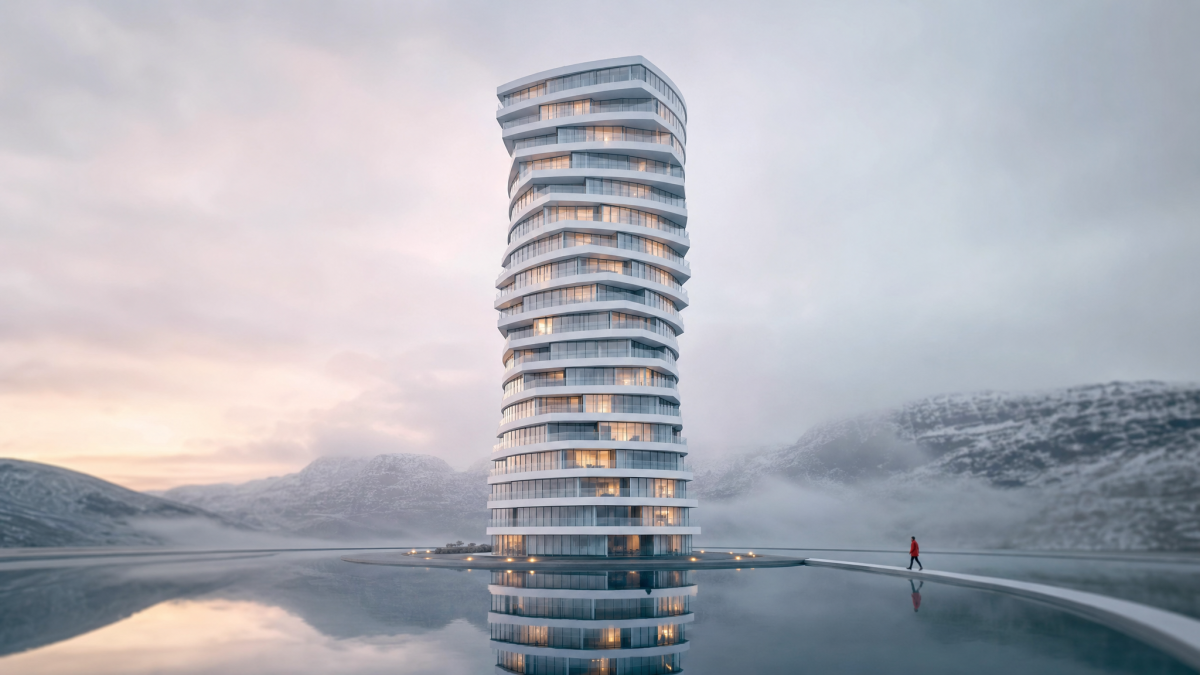
Nano Banana 2 produces a cleaner and more believable architectural photograph. The tower feels more physically buildable, the white concrete and glass facade are more consistent, and the reflecting pool behaves more naturally. The person in red is placed cleanly for scale, and the surrounding landscape has stronger photographic realism.
But Nano Banana 2 softens the “impossible” requirement. The tower is twisted, but not in the exact incremental way described by the prompt. It chooses realism over geometric oddity. That makes the output more useful for architecture mood boards or pitch visuals, while GPT Image 2 better explores the impossible-building idea.
Verdict: Nano Banana 2 wins for usable architectural visualization and reflection realism. GPT Image 2 is more conceptually dramatic, but less controlled.
Round 6: Product Photography — Split Decision
For product images that are close but not ready to animate, the Image Region Editor can handle a focused correction. If the placement needs more background or a different framing, Magic Extend is the more appropriate preparation step.
What we are testing: Can the model produce a product image that looks ready for an e-commerce listing or ad campaign? Material textures, reflections, lighting physics, typography, and commercial polish all matter here.
Prompt:
A hyper-realistic luxury sneaker advertisement. A single white athletic sneaker floats at a slight angle above a glossy wet obsidian surface, reflecting neon pink and electric blue studio lights. Tiny water droplets suspended mid-air around the shoe. Background: deep charcoal gradient with subtle fog. Dramatic rim lighting carves out every stitch and mesh texture. One bold text overlay reads “JUST DROPPED” in condensed uppercase geometric sans-serif lettering at the bottom. Commercial product photography, no other objects.
GPT Image 2 result:
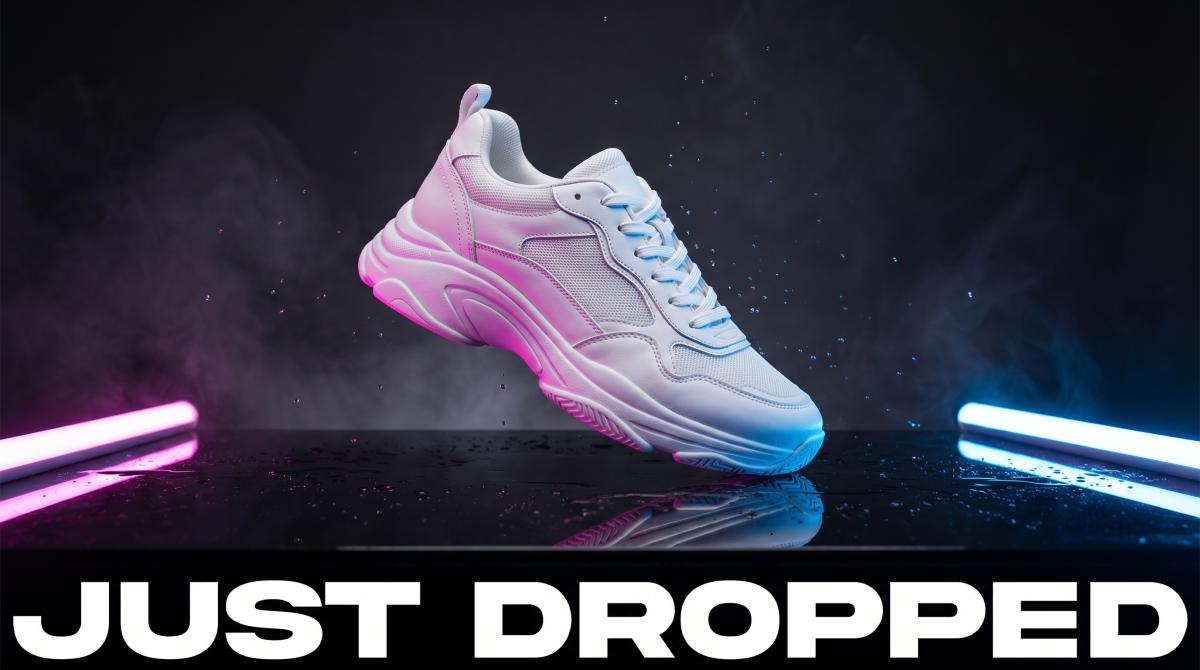
GPT Image 2 pushes a maximalist launch look. The shoe reads as a chunky white athletic silhouette with mesh and synthetic panels, rim-lit hard from the pink and cyan sides, sitting over a mirror-wet plane that throws a clean reflection. Fine droplets hang in the air and pick up both colors, and the background leans into soft volumetric haze for a high-end streetwear spot feel. “JUST DROPPED” spans the bottom as a wide, heavy sans band with correct spelling and strong contrast. There are no visible logos on the shoe, which keeps the frame brand-neutral.
The trade-off is fidelity to the brief’s “minimal obsidian tabletop” language: the scene is closer to a smoky neon stage than a restrained catalog setup, and the sole volume reads more statement-footwear than slim runner. For a loud single-image drop on social, it still wins on stopping power.
Nano Banana 2 result:
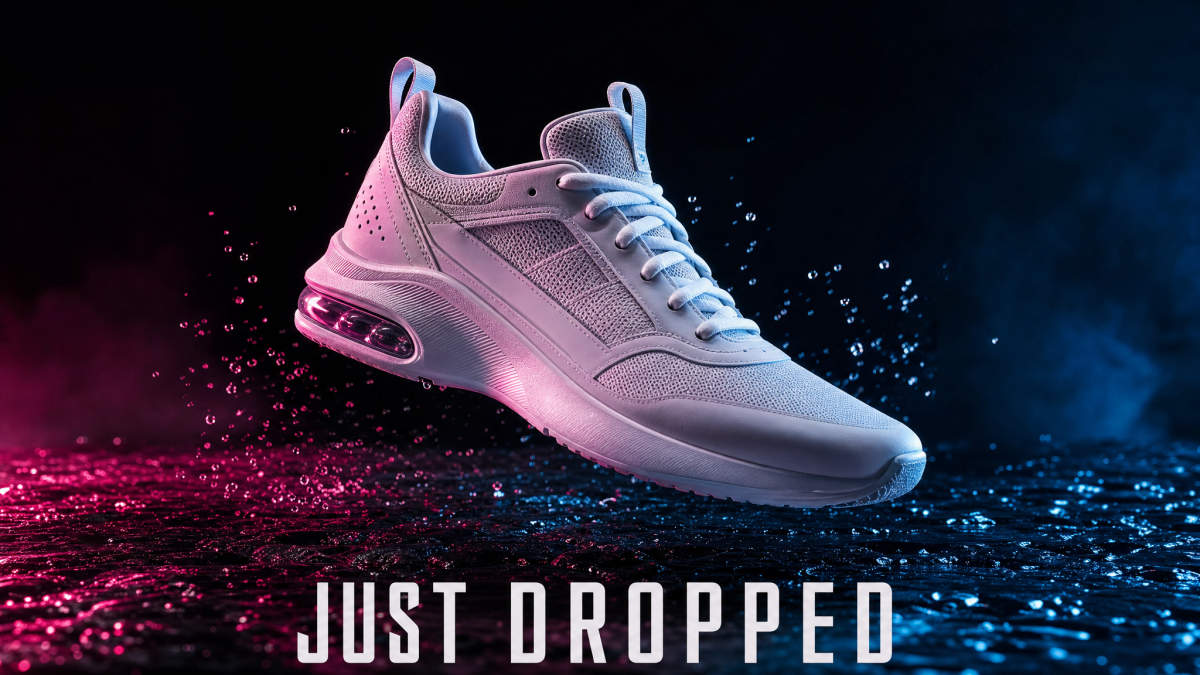
Nano Banana 2 reads more like a product hero for retail. The upper is slimmer, with clearer mesh layering and a translucent cushioning element at the heel that reads under the cross-light. Pink and blue studio light stay dramatic, but the background stays darker and quieter so the shoe holds the focal weight. The ground looks like wet asphalt or stone with spray frozen mid-air, which sells motion without turning the whole frame into a poster. “JUST DROPPED” stays legible in bold caps with a slight perspective tuck toward the surface.
The trade-off is typography: the headline is bold but not as billboard-wide as GPT Image 2’s version, and the overall mood is a notch less “neon club,” a notch more athletic PDP. For e-commerce heroes and footwear-tech storytelling, this output is easier to ship as-is.
Verdict: GPT Image 2 wins on theatrical scale, haze, and headline width. Nano Banana 2 wins on footwear-structure clarity (cushioning read, upper detail) and a grounded wet-surface product shot. Choose GPT Image 2 for the loudest launch still; choose Nano Banana 2 when the shoe needs to read like a SKU-grade hero.
What the Same-Prompt Tests Show
The pattern is clearer than a simple winner/loser ranking would suggest: GPT Image 2 behaves more like a layout-aware design assistant, while Nano Banana 2 behaves more like a fast visual photographer.
GPT Image 2 was more reliable when the prompt required exact structure: comic panels, ordered steps, readable labels, and large on-image text. In Round 6, its wide headline band and smoky neon stage also read more like a maximalist launch still. When the job is closer to design production — posters, infographics, mockups, storyboards, labeled diagrams — GPT Image 2 gives you more control.
Nano Banana 2 was stronger when the prompt depended on visual realism: the fisherman portrait, executive ogre portrait, architectural scene, and Round 6 sneaker hero with clearer cushioning detail and a grounded wet-surface splash all felt more photographic. It tends to simplify complex instructions, but the results often look more natural and immediately usable. When the job is closer to campaign imagery, lifestyle visuals, product photography, or editorial scenes, Nano Banana 2 is easier to recommend.
For searchers comparing AI image models, the important benchmark result is not “OpenAI beats Google” or “Google beats OpenAI.” It is that GPT Image 2 wins more often when the image must communicate precise information, while Nano Banana 2 wins more often when the image must feel photographed.
Model Context and Test Setup
GPT Image 2 is OpenAI’s image model route, also searched as gpt-image-2 or ChatGPT Images 2.0. In this comparison, it represents the text-and-layout side of the test: captions, panels, diagrams, and structured visual instructions. For a deeper standalone explainer, see our GPT Image 2 review and prompt guide. OpenAI has since announced a successor; our GPT Image 2.5 review and prompt guide explains what changed and how Flare and Sunburst differ.
Nano Banana 2 is Google’s Gemini 3.1 Flash Image route, listed in Google AI documentation as gemini-3.1-flash-image and described there as Nano Banana 2. In this test, it represents the realism side: skin, light, materials, and product hero finish. Platform availability is covered in our Nano Banana 2 launch note on PixVerse.
Some searches mix Nano Banana 2 and Nano Banana Pro. In this guide, Nano Banana 2 refers to the fast Google image model option tested against GPT Image 2 on PixVerse. Nano Banana Pro is a related higher-fidelity branch in the Nano Banana family, so use this article as a baseline if your real question is GPT Image 2 vs Nano Banana Pro.
For the test itself, every round used the same prompt text, the same PixVerse workspace, and comparable generation settings. We scored prompt match, on-image text, layout control, photorealism, product realism, and whether the result would save cleanup time for a marketer, designer, seller, or creator.
GPT Image 2 vs Nano Banana 2 Pricing and Value
Cost depends on whether you bill directly through each vendor’s API or through a platform like PixVerse. List prices help compare models; your real invoice also depends on resolution, quality tier, retries, and batch discounts.
API pricing (official vendor list prices)
These figures come from each provider’s public API pricing as of July 8, 2026. Always confirm on the live pricing pages: OpenAI (image generation) and Google AI Gemini API (Gemini 3.1 Flash Image / Nano Banana 2).
GPT Image 2 (gpt-image-2) is listed by OpenAI with token-based pricing for image and text input, cached input, and image output. OpenAI also points developers to the image generation calculator for exact per-image estimates.
| GPT Image 2 API route | Image input | Cached image input | Image output | Text input | Cached text input |
|---|---|---|---|---|---|
| Standard, per 1M tokens | $8.00 | $2.00 | $30.00 | $5.00 | $1.25 |
| Batch, per 1M tokens | $4.00 | $1.00 | $15.00 | $2.50 | $0.625 |
Nano Banana 2 (gemini-3.1-flash-image) bills image output as tokens. Google’s docs express the image-output row as approximate cost per still by output size:
| Output size | Standard (approx. / image) | Batch (approx. / image) |
|---|---|---|
| 0.5K (~512 px) | $0.045 | $0.022 |
| 1K (~1024×1024) | $0.067 | $0.034 |
| 2K (~2048×2048) | $0.101 | $0.050 |
| 4K (~4096×4096) | $0.151 | $0.076 |
How to read the comparison: do not compare one table row in isolation. GPT Image 2 and Nano Banana 2 expose different billing shapes, and real spend depends on prompt length, reference images, output size, quality settings, batching, and retries. For production planning, compare cost per accepted asset, not just the first-generation API row.
PixVerse pricing (platform credits)
On PixVerse, you typically spend credits inside one account rather than reconciling separate OpenAI and Google Cloud bills. Credit burn per generation may not match raw API list prices 1:1—platforms bundle infrastructure, routing, promotions, and model access.
Practical takeaway for value on PixVerse:
- Compare cost per accepted asset (including retries), not just the API row for a single size.
- High-volume testing often comes down to which model reaches “good enough” in fewer runs for your prompt style, plus whatever credit packages or offers apply in the app at the time.
Note: PixVerse may run promotions or included usage for specific models (for example, limited free generations). Check the in-app pricing and credit packs for current terms; they override any back-of-napkin API comparison for day-to-day use.
User Feedback and Community Signals
The conversation on Reddit (r/ChatGPT, r/StableDiffusion, r/Gemini) clusters around a few recurring themes:
- Text accuracy is a major GPT Image 2 reason-to-test — creator discussions consistently treat readable English text as one of GPT Image 2’s strongest practical advantages.
- Nano Banana 2 is often judged by realism first — portrait, product, and landscape comparisons tend to focus on lighting, skin, materials, and photographic atmosphere.
- Complex layouts still need review — both models can miss very specific spatial instructions, exact grid layouts, or precise object placement. GPT Image 2 is stronger here, but not deterministic.
- Iteration speed matters — when a creator generates many variants, the model that reaches “good enough” in fewer attempts can be the cheaper practical choice even if the list price looks similar.
The community consensus aligns with our testing: there is no universal winner. Users judge these models by workflow, not brand name. Designers care about text and layout. Photographers care about realism. Social media creators care about speed and scroll-stopping aesthetics. Developers care about pricing, API behavior, and predictable outputs.
Best AI Image Model by Use Case: GPT Image 2 or Nano Banana 2?
Rather than a single recommendation, use this decision framework.
Note (PixVerse vs API): On PixVerse, both models draw from the same credit balance and skip separate vendor billing setups. The app may also run time-limited promotions (for example, included generations for a given model). For high-volume testing, credits + routing often matter more than comparing a single API list price. The pricing section above has the full breakdown.
Choose GPT Image 2 for Design-Led AI Image Generator Workflows
GPT Image 2 is the better first choice when the image needs to communicate structured information. If your image includes a headline, UI labels, diagram steps, menu text, captions, callouts, or multiple panels, GPT Image 2 is usually easier to control.
It is especially useful for:
- Graphic designers creating posters, campaign key visuals, and social graphics with readable copy
- Product marketers building infographics, explainers, product comparison visuals, and launch announcements
- UX/UI designers testing dashboard mockups, app screens, and layout concepts
- Educators and bloggers making diagrams where labels must be understandable
- Storyboard artists generating multi-panel concepts before moving into video production
In these workflows, a beautiful image with misspelled text is often unusable. GPT Image 2’s main advantage is that it reduces that risk.
Choose Nano Banana 2 for Photo-Led AI Image Generator Workflows
Nano Banana 2 is the better first choice when the image needs to feel like a polished photograph. It tends to create more natural light, more convincing skin, smoother product surfaces, and better environmental atmosphere.
It is especially useful for:
- E-commerce sellers creating product hero shots, lifestyle product scenes, and catalog visuals
- Social media creators who need fast, polished images for trend-driven posts
- Brand marketers producing cinematic campaign visuals, portraits, and lifestyle assets
- Photographers and art directors exploring lighting, mood boards, and editorial directions
- Small businesses that want attractive images quickly without heavy prompt tuning
In these workflows, the winning image is often the one that looks ready to publish with the least editing. Nano Banana 2 is strong when realism and aesthetics matter more than exact text or rigid layout.
Choose by Scenario
For a social post with bold text, start with GPT Image 2 because typography and spelling matter more than photographic subtlety.
For a product page hero image, start with Nano Banana 2 because material realism, lighting, and surface detail usually decide whether the image feels commercial.
For an educational infographic, start with GPT Image 2. Labels, step order, and visual hierarchy are the hard parts.
For a human portrait or lifestyle campaign image, start with Nano Banana 2. It tends to produce a more natural scene and photographic mood.
For a comic strip or storyboard, start with GPT Image 2 because panel discipline and sequence control matter more than one beautiful frame.
For a meme, character mashup, or final campaign visual, test both. GPT Image 2 usually handles text and structure better; Nano Banana 2 usually handles realism and visual finish better. For high-volume ideation, compare cost per accepted image, including retries, rather than judging only by one API price row.
Choose by Budget, API, and Production Value
If you are experimenting through the API, compare total token usage and accepted-output rate rather than assuming one model is always cheaper. GPT Image 2 pricing is token-based across text and image inputs, cached inputs, and image output; Nano Banana 2 pricing is easier to estimate by output resolution, especially for 1K, 2K, and 4K stills.
On the API, Nano Banana 2 scales predictably by output resolution (see tables above). If your use case is product photography, portraits, or mood boards, Nano Banana 2 may still win on fewer retries, which can matter more than the cheaper-looking row in a pricing table.
For teams, the most cost-effective approach is usually not choosing one model permanently. Use GPT Image 2 for layout/text-heavy drafts, use Nano Banana 2 for photoreal hero visuals, and keep both inside one workspace so the model choice follows the prompt rather than a subscription limitation.
Choose Both in a PixVerse Hybrid AI Image and Video Workflow
Many real projects do not fit neatly into one model’s strengths. A launch campaign might need:
- A photoreal product hero image
- A text-heavy comparison graphic
- A six-panel storyboard for video planning
- Social media variants with short slogans
- A video version of the best image
That is where PixVerse is useful. You can test GPT Image 2 and Nano Banana 2 side by side, keep the stronger output, and then move into PixVerse image-to-video workflows without rebuilding the asset pipeline elsewhere. Switching models becomes part of the creative process instead of a procurement decision.
FAQ
Is GPT Image 2 better than Nano Banana 2?
Neither is universally better. GPT Image 2 leads in text rendering reliability, structural control, and complex multi-element compositions. Nano Banana 2 leads in photorealism, cinematic lighting quality, and fast visual iteration. The right choice depends on your specific use case.
Is Nano Banana 2 better than GPT Image 2?
Nano Banana 2 is better than GPT Image 2 when the output needs to look like a polished photograph, especially for portraits, cinematic scenes, product hero shots, and material realism. GPT Image 2 is better when the output needs readable text, exact layout, ordered panels, or infographic-style structure.
Is GPT Image 2 the same as ChatGPT Images 2.0?
People often search for ChatGPT Images 2.0 when they mean the image generation experience powered by OpenAI’s newer image model family. In this comparison, GPT Image 2 refers to the model route we tested against Nano Banana 2, including the kind of text rendering, layout control, and prompt-following users associate with ChatGPT Images 2.0.
Which is the best AI image model in 2026?
There is no single best AI image model for every creative job. GPT Image 2 is the better first pick for text rendering, structured layouts, infographics, UI mockups, and multi-panel concepts. Nano Banana 2 is the better first pick for photoreal portraits, product hero images, cinematic lighting, and fast visual iteration. If your workflow includes both asset types, compare both models on the same prompt before choosing a final still.
Is this a GPT Image 2 vs Nano Banana 2 benchmark or a review?
It is a practical benchmark-style comparison. We used six identical prompts, judged the outputs by asset type, and then turned the results into model-choice guidance. It is not a full standalone review of either model; for a deeper GPT Image 2 breakdown, read the GPT Image 2 review and prompt guide.
How is Nano Banana Pro different from Nano Banana 2?
Nano Banana Pro is usually discussed as the higher-fidelity branch of Google’s image model family, while Nano Banana 2 is the fast model option compared in this article. For creator workflows, the difference matters only after you define the job: speed and iteration, photoreal final quality, text rendering, cost, and whether the image needs to become a video asset.
Can Nano Banana 2 render text inside images?
Yes, but with limitations. Nano Banana 2 handles short strings and titles reasonably well, but accuracy drops for longer text, multiple text elements, or non-Latin scripts. GPT Image 2 is significantly more reliable for text-heavy image generation.
Which model is faster?
Speed varies by platform load, output size, quality settings, and queue behavior. In practical high-volume workflows, the important metric is not only raw generation time; it is how quickly each model reaches an accepted image with minimal retries.
Which model is cheaper?
On the direct API, it depends on GPT Image 2 token usage versus Nano Banana 2 output size and batch mode. OpenAI lists GPT Image 2 by image/text token input, cached input, and image output; Google lists Nano Banana 2 with image-output token pricing and approximate per-image equivalents. On PixVerse, use credits and promotions rather than raw API rows; the pricing section above explains how that differs.
Can I use both models on PixVerse?
Yes. Both GPT Image 2 and Nano Banana 2 are available as generation options on PixVerse. You can test the same prompt on both models within a single workspace, using one credit balance, without maintaining separate accounts.
Which is better for e-commerce product photography?
For pure product realism and material rendering, Nano Banana 2 typically produces more commercially ready output. For product layouts that require text (pricing, labels, feature callouts), GPT Image 2 delivers more reliable results. Many e-commerce workflows benefit from using both.
Can I turn GPT Image 2 or Nano Banana 2 images into videos?
Yes. The cleanest workflow is to choose the stronger still image first, then use PixVerse image-to-video to add motion, camera movement, or campaign variants. GPT Image 2 is useful for structured first frames with text or diagrams; Nano Banana 2 is useful for photoreal product, portrait, and lifestyle first frames.
Nano Banana 2 vs GPT Image 2: which should I test first?
Start with GPT Image 2 if the brief contains text, labels, panels, UI elements, or strict composition. Start with Nano Banana 2 if the brief asks for a realistic person, a physical product, natural light, or a campaign hero image. On PixVerse, the easiest workflow is to run the same prompt in both models and keep the first output that needs fewer edits.
Conclusion
After six identical prompts, the answer is clear enough: use GPT Image 2 when the asset needs structure, text, panels, labels, or layout discipline. Use Nano Banana 2 when the asset needs realism, light, skin, materials, or a product image that should feel photographed.
The strongest workflow is not choosing one model forever. It is routing the prompt to the model that fits the job. On PixVerse, you can test GPT Image 2 and Nano Banana 2 side by side, keep the stronger still image, and then move into video generation without rebuilding the asset pipeline elsewhere.
Try both. Let the prompts decide the winner.
Try PixVerse: test GPT Image 2 and Nano Banana 2 in the PixVerse app.
When a still image needs to become a multi-shot sequence, Director Shots can help carry the concept forward.