FLUX 3 Video Review: Audio, Keyframes, and Pricing
A practical FLUX 3 review covering video specs, native audio, keyframes, pricing, test criteria, and the rollout limits creative teams should know.
The FLUX 3 AI video generator is worth attention because it is not being framed as a video model with audio bolted on afterward. Black Forest Labs is shipping video, speech, effects, and ambience from one multimodal system, with text, image, keyframe, and continuation inputs. That is a useful direction for creative teams that spend more time fixing seams between shots and sound than writing prompts.
The important qualifier is scope. This review covers the public FLUX 3 Video release as of September 1, 2026. Image generation and editing, action prediction, and open weights are separate parts of the rollout. The public FLUX 3 model specifications are detailed enough to plan a pilot, but they are not a substitute for a repeatable test on your own assets.
This is a document-led review, not a claim that a company demo equals a lab result. We assessed the published release material, the current API documentation, and the limits those documents state. Black Forest Labs’ early comparison results may be useful context, but they are company-reported evaluations; they should not be treated as an independent leaderboard.
Text-to-video sample: review the scene changes, spoken line, sound cues, and object consistency at full size before treating a clip as production-ready.
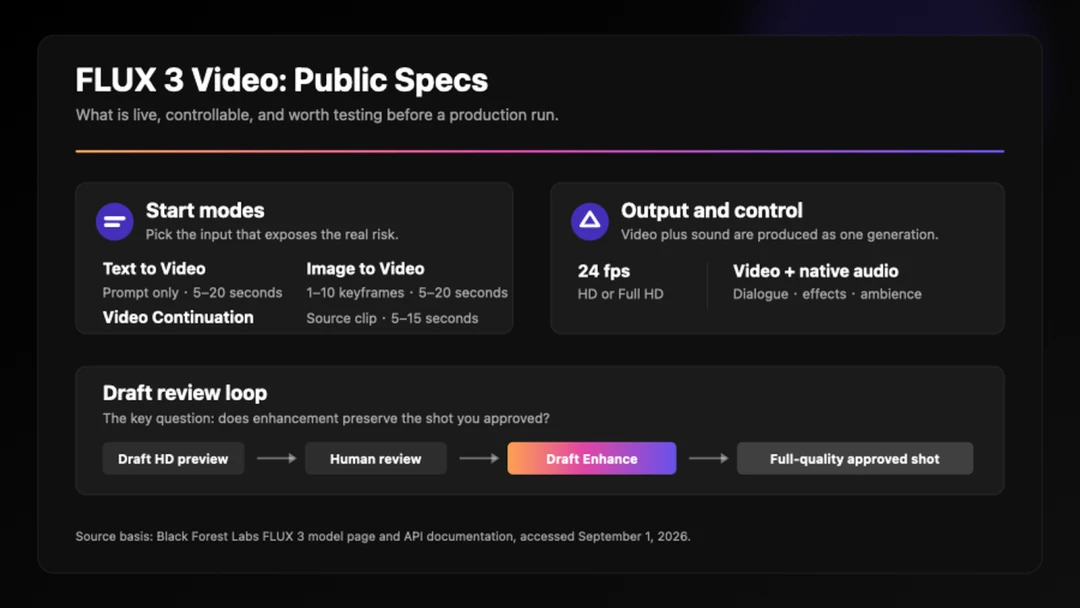
The public FLUX 3 Video workflow: choose an input mode, review a Draft HD clip, then use Draft Enhance on the selected take.
FLUX 3 AI Video Generator Features and Workflow
The live product is FLUX 3 Video. It creates 5–20-second text-to-video and image-to-video clips, plus 5–15-second continuations, in HD or Full HD at 24 fps. It can work from text, a start image, 1–10 timed keyframes, or a short source video; dialogue, effects, and ambience are generated with the picture. The official FLUX 3 Video release also describes multi-scene generation and a Draft Enhance path for promoting a selected preview.
That matters when the event on screen has to agree with its sound. A spoken line, a ceramic clink, and a cut to a close-up should feel like one decision rather than three disconnected jobs. FLUX 3 is therefore most interesting for short narrative beats, product moments, and character scenes where audio continuity is part of the brief.
There are three practical entry points. Text to Video is the open-ended option for testing direction and camera movement. Image to Video is for shots where an approved opening frame, packaging, wardrobe, or end composition matters. Video Continuation is for extending an existing clip; BFL documents a source input of up to four seconds with audio.
For a model-agnostic place to shape the initial shot brief, an ai video generator gives a team a separate environment for prompt-led exploration. The AI video prompt guide is useful for locking subject, action, camera, sound, and exclusions before a test run.
For the practical sequence after choosing a model, see the How to Use FLUX 3 guide. It explains how to match text, image, keyframe, and continuation inputs to the shot, direct audio, use Draft Enhance, and review the take that matters.
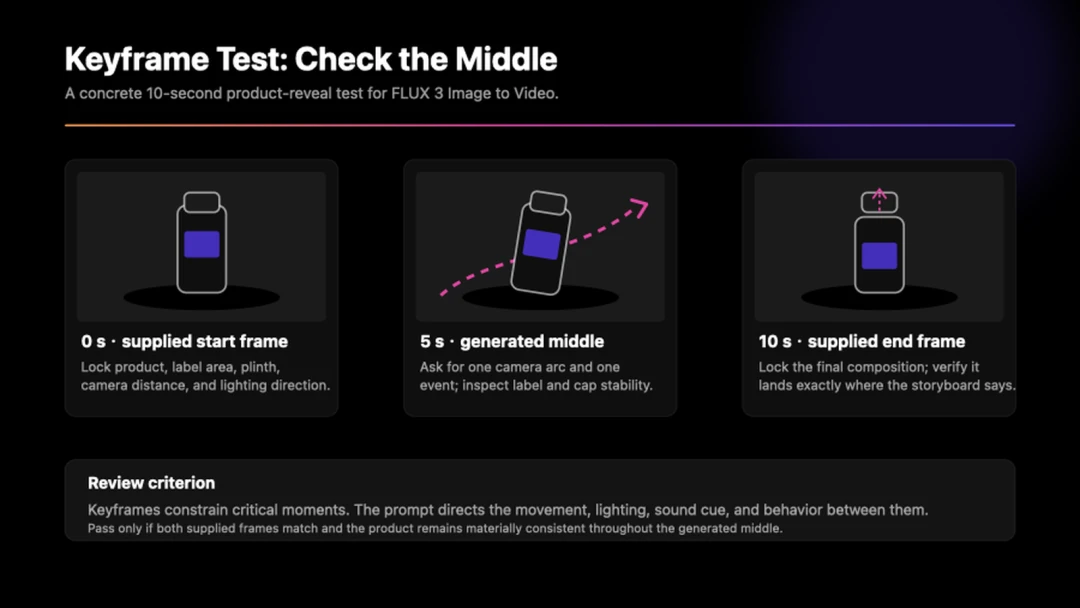
A keyframe test should lock the opening and ending composition, then judge whether the generated movement keeps the product recognizable.
What to Test Before Using FLUX 3 Video
Keyframes are more useful than a generic image-to-video label suggests. They can pin several moments in a short clip, giving an editor a way to protect a product reveal or a planned transition. Draft mode is similarly practical: create lower-cost previews, choose a take, and use Draft Enhance rather than rerunning the same prompt and hoping for the same result. Check the enhanced clip carefully for small text, a moving logo, a hand-held object, and dialogue timing.
The restraint here is as important as the feature list. BFL’s comparison results are provider-run and described as preliminary. FLUX 3 Image, Action, and Dev are separate rollout tracks, not one finished package. And a 20-second multi-shot output still needs an edit review for props, screen text, pace, and audio across every cut. When a project needs a locked still before animation, image to video keeps the approved source frame separate from the motion direction.
The published rates make a focused pilot feasible: Draft HD costs $0.06 per second, standard HD $0.17, standard FHD $0.29, and HD video continuation $0.43. These are provider list prices for the documented modes, so check the FLUX 3 API documentation before booking a large run. Plan for several controlled attempts, not one winner. For teams turning that process into a production system, the AI video API guide covers the integration questions that follow a successful pilot.
FLUX 3 Video Pilot Plan
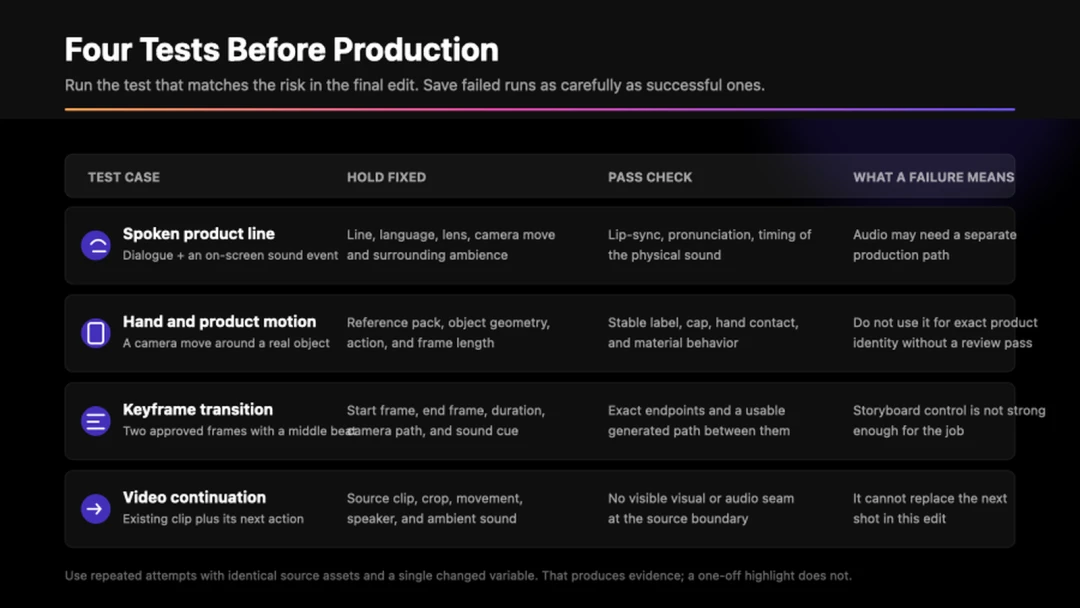
A fixed pass/fail checklist prevents a strong-looking clip from hiding an audio, motion, or continuity failure.
- Choose the risk your project cannot absorb: a spoken brand name, product geometry, identity retention, a keyframe transition, or a clip handoff.
- Use the matching input mode and hold the brief and source media steady across several runs.
- Review at full size with sound on, then scrub the relevant frames for hands, props, text, eye lines, cuts, and sound cues.
- Enhance the approved draft and compare it directly with the preview before treating the workflow as reliable.
For a separate prompt-led test space, text to video gives teams a direct route to create and review short video concepts.
FLUX 3 Review Verdict
FLUX 3 Video is a credible option for a controlled pilot when a short scene needs motion, dialogue, effects, and ambience to land together. Its most useful public controls are timed keyframes, source-video continuation, native audio, and Draft Enhance—not a promise that every long, multi-shot clip will arrive ready to publish.
Treat the provider’s early comparisons as an invitation to run your own tests. If it passes the exact failure case that matters to your project, it belongs on the shortlist; if it does not, the model’s launch reel will not rescue the edit. For a wider decision set, see the best AI video generators compared by workflow and use case.
FLUX 3 FAQ
What is FLUX 3?
FLUX 3 is Black Forest Labs’ multimodal model family for video, audio, images, and action prediction. The public creative release currently centers on FLUX 3 Video, which generates video with optional synchronized audio.
How long can FLUX 3 videos be?
Text-to-video and image-to-video support clips from 5 to 20 seconds. Video Continuation supports 5 to 15 seconds. Current outputs are 24 fps in HD or FHD, with available aspect ratios including widescreen, square, and portrait formats.
Does FLUX 3 produce audio with its videos?
Yes. FLUX 3 Video can generate dialogue, sound effects, and ambience with the picture. The current API documentation sets audio generation on by default, though you should test the speech, effects, and mix on your own scenes before publishing.
What should teams test before using FLUX 3?
Start with the failure most costly to your project: identity retention, product geometry, hand-and-prop interaction, keyframe control, clip continuation, or multilingual speech. Keep the source assets and brief constant across several attempts so the result is useful evidence.