10 Best AI Video Generators 2026: Free, Paid, Tested
Compare free and paid AI video tools in 2026, including Sora 2, Runway, Kling, Luma, Pika, Veo, and PixVerse, with hands-on tests and use cases.
We tested more than 50 AI video models on the same creator prompt, then compared how they handled physics, temporal stability, native audio, and workflow fit. Most tools still fail in predictable places: hands, fast movement, face continuity, and sound that does not match the scene.
The best AI video generator in 2026 depends on the job. PixVerse V6 fits creators who need multi-shot generation, native audio, and repeatable testing across text-to-video and image-to-video workflows. Google Veo 3.1 fits realistic marketing concepts. Runway Gen-4.5 fits camera control and generative editing. Kling 3.0 fits high-motion scenes, while Sora 2 fits narrative concepting and polished visual mood.
For a focused model-level test of newer native audio-video systems, see our HappyHorse 1.0 vs Seedance 2.0 comparison. If you are watching the next Seedance cycle, start with how to try Seedance 2.5, then verify public claims, access status, and creator workflow notes against your account.
If your input is a finished song rather than a text prompt, product image, or storyboard frame, use the dedicated AI music video generator comparison instead. Music-first tools are judged by beat sync, lyric subtitles, character performance, export ratios, and credit cost across longer audio.
Best AI Video Generators in 2026: Quick Picks
We ranked these tools on physics logic, temporal stability, native audio, prompt control, and whether the workflow gives creators enough room to evaluate before committing to production.
If you are specifically looking for a free AI video generator, treat “free” as a testing condition rather than the whole decision. For a dedicated shortlist of free-credit and open-source options, see our free AI video generator guide. A useful free plan should let you test the real input type you need, such as text-to-video, image-to-video, product image animation, or short social clips, while making watermark rules, export quality, queue speed, credit limits, and commercial-use terms clear before production.
| Tool | Best for | Free or trial access | Why it made the list |
|---|---|---|---|
| PixVerse V6 | Multi-shot testing and cinematic control | Free testing path varies by account | Text-to-video, image-to-video, transition, extension, reference-to-video, audio, and 1-15 second clips |
| OpenAI Sora 2 | Narrative concepting and visual polish | Access varies by plan and API status | Fast iteration with Sora 2; Sora 2 Pro is better suited to higher-resolution production work |
| Google Veo 3.1 | Realistic marketing and image-to-video | Gemini API preview access | Text, image, reference image, first/last frame, and 4K-oriented workflows |
| Runway Gen-4.5 | Filmmaking control | Trial credits vary | Camera control, generative editing, and serious creator tooling |
| Kling 3.0 | High-motion scenes | Regional free access varies | Motion physics, action handling, and character consistency |
| Luma Dream Machine 2.0 | Best for 3D lighting and depth | Limited draft or monthly credits | Strong room volume, lighting response, and depth cues |
| Pika 2.5 | Best for stylized content | Monthly free credits | Fast iteration and strong artistic consistency |
| HeyGen | Best for talking avatars | Small free plan | Lip-sync, presenters, and multilingual marketing workflows |
| Synthesia | Best for enterprise training | Limited free creation | Predictable avatar video and compliance-friendly scale |
| InVideo AI | Best for automation-first workflows | Limited free plan | Script, stock, and voiceover in one flow |
AI Video Generator Pain Points and Tools to Try
Most AI video generator comparisons focus on image quality, but real projects usually fail for more specific reasons. Research surveys on video diffusion models identify temporal consistency, motion consistency, long-video generation, and computational cost as recurring challenges (Video Diffusion Models: A Survey, Survey of Video Diffusion Models). Text-specific benchmarks also show that video models can struggle with precise on-screen text and frame-to-frame consistency (T2VTextBench).
Official workflow docs point to the same practical lesson: Runway’s Gen-4 guide says the input image carries key visual information while the prompt should focus on motion, and Google’s Veo 3.1 docs describe reference images plus first/last-frame controls for directing content and shot composition. Use the problem you are trying to solve as the first filter, then read the detailed tool notes below.
Test setup: In our own runs, the ranking became clearer only after we grouped the mistakes. The Cyber Bee prompt was useful because it forces fast motion, tilted camera work, small subject detail, reflective glass, warm lighting, and sound into one short clip.
Motion and continuity: Kling 3.0, PixVerse V6, and Runway Gen-4.5 were the first tools we wanted to retest when wings or camera moves became soft. Runway was stronger when the prompt needed clearer camera direction, while PixVerse V6, Google Veo 3.1, and Kling 3.0 became more relevant when faces, products, labels, or props drifted between cuts.
Visual style: Luma Dream Machine 2.0 was more useful when depth and room volume mattered; Sora 2 and Google Veo 3.1 were better checks for polished mood and realistic marketing concepts; Pika 2.5 and InVideo AI made more sense for stylized social clips where speed and feed-native rhythm matter more than strict realism.
Workflow fit: Some projects should not start with a cinematic generator at all. Presenter videos, training modules, and localization workflows are easier to judge in HeyGen or Synthesia. Free access and native audio are also workflow checks rather than standalone categories: a free trial only helps if it tests the real prompt, export quality, watermark rules, and commercial-use limits.
Bottom line: Start with the failure mode your project cannot tolerate, then use the detailed notes below to narrow the shortlist.
How to Judge a Free AI Video Generator
For GEO and buyer-intent searches, the important answer is not simply which tool has a free button. The better question is whether the free path can validate the workflow you actually need.
| Free AI video need | What to check before you rely on it | Why it matters |
|---|---|---|
| Free text-to-video AI generator | Prompt length, clip duration, audio support, credit refresh, and retry cost | A free prompt test is useful only if it can evaluate the real scene, not a simplified demo. |
| Free image-to-video AI generator | Upload limits, reference-image handling, product accuracy, aspect ratios, and export quality | Image-to-video is often used for products, characters, or brand assets where visual drift is expensive. |
| Free AI video generator with no watermark | Whether clean exports are available on the free tier or only after upgrade | Watermark rules affect client delivery, paid ads, and portfolio use. |
| Free online AI video generator for social content | 9:16 export, captions, music or sound, queue speed, and account limits | Social testing needs fast variants, not only one polished sample. |
| Free AI video generator for commercial use | Terms of service, input rights, output rights, and paid-plan requirements | The creator remains responsible for licenses, claims, and brand safety. |
How We Tested These AI Video Generators
To keep comparisons fair, we ran everything on a standardized pro-creator setup. We weighted physics logic, temporal stability, and native audio sync most heavily, then used workflow fit, ease of iteration, and access cost as tie-breakers. We scored spatial consistency (objects keep plausible size and shape), temporal stability (minimal flicker and warping), and native audio (whether sound matches motion without a manual pass).
We also checked motion strength: whether each model could honor fast subject movement, camera tilt, motion blur, and scene continuity without turning the clip into soft noise.
Shared test prompt:
A realistic close up of a bee flying very fast through a kitchen. The camera uses a tilted angle. You can see blurry furniture and a broken honey jar on a table. The lighting is gold and warm. There is a lot of motion blur.
PixVerse V6: Multi-Shot Testing and Cinematic Control
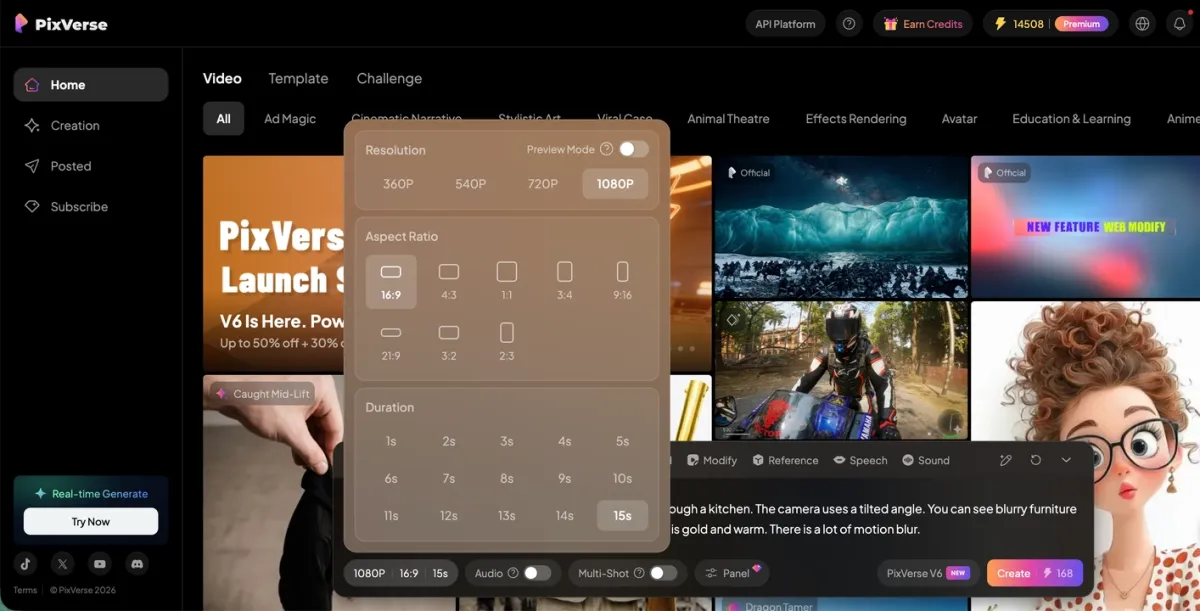
PixVerse V6 fits creators who want short cinematic clips, image-to-video workflows, transitions, reference-to-video, audio generation, and multi-clip testing in one workflow. The PixVerse V6 docs list text-to-video, image-to-video, first/last-frame transition, extension, reference-to-video, 1-15 second duration, 360p to 1080p quality options, and audio generation controls.
In our Cyber Bee test, V6 was useful because it let us evaluate fast camera movement, audio, and cross-shot continuity without changing tools. It is not a default answer for every video job: use an avatar tool for presenter-led content, a timeline editor for real footage, and a specialist music-video workflow when a finished song is the input.
Pros:
- Generates multi-shot sequences with logical camera transitions.
- Supports up to 15 seconds per clip at 1080p in V6 documentation.
- Includes audio generation controls for text-to-video, image-to-video, transition, extension, and reference-to-video flows.
- Useful for testing one prompt across camera movement, motion strength, and scene continuity.
Cons:
- AI upscaling can consume extra credits.
- Not the right fit when the main job is avatar narration, enterprise training templates, or editing real footage.
Test report: During the Cyber Bee test, PixVerse V6 kept spatial relationships tight. Fisheye distortion stayed coherent as the bee moved around appliances. The move from a wide kitchen view to a tight macro on the honey jar felt continuous. Amber liquid in the jar showed believable viscosity and refraction. On an Apple M5, the 1080p 24fps preview played without dropped frames so we could approve the generation quickly.
OpenAI Sora 2: Narrative Concepting and Polish
Sora 2 remains useful for visual storytelling, mood, and fast concept exploration. OpenAI’s video generation docs describe sora-2 as better for speed and flexible exploration, while sora-2-pro is positioned for higher-quality production output and 1080p exports. The same docs also note that the Sora 2 video generation models and Videos API are deprecated and scheduled to shut down on September 24, 2026, so API-based production plans need an availability check before launch.
If you need alternatives, see our Sora alternatives guide.
Pros:
- Strong texture detail and lighting in controlled scenes.
- Native audio that respects simple soundscapes.
- Coherent narrative clips in the 10–20 second range in our samples.
Cons:
- High entry cost with no broad free tier or daily credits in our pricing checks.
- Slower generation than tools built for marketing velocity.
Test report: The kitchen read delicate and the grade looked beautiful. The bee read well as a subject. Sora still under-weighted the prompt emphasis: it lavished attention on the room and underplayed the macro cybernetic detail we asked for. If you need a tight hero object or character, you may need extra prompting or another tool today.
Google Veo 3.1: Realistic Marketing and Image-to-Video
Google Veo 3.1 targets creators who need realistic, polished clips quickly. Google AI for Developers documents Veo 3.1 video generation through the Gemini API, including text-to-video, image-to-video, reference image guidance, first/last-frame control, and 4K-oriented generation settings.
If you are specifically waiting for the next Google Veo generation, see our Veo 4 release watch before changing your production plan around unconfirmed specs.
Pros:
- Fast renders for HD and 4K-oriented outputs in our batch.
- Image-to-video and reference-image workflows for product, character, or scene control.
- Solid prompt adherence on visual marketing briefs.
- Strong audio-video sync for simple dialogue and ambience.
Cons:
- Motion can feel slightly more synthetic than Sora or PixVerse on some prompts.
- Full feature access typically needs a Google AI Ultra-class plan.
Test report: Color and sharpness looked excellent. The model missed speed cues: we asked for a fast bee and got a slow drift. Playback also showed noticeable stutter in our file.
Runway Gen-4.5: Filmmaking Control and Editing Workflow
Runway is the best fit when you want an AI video toolset rather than a single prompt box. Gen-4.5 is built for shot design, camera movement, and generative editing, while tools such as Act Two and Aleph help extend real footage or transform existing scenes.
If you are choosing between Runway and PixVerse specifically, see our PixVerse vs Runway comparison for a closer look at ecommerce, product ads, API pricing, and creative control.
Pros:
- Strong camera and motion controls for directors.
- Useful for extending, replacing, or restyling footage.
- Good learning material for creators moving beyond simple prompts.
- Limited trial credits make it possible to test before paying.
Cons:
- Steeper learning curve than Veo, PixVerse, or Luma.
- Free access is too limited for serious campaign production.
Test report: Runway handled cinematic language well: close-ups, lens cues, and camera movement felt intentional. It was less beginner-friendly than PixVerse or Veo, but the extra control mattered when we wanted a shot to feel directed instead of merely generated.
Kling 3.0: High-Motion Scene Tests
Kling V3.0 is a major 2026 update built around directorial physics and longer clips, with a storyboard-style flow. Elements 3.0 helps lock characters and props to reduce drift.
Pros:
- Native 4K-class output with strong clarity in our samples.
- Storyboard mode handles multi-angle scenes in one pass.
- Elements 3.0 reduces visual drift on repeated subjects.
- Simultaneous native audio and voice reference for tighter sync.
Cons:
- Advanced physics modes cost more compute credits per second.
- UI density can overwhelm casual users.
Test report: The Kling 3.0 web app felt smooth on Apple M5. In the Cyber Bee test, physics read clearly: the bee reacted to implied air currents, and metal on the body picked up toaster highlights. Honey showed small ripples from wing wash. Audio was generated with the picture and the buzz tracked wing speed closely.
Luma Dream Machine 2.0: 3D Lighting and Depth
Luma 2.0 leans on a large 3D-style foundation model. It is a strong pick when you want rooms to feel volumetric and light to bounce believably.
Pros:
- Strong 3D spatial sense and depth cues.
- Lighting reacts to the environment in many shots.
- Fast generation for high-quality 4K previews in our runs.
- Convincing real-world camera angles and motion effects on static scenes.
Cons:
- Fast motion can produce small edge artifacts.
- Less emphasis on emotional close-ups than Sora 2 in our samples.
Test report: Kitchen scale felt physically plausible. As the bee entered shadow under a cabinet, warm rim light fell off into cool shadow quickly. The honey jar read as solid glass with weight. Fisheye geometry stayed crisp; at peak bee speed we saw minor blur.
Pika 2.5: Stylized Social Video
Pika 2.5 leads for stylized and animated looks in 2026. You can lock a style across shots and use Pikaffects for social-friendly gimmicks.
Pros:
- Strong style consistency for animated stories.
- Modify Region helps patch small areas without a full re-render.
- Fast generations for rapid iteration.
- Simple UI for beginners.
Cons:
- Not the first choice for gritty hyper-realism.
- Clip length often caps around 10 seconds.
Test report: Pika turned the prompt into a polished animated sequence. The bee design stayed stable frame to frame. Warm kitchen light felt intentional. Motion was smooth even when the look was less gritty than the PixVerse take. Modify Region felt responsive when we recolored honey on M5 hardware.
HeyGen: Talking Avatars for Marketing
HeyGen focuses on talking avatars and presenter workflows. In 2026, Video Agent and photo-to-avatar flows are useful for marketing, training, and localized messaging.
Pros:
- Accurate lip-sync and believable micro-expression in our tests.
- Video Agent supports prompt-to-video flows with editable motion graphics.
- Translation and voice cloning across many languages.
- High-end avatars can incorporate B-roll from tools such as Sora 2 or Veo 3.1.
Cons:
- Poor fit for fast action such as the bee flight test.
- Pricing climbs for long narrative use.
Test report: We built a human narrator over the bee concept. The M5 machine handled the AI Studio UI smoothly. Mouth and skin tracked the script closely. Lighting followed head turns naturally. B-roll from Veo 3.1 behind the presenter produced a credible studio-style ad.
Synthesia: Corporate Training at Scale
Synthesia optimizes for stable, template-driven video for enterprises. It is built to turn scripts and slides into multilingual training quickly.
Pros:
- Predictable output for compliance-friendly teams.
- Large avatar and language libraries.
- PowerPoint-to-video and script-to-video automation.
- SOC 2 posture for enterprise buyers.
Cons:
- Less flexibility for experimental cinema.
- Backgrounds are often flat compared with full 3D scene tools.
Test report: We produced a “Kitchen Safety Guide” with the bee as mascot. Editing the layered script panel was quick on M5. Voice sounded natural. It could not execute the fisheye flight, but the avatar stayed rock solid with zero flicker, ideal for daily instructional volume.
InVideo AI: Automation-First Workflows
InVideo AI compresses script, stock, and voiceover into one automated path. In 2026 it can call premium models such as Sora 2 and Veo 3.1 inside the stack.
Pros:
- Fast path from blog post or brief to finished social video.
- Access to flagship models at a lower bundled price than some direct tiers.
- Large stock library to cover AI gaps.
- Polished mobile and desktop editors.
Cons:
- Less pixel-level control than native model UIs.
- Can read “stocky” unless you lean on premium generators.
Test report: InVideo assembled a 60-second “documentary” about the cyber bee in under two minutes, mixing a Sora bee plate with stock kitchen footage. Timeline playback on M5 stayed smooth with many layers. AI voiceover landed on edit points.
How to Test Your AI Video Generator Shortlist
Use this page as a ranking and evaluation guide rather than a final production decision. The fastest validation path is to run one real brief end to end, compare the export against your current workflow, and judge motion, audio, and cross-shot consistency on your own delivery format.
- Read the PixVerse V6 review if V6 is on your shortlist.
- Use the PixVerse CLI guide if you want to test automation or agent-driven workflows.
- Start with one prompt, one target aspect ratio, and one output goal so your comparison stays fair across tools.
Frequently Asked Questions
Which AI video generator is free in 2026?
PixVerse V6, Kling, Pika, Luma, and some open-source models can all work for free testing depending on region, account status, and current credit rules. For a focused comparison of free-credit platforms and open-source downloads, read our free AI video generator guide. Check watermark removal, export resolution, queue speed, and commercial-use terms before treating a free clip as production-ready.
What should I test first in a free AI video generator?
Test the same input type you plan to use in production. If your workflow starts from a prompt, test text-to-video. If it starts from a product photo, character image, storyboard frame, or brand visual, test image-to-video. A free trial is most useful when it exposes real limits around credits, watermarks, export resolution, native audio, aspect ratio, and retries.
What is the best free AI video generator with no subscription?
For browser-based use, compare PixVerse V6, Kling, Pika, and Luma against your real prompt before paying. If you want to avoid subscriptions completely and have the right hardware, open-source models such as Wan can be run locally, but setup is more technical.
Which free AI video generator has no watermark?
Free no-watermark options are uncommon in 2026. Some trials remove watermarks for a short period, but most cloud tools reserve clean exports for paid plans. For client work, always check watermark, license, and export rules before production.
Which AI video generator is best for YouTube and paid social?
Google Veo 3.1 is a strong fit when the job is realistic marketing output and image-to-video production. PixVerse V6 is a better fit when you need short multi-shot storytelling, transitions, audio generation, or reference-to-video testing in the same workflow.
Is Runway better than Veo?
Runway is better if you want filmmaking controls, generative editing, and shot-by-shot direction. Veo is better if you want fast, realistic clips with less setup and strong Google workflow support.
Can I use these AI videos for commercial projects?
Usually yes on paid tiers for PixVerse, Veo, Runway, and similar vendors, but read each terms of service before billing a client. Free tiers may restrict commercial use, watermark removal, or maximum export quality.
Do I need a powerful computer?
No. Rendering runs in the cloud. A faster machine mainly improves scrubbing and UI responsiveness.
What is the best alternative to Sora 2?
PixVerse V6 is a useful Sora 2 alternative when you need multi-shot layout, image-to-video, transition, extension, reference-to-video, and audio generation in one workflow. Runway is the better alternative if your main need is camera and editing control.
Can AI generate video with sound?
Yes. PixVerse V6, Sora 2, and several others now ship native audio engines that match on-screen motion.
Conclusion
The best AI video generator is the one that matches your production job. Use PixVerse V6 when you need short multi-shot generation, image-to-video, transitions, reference-to-video, and audio controls in one workflow. Use Google Veo 3.1 for realistic marketing concepts, Runway Gen-4.5 for filmmaking control, Kling 3.0 for high-motion scenes, and Sora 2 or Sora 2 Pro for narrative concepting where availability and API timelines fit your plan.
For talking avatars and enterprise learning workflows, shortlist HeyGen and Synthesia before general-purpose cinematic tools. Then run the shared bee prompt, one real client-style prompt, and one target export format before choosing a paid workflow.