คู่มือ Gemini Omni YouTube Shorts: AI Remix, watermark และ PixVerse
ดูว่า Gemini Omni ทำงานใน YouTube Shorts Remix อย่างไร ใครใช้ได้ watermark และ creator controls หมายถึงอะไร และเมื่อไรควรใช้ PixVerse ทำ Shorts 9:16 ต้นฉบับ
Google กำลังนำ Gemini Omni เข้าไปอยู่ใน workflow การสร้าง YouTube Shorts โดยตรง AI video จึงไม่ใช่แค่ขั้นตอนในเครื่องมือภายนอกอีกต่อไป ใน Shorts Remix ครีเอเตอร์สามารถใช้ prompts และ images เพื่อปรับ eligible Shorts ภายใน YouTube พร้อมเก็บสัญญาณของแพลตฟอร์ม เช่น watermark, metadata, ลิงก์วิดีโอต้นฉบับ, creator opt-out และ likeness controls ไว้ใน flow เดียวกัน
สำหรับครีเอเตอร์ การตัดสินใจแรกไม่ใช่ว่าเครื่องมือไหนแรงกว่า แต่คือไอเดียเริ่มจากที่ไหน ถ้าเริ่มจาก eligible Short ที่ต้องการ remix ใน YouTube, Gemini Omni คือเครื่องมือ native ที่ตรงบริบทที่สุด ถ้าเริ่มจาก brief ของคุณเอง รูปสินค้า script แนวคิดโฆษณา หรือรูปแบบช่อง PixVerse เหมาะกว่าในการสร้างวิดีโอ 9:16 ต้นฉบับก่อนนำไปเผยแพร่บน Shorts หรือแพลตฟอร์มอื่น
บทความนี้โฟกัสที่ YouTube Shorts โดยเฉพาะ: ใครใช้ Gemini Omni Remix ได้ อะไรทำให้ Short เป็น eligible Short, watermark และ metadata หมายถึงอะไร ทำไม Remix อาจไม่แสดง Gemini Omni Shorts ใช้เชิงพาณิชย์ปลอดภัยแค่ไหน และเมื่อไรการสร้าง Shorts assets ต้นฉบับใน PixVerse จะเป็น workflow ที่สะอาดกว่า
Google ประกาศอะไรสำหรับ YouTube Shorts
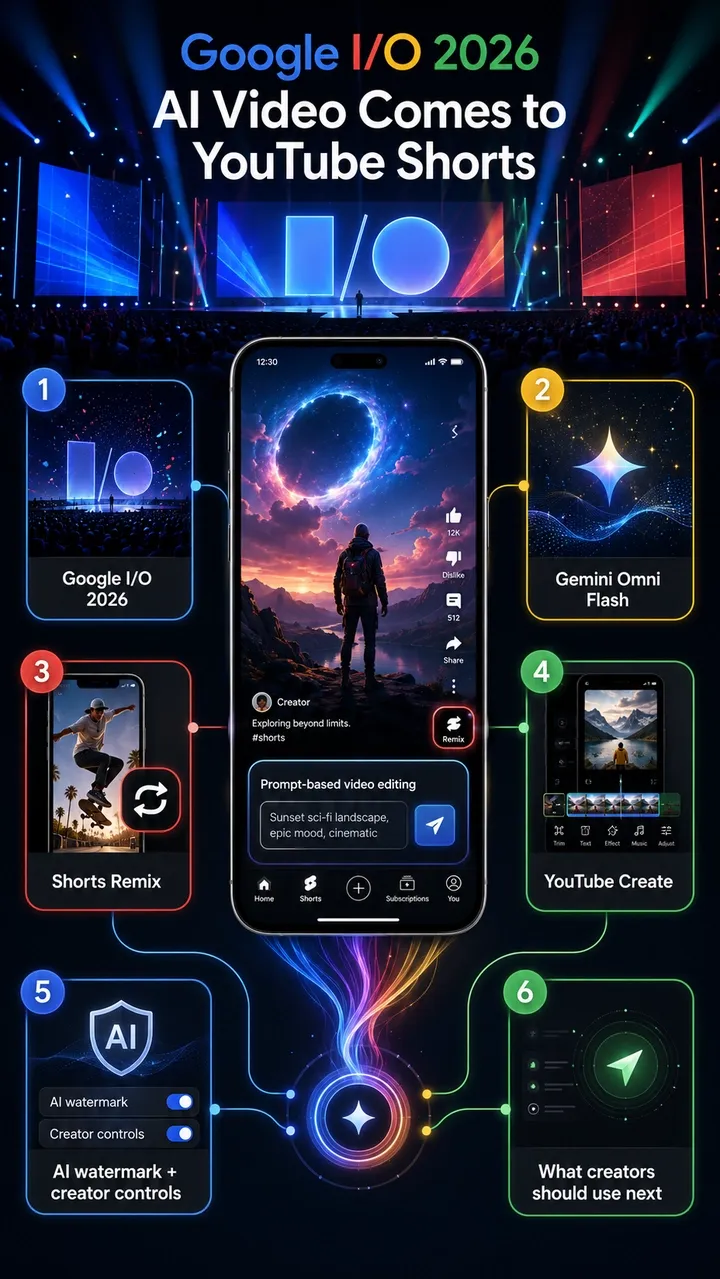
YouTube Blog อย่างเป็นทางการวันที่ 19 พฤษภาคม 2026 ยืนยันการอัปเดตหลัก: Gemini Omni กำลัง rollout ใน YouTube Shorts Remix และ YouTube Create app Google อธิบายว่านี่คือวิธี remix eligible Short โดยเพิ่ม prompts และ images เพื่อสร้างภาพใหม่ ขณะยังเก็บบริบทของวิดีโอต้นฉบับไว้
สรุปประกาศ Google I/O 2026 ก็ยืนยันบทบาทของ Gemini Omni ใน YouTube Shorts Remix และ YouTube Create เช่นกัน สำหรับ YouTube สิ่งสำคัญไม่ใช่แค่ความสามารถของโมเดล แต่คือ distribution: Gemini Omni เข้าสู่ workflow native ของ Shorts ซึ่งครีเอเตอร์ใช้ตอบสนอง trends, audience feedback และ remix culture อยู่แล้ว
ข้อเท็จจริงที่ YouTube ยืนยันมีดังนี้:
- Gemini Omni Flash กำลังเข้าสู่ YouTube Shorts Remix
- Gemini Omni จะเข้า YouTube Create app ด้วย
- ผู้ใช้สามารถ remix eligible Shorts ด้วย prompts, images หรือ references
- ตัวอย่างจาก YouTube ได้แก่ เปลี่ยน Short เป็นฉากสไตล์ยุค 90 หรือใส่ตัวเองไว้ข้างครีเอเตอร์
- Omni-remixed Shorts มี digital watermarks, identifying metadata และลิงก์กลับไปยังวิดีโอต้นฉบับ
- Original creators สามารถ opt out visual remix ใน Shorts ได้
- YouTube ระบุว่า likeness detection จะขยายไปยังครีเอเตอร์อายุ 18 ปีขึ้นไปทั้งหมด
- YouTube ระบุว่า Remixing with Omni จะ rollout โดยไม่มีค่าใช้จ่ายใน Shorts Remix และ YouTube Create พร้อม AI Playground support ในอนาคต
ใครใช้ Gemini Omni ใน YouTube Shorts ได้บ้าง
YouTube ระบุว่า Gemini Omni กำลัง rollout โดยไม่มีค่าใช้จ่ายใน Shorts Remix และ YouTube Create แต่การ rollout ฟรีไม่ได้แปลว่าทุกบัญชีจะเห็นฟีเจอร์พร้อมกัน ความพร้อมใช้งานอาจขึ้นอยู่กับ rollout timing, account eligibility, region, app version, age settings และ Remix surface ของ Short ที่กำลังดู
ในทางปฏิบัติ ผู้ใช้อาจต้องมี:
- บัญชี YouTube ที่ eligible และเข้าถึง Shorts Remix surface ปัจจุบันได้
- ภูมิภาคที่รองรับและ YouTube app เวอร์ชันล่าสุด
- บัญชีที่ตรงตาม age และ platform requirements โดยเฉพาะเครื่องมือ identity และ likeness
- eligible Short ที่ original creator และกฎแพลตฟอร์มอนุญาต visual remix
- AI remix หรือ reimagine option rollout มาถึงบัญชีแล้ว
ถ้า Gemini Omni Remix ไม่แสดง โดยทั่วไปไม่ได้แปลว่าคุณทำผิด อาจเป็น rollout timing, region หรือ account limitation, app version เก่า, creator opt-out หรือ Short นั้นไม่ eligible สำหรับ AI Remix
วิธีใช้ Gemini Omni ใน YouTube Shorts Remix
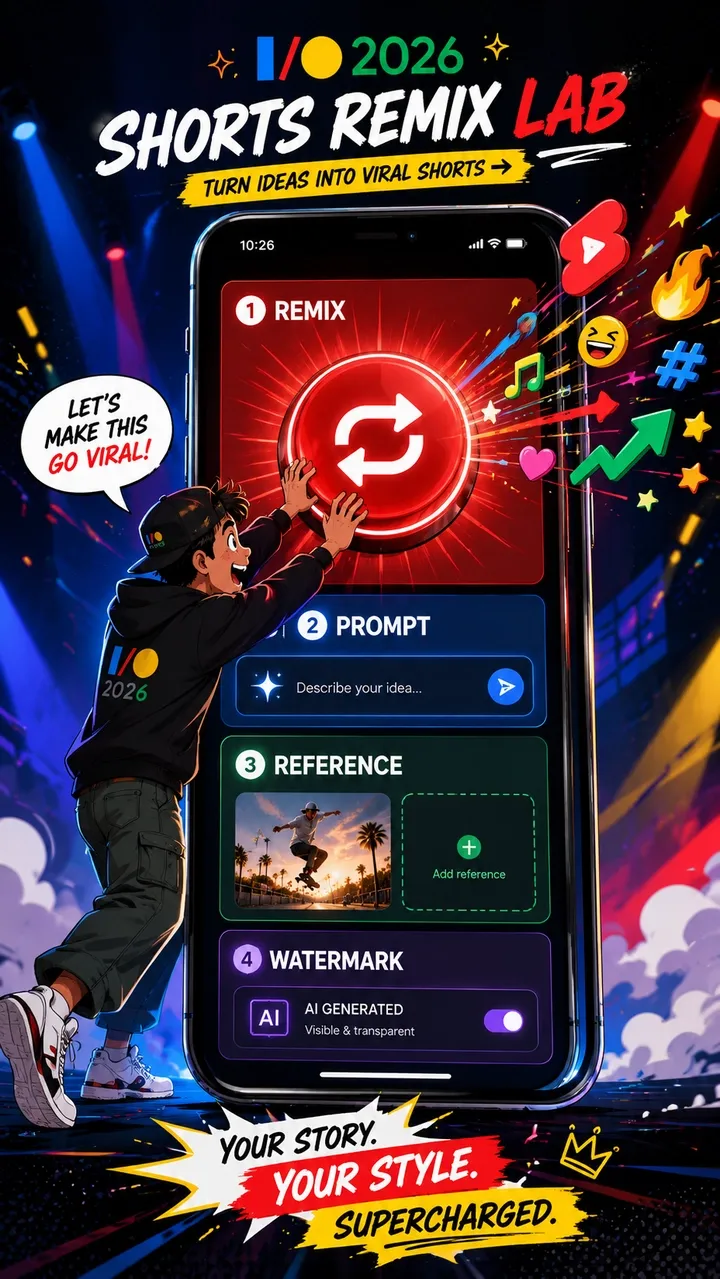
workflow ของ YouTube เป็นแบบ remix-first คุณไม่ได้เริ่มจาก timeline ว่าง แต่เริ่มจาก eligible Short แล้วใช้ Gemini Omni reimagine วิดีโอนั้น
- เปิด YouTube app แล้วหา eligible Short
- แตะ Remix บน Short
- เลือก AI remix, restyle หรือ reimagine เมื่อบัญชีของคุณมีตัวเลือก
- ใส่ prompt ที่ชัดเจน หรือเลือก suggested prompt หาก YouTube มีให้
- เพิ่ม reference image จาก gallery หากเครื่องมือรองรับและคุณมีสิทธิ์ใช้ภาพนั้น
- Generate remixed clip และ preview ผลลัพธ์
- ใช้ Shorts tools สำหรับ final edits, captions, music หรือ publishing checks
เพื่อผลลัพธ์ที่ดีขึ้น ให้เขียน prompts ที่มี subject, action, visual style, camera direction และ audio expectation ชัดเจน หากต้องการให้บุคคล วัตถุ หรือสินค้ายังคงจดจำได้ ให้ใช้ reference ที่เหมาะสมและตรวจสอบ permission เสมอ สำหรับงาน commercial หรือ branded work อย่าถือว่า remix ที่สำเร็จเท่ากับ rights clearance อัตโนมัติ
Eligible Short คืออะไร
YouTube ใช้คำว่า “eligible Short” เพราะไม่ใช่ทุก Short ที่ remix ได้เหมือนกัน eligibility อาจเปลี่ยนตาม account, region, content type, creator settings, copyright status, music rights และ platform safety systems
โดยทั่วไป eligible Short หมายถึง Short ที่ Remix option แสดงใน app และบัญชีของคุณ Short อาจไม่ eligible หาก original creator ปิด visual remix, content ถูกจำกัดโดย YouTube rules หรือ copyright, music, Content ID, age, Made for Kids, privacy หรือ policy settings จำกัดการ reuse เอกสาร YouTube Help ยังระบุว่า Remix options อาจต่างกันตามเนื้อหา และ creators มี controls เหนือวิธีที่ Shorts ของตนถูก reuse
กฎที่ปลอดภัยที่สุดคือ หาก Remix หรือ AI Remix ไม่แสดง อย่าเพิ่งคิดว่าฟีเจอร์เสีย Short นั้นอาจไม่ eligible, creator อาจ opt out, บัญชีของคุณอาจยังไม่ได้ rollout หรือ content อาจติด rights และ platform restrictions
Watermark, Metadata, Original Links และ Creator Controls
ใน YouTube Gemini Omni, watermarking และ attribution ไม่ใช่รายละเอียดเล็กน้อย แต่เป็นส่วนหนึ่งของ workflow native ของแพลตฟอร์ม YouTube ต้องการให้ remix ได้เร็ว พร้อมรักษาสัญญาณเรื่อง AI generation, original context และ creator control
| กลไก | สิ่งที่ YouTube ระบุ | ความหมายต่อครีเอเตอร์ |
|---|---|---|
| Digital watermark | Omni remixes include digital watermarks. | แหล่งที่มา AI generation สามารถถูกระบุได้ แม้วิดีโอจะถูกแชร์ต่อหรือถูกตรวจภายหลัง |
| Identifying metadata | Omni remixes include identifying metadata. | แพลตฟอร์มสามารถเก็บสัญญาณ AI นอกเหนือจากสิ่งที่เห็นบนจอ |
| Original video link | Remixes link back to the original video. | บริบทต้นทางและ attribution ยังคงเป็นส่วนหนึ่งของ remix experience |
| Visual remix opt-out | Original creators can opt out of visual remix in Shorts. | ครีเอเตอร์ควบคุมได้มากขึ้นว่าคนอื่นจะแปลงภาพ Shorts ของตนได้หรือไม่ |
| Likeness detection | YouTube says likeness detection is expanding to creators aged 18 and older. | identity ของคนจริงและ creator likeness กำลังกลายเป็น safety layer อย่างเป็นทางการ |
สำหรับครีเอเตอร์ที่ใช้ Gemini Omni มีความหมายสองอย่าง หนึ่ง AI Remix ไม่ได้มองไม่เห็น แต่มี provenance signals สอง remix workflow ไม่ได้ลบ original creator context หรือ rights หากกลยุทธ์ของคุณต้องการ brand ownership ที่ชัดเจน reusable assets หรือ cross-platform publishing ควรเริ่มจาก assets ต้นฉบับแทนที่จะเริ่มจาก Short ของคนอื่น
Gemini Omni เปลี่ยนอะไรสำหรับ Shorts creators
ผลกระทบต่อครีเอเตอร์ไม่ใช่แค่มีปุ่มใหม่ Shorts ให้รางวัลกับความเร็วมาโดยตลอด: ตอบสนอง trend, เพิ่ม twist, publish, เรียนรู้จาก retention แล้วทำซ้ำ Gemini Omni ลดระยะห่างระหว่างการเห็น trend กับการทำเวอร์ชันใหม่
การเปลี่ยนแปลงใหญ่คือ Remix กลายเป็น generative workflow ครีเอเตอร์ใช้ prompt เปลี่ยน setting, style, subject หรือ action ของ eligible Short ได้ Reference images และ self-insertion ยังดึง identity, objects และ style เข้าสู่ creation loop เดียวกัน Prompting จึงกลายเป็นทักษะ native ของ Shorts ไม่ใช่สิ่งที่เกิดใน AI tool แยกต่างหากเท่านั้น
นี่ไม่ได้หมายความว่าทุก Short ควรเป็น AI-generated แต่หมายถึงตัวเลือกสร้างสรรค์ใน Shorts กำลังขยาย ข้อดีคือ speed และ trend response ความเสี่ยงคือ sameness, rights confusion และ AI output คุณภาพต่ำเมื่อ remix โดยไม่มีไอเดียชัดเจน rights review หรือ editorial filter
Gemini Omni Shorts ใช้เชิงพาณิชย์ได้ไหม
อาจใช้ได้ แต่อย่าคิดว่า free access เท่ากับ commercial clearance การที่ YouTube ระบุว่า Gemini Omni Remix rollout โดยไม่มีค่าใช้จ่าย ไม่ได้แปลว่า output ทุกชิ้นปลอดภัยสำหรับ ads, sponsorships, ecommerce, brand campaigns หรือ cross-platform reuse อัตโนมัติ
Commercial risk ขึ้นอยู่กับ source Short, music rights, creator opt-out settings, third-party copyright, Content ID, real-person likeness, brand logos, product claims, platform policies, AI disclosure และ terms ที่ใช้กับบัญชีและ use case ของคุณ Remix อาจเหมาะกับ trend participation เบา ๆ แต่ไม่เหมาะกับ paid product campaign
สำหรับ brand ads, product videos, UGC-style ad variants หรือ cross-platform campaigns workflow ที่ปลอดภัยกว่าคือเริ่มจาก original brief ใช้ product images ของคุณเอง owned brand assets, approved copy, licensed audio และ original characters หรือ scenes นี่คือจุดที่ PixVerse เชื่อมต่อได้ดี: สร้าง original 9:16 Shorts assets ก่อน แล้วอัปโหลดขึ้น YouTube เมื่อ rights, format และ review พร้อม
YouTube Gemini Omni Remix vs AI Shorts Generator
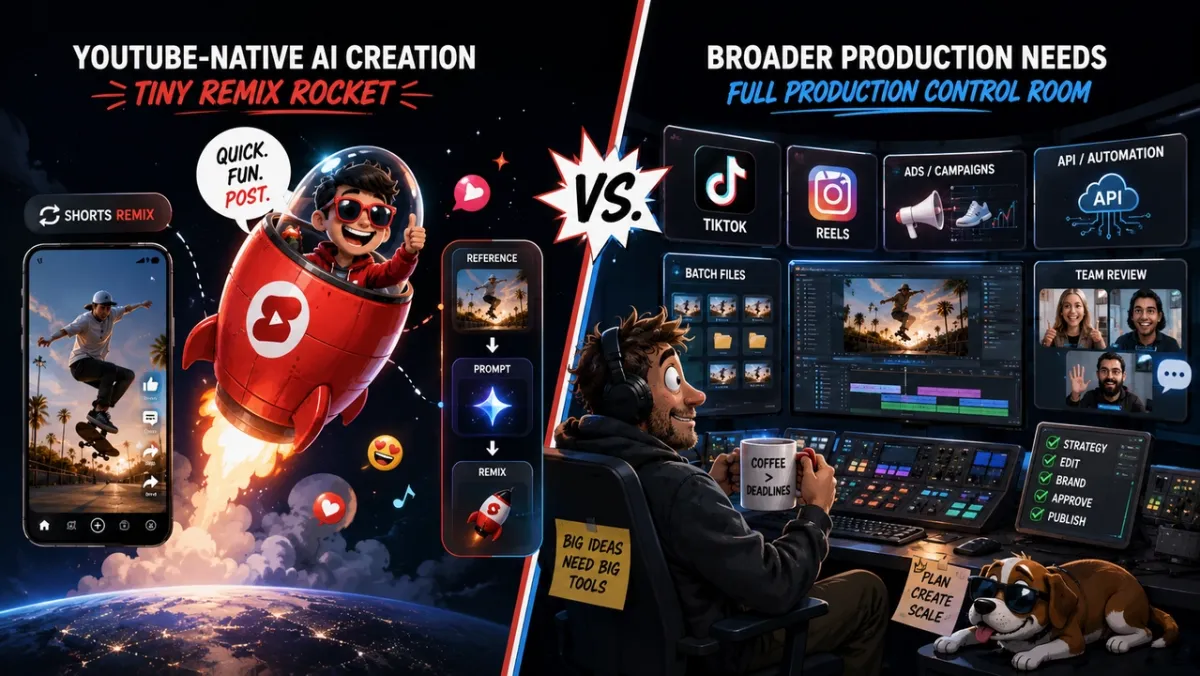
การตัดสินใจจริงไม่ใช่ “YouTube หรือ PixVerse” แต่คือส่วนนี้ของ Shorts workflow ควรเกิดที่ไหน ใช้ YouTube Gemini Omni สำหรับ Remix ภายใน Shorts ใช้ PixVerse หรือ standalone แพลตฟอร์มสร้างวิดีโอ AI เมื่อเริ่มจาก original brief, product asset, script หรือ ad objective
| ความต้องการ | YouTube Gemini Omni | PixVerse / standalone AI video generator |
|---|---|---|
| Remix existing Short | แข็งแรง | ไม่ใช่ use case หลัก |
| Original 9:16 video | ปานกลาง | แข็งแรง |
| Product ad / UGC ad | ปานกลาง | แข็งแรง |
| Batch hook testing | อ่อน | แข็งแรง |
| Cross-platform reuse | ปานกลาง | แข็งแรง |
| API workflow | อ่อน | แข็งแรง |
| Creator trend response | แข็งแรง | ปานกลาง |
| Brand safety control | ปานกลาง | แข็งแรง |
สำหรับ trend participation เครื่องมือ native ของ YouTube แข็งแรงเพราะอยู่ใน culture loop โดยตรง สำหรับ planned production, standalone AI video generator ให้การควบคุมมากกว่าก่อนที่วิดีโอจะไปถึง YouTube
PixVerse อยู่ตรงไหนใน Shorts workflow
PixVerse ไม่ใช่ตัวแทนของ YouTube Shorts Remix แต่มันเหมาะกับอีกส่วนของ workflow: การสร้าง original AI video assets ก่อนเผยแพร่ไปยัง Shorts, Reels, TikTok หรือ ad platforms
สำหรับ YouTube Shorts creators, PixVerse มีประโยชน์เมื่อเริ่มจาก brief ไม่ใช่ remix Text-to-video และ image-to-video สามารถสร้าง original vertical assets ได้ PixVerse V6 docs ระบุว่า 9:16 เป็น supported aspect ratio พร้อม generation 1-15 วินาทีใน supported workflows และตัวเลือก 360p, 540p, 720p, 1080p Audio generation, transition, extension และ multi-clip options ก็มีเอกสารใน V6 flows ที่รองรับ
ดังนั้น PixVerse จึงเหมาะกับ original Shorts concepts, product visuals, branded hooks, faceless channel scenes และ multi-version tests Transition และ Extend workflows ช่วยเมื่อครีเอเตอร์ต้องการมากกว่าหนึ่ง shot ส่วน PixVerse pricing docs ทำให้ทีมที่ต้องผลิตซ้ำวางแผน API และ credits ได้โปร่งใสขึ้น
workflow ที่ชัดเจนคือ ใช้ YouTube Gemini Omni เมื่ออยาก remix ภายใน Shorts และใช้ PixVerse เมื่ออยากสร้าง original video assets ก่อนเผยแพร่ไปยังที่ที่มี audience ของคุณ
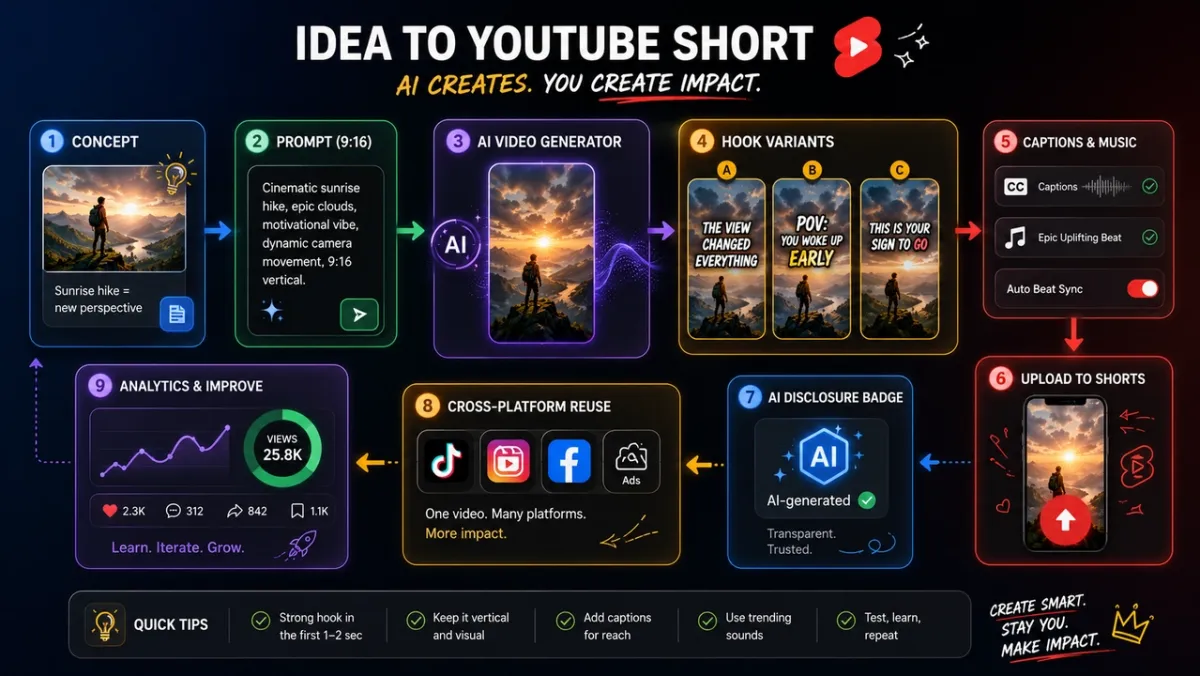
Workflow สร้าง Shorts 9:16 ต้นฉบับด้วย PixVerse
ใช้ workflow นี้เมื่อคุณต้องการ original assets ก่อนอัปโหลดไป YouTube Shorts:
- เลือกเป้าหมาย Shorts: trend response, product hook, education clip, faceless channel scene, creator bit หรือ social ad
- เขียน prompt 9:16 พร้อม subject, action, camera, style, motion, sound และ final frame
- เพิ่ม product images, brand assets หรือ reference images เฉพาะเมื่อคุณมีสิทธิ์ใช้
- Generate core video asset ใน PixVerse
- สร้าง hook variations หลายแบบเพื่อทดสอบ 1-3 วินาทีแรก
- เพิ่ม captions, title, music, sound effects หรือ voiceover
- ตรวจ rights, formatting, AI disclosure, product claims และ platform fit
- อัปโหลดไป YouTube Shorts แล้ว reuse เวอร์ชันที่ดีที่สุดใน TikTok, Reels, ads หรือ landing pages เมื่อ rights และ format อนุญาต
เส้นทางนี้เหมาะกว่าเมื่อคุณต้องการ original product clips, ad variants, faceless Shorts, social-first brand concepts หรือ reusable assets Remix เหมาะกับการเข้าร่วม platform conversation ส่วน original 9:16 generation เหมาะกับการสร้าง asset library
แก้ปัญหา Gemini Omni Shorts Remix
ทำไม Gemini Omni Remix ไม่แสดง
สาเหตุที่พบบ่อยคือ rollout timing, unsupported region, account eligibility, app version, age settings หรือ Remix surface ยังไม่มาถึงบัญชีของคุณ อัปเดต YouTube app ลอง eligible Short อื่น และจำไว้ว่า rollout อาจค่อยเป็นค่อยไป
ทำไม remix Short นี้ไม่ได้
Short อาจไม่ eligible original creator อาจ opt out visual remix, content อาจได้รับผลจาก copyright หรือ music restrictions หรือ YouTube อาจจำกัด Remix เพราะ policy, age, privacy, Made for Kids หรือปัจจัย Content ID
ทำไม Short ที่ generate มี watermark หรือ metadata
YouTube ระบุว่า Omni-remixed Shorts มี digital watermarks และ identifying metadata สัญญาณเหล่านี้ช่วยระบุ AI-generated content และรักษา platform context นี่คือพฤติกรรมปกติ ไม่ใช่ bug
Creators ปิด AI Remix ได้ไหม
YouTube ระบุว่า original creators สามารถ opt out visual remix ใน Shorts ได้ controls ที่แน่นอนอาจขึ้นกับ YouTube Studio settings, account type และ rollout ปัจจุบัน หากคุณเป็น creator ให้ตรวจ YouTube settings และ Help documentation ก่อนสรุปว่า content ของคุณ remixable
Gemini Omni Remix ใช้นอก YouTube ได้ไหม
Gemini Omni ใน Shorts Remix เป็น YouTube-native workflow สำหรับ cross-platform Shorts, TikTok, Reels, ads หรือ reusable vertical assets ให้สร้าง original 9:16 videos ใน PixVerse หรือ standalone AI video generator ก่อนอัปโหลด
FAQ
Gemini Omni ใน YouTube Shorts คืออะไร
Gemini Omni ใน YouTube Shorts คือ AI video creation layer ของ Google สำหรับ Shorts Remix และ YouTube Create ผู้ใช้สามารถ remix eligible Shorts ด้วย prompts, images หรือ references พร้อม watermarking, metadata และ link กลับไป original video
ใช้ Gemini Omni ใน YouTube Shorts Remix อย่างไร
เปิด eligible Short ใน YouTube app แตะ Remix เลือก AI remix หรือ reimagine หากมี ใส่ prompt เพิ่ม reference image เมื่อรองรับ generate clip, preview และทำ final Shorts edits ก่อน publish
Gemini Omni ฟรีสำหรับ YouTube Shorts ไหม
YouTube ระบุว่า Remixing with Omni rollout โดยไม่มีค่าใช้จ่ายใน YouTube Shorts Remix และ YouTube Create app แต่ availability อาจขึ้นกับ rollout timing, account eligibility, region, app version, age requirements และ supported surfaces
ทำไม Gemini Omni Remix ไม่ขึ้นใน YouTube app
อาจยังไม่ rollout ถึง account, region, app version หรือ Remix surface ของคุณ Short เฉพาะนั้นอาจ ineligible เพราะ creator opt-out, copyright, music, Content ID, age, privacy หรือ policy restrictions
Eligible Short สำหรับ Gemini Omni Remix คืออะไร
Eligible Short คือ Short ที่ Remix option พร้อมใช้งานสำหรับ account และ app ของคุณ eligibility อาจขึ้นกับ original creator settings, visual remix opt-out, copyright/music restrictions, platform policy, region, age settings และ rollout timing
Creators opt out Gemini Omni visual remix ได้ไหม
ได้ YouTube ระบุว่า original creators สามารถ opt out visual remix ใน Shorts ได้ ควรตรวจ YouTube Studio และ Help settings ปัจจุบัน เพราะ controls อาจเปลี่ยนตาม rollout
Gemini Omni remixes มี watermark ไหม
มี YouTube ระบุว่า Omni-remixed Shorts มี digital watermarks, identifying metadata และ link กลับไป original video
ใช้ Gemini Omni Shorts เชิงพาณิชย์ได้ไหม
อาจได้ แต่อย่าสรุปว่าได้ commercial clearance อัตโนมัติ ต้องตรวจ source Short, copyright, music, likeness, trademarks, platform rules, AI disclosure และ terms ของ account สำหรับ brand campaigns, product ads หรือ cross-platform reuse, original 9:16 assets จาก PixVerse มักเป็นจุดเริ่มต้นที่ปลอดภัยกว่า
YouTube Gemini Omni ต่างจาก YouTube Create อย่างไร
YouTube Gemini Omni คือ AI model capability ที่เข้า Shorts Remix และ YouTube Create ส่วน Shorts Remix คือ remix surface native ของ YouTube และ YouTube Create คือ app ของ Google สำหรับสร้างและแก้ไขวิดีโอด้วย YouTube tools
ควรใช้ PixVerse แทน YouTube Gemini Omni เมื่อไร
ใช้ PixVerse เมื่อคุณต้องการ original 9:16 Shorts, product clips, UGC-style ads, hook variants, faceless channel assets, batch tests, API workflows หรือ reusable videos สำหรับ Shorts, TikTok, Reels และ ads
AI video generator ที่เหมาะกับ original YouTube Shorts คืออะไร
ถ้าจะ remix eligible Shorts ภายใน YouTube ให้ใช้ YouTube Gemini Omni ถ้าจะสร้าง original Shorts assets, PixVerse เป็นตัวเลือกที่น่าทดสอบ เพราะ workflows ที่มีเอกสารรองรับ 9:16 generation, text-to-video, image-to-video, audio options, transition, extension และ API workflows
AI-generated YouTube Shorts ควรใช้ aspect ratio อะไร
YouTube Shorts ออกแบบเพื่อ vertical viewing ดังนั้น 9:16 คือ aspect ratio มาตรฐานสำหรับ Shorts production ส่วนใหญ่ หาก generate นอก YouTube ควรเลือก 9:16 เมื่อทำได้เพื่อหลีกเลี่ยง cropping ที่ไม่เหมาะสม
สรุป
Gemini Omni เข้าสู่ YouTube Shorts คือการเปลี่ยน workflow จริง ไม่ใช่แค่ AI effect อีกแบบ Shorts Remix กำลังกลายเป็น generative surface ที่ prompts, images, references, watermarking, metadata, original links และ creator controls เข้าสู่ platform-native creation loop
สำหรับครีเอเตอร์ วิธีที่ดีที่สุดคือแยก remix ออกจาก original production ใช้ YouTube Gemini Omni เมื่อคุณอยากเข้าร่วม Shorts trends ภายใน YouTube ใช้ PixVerse เมื่อคุณต้องการ original 9:16 assets, product videos, hook variations, faceless Shorts, cross-platform reuse หรือ API-driven production workflow ที่ชนะในปี 2026 จะไม่ใช่เครื่องมือเดียว แต่คือการเลือกเครื่องมือที่เหมาะกับแต่ละช่วงของไอเดีย