Veo 3.1 Standard and Veo 3.1 Fast Now Available on PixVerse
PixVerse now offers Google's Veo 3.1 Standard and Fast video generation models, featuring film-grade HD quality, flexible durations, and rapid iteration options.
Introduction
We are excited to announce that Veo 3.1 Standard and Veo 3.1 Fast, Google’s video generation models, are now available as new generation options on PixVerse. Starting today, Pro and Premium subscribers can access these additional video generation capabilities directly within the PixVerse platform, expanding their creative toolkit with more choices.
As part of our commitment to empowering creators, PixVerse continues to integrate diverse generation options alongside our proprietary models. Veo 3.1 Standard and Veo 3.1 Fast add another dimension to what you can create on our platform.
What is Veo 3.1?
Veo 3.1 is Google’s film-grade video generation model, offering text-to-video and transition capabilities with high-definition output. This latest version from Google delivers stable, high-quality video generation, making it a solid choice for creators seeking polished video content.
If you are deciding whether to use Veo 3.1 now or wait for Google’s next model cycle, our Veo 4 release guide tracks official signals, rumors, and creator discussion separately.
Veo 3.1 Standard vs Veo 3.1 Fast
PixVerse offers both versions to give you flexibility based on your project needs:
| Feature | Veo 3.1 Standard | Veo 3.1 Fast |
|---|---|---|
| Max Resolution | 1080p | 1080p |
| Duration Options | 4s, 6s, 8s | 4s, 6s, 8s |
| Aspect Ratios | 16:9, 9:16 | 16:9, 9:16 |
| Generation Speed | Standard | Fast |
| Best For | Film-grade production quality | Quick iteration and drafts |
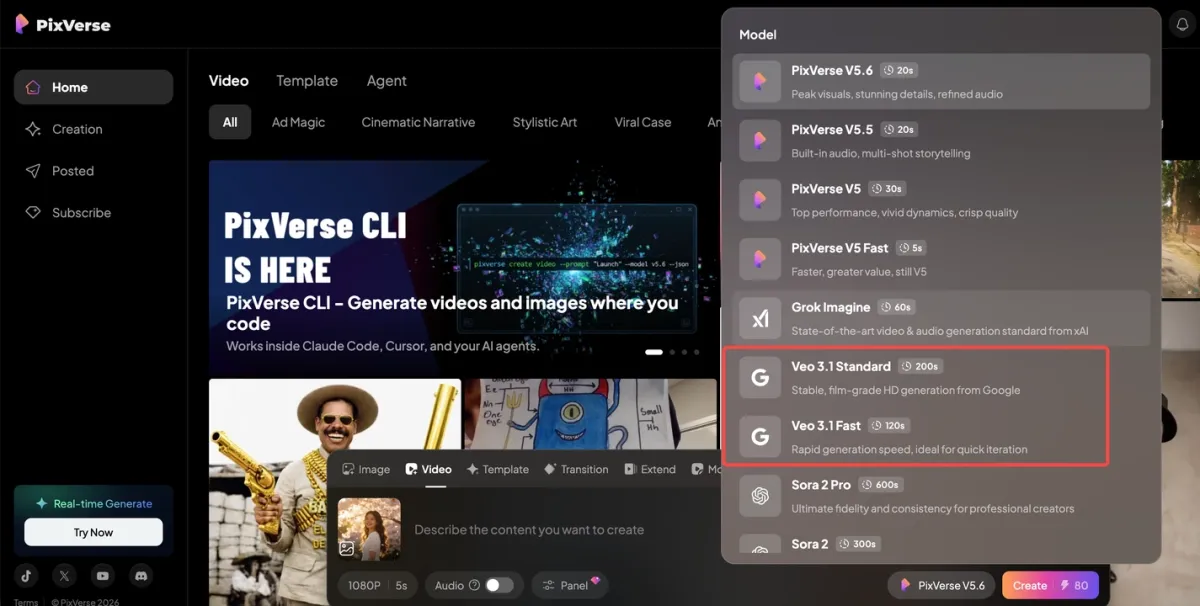
- Veo 3.1 Standard: Stable, film-grade HD generation from Google — ideal for high-quality content creation requiring consistent, polished output
- Veo 3.1 Fast: Rapid generation speed from Google — perfect for quick iteration, prototyping, and exploring creative ideas efficiently
Key Capabilities
- Text-to-Video Generation: Transform your text prompts into video sequences with detailed instruction following
- Video Transitions: Create smooth transitions between scenes for professional editing workflows
- Film-Grade HD Quality: Generate polished, high-definition videos suitable for professional use
- Flexible Duration Options: Choose from 4, 6, or 8-second video lengths to match your needs
- Multiple Aspect Ratios: Create content optimized for landscape (16:9) or portrait (9:16) formats
Availability on PixVerse
Who Can Access Veo 3.1?
Veo 3.1 Standard and Veo 3.1 Fast are available to Pro and Premium subscribers on PixVerse. This ensures our paying members have access to the widest range of creative options on the platform.
Supported Output Specifications
We’ve configured the integration to offer flexible options for your creative needs:
Veo 3.1 Standard:
| Specification | Options |
|---|---|
| Resolution | 720p, 1080p |
| Duration | 4 seconds, 6 seconds, 8 seconds |
| Aspect Ratios | 16:9 (landscape), 9:16 (portrait) |
| 1080p Duration | 8 seconds only |
Veo 3.1 Fast:
| Specification | Options |
|---|---|
| Resolution | 720p, 1080p |
| Duration | 4 seconds, 6 seconds, 8 seconds |
| Aspect Ratios | 16:9 (landscape), 9:16 (portrait) |
| 1080p Duration | 8 seconds only |
Whether you’re creating content for YouTube (16:9) or TikTok and Instagram Reels (9:16), you have the aspect ratio options to match your target platform.
Pricing
The pricing structure for Veo 3.1 on PixVerse is as follows:
Veo 3.1 Standard:
| Resolution | Price |
|---|---|
| 720p | 80 Credits per second |
| 1080p | 80 Credits per second |
Veo 3.1 Fast:
| Resolution | Price |
|---|---|
| 720p | 30 Credits per second |
| 1080p | 30 Credits per second |
For example, an 8-second video with Veo 3.1 Standard at 1080p would cost 640 Credits, while the same duration with Veo 3.1 Fast would be only 240 Credits. Choose Standard for maximum quality or Fast for rapid prototyping and exploration.
Why Add Veo 3.1 to PixVerse?
Veo 3.1 expands the platform’s options alongside other model releases, including Seedance 2.0 for multimodal video workflows and Nano Banana 2 for image generation.
At PixVerse, we believe in giving creators choice. By offering multiple generation options—including our own models and partner integrations like Veo 3.1—we empower you to:
- Explore Different Styles: Each model has unique characteristics; try different options to find what works best for your project
- Maximize Flexibility: Choose the right tool for each specific creative task
- Balance Quality and Speed: Use Standard for final output and Fast for quick iterations
- Access Film-Grade Quality: Leverage Google’s video generation technology directly on PixVerse
- Create Without Limits: More options mean more creative possibilities
Getting Started
Ready to try Veo 3.1 on PixVerse? Here’s how to get started:
- Ensure you have a Pro or Premium subscription — Veo 3.1 is available to these tiers
- Navigate to the Video Generation section in PixVerse
- Select Veo 3.1 Standard or Veo 3.1 Fast as your generation model
- Configure your output settings — choose your preferred resolution, duration, and aspect ratio
- Enter your prompt and generate your video
Conclusion
The addition of Veo 3.1 Standard and Veo 3.1 Fast to PixVerse reflects our ongoing commitment to providing creators with diverse, powerful tools for video generation. Combined with PixVerse’s own proprietary models, you now have even more ways to bring your creative visions to life.
Explore Veo 3.1 today and discover what you can create on PixVerse.
For more information about Veo, visit the Google DeepMind website.