Seedance 2.5 Review: AI Video Features and How to Try

See what Seedance 2.5 adds, including 30s clips, R2V references, 50 inputs, official evidence, access notes, and creator workflow tips.

Industry News
Seedance 2.5 Review: AI Video Features and How to Try

Seedance 2.5 is a Dreamina/CapCut-listed AI video generator that appears to focus on longer clips, reference-led control, multimodal inputs, and local editing. The public Dreamina Seedance 2.5 page describes 30-second standard clips, a 180-second beta long-video mode, R2V references, local editing, free daily credits, and up to 50 multimodal inputs.

This guide focuses on what has official public basis, what still needs direct output verification, and how creators can prepare references, prompts, and review criteria before building a longer Seedance 2.5 workflow.

Seedance 2.5 official evidence map showing 30-second clips, 180-second beta mode, 50 references, R2V, and local editing

SourceTypeWhat it supports in this guide
Dreamina Seedance 2.5 pageDreamina public page30-second clips, 180-second beta mode, R2V, 50 multimodal inputs, local editing, free daily credits, and language list
ByteDance Seedance 2.0 pageByteDance Seed official pageOfficial multimodal audio-video positioning for the previous Seedance generation
Seedance 2.0 arXiv paperarXiv paper4-15 second duration, 480p/720p native output, and multimodal reference input limits
PixVerse V6 docsPixVerse docsCurrent AI video workflow reference for creators comparing available tools

What Is Seedance 2.5?

Seedance 2.5 is a new Seedance AI video model shown on Dreamina/CapCut public pages for text, image, video, audio, and reference-driven video generation. Dreamina positions it for longer AI video clips, R2V reference guidance, multimodal creative direction, and edits that adjust specific regions without recreating an entire scene.

Based on the Dreamina page, the intended workflow is closer to a production brief than a text-only prompt: add scripts, images, audio, video references, style guides, or motion references, then generate a more controlled clip.

Seedance 2.5 Release Status: What Has Official Basis

The clearest official source available now is the Dreamina/CapCut Seedance 2.5 page. The table below separates public official page claims from items that still need direct product or output verification.

ClaimOfficial basisCurrent reading
Seedance 2.5 page existsThe Dreamina page is titled “ByteDance Official Seedance 2.5” and describes it as an official Seedance 2.5 modelOfficial Dreamina/CapCut public page exists
30-second clipsDreamina says users can generate 30-second clips from text, images, video, audio, and referencesOfficial Dreamina claim
180-second beta long-video modeDreamina says standard mode supports up to 30 seconds and beta long-video mode can extend to 180 secondsOfficial Dreamina claim
Up to 50 multimodal inputsDreamina says Seedance 2.5 supports up to 50 multimodal inputs, including scripts, images, audio, video, and style referencesOfficial Dreamina claim
R2V referencesDreamina describes green screen or white model references for character movement, spatial location, and interactionsOfficial Dreamina claim
Local editingDreamina describes refining only the parts of a video that need adjustment instead of recreating the entire sceneOfficial Dreamina claim
Major-language supportDreamina lists Chinese, English, Spanish, Indonesian, Malay, Thai, Arabic, Portuguese, Vietnamese, Japanese, and KoreanOfficial Dreamina claim

There is no verified Seedance 2.5 release date beyond the public Dreamina page being live as of June 30, 2026.

Official evidence status board for Seedance 2.5 claims, separating Dreamina confirmed items from items still requiring output verification

What’s New Compared With Seedance 2.0?

Seedance 2.0 is the useful baseline because it has official ByteDance material and an arXiv model card. ByteDance describes Seedance 2.0 as a unified multimodal audio-video architecture for text, image, audio, and video inputs. The arXiv paper lists 4-15 second generation, native 480p and 720p output, and reference inputs of up to 3 video clips, 9 images, and 3 audio clips.

Seedance 2.5 appears to extend the family toward longer clips, more references, R2V motion control, and editability. The table separates Seedance 2.0 facts from Seedance 2.5 public claims so official evidence and still-unverified output behavior stay clearly separated.

CapabilitySeedance 2.0 baselineSeedance 2.5 public claimWhy it matters
Duration4-15 seconds in the arXiv model card30 seconds standard; 180 seconds betaLonger clips may reduce manual stitching for short stories and ads
Reference countarXiv lists 3 video clips, 9 images, and 3 audio clipsUp to 50 multimodal inputsMore references could support fuller creative briefs
Reference controlMultimodal reference inputs and image referencesR2V references for motion path and spatial controlMotion references can help teams move beyond text-only prompting
EditingGeneration and reference workflowsLocal editing for specific regionsLocal fixes could reduce full regeneration when only one detail fails

For a deeper Seedance 2.0 workflow reference, use the Seedance 2.0 review and prompt guide before planning a Seedance 2.5 comparison.

Why Seedance 2.5 Matters in the Current AI Video Race

Longer Clips Make Seedance 2.5 More Useful for Story-Driven Content

Most AI video workflows still break when the idea needs more than a short visual beat. A social ad may need a hook, product reveal, and closing motion. A short drama may need setup, reaction, and a final turn.

Dreamina’s 30-second standard claim matters because it points at fewer stitched clips. If character, lighting, and motion logic stay inside one longer generation, editing could become simpler. The word “could” matters: longer duration helps only when continuity, identity, and audio stay stable.

The open question is not only duration. A 30-second model is useful when subject identity, lighting, action, and sound remain coherent from the first frame to the last. That is why any serious evaluation should compare the same prompt, references, duration, and review criteria across multiple outputs.

Reference-Led Generation Is Becoming the New Control Layer

The most important shift in AI video is not only longer duration. It is the move from pure text prompts to reference-led direction. Ecommerce teams already have product photos, packaging shots, brand colors, model poses, and campaign moodboards. Film and social teams often have pose references, camera references, or location boards before they write the final prompt.

Seedance 2.5’s public R2V positioning fits that direction. Dreamina describes green screen or white model references for character movement, spatial location, and interactions. If that workflow holds up, it could make the model easier to evaluate against a creative brief.

PixVerse creators can already prepare for this style of workflow. Build a reference pack with product images, logo-safe frames, character sheets, color references, camera examples, and sound notes. That preparation is useful for current reference-led AI video workflows and future Seedance 2.5 comparisons.

R2V reference workflow illustration showing green screen motion reference, white model pose reference, product images, and final cinematic video frame

Local Editing Moves AI Video Closer to Post-Production Workflows

Local editing is the highest-information-gain feature in Seedance 2.5 public material. AI video outputs often fail in one region, not everywhere: a product shifts, a background object changes, a hand distracts, or a logo needs repair.

If local editing can preserve lighting, composition, motion, audio, and timeline continuity while replacing only the problem area, creators could save many full regenerations. The question becomes less “Can the first generation be perfect?” and more “Can the workflow repair the exact failure without breaking the scene?”

The key verification points are edit boundary quality, object preservation, character consistency after edits, audio sync after edits, and whether repeated local edits accumulate visual artifacts.

Multilingual Creation Expands the Use Case Beyond One-Market Videos

Dreamina lists major-language support for Seedance 2.5, including Chinese, English, Spanish, Indonesian, Malay, Thai, Arabic, Portuguese, Vietnamese, Japanese, and Korean. That positioning matters for teams that need the same product or story concept across several markets.

Multilingual AI video is not only translation. A localized ad may need a different spoken line, caption treatment, product label, actor gesture, cultural cue, or aspect ratio. Seedance 2.5 could help if those claims hold across real account access.

For PixVerse teams, keep one core scene brief, then version the language, CTA, captions, voice, and product-market notes. That habit works now in PixVerse V6 and Seedance 2.0, and it will make later Seedance 2.5 comparisons cleaner.

How Seedance 2.5 Fits Against Veo, Kling, Runway, and PixVerse V6

This should not be framed as a leaderboard. AI video models are splitting by workflow dimension: duration, reference control, local editing, audio/storytelling, access path, and repeatability.

Veo 3.1 is relevant when teams need polished video generation and Google workflow access; Google’s Flow update also emphasizes editing, audio, and API availability. Kling and Runway matter for motion physics, camera control, or editing workflows. PixVerse V6 matters when creators want text-to-video, image-to-video, transition, extension, reference-to-video, audio controls, 1-15 second generation, and up to 1080p inside one creative workspace.

Seedance 2.5 appears to compete most directly on longer clips, reference density, R2V control, and local editing.

How to Try Seedance 2.5 Today

To try Seedance 2.5 today, use the Dreamina/CapCut public page and account flow. Dreamina describes free daily credits, but the exact available credits, queue behavior, watermark policy, export rights, and commercial-use terms should be checked inside the account before production use.

PixVerse plans to add Seedance 2.5 when platform support is ready. If you need to create now, PixVerse already offers many AI video generator options for text-to-video, image-to-video, reference workflows, audio, transitions, extension, and product-video creation. Members may also see model-specific or campaign-specific limited-time discounts inside the app.

A practical preparation workflow:

  1. Write a scene brief with subject, action, environment, camera path, duration, audio, and CTA.
  2. Prepare reference assets: product photos, character sheets, style boards, motion references, and first/last frames.
  3. Generate a short current-model version with a PixVerse AI video generator.
  4. Record prompt, references, duration, resolution, audio setting, cost, and failure notes.
  5. Reuse the same pack when Seedance 2.5 support expands.

Step-by-step Seedance 2.5 preparation guide showing brief, references, duration settings, output review, and comparison notes

For broader model planning, our Sora vs Veo vs PixVerse comparison explains how different workflows handle motion, continuity, audio, and production fit.

Create With Current AI Video Generators While You Wait

A disciplined prompt and reference archive lets you compare models fairly later, and it also helps you make stronger current clips now. On PixVerse, creators can already work across multiple AI video generator workflows, including PixVerse V6, Seedance 2.0, Veo, Kling, Grok Imagine, HappyHorse, product-video mini apps, sound effects, video expansion, and reference-led tools.

The practical move is to build a reusable creative kit: one prompt, one reference folder, one review checklist, and one place to track which model handled motion, identity, audio, and editability best. For teams managing many shots and variations, the PixVerse Canvas workflow guide is useful for references, model comparison, and version control.

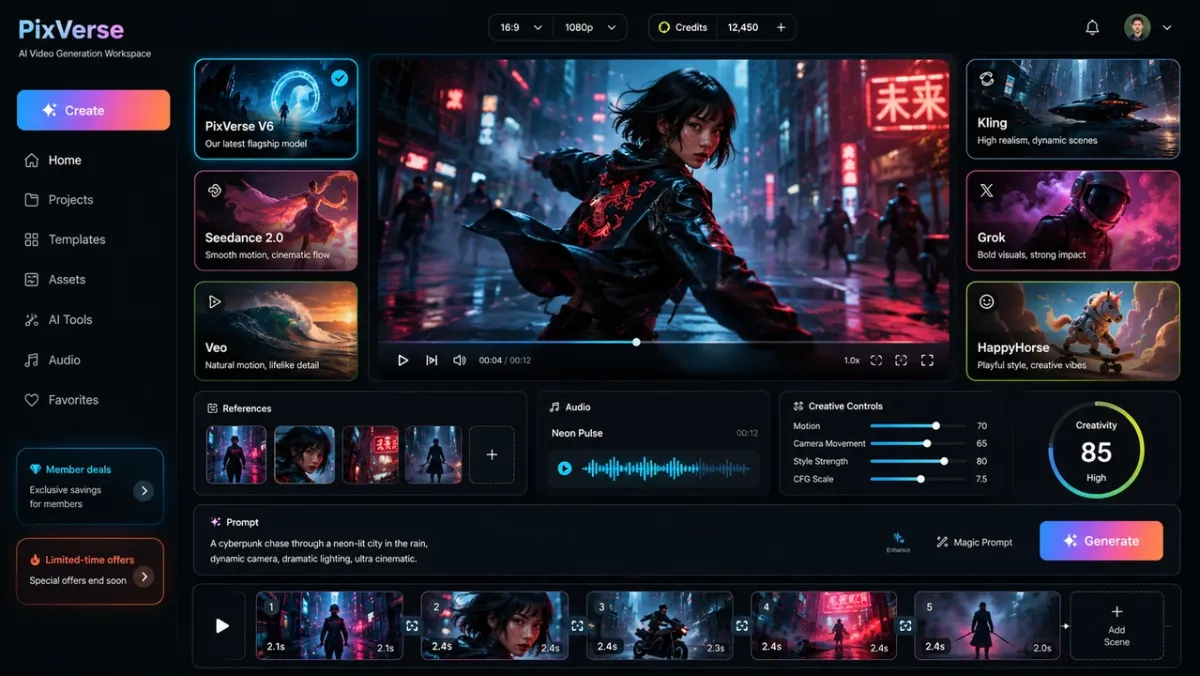
PixVerse AI video generator workspace with multiple model cards, creator references, discount badges, and a central cinematic preview screen

What We Still Need to Verify After Access Expands

Before treating Seedance 2.5 as a stable campaign workflow, a production evaluation should verify:

  • The same prompt set across Seedance 2.5, Seedance 2.0, PixVerse V6, Veo, Kling, and Runway.
  • The same references across product, character, motion, and scene-control tasks.
  • 30-second continuity for character identity, lighting, camera geography, and object stability.
  • R2V motion-path accuracy in single-character and multi-character scenes.
  • Multi-character consistency when subjects cross or overlap.
  • Local edit preservation after object replacement, background repair, or motion correction.
  • Audio sync, unwanted background music behavior, caption cleanliness, and multilingual dialogue quality.
  • Credit cost, queue speed, export limits, watermark rules, and commercial-use terms.

This is a source-based guide, not a direct output evaluation. Stronger claims about quality, reliability, cost, or production readiness require controlled generation records.

FAQ

Is Seedance 2.5 available?

Seedance 2.5 is publicly listed on Dreamina/CapCut pages as of June 30, 2026. That confirms a public access path through Dreamina; account-level availability, credits, queues, and export rules should still be checked before production use.

Is Seedance 2.5 free?

Dreamina describes free daily credits for trying Seedance 2.5. That does not mean every production use is free. Before commercial use, check credits, watermark rules, export quality, queues, paid-plan requirements, and terms.

Is Seedance 2.5 coming to PixVerse?

PixVerse plans to add Seedance 2.5 when platform support is ready. Until then, creators can use the current PixVerse AI video generator lineup for text-to-video, image-to-video, references, transitions, extension, audio, and product-video workflows.

What is new in Seedance 2.5?

Dreamina publicly lists 30-second standard clips, a 180-second beta long-video mode, up to 50 multimodal inputs, R2V references, local editing, major-language support, and free daily credits. Treat these as official-page claims until direct output testing is available.

How is Seedance 2.5 different from Seedance 2.0?

Seedance 2.0 official materials describe multimodal audio-video generation, 4-15 second clips, and reference inputs. Seedance 2.5 public pages claim longer durations, more multimodal references, R2V guidance, and local editing. Treat the 2.5 side as public-page information until direct evaluation is possible.

Does Seedance 2.5 support R2V references?

Dreamina says Seedance 2.5 supports R2V references, including green screen and white model references for motion, spatial layout, and interactions. Motion-path accuracy and character preservation across complex scenes still require direct output testing.

Can Seedance 2.5 create 30-second videos?

Dreamina publicly lists 30-second standard clips for Seedance 2.5 and mentions a 180-second beta long-video mode. Continuity, cost, queue speed, audio sync, and export behavior still require direct output testing.

Which Seedance 2.5 alternatives make sense right now?

Use the current PixVerse AI video generator lineup when you need to create now: text-to-video, image-to-video, reference workflows, transitions, extension, audio controls, product-video generation, and short-form variants in one creative workspace.

PixVerse will update Seedance 2.5 availability when support is ready.