GPT Image 2 프롬프트 가이드: 80개 프롬프트, 리뷰 및 API 팁 (2026)
광고, 포스터, 제품, 캐릭터, 영상 워크플로를 위한 복사 가능한 GPT Image 2 프롬프트 80개와 API 메모, 실사용 리뷰를 확인하세요.
제품 광고, 포스터, 썸네일, 캐릭터, 소셜 이미지, UI 모형, 편집 및 비디오 지원 첫 프레임 등 사용 가능한 프롬프트가 먼저 필요한 제작자를 위한 GPT Image 2 프롬프트 가이드 및 실습 리뷰입니다.
필요한 것이 무엇인지 이미 알고 있다면 아래의 빠른 경로를 사용하세요.
- 복사 프롬프트: 아래 80개의 복사 준비 GPT Image 2 프롬프트 예를 참조하세요.
- 테스트 결과 보기: 실습 검토 점수 및 제한 사항을 확인하세요.
- 이미지를 비디오로 변환: PixVerse 이미지-비디오 워크플로를 따르세요.
GPT Image 2는 읽을 수 있는 텍스트, 깔끔한 레이아웃, 제품 구성, UI 모형, 인포그래픽, 편집 가능한 참조 및 비디오 지원 첫 번째 프레임 등 이미지가 설계된 자산처럼 작동해야 할 때 가장 강력합니다. 작업이 정확한 브랜드 로고 재현, 작은 규정 준수 사본, 독점 글꼴 또는 수동 QA 없이 배송되어야 하는 투명한 최종 자산에 의존하는 경우 신뢰성이 떨어집니다.
OpenAI는 2026년 4월 21일에 ChatGPT Images 2.0를 출시했습니다. 크리에이터는 GPT Image 2, gpt-image-2 또는 ChatGPT Images 2.0와 동일한 경험을 검색하는 경우가 많습니다. 출시 주간에 처음 테스트한 후 2026년 6월 22일에 OpenAI의 공식 프롬프트 가이드, API 가격 페이지 및 ChatGPT 이미지 도움말 문서와 비교하여 이 가이드를 다시 검토했습니다.
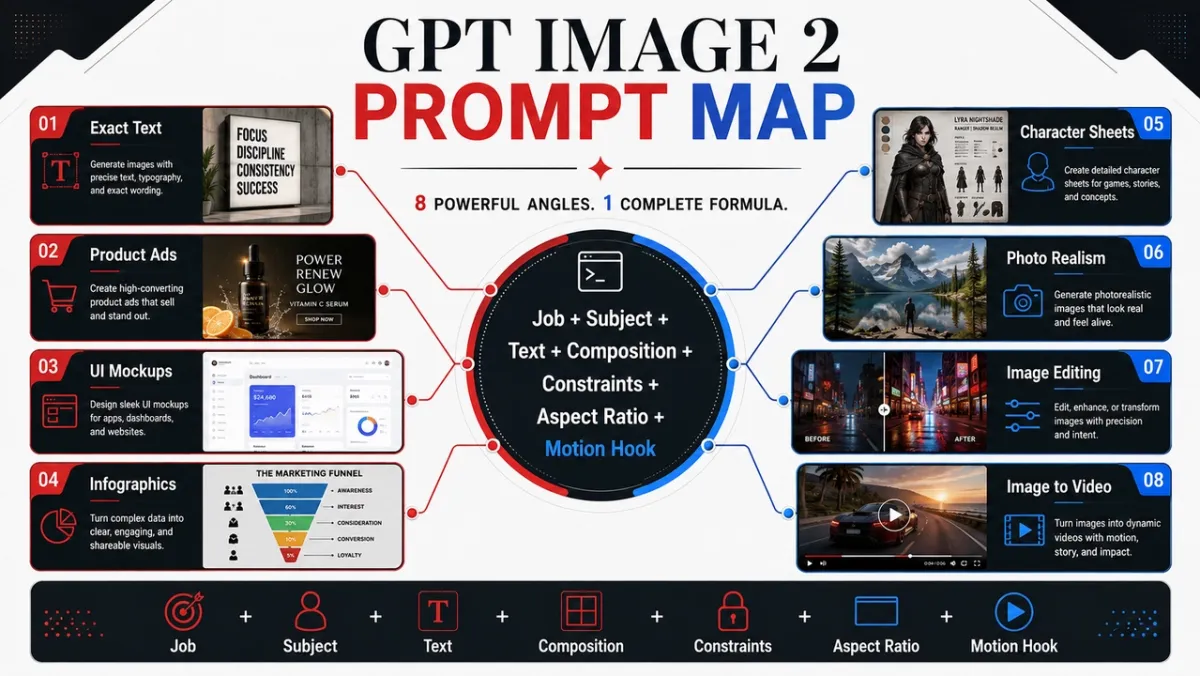
5 GPT Image 2는 먼저 복사하라는 메시지를 표시합니다.
이 다섯 가지 프롬프트는 이 가이드에서 가장 가치 있는 사용 사례를 다룹니다. 각각은 사용 사례, 프롬프트, 최적, 팁 등 동일한 형식을 따릅니다.
프롬프트 예 1: 제품 사진
사용 사례: 전자상거래 제품 히어로 이미지
프롬프트:
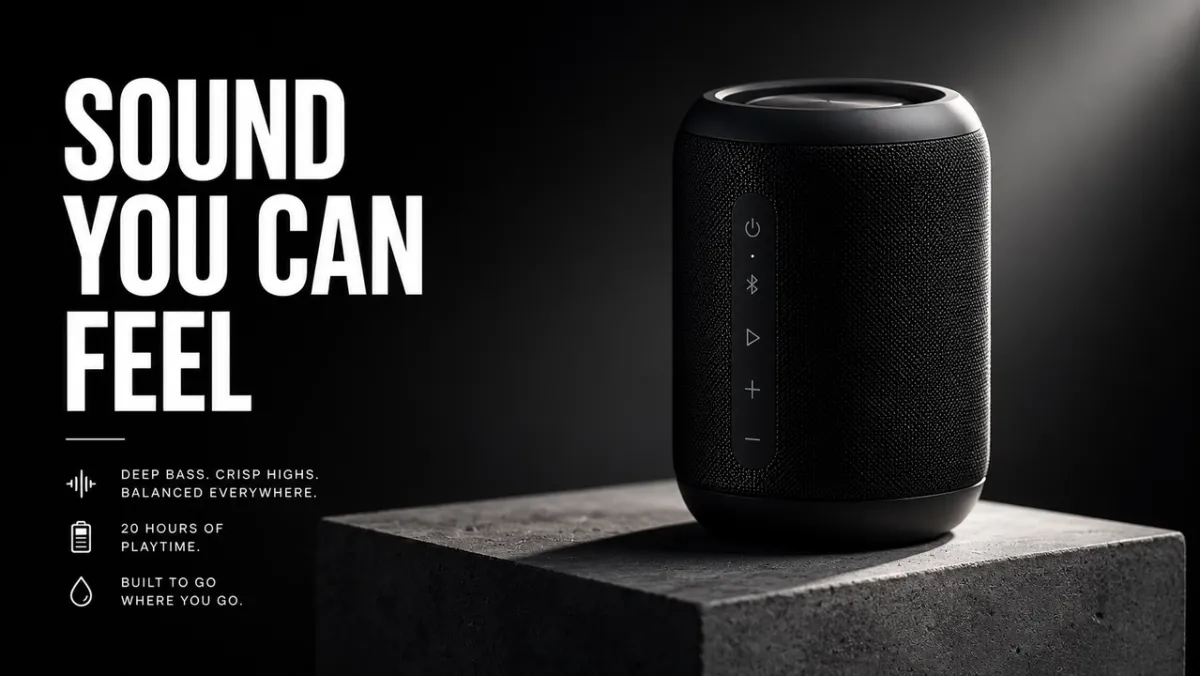
콘크리트 받침대에 무광택 검정색 무선 스피커를 위한 프리미엄 전자상거래 히어로 이미지를 만듭니다. 제품은 날카로운 모서리, 사실적인 소재 질감, 깨끗한 접촉 그림자, 드라마틱한 림 라이트로 오른쪽 1/3에 위치합니다. 왼쪽 1/3을 헤드라인의 여백으로 남겨두세요. 가짜 브랜드 로고, 워터마크, 추가 개체가 없습니다. 화면 비율 16:9.
최적의 용도: 제품 목록, 유료 소셜 광고, 방문 페이지 히어로 이미지
팁: 참조 이미지를 제공하는 경우 ’제품 모양, 색상, 라벨, 비율을 정확하게 유지하세요.’를 추가하세요.
프롬프트 예 2: AI 광고 크리에이티브
사용 사례: 정확한 텍스트가 포함된 캠페인 포스터
프롬프트:
가상 디자인 도구를 위한 수직형 제품 출시 포스터를 만듭니다. 헤드라인: “더 빠르게 만들기”. 부제목: “즉시 캠페인까지”. 깔끔한 스위스 그리드, 황백색 배경, 검은색 타이포그래피, 일렉트릭 블루 액센트 모양 1개, 강력한 계층 구조, 정확한 텍스트만, 추가 단어 없음, 워터마크 없음. 화면비율 9:16.
최적의 용도: 광고 컨셉, 포스터 테스트, 출시 그래픽, 소셜 캠페인 이미지
팁: 헤드라인 텍스트를 짧게 유지하고 정확하게 인용하세요. 긴 텍스트는 깔끔하게 렌더링하기가 더 어렵습니다.
프롬프트 예 3: 문자 일관성
사용 사례: 문자 참조 시트
프롬프트:
“NOVA”라는 이름의 오리지널 SF 택배기사에 대한 전문 캐릭터 참조 시트를 만듭니다. 전면, 측면 및 후면 보기를 포함합니다. 네 가지 표정; 재킷, 부츠, 배낭 설명선; 및 색상 팔레트 행. 모든 보기에서 동일한 얼굴, 헤어스타일, 복장 및 비율을 유지하세요. 깨끗한 흰색 배경, 읽을 수 있는 라벨, 컨셉 아트 스타일. 화면 비율 16:9.
최적의 용도: 게임 캐릭터, 애니메이션 참조, 브랜드 마스코트, 스토리보드
팁: 이름, 얼굴, 헤어스타일, 의상, 색상 팔레트, 역할 등 재생성할 때마다 정체성 기준을 반복하세요.
프롬프트 예 4: 썸네일 또는 소셜 이미지
사용 사례: YouTube 미리보기 이미지 또는 소셜 게시물
프롬프트:
AI 이미지 프롬프트에 대한 비디오를 위한 굵은 YouTube 썸네일을 만듭니다. 본문: “더 나은 프롬프트”. 왼쪽에는 지저분한 프롬프트 카드, 오른쪽에는 세련된 캠페인 시각 자료를 사용하여 분할 화면 전후 이미지 결과를 표시합니다. 고대비, 얼굴 없는 선명한 구성, 읽을 수 있는 텍스트, 가짜 로고 없음, 추가 단어 없음. 화면 비율 16:9.
최적의 용도: 미리보기 이미지, 소셜 설명, 블로그 그래픽, 크리에이터 콘텐츠
도움말: 얼마나 많은 단어가 나타나야 하고 어디로 가야 하는지 모델에 정확하게 알려주세요.
프롬프트 예 5: 이미지-비디오 첫 번째 프레임
사용 사례: PixVerse 이미지-비디오의 첫 번째 프레임
프롬프트:
이미지-비디오 클립을 위한 영화 같은 첫 번째 프레임 만들기: 젖은 검은 돌 위에 서 있는 유리 향수병, 그 뒤에 있는 얇은 안개 리본, 강한 전경 실루엣, 눈에 띄는 깊이 레이어, 미묘한 반사, 카메라 움직임을 위한 빈 공간, 손 없음, 텍스트 없음, 워터마크 없음. 화면 비율 16:9.
최적의 용도: 제품 공개, 짧은 광고, 뮤직 비디오 오프닝, 영화 같은 소셜 클립
팁: 정지 이미지에 안개, 먼지, 증기, 직물, 화면 빛, 반사 등 하나의 모션 큐를 추가하세요.
PixVerse를 사용하여 GPT Image 2 스틸을 비디오로 전환하세요
스틸 이미지를 애니메이션화하기 전에 준비가 필요하다면 PixVerse Mini Apps에서 이미지 정리, 화면 확장 등 관련 제작 작업을 위한 워크플로를 찾을 수 있습니다.
강력한 GPT Image 2 프롬프트는 정지 이미지를 생성할 수 있습니다. PixVerse는 여전히 모션, 카메라 움직임 또는 짧은 캠페인 클립이 필요한 경우 다음 단계입니다.
- GPT Image 2를 사용하여 첫 번째 프레임을 생성합니다.
- 승인된 이미지를 PixVerse에 업로드하세요.
- 집중된 모션 프롬프트를 추가하세요.
- 테스트, 광고, 소셜 게시물 또는 제품 페이지용으로 짧은 비디오를 내보냅니다.
다음을 시도하라는 모션 메시지가 표시됩니다.
- 이미지를 첫 번째 프레임으로 사용하세요. 카메라 뒤쪽으로 안개가 흩뿌려지는 동안 카메라를 제품 쪽으로 천천히 밀어주세요. 제품 모양, 라벨, 조명 및 위치를 보존하십시오.
- 이미지를 첫 번째 프레임으로 사용하세요. 손으로 들고 찍은 부드러운 카메라 움직임, 바람에 흔들리는 옷감, 부드러운 배경 시차를 추가하세요. 캐릭터의 얼굴이나 의상을 변경하지 마세요.
- 이미지를 첫 번째 프레임으로 사용하세요. 카메라가 약간 왼쪽으로 이동하는 동안 도시의 불빛이 하나씩 켜지는 애니메이션을 만들어 보세요. 읽을 수 있는 모든 포스터 텍스트를 보존합니다.
- 이미지를 첫 번째 프레임으로 사용하세요. 받침대 위에서 제품을 미묘하게 회전시키고 무빙 림 라이트를 추가하여 배경을 깔끔하게 유지하세요.
- 이미지를 첫 번째 프레임으로 사용하세요. 증기, 반사, 느린 하향식 카메라 드리프트를 추가하세요. 음식 모양, 접시 위치, 색상을 보존합니다.
더 자세한 모션 프롬프트 구조는 AI 동영상 프롬프트 가이드, 이미지를 동영상으로 변환하는 도구 가이드 및 AI 동영상 광고 생성기 워크플로를 참조하세요.
실제로 작동하는 GPT Image 2 프롬프트 작성 방법
최고의 GPT Image 2 프롬프트는 단지 그림을 설명하는 것이 아닙니다. 그들은 그림이 수행해야 하는 작업을 설명합니다. 소셜 광고에 대한 프롬프트는 제품 컷아웃, 인포그래픽, UI 화면 또는 비디오의 첫 번째 프레임에 대한 프롬프트와 다르게 읽어야 합니다.
안정적인 시작 패턴은 다음과 같습니다.
[사용 사례]에 대한 [이미지 유형]을 만듭니다. 주요 주제: [특정 주제 및 눈에 보이는 세부정보]. 정확한 텍스트(있는 경우): “[반드시 표시되어야 하는 사본]”. 구성: [프레임, 레이아웃, 네거티브 스페이스, 피사체 배치]. 스타일 및 조명: [시각적 언어, 매체, 분위기, 조명 방향]. 제약 조건: [변경해서는 안 되는 것, 추가 단어 없음, 워터마크 없음]. 출력 형식: [종횡비, 투명한 배경, 비디오 지원 프레임].
공식:
주제 + 시각적 스타일 + 구성 + 조명 + 세부 사항 + 제약 조건 + 출력 사용 사례
기술 1: 스타일 이전에 작업 이름 지정
출력 유형(포스터, 제품 광고, 앱 화면, 캐릭터 시트, 교육 다이어그램, 편집 또는 이미지-비디오 첫 번째 프레임)부터 시작하세요. GPT Image 2는 성공 표준을 이해하면 프롬프트를 더 잘 따릅니다.
약한 프롬프트:
멋진 미래형 스피커, 영화 같은 느낌, 높은 디테일.
더 나은 프롬프트:
무광 블랙 무선 스피커에 대한 프리미엄 제품 광고를 만들어보세요. 이미지는 16:9 캠페인 배너로 작동해야 하며 오른쪽에 제품이 있고 왼쪽에 짧은 제목이 있고 깔끔한 여백과 선명한 제품 가장자리가 있어야 합니다.
두 번째 프롬프트는 이미지가 아름다움뿐만 아니라 레이아웃, 계층 구조, 유용성 등을 기준으로 어떻게 판단되는지 모델에게 알려줍니다.
기술 2: 텍스트를 잠긴 자산처럼 취급
텍스트가 중요한 경우 따옴표로 묶고 모델에 렌더링 방법을 알려주세요. 모델이 단어를 만들어내는 것을 원하지 않는 한 “슬로건”을 요구하지 마십시오.
다음 패턴을 사용하세요.
제목: “당신이 느낄 수 있는 소리”. 헤드라인을 그대로 렌더링합니다. 추가 단어, 중복 텍스트, 가짜 로고가 없습니다. 굵은 흰색 산세리프체, 구성의 왼쪽, 멀리서도 읽을 수 있음.
긴 내용을 복사하려면 프롬프트에서 텍스트를 별도의 줄로 분할하세요. 결과에서 단어 철자가 틀린 경우 더 적은 텍스트, 더 큰 유형, 더 엄격한 “정확한 텍스트 전용” 언어로 다시 생성하세요.
기술 3: 모델에 카메라와 레이아웃 제공
GPT Image 2는 구성 신호를 따를 수 있지만 명확하게 명시되어야 합니다. 카메라 거리, 각도, 피사체 배치, 네거티브 스페이스 및 종횡비를 추가합니다.
유용한 문구:
- 클로즈업 제품 질감, 손, 얼굴, 소재, 라벨을 보여줍니다.
- 환경, 스토리 장면, 도시 포스터, 비디오 지원 프레임을 위한 와이드 샷.
- 음식, 책상 장면, 평면 배치, 포장 키트용 하향식.
- 왼쪽 세 번째 / 오른쪽 세 번째 - 텍스트와 제품 균형이 포함된 광고 레이아웃입니다.
- UI 모형, 문자 시트, 다이어그램, 인포그래픽을 위한 깨끗한 그리드.
기술 4: 편집 내용을 세 문장으로 작성
편집 프롬프트는 변경 사항, 잠긴 요소 및 물리적 사실성을 분리할 때 가장 잘 작동합니다.
주차된 차량을 빈티지 자전거로 교체해보세요. 집, 울타리, 진입로, 조경, 조명 방향, 카메라 각도, 시간 등을 정확하게 보존하세요. 자전거 저울, 접촉 그림자, 원근감을 기존 장면에 일치시킵니다.
이 패턴은 GPT Image 2에게 창의성이 허용되는 곳과 허용되지 않는 곳을 알려주기 때문에 “더 좋게 보이게 만드는 것”보다 더 강력합니다.
기술 5: 이미지가 비디오가 될 때 모션 큐 추가
정지 이미지가 PixVerse 이미지-비디오 소스가 되는 경우 깊이와 모션 준비 여부를 묻는 메시지가 표시됩니다. 전경, 중간, 배경, 깨끗한 피사체 실루엣과 먼지, 천, 머리카락, 비, 반사, 차량 움직임, 회전하는 제품 또는 카메라 푸시 경로 등 눈에 보이는 하나의 동작 신호를 요청하세요.
대신:
사막의 우주 비행사.
사용:
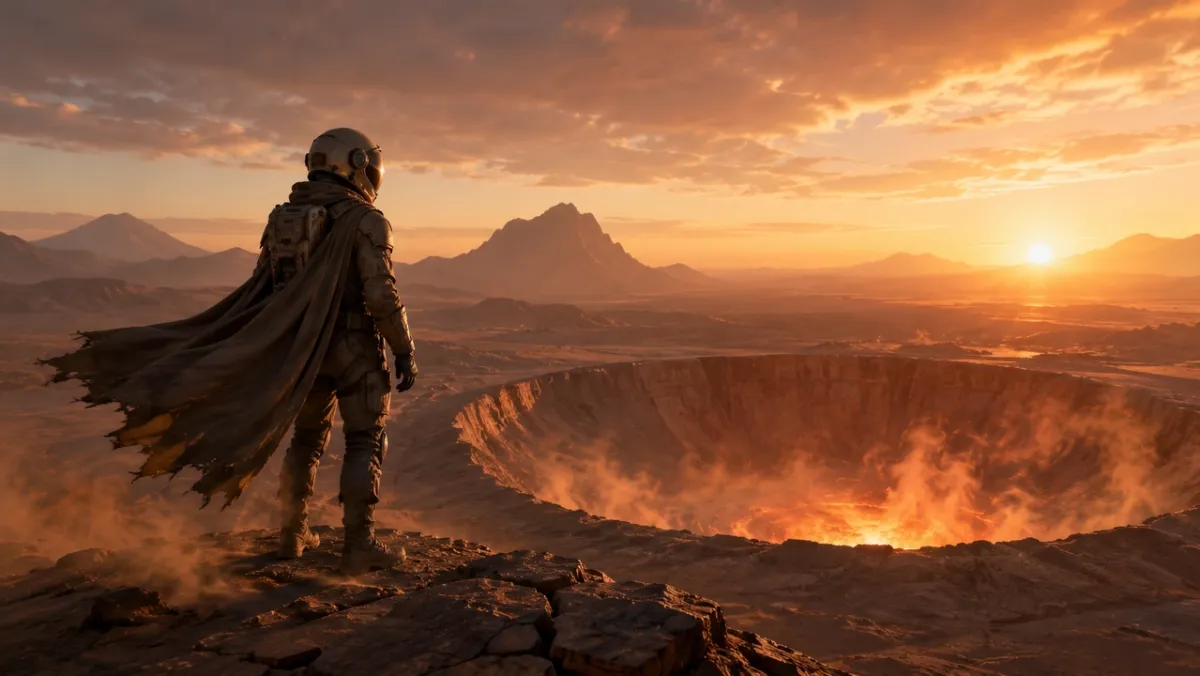
이미지-비디오 클립을 위한 영화 같은 첫 번째 프레임: 새벽에 빛나는 사막 분화구 가장자리에 서 있는 외로운 우주 비행사, 바람에 움직일 준비가 된 망토와 먼지, 강력한 전경 실루엣, 선명한 깊이 레이어 및 따뜻한 수평선 빛.
GPT Image 2 프롬프트 라이브러리: 80개의 복사 준비 예제
아래의 각 각도에는 10개의 프롬프트가 포함되어 있습니다. 각 그룹의 첫 번째 프롬프트는 각도가 보여주려는 기능을 강조하기 때문에 시각적 예시에 가장 적합한 후보입니다. 다른 프롬프트는 복사, 조정 및 테스트할 수 있는 텍스트 전용 예제입니다.
| 프롬프트 모듈 | 프롬프트 번호 | 다음에 가장 적합 |
|---|---|---|
| 제품 사진 및 AI 광고 크리에이티브 프롬프트 | 21-30 | 제품 목록, 유료 광고, 전자상거래 히어로 이미지, 포장 모형 |
| 로고 및 텍스트 렌더링 프롬프트 | 11-20 | 포스터, 메뉴판, 썸네일, 앨범 커버, 정확한 헤드라인 테스트 |
| 캐릭터 일관성 프롬프트 | 41-50 | 캐릭터 시트, 마스코트, 게임 자산, 표현 행 |
| 포스터, 썸네일 및 영화 장면 프롬프트 | 1-10 | 영웅 이미지, 편집 스틸, 분위기 있는 장면, 시각적 후크 |
| 소셜 미디어 이미지 및 인포그래픽 프롬프트 | 31-40 | 블로그 시각 자료, 설명, 비교 그래픽, 공유 가능한 교육 자산 |
| UI 모형 프롬프트 | 51-60 | 앱 화면, 대시보드, 소셜 프로필, 제품 UI 개념 |
| 스타일 전환 및 내러티브 아트 프롬프트 | 61-70 | 만화, 스토리 패널, 편집 아트, 컨셉 탐색 |
| 이미지-비디오 첫 프레임 프롬프트 | 71-80 | PixVerse 모션 워크플로우, 제품 공개, 편집, 다중 참조 소스 프레임 |
1. 포스터, 썸네일 및 영화 장면 프롬프트
이 각도는 조명과 현실감이 중요한 인물 사진, 편집 이미지, 라이프스타일 장면, 분위기 있는 스틸 사진에 가장 적합합니다.
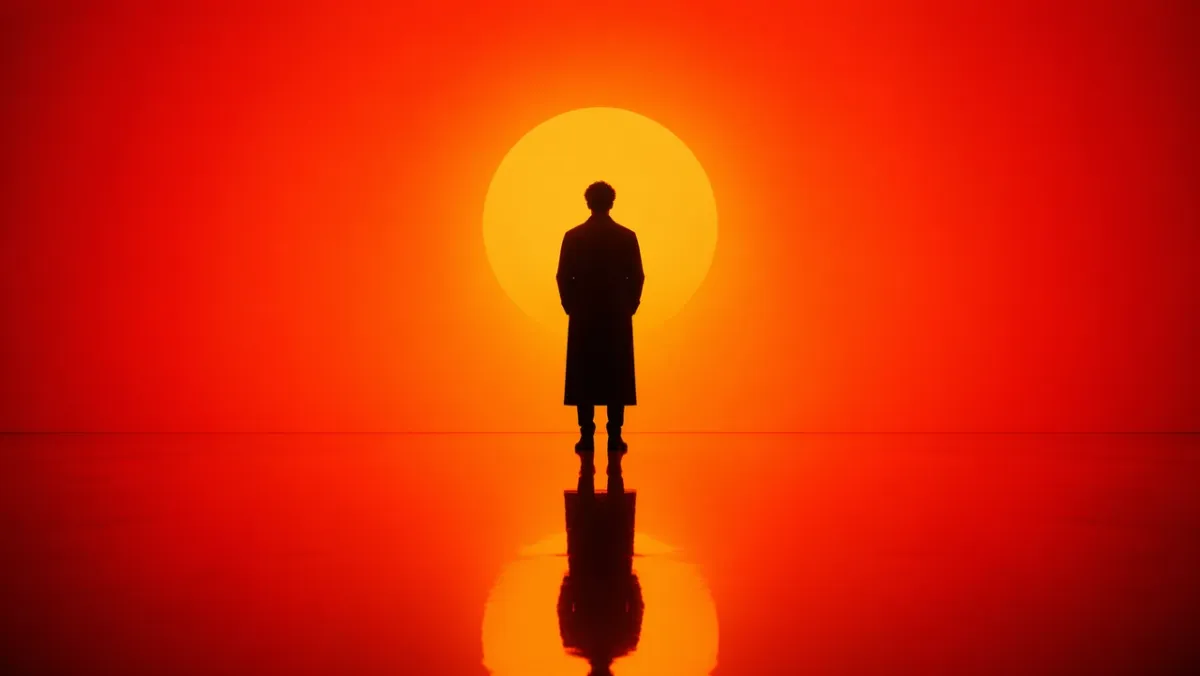
프롬프트 1:
강렬한 주황색-빨간색 그라데이션 환경에 서 있는 고독한 인물의 영화적 초상화를 생성합니다. 뒤에서 나오는 강한 실루엣 조명, 깊은 그림자 대비, 인물을 반영하는 반사 광택 바닥. 대칭적인 구성, 최소한의 세트 디자인, 배경이 어수선하지 않습니다. 분위기는 공상과학 영화의 한 장면처럼 사색적이고 강렬합니다. 화면 비율 16:9.
프롬프트 2:
비가 내린 뒤의 솔직하고 사실적인 서울 거리 풍경. 파란 시간에 작은 가게를 닫는 꽃집, 젖은 노면의 반사, 따뜻한 가게의 빛, 피곤한 자연스러운 자세, 50mm 다큐멘터리 느낌, 사실적인 피부 질감, 글래머러스한 포즈 없음, 워터마크 없음. 화면비율 3:2.
프롬프트 3:
- 긁힌 나무 책상 위에 오래된 필름 카메라를 수리하는 풍화된 손의 클로즈업. 카메라 왼쪽의 창 조명, 눈에 보이는 먼지, 황동 및 검정색 가죽 질감, 얕은 피사계 심도, 조용한 작업장 분위기, 사실적, 텍스트 오버레이 없음. 화면 비율 4:3.*
프롬프트 4:
눈이 많이 내리는 북유럽의 조용한 야간 열차 승강장. 긴 코트를 입은 한 여행자가 따뜻한 역 램프 아래 서 있고, 차가운 공기 속에서 숨결이 보이고, 기차 창문을 배경으로 빛나고, 영화적 현실감, 절제된 색상 팔레트, 35mm 다큐멘터리 느낌, 텍스트가 없습니다. 화면 비율 16:9.
프롬프트 5:
어두운 세라믹 접시 위의 수제 국수, 김이 오르는 모습, 비스듬히 놓여 있는 젓가락, 낡은 나무 테이블, 부드러운 측면 조명, 사실적인 기름 광택과 질감, 브랜딩 없음, 텍스트 오버레이 없음의 하향식 편집 음식 사진입니다. 화면 비율 4:5.
프롬프트 6:
물레 위에서 흙그릇을 손질하는 도예가의 사실적인 다큐멘터리 스타일의 초상화. 중간 클로즈업, 손과 회전하는 점토, 선명한 초점, 천연 얼룩이 있는 앞치마, 부드러운 작업장 창문 조명, 배경에 있는 미완성 그릇 선반, 정직한 질감, 매력적인 리터칭 없음, 텍스트 없음. 화면비율 3:2.
프롬프트 7:
여름 폭풍 이후 작은 산간 마을의 넓은 영화 스틸. 짙은 녹색 소나무에서 안개가 피어오르고, 오두막 창문에 따뜻한 빛이 나타나고, 젖은 도로의 반사가 중앙을 향해 이어지고, 저 멀리 우산을 들고 걷고 있는 한 사람, 자연스러운 규모, 사실적인 분위기, 텍스트가 없습니다. 화면 비율 16:9.
프롬프트 8:
접힌 리넨 천 위에 놓인 빈티지 손목시계의 사실적인 클로즈업 사진입니다. 눈에 띄는 브러시 처리된 금속, 케이스의 작은 긁힘, 판독 가능하지만 가상의 시계 모드 표시, 부드러운 방향성 아침 조명, 얕은 피사계 심도, 세련된 편집 제품 사진 분위기, 실제 브랜드 로고 없음. 화면 비율 4:5.
프롬프트 9:
작은 건축 스튜디오의 늦은 밤 솔직한 실내 풍경입니다. 두 명의 디자이너가 책상 램프 아래의 폼 모델과 인쇄된 평면도, 근처에 있는 커피 컵, 사실적인 그림자, 실용적인 작업 공간의 혼란, 차분하고 집중된 분위기, 35mm 필름 모양, 텍스트 오버레이 없음을 검토합니다. 화면 비율 16:9.
프롬프트 10:
해질녘 지하철 입구에 서 있는 심플한 크림색 코트를 입은 모델의 자연스러운 패션 화보 이미지입니다. 빛나기 시작하는 가로등, 차분한 도시 배경, 사실적인 천 접힘, 편안한 자세, 눈높이 프레임, 미묘한 필름 그레인, 눈에 띄는 브랜드 이름 없음, 텍스트 없음. 화면 비율 2:3.
찾을 사항: 결과에는 믿을 수 있는 빛 방향, 물리적으로 그럴듯한 반사 또는 그림자, 자연스러운 피사체 포즈가 있어야 합니다. 이미지가 너무 세련되어 보인다면 다큐멘터리 세부 사항을 더 추가하고 모호한 품질의 언어를 제거하세요.
2. 로고 및 텍스트 렌더링 프롬프트
GPT Image 2는 프롬프트가 텍스트를 장식이 아닌 디자인 요구 사항으로 처리할 때 가장 강력합니다.
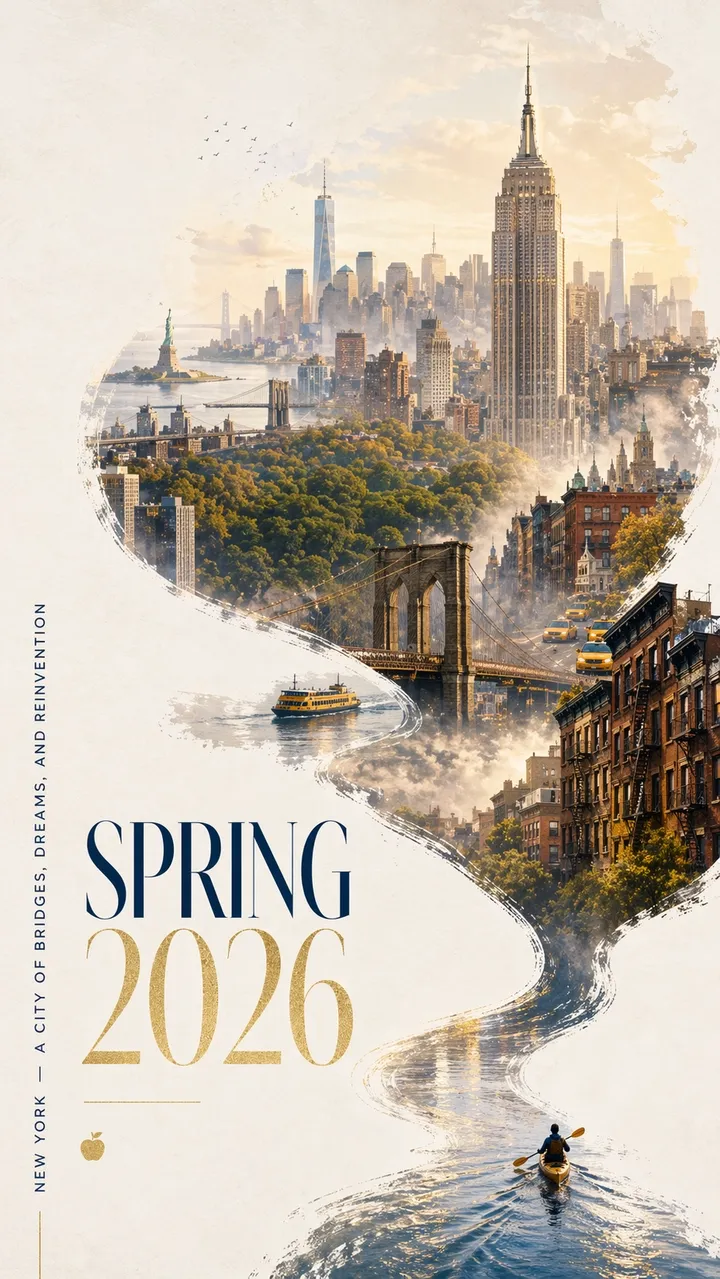
프롬프트 11:
대담하고 현대적인 디자인과 우아한 축하 분위기를 갖춘 인상적인 2026년 봄 뉴욕 도시 포스터입니다. 넉넉한 네거티브 공간을 사용하여 회백색 질감의 배경을 깔끔하게 정리합니다. 미니어처 카약커가 오른쪽 하단 모서리에 반사되는 물의 좁은 리본을 가로질러 노를 저어갑니다. 여파는 역동적인 붓글씨 곡선을 그리며 위쪽으로 휩쓸려 점차 허드슨 강으로 변한 다음 손으로 그린 꿈 같은 맨해튼 파노라마로 변합니다. 흐르는 강 모양의 구성 안에는 엠파이어 스테이트 빌딩, 브루클린 브리지, 센트럴 파크 캐노피, 원 월드 트레이드 센터, 브라운스톤 지붕, 노란 택시, 항구 페리, 그리고 저 멀리 자유의 여신상이 있습니다. 부드러운 아침 안개, 황금빛 봄빛, 네이비와 골드의 은은한 액센트. 왼쪽 하단의 우아한 타이포그래피에는 “NEW YORK - A CITY OF BRIDGES, DREAMS, AND REINVENTION”이라는 수직 슬로건과 함께 “SPRING 2026”이 적혀 있습니다. 텍스트는 선명하고 아름답게 구성되어야 합니다. 추가 단어가 없습니다. 프리미엄 그래픽 디자인, 화면비 9:16.
프롬프트 12:
“FRAME 2026”이라는 가상 디자인 컨퍼런스를 위한 수직 출시 포스터를 만듭니다. 큰 헤드라인: “FRAME 2026”. 부제목: “기계적 상상력을 활용한 설계”. 깔끔한 스위스 그리드, 황백색 배경, 검정색 타이포그래피, 빨간색 기하학적 액센트 1개, 넉넉한 네거티브 공간, 완벽하게 읽기 쉬운 텍스트, 추가 단어 없음, 워터마크 없음. 화면비율 9:16.
프롬프트 13:
“SOFT SIGNALS”라는 제목의 미니멀리스트 앨범 표지를 만듭니다. 아티스트 이름: “MIRA VALE”. 중앙 타이포그래피, 음소거된 파란색 종이 질감, 라디오 타워의 작은 은색 선 그림, 우아한 간격, 추가 텍스트 없음, 로고 없음, 화면 비율 1:1.
프롬프트 14:
큰 세리프체로 “READ MORE SLOWLY”라고 적힌 서점 창문 포스터를 만듭니다. 더 작은 줄: “봄 독서 주간”. 유리에 비친 따뜻한 저녁 거리의 반사, 크림색 종이 질감, 읽을 수 있는 타이포그래피, 추가 단어 없음, 워터마크 없음. 화면 비율 4:5.
프롬프트 15:
“내일의 물건”이라는 제목의 박물관 전시 포스터를 만듭니다. 부제: “2026년의 디자인 역사”. 황백색 종이에 검정 텍스트, 중앙에 하나의 추상 크롬 개체, 깔끔하고 현대적인 레이아웃, 정확하게 읽을 수 있는 텍스트만, 가짜 로고 없음. 화면비율 9:16.
프롬프트 16:
정확한 제목이 “AFTERLIGHT SESSIONS”인 수직 음악 축제 포스터를 만듭니다. 작은 텍스트: ‘6월 12~14일’. 짙은 남색 배경, 빛나는 원형 무대 조명 1개, 우아하고 압축된 산세리프 타이포그래피, 균형 잡힌 네거티브 스페이스, 정확한 텍스트만 사용, 추가 단어 없음, 워터마크 없음을 사용하세요. 화면비율 9:16.
프롬프트 17:
“MORNING MENU”라는 제목의 깔끔한 카페 메뉴판을 만들어 보세요. 정확히 4개의 항목을 포함합니다: “ESPRESSO”, “MATCHA LATTE”, “CARDAMOM BUN”, “COLD BREW”. 따뜻한 크림색 배경, 검정색 세리프체, 단순한 구분선, 멀리서도 읽을 수 있음, 가격 없음, 추가 항목 없음. 화면 비율 4:5.
프롬프트 18:
가상의 러닝 클럽을 위한 정사각형 소셜 캠페인 그래픽을 만듭니다. 본문: “RUN THE RIVER”. 보조 줄: “토요일 오전 7시”. 대담한 키네틱 타이포그래피, 추상 강선, 밝은 녹색 및 검정색 팔레트, 명확한 계층 구조, 추가 텍스트 없음, 실제 로고 없음. 화면 비율 1:1.
프롬프트 19:
“THE QUIET MACHINE”이라는 가상 소설의 책 표지를 만들어 보세요. 저자 이름: “ELENA ROWE”. 작은 은색 기계식 새 실루엣, 무광 검정색 배경, 세련된 타이포그래피, 정확한 텍스트만, 출판사 로고 없음, 추가 사본이 없는 미니멀리스트 표지입니다. 화면 비율 2:3.
프롬프트 20:
“더 나은 질문을 하세요”라는 제목의 교실 포스터를 만드세요. 세 개의 짧은 줄을 포함합니다: “관찰”, “설명”, “테스트”. 친근한 편집 디자인, 부드러운 노란색 배경, 단순한 선 아이콘, 판독 가능한 고대비 텍스트, 추가 단어 없음, 워터마크 없음. 화면 비율 4:5.
찾을 사항: 모든 문자는 읽을 수 있어야 합니다. 모델이 추가 단어를 추가하는 경우 복사본을 “정확한 텍스트만”으로 다시 지정하고 프롬프트에서 각 줄을 별도의 줄에 배치합니다.
3. 제품 사진 및 AI 광고 크리에이티브 프롬프트
캠페인 영상, 영웅 사진, 소셜 광고, 전자상거래 모형, 제품 스토리텔링에 이 각도를 사용하세요.
프롬프트 21:
콘크리트 받침대 위에 놓인 무광 블랙 무선 스피커의 프리미엄 제품 광고입니다. 제목: “당신이 느낄 수 있는 소리”. 오른쪽 제품, 왼쪽의 굵은 흰색 유형, 드라마틱한 림 조명, 깔끔한 그림자, 럭셔리 기술 캠페인 스타일, 선명한 제품 가장자리, 가짜 브랜드 로고 없음, 워터마크 없음. 화면 비율 16:9.
프롬프트 22:
반투명 유리에 찍은 사설 스킨케어 세럼 사진입니다. “LUMA SERUM”이라는 간단한 라벨이 있는 반투명 병, 부드러운 확산광, 연한 녹색 배경, 하이엔드 뷰티 캠페인 스타일, 선명한 라벨 텍스트, 깨끗한 반사, 추가 소품 없음, 화면 비율 4:5.
프롬프트 23:
골든 아워 산길을 걷는 내구성이 뛰어난 여행용 병의 정사각형 소셜 광고입니다. 태그라인: “장거리를 위한 설계”. 전경에서 명확하게 보이는 제품, 자연스러운 그립감, 따뜻한 햇빛, 아래쪽 1/3 부분에 또렷하게 읽을 수 있는 텍스트, 추가 단어 없음, 화면 비율 1:1.
프롬프트 24:
순백색 배경에 무선 헤드폰이 있는 깔끔한 전자상거래 제품 사진입니다. 직각 각도, 또렷한 실루엣, 은은한 밀착 그림자, 눈에 띄는 이어쿠션 질감, 텍스트 없음, 로고 없음, 소품 없음, 고해상도 제품 사진. 화면 비율 1:1.
프롬프트 25:
세라믹 커피잔에 대한 광고판 스타일의 캠페인 비주얼입니다. 헤드라인: “아침, 재가열”. 전경의 큰 제품, 따뜻한 주방 창문 조명, 부드러운 증기, 왼쪽 상단에 읽을 수 있는 굵은 글씨, 추가 사본 없음, 워터마크 없음. 화면 비율 16:9.
프롬프트 26:
돌 선반 위에 미니멀한 하이킹 배낭을 올려놓은 프리미엄 전자상거래 히어로 이미지. 제품 중심, 전면 포켓 및 스트랩 표시, 부드러운 알파인 아침 햇살, 깨끗한 그림자, 사람 없음, 로고 없음, 텍스트 오버레이 없음, 사실적인 나일론 질감 및 지퍼 디테일. 화면 비율 1:1.
프롬프트 27:
- 반투명 유리 모이스처라이저 용기에 대한 세련된 스킨케어 캠페인 이미지입니다. 헤드라인: “병 속의 진정”. 오른쪽 하단의 제품, 연한 파란색 배경, 부드러운 물 반사, 가짜 브랜드가 없는 선명한 라벨 영역, 우아한 흰색 타이포그래피, 추가 단어가 없습니다. 화면 비율 4:5.*
프롬프트 28:
충전 케이스가 열려 있는 무광택 흰색 무선 이어버드의 영화 제품 사진입니다. 어두운 목탄 배경, 얇은 테두리 조명, 아래의 미묘한 반사, 캠페인 헤드라인을 위한 깔끔한 음수 공간, 로고 없음, 텍스트 없음, 선명한 제품 가장자리. 화면 비율 16:9.
프롬프트 29:
“NOVA OATS”라는 가상의 그래놀라 브랜드의 정사각형 스낵 포장 모형입니다. 밝은 목재 표면에 똑바로 서 있는 파우치 하나, 선명한 라벨 텍스트, 베이스 주변의 귀리 및 말린 과일, 따뜻한 자연광, 프리미엄이지만 접근하기 쉬운 포장 디자인, 추가 브랜드 없음을 보여줍니다. 화면 비율 1:1.
프롬프트 30:
어두운 벨벳 표면에 작은 파란색 돌이 있는 은반지의 고급 주얼리 제품 사진입니다. 매크로 디테일, 사실적인 금속 반사, 왼쪽 위의 부드러운 스포트라이트, 깨끗한 그림자, 손 없음, 텍스트 없음, 워터마크 없음, 제품이 배경과 명확하게 구분됩니다. 화면 비율 4:5.
찾을 사항: 제품은 시각적 영웅으로 남아 있어야 합니다. 모델이 너무 많은 포장 세부 사항을 고안하는 경우 참조 이미지를 사용할 때 “일반 포장” 또는 “입력 제품을 정확하게 보존”을 지정하십시오.
4. 소셜 미디어 이미지 및 인포그래픽 프롬프트
이 각도는 읽을 수 있는 레이블이 필요한 다이어그램, 설명, 워크플로 맵, 차트, 강의실 시각적 자료 및 블로그 일러스트레이션에 유용합니다.
프롬프트 31:
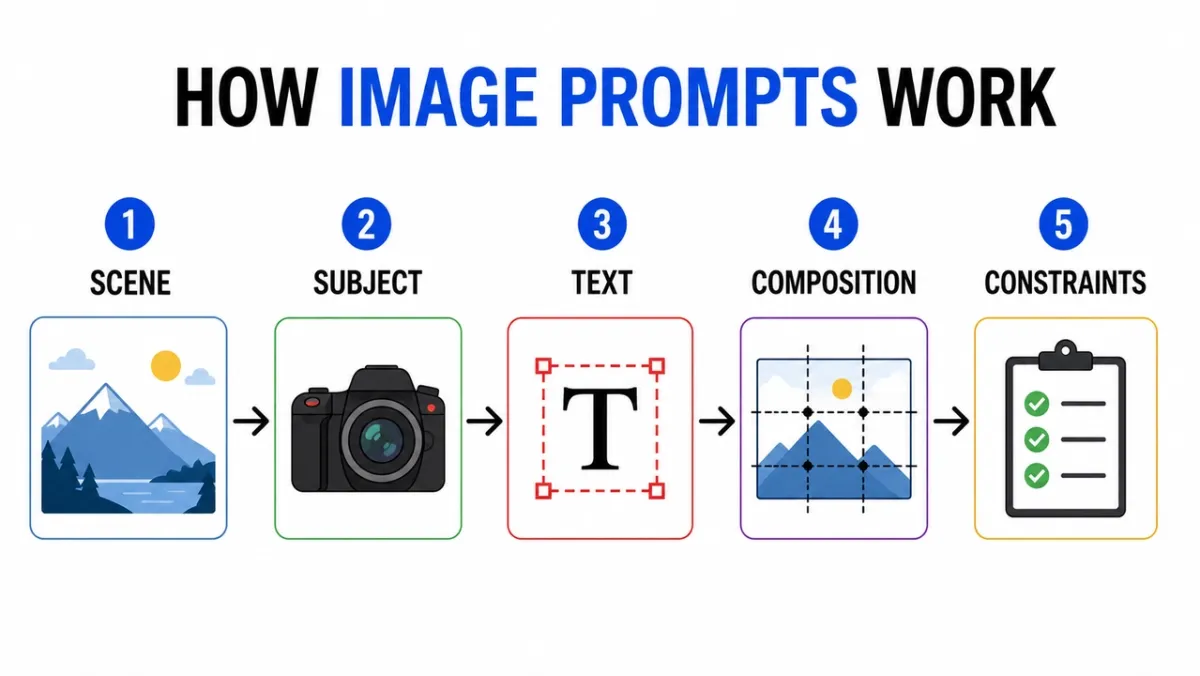
“이미지 프롬프트 작동 방식”이라는 제목의 깔끔한 인포그래픽을 만듭니다. 5개의 레이블이 지정된 단계: “장면”, “주제”, “텍스트”, “구성”, “제약 조건”. 플랫 편집 아이콘, 단계 사이의 화살표, 고대비, 흰색 배경, 읽을 수 있는 산세리프 레이블, 일관된 간격, 추가 텍스트 없음, 워터마크 없음. 화면 비율 16:9.
프롬프트 32:
카메라 렌즈의 레이어를 보여주는 교육 다이어그램입니다. 라벨이 붙은 부분을 포함합니다: “전면 요소”, “조리개”, “초점 그룹”, “이미지 센서”. 깔끔한 장면 전환 그림, 흰색 배경, 교과서 스타일, 명확한 지시선, 읽을 수 있는 레이블, 장식적인 혼란 없음. 화면 비율 16:9.
프롬프트 33:
“포스터 프롬프트 VS 제품 프롬프트”라는 제목의 비교 인포그래픽. 2개의 열, 6개의 행, 간결한 레이블, 중립 배경, 검정색 텍스트, 파란색 강조선, 전문적인 블로그 그래픽 스타일, 모두 복사 가능, 추가 텍스트 없음. 화면 비율 16:9.
프롬프트 34:
“차가운 맥주를 만드는 방법”이라는 제목의 단계별 지침 영상을 만듭니다. 짧은 라벨이 있는 5가지 그림 단계: “분쇄”, “가파르게”, “필터”, “붓기”, “서빙”. 따뜻한 흙색, 명확한 화살표, 일관된 아이콘 스타일, 읽을 수 있는 텍스트, 추가 단어 없음. 화면 비율 16:9.
프롬프트 35:
“AI IMAGE WORKFLOW”라는 제목의 깔끔한 비교 차트를 만듭니다. 세 개의 열: “초안”, “수정”, “애니메이션”. 간단한 아이콘, 짧은 레이블, 고대비, 넉넉한 간격, 흰색 배경, 전문적인 블로그 그래픽 스타일, 모든 텍스트 읽기 가능을 사용하세요. 화면 비율 16:9.
프롬프트 36:
“FROM PROMPT TO POSTER”라는 제목의 깔끔한 타임라인 인포그래픽을 만듭니다. 5단계: “개요”, “레이아웃”, “텍스트”, “검토”, “내보내기”. 수평 흐름, 단순한 숫자 원, 파란색과 검정색 액센트 팔레트, 고대비 라벨, 추가 텍스트 없음, 워터마크 없음. 화면 비율 16:9.
프롬프트 37:
“참조 이미지 역할”이라는 제목의 교육 다이어그램을 만듭니다. 3개의 라벨이 붙은 카드: ‘주제’, ‘스타일’, ‘배경’. 간단한 이미지 축소판, 하나의 최종 출력 프레임에 화살표 표시, 명확한 레이블, 흰색 배경, 일관된 간격, 추가 텍스트 없음. 화면 비율 16:9.
프롬프트 38:
“어떤 이미지가 표시되나요?“라는 제목의 의사결정 트리를 만듭니다. 분기: “텍스트”, “제품”, “장면”, “편집”. 깔끔한 상자와 화살표, 읽기 쉬운 산세리프 타이포그래피, 최소한의 회색 배경, 녹색 액센트 색상 1개, 추가 단어 없음, 장식적 혼란 없음을 사용하세요. 화면 비율 16:9.
프롬프트 39:
“생성하기 전에”라는 제목의 안전 체크리스트 인포그래픽을 만듭니다. 4가지 검사: “권리”, “개인 정보 보호”, “텍스트”, “브랜드”. 간단한 확인 아이콘, 간결한 라벨, 흰색 배경, 전문 SaaS 도움말 센터 스타일, 고대비, 추가 사본 없음을 사용하세요. 화면 비율 4:5.
프롬프트 40:
“이미지 편집 프롬프트”라는 제목의 시각적 설명을 만듭니다. 3개의 누적 행: “변경”, “보존”, “일치”. 각 행에 대한 작은 예제 아이콘, 깔끔한 지시선, 읽을 수 있는 레이블, 제한된 색상, 추가 텍스트 없음, 워터마크 없음을 포함합니다. 화면 비율 16:9.
찾을 사항: 먼저 라벨을 확인하세요. 시각적으로 아름다운데 단어가 틀리면 출력을 사용할 수 없습니다. 밀도가 높은 차트의 경우 레이블 수를 줄이고 다시 생성하세요.
5. 캐릭터 일관성 프롬프트
캐릭터 시트는 아이덴티티, 의상, 팔레트, 표현을 하나의 참조 프레임으로 압축하기 때문에 유용합니다.
프롬프트 41:
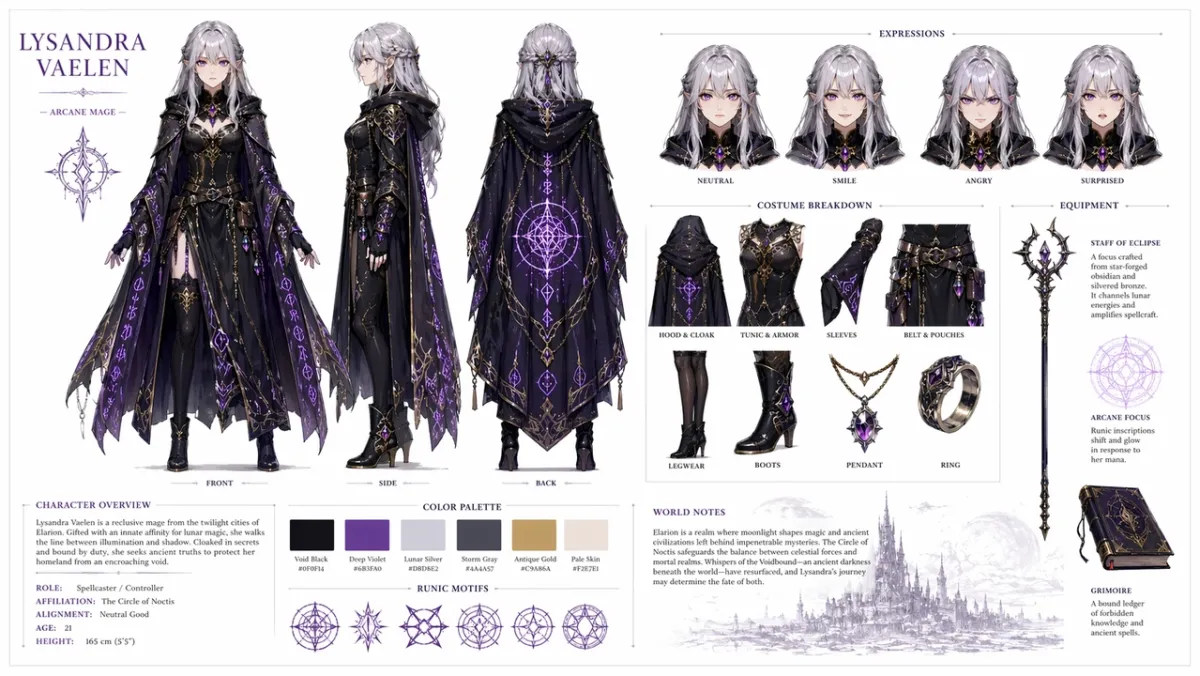
오리지널 판타지 RPG 캐릭터에 대한 전문 캐릭터 참조 시트를 만듭니다. 은색 머리카락과 보라색 눈을 가진 젊은 여성 마법사, 빛나는 룬 패턴이 있는 화려한 검은 망토를 입고 있습니다. 깨끗한 흰색 배경에 포함: 전면, 측면, 후면을 보여주는 3개 보기 전환; 중립, 미소, 화남, 놀란 표정 변화; 의상과 장비의 상세한 분석; 색상 팔레트 견본 행; 깔끔한 타이포그래피로 된 간략한 세계 건설 노트. 체계적인 그리드 레이아웃, 컨셉 아트 스타일, 고해상도. 화면 비율 16:9.
프롬프트 42:
“NOVA”라는 이름의 오리지널 캐릭터에 대한 공상과학 택배 캐릭터 시트를 만듭니다. 전면, 측면 및 후면 보기, 4가지 얼굴 표정, 재킷 및 배낭 설명선, 색상 팔레트 견본, 깨끗한 흰색 배경, 읽을 수 있는 라벨, 모든 보기에서 일관된 얼굴 및 재킷을 포함합니다. 화면 비율 16:9.
프롬프트 43:
녹색 우비를 입은 꼬마 숲 도우미를 위한 동화책 캐릭터 시트를 만들어 보세요. 표정 행, 소품 행, 걷는 포즈, 손을 흔드는 포즈, 색상 팔레트, 읽기 쉬운 간단한 메모, 부드러운 일러스트레이션 스타일, 추가 문자 없음을 포함합니다. 화면 비율 16:9.
프롬프트 44:
“REI”라는 이름의 오리지널 캐릭터에 대한 사이버펑크 탐정 캐릭터 시트를 만듭니다. 정면도, 측면도, 후면도, 세 가지 표정, 트렌치코트 설명선, 장치 소품, 네온 색상 팔레트, 깔끔한 라벨, 일관된 얼굴 및 헤어스타일을 포함합니다. 화면 비율 16:9.
프롬프트 45:
친절한 로봇 제빵사를 위한 마스코트 참조 시트를 만듭니다. 전신 포즈, 세 가지 얼굴 표시 표정, 앞치마 세부 정보, 페이스트리 소품, 색상 팔레트 견본, 간단한 전환, 깔끔한 흰색 배경, 판독 가능한 라벨을 포함합니다. 화면 비율 16:9.
프롬프트 46:
“KAI”라는 이름의 오리지널 사막 정찰병에 대한 모바일 게임 캐릭터 시트를 만듭니다. 전면, 측면 및 후면 보기, 세 가지 액션 포즈, 스카프 및 다용도 벨트 설명선, 색상 팔레트 견본, 읽을 수 있는 라벨, 일관된 얼굴 및 의상, 깔끔한 황백색 배경을 포함합니다. 화면 비율 16:9.
프롬프트 47:
“MARN”이라는 이름의 오리지널 캐릭터에 대한 아늑한 판타지 마을 상인 캐릭터 시트를 만듭니다. 전신 정면도, 측면도, 랜턴과 원장이 있는 소품 행, 4가지 표현 연구, 패브릭 질감 설명선, 따뜻한 색상 팔레트, 깔끔한 격자 레이아웃, 읽을 수 있는 메모를 포함합니다. 화면 비율 16:9.
프롬프트 48:
공상과학 유지보수 드론 디자인 시트를 만듭니다. 상단, 측면 및 전면 보기, 센서용 작은 세부 패널, 랜딩 피트, 도구 팔, 배터리 팩 및 경고등을 포함합니다. 깔끔한 기술 컨셉 아트 레이아웃, 중립적 배경, 읽기 쉬운 라벨, 일관된 산업 디자인. 화면 비율 16:9.
프롬프트 49:
“MILO”라는 이름의 독창적인 교실 발명가를 위한 어린이 애니메이션 캐릭터 시트를 만듭니다. 서있는 자세 1개, 생각하는 자세 1개, 신나는 포즈 1개, 표정 행, 배낭 및 노트북 소품, 밝지만 절제된 팔레트, 읽을 수 있는 라벨, 추가 문자가 포함되지 않습니다. 화면 비율 16:9.
프롬프트 50:
오리지널 사이버펑크 택배원에 대한 전술 의상 참조 시트를 만듭니다. 전면, 후면 및 측면 뷰, 재킷 설명선, 신발 디테일, 메신저 백 디테일, 색상 견본, 세 가지 실루엣 포즈, 선명한 라벨 텍스트, 일관된 헤어스타일 및 뷰 전체에 걸친 얼굴을 포함합니다. 화면 비율 16:9.
찾아야 할 사항: 동일한 얼굴, 의상, 색상 팔레트가 여러 보기에서 유지되어야 합니다. 측면도가 의상을 변경하는 경우 더 강력한 “보존” 언어로 재생성합니다.
6. UI 모형 및 소셜 스크린샷 프롬프트
이 관점은 팀과 논의할 수 있을 만큼 체계적으로 보이는 현실적인 앱 컨셉, 대시보드, 소셜 프로필 또는 제품 UI가 필요할 때 효과적입니다.
프롬프트 51:
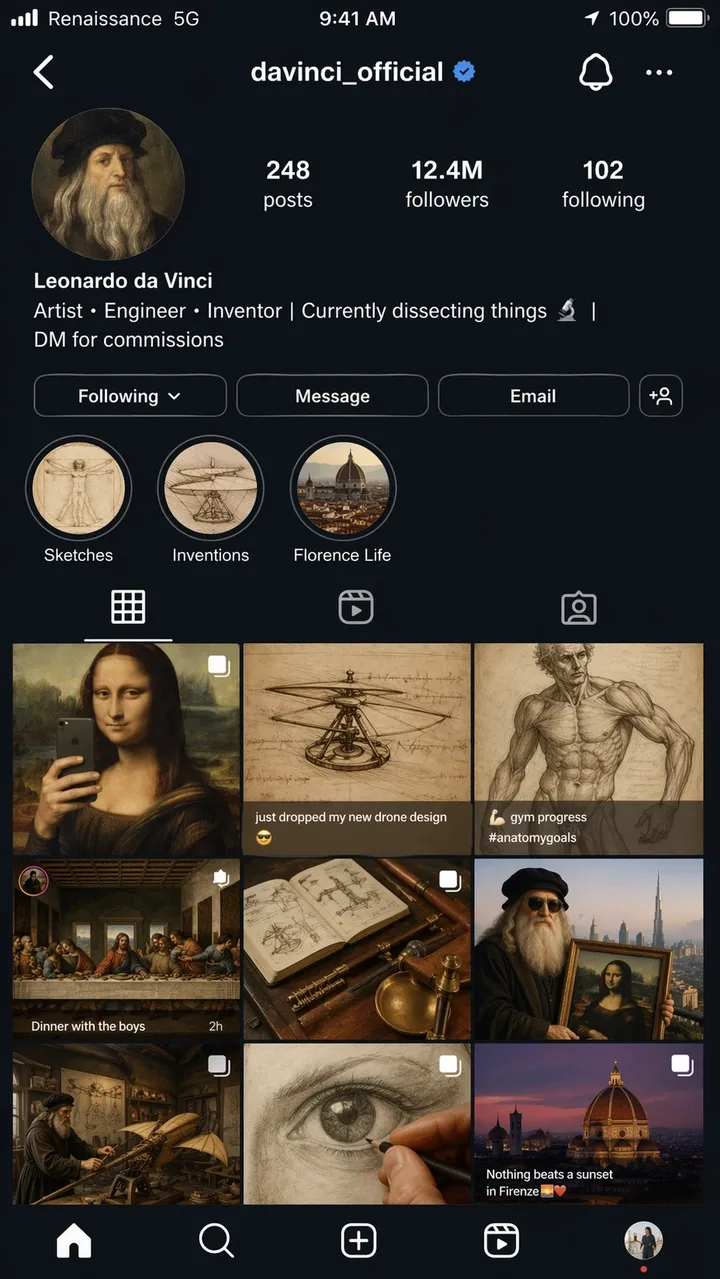
Leonardo da Vinci(사용자 이름 @davinci_official)에 대한 가상의 Instagram 프로필 페이지에 대한 초현실적인 iPhone 스크린샷. 마치 그가 2026년 현대의 영향력 있는 인물인 것처럼 보입니다. 프로필 사진은 원형 크롭의 르네상스 자화상입니다. 약력: “예술가, 엔지니어, 발명가 | 현재 해부하고 있는 것 | 커미션용 DM”. 그리드에는 9개의 게시물이 표시됩니다. 거울 셀카로 재구성된 모나리자, “방금 새 드론 디자인을 떨어뜨렸습니다”라는 캡션이 붙은 헬리콥터 스케치, 체육관 진행 사진으로 게시된 해부학 연구, 디너 파티 단체 사진으로 연출된 최후의 만찬, 기타 창의적이고 시대착오적인 매시업입니다. 팔로워 수: 1240만 명. 스케치, 발명, 플로렌스 라이프라는 라벨이 붙은 스토리 하이라이트. 이동통신사 텍스트가 “르네상스”인 완전한 iOS 상태 표시줄 5G”, 배터리 아이콘 및 현재 시간. 전체적으로 어두운 모드 UI. 사실적인 스크린샷 품질, 화면 비율 9:16.
프롬프트 52:
“LUMA”라는 가상의 습관 앱에 대한 현실적인 모바일 온보딩 화면입니다. 헤드라인: “더 나은 날을 만들어 보세요”. 버튼: “지금 시작” 및 “데모 보기”. 깔끔한 iOS 스타일 레이아웃, 부드러운 흰색 배경, 파란색 액센트, 읽을 수 있는 UI 텍스트, 휴대폰 프레임 내부에 바로 표시됩니다. 화면비율 9:16.
프롬프트 53:
전자상거래 분석 도구를 위한 데스크톱 SaaS 대시보드. 왼쪽 사이드바, 수익, 주문, 전환율에 대한 상위 KPI 카드, 꺾은선형 차트 및 상위 제품 표. 깔끔한 흰색 인터페이스, 사실적인 간격, 읽기 쉬운 라벨, 실제 브랜드 이름이 없습니다. 화면 비율 16:9.
프롬프트 54:
“SKYLINE”이라는 가상 앱의 현실적인 모바일 날씨 앱 화면입니다. 현재 도시: “리스본”. 헤드라인 온도: “22C”. 바람, 습도, UV 및 일몰에 대한 카드입니다. 차분한 파란색 인터페이스, 읽을 수 있는 라벨, iPhone 프레임, 실제 앱 브랜딩 없음. 화면비율 9:16.
프롬프트 55:
예약 확인을 보여주는 레스토랑 예약 앱 화면. 레스토랑 이름: “노스 테이블(North Table)”. 날짜: “6월 18일”. 시간: “오후 7시 30분”. 파티 규모: “4명”. 상단의 따뜻한 편집 음식 사진, ’캘린더에 추가’라고 표시된 깔끔한 CTA 버튼, 읽을 수 있는 UI 텍스트. 화면비율 9:16.
프롬프트 56:
가상 제작자 스튜디오를 위한 현실적인 데스크톱 분석 대시보드입니다. 왼쪽 탐색, 조회수, 시청 시간, 수익, 신규 팔로어에 대한 상위 카드, 선 차트, 캠페인 표. 깔끔한 흰색 UI, 파란색 액센트, 읽기 쉬운 라벨, 실용적인 간격, 실제 브랜드 이름이 없습니다. 화면 비율 16:9.
프롬프트 57:
’TrailCart’라는 가상의 아웃도어 장비 매장의 모바일 결제 화면입니다. 제품 썸네일, 수량 스테퍼, 배송 주소 카드, 할인 필드, 총 가격 및 “주문하기”라는 CTA 버튼을 표시합니다. 최신 iOS 스타일, 읽기 쉬운 UI 텍스트, 실제 로고 없음. 화면비율 9:16.
프롬프트 58:
- 프롬프트 라이브러리 앱을 위한 태블릿 UI 모형. “포스터”, “제품”, “UI” 및 “편집”이라는 탭을 표시합니다. 메인 패널에는 짧은 미리보기 텍스트, 복사 버튼, 카테고리 칩이 포함된 프롬프트 카드 3개가 포함되어 있습니다. 깔끔한 인터페이스, 높은 가독성, 실제 브랜드 이름이 없습니다. 화면 비율 4:3.*
프롬프트 59:
가상 AI 이미지 도구에 대한 SaaS 설정 화면입니다. “모델”, “품질”, “종횡비”, “참조 이미지” 및 “안전”이라는 라벨이 붙은 섹션. 토글, 드롭다운, 슬라이더 및 명확한 저장 버튼을 사용하세요. 조용하고 전문적인 UI, 읽기 쉬운 라벨, 장식적인 요소가 없습니다. 화면 비율 16:9.
프롬프트 60:
교토로의 가상 여행을 위한 모바일 여행 일정 앱 화면입니다. 헤더에는 “Kyoto Weekend”라고 적혀 있습니다. ‘1일차’, ‘2일차’, ‘사원 산책’, ‘저녁 식사’ 카드입니다. 부드럽고 중립적인 UI, 사실적인 간격, 작은 지도 미리보기, 읽을 수 있는 텍스트, 실제 앱 브랜딩 없음. 화면비율 9:16.
찾을 사항: 레이아웃은 장식용 포스터가 아닌 실제 인터페이스처럼 느껴져야 합니다. 탐색 라벨, 버튼 텍스트, 아이콘 간격, 화면 계층 사용 가능 여부를 확인하세요.
7. 스타일 전환 및 내러티브 아트 프롬프트
짧은 내러티브 프롬프트는 GPT Image 2가 시각적 농담, 다중 패널 스토리텔링 및 장면 내부의 작은 텍스트를 통해 추론할 수 있는지 테스트합니다.
프롬프트 61:
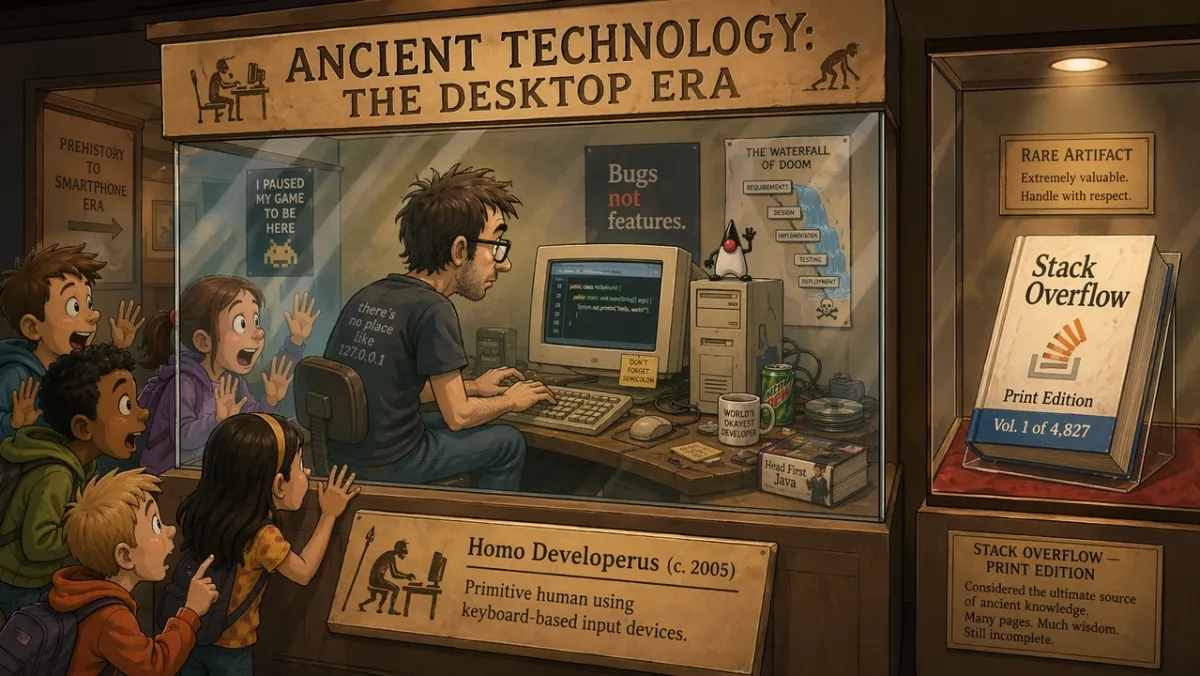
“고대 기술: 데스크탑 시대”라는 제목의 박물관 전시관에서는 유리 진열장에 있는 프로그래머가 CRT 모니터에서 코딩을 실시간으로 시연하고 있으며 놀란 학생들은 유리에 얼굴을 대고 있습니다. 전시 플래카드에는 “Homo Developerus (c. 2005) - 키보드 기반 입력 장치를 사용하는 원시 인간”이라고 적혀 있습니다. 근처의 두 번째 진열 케이스에는 “Stack Overflow - Print Edition, Vol. 1 of 4,827”이라는 라벨이 붙은 실제 책이 표시되어 있습니다. 2D 만화 일러스트레이션 스타일, 따뜻한 박물관 조명, 유머러스하고 향수를 불러일으키는 톤. 화면 비율 16:9.
프롬프트 62:
“MORNING ROUTINE”이라는 제목의 4컷 만화입니다. 패널 1: 알람이 꺼집니다. 패널 2: 캐릭터가 커피를 만듭니다. 패널 3: 캐릭터가 앉아서 일합니다. 패널 4: 캐릭터는 이미 책상에서 자고 있습니다. 따뜻한 최소한의 일러스트레이션 스타일, 표현력 있는 캐릭터, 읽기 쉬운 제목, 추가 텍스트 없음. 화면 비율 16:9.
프롬프트 63:
창의적 자동화에 관한 기사에 대한 단일 사설 일러스트레이션입니다. 디자이너와 AI 보조원이 큰 테이블, 부드러운 스튜디오 조명, 은은한 유머, 현대적인 잡지 일러스트레이션 스타일, 눈에 띄는 브랜드 로고 없음, 텍스트 없음 위에 종이 스토리보드를 배열합니다. 화면비율 3:2.
프롬프트 64:
“THE MORNING HERALD”라는 제목의 신문 1면 스타일 일러스트레이션. 주요 헤드라인: “도시는 옥상 정원을 승인합니다”. 2열 레이아웃, 사실적인 시의회 사진 영역 1개, 클래식한 넓은 시트 디자인, 읽을 수 있는 마스트헤드 및 헤드라인, 추가 기사 텍스트 없음. 화면 비율 4:5.
프롬프트 65:
그림 그리는 법을 배우는 로봇에 관한 2컷 만화입니다. 패널 1: 로봇은 빈 캔버스를 주의 깊게 연구합니다. 패널 2: 로봇은 지저분하지만 매력적인 그림을 자랑스럽게 보여줍니다. 따뜻한 스튜디오 조명, 표현력이 풍부한 신체 언어, 말풍선 없음, 간단한 제목: “첫 번째 시도”. 화면 비율 16:9.
프롬프트 66:
“THE DEADLINE”이라는 제목의 3컷 만화 편집 만화입니다. 패널 1: 디자이너가 차분하게 빈 파일을 엽니다. 패널 2: 시계가 앞으로 움직이고 스티커 메모가 책상을 덮습니다. 패널 3: 디자이너는 놀란 듯한 안도감이 담긴 세련된 포스터를 제시합니다. 최소한의 표현 일러스트레이션 스타일, 읽을 수 있는 제목, 말풍선 없음. 화면 비율 16:9.
프롬프트 67:
창의적인 초점에 대한 초현실적인 잡지 삽화: 한 사람이 빛나는 창문이 있는 조용한 도서관에 떠 있는 작은 책상에 앉아 있는데, 각 창문은 서로 다른 미완성 아이디어를 보여줍니다. 부드러운 영화 조명, 사려 깊은 분위기, 깔끔한 구성, 눈에 띄는 브랜드 로고 없음, 텍스트 없음. 화면비율 3:2.
프롬프트 68:
제품 출시 티저용 4컷 스토리보드입니다. 패널 1: 테이블 위의 닫힌 상자. 패널 2: 상자에서 빛이 새어 나옵니다. 패널 3: 뚜껑을 들어올리는 손. 패널 4: 빛나는 제품 실루엣이 공개되었습니다. 읽을 수 있는 브랜드도 없고, 대화도 없고, 영화 같은 조명, 명확한 패널 테두리가 없습니다. 화면 비율 16:9.
프롬프트 69:
“THE FIRST GROUP CHAT”이라는 제목의 유머러스한 박물관 디오라마입니다. 위에 새겨진 메시지 풍선, 따뜻한 박물관 조명, 유쾌한 편집 일러스트레이션, 읽을 수 있는 제목만 있고 추가 텍스트 없이 돌판 주위에 모여 있는 고대 모습의 인물을 보여줍니다. 화면 비율 16:9.
프롬프트 70:
창의적인 반복 ’이전’과 ’이후’를 보여주는 분할 화면 내러티브 포스터입니다. 왼쪽: 지저분한 스케치 벽과 거친 메모. 오른쪽: 깨끗하고 광택이 나는 캠페인 보드. 현대적인 편집 일러스트레이션, 강한 대비, 로고 없음, “BEFORE” 및 “AFTER” 이외의 추가 단어 없음. 화면 비율 16:9.
찾을 사항: 장면은 아이디어를 시각적으로 전달해야 합니다. 농담이 전적으로 텍스트에만 의존하는 경우 설정을 단순화하고 실제 동작을 더 명확하게 만드세요.
8. 이미지-비디오 첫 번째 프레임 프롬프트 및 참조 편집
이 각도는 GPT Image 2가 1차 통과 생성기 이상의 역할을 하는 지점입니다. 제품 컷아웃, 의상 교체, 배경 변경, 참조 기반 편집, 모션용으로 설계된 스틸 프레임에 유용합니다.
프롬프트 71:
이미지-비디오 클립을 위한 영화 같은 첫 번째 프레임 만들기: 새벽에 빛나는 사막 분화구 가장자리에 서 있는 외로운 우주 비행사, 바람에 움직일 준비가 된 망토와 먼지, 강한 전경 실루엣, 선명한 깊이 레이어, 따뜻한 수평선 빛, 텍스트 없음, 워터마크 없음. 화면 비율 16:9.
프롬프트 72:
이미지 1은 제품 사진으로, 이미지 2는 배경 스타일 참고로 사용하세요. 이미지 2의 장면에 제품을 배치합니다. 제품 모양, 라벨 텍스트, 비율, 색상, 재질을 정확하게 유지합니다. 조명, 규모, 그림자 및 원근감을 일치시킵니다. 제품의 스타일을 변경하지 마십시오. 추가 로고나 워터마크가 없습니다.
프롬프트 73:
입력된 상품 이미지에서 배경을 제거하세요. 선명한 실루엣, 깨끗한 가장자리, 후광 없음, 언저리 없음으로 투명한 배경을 출력합니다. 병 형상, 캡 모양, 라벨 텍스트, 라벨 색상 및 인쇄 선명도를 정확하게 유지합니다. 비율을 변경하지 마십시오.
프롬프트 74:
입력 이미지의 날씨와 조명만 변경합니다. 장면을 눈이 살짝 내리는 겨울 저녁처럼 보이게 만듭니다. 사람, 건물, 표지판, 카메라 각도, 물체 배치, 구도를 정확하게 보존하세요. 읽을 수 있는 모든 텍스트를 변경하지 않고 유지하세요.
프롬프트 75:
화상 1은 보존 대상자입니다. 이미지 2는 재킷 참조입니다. 이미지 3은 부츠 참조입니다. 이미지 2와 3의 옷을 사용하여 이미지 1의 사람에게 옷을 입힙니다. 얼굴, 몸 모양, 포즈, 손, 배경, 카메라 각도 및 조명을 정확하게 유지합니다. 의류만 교체하세요.
프롬프트 76:
입력된 상품 사진을 잠긴 피사체로 사용하세요. 아침 햇살이 은은하게 들어오는 깨끗한 대리석 욕실 카운터 위에 제품을 올려두세요. 제품 모양, 라벨 텍스트, 캡 색상, 비율, 재질을 정확하게 보존합니다. 접촉 그림자, 규모 및 원근감을 일치시킵니다. 라벨, 로고, 소품을 추가하지 마세요.
프롬프트 77:
이미지-비디오 클립을 위한 영화 같은 첫 번째 프레임을 만듭니다. 젖은 검은 돌 위에 서 있는 유리 향수병과 그 뒤에서 얇은 안개 리본이 움직입니다. 제품 중심, 강렬한 실루엣, 선명한 전경과 배경 깊이, 손 없음, 텍스트 없음, 워터마크 없음. 화면 비율 16:9.
프롬프트 78:
배경만 따뜻한 회색의 깨끗한 편집 스튜디오 배경으로 변경하여 입력 초상화를 편집합니다. 얼굴, 머리카락, 의상, 포즈, 피부색, 카메라 각도, 조명 방향, 표정 등을 정확하게 유지하세요. 새로운 배경의 그림자와 깊이를 자연스럽게 맞추세요.
프롬프트 79:
이미지 1을 객실 사진으로, 이미지 2를 벽 예술 참고 자료로 사용하세요. 이미지 2의 예술 작품을 이미지 1의 빈 벽에 추가합니다. 가구, 바닥, 창문 조명, 카메라 각도, 색상 균형 및 방 레이아웃을 정확하게 유지합니다. 프레임 규모, 원근감, 벽 그림자를 일치시킵니다.
프롬프트 80:
제품 공개를 위한 비디오 준비가 된 첫 번째 프레임 만들기: 테이블 위에 닫힌 무광 블랙 박스, 이음새에서 새어나오는 얇은 파란색 빛, 광선에 보이는 먼지 입자, 낮고 가까이 위치한 카메라, 강한 깊이 레이어, 동작을 위한 빈 공간, 텍스트 없음, 로고 없음. 화면 비율 16:9.
찾을 사항: 편집의 경우 잠긴 세부정보가 잠겨 있는 경우에만 출력이 성공합니다. 비디오 지원 프레임의 경우 피사체 분리, 전경/배경 깊이, 장면이 PixVerse에 모션 공간을 제공하는지 여부를 확인하세요.
GPT Image 2 검토: 테스트 결과 및 점수
테스트 및 업데이트 날짜: 2026년 6월 23일.
이 페이지를 방문하는 대부분의 독자는 먼저 예제가 필요하기 때문에 이 검토 섹션은 의도적으로 프롬프트 라이브러리 뒤에 있습니다. 검토는 여전히 중요합니다. GPT Image 2는 텍스트, 구조 및 지침을 따르는 것이 느슨한 시각적 탐색보다 더 중요한 경우 유용합니다.
| 검토 차원 | 점수(1-5) | 실습 테스트에서 본 내용 |
|---|---|---|
| 텍스트 정확도 | 4 | 큰 헤드라인, 짧은 라벨, 포스터 제목, 메뉴 항목, 인포그래픽 단계, 간단한 UI 라벨은 정확한 카피를 인용할 때 제어하기가 더 쉬웠습니다. 작은 법적 문구와 촘촘한 문단은 여전히 신중한 검토가 필요합니다. |
| 캐릭터 일관성 | 3 | 캐릭터 시트, 표정 행, 의상 설명선 및 팔레트 견본은 참조로 유용했지만 얼굴, 비율 및 의상 세부 사항은 측면과 후면에 걸쳐 표류할 수 있습니다. |
| 스타일 제어 | 4 | 프롬프트에서 스택 스타일 키워드만 지정하는 대신 사용 사례, 레이아웃, 매체, 조명 및 제약 조건을 지정했을 때 모델은 광범위한 시각적 방향을 잘 따랐습니다. |
| 제품 현실감 | 4 | 제품 광고 레이아웃, 캠페인 네거티브 공간, 깨끗한 표면 및 제품 우선 구성은 강력했지만 실제 라벨, 로고, 포장 기하학 및 규제된 주장에는 여전히 수동 QA가 필요합니다. |
| 편집능력 | 3 | “변경, 보존, 일치” 패턴은 광범위한 편집 요청보다 더 잘 작동했지만 선택 경계, 투명한 배경 출력 및 정확한 제품 보존은 여전히 검토가 필요합니다. |
| 질문 검색 | 실용적인 답변 |
|---|---|
| 다음에 가장 적합 | 정확한 텍스트 포스터, 제품 광고 컨셉, UI 모형, 인포그래픽, 문자 시트, 참조 편집 및 이미지-비디오용 첫 번째 프레임. |
| 주요 제한사항 | 작은 텍스트, 정확한 브랜드 마크, 독점 글꼴, 법적 사본, 복잡한 투명 배경 결과물 및 잠긴 제품 라벨은 여전히 검토가 필요합니다. |
| API 가용성 | 개발자 워크플로에는 OpenAI의 gpt-image-2 API 경로를 사용하세요. ChatGPT Images 2.0 액세스와 API 청구는 별도의 경로입니다. |
| API 노트 | 2026년 6월 22일 현재, OpenAI는 이미지 입력, 캐시된 이미지 입력, 이미지 출력, 텍스트 입력 및 캐시된 텍스트 입력에 대한 GPT-Image-2 토큰 가격을 나열합니다. |
| 비디오 워크플로우 | 이미지가 나중에 이미지-비디오 소스가 될 수 있는 경우 깨끗한 피사체 가장자리, 깊이 레이어 및 하나의 모션 큐에 대한 메시지를 표시합니다. |
| 비교할 대안 | 빠른 사실적 테스트에는 Nano Banana 2를 사용하고, 양식화된 탐색에는 Midjourney를 사용하고, 승인된 항목을 비디오 자산으로 만들어야 하는 경우에는 PixVerse를 사용하세요. |
GPT Image 2 테스트 방법
우리는 인물 사진, 텍스트가 많은 포스터, 제품 스타일 구성, 캐릭터 시트, UI 모형 및 실험적인 내러티브 장면 전반에 걸쳐 GPT Image 2를 테스트했습니다. 목표는 벤치마크 등급 점수를 생성하는 것이 아니었습니다. 디자이너, 마케터 또는 제작자가 자산을 처음부터 다시 구축하는 대신 간단한 편집으로 출력을 사용할 수 있는지 확인하는 것이 었습니다.
| 테스트 영역 | 샘플 프롬프트 | 우리가 확인한 것 |
|---|---|---|
| 인물 사진 및 영화 스틸 | 12 | 조명 제어, 피부 질감, 반사, 분위기 및 장면 일관성. |
| 포스터 및 타이포그래피 레이아웃 | 14 | 제목 철자법, 여러 줄로 된 텍스트, 계층 구조, 여백 및 브랜드와 같은 세련미. |
| 캐릭터 및 컨셉 시트 | 9 | 멀티뷰 일관성, 의상 세부정보, 팔레트 정렬 및 라벨 정확성. |
| UI 및 소셜 모형 | 8 | 레이아웃 사실성, 작은 텍스트, 아이콘 간격, 피드 그리드 및 스크린샷 신뢰성. |
| 실험적 프롬프트 | 10+ | 유머, 내러티브 추론, 개체 배치 및 작은 캡션의 정확성. |
패턴은 분명했습니다. GPT Image 2는 키워드 체인보다 정확한 브리핑에 더 많은 보상을 제공합니다. 프롬프트가 작업 이름을 지정하고 성공을 정의할 때 모델은 구조를 유지하는 경향이 있습니다. 프롬프트에서 제약 없는 아름다운 이미지를 요구하면 결과는 여전히 세련되어 보일 수 있지만 재사용하기는 더 어렵습니다.
사용 사례별 결과 검토
| 사용 사례 | 잘 된 점 | 아직 검토가 필요한 사항 |
|---|---|---|
| 텍스트 렌더링 | 큰 헤드라인, 짧은 라벨, 포스터 제목, 메뉴 항목, 인포그래픽 단계, 간단한 UI 라벨은 정확한 카피를 인용할 때 제어하기가 더 쉬웠습니다. | 작은 법적 문구, 촘촘한 문단, 스타일화된 글꼴, 반복되는 단어는 여전히 표류할 수 있습니다. 사본을 짧게 유지하고 모든 문자를 확인하십시오. |
| 제품 이미지 | GPT Image 2는 제품 광고 레이아웃, 캠페인 네거티브 공간, 깨끗한 표면 및 제품 우선 구성을 잘 처리했습니다. | 실제 라벨, 로고, 포장 형상 및 규제된 주장은 수동으로 확인하거나 승인된 자산에서 합성되어야 합니다. |
| UI 모형 | 모바일 화면, 대시보드, 카드, 버튼, 메뉴 및 앱과 같은 계층 구조는 프롬프트에서 실제 인터페이스 요소를 명명했을 때 그럴듯해 보였습니다. | 출력을 프로덕션 UI가 아닌 개념 모형으로 처리합니다. 작은 레이블, 아이콘 정렬 및 정확한 데이터를 정리해야 하는 경우가 많습니다. |
| 캐릭터 일관성 | 캐릭터 시트, 표정 행, 의상 설명선, 팔레트 견본은 창의적인 참고 자료로 유용했습니다. | 얼굴, 의상 세부정보 및 비율은 보기에 따라 변경될 수 있습니다. 측면 또는 후면 보기가 표류하는 경우 ID 앵커를 반복하고 재생성합니다. |
| 이미지-비디오 첫 번째 프레임 | 전경, 중간, 배경 및 하나의 모션 큐가 있는 넓은 프레임은 PixVerse에 더 많은 소스 자료를 제공했습니다. | 너무 많은 이미지, 무거운 텍스트, 모호한 모션 큐로 인해 이후 비디오 생성이 더 어려워집니다. |
| 편집 및 합성 | “변경, 보존, 일치” 프롬프트 패턴은 광범위한 편집 요청보다 더 잘 작동했습니다. | 선택 경계, 투명한 배경 출력, 정확한 제품 보존 및 미세한 디테일은 여전히 QA가 필요합니다. |
모델 비교에서 유용한 구별은 브랜드 대 브랜드가 아닙니다. GPT Image 2는 의사소통이 많은 이미지를 위한 구조화된 설계 보조자처럼 작동합니다. Midjourney는 스타일화된 탐색 및 아트 디렉션의 폭을 넓히는 데 여전히 유용합니다. Nano Banana 2는 포토리얼리즘, 소재 디테일 및 빠른 시각적 반복에 대한 강력한 비교 지점입니다. PixVerse는 정지 이미지가 클립, 광고, 제품 공개 또는 스토리 샷이 되어야 하는 경우의 다음 워크플로우 레이어입니다.
일반적인 GPT Image 2 프롬프트 오류
- 정확한 사본을 제공하지 않고 정확성을 요구합니다. 이미지에 텍스트가 필요한 경우 텍스트를 정확하게 쓰고 어디에 표시되어야 하는지 알려주세요.
- 가능한 모든 세부 사항으로 하나의 프롬프트를 오버로드합니다. 핵심 장면부터 시작한 다음 한 번에 하나의 변수를 구체화합니다.
- 편집 중 불변성을 잊어버립니다. 정체성, 배경, 포즈, 조명, 제품 모양, 라벨 텍스트 또는 카메라 각도 등 변경되지 않아야 하는 사항을 모델에 알려줍니다.
- 기능적 작업에 장식적인 품질의 단어를 사용합니다. “아름답다”라고 해서 라벨을 읽을 수 있는 것은 아닙니다. “명확한 레이블 텍스트”, “깔끔한 커닝”, “멀리서도 읽기 가능”과 같은 문구를 사용하세요.
- 가로세로 비율을 건너뛰는 중입니다. 좋은 정사각형 이미지는 세로 광고나 동영상 미리보기 이미지로는 적합하지 않을 수 있습니다.
- 로고를 일반 텍스트처럼 취급합니다. GPT Image 2는 로고 컨셉을 디자인할 수 있지만 정확한 브랜드 마크는 일반적으로 승인된 브랜드 자산에서 합성되어야 합니다.
GPT Image 2 API 및 가격 참고 사항
OpenAI의 API 가격 페이지에는 토큰 기반 가격으로 GPT-Image-2가 나와 있습니다. 2026년 6월 22일 현재 표시된 요금은 다음과 같습니다.
| 품목 | 표시 가격 |
|---|---|
| 이미지 입력 | $8.00 / 100만 토큰 |
| 캐시된 이미지 입력 | $2.00 / 100만 토큰 |
| 이미지 출력 | $30.00 / 100만 토큰 |
| 텍스트 입력 | $5.00 / 100만 토큰 |
| 캐시된 텍스트 입력 | $1.25 / 100만 토큰 |
실제 생성 비용은 프롬프트 길이, 참조 이미지, 출력 크기, 캐싱, 품질 및 사용하는 액세스 경로에 따라 달라집니다. API가 아닌 ChatGPT를 사용하는 경우 계획 한도 및 할당량은 API 토큰 가격과 별개입니다. 반복 가능한 앱이나 배치 워크플로를 구축하는 경우 OpenAI의 GPT 이미지 생성 모델 프롬프트 가이드도 읽어 볼 가치가 있습니다.
GPT Image 2가 무료인지 또는 GPT Image 2 API 비용이 얼마인지 묻는 검색자에게는 이러한 구별이 중요합니다. ChatGPT Images 2.0 가용성, ChatGPT 계획 할당량, OpenAI API 청구 및 PixVerse 크레딧은 별도의 상용 경로입니다. 대용량 작업의 경우 1세대 시도의 나열된 가격뿐만 아니라 재시도 후 허용된 자산당 비용을 비교하세요.
| 워크플로 선택 | 실용적인 프롬프트 및 설정 조언 |
|---|---|
| 텍스트가 많은 포스터 또는 다이어그램 | 이미지당 더 적은 단어를 사용하고, 정확한 사본을 인용하고, 계층 구조를 지정하고, 예산이 허용하는 경우 더 높은 품질 설정을 사용하십시오. |
| 제품 사진 | 제품 모양, 라벨, 색상, 재질, 카메라 각도를 잠급니다. 참조를 사용하는 경우 편집할 때마다 보존 목록을 반복합니다. |
| UI 모형 | 탐색, 카드, 버튼, 상태, 레이블 및 간격 등 화면을 기본 인터페이스로 설명합니다. 컨셉 아트 언어를 피하세요. |
| 다중 참조 편집 | 주제, 스타일, 배경, 의상, 제품 또는 자료 참조 등 역할별로 각 이미지에 라벨을 지정합니다. |
| 일괄 생성 | 시도당 비용뿐만 아니라 허용된 이미지당 비용도 비교하세요. 많은 재시도가 필요한 경우 더 저렴한 실행이 더 저렴하지 않습니다. |
| PixVerse 생산 | 스틸 이미지를 생성하거나 가져온 다음 자산에 모션, 카메라 이동 또는 캠페인 변형이 필요할 때 이미지-비디오를 사용합니다. |
API 우선 이미지 워크플로를 사용할지 아니면 제작자 워크플로를 사용할지 결정하는 팀의 경우 실질적인 질문은 “GPT Image 2가 정지 이미지를 만들 수 있습니까?“만이 아닙니다. “정지영상이 승인된 후에는 어떻게 되나요?” 이기도 합니다. 1차 통과 이미지 품질을 비교하려면 GPT Image 2와 Nano Banana 2 동일 프롬프트 테스트를 참조하세요. 터미널 또는 AI 에이전트 워크플로에서 자동 생성이 필요한 경우 PixVerse CLI 가이드에서 명령줄 파이프라인의 이미지 및 비디오 생성을 다룹니다.
상세한 PixVerse 이미지-비디오 워크플로우
GPT Image 2 이미지가 승인되면 이를 비디오의 첫 번째 프레임으로 처리할 수 있습니다. 중요한 부분은 애니메이션을 적용하기 전에 스틸을 준비하는 것입니다. 비디오 모델은 철자가 틀린 포스터 텍스트, 뒤틀린 제품 라벨 또는 이미 잘못된 것처럼 보이는 UI 모형을 마법처럼 수정하지 않습니다.
1. 첫 번째 프레임으로 스틸을 생성합니다.
이미지가 클립이 될 수 있다는 것을 알고 있다면 이미지 프롬프트에 모션 준비를 추가하세요. 선명한 피사체 가장자리, 전경 및 배경 깊이, 카메라 경로, 그리고 움직일 수 있는 하나의 물리적 신호(천, 먼지, 증기, 비, 머리카락, 화면 빛, 제품 반사 또는 변화하는 광원)를 요청하세요.
제품 포스터만 묻는 대신 비디오 오프닝 프레임이 될 수 있는 제품 포스터를 묻는 메시지를 표시하세요.
콘크리트 받침대 위의 무광 검정색 스피커에 대한 16:9 캠페인 첫 번째 프레임을 만듭니다. 왼쪽에 깨끗한 네거티브 공간을 두고 오른쪽에 스피커를 선명하게 유지하세요. 광선에 부드러운 먼지를 추가하고 나중에 애니메이션화할 수 있는 은은한 파란색 LED 빛을 추가합니다. 추가 텍스트, 가짜 로고, 워터마크가 없습니다.
2. 모션을 추가하기 전에 이미지를 검토하세요.
최종 디자인 파일과 같은 정지영상을 확인해보세요. 철자, 제품 기하학, 라벨, 손, 얼굴, UI 정렬, 주장 및 권리에 민감한 요소를 살펴보세요. 소스 이미지가 이러한 검사 중 하나라도 실패하면 비디오로 이동하기 전에 스틸을 재생성하거나 편집하십시오.
3. 별도의 모션 프롬프트 작성
비디오 프롬프트는 전체 이미지 프롬프트를 반복해서는 안 됩니다. 무엇이 이동하고 무엇이 잠겨 있는지 설명해야 합니다.
이미지를 첫 번째 프레임으로 사용하세요. 카메라가 스피커를 향해 천천히 밀어 넣습니다. 파란색 LED가 켜지고 먼지가 광선을 통해 이동하며 배경 반사가 약간 이동합니다. 스피커 모양, 재질, 위치 및 눈에 보이는 모든 디자인 세부 사항을 보존합니다. 새로운 텍스트, 로고, 손 또는 추가 제품을 추가하지 마세요.
4. 스틸이 작동한 후에만 애니메이션을 적용하세요.
PixVerse를 사용하는 경우 앱에서 GPT Image 2 이미지를 생성하거나 완성된 이미지를 가져온 다음 이미지-비디오를 사용하여 모션을 추가할 수 있습니다. 스틸에서 직접 모션을 보려면 이미지-비디오를 사용하고, 더 폭넓은 15초 창의적인 작업 흐름을 위해서는 PixVerse V6를 사용하고, 샷에 더 많은 영화적 참조 제어가 필요할 때는 C1를 사용하세요.
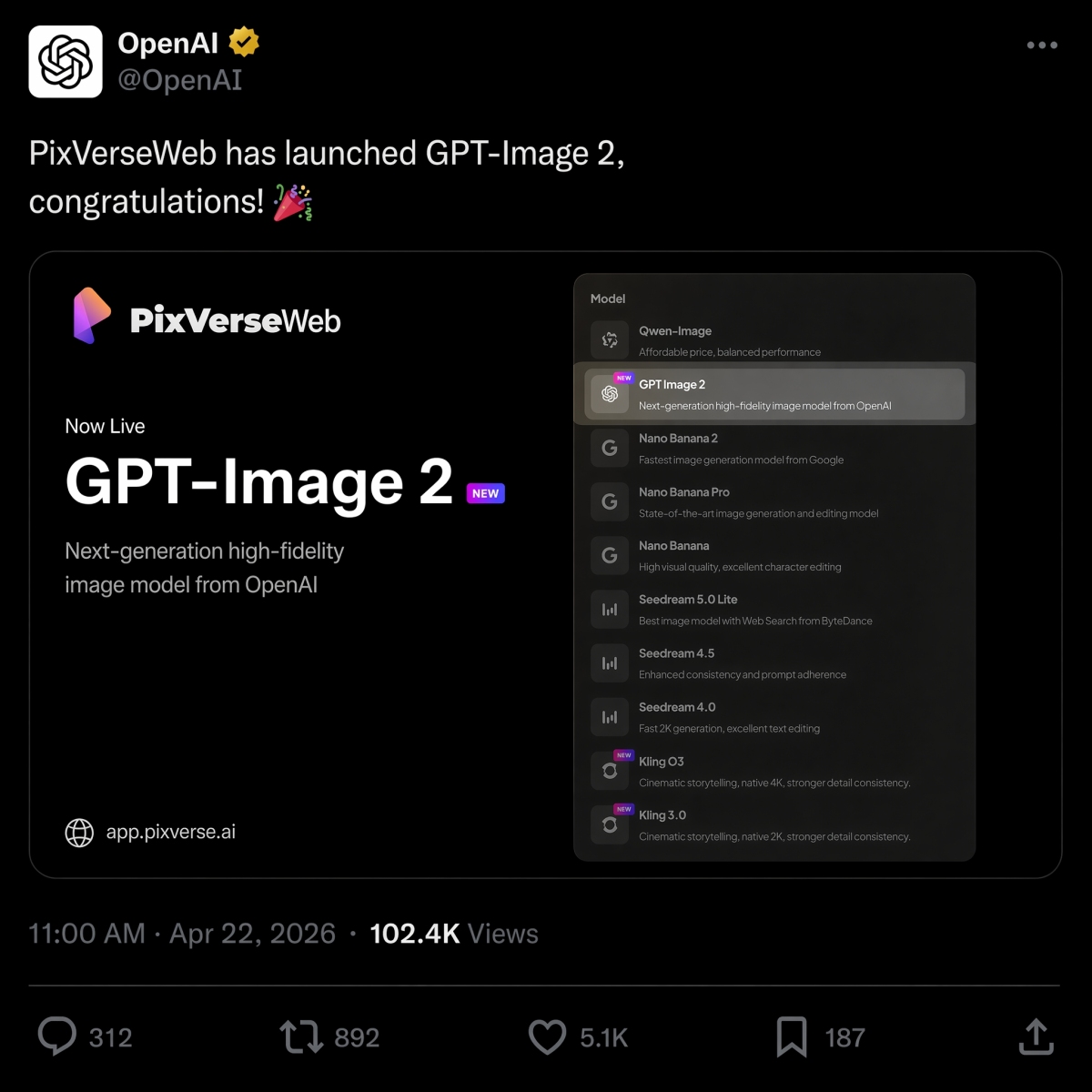
2026년 4월 22일, PixVerse는 GPT Image 2를 텍스트-이미지 옵션으로 출시하여 Nano Banana 2, Seedream에 합류했습니다. HappyHorse 1.0 모델 라인업.
동일한 요약에 대해 OpenAI와 Google 이미지 모델 중 하나를 선택하는 경우 GPT Image 2 대 Nano Banana 2 비교에서 동일한 프롬프트의 나란히 결과를 확인하세요.
귀하의 신속한 작업이 대부분 비디오에 관한 것인 경우, 당사의 최고의 이미지-비디오 AI 도구 가이드는 스틸 이미지가 준비된 후 올바른 모션 워크플로우를 선택하는 방법을 설명합니다.
PixVerse를 사용해 보세요: PixVerse 앱 열기.
FAQ
최고의 GPT Image 2 프롬프트는 무엇입니까?
최고의 GPT Image 2 프롬프트는 시각적 스타일뿐만 아니라 명확한 생산 작업을 설명합니다. 강력한 프롬프트에는 일반적으로 제목, 출력 유형, 필요한 경우 정확한 텍스트, 구성, 조명, 제약 조건, 종횡비 및 최종 사용 사례가 포함됩니다. 제품 광고, 정확한 텍스트 포스터, 문자 시트, UI 모형, 인포그래픽, 이미지-비디오 첫 번째 프레임은 특히 시작하기에 좋은 프롬프트 카테고리입니다.
더 나은 GPT Image 2 프롬프트를 작성하려면 어떻게 해야 합니까?
다음 공식을 사용하세요: 피사체 + 시각적 스타일 + 구성 + 조명 + 세부 사항 + 제약 조건 + 출력 사용 사례. GPT Image 2에게 이미지가 수행해야 할 작업을 알려주고, 정확한 텍스트를 인용하고, 레이아웃과 가로 세로 비율을 지정하고, 변경해서는 안 되는 항목을 나열하세요. 편집을 위해서는 변경 사항, 잠긴 요소, 사실성 요구 사항을 분리하세요.
GPT Image 2는 제품 이미지에 좋은가요?
그렇습니다. GPT Image 2는 제품 광고 컨셉, 전자상거래 히어로 이미지, 포장 모형, 제품 컷아웃 및 캠페인 시각적 자료에 유용합니다. 제품 팀은 광고 또는 제품 목록에 출력을 사용하기 전에 제품 구조, 라벨 텍스트, 규제 대상 주장, 로고 및 포장 세부 정보를 검토해야 합니다.
GPT Image 2는 텍스트가 포함된 이미지를 만들 수 있나요?
예, GPT Image 2는 읽을 수 있는 텍스트, 특히 짧은 헤드라인, 라벨, 포스터, 메뉴 항목, 인포그래픽 단계 및 UI 라벨이 포함된 이미지를 생성할 수 있습니다. 최상의 결과를 얻으려면 정확한 텍스트를 따옴표 안에 넣고, 표시되는 위치를 지정하고, 짧게 복사하고, “정확한 텍스트만”, “추가 단어 없음”, “중복 텍스트 없음”과 같은 제약 조건을 추가하세요.
GPT Image 2 이미지를 비디오로 어떻게 변환합니까?
먼저 정지 이미지를 생성하거나 승인한 다음 PixVerse 이미지 투 비디오에 업로드하세요. 무엇이 움직이고 무엇이 잠겨 있는지 설명하는 별도의 모션 프롬프트를 작성하세요. 좋은 모션은 카메라 움직임, 피사체 보존, 배경 모션 및 새 텍스트 없음, 새 로고 없음, 추가 제품 없음 등의 제약 조건을 언급하도록 유도합니다.
GPT Image 2 vs Nano Banana 2: 어느 것이 더 낫나요?
GPT Image 2는 일반적으로 텍스트가 많은 포스터, 다이어그램, UI 모형, 편집 가능한 시각적 요약 및 이미지-비디오 첫 번째 프레임과 같은 구조화된 디자인 출력에 더 좋습니다. Nano Banana 2는 포토리얼리즘, 소재 디테일, 빠른 시각적 반복이 더 중요한 경우 비교할 가치가 있습니다. 동일한 프롬프트 결과를 보려면 GPT Image 2 대 Nano Banana 2 비교를 참조하세요.
GPT Image 2는 ChatGPT Images 2.0와 동일합니까?
검색 의도로는 그렇습니다. 많은 사용자가 GPT Image 2, gpt-image-2 및 ChatGPT Images 2.0를 사용하여 OpenAI의 최신 ChatGPT 이미지 생성 환경을 설명합니다. OpenAI의 제품 명칭은 ChatGPT Images 2.0이고, gpt-image-2는 개발자와 제작자가 API 워크플로를 논의할 때 자주 사용하는 모델 스타일 문구입니다.
GPT Image 2는 무료이며 API 비용은 얼마입니까?
OpenAI 도움말에는 ChatGPT Images 2.0가 모든 계층에서 사용 가능한 것으로 나열되어 있지만 계획 할당량과 API 청구는 별개입니다. 2026년 6월 22일 현재, OpenAI는 GPT-Image-2 이미지 출력을 1M 토큰당 $30.00로 표시합니다. 실제 비용은 프롬프트 길이, 참조, 출력 크기, 품질 및 캐싱에 따라 달라집니다.