Seedance 2.0 Review: Features, Prompts, and Alternatives in 2026
Seedance 2.0 review with pricing, tested prompts, fixes, and comparisons vs PixVerse V6, Kling 3.0, Veo 3, and more.
Seedance 2.0 dropped in early February 2026 and took over X and Reddit within 48 hours. Creators were posting clips that looked like they came out of a production studio — not an AI model. The benchmarks backed up the hype: ELO 1,269 on text-to-video and 1,351 on image-to-video, placing it ahead of Kling 3.0, Veo 3, and Runway Gen-4.5 at launch.
Two months later, the dust has settled. We have spent weeks testing Seedance 2.0 across different scenarios — cinematic scenes, product ads, portraits, fantasy sequences — and reading through hundreds of community posts to separate what actually works from what just looks good in a demo reel. This review covers what the model does well, where it falls short, what real users think of it, how it compares to its predecessor and competitors, and six use cases with prompts you can test right now.
Key Takeaways:
- Seedance 2.0 accepts up to 12 mixed inputs (text, images, video, audio) and generates 4–15 second clips at up to 2K resolution with native audio.
- Camera behavior, character consistency, and hand/limb rendering are noticeably better than Seedance 1.0.
- Access outside China remains a pain point. Aggressive content moderation and a steep learning curve for casual users are common complaints.
- Explore Seedance 2.0 on PixVerse, then try it alongside PixVerse V6, Kling, Veo, and other models without switching platforms.
- For source-backed updates on the next model cycle, see our Seedance 2.5 release status.
- If you are deciding between ByteDance’s model and Alibaba’s newer model, read our HappyHorse 1.0 vs Seedance 2.0 comparison.
What Is Seedance 2.0?
Seedance 2.0 is a multimodal AI video model built by ByteDance. It launched on February 7, 2026 as a ground-up rebuild — not an incremental update to Seedance 1.0.
The previous version processed text and images through separate pipelines. Seedance 2.0 replaces that with a unified Multimodal Diffusion Transformer that encodes text, image, audio, and video into a shared representation space. In practical terms, this means the model can take a text prompt, a reference photo of your character, a video clip showing the camera move you want, and an audio track — then combine all of that into a single output.
The model supports up to 12 reference assets per generation: 9 images, 3 videos, and 3 audio files. You tag them in your prompt using an @ syntax (@image1, @video1, etc.) to tell the model exactly where each reference should apply.
Output specs: 4–15 seconds of video at up to 2K resolution, with native stereo audio generated in the same pass as the visuals.
Seedance 2.0 Highlights: What It Does Well
Multimodal Input and the @Reference System
The reference system is the headline feature. Instead of describing everything in text and hoping the model interprets it correctly, you can show it what you want. Upload a face photo and tag it as @image1 in your prompt, add a video clip showing the camera trajectory you want, and include a background music track. The model reads each reference and applies it where you specified.
This works especially well for character consistency across multiple generations. Upload the same face reference and the character holds its appearance — something that still requires workarounds on most competing models.
Cinematic Camera Behavior
Seedance 2.0 handles camera movement more naturally than most models we have tested. Tracking shots, push-ins, and slow orbits feel smooth and intentional rather than random. One Reddit user reported recreating camera moves from the show Severance with “remarkably accurate” results.
The model responds well to specific camera language in prompts: “slow dolly-in from medium shot to close-up” or “low-angle tracking shot” produce predictable results. Vague instructions like “cinematic” give you less control, but the output still defaults to something reasonable.
How to control camera movement in Seedance 2.0:
- Use precise cinematography terms in your prompt. Instead of “moving camera,” write “slow dolly-in from wide to medium close-up” or “low-angle tracking shot moving left to right.” The model recognizes standard film terminology.
- Upload a @video reference showing the move you want. Record a rough clip (even from your phone) showing the trajectory, tag it
@video1, and describe it in the prompt: “Camera follows the trajectory shown in @video1.” - Use timeline notation for complex sequences. Write
0–4s: wide establishing shot, static→4–8s: slow push-in to medium→8–12s: orbit around subject. The model generates each segment as part of one coherent clip.
Unlike Runway Gen-4.5’s Motion Brush (which allows region-level motion painting), Seedance 2.0 does not offer frame-by-frame motion control. Camera behavior is controlled entirely through prompt language and video references — less granular, but faster to iterate.
Native Audio-Video Sync
Seedance 2.0 generates audio and video simultaneously through joint diffusion. That includes:
- Dialogue with lip-sync across 7+ languages
- Sound effects timed to on-screen actions
- Ambient soundscapes and background music that match the visual mood
The lip-sync quality is strong in our testing — noticeably better than post-production dubbing tools. It is not perfect, but it eliminates the need for a separate audio pipeline in most cases.
Temporal Consistency and Physical Realism
Characters and objects hold their shape across frames with minimal flicker. Hand rendering — historically the weak link in AI video — is considerably improved over 1.0. Fingers stay at the right count more often, and limb movements look weighted rather than floaty.
Fabric draping, water behavior, and collision physics all feel more grounded. This matters for anything beyond abstract visuals. If you are generating a product ad or a character-driven narrative, believable physics makes the difference between “impressive AI demo” and “usable footage.”
Multi-Shot Storytelling
You can structure your prompt as a timeline — 0–4s: wide establishing shot, 4–8s: medium tracking shot, etc. — and the model generates each segment as a coherent sequence. Characters stay consistent, and transitions between shots are smooth rather than jarring.
This is a genuine workflow shift. Earlier models required you to generate shots individually and stitch them in post. Seedance 2.0 handles the sequencing natively.
In-Video Editing
You can swap characters or objects in an existing video without regenerating the entire clip. Need to change the outfit on your character? Replace the background? The model modifies the targeted element and keeps everything else intact. This is not available on most competing models and saves significant iteration time.
Seedance 2.0 at a Glance
| Spec | Detail |
|---|---|
| Developer | ByteDance |
| Release date | February 7, 2026 |
| Architecture | Unified Multimodal Diffusion Transformer |
| Inputs | Text + up to 9 images + 3 videos + 3 audio files |
| Max resolution | 2K |
| Duration | 4–15 seconds |
| Native audio | Yes (dialogue, effects, ambient, music) |
| Lip-sync languages | 7+ |
| In-video editing | Yes (character/object swap) |
Where Seedance 2.0 Falls Short
No model ships without trade-offs. Here are the ones that matter.
Regional access is limited. Seedance 2.0 launched primarily through ByteDance’s Chinese ecosystem (the Jimeng app). International users face verification delays, region locks, and payment friction. The simplest workaround is accessing it through PixVerse, which removes the geographic barriers entirely.
Content moderation is aggressive. Multiple users report getting prompts flagged for benign content. Face-related generations are especially likely to trigger filters. One Reddit comment summed it up: “The censorship just ruined Seedance 2.0.” This is a real bottleneck for commercial creative work where you need consistent output.
The learning curve is steep. If you just want to type a sentence and get a video, Seedance 2.0 is not the easiest starting point. The @reference system, timeline prompting, and multimodal inputs are powerful — but they require time to learn. Reviewers consistently rate it high for professionals (8.5/10) and low for casual users (5/10).
API is still in beta. Enterprise teams that need stable programmatic access should plan for breaking changes and rate-limit surprises.
Text rendering in video is unreliable. If your scene includes on-screen text — a sign, a title card, a product label — expect inconsistent results. This is a shared weakness across most video models in 2026, but worth noting.
No LoRA support. You cannot fine-tune the model on custom datasets. If you need a specific visual style or brand look that the base model does not cover, you are limited to prompt engineering and reference images.
Maximum 15 seconds per clip. Long enough for social content and ads, but short for narrative work. Multi-shot prompting helps, but you are still capped at 15 seconds total per generation.
Commercial licensing terms are unclear. ByteDance has not published explicit commercial usage rights for Seedance 2.0 outputs. Jimeng’s terms of service grant usage rights for content generated through the platform, but specifics around redistribution, derivative works, and liability in commercial advertising are not explicitly addressed. If you generate through PixVerse, PixVerse’s commercial license applies to the output. For high-stakes commercial work — product ads, client deliverables, broadcast — confirm rights before publishing.
How to Fix Common Seedance 2.0 Errors
If you are running into issues, you are not alone. These are the most frequently reported problems and their fixes based on community reports and our own testing.
| Problem | Likely Cause | Fix |
|---|---|---|
| Prompt flagged / rejected by moderation | Face-related keywords or ambiguous phrasing triggering content filters | Remove explicit face descriptions. Use @image references instead of describing faces in text. Avoid words like “realistic portrait” in combination with named individuals. |
| Black frames or generation failure | Prompt too complex for the selected duration/resolution | Reduce to one action per 4–5 seconds. Lower resolution from 2K to 720p. Split multi-shot prompts into shorter segments. |
| Character face changes between shots | No consistent reference anchor | Upload the same face photo as @image1 in every generation. Reference it explicitly: “The person in @image1 walks toward the camera.” |
| Audio out of sync with visuals | Joint diffusion mismatch on complex lip-sync scenes | Regenerate with audio disabled, then add audio in a separate pass. Alternatively, simplify the dialogue to shorter phrases. |
| “Region not supported” or payment error | Jimeng requires Chinese verification | Access Seedance 2.0 through PixVerse instead — no region lock, no Chinese phone number needed. |
| Hands/fingers distorted | Complex hand interactions without reference guidance | Add a reference image showing the hand pose you want. Avoid prompts requiring more than one hand interaction simultaneously. |
| Output looks “AI-generated” or plasticky | Over-reliance on style keywords without grounding | Add physical details: specific materials, real lighting conditions, lens type. Use “shot on Arri Alexa, 35mm” instead of generic “cinematic.” |
If your generation consistently fails after 3+ attempts with the same prompt structure, the issue is likely prompt complexity rather than a platform bug. Simplify, generate, then layer complexity back in.
How Much Does Seedance 2.0 Cost?
Seedance 2.0 is free on Jimeng with limited daily generations, and costs 150 credits per 5-second clip (720p Standard) on PixVerse. Here is the full pricing breakdown across both access methods.
On Jimeng (ByteDance’s native platform):
| Plan | Monthly Price | Daily Generations | Notes |
|---|---|---|---|
| Free | $0 | ~5–10 clips/day | Region-locked to China, requires Chinese phone |
| Basic | ~$9.99 | 50+ clips/day | Higher resolution access |
| Pro | ~$29.99 | 200+ clips/day | Priority queue |
| Premium | ~$49.99 | Unlimited | All features, fastest generation |
On PixVerse (global access, no region lock):
| Tier | 480p | 720p | 1080p |
|---|---|---|---|
| Standard | 15 credits/s | 30 credits/s | Available |
| Fast | 10 credits/s | 20 credits/s | N/A |
A 5-second clip at 720p Standard costs 150 credits. Fast mode costs 100 credits for the same clip. Pro, Premium, and Ultra members can access Seedance 2.0.
Cost comparison per 5-second 720p clip:
| Model | Platform | Approximate Cost |
|---|---|---|
| Seedance 2.0 Standard | PixVerse | ~$0.75 (150 credits) |
| Seedance 2.0 Fast | PixVerse | ~$0.50 (100 credits) |
| PixVerse V6 | PixVerse | ~$0.35 (70 credits) |
| Kling 3.0 | Kling | Included in $10/mo plan |
| Hailuo AI | MiniMax | Included in $9.99/mo plan |
| Sora 2 | OpenAI | ~$0.50–$2.50 |
At roughly $0.15 per second (Standard 720p), Seedance 2.0 is about 2x the per-clip cost of PixVerse V6 but includes multimodal input — making it most cost-effective for projects that would otherwise require multiple reference-matching passes or extensive post-production.
What the Community Is Saying
Creator and Professional Feedback
Professional creators — filmmakers, music video producers, ad agencies — are the most enthusiastic user group. The multimodal reference system and timeline prompting match how they already think about production: in terms of shots, references, and sequences rather than text descriptions.
One review rated Seedance 2.0 at 8.5/10 for creative professionals who need granular control. An early tester on X noted: “My co-founder spent an entire day trying to get this effect. Seedance 2.0 did it in 5 minutes.”
The model gets described as something that “thinks like a director” — it responds to shot-level direction rather than just generating something that vaguely matches your prompt. For teams already working in pre-production workflows, this is a meaningful shift.
Social Media and Forum Reactions
Reddit communities (r/SeedanceAI_Lab, r/Seedance_v2) are active and growing. The most-shared outputs tend to be cinematic clips that look closer to live-action footage than typical AI video.
The common complaints on social media track with our own findings: access difficulty outside China, moderation false positives, and the time investment needed to learn the prompt system. Several threads compare it to “having a powerful camera but needing to learn manual mode before you get good shots.”

The Copyright Controversy
Within days of launch, Disney sent ByteDance a cease-and-desist letter, alleging that Seedance 2.0 was generating Disney characters from its training data. The Motion Picture Association and SAG-AFTRA issued public statements. Viral videos of AI-generated celebrity likenesses added fuel.
This is an ongoing legal question across the entire AI video space, not specific to Seedance 2.0. But it is worth tracking if you plan to use the model for commercial work involving recognizable characters or likenesses.
Seedance 2.0 vs. Seedance 1.0: What Changed
The jump from 1.0 to 2.0 is a full architectural rebuild. Here is how they compare:
| Feature | Seedance 1.0 | Seedance 2.0 |
|---|---|---|
| Architecture | Separate text and image pipelines | Unified Multimodal Diffusion Transformer |
| Text input | Yes | Yes |
| Image input | Single optional image | Up to 9 images with @tag control |
| Video input | No | Up to 3 reference videos |
| Audio input | No | Up to 3 audio files |
| Native audio output | No | Yes (dialogue, effects, ambient, music) |
| Max resolution | 1080p | 2K |
| Duration | 5–10 seconds | 4–15 seconds |
| Multi-shot | Basic | Timeline storyboard with cross-shot consistency |
| Hand/limb quality | Frequent artifacts | Noticeably improved |
| In-video editing | No | Yes (character/object swap) |
| Usable output rate | Less predictable | More consistent in our tests |
The two biggest upgrades in daily use are native audio (1.0 had none) and the multimodal reference system (1.0 was limited to a single optional image). If you tried 1.0 and moved on, 2.0 is a fundamentally different tool.
Seedance 2.0 Use Cases: Six Tested Prompts
We tested Seedance 2.0 across six scenarios that cover the most common creative needs. Each prompt below is ready to copy and test. For each one, we describe what we got back, how long it took, and what worked or did not work.
All tests were run on PixVerse using Seedance 2.0 Standard at 720p, 5–8 seconds, 16:9 aspect ratio unless noted otherwise.
Cinematic Film Scene
This prompt tests camera behavior, atmosphere, and character rendering under dark, high-contrast conditions — the kind of scene that exposes motion artifacts quickly.
Prompt:
A retired detective in a long dark coat walks through a rain-soaked alley at night. Neon signs reflect red and blue on the wet cobblestones. He pauses, lights a cigarette, and glances over his shoulder. Slow push-in from wide shot to medium close-up. Film noir style, anamorphic lens flare, teal-orange color grading, film grain.
What we got: The camera push-in was smooth and steady — no jitter or sudden jumps. Rain reflections on the cobblestones looked convincing, with neon colors bleeding into the wet surface the way they should. The detective’s coat moved naturally as he walked, and the cigarette-lighting gesture was handled without any hand distortion. The ambient audio included rain and distant city noise, which fit the scene well. Generation took about 70 seconds on Standard. Overall, this is the kind of output you could drop into a mood reel or short film pitch without much post-work.
Product Commercial
Product shots are a practical test for physics simulation: does light hit the surface correctly, does the rotation feel mechanically smooth, and does the material look like what it is supposed to be?
Prompt:
A luxury perfume bottle rotates slowly on a black marble surface. Golden liquid catches the light as it turns. Soft particles of gold dust float in the air around it. Macro close-up, slow 360-degree orbit camera. Studio lighting with warm rim light, high-end commercial photography style.
What we got: Glass refraction and liquid behavior inside the bottle were surprisingly accurate. The golden particles drifted at a natural pace, and the marble surface had visible grain texture. The orbit camera was smooth through the full rotation. Light hit the glass at the right angles, producing the kind of caustic highlights you would expect from a real studio setup. Total generation time: around 65 seconds. For a first draft of a product concept video, this saves hours compared to setting up a 3D render.
Music Video
Music videos demand expressive motion, dramatic lighting changes, and the ability to hold a character’s look through dynamic movement. This is where temporal consistency gets tested hard.
Prompt:
A female singer in a flowing red silk dress performs on a rooftop at sunset. City skyline stretches behind her. Wind blows her hair and dress dramatically. She sings with emotional intensity, arms spread wide. Dynamic tracking shot circling around her. Golden hour backlighting, lens flare, vibrant warm tones.
What we got: The dress physics were the standout — red silk catching wind and light in a way that looked physical, not procedural. The tracking orbit around the singer was fluid, and her face stayed consistent through the full rotation. Hair movement felt natural and matched the wind direction on the dress, which is a detail many models get wrong. The native audio generated an ambient musical track that matched the tempo of her movements. Generation: about 75 seconds. If you are building a mood board or concept video for a music project, this gets you 80% of the way there in one generation.
Character Portrait in Motion
Subtle motion is harder than dramatic action for most video models. Small gestures — a turn of the head, hands examining an object — expose temporal instability that fast-moving scenes can hide.
Prompt:
An elderly Japanese craftsman in a traditional wooden workshop, morning light streaming through paper screens. He slowly lifts a hand-forged ceramic tea bowl, examining it with quiet pride. His weathered hands rotate the bowl gently. Close-up of his hands, then slow tilt up to reveal his face. Wabi-sabi aesthetic, warm natural light, documentary portrait quality.
What we got: This was one of the strongest results in our testing. The hands — typically the weakest link in AI video — held steady with correct finger count and natural joint movement throughout the clip. The camera tilt from hands to face was smooth, and the transition in focus felt like a real lens rack. Morning light through the paper screens cast soft, even shadows. The model added faint workshop ambient sounds on its own: a distant bird, the soft clink of ceramic. Skin texture on the weathered hands looked realistic without over-sharpening. Generation: around 80 seconds. For documentary-style content or brand storytelling, this level of subtlety is exactly what you need.
Nature and Landscape
Aerial and landscape shots test large-scale coherence: can the model maintain a consistent environment across a moving camera over several seconds?
Prompt:
Aerial drone shot gliding over a misty mountain valley at sunrise. Layers of fog roll between emerald green peaks. A winding river reflects the golden morning light below. Eagles soar through the frame at eye level. Smooth forward tracking with slight descent. Epic landscape, volumetric fog, golden hour lighting.
What we got: Fog layers moved independently and at different speeds, which gave the scene real depth rather than a flat matte painting look. The river reflection updated correctly as the camera advanced — a detail that requires spatial awareness from the model. The overall color palette — warm golds hitting cool blue-green mountains — was handled well, and the volumetric fog felt three-dimensional. The audio included wind and distant bird calls that matched the environment. This was also the fastest generation in our batch: about 55 seconds. The output is close to what you would get from a professional drone shoot, minus the travel budget.
Anime and Fantasy
Stylized content is a different challenge from photorealism. The model needs to maintain a consistent art style (cel-shading, speed lines, flat color) while still generating believable motion.
Prompt:
An anime warrior princess stands atop a cliff overlooking a burning medieval city at night. Her long silver hair and crimson cape billow in the wind. She draws a glowing blue katana, electricity crackling along the blade. Cherry blossom petals swirl around her. Dynamic low-angle shot with slow push-in. Cel-shading style, vibrant neon accents, dramatic speed lines.
What we got: The cel-shading held consistently across the entire clip — no blending between anime and photorealistic styles, which is a common issue with other models. The katana draw was fluid, and the electricity effect along the blade looked like it belonged in an actual anime rather than a generic glow overlay. Cherry blossom petals moved independently, with some catching the firelight from the burning city below. The audio included a dramatic swoosh for the sword draw that landed right on the motion. Generation: about 70 seconds. Style consistency is the hardest thing to get right in AI-generated anime, and Seedance 2.0 handled it better than most models we have tested.
Seedance 2.0 Alternatives: How the Top AI Video Generators Compare in 2026
Seedance 2.0 is a strong model, but it is not the only option — and depending on what you need, it may not be the best fit. Below we compare Seedance 2.0 against PixVerse V6, Runway Gen-4.5, Pika 2.2, Luma Ray3, and five other leading models across resolution, pricing, audio, and workflow fit.
PixVerse V6 — and Seedance 2.0 on PixVerse
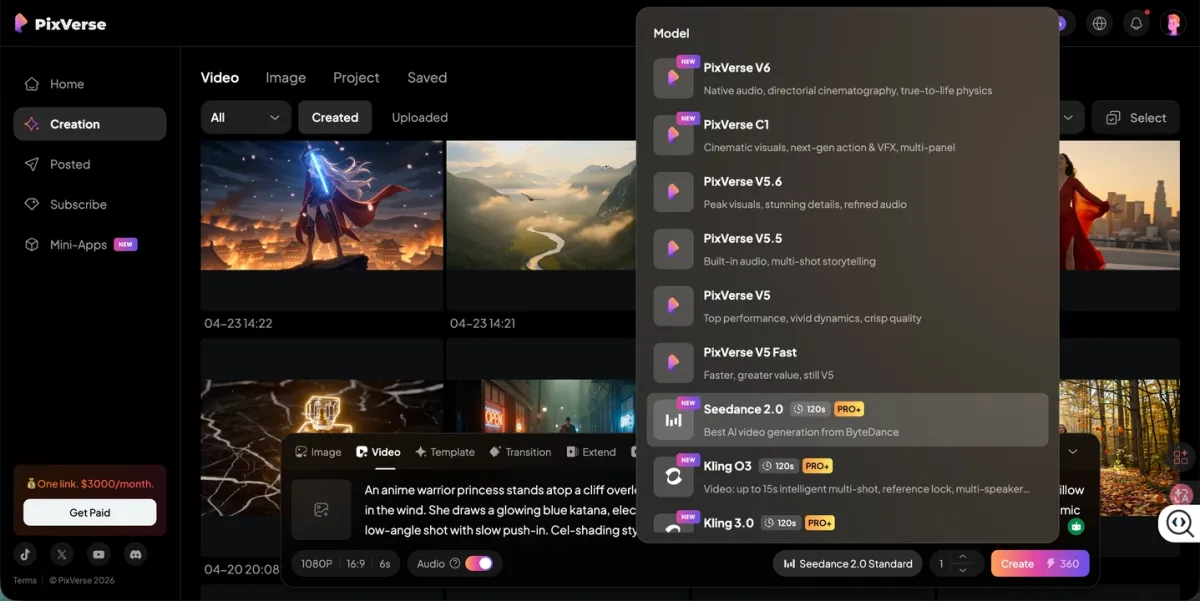
Before comparing individual models, it is worth addressing a practical problem: each model lives on its own platform with its own account, pricing, and workflow. If you want to test Seedance 2.0 against Kling 3.0 for a product ad, you normally need two accounts and two sets of credits.
PixVerse solves that. Seedance 2.0 launched on PixVerse on April 13, 2026, joining Kling O3, Veo 3.1, Sora 2, and other models. One account, one credit balance, side-by-side comparison.
Seedance 2.0 on PixVerse comes in two tiers:
| Tier | 480p | 720p | 1080p |
|---|---|---|---|
| Standard | 15 credits/s | 30 credits/s | Available |
| Fast | 10 credits/s | 20 credits/s | N/A |
A 5-second clip at 720p Standard costs 150 credits. Fast mode costs 100 credits for the same clip. Pro, Premium, and Ultra members can access Seedance 2.0.
Beyond hosting third-party models, PixVerse V6 is a strong alternative in its own right. It takes a different approach — where Seedance 2.0 excels at multi-reference precision, PixVerse V6 focuses on camera control and multi-shot production.
| Feature | PixVerse V6 | Seedance 2.0 |
|---|---|---|
| Max duration | 15 seconds | 15 seconds |
| Camera control | 20+ parameterized controls (dolly, crane, orbit, tracking) | Prompt-based description |
| Native audio | Yes | Yes (lip-sync in 7+ languages) |
| Input types | Text + image; multi-shot engine | Text + 9 images + 3 videos + 3 audio |
| In-video editing | No | Yes |
| Multi-shot | Single-prompt film with native audio | Timeline storyboard |
| Access | Web, mobile, API, CLI | Jimeng (China) or PixVerse |
| Cost (1080p, per second) | 14 credits (~$0.07) | 30 credits Standard (~$0.15) |
Choose V6 when: you need precise camera moves, CLI integration for developer workflows (works with Claude Code, Codex, Cursor), or global access without restrictions.
Choose Seedance 2.0 when: you need multi-reference input control, higher resolution output, or in-video editing.
Both are available on PixVerse, so you do not have to commit to one.
Sora 2 (OpenAI)
Sora 2 is strongest at narrative storytelling and physics simulation. Prompt adherence is high, and the model handles emotional scenes — dialogue-driven moments, subtle character interactions — better than most competitors. It requires a ChatGPT Plus ($20/mo) or Pro ($200/mo) subscription. API pricing runs $0.10–$0.50 per second depending on resolution. Max output: 1080p, up to 20 seconds.
Veo 3 (Google)
Veo 3 is the resolution champion: native 4K output with a 60fps option and spatial audio. It fits into Google Cloud workflows smoothly, which makes it attractive for enterprise teams already in that ecosystem. The trade-off is duration — clips cap at 8 seconds, which limits its usefulness for narrative content. Pricing starts at $0.05/s for the Lite tier.
Kling 3.0 (Kuaishou)
Kling 3.0 offers the best value per clip. Native 4K at 60fps, multi-language lip-sync, and a Multi-Shot AI Director that handles up to six camera cuts in a single 15-second generation. Element Binding keeps characters and objects consistent across shots. Plans start at $10/month. The free tier exists but is limited to Kling 2.0.
Runway Gen-4.5
Runway has the most mature editing toolkit. Motion Brush gives you frame-level control over how specific regions of your video move. If you already work in a post-production pipeline with After Effects or DaVinci Resolve, Runway fits naturally. The downside: 720p maximum resolution and 10-second clip cap. API pricing is about $0.12 per second.
Hailuo AI (MiniMax)
Hailuo is the speed option. Generation times run 30–90 seconds per clip — the fastest in this comparison. It ranks #1 on WorldModelBench for physics simulation and handles anime and stylized content well. Max resolution is 1080p, but clips cap at 10 seconds. Plans start at $9.99/month.
Pika 2.2 (Pika Labs)
Pika 2.2 focuses on creative editing rather than raw generation. Its Scene-to-Scene feature lets you transform existing footage into entirely new visual styles, and Lip Sync handles dialogue overlay without requiring a full video regeneration. The Pikaffects system applies stylized transformations (crush, melt, explode) that are popular for social media content. At $8/month for the standard plan, it is one of the most affordable options. Max resolution is 1080p with clips up to 10 seconds. The trade-off: Pika’s raw generation quality and physics simulation trail behind Seedance 2.0, Kling, and Veo on benchmarks.
Luma Ray3 (Dream Machine)
Ray3 targets professional post-production. Native 1080p with HDR, 16-bit EXR frame output for color grading pipelines, and a Draft Mode that generates 5x faster at 5x lower cost for rapid prototyping. The Modify Video feature extends to 18 seconds. Plans start at $9.99/month.
Quick Three-Way Comparison
Looking for a direct head-to-head? Here is how the top models split by primary strength:
- Multi-reference precision + cinematic narrative: Seedance 2.0
- Frame-level motion control + post-production integration: Runway Gen-4.5
- HDR/EXR workflows + rapid prototyping: Luma Ray3
- Creative effects + social content on a budget: Pika 2.2
- Parameterized camera control + CLI/developer access: PixVerse V6
Full Comparison Table
| Model | Max Duration | Native Audio | Starting Price | Best For |
|---|---|---|---|---|
| Seedance 2.0 | 15s | Yes | ~150 credits/clip on PixVerse | Multi-reference control, cinematic narratives |
| PixVerse V6 | 15s | Yes | ~70 credits/clip | Camera control, multi-shot films, CLI workflows |
| Sora 2 | 20s | No | $0.10/s | Storytelling, physics simulation |
| Veo 3 | 8s | Yes (spatial) | $0.05/s | 4K photorealism, enterprise |
| Kling 3.0 | 15s | Yes | $10/mo | Value, long-form, multi-shot |
| Runway Gen-4.5 | 10s | No | ~$0.12/s | Motion Brush, filmmaker tools |
| Pika 2.2 | 10s | No | $8/mo | Creative effects, social content, budget |
| Hailuo AI | 10s | No | $9.99/mo | Speed, budget, physics |
| Luma Ray3 | ~10.5s | No | $9.99/mo | HDR workflows, post-production |
Frequently Asked Questions
What is Seedance 2.0?
Seedance 2.0 is a multimodal AI video model from ByteDance, released in February 2026. It generates 4–15 second video clips at up to 2K resolution with native audio. The model accepts text, images, video, and audio as combined inputs — up to 12 reference assets per generation.
Is Seedance 2.0 free?
Seedance 2.0 offers free and paid tiers on its native platform. On PixVerse, it is available to Pro, Premium, and Ultra members, billed by credits — a 5-second 720p Standard clip costs 150 credits.
How does Seedance 2.0 compare to Seedance 1.0?
It is a complete rebuild, not a minor update. The main upgrades: native audio generation (1.0 had none), multimodal input with up to 12 assets (1.0 supported only text plus one optional image), higher resolution (2K vs. 1080p), better hand/limb rendering, and more consistent usable outputs in our testing.
Can I use Seedance 2.0 outside China?
Direct access through the Jimeng app requires Chinese phone numbers and payment methods, which creates friction for international users. The easier route is using Seedance 2.0 through PixVerse — no region restrictions, no separate account needed.
What is the best prompt structure for Seedance 2.0?
Start with: [Subject] + [Action] + [Setting] + [Style] + [Camera] + [Lighting]. Be specific with camera directions (“slow dolly-in from medium shot to close-up”) and use the @image1 / @video1 reference syntax when you have visual assets to guide the output. For multi-shot sequences, use timeline notation: 0–4s: wide shot, 4–8s: tracking shot, etc.
Seedance 2.0 vs. PixVerse V6 — which should I use?
It depends on the project. PixVerse V6 gives you 20+ parameterized camera controls, CLI access for developer workflows, and straightforward global availability. Seedance 2.0 offers richer multimodal inputs (12 assets), higher resolution (2K), and in-video editing. Both models are on PixVerse, so you can test them side by side.
Does Seedance 2.0 generate audio?
Yes. It generates dialogue (with lip-sync across 7+ languages), sound effects, and ambient audio in the same pass as the video. No separate audio production step is needed. Audio is on by default and can be disabled if you only need the visual track.
What are the main limitations of Seedance 2.0?
Regional access barriers (primarily tied to Chinese platforms), aggressive content moderation, beta-stage API, no LoRA or fine-tuning support, unreliable text rendering inside video, unclear commercial licensing terms, a steep learning curve, and a 15-second maximum clip length. For social media content creators specifically: the 15-second cap works for Reels, TikTok, and Shorts, but the learning curve and moderation flags can slow down high-volume workflows where speed matters more than per-clip precision.
Is Seedance 2.0 worth the upgrade for professional animators?
For 2D/3D animators who need reference-driven generation — yes. The @reference system mirrors how animators already work: pose sheets, turnarounds, and style frames become direct inputs rather than things you describe in text. In our testing, that consistency reduced iteration loops. However, if your workflow depends on LoRA fine-tuning for custom character models, Seedance 2.0 does not support that. For anime-specific work, Hailuo AI and PixVerse V6 also produce strong results at lower per-clip cost. The decision comes down to whether multi-reference input control justifies the higher credit cost for your specific pipeline.
Can I use the Seedance 2.0 API in production workflows?
The API is in public beta as of April 2026. It supports text-to-video and image-to-video endpoints with basic parameter control. However, rate limits, breaking changes between versions, and incomplete documentation make it unsuitable for production-critical automated pipelines right now. For programmatic video generation today, PixVerse’s API and CLI offer stable access to Seedance 2.0 alongside other models — with consistent endpoints, documented rate limits, and Claude Code / Cursor integration for developer workflows.
Final Verdict
Seedance 2.0 is a genuine step forward for AI video generation — particularly for creators who are willing to invest time learning its multimodal prompt system. The reference-based workflow, native audio, and timeline-based multi-shot generation put it closer to a production tool than a novelty generator.
Who should use Seedance 2.0:
- Professional filmmakers and animators: Best-in-class for multi-reference, multi-shot narratives. The learning curve pays off if you already think in terms of shot lists and reference boards.
- Social media content creators: Viable for high-quality hero content and campaign videos. Overkill for daily posting volume — consider PixVerse V6 or Hailuo AI for speed-first workflows.
- Enterprise and API-dependent teams: Wait for the API to exit beta, or use PixVerse’s API layer for stable programmatic access to Seedance 2.0 today.
- Casual users and beginners: Start with PixVerse V6 or Hailuo AI — simpler prompt systems, faster results, lower cost per clip.
It is not for everyone. If you want a one-line prompt to produce a quick clip, models like Hailuo AI or PixVerse V6 will get you there faster with less friction. If you need 4K output, Veo 3 or Kling 3.0 are better fits. And if camera control is your priority, PixVerse V6 currently offers more precise and parameterized options than Seedance 2.0’s prompt-based approach.
The strongest argument for trying Seedance 2.0 right now is that you do not have to choose just one model. On PixVerse, you can run the same concept through Seedance 2.0, V6, Kling, and Veo, then line it up against every flagship in our ai video generator roundup — compare the results, and use whatever works best for each shot. That flexibility matters more than any single model’s benchmark score.