Grok Imagine 1.5 on PixVerse: Image-to-Video Guide
Use Grok Imagine 1.5 on PixVerse for image-to-video with native audio, 1-15s duration, 480p/720p output, and Pro plan access.
Grok Imagine 1.5 is available on PixVerse as an Image-to-Video model option for creators who want fast short-form generation with native audio inside the PixVerse workflow.
This guide focuses on one practical question: how to use Grok Imagine 1.5 on PixVerse today. It covers what the new 1.5 model supports, what it does not support, the available duration and resolution settings, and when PixVerse members should switch to the earlier Grok Imagine option or another PixVerse model.
Grok Imagine 1.5 on PixVerse: What You Can Use Today
On PixVerse Web and App, Grok Imagine 1.5 is available only in Image-to-Video mode. It requires an image input, uses that image as the first frame, and adds motion from your prompt. It does not appear in Text-to-Video, Reference, Modify, or Extend workflows.
| PixVerse option | What it supports | Best fit |
|---|---|---|
| Grok Imagine 1.5 | Image-to-Video only, with required image input and native audio. | Product images, posters, thumbnails, character art, campaign stills, social video drafts. |
| Grok Imagine 1.0 | Earlier Grok workflows on PixVerse, including Text-to-Video, Image-to-Video, Reference, and Extend where available. | Text-first ideas, reference-guided tests, and clip extension workflows. |
| Other PixVerse models | Higher-resolution output, broader production control, editing, audio, lip sync, or model comparison. | 1080p delivery, polished campaigns, cinematic shots, and final assets. |
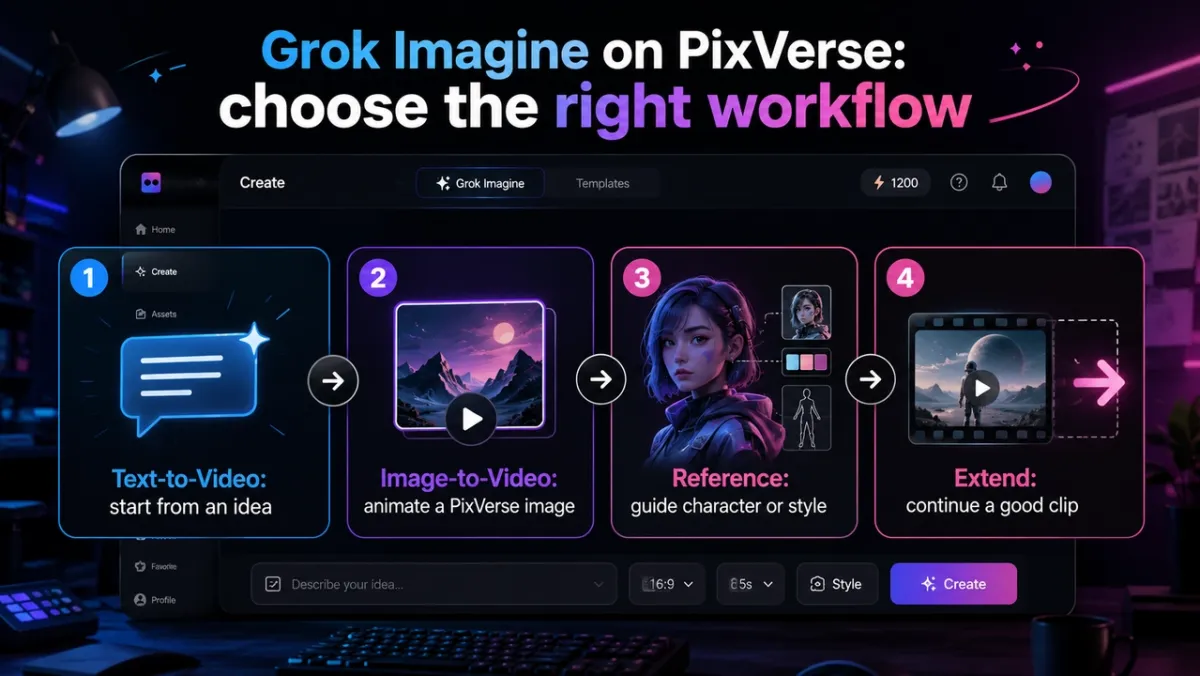
Grok Imagine’s broader xAI documentation includes additional Imagine capabilities. Inside PixVerse, however, creators should treat Grok Imagine 1.5 as a focused Image-to-Video option. If you need text-only generation, reference guidance, modification, or extension, choose a PixVerse workflow that explicitly supports that mode.
For a capability-led breakdown of what Grok supports on PixVerse, read our Grok Imagine video generation capabilities 2026 guide.
June 2026 Update: Grok Imagine 1.5 Settings
Grok Imagine 1.5 is positioned as native audio-video generation from xAI. On PixVerse, it appears as a new model option above the earlier Grok Imagine model and is marked with a NEW badge where the interface shows model badges.
| Setting | Grok Imagine 1.5 on PixVerse |
|---|---|
| Available mode | Image-to-Video only |
| Required input | An uploaded or PixVerse-generated image |
| Prompt | Required motion instruction describing how the image should move |
| Duration | 1-15 seconds, default 6 seconds |
| Resolution | 480p or 720p, default 720p |
| Aspect ratio | Follows the input image; no separate aspect ratio selector |
| Audio | Native audio is on by default and cannot be turned off |
| Plan access | Pro and above; Ultra members receive a 40% discount |
| PixVerse credit planning | 20 credits per second at 480p, 40 credits per second at 720p |
If you submit Grok Imagine 1.5 without an image, PixVerse blocks the request because the model needs an image input. Use a clear source image first, then write the prompt around motion, camera behavior, atmosphere, and what must stay unchanged.
How to Use Grok Imagine on PixVerse
- Open PixVerse and sign in.
- Switch to Image to Video mode.
- Choose Grok Imagine 1.5 from the model selector if it is available on your account.
- Upload a source image, or first create a source image with a PixVerse image model.
- Write a motion prompt that describes the camera movement, subject action, mood, and constraints.
- Choose duration from 1-15 seconds and resolution from 480p or 720p. The aspect ratio follows your input image.
- Generate the first result, then review motion, composition, subject consistency, native audio fit, and platform fit.
- If you need Text-to-Video, Reference, Modify, Extend, or 1080p final output, switch to the PixVerse model or workflow that supports that task.
The fastest rule is simple: use Grok Imagine 1.5 when you have a source image and want a short image-to-video result with native audio. Use another PixVerse workflow when your starting point is only text, multiple references, an existing clip to edit, or a clip you want to extend.
Grok Imagine PixVerse Workflows: What 1.5 Changes
| Creator goal | Use this Grok workflow | Prompt or input tip |
|---|---|---|
| Animate a product image, poster, character image, or thumbnail | Grok Imagine 1.5 Image-to-Video | Upload or create the source image first, then describe only the motion you want added. |
| Turn a written idea into a short video | Use the earlier Grok Imagine option or another PixVerse text-to-video model where available | Describe the subject, action, setting, camera movement, and target format. |
| Keep a character, product, or style visible with references | Use a PixVerse model or workflow that explicitly supports Reference | Generate clean reference images on PixVerse and map each image to a role in the prompt. |
| Make a good clip longer | Use Extend in a workflow that supports it | Start from a PixVerse-generated clip, then describe the next beat instead of repeating the entire original scene. |
This distinction matters because Grok Imagine 1.5 is not a drop-in replacement for every Grok workflow. It is the newer Image-to-Video route. For polished delivery, you can continue the project with PixVerse V6, C1, audio tools, or other PixVerse member features depending on the final output you need.
Grok Imagine 1.5 Prompt Guide: Create Source Assets on PixVerse First
For Grok Imagine 1.5, build the visual source asset inside PixVerse first. Then use the generated image as the required Image-to-Video input and ask Grok Imagine 1.5 to animate it. This keeps the workflow on PixVerse instead of asking creators to prepare images in another tool.
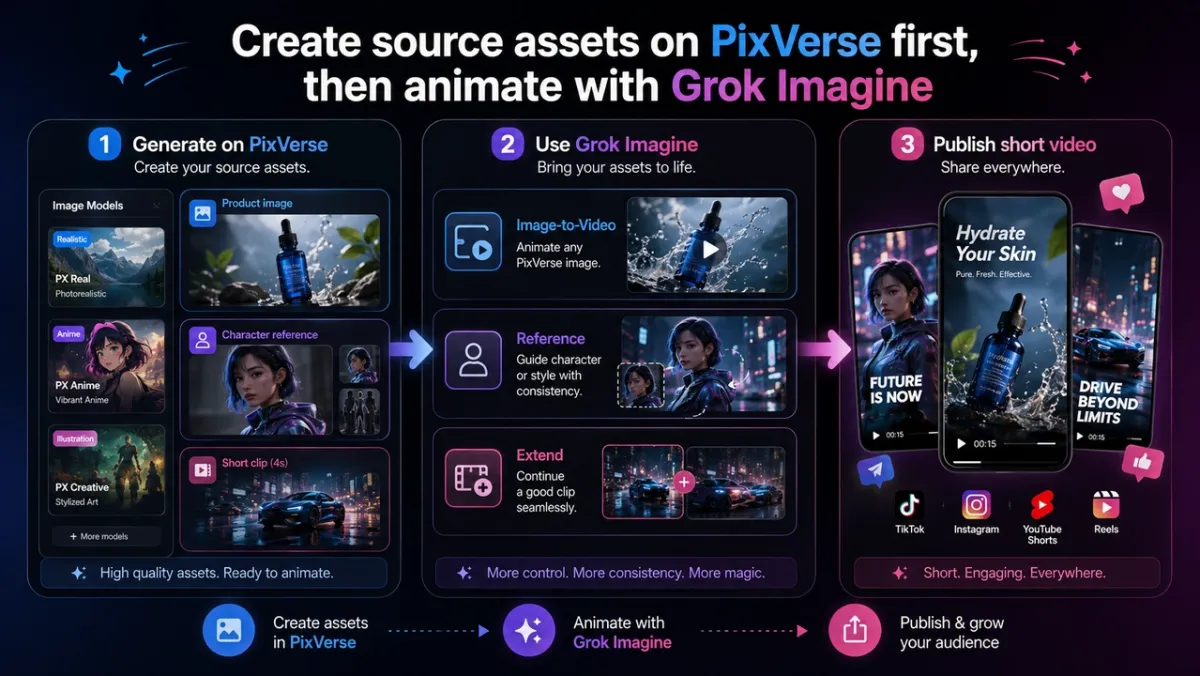
Text-to-Video Prompt Adapted for Grok Imagine 1.5
Grok Imagine 1.5 on PixVerse does not support text-only video generation. If you start with only an idea, use the prompt below as a source image brief first, then animate that image with Grok Imagine 1.5.
Source image prompt:
A compact wireless speaker sits on a rain-slicked city rooftop at night. Neon signs reflect across the black surface of the speaker. The camera starts with a close-up of water droplets on the grille, then slowly pulls back to reveal the skyline. Soft blue and magenta lighting, realistic product commercial style, smooth slow-motion rain, vertical 9:16 social video.
Grok Imagine 1.5 motion prompt:
Animate this PixVerse-generated speaker image into a short product teaser. Keep the speaker shape, grille texture, rooftop table, neon reflections, and vertical framing consistent. Add slow rain motion, a gentle camera pull-back, subtle blue light from the speaker rim, and native ambient city sound. No extra text, no logo distortion.
What to look for: The first frame should stay close to the source image. Rain, reflections, and native audio should add energy without hiding the product.
How to Create a PixVerse Product Image for Grok Image-to-Video
Step 1: generate the product image on PixVerse with an image model.
Source asset prompt:
A compact matte-black wireless speaker on a clean dark studio surface. Soft blue rim light from the left, subtle magenta accent light from the right, visible fabric grille texture, tiny water droplets on the surface, premium product photography, centered composition, no text, no logo, vertical 9:16.
Step 2: use the generated image as the Image-to-Video input in Grok Imagine 1.5.
Prompt:
Animate the PixVerse-generated product image into a short cinematic teaser. Keep the speaker’s shape, color, texture, and framing consistent. Add a slow push-in camera move, subtle light sweep across the grille, small droplets sliding naturally, soft background motion, and clean native ambient sound. Clean premium launch mood, realistic motion, no extra text, vertical 9:16 social video.
What to look for: The first frame should stay close to the PixVerse-generated image. The added motion should enhance the still image without changing the main design.
How to Create PixVerse Reference Images for Other Grok Workflows
Grok Imagine 1.5 on PixVerse does not support Reference mode. Use this workflow only with an earlier Grok Imagine option or another PixVerse model that explicitly supports references.
Step 1: generate a character reference image on PixVerse.
Source asset prompt for @Image1:
A young cyberpunk courier character wearing a cropped silver jacket, black utility pants, white sneakers, and a small glowing blue messenger bag. Short black hair with a silver streak, confident expression, full-body character concept art, clean neutral background, consistent outfit details, no text, vertical 9:16.
Step 2: generate an environment style reference image on PixVerse.
Source asset prompt for @Image2:
A neon-lit futuristic corridor with reflective black floor panels, blue and magenta wall lights, light mist in the air, glossy sci-fi architecture, cinematic depth, no people, no text, vertical 9:16.
Step 3: use both PixVerse-generated images as references in a supported Reference workflow.
Prompt:
Use @Image1 as the main character reference and @Image2 as the environment style reference. The character walks through a neon-lit corridor while reflections move across the walls. Keep the character’s outfit, hairstyle, and color palette consistent. Slow tracking shot from medium wide to close-up, cinematic lighting, short vertical concept video.
What to look for: The result should borrow identity or style from the references while still generating a new scene. If the character drifts, simplify the prompt and make each reference role more explicit.
How to Prepare a PixVerse Clip for Extend
Grok Imagine 1.5 on PixVerse does not support Extend because the current integration has no video input path for extension. Use this workflow only with a PixVerse model or feature that supports Extend.
Step 1: generate the first short clip on PixVerse with any suitable PixVerse video model.
Starting clip prompt:
A compact wireless speaker sits on a rooftop table at night as rain falls softly around it. Neon city lights reflect on the wet table surface. The camera begins in a medium close-up and slowly pushes toward the speaker. Premium product commercial style, realistic rain, blue and magenta lighting, vertical 9:16.
Step 2: use a supported Extend workflow to continue the clip.
Extend prompt:
Continue from the final frame. The camera pulls back slightly as the speaker lights turn on, a subtle pulse of blue light moves around the grille, and the rain reflections become brighter. Keep the same product, rooftop setting, neon lighting, and premium commercial mood.
What to look for: The extended section should feel like the next beat of the same PixVerse-generated clip, not a new scene with a different product or background.
When to Use Grok Imagine on PixVerse
Grok Imagine 1.5 for Image-to-Video Social Drafts
Use Grok Imagine 1.5 when you already have a visual starting point for TikTok, Reels, Shorts, or X-style video posts. A strong poster, product image, thumbnail, character concept, or campaign still gives the model a clear first frame and makes the output easier to judge.
Grok Imagine 1.5 for Image-to-Video Animation
Use Image-to-Video after you create a poster, product shot, thumbnail, character design, or AI-generated image on PixVerse. Grok Imagine 1.5 can help test whether that PixVerse-generated still visual has enough motion potential for a short video, with native audio included in the generation.
Reference Mode for Character or Product Ideas
Use a supported Reference workflow when a specific person, object, product, or style needs to guide the generated clip. This is useful for early storyboard tests, brand concept exploration, and recurring visual motifs, but it is not part of the Grok Imagine 1.5 Image-to-Video integration on PixVerse.
Extend for Longer Short-Form Clips
Use a supported Extend workflow when a generated clip has the right look but ends too soon. Grok Imagine 1.5 on PixVerse does not support Extend, so choose another PixVerse workflow when continuation is the main task.
PixVerse Member Workflows Beyond Grok Imagine
Grok Imagine 1.5 is one Image-to-Video model option inside PixVerse, not the full PixVerse feature set. Some video creation tasks are better handled by other PixVerse models or member tools.
| Need | Better PixVerse direction |
|---|---|
| 1080p final output | Use PixVerse V6 or another high-resolution PixVerse workflow. |
| Text-to-Video from a written idea | Use an earlier Grok Imagine option or another PixVerse text-to-video model where available. |
| Reference-guided generation | Use a PixVerse workflow that explicitly supports Reference. |
| Clip extension | Use Extend in a PixVerse workflow that supports video continuation. |
| More cinematic production control | Use PixVerse V6 or PixVerse C1 depending on the shot style. |
| Video modify, restyle, or other editing tasks | Use the relevant PixVerse member features or models that support those tools. |
| Polished sound, dialogue, or lip sync | Use PixVerse audio, lip sync, or dedicated audio workflows where available. |
This distinction matters for search intent and for user experience. Grok Imagine 1.5 on PixVerse is strongest as a fast route for Image-to-Video with native audio. PixVerse members can still access other creation features on the platform, but they should not all be described as Grok Imagine 1.5 modes.
Quick Answers to Broader Grok Questions
Does Grok Imagine have video generation on PixVerse?
Yes. Grok Imagine 1.5 supports video generation on PixVerse through Image-to-Video. Earlier Grok Imagine or other PixVerse workflows may support Text-to-Video, Reference, and Extend where those modes are available.
Does Grok Imagine support image editing on PixVerse?
For Grok Imagine 1.5, treat images as required video inputs for Image-to-Video. If you need standalone image editing, reference-guided generation, modification, or advanced video editing, use the relevant PixVerse member tools or another model that supports that task.
Is Grok Imagine the same as all PixVerse video tools?
No. Grok Imagine 1.5 is one Image-to-Video model option inside PixVerse. PixVerse also offers other models and tools for higher-resolution generation, editing, sound, lip sync, and production workflows.
Grok Imagine on PixVerse FAQ
Is Grok Imagine 1.5 available on PixVerse?
Yes. Grok Imagine 1.5 is available on PixVerse as an Image-to-Video generation option on Web and App. Availability may depend on your account plan and the current PixVerse model selector.
How do I use Grok Imagine 1.5 on PixVerse?
Open PixVerse, switch to Image to Video, choose Grok Imagine 1.5, upload or create a source image, write a motion prompt, choose duration and resolution, and generate the clip.
Does Grok Imagine 1.5 support Text-to-Video on PixVerse?
No. On PixVerse, Grok Imagine 1.5 is available only for Image-to-Video. It requires an image input, so use another PixVerse workflow if you want to generate from text only.
Can I create 1080p videos with Grok Imagine 1.5 on PixVerse?
For 1080p delivery, use PixVerse V6 or another PixVerse workflow that supports higher-resolution output. Grok Imagine 1.5 offers 480p and 720p options on PixVerse.
Does Grok Imagine 1.5 include audio?
Yes. Grok Imagine 1.5 uses native audio-video generation. Audio is on by default and there is no separate audio switch in the PixVerse workflow.
How many PixVerse credits does Grok Imagine 1.5 use?
For planning, Grok Imagine 1.5 uses 20 credits per second at 480p and 40 credits per second at 720p on PixVerse. Check the in-product credit display before generating because account benefits and pricing rules can change.
Who can use Grok Imagine 1.5 on PixVerse?
Grok Imagine 1.5 is available to Pro members and above. Ultra members receive a 40% discount.
Who should use Grok Imagine 1.5 on PixVerse?
Use it if you are a creator, marketer, designer, or social video producer who wants fast AI video drafts from images, posters, thumbnails, character concepts, or product stills.
Is Grok Imagine 1.5 better for text-to-video or image-to-video on PixVerse?
Grok Imagine 1.5 on PixVerse is an Image-to-Video model, so use it when you have a source visual. If you only have a written idea, create a source image first or switch to a PixVerse text-to-video workflow.
Start Creating Grok Imagine 1.5 Videos on PixVerse
Start with one focused task: animate a strong still image into a short social video. Once the direction works, continue refining with the PixVerse model or member workflow that fits the final output.
Open PixVerse, switch to Image to Video, and choose Grok Imagine 1.5 from the model selector to begin.