Grok 能生成视频吗?Video 1.5、提示词、价格与限制
是的,Grok 可通过 Grok Imagine 生成视频。了解 Video 1.5 更新、文生视频限制、API 价格、提示词和 PixVerse 测试建议。
当创作从静态画面或参考素材出发时,可以通过 AI 图生视频 将画面转为动态片段。
当创意从文字描述开始时,可以通过 AI 文生视频 生成首版片段。
是的,Grok 可以通过 Grok Imagine 生成视频,但准确答案取决于你使用的产品入口、模型和视频生成工作流。xAI 的 Imagine 总览文档描述了从文本或静态图生成视频的能力,而官方 grok-imagine-video-1.5-preview API 模型页列出的是 Image 和 Video 模态,并说明该 preview 模型目前不支持文生视频。
对于正在比较 AI 视频工具的创作者,这一区别尤为关键。部分 Grok Imagine 工作流以提示词、源图、参考素材或已有片段为起点;另一些则侧重图生视频、视频编辑或延展,而非纯文生视频输出。
如果你正在决定下一步测试什么,这个区别很重要。本指南会整理 2026 年 6 月 Grok Imagine Video 1.5 Preview 更新、可复制提示词、API 价格提示、文生视频限制、图生视频与视频输入工作流,以及当你想在一个创作流程中对比 Grok 和其他 AI 视频模型时 PixVerse 的位置。
Grok 能生成视频吗?
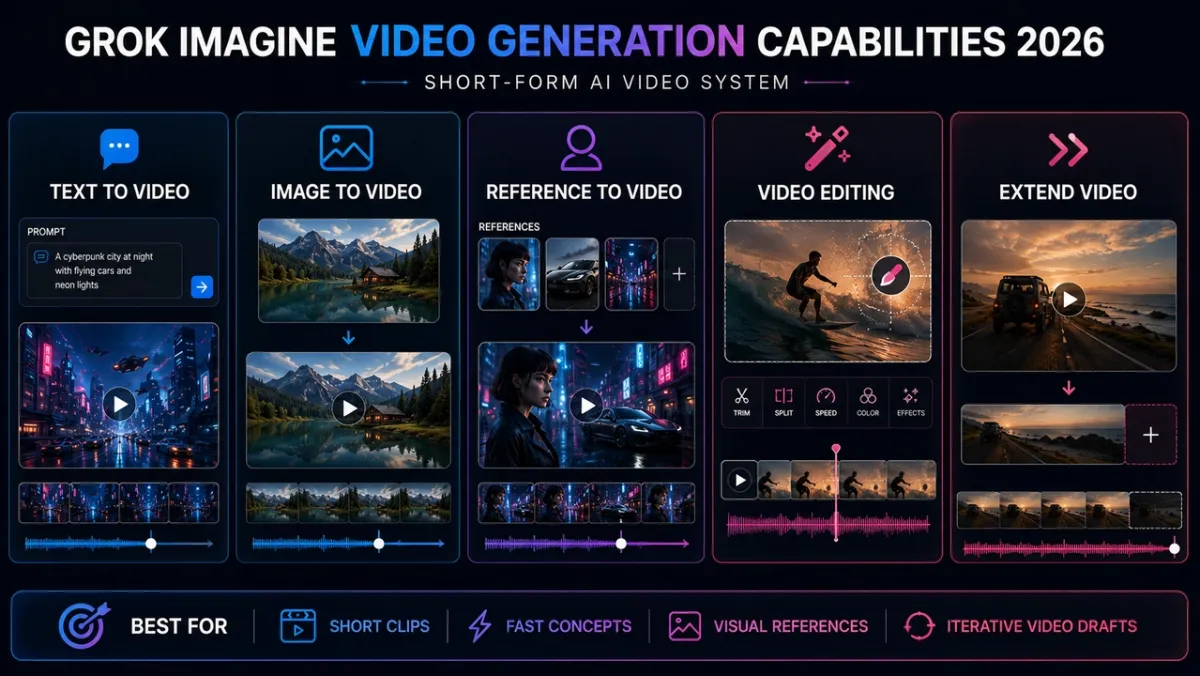
是的。Grok 通过 Grok Imagine 生成视频,后者是 xAI 的图像和视频生成模型家族。根据工作流,创作者可以将提示词、源图、参考素材或已有视频片段作为输入。官方 xAI Imagine overview 将 Imagine 描述为支持图像生成、图像编辑、基于文本或静态图的视频生成、视频编辑、参考图生成视频和视频延展的模型家族。
但对于搜索「Grok 是否有视频生成」的用户,更实用的答案不是简单的「有」。Grok Imagine 可以让静态图动起来,可以支持参考图工作流,也可以在更广义的 Imagine 文档中处理视频创作或编辑路径。不过,不应默认每一个 Grok 视频模型都支持文生视频。当前 grok-imagine-video-1.5-preview API 页面明确写着该模型不支持 text-to-video。
因此更稳妥的生产判断是:Grok 的视频支持取决于你使用的入口。先确认你是在 Grok、X、xAI API 还是合作方工作流里操作,再核对具体模型名、输入类型、价格、rate limit 和输出限制。
2026 年 6 月更新:Grok Imagine Video 1.5 Preview
截至 2026 年 6 月 3 日,xAI 已经有官方 grok-imagine-video-1.5-preview 模型页。它明确了更广义的 Grok Imagine 产品与这个具体 API 模型之间的区别。
对开发者和创作者而言,关键在于不同 Grok Imagine 模型可接受的输入、输出和工作流限制可能不同。在对分辨率、生成能力或视频处理行为作出假设前,应确认具体模型。
该模型页列出的模型名是 grok-imagine-video-1.5-preview,alias 为 grok-imagine-video-1.5-2026-05-30。页面列出 Image 和 Video 模态,而不是纯文本生成视频路径,并说明该模型目前不支持 text-to-video。
价格方面,同一页面列出 output 为 $0.08 per second,image input 为 $0.01,video input 480p 为 $0.08/sec,video input 720p 为 $0.14/sec,rate limit 为每分钟 60 次请求。把这些当作官方文档快照,而不是永久投放假设,因为 preview 模型的访问、限额和价格都可能变化。
最稳妥的写法是:Grok Imagine 更广义的视频工作流可能会根据产品入口和模型支持 text-to-video,但当前 grok-imagine-video-1.5-preview API 页面列出 Image 和 Video 模态,并说明它不支持 text-to-video。
Grok Imagine vs Grok Imagine Video 1.5 Preview
选择测试路径或写生产 brief 时,可以用这张简表快速区分。
| 模型 / 入口 | 支持的输入方向 | Text-to-video 状态 | 最适合用途 |
|---|---|---|---|
| Grok Imagine 更广义的产品/API 工作流 | 可能包含文本、图片、参考图、编辑和延展工作流,取决于具体入口。 | Imagine 总览中有相关能力,但可用性取决于模型和产品入口。 | 用于 prompts、静态图动画、参考图、编辑和延展等宽泛创意探索。 |
grok-imagine-video-1.5-preview API 模型 |
官方模型页列出图片和视频输入工作流。 | 当前模型页不支持。 | 用新版 preview 模型做可控的图生视频和视频输入测试。 |
使用任一路径之前,都要核对当前产品访问权限、模型名、输入类型、时长、分辨率、存储方式、安全审核、价格和 rate limits。做成本规划时,应查看最新 xAI pricing page 和具体模型页,而不是只依赖一句笼统的 Grok Imagine 能力描述。
2026 年 Grok Imagine 视频功能
在更广义的 Grok Imagine 生态中,xAI 当前 Imagine 文档列出了可配置视频生成、图生视频、视频编辑、参考图生成视频和延展工作流。2026 年最关键的细节是:真正上线使用前,要把这些能力和具体模型页对齐。
当某个入口支持文字提示词时,text-to-video 适合快速概念探索,比如社交短片、产品氛围、meme 想法或电影感草稿。但对 1.5 Preview API 模型,不要在模型页更新前默认它支持这一路径。
图生视频更适合产品图、海报、角色、缩略图和概念帧。静态图会锚定首帧,因此当形状、构图或身份稳定性很重要时,这条路径更可控。
参考图生成视频适合需要复用视觉身份,但又不想让参考图强制成为首帧的场景。它更适合角色身份、产品轮廓、服装、风格或重复出现的物体。
视频编辑和延展更偏生产工作流。编辑是让模型修改现有片段,同时尽量保留场景其余部分;延展是从片段结尾帧继续生成。它们适合天气变化、风格重绘、第二个动作、备选结尾和短视频节奏测试。
Grok Imagine 如何融入现代 AI 视频工作流
现代 AI 视频工作流通常结合提示词理解、图像条件控制、运动生成和画面合成。在产品层面,Grok Imagine 支持面向创作者的路径,例如图生视频、视频编辑、参考素材引导的工作流和片段延展。
在许多工作流中,输入图片会成为锚点,有助于在生成过程中保持身份、构图、产品形状或视觉风格。因此,当视觉一致性很重要时,图生视频往往比纯文生视频更可控。
xAI 尚未公开说明 Grok Imagine 背后的每一项技术组件。将其与基于扩散模型的视频系统进行更广泛比较时,应仅将此作为工作流背景,并用接近实际生产的测试验证具体模型的行为。
值得生成视频的 Grok Imagine 提示词
可以先从能体现不同能力的提示词开始:产品稳定性、人物运动和电影感环境控制。如果你使用的 Grok Imagine 入口支持 text-to-video,可以直接使用这些提示词。如果你测试的是 grok-imagine-video-1.5-preview,请先创建或上传起始图,再把提示词当作运动、镜头和风格方向。
1. 产品广告提示词
用这条测试产品可读性、表面细节、灯光运动和商业质感。
提示词:
A compact black wireless speaker sits on a rain-slicked rooftop at night. Neon signs reflect across the wet surface and tiny droplets bead on the speaker grille. The camera begins in an extreme macro close-up on the droplets, then slowly pulls back to reveal the skyline. A soft blue light pulses once around the speaker rim as rain falls in slow motion. Realistic premium product commercial, shallow depth of field, vertical 9:16, no text, no logo distortion.
效果点评: 好的结果应该像一个高级新品预告:产品轮廓清晰、雨滴可信、镜头拉远时能露出天际线且不丢失音箱。主要风险是产品漂移。如果格栅、边缘或机身形状在镜头运动中变化过大,画面虽然好看,但对真实产品工作流的价值会降低。
2. 角色社交短片提示词
用这条测试人脸稳定性、身体运动、场景转场和短视频钩子。
提示词:
A stylish young creator in a silver jacket stands in a tiny elevator lined with mirrored panels. The lights flicker once, then the elevator doors open onto a surreal midnight city street filled with glowing billboards and drifting steam. The camera tracks backward as she steps out, smiles at the camera, and raises a small camera toward the viewer. Fast social hook, cinematic but playful, crisp facial detail, smooth motion, vertical 9:16, no captions.
效果点评: 这条适合判断 Grok Imagine 能否在快节奏社交钩子里稳定保持人物。最佳结果应该让电梯到城市街道的揭示既惊喜又连续。风险在人脸稳定性:如果微笑、眼睛或夹克细节在镜头间漂移,它仍可作为氛围测试,但不够适合作为精修创作者广告。
3. 电影感环境提示词
用这条测试镜头规模、反射、环境运动和电影构图。
提示词:
A lone astronaut walks across a shallow mirror-like salt flat at sunrise. The sky is pale orange and violet, and a huge broken moon hangs low on the horizon. Each step sends a soft ripple through the reflective water. The camera starts behind the astronaut, then slowly cranes upward to reveal the vast landscape and a distant glowing research station. Epic cinematic sci-fi mood, realistic reflections, slow graceful motion, widescreen 16:9, no text.
效果点评: 这是三条里最强的电影感压力测试,因为它同时要求尺度、反射和受控镜头运动。好的结果应该让盐湖、涟漪、月亮和升臂镜头在空间上连贯。常见失败是「很美但运动模糊」:场景很宏大,但宇航员、倒影或远处研究站不一致。
更多不同场景的 Grok Imagine 提示词
这些提示词适合做更广泛的测试覆盖。text-to-video 示例更适用于支持纯文本生成视频的 Grok Imagine 入口。对于 Grok Imagine Video 1.5 Preview,可以把它们当作「源图 + 运动提示」的 brief。
文生视频:快速 meme 或趋势短片
A tiny robot barista tries to make latte art inside a crowded futuristic cafe. The foam accidentally forms a perfect smiley face, and everyone at the counter reacts with surprised laughter. Quick comedic timing, handheld social video feel, warm cafe lighting, clear robot expression, vertical 9:16, no text overlays.
文生视频:美妆或时尚镜头
A fashion model wearing a translucent raincoat walks through a glowing tunnel of blue LED lights. The camera tracks beside her in slow motion as water droplets sparkle on the fabric. High-fashion editorial look, crisp facial detail, glossy reflections, controlled runway pacing, vertical 9:16.
文生视频:食物 ASMR
A chef slices a glossy mango on a dark stone board under warm morning light. Juice beads along the knife edge, thin slices fan open in perfect rhythm, and a soft breeze moves a linen napkin in the background. Macro food commercial, shallow depth of field, smooth slow motion, no text.
图生视频:产品预告
Animate the uploaded product image into a premium launch teaser. Keep the product shape, color, label, and camera angle consistent. Add a slow push-in, a subtle light sweep across the surface, tiny particles floating in the background, and a clean studio shadow shift. No extra text, no extra objects, vertical 9:16.
图生视频:海报动画
Animate this movie poster as a short atmospheric teaser. Keep the main character, composition, title placement, and color palette unchanged. Add drifting fog, a slow camera push toward the character’s face, faint background light movement, and subtle fabric motion. Cinematic suspense mood, no new text.
参考图生成视频:角色一致性测试
Use the reference images to preserve the character’s face, hairstyle, jacket, and color palette. Generate a new shot where the character walks through a rainy train station at night, glances over their shoulder, then disappears into a passing crowd. Smooth tracking shot, realistic reflections, moody thriller lighting, no extra characters with the same face.
参考图生成视频:产品身份测试
Use the reference images to preserve the product silhouette, material, color, and front label. Create a new studio scene where the product rotates slowly on a matte black pedestal while a narrow beam of light moves across the surface. Premium hardware launch style, minimal background, no logo distortion, no text changes.
视频编辑:天气变化
Change the scene from sunny afternoon to light rain at dusk. Preserve the people, camera angle, building layout, and original action. Add wet pavement reflections, soft gray-blue lighting, small raindrops, and a calm cinematic mood. Do not add new people or text.
视频编辑:产品颜色变化
Change only the product body color from white to deep matte black. Preserve the logo placement, shape, camera movement, hands, table, background, and lighting direction. Keep the rest of the scene unchanged and realistic.
视频延展:第二个节拍
Continue from the final frame. The camera pulls back slightly as the product lights turn on, a subtle blue pulse moves around the edge, and the background reflections become brighter. Keep the same product, setting, camera angle, lighting mood, and color palette.
视频延展:故事结尾
Continue from the final frame. The character pauses, turns toward the distant glowing doorway, and takes one slow step forward as the light brightens. Keep the same character design, wardrobe, environment, camera movement, and cinematic mood.
如何写出更好的 Grok Imagine 视频提示词
Grok 视频提示词最好描述「运动」,而不只是画面外观。一个好的提示词能为生成工作流提供足够上下文,以保持主体、理解动作、遵循镜头方向并满足预期限制。一个好提示词应该回答五个问题:
- 明确必须保持可读的主体:人物、产品、物体、角色或场景。
- 描述片段中会发生的动作:行走、转身、光线扫过、下雨或镜头移动。
- 补充镜头行为:推近、拉远、跟拍、升镜头、手持感、微距特写或俯拍。
- 设定环境:地点、时间、光线、天气、背景运动和氛围。
- 加入保护素材的限制:无文字、不要扭曲 logo、保留产品标签、保持角色身份、避免多余人物。
对于图生视频和参考图生成视频,最重要的是克制。图片本身已经包含主体、构图和风格信息,所以提示词应集中在运动、镜头行为、氛围,以及哪些元素必须保持不变。
在商业项目或以角色为主的工作流中,创作者通常会先优化静态素材,再让它动起来。当图像一致性重要时,这有助于建立更干净的起点。
工作流准备:图像局部重绘与视频编辑
图像局部重绘会在保留周围内容的同时,修改静态图片的指定部分;视频编辑则将类似的 AI 引导式修改应用到连续运动的帧中。
在实践中,图像局部重绘可以作为图生视频前的准备步骤。先优化产品图、角色肖像或营销素材,再将审核通过的视觉资产制作成视频序列,有助于提升 AI 辅助制作流程中的视觉一致性、提示词控制和商业可用性。
Grok Imagine Video 1.5 价格与 API 注意事项
当前 xAI 文档让 grok-imagine-video-1.5-preview 的价格更明确。这些数字适合用来规划测试,但应视为 xAI 文档快照,并在生产前再次核对。
核心成本是 output $0.08 per second,也就是说生成预算应按片段时长计算,而不只是按请求次数计算。image input 标为 $0.01,因此静态图测试相对容易估算。video input 更贵:480p input 为 $0.08/sec,720p input 为 $0.14/sec,所以即使是短片编辑测试,只要迭代次数多,成本也会累积。
模型页还列出每分钟 60 次请求。这个额度足够做结构化测试,但团队在做自动化之前仍应核对账号权限、区域可用性和当前 rate limit 状态。
短时长决定工作流。 把 Grok Imagine 当作短片段生成器。更长内容应拆成多个片段、延展或后期剪辑。
一致性仍然需要锚点。 如果人物、产品、服装或物体必须稳定,图生视频或参考图生成视频通常比纯文生视频更稳。
文字和 logo 必须复核。 AI 视频模型可能生成看似可读、但实际不准确的标签。发布前一定检查所有屏幕文字。
安全政策很重要。 避免依赖未经同意的肖像修改、误导性身份变化、真实人物性化呈现或其他敏感变换。
如何测试 Grok Imagine Video 1.5
不要只用一个好看的 prompt 判断 Grok Imagine Video 1.5 Preview。应该用接近生产的输入测试,并按真实投放标准评分。
先做图生视频测试。准备干净的产品图、包装图、电商主图、人像、角色概念图、海报或活动缩略图。让 Grok 添加可控运动:镜头推进、光线扫过、轻微动作、背景氛围、雾气、布料运动或前景粒子。目标不是最大戏剧性,而是看主体在变得更有生命力的同时是否保持稳定。
然后用动作清晰、构图稳定的短视频测试 video input。每次只要求一个受控变化:天气、光线、情绪、色彩处理、产品颜色、背景时间或美术方向。这能看出该工作流在受控条件下如何处理运动一致性、场景结构和提示词对齐。
每次测试都用五个指标评分:主体一致性、运动连贯性、prompt 遵循度、文字/logo 准确性和商业可用性。如果片段很漂亮,但产品形状变化或 logo 无法读清,就还不适合广告、电商页面或品牌活动。
PixVerse 如何承接 Grok Imagine 测试
如果你的目标是把 Grok 与其他 AI 视频模型放在一起比较,或者你需要 text-to-video、image-to-video、reference control、短视频广告工作流和多轮迭代,PixVerse 更适合作为测试工作流,而不是只依赖单一模型。
在 PixVerse 中,可以把 Grok 当作一个模型选项,与其他可用 AI 视频模型并排测试。用同一个 prompt、图片或参考想法跑不同模型,再比较提示词遵循度、运动质量、身份稳定性、商业可用性、输出质量和迭代成本,最后选择最适合发布的片段。
哪里可以试用 Grok Imagine?
有几条路径,它们解决的问题不同。
Grok 或 X 的产品入口最适合普通用户快速试想法和社交内容。在默认所有控制都可用之前,请先确认你所在地区、套餐和界面里是否已经开放视频生成。
xAI API 更适合开发者工作流、自动化和可控实验。用于生产前,要核对当前 API 价格、支持的输入类型、分辨率、时长、rate limits,以及生成资产应该如何保存。
PixVerse 更适合在同一个创作环境里比较 Grok 和其他 AI 视频模型。关键不只是 Grok 能不能用,而是哪一个模型最适合你的 prompt、参考图、风格和发布渠道。
如果你的下一步是在创作者工作流中把 Grok 和其他 AI 视频选项一起测试,可以阅读单独的 Grok Imagine on PixVerse guide。那篇是 PixVerse 专属教程;本文解释 Grok Imagine 的能力、提示词、限制和决策点。
FAQ:Grok Imagine 视频生成器
Grok 能生成视频吗?
可以。Grok 可以通过 Grok Imagine 生成视频。2026 年的关键细节是,不同产品入口和模型的能力不同:更广义的 Grok Imagine 文档包含从文本提示词或静态图生成视频,而 grok-imagine-video-1.5-preview 被记录为图片/视频输入 preview 模型,目前不支持 text-to-video。
Grok Imagine Video 1.5 支持 text-to-video 吗?
不支持,至少当前 xAI 模型页是这样写的。官方 grok-imagine-video-1.5-preview 页面列出 Image 和 Video 模态,并说明该模型目前不支持 text-to-video。由于 preview 模型的能力可能变化,请始终核对最新文档。
grok-imagine-video-1.5-preview 是什么?
grok-imagine-video-1.5-preview 是 xAI 官方用于 Grok Imagine 视频工作流的 preview API 模型,有自己的价格、rate limit、可接受输入和工作流限制。模型页列出 alias grok-imagine-video-1.5-2026-05-30、Image 和 Video 模态、output $0.08/sec,以及 60 RPM rate limit。
Grok Imagine Video 1.5 多少钱?
根据 xAI 文档,grok-imagine-video-1.5-preview output 为每生成一秒 $0.08。同一模型页列出 image input $0.01,video input 480p 为 $0.08/sec,video input 720p 为 $0.14/sec。生产前请重新查看官方文档,因为 preview 价格可能变化。
Grok Imagine 和 Grok Imagine Video 1.5 Preview 有什么区别?
Grok Imagine 是更广义的图像和视频生成家族或产品入口。Grok Imagine Video 1.5 Preview 是一个具体 API 模型,有自己的模型名、alias、模态、价格和 rate limit。因此「Grok 支持 text-to-video」这类笼统说法必须回到你实际使用的模型确认。
Grok 有图生视频能力吗?
有。Grok Imagine 可以用文字提示词让静态图动起来。当产品形状、角色身份、构图或视觉一致性需要在生成视频中保持稳定时,图生视频工作流往往是更合适的选择。
Grok Imagine 更适合图生视频还是文生视频?
对当前 grok-imagine-video-1.5-preview API 模型来说,图生视频和视频输入测试更稳,因为模型页说明它不支持 text-to-video。对于支持 text-to-video 的更广义 Grok Imagine 入口,文本提示适合快速探索想法;当产品形状、身份、构图或风格一致性更重要时,用图生视频。
可以在 PixVerse 上比较 Grok Imagine 和其他 AI 视频模型吗?
可以。PixVerse 适合把 Grok 作为一个模型选项,与其他可用 AI 视频模型一起测试。用同一个 prompt、图片或参考想法跑不同模型,然后比较主体一致性、运动连贯性、prompt 遵循度、文字/logo 准确性、商业可用性和迭代成本。
最好的 Grok Imagine 视频提示词结构是什么?
使用主体、动作、镜头、环境和限制。描述画面中有什么、它如何运动、镜头如何表现、光线或氛围如何设置,以及需要遵守的限制,例如保留产品标签或避免文字叠加。
Grok Imagine 支持视频编辑吗?
支持。xAI 文档列出了基于 prompt 的视频编辑:提供现有视频,并描述你想改变什么,同时尽量保留场景其他部分。
Grok Imagine 能使用参考图吗?
能。参考图生成视频可以用视觉参考引导输出,而不必把参考图强制作成首帧。它适合角色身份、产品形状、服装、视觉风格和重复物体。
Grok Imagine 视频可以有多长?
xAI 当前视频总览列出生成最长可到 15 秒、编辑输入视频最长 8.7 秒、延展输出 2 到 10 秒,并有输入视频要求。规划最终交付前,请始终查看当前界面或 API 文档。
为什么我看不到 Grok 视频生成功能?
可用性可能受产品入口、账号、地区、灰度阶段和访问路径影响。如果某个界面没有看到该功能,请检查当前 Grok、X、xAI API 或支持的合作方工作流。
结论
Grok 可以生成视频,但更关键的问题是你说的是哪一个 Grok Imagine 入口或模型。对更广义的 Grok Imagine 工作流,文本提示、静态图、参考图、编辑和延展都可能重要。对 grok-imagine-video-1.5-preview,应聚焦官方图片/视频输入工作流,不要默认它支持 text-to-video。
实际测试时,不要停在「可以」这个答案。应评估完整工作流:提示词质量、图像输入、参考素材、编辑控制和输出一致性。结合上面的 2026 年 6 月模型说明、价格提示、prompt 和评估流程,决定是直接测试 Grok、使用 xAI API,还是在 PixVerse 中把 Grok 与其他 AI 视频模型一起比较。