Grok สร้างวิดีโอได้ไหม? Video 1.5, พรอมต์ ราคา และข้อจำกัด
ได้ Grok สร้างวิดีโอผ่าน Grok Imagine ดูอัปเดต Video 1.5 ข้อจำกัด text-to-video ราคา API พรอมต์ และวิธีทดสอบบน PixVerse
เมื่อเวิร์กโฟลว์เริ่มจากภาพนิ่งหรือสื่ออ้างอิง image-to-video ด้วย AI ช่วยเปลี่ยนภาพนั้นให้เป็นคลิปที่มีการเคลื่อนไหวได้
เมื่อไอเดียเริ่มจากคำอธิบายเป็นข้อความ text-to-video ด้วย AI ช่วยสร้างคลิปแรกได้
ได้ Grok สามารถสร้างวิดีโอผ่าน Grok Imagine ได้ แต่คำตอบที่ถูกต้องขึ้นอยู่กับ product surface โมเดล และเวิร์กโฟลว์การสร้างวิดีโอที่คุณใช้ เอกสารภาพรวมของ xAI Imagine อธิบายการสร้างวิดีโอจากข้อความหรือภาพนิ่ง ขณะที่หน้าโมเดล API อย่างเป็นทางการของ grok-imagine-video-1.5-preview ระบุ modality เป็น Image และ Video และบอกว่าโมเดล preview นี้ยังไม่รองรับ text-to-video ในปัจจุบัน
สำหรับครีเอเตอร์ที่กำลังเปรียบเทียบเครื่องมือวิดีโอ AI ความแตกต่างนี้สำคัญมาก เวิร์กโฟลว์ Grok Imagine บางแบบเริ่มจากพรอมต์ ภาพต้นทาง แอสเซ็ตอ้างอิง หรือคลิปที่มีอยู่แล้ว ขณะที่บางแบบมุ่งที่การสร้าง image-to-video การตัดต่อวิดีโอ หรือการต่อคลิป มากกว่าการสร้าง text-to-video ล้วน
ความแตกต่างนี้สำคัญมากหากคุณกำลังตัดสินใจว่าจะทดสอบอะไรต่อ บทความนี้สรุปอัปเดต Grok Imagine Video 1.5 Preview เดือนมิถุนายน 2026 พรอมต์ที่นำไปใช้ได้ หมายเหตุราคา API ข้อจำกัด text-to-video เวิร์กโฟลว์ image-to-video และ video input รวมถึงบทบาทของ PixVerse เมื่อคุณต้องการเปรียบเทียบ Grok กับโมเดลวิดีโอ AI อื่นใน workflow เดียว
Grok สร้างวิดีโอได้ไหม?
ได้ Grok สร้างวิดีโอผ่าน Grok Imagine ซึ่งเป็นตระกูลโมเดลภาพและวิดีโอของ xAI ครีเอเตอร์สามารถใช้พรอมต์ ภาพต้นทาง แอสเซ็ตอ้างอิง หรือคลิปวิดีโอที่มีอยู่แล้วเป็นอินพุตได้ตามเวิร์กโฟลว์ เอกสาร xAI Imagine overview อธิบายว่า Imagine รองรับการสร้างภาพ การแก้ไขภาพ การสร้างวิดีโอจากข้อความหรือภาพนิ่ง การแก้ไขวิดีโอ reference-to-video และการต่อความยาววิดีโอ
แต่สำหรับคนที่ค้นหาว่า Grok มี video generation หรือไม่ คำตอบเชิงใช้งานจริงละเอียดกว่าคำว่าได้ Grok Imagine สามารถทำให้ภาพนิ่งเคลื่อนไหว ใช้ workflow ที่อิง reference และรองรับเส้นทางสร้างหรือแก้ไขวิดีโอในเอกสาร Imagine ที่กว้างกว่าได้ อย่างไรก็ตาม ไม่ควรเหมารวมว่าทุกโมเดลวิดีโอของ Grok รองรับ text-to-video หน้า grok-imagine-video-1.5-preview ปัจจุบันระบุชัดว่าโมเดลนี้ไม่รองรับ text-to-video
คำตอบที่ปลอดภัยสำหรับการใช้งานจริงคือ ความสามารถด้านวิดีโอของ Grok ขึ้นอยู่กับ surface ที่ใช้ ให้ตรวจสอบก่อนว่าคุณใช้งานผ่าน Grok, X, xAI API หรือ workflow ของพาร์ตเนอร์ แล้วค่อยยืนยันชื่อโมเดล ประเภท input ราคา rate limit และข้อจำกัด output
อัปเดตเดือนมิถุนายน 2026: Grok Imagine Video 1.5 Preview
ณ วันที่ 3 มิถุนายน 2026 xAI มีหน้าโมเดลอย่างเป็นทางการสำหรับ grok-imagine-video-1.5-preview ซึ่งช่วยอธิบายความแตกต่างระหว่างผลิตภัณฑ์ Grok Imagine ในภาพรวมกับโมเดล API เฉพาะนี้ให้ชัดเจนขึ้น
สำหรับนักพัฒนาและครีเอเตอร์ ประเด็นสำคัญคือโมเดล Grok Imagine แต่ละรุ่นอาจรับอินพุต ให้เอาต์พุต และมีข้อจำกัดของเวิร์กโฟลว์ต่างกัน ควรยืนยันโมเดลที่แน่นอนก่อนสรุปเรื่องความละเอียด ความสามารถในการสร้าง หรือพฤติกรรมการประมวลผลวิดีโอ
หน้าโมเดลระบุชื่อ grok-imagine-video-1.5-preview และ alias grok-imagine-video-1.5-2026-05-30 โดยแสดง modality เป็น Image และ Video ไม่ใช่เส้นทาง text-to-video ล้วน และระบุว่าโมเดลนี้ยังไม่รองรับ text-to-video
ด้านราคา หน้าเดียวกันระบุ output ที่ $0.08 per second, image input $0.01, video input 480p $0.08/sec, video input 720p $0.14/sec และ rate limit 60 requests ต่อนาที ให้มองตัวเลขเหล่านี้เป็น snapshot จากเอกสารทางการ ไม่ใช่สมมติฐานถาวรสำหรับ production เพราะสิทธิ์เข้าถึง limit และราคา preview อาจเปลี่ยนได้
คำอธิบายที่ปลอดภัยที่สุดคือ workflow วิดีโอของ Grok Imagine ในความหมายกว้างอาจรองรับ text-to-video ตาม surface และโมเดล แต่หน้า API ปัจจุบันของ grok-imagine-video-1.5-preview ระบุ Image และ Video และบอกว่าไม่รองรับ text-to-video
Grok Imagine vs Grok Imagine Video 1.5 Preview
ใช้ตารางย่อนี้เมื่อเลือกเส้นทางทดสอบหรือเขียน production brief
| โมเดล / surface | ทิศทาง input ที่รองรับ | สถานะ text-to-video | เหมาะกับ |
|---|---|---|---|
| Workflow กว้างของ Grok Imagine ใน product/API | อาจมีข้อความ ภาพ reference การแก้ไข และ extension ตาม surface ที่ใช้ | มีใน Imagine overview แต่ขึ้นอยู่กับโมเดลและ surface | ทดลองไอเดียกว้าง ๆ ด้วยพรอมต์ ภาพนิ่ง reference การแก้ไข และ extension |
โมเดล API grok-imagine-video-1.5-preview |
Workflow ที่ใช้ image และ video input ตามหน้าโมเดลทางการ | หน้าโมเดลปัจจุบันไม่รองรับ | ทดสอบ image-to-video และ video input แบบควบคุมด้วยโมเดล preview ใหม่ |
ก่อนใช้เส้นทางใด ควรตรวจสอบสิทธิ์ใช้งาน ชื่อโมเดล ประเภท input ความยาว ความละเอียด วิธีเก็บไฟล์ safety review ราคา และ rate limits ปัจจุบัน สำหรับการวางแผนต้นทุน ให้ดู xAI pricing page และหน้าโมเดลเฉพาะเสมอ
ฟีเจอร์วิดีโอ Grok Imagine ในปี 2026
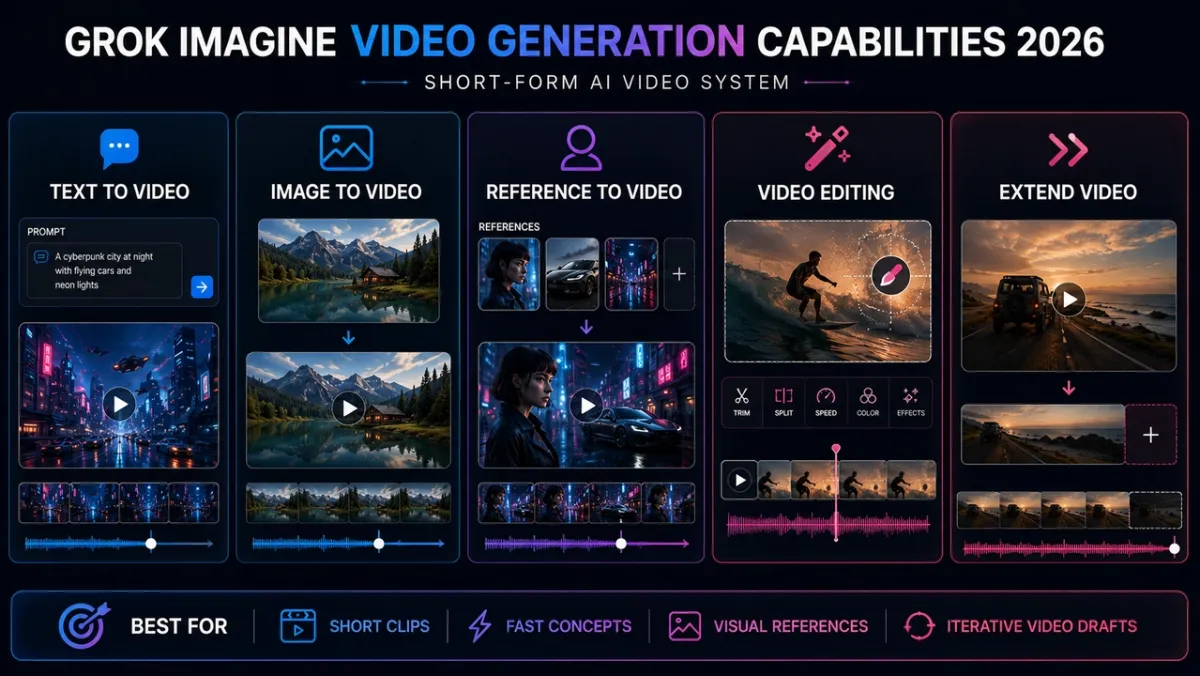
ในระบบ Grok Imagine ที่กว้างกว่า เอกสาร xAI ระบุ workflow เช่น configurable video generation, image-to-video, video editing, reference-to-video และ extension จุดสำคัญของปี 2026 คือ ต้องเทียบความสามารถเหล่านี้กับหน้าโมเดลจริงก่อนนำไปทำ workflow
Text-to-video มีประโยชน์เมื่อ surface ที่ใช้รับ prompt แบบข้อความ และเหมาะกับการลองคอนเซปต์เร็ว ๆ เช่น social clip mood ของสินค้า ไอเดีย meme หรือภาพร่างแบบ cinematic แต่สำหรับ API model 1.5 Preview อย่าถือว่ารองรับเส้นทางนี้จนกว่าหน้าโมเดลจะเปลี่ยน
Image-to-video เป็นเส้นทางที่ควบคุมได้มากกว่าสำหรับภาพสินค้า โปสเตอร์ ตัวละคร thumbnail และ concept frame เพราะภาพนิ่งช่วยล็อกเฟรมแรก เหมาะเมื่อรูปทรง composition หรือ identity สำคัญ
Reference-to-video เหมาะเมื่ออยากรักษา visual identity ซ้ำ ๆ โดยไม่บังคับให้ reference image เป็นเฟรมแรก เหมาะกับตัวละคร รูปทรงสินค้า เสื้อผ้า สไตล์ และวัตถุที่ต้องปรากฏซ้ำ
Video editing และ extension เป็น workflow ที่ใกล้ production มากกว่า editing ใช้แก้คลิปเดิมโดยรักษาส่วนอื่นไว้ ส่วน extension ต่อจากเฟรมสุดท้าย เหมาะกับการเปลี่ยนสภาพอากาศ restyle เพิ่มจังหวะที่สอง ตอนจบทางเลือก และการทดสอบจังหวะ short-form
Grok Imagine ในเวิร์กโฟลว์วิดีโอ AI สมัยใหม่
เวิร์กโฟลว์วิดีโอ AI สมัยใหม่มักรวมการตีความพรอมต์ การกำหนดเงื่อนไขจากภาพ การสร้างการเคลื่อนไหว และการสังเคราะห์เฟรมเข้าด้วยกัน ในระดับผลิตภัณฑ์ Grok Imagine รองรับเส้นทางสำหรับครีเอเตอร์ เช่น การสร้าง image-to-video การตัดต่อวิดีโอ เวิร์กโฟลว์ที่มีภาพอ้างอิง และการต่อคลิป
ในหลายเวิร์กโฟลว์ ภาพอินพุตทำหน้าที่เป็นจุดยึดที่ช่วยรักษา identity องค์ประกอบภาพ รูปทรงสินค้า หรือสไตล์ภาพตลอดการสร้างวิดีโอ นี่จึงเป็นเหตุผลที่ image-to-video มักควบคุมได้มากกว่า text-to-video ล้วนเมื่อความสม่ำเสมอของภาพสำคัญ
xAI ยังไม่ได้อธิบายองค์ประกอบทางเทคนิคทั้งหมดเบื้องหลัง Grok Imagine ต่อสาธารณะ ให้ใช้การเปรียบเทียบกับระบบวิดีโอแบบ diffusion ในวงกว้างเป็นบริบทของเวิร์กโฟลว์ แล้วตรวจสอบพฤติกรรมของโมเดลจริงด้วยการทดสอบที่ใกล้เคียงงาน production
พรอมต์ Grok Imagine ที่เหมาะจะนำไปสร้างวิดีโอ
เริ่มจากพรอมต์ที่ทดสอบจุดแข็งต่างกัน เช่น ความเสถียรของสินค้า การเคลื่อนไหวของคน และการควบคุมฉากแบบ cinematic หาก surface ของ Grok Imagine รองรับ text-to-video ให้ใช้ได้โดยตรง หากทดสอบ grok-imagine-video-1.5-preview ให้สร้างหรืออัปโหลดภาพเริ่มต้นก่อน แล้วใช้พรอมต์เป็นทิศทางของ motion กล้อง และสไตล์
1. พรอมต์โฆษณาสินค้า
ใช้ทดสอบความชัดของสินค้า รายละเอียดพื้นผิว การเคลื่อนของแสง และความเนี้ยบแบบโฆษณา
พรอมต์:
A compact black wireless speaker sits on a rain-slicked rooftop at night. Neon signs reflect across the wet surface and tiny droplets bead on the speaker grille. The camera begins in an extreme macro close-up on the droplets, then slowly pulls back to reveal the skyline. A soft blue light pulses once around the speaker rim as rain falls in slow motion. Realistic premium product commercial, shallow depth of field, vertical 9:16, no text, no logo distortion.
หมายเหตุผลลัพธ์: ผลลัพธ์ที่ดีควรเหมือน teaser เปิดตัวสินค้า premium: เห็นรูปทรงสินค้า ชัดเจน ฝนดูจริง และกล้องถอยออกอย่างลื่นโดยไม่ทำให้ลำโพงเสียรูป จุดเสี่ยงคือ product drift หากตะแกรง ขอบ หรือรูปทรงเปลี่ยนมาก คลิปอาจสวยแต่ใช้กับงานสินค้าจริงได้น้อยลง
2. พรอมต์คลิปตัวละครสำหรับ social
ใช้ทดสอบความนิ่งของใบหน้า การเคลื่อนไหวของร่างกาย การเปลี่ยนฉาก และพลัง hook แบบ social
พรอมต์:
A stylish young creator in a silver jacket stands in a tiny elevator lined with mirrored panels. The lights flicker once, then the elevator doors open onto a surreal midnight city street filled with glowing billboards and drifting steam. The camera tracks backward as she steps out, smiles at the camera, and raises a small camera toward the viewer. Fast social hook, cinematic but playful, crisp facial detail, smooth motion, vertical 9:16, no captions.
หมายเหตุผลลัพธ์: พรอมต์นี้ใช้ดูว่า Grok Imagine คุมคนใน social hook เร็ว ๆ ได้หรือไม่ ผลลัพธ์ที่ดีควรทำให้การเปลี่ยนจากลิฟต์สู่ถนนดูต่อเนื่องและน่าตื่นเต้น ความเสี่ยงคือหน้าไม่นิ่ง เช่น รอยยิ้ม ดวงตา หรือเสื้อเปลี่ยน
3. พรอมต์ฉาก cinematic
ใช้ทดสอบ scale กล้อง reflection motion ของสภาพแวดล้อม และองค์ประกอบแบบ cinematic
พรอมต์:
A lone astronaut walks across a shallow mirror-like salt flat at sunrise. The sky is pale orange and violet, and a huge broken moon hangs low on the horizon. Each step sends a soft ripple through the reflective water. The camera starts behind the astronaut, then slowly cranes upward to reveal the vast landscape and a distant glowing research station. Epic cinematic sci-fi mood, realistic reflections, slow graceful motion, widescreen 16:9, no text.
หมายเหตุผลลัพธ์: นี่คือ stress test แบบ cinematic ที่หนักสุด เพราะต้องการ scale reflection และกล้องที่ควบคุมได้พร้อมกัน ผลที่ดีควรทำให้พื้นเกลือ ระลอกน้ำ ดวงจันทร์ และ crane-up เชื่อมกัน ความล้มเหลวบ่อยคือภาพสวยแต่ motion ไม่ชัด
พรอมต์ Grok Imagine เพิ่มเติมสำหรับหลายกรณี
ใช้พรอมต์เหล่านี้เพื่อเพิ่ม coverage การทดสอบ ตัวอย่าง text-to-video เหมาะกับ surface ของ Grok Imagine ที่รองรับการสร้างจากข้อความล้วน สำหรับ Grok Imagine Video 1.5 Preview ให้ใช้เป็น brief สำหรับ source image บวก motion prompt
Text-to-Video: meme หรือ trend clip เร็ว
A tiny robot barista tries to make latte art inside a crowded futuristic cafe. The foam accidentally forms a perfect smiley face, and everyone at the counter reacts with surprised laughter. Quick comedic timing, handheld social video feel, warm cafe lighting, clear robot expression, vertical 9:16, no text overlays.
Text-to-Video: beauty หรือ fashion shot
A fashion model wearing a translucent raincoat walks through a glowing tunnel of blue LED lights. The camera tracks beside her in slow motion as water droplets sparkle on the fabric. High-fashion editorial look, crisp facial detail, glossy reflections, controlled runway pacing, vertical 9:16.
Text-to-Video: food ASMR
A chef slices a glossy mango on a dark stone board under warm morning light. Juice beads along the knife edge, thin slices fan open in perfect rhythm, and a soft breeze moves a linen napkin in the background. Macro food commercial, shallow depth of field, smooth slow motion, no text.
Image-to-Video: teaser สินค้า
Animate the uploaded product image into a premium launch teaser. Keep the product shape, color, label, and camera angle consistent. Add a slow push-in, a subtle light sweep across the surface, tiny particles floating in the background, and a clean studio shadow shift. No extra text, no extra objects, vertical 9:16.
Image-to-Video: animation โปสเตอร์
Animate this movie poster as a short atmospheric teaser. Keep the main character, composition, title placement, and color palette unchanged. Add drifting fog, a slow camera push toward the character’s face, faint background light movement, and subtle fabric motion. Cinematic suspense mood, no new text.
Reference-to-Video: ทดสอบความคงที่ของตัวละคร
Use the reference images to preserve the character’s face, hairstyle, jacket, and color palette. Generate a new shot where the character walks through a rainy train station at night, glances over their shoulder, then disappears into a passing crowd. Smooth tracking shot, realistic reflections, moody thriller lighting, no extra characters with the same face.
Reference-to-Video: ทดสอบ identity สินค้า
Use the reference images to preserve the product silhouette, material, color, and front label. Create a new studio scene where the product rotates slowly on a matte black pedestal while a narrow beam of light moves across the surface. Premium hardware launch style, minimal background, no logo distortion, no text changes.
Video Editing: เปลี่ยนสภาพอากาศ
Change the scene from sunny afternoon to light rain at dusk. Preserve the people, camera angle, building layout, and original action. Add wet pavement reflections, soft gray-blue lighting, small raindrops, and a calm cinematic mood. Do not add new people or text.
Video Editing: เปลี่ยนสีสินค้า
Change only the product body color from white to deep matte black. Preserve the logo placement, shape, camera movement, hands, table, background, and lighting direction. Keep the rest of the scene unchanged and realistic.
Video Extension: จังหวะที่สอง
Continue from the final frame. The camera pulls back slightly as the product lights turn on, a subtle blue pulse moves around the edge, and the background reflections become brighter. Keep the same product, setting, camera angle, lighting mood, and color palette.
Video Extension: ตอนจบเรื่อง
Continue from the final frame. The character pauses, turns toward the distant glowing doorway, and takes one slow step forward as the light brightens. Keep the same character design, wardrobe, environment, camera movement, and cinematic mood.
วิธีเขียนพรอมต์วิดีโอ Grok Imagine ให้ดีขึ้น
พรอมต์วิดีโอของ Grok ทำงานได้ดีขึ้นเมื่ออธิบายการเคลื่อนไหว ไม่ใช่แค่ลักษณะภายนอก พรอมต์ที่ดีให้บริบทแก่เวิร์กโฟลว์การสร้างมากพอที่จะรักษาตัวแบบ ตีความการเคลื่อนไหว ทำตามทิศทางกล้อง และเคารพข้อจำกัดที่ตั้งไว้ พรอมต์ที่มีประโยชน์ควรตอบ 5 ข้อ:
- ระบุ subject ที่ต้องอ่านออกหรือจำได้ เช่น คน สินค้า วัตถุ ตัวละคร หรือฉาก
- อธิบายสิ่งที่เปลี่ยนในคลิป เช่น เดิน หัน แสงกวาดผ่าน ฝนตก หรือกล้องเคลื่อน
- เพิ่มพฤติกรรมกล้อง เช่น push-in, pull-back, tracking shot, crane-up, handheld, macro หรือ overhead
- กำหนด environment เช่น สถานที่ เวลา แสง สภาพอากาศ การเคลื่อนไหวของพื้นหลัง และบรรยากาศ
- ใส่ข้อจำกัดเพื่อปกป้อง asset เช่น no text, no logo distortion, preserve product label, keep character identity หรือ avoid extra people
สำหรับ image-to-video และ reference-to-video สิ่งสำคัญคือความพอดี ภาพมี subject, composition และ style อยู่แล้ว ดังนั้นพรอมต์ควรเน้น motion กล้อง atmosphere และสิ่งที่ต้องคงไว้
ในเวิร์กโฟลว์เชิงพาณิชย์หรือที่ขับเคลื่อนด้วยตัวละคร ครีเอเตอร์มักปรับแต่งแอสเซ็ตภาพนิ่งให้เรียบร้อยก่อนนำไปทำแอนิเมชัน วิธีนี้ช่วยให้มีจุดเริ่มต้นที่สะอาดขึ้นเมื่อความสม่ำเสมอของภาพมีความสำคัญ
การเตรียมเวิร์กโฟลว์: Image Inpainting เทียบกับ Video Editing
Image inpainting คือการแก้ไขส่วนที่เลือกของภาพนิ่งโดยคงเนื้อหาโดยรอบไว้ ส่วน video editing คือการนำการเปลี่ยนแปลงที่ขับเคลื่อนด้วย AI ลักษณะเดียวกันไปใช้กับเฟรมที่เคลื่อนไหว
ในทางปฏิบัติ image inpainting อาจเป็นขั้นตอนเตรียมงานที่มีประโยชน์ก่อนสร้าง image-to-video ปรับภาพสินค้า ภาพบุคคลของตัวละคร หรือแอสเซ็ตการตลาดก่อน แล้วจึงนำภาพที่อนุมัติแล้วไปสร้างเป็นลำดับวิดีโอ วิธีนี้อาจช่วยเพิ่มความสม่ำเสมอของภาพ การควบคุมพรอมต์ และความพร้อมใช้งานเชิงพาณิชย์ตลอดเวิร์กโฟลว์การผลิตที่มี AI ช่วย
ราคาและหมายเหตุ API ของ Grok Imagine Video 1.5
เอกสาร xAI ปัจจุบันทำให้ราคาของ grok-imagine-video-1.5-preview ชัดขึ้น ตัวเลขเหล่านี้เหมาะสำหรับวางแผนทดสอบ แต่ควรตรวจอีกครั้งก่อน production
ต้นทุนหลักคือ output $0.08 per second ดังนั้นงบควรคำนวณตามความยาวคลิป ไม่ใช่แค่จำนวน request image input ระบุที่ $0.01 จึงคุมงบง่ายกว่า ส่วน video input แพงกว่า: 480p อยู่ที่ $0.08/sec และ 720p อยู่ที่ $0.14/sec แม้คลิปสั้นก็มีต้นทุนสูงได้ถ้าทดลองหลายรอบ
หน้าโมเดลยังระบุ 60 requests ต่อนาที เพียงพอสำหรับ structured testing แต่ทีมควรตรวจสอบ account access, region availability และ rate limit ปัจจุบันก่อนทำ automation
ความยาวสั้นกำหนด workflow ให้มอง Grok Imagine เป็นตัวสร้างคลิปสั้น ถ้าต้องการงานยาวให้วางแผนหลายคลิป extension หรือ editing
ความสม่ำเสมอต้องมี anchor หากคน สินค้า เสื้อผ้า หรือวัตถุต้องคงที่ image-to-video หรือ reference-to-video มักปลอดภัยกว่า text-to-video ล้วน
ข้อความและ logo ต้องตรวจซ้ำ โมเดลวิดีโออาจสร้าง label ที่ดูเหมือนอ่านได้แต่ไม่ถูกต้อง ตรวจทุกข้อความบนจอก่อนเผยแพร่
นโยบายความปลอดภัยสำคัญ หลีกเลี่ยง workflow ที่พึ่งพาการแก้ likeness โดยไม่ได้รับความยินยอม การเปลี่ยน identity ที่ทำให้เข้าใจผิด หรือ transformation ที่อ่อนไหว
วิธีทดสอบ Grok Imagine Video 1.5
อย่าตัดสิน Grok Imagine Video 1.5 Preview ด้วยพรอมต์สวย ๆ เพียงอันเดียว ให้ใช้ input ที่ใกล้ production และประเมินเหมือนแคมเปญจริง
เริ่มจาก image-to-video ใช้ภาพสินค้าชัด ๆ ภาพแพ็กเกจ ecommerce hero frame portrait concept character โปสเตอร์ หรือ campaign thumbnail ให้ Grok เพิ่ม motion แบบควบคุม เช่น camera push, light sweep, gesture เล็ก ๆ, background atmosphere, fog, fabric motion หรือ particles เป้าหมายไม่ใช่ความอลังการสูงสุด แต่คือดูว่า subject ยังไม่เพี้ยนในขณะที่ shot มีชีวิตขึ้นหรือไม่
ต่อด้วย video input ใช้คลิปสั้นที่ action ชัดและ framing เสถียร ขอเปลี่ยนทีละอย่าง เช่น weather, lighting, mood, color treatment, product color, time of day หรือ art direction วิธีนี้ช่วยแสดงให้เห็นว่าเวิร์กโฟลว์จัดการความสม่ำเสมอของการเคลื่อนไหว โครงสร้างฉาก และการทำตามพรอมต์ได้อย่างไรภายใต้เงื่อนไขที่ควบคุมไว้
ประเมิน 5 อย่าง: subject consistency, motion coherence, prompt adherence, text/logo accuracy และ commercial usability ถ้าคลิปสวยแต่รูปทรงสินค้าเพี้ยนหรือ logo อ่านไม่ได้ ยังไม่พร้อมสำหรับโฆษณา ecommerce หรือ brand campaign
PixVerse ช่วยทดสอบ Grok Imagine อย่างไร
ถ้าต้องการเปรียบเทียบ Grok กับโมเดลวิดีโอ AI อื่น หรือจำเป็นต้องใช้ text-to-video, image-to-video, reference control, short-form ad workflow และการ iterate หลายรอบ PixVerse เหมาะเป็น testing workflow มากกว่าการพึ่งพาโมเดลเดียว
บน PixVerse ให้มอง Grok เป็นหนึ่งในตัวเลือกโมเดลร่วมกับโมเดลวิดีโอ AI อื่น ๆ ทดลอง prompt, image หรือ reference idea เดียวกันกับหลายโมเดล แล้วเปรียบเทียบการทำตามพรอมต์ คุณภาพการเคลื่อนไหว ความเสถียรของ identity ความพร้อมใช้งานเชิงพาณิชย์ คุณภาพเอาต์พุต และต้นทุนการทำซ้ำ ก่อนเลือกคลิปสำหรับเผยแพร่
ทดลอง Grok Imagine ได้ที่ไหน?
มีหลายเส้นทาง และแต่ละเส้นทางตอบโจทย์ต่างกัน
Grok หรือ X product surfaces เป็นทางที่ง่ายที่สุดสำหรับผู้ใช้ทั่วไปที่อยากทดลองเร็วและทำไอเดีย social content ก่อนสรุปว่าใช้ได้ทุกที่ ให้เช็กก่อนว่า video generation เปิดใน region, plan และ interface ของคุณหรือยัง
xAI API เหมาะกับ developer workflow, automation และ controlled experiments ก่อนใช้ production ให้ตรวจราคา API ปัจจุบัน input type ที่รองรับ ความละเอียด ความยาว rate limits และวิธีเก็บไฟล์ที่สร้าง
PixVerse เหมาะเมื่อคุณต้องการเปรียบเทียบ Grok กับโมเดลวิดีโอ AI อื่นใน creator environment เดียว คำถามสำคัญไม่ใช่แค่ Grok ใช้ได้ไหม แต่โมเดลใดให้ผลลัพธ์ดีที่สุดสำหรับ prompt, reference image, style และช่องทางเผยแพร่ของคุณ
หากขั้นต่อไปคือทดสอบ Grok ร่วมกับตัวเลือกวิดีโอ AI อื่นใน creator workflow โปรดอ่าน Grok Imagine on PixVerse guide แยกต่างหาก หน้านั้นเป็น tutorial เฉพาะ PixVerse ส่วนหน้านี้อธิบายความสามารถ พรอมต์ ข้อจำกัด และจุดตัดสินใจของ Grok Imagine
FAQ: เครื่องมือสร้างวิดีโอ Grok Imagine
Grok สร้างวิดีโอได้ไหม?
ได้ Grok สร้างวิดีโอผ่าน Grok Imagine ได้ จุดสำคัญในปี 2026 คือความสามารถต่างกันตาม product surface และโมเดล เอกสาร Grok Imagine แบบกว้างครอบคลุมการสร้างวิดีโอจากพรอมต์ข้อความหรือภาพนิ่ง แต่ grok-imagine-video-1.5-preview ถูกอธิบายเป็นโมเดล preview แบบ image/video input และปัจจุบันไม่รองรับ text-to-video
Grok Imagine Video 1.5 รองรับ text-to-video ไหม?
ไม่รองรับตามหน้าโมเดล xAI ปัจจุบัน หน้า grok-imagine-video-1.5-preview ระบุ Image และ Video และบอกว่าโมเดลนี้ยังไม่รองรับ text-to-video ควรตรวจเอกสารล่าสุดเสมอ เพราะความสามารถของโมเดล preview อาจเปลี่ยนแปลงได้
grok-imagine-video-1.5-preview คืออะไร?
grok-imagine-video-1.5-preview คือโมเดล API preview อย่างเป็นทางการของ xAI สำหรับเวิร์กโฟลว์วิดีโอ Grok Imagine โดยมีราคา rate limit อินพุตที่รองรับ และข้อจำกัดของเวิร์กโฟลว์เป็นของตัวเอง หน้าโมเดลระบุ alias grok-imagine-video-1.5-2026-05-30, modality Image/Video, output $0.08/sec และ rate limit 60 RPM
Grok Imagine Video 1.5 ราคาเท่าไร?
ตามเอกสาร xAI output ของ grok-imagine-video-1.5-preview ราคา $0.08 ต่อวินาทีที่สร้าง หน้าเดียวกันระบุ image input $0.01, video input 480p $0.08/sec และ video input 720p $0.14/sec ควรตรวจเอกสารทางการก่อน production เพราะราคา preview เปลี่ยนได้
Grok Imagine ต่างจาก Grok Imagine Video 1.5 Preview อย่างไร?
Grok Imagine คือ family หรือ surface ที่กว้างกว่าสำหรับ image/video generation ส่วน Grok Imagine Video 1.5 Preview คือโมเดล API เฉพาะที่มีชื่อ alias modality ราคา และ rate limit ของตัวเอง ดังนั้นคำกล่าวทั่วไปว่า Grok รองรับ text-to-video ต้องตรวจจากโมเดลจริงที่ใช้
Grok มี image-to-video ไหม?
มี Grok Imagine สามารถทำให้ภาพนิ่งเคลื่อนไหวด้วย prompt ข้อความ เวิร์กโฟลว์ image-to-video มักเหมาะกว่าเมื่อจำเป็นต้องคงรูปทรงสินค้า identity ของตัวละคร องค์ประกอบภาพ หรือความสม่ำเสมอของภาพตลอดวิดีโอที่สร้าง
Grok Imagine เหมาะกับ image-to-video หรือ text-to-video มากกว่า?
สำหรับ grok-imagine-video-1.5-preview ปัจจุบัน image-to-video และ video input เป็นจุดทดสอบที่ปลอดภัยกว่า เพราะหน้าโมเดลระบุว่าไม่รองรับ text-to-video สำหรับ surface อื่นที่รองรับ text-to-video ให้ใช้ข้อความเพื่อสำรวจไอเดียเร็ว และใช้ image-to-video เมื่อรูปทรงสินค้า identity composition หรือ style consistency สำคัญ
เปรียบเทียบ Grok Imagine กับโมเดลอื่นบน PixVerse ได้ไหม?
ได้ PixVerse เหมาะเมื่อคุณต้องการทดสอบ Grok เป็นหนึ่งในตัวเลือกโมเดลร่วมกับโมเดลวิดีโอ AI อื่น ใช้ prompt, image หรือ reference idea เดียวกัน แล้วเทียบ subject consistency, motion, prompt adherence, text/logo accuracy, commercial usability และ iteration cost
โครงสร้างพรอมต์วิดีโอ Grok Imagine ที่ดีที่สุดคืออะไร?
ใช้ subject, action, camera, environment และ constraints อธิบายสิ่งที่ปรากฏในฉาก วิธีที่สิ่งนั้นเคลื่อนไหว พฤติกรรมของกล้อง แสงหรือบรรยากาศ และข้อจำกัดต่าง ๆ เช่น การคง label ของสินค้าหรือไม่ให้มี text overlay
Grok Imagine รองรับ video editing ไหม?
รองรับ xAI มีเอกสาร prompt-based video editing โดยให้วิดีโอเดิมและอธิบายการเปลี่ยนแปลงที่ต้องการ พร้อมพยายามรักษาส่วนอื่นของฉาก
Grok Imagine ใช้ reference images ได้ไหม?
ได้ Reference-to-video ใช้ visual references เพื่อกำกับ output โดยไม่บังคับให้ reference image เป็นเฟรมแรก เหมาะกับ character identity, product shape, wardrobe, style และ recurring objects
วิดีโอ Grok Imagine ยาวได้แค่ไหน?
xAI video overview ปัจจุบันระบุ generation สูงสุด 15 วินาที editing input video สูงสุด 8.7 วินาที และ extension output 2-10 วินาทีพร้อมข้อกำหนด input ควรตรวจ interface หรือ API docs ปัจจุบันก่อนวางแผน deliverables
ทำไมฉันไม่เห็นฟีเจอร์วิดีโอของ Grok?
ความพร้อมใช้งานขึ้นอยู่กับ product surface, account, region, rollout stage และ access path หากไม่เห็นฟีเจอร์ใน interface หนึ่ง ให้ตรวจ Grok, X, xAI API หรือ partner workflow ที่รองรับ
สรุป
Grok สร้างวิดีโอได้ แต่คำถามที่สำคัญกว่าคือคุณหมายถึง surface หรือโมเดล Grok Imagine ใด สำหรับ workflow แบบกว้าง text prompt, still image, references, editing และ extension อาจสำคัญทั้งหมด สำหรับ grok-imagine-video-1.5-preview ให้โฟกัส workflow image/video input อย่างเป็นทางการ และอย่าสรุปว่ารองรับ text-to-video
ในการทดสอบจริง อย่าหยุดที่คำว่าได้ ให้ประเมินเวิร์กโฟลว์ทั้งหมด ทั้งคุณภาพพรอมต์ ภาพอินพุต แอสเซ็ตอ้างอิง การควบคุมการตัดต่อ และความสม่ำเสมอของเอาต์พุต ใช้หมายเหตุโมเดลเดือนมิถุนายน 2026 ราคา พรอมต์ และเวิร์กโฟลว์ประเมินผลข้างต้น เพื่อตัดสินใจว่าจะทดสอบ Grok โดยตรง ใช้ xAI API หรือเปรียบเทียบ Grok กับโมเดลวิดีโอ AI อื่นใน PixVerse