เครื่องมือสร้างเอฟเฟกต์เสียง AI ที่ดีที่สุด 2026
เลือก AI sound effect generator สำหรับ video sync, text-to-SFX, Adobe workflow, social clip, game audio และงานเชิงพาณิชย์
การสร้างวิดีโอเร็วขึ้นมาก แต่เสียงใน post-production ยังทำให้ครีเอเตอร์ช้าลงได้ สิ่งสำคัญไม่ใช่แค่สร้างเสียงได้หรือไม่ แต่ workflow นั้นเข้ากับวิดีโอ แพลตฟอร์ม สิทธิ์การใช้งาน และ timeline การตัดต่อหรือไม่
บทความนี้เปรียบเทียบ AI sound effect generator 9 ตัวตาม use case, input, video sync, pricing, rights และ workflow friction
หากครีเอทีฟเริ่มจากเพลงแทนวิดีโอที่มีอยู่ Vibe MV คือเวิร์กโฟลว์ที่เน้นเสียงมากกว่า ส่วนงานโปรโมชันที่รวมวิดีโอเสร็จแล้วเข้ากับการจัดแพ็กเกจแคมเปญสามารถใช้ Promo Mix เป็นตัวเลือกเสริมได้ ดูเวิร์กโฟลว์การสร้างสรรค์ทั้งหมดของ PixVerse ได้ที่ เครื่องมือสร้างวิดีโอ AI
วิธีเลือก AI Sound Effect Generator
AI sound effect generator ที่ดีที่สุดคือเครื่องมือที่ลดงานจาก audio workflow จริงของคุณได้มากที่สุด
ก่อนเทียบเครื่องมือ ให้ถาม 5 ข้อนี้:
- Text-to-sound หรือ video-to-audio? ถ้าอธิบายเสียงด้วยข้อความได้ ใช้ text-to-sound; ถ้าเสียงต้องตาม action บนจอ ใช้ video-to-audio
- เสียงต้องตรง motion ไหม? ถ้า hit, footstep, transition หรือ impact ต้องลงตรง frame ให้เลือก video upload หรือ editor-native sync
- สิทธิ์ commercial ชัดไหม? ใช้ในงาน commercial เฉพาะเมื่อ terms ปัจจุบันครอบคลุม plan, project type และ distribution channel
- ต้องการ WAV, MP3, loop หรือ duration control ไหม? งานเกม โฆษณา และ pro editing ควรมี downloadable audio และ timing controls; social post เร็ว ๆ ใช้ in-app audio ก็พอได้
- เครื่องมือใกล้ workflow ไหม? Social ใช้ CapCut/Canva, Adobe ใช้ Firefly, developer ดู AudioCraft, งาน sync ใช้ video-to-audio tools
Text-to-Audio vs Video-to-Audio
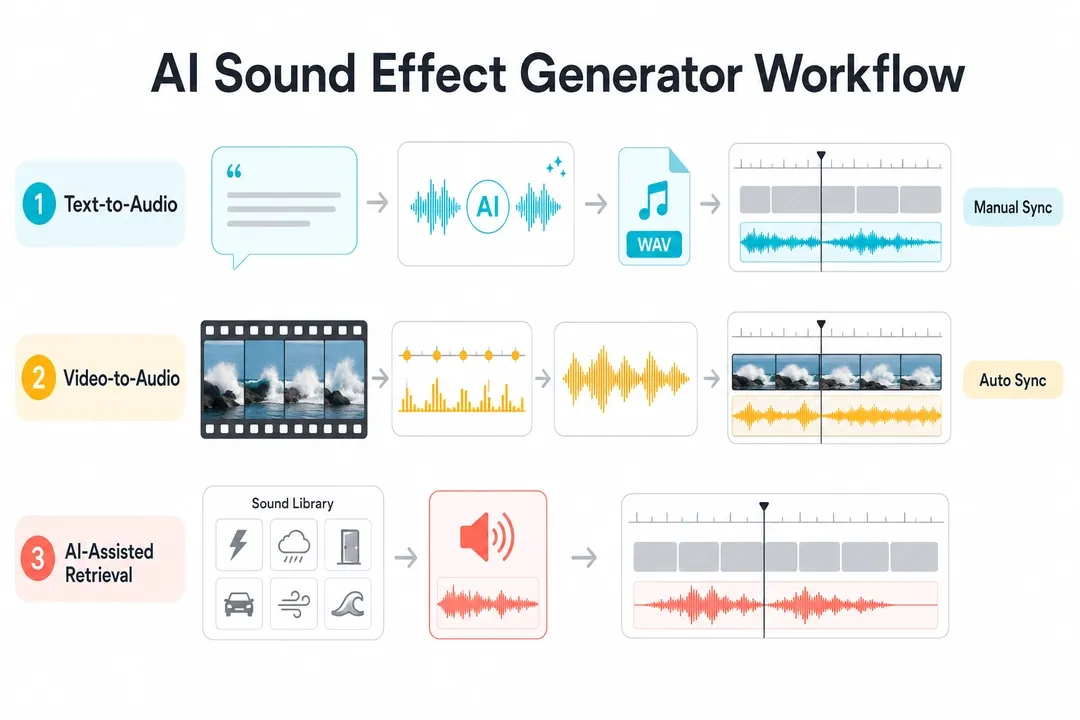
คำตอบสั้น ๆ: text-to-audio เหมาะกับ sound design แบบ standalone ส่วน video-to-audio เหมาะเมื่อ timing กับคลิปสำคัญ
- Text-to-audio เริ่มจาก prompt เหมาะกับ Foley, ambience, UI sound, game audio และ fantasy effects แต่ปกติต้อง sync เอง
- Video-to-audio เริ่มจาก video clip หรือ timeline เหมาะกับ footsteps, impacts, transitions, product demos และ AI videos ที่ต้อง sync
- AI-assisted retrieval เริ่มจาก sound library หรือ editor project เร็วสำหรับ swipes, clicks, whooshes และ ambience แต่ unique น้อยกว่า
ควรลองเครื่องมือไหนก่อน?
- Video sync: เทียบ PixVerse และ CapCut
- Cinematic text-to-SFX: เทียบ ElevenLabs, Adobe Firefly และ LoudMe
- Adobe workflows: เริ่มที่ Adobe Firefly
- Social creators: เริ่มที่ CapCut หรือ Canva
- Open-source: เริ่มที่ Meta AudioCraft
- Quick browser tasks: เทียบ Canva, MyEdit และ LoudMe
- Games and apps: เทียบ ElevenLabs, LoudMe และ Meta AudioCraft
เปรียบเทียบ AI Sound Effect Generator แบบเร็ว
| เครื่องมือ | เหมาะกับ | Input | Video sync | ราคา / การเข้าถึง |
|---|---|---|---|---|
| PixVerse Sound Effect Generator | Video-to-audio sync for clips, ads, and AI videos | Video upload; optional text hint | Aligns sound to motion; can keep original audio | Credit-based; 6s test used 14 credits |
| ElevenLabs Sound Effects | Detailed text-to-SFX prompts and variations | Text prompt | Manual sync after download | Free tier; Starter listed at $6/month on 2026-06-23 |
| Adobe Firefly Generate Sound Effects | Adobe workflows with prompt, reference, or mic | Text, reference audio, mic | Can add to media, still needs placement choices | Depends on Adobe plan and credits |
| Canva AI Sound Effect Generator | Quick social and design projects | Text, duration, intensity | Inside Canva projects | One free custom SFX credit listed |
| LoudMe AI Sound Effect Generator | Browser SFX for creators and game/audio projects | Text | Download and place manually | Free entry; commercial use depends on paid terms |
| CapCut AI Sound Effects Generator | Short-form editors in CapCut | Project analysis, library | CapCut says it can add matching effects | Free entry; Pro/AI varies |
| Pika video workflow | Pika-native video workflow | Pika workflow | Audio stays inside Pika | Basic $0; paid yearly from $8/month |
| Meta AudioCraft | Developers and researchers | Text prompt through code | Manual sync after export | Open-source; hardware and ops cost |
| MyEdit AI Sound Effect Generator | Quick browser tasks | Text | Manual sync after download | Freemium; check limits |
วิธีคัดเลือกเครื่องมือ
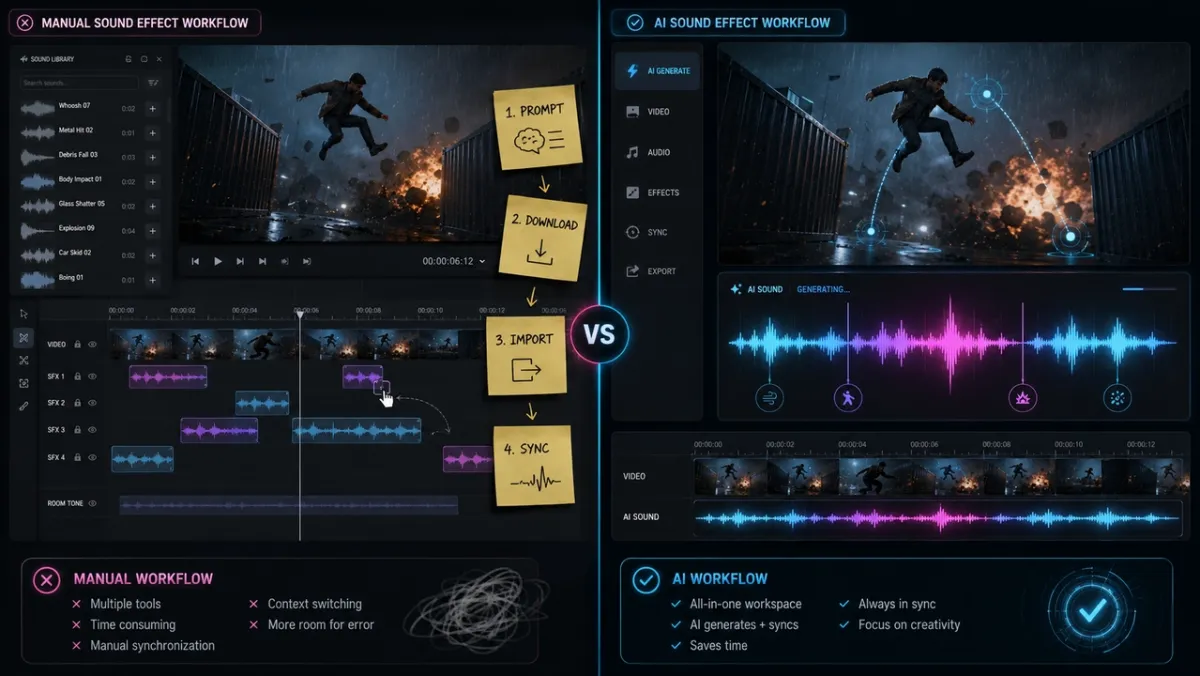
เราประเมินจากมุมมอง video production ไม่ใช่แค่คุณภาพเสียงแยกเดี่ยว เกณฑ์คือ use case, input method, video sync, output control, rights/pricing clarity และ workflow friction
1. PixVerse Sound Effect Generator: เหมาะกับ video-to-audio sync
PixVerse Sound Effect Generator เหมาะกับครีเอเตอร์ที่ต้องการสร้างเสียงจากวิดีโอและซิงก์กับ motion แทนที่จะต้องอธิบายทุกเสียงด้วย text tool ใช้วิดีโอที่อัปโหลดเป็น source PixVerse Platform Docs ยังมี API endpoint ที่รับ source video ID, original sound switch และ optional sound effect content
เราทดสอบด้วยคลิปประตูไม้หนักปิดลง PixVerse สร้างเสียง thud ลึกที่จุด impact ในภาพ และเมื่อเปิด “Keep original audio” เสียงใหม่ผสมกับ room tone เดิมได้ สิ่งที่ช่วยมากคือการตัดขั้นตอน search, download, import และ manual alignment
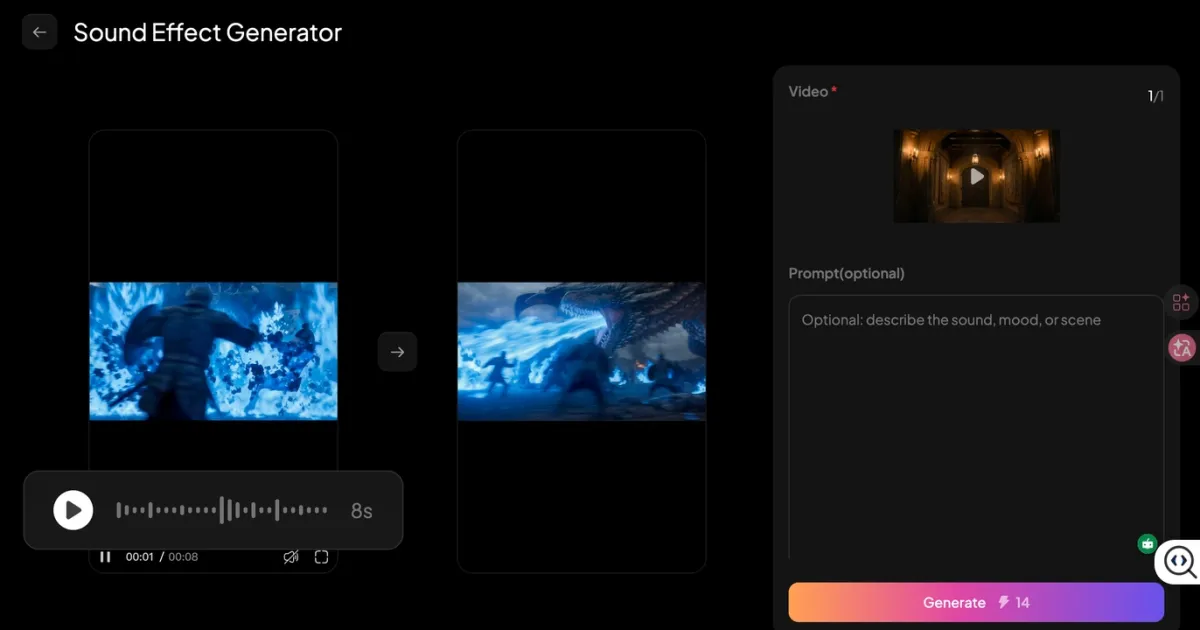
PixVerse เหมาะกับ short clips, social video และ AI video workflows ไม่ได้แทนที่ multitrack film mix ที่ซับซ้อน แต่ช่วยให้คลิปเงียบกลายเป็นวิดีโอมีเสียงได้เร็วมาก
2. ElevenLabs Sound Effects: เหมาะกับ cinematic text-to-SFX
ElevenLabs Sound Effects เป็น text-to-audio tool ที่มี controls สำหรับ duration, looping และ prompt influence โดยแต่ละครั้งจะสร้าง 4 variations
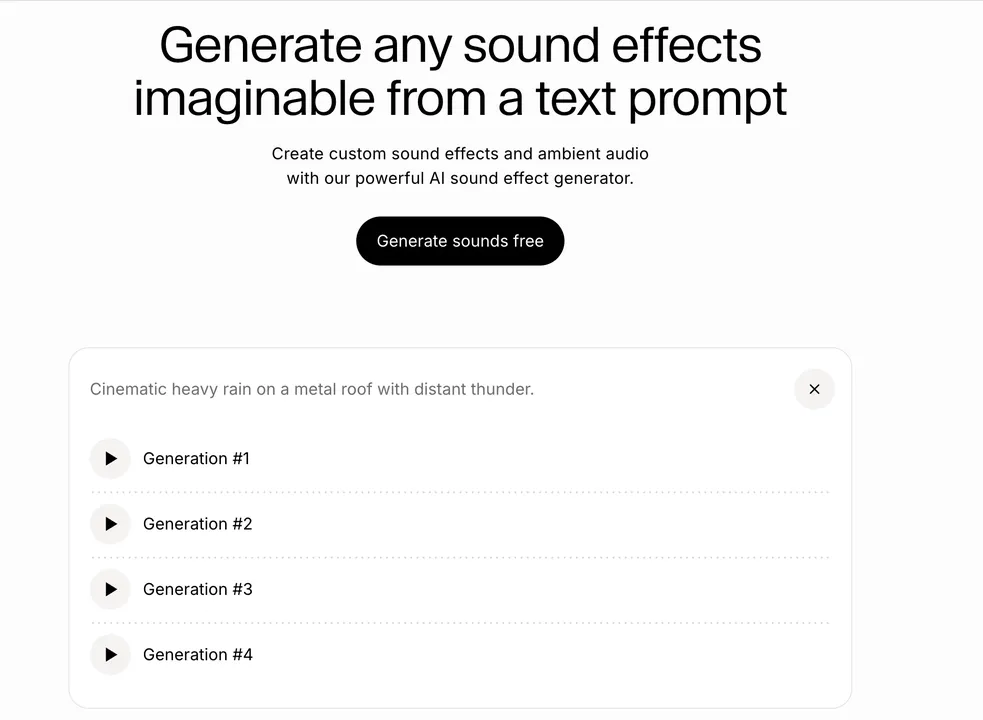
prompt “Cinematic heavy rain on a metal roof with distant thunder” ให้ ambience ที่ใช้ได้เร็ว แต่หลัง download ยังต้องเลื่อน thunder ใน Premiere Pro ให้ตรงกับ lightning ด้วยมือ
3. Adobe Firefly Generate Sound Effects: เหมาะกับ Adobe workflow
Adobe Firefly Generate Sound Effects รองรับ text, reference audio และ microphone performance จึงช่วย guide timing และ intensity ได้ เหมาะกับผู้ที่ทำงานใน Adobe อยู่แล้ว แต่สำหรับคลิปภายนอกยังต้องตัดสินใจ placement และ layering
4. Canva AI Sound Effect Generator: เหมาะกับ social/design เร็ว
Canva AI Sound Effect Generator เหมาะกับ social posts, presentations, product explainers และ editing เบา ๆ ผู้ใช้ใส่ prompt ตั้ง duration และ intensity แล้วใช้ผลลัพธ์ใน Canva project
ข้อดีคือ friction ต่ำ แต่ไม่ใช่ audio post-production station และไม่ได้ออกแบบมาเพื่อวิเคราะห์ motion ในวิดีโอโดยเฉพาะ
5. LoudMe AI Sound Effect Generator: เหมาะกับ browser SFX
LoudMe เน้น text prompts, downloads, sharing และ royalty-free use เหมาะกับ nature, urban, machinery, creature, game และ production effects แต่ยังเป็น workflow แบบ generate, download, manual placement
6. CapCut AI Sound Effects Generator: เหมาะกับ short-form editing
CapCut AI Sound Effects Generator สะดวกใน editor CapCut ระบุว่าสามารถวิเคราะห์วิดีโอและเพิ่ม effects ที่ตรงกับ motion, transitions และ scene changes
กับคลิปเดินในป่า การค้นหา “crunchy autumn leaves footsteps” ได้ตัวเลือกที่ใช้ได้เร็ว เหมาะกับผู้ใช้ CapCut แต่ไม่ portable เท่ากับ workflow อิสระ
7. Pika Pikaformance: เหมาะกับ Pika workflow
Pika pricing ระบุ Pikaformance พร้อม audio สูงสุด 10 วินาทีใน free access และ 30 วินาทีใน paid access ที่ 3 credits/second เหมาะเมื่อ workflow อยู่ใน Pika
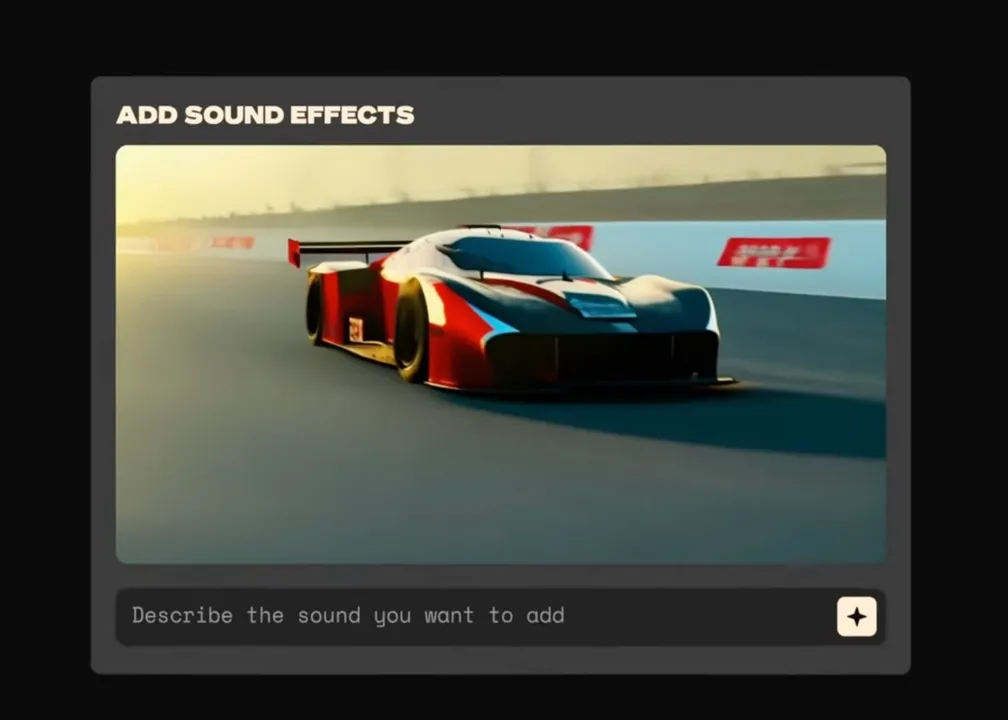
สำหรับคลิปภายนอกใด ๆ ยังไม่เปิดเท่า dedicated video-to-audio workflow
8. Meta AudioCraft: เหมาะกับนักพัฒนา
Meta AudioCraft เป็น open-source library สำหรับ audio processing และ generation รวม AudioGen และ MusicGen เหมาะกับทีมเทคนิคที่อยากสร้าง pipeline เอง
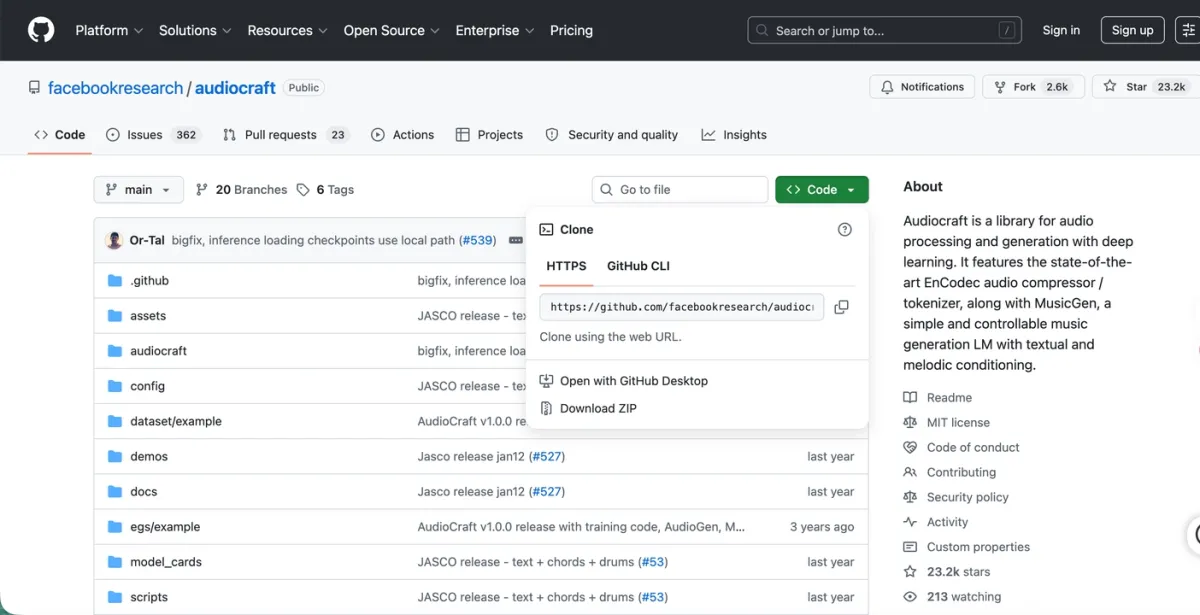
ข้อดีคือ local control ส่วนต้นทุนจริงคือ GPU, engineering และ operations การซิงก์กับวิดีโอหลัง export ยังต้องทำเอง
9. MyEdit AI Sound Effect Generator: เหมาะกับ browser tasks
MyEdit เป็นเครื่องมือ browser เบา ๆ สำหรับ beep, pop, transition, whoosh และ ambience สั้น ๆ
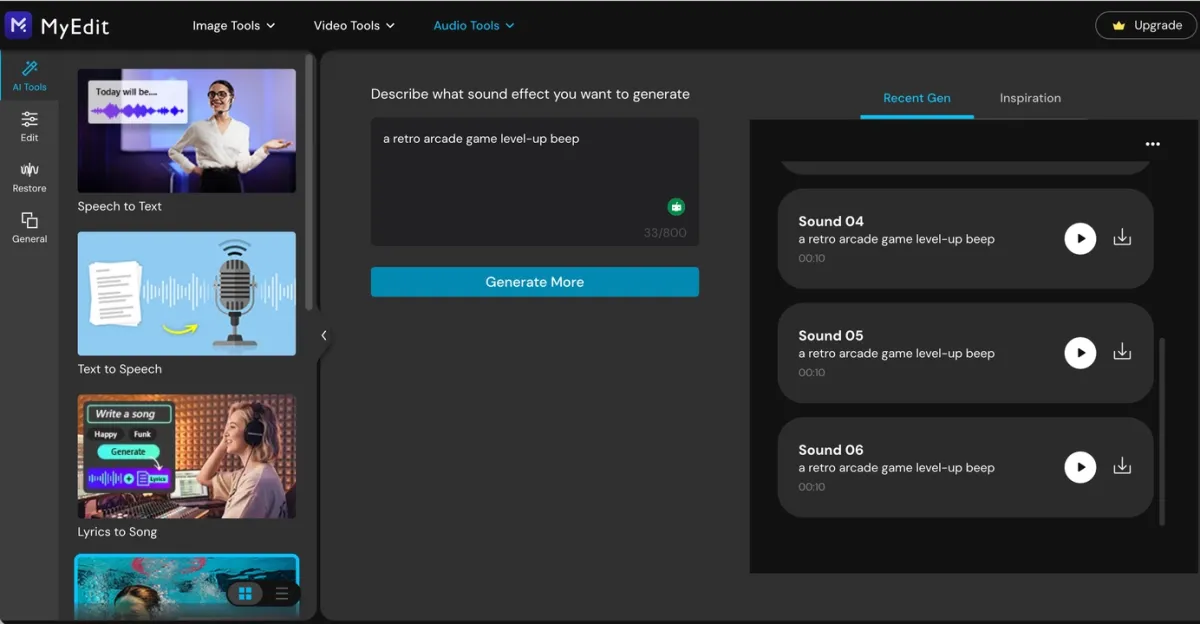
เนื่องจากไม่ได้ออกแบบรอบ video analysis จึงต้อง download และ sync เอง
AI Sound Effect Generator From Video ที่เหมาะที่สุด
ถ้าคำค้นคือ “AI sound effect generator from video” ให้มองหาเครื่องมือที่รับคลิปเป็น input ไม่ใช่แค่ text prompt ในลิสต์นี้ PixVerse เป็นหนึ่งในตัวเลือกที่ชัดสำหรับ video-to-audio workflow ส่วน CapCut เหมาะถ้าคุณตัดต่ออยู่ใน CapCut แล้ว
เหมาะกับ door slam, footsteps, object drops, transitions, silent AI videos และ automation ผ่าน source video ID งาน film mix, game audio หรือ layered sound design ที่ซับซ้อนยังควรใช้ DAW, NLE หรือ audio workflow เฉพาะทาง
ตัวอย่าง Prompt
| Use case | Prompt |
|---|---|
| Product video | “soft magnetic snap of a premium cosmetic compact closing, clean studio sound, short and satisfying” |
| Cinematic impact | “heavy wooden door slamming shut in a stone hallway, deep thud, subtle room echo” |
| UI | “bright futuristic interface confirmation beep, tiny sparkle tail, under one second” |
| Nature | “light rain on leaves in a quiet forest, gentle wind, no thunder, seamless loop” |
| Action | “motorcycle tire skid on wet asphalt, close perspective, sharp start, short fade” |
| Game | “retro arcade level-up chime, playful 8-bit energy, two seconds” |
ปัญหา AI audio ที่พบบ่อยและวิธีแก้
เสียงไม่ตรงกับเฟรมที่ต้องการ
คลิปอาจมี action หลายจุดเกินไป ให้ตัดเหลือ 2-3 วินาทีที่สำคัญ และเพิ่ม hint สั้น ๆ เช่น “door slam” หรือ “soft object drop”
เสียงฟังดูขุ่นหรือรก
เสียงที่สร้างอาจชนกับ music, dialogue หรือ noise เดิม ลองปิด original audio ลดเสียง track เดิม หรือสร้าง sound effect ที่สั้นและแห้งกว่า
เครื่องมือสร้างเสียงผิดแบบ
อธิบาย material, action และ intensity ให้ชัดขึ้น “Impact” กว้างเกินไป แต่ “small ceramic cup tapping a wooden table” ชัดกว่า
เสียงที่สร้างยาวเกินไป
ใส่ duration ใน prompt เช่น “under one second”, “short hit” หรือ “two-second loop”
workflow ยังช้า
ถ้าเวลาหมดไปกับการ download, import และเลื่อน audio เอง แปลว่าคุณอาจใช้ text-to-audio แก้ปัญหา video sync ควรลอง video-to-audio หรือ editor-native sync ก่อน
คำถามที่พบบ่อย
AI sound effect generator แบบไหนเหมาะกับวิดีโอที่สุด?
ถ้าเสียงต้องตาม action ในภาพ ให้เริ่มจาก PixVerse เพราะสามารถ upload วิดีโอและสร้างเสียงที่ sync กับภาพได้ หากตัดต่อใน CapCut อยู่แล้ว CapCut ก็เป็นตัวเลือกที่ควรเทียบ
AI sound effect generator สร้างเสียงจากวิดีโอได้ไหม?
ได้ เครื่องมือ video-to-audio ใช้คลิปเป็น input ประเมิน action สำคัญและ timing แล้วสร้าง sound effect ที่เกี่ยวข้อง
Text-to-audio ต่างจาก video-to-audio อย่างไร?
Text-to-audio สร้างไฟล์เสียงจาก prompt ส่วน video-to-audio เริ่มจากคลิปและใช้ภาพช่วยเลือกเสียงกับ timing
เครื่องมือฟรีตัวไหนน่าสนใจ?
นักพัฒนาดู Meta AudioCraft ได้ ส่วน creator ทั่วไปควรเทียบ free หรือ freemium entry ของ Canva, ElevenLabs, CapCut, Pika, LoudMe และ MyEdit
เสียงที่ AI สร้าง royalty-free ไหม?
ไม่เสมอไป แม้บาง platform จะเขียนว่า royalty-free หรือ commercial-ready ก็ควรตรวจ terms ปัจจุบันก่อนใช้กับ ads, games, client work หรือวิดีโอ monetized
ใช้เสียงที่สร้างกับ YouTube, TikTok หรือ ads ได้ไหม?
ใช้ได้เมื่อ terms ปัจจุบันครอบคลุม account, plan, project type และ distribution channel ของคุณอย่างชัดเจน
ใช้ PixVerse Sound Effect Generator กับ PixVerse V6 ได้ไหม?
ได้ คุณสามารถสร้างวิดีโอด้วย PixVerse V6 แล้วเพิ่มเสียง sync ด้วย Sound Effect Generator
เขียน prompt สำหรับ AI sound effect อย่างไรให้ดี?
เริ่มจาก object และ action แล้วเติม material, space, mood และ duration เช่น “heavy metal gate closing in an empty warehouse, deep echo, two seconds”
ควรเลือกเครื่องมือไหน?
PixVerse สำหรับ video sync, ElevenLabs สำหรับ text-to-SFX ที่ละเอียด, Firefly สำหรับ Adobe, Canva สำหรับ social งานเบา, LoudMe หรือ MyEdit สำหรับ browser tasks, CapCut สำหรับงานใน CapCut และ AudioCraft สำหรับนักพัฒนา
สรุป
เครื่องมือที่ดีที่สุดไม่เหมือนกันสำหรับทุกคน Text-to-audio เหมาะกับเสียงแยก, browser tools เหมาะกับความเร็ว, editor-native tools เหมาะเมื่อ workflow อยู่ในแอปนั้น
สำหรับครีเอเตอร์วิดีโอ คำถามหลักคือ synchronization หากยังต้องวางเสียงด้วยมือ workflow ก็ยังช้า PixVerse แก้จุดนี้ด้วยการสร้าง sound effects from video และ align กับ action
ทดลอง PixVerse Sound Effect Generator เพื่อเปลี่ยนคลิปถัดไปให้เป็น audiovisual asset ที่สมบูรณ์ขึ้น