Sora vs. Veo vs. PixVerse: A 2026 Pro Guide to AI Video Stacks
Sora 2 is offline as of March 2026. This guide compares Veo 3.1 and PixVerse V6 on specs and the same test prompt, with Sora 2 as historical context.
Sora 2 went offline on March 24, 2026. OpenAI cited compute costs and regulatory pressure. The live text to video decision for file-based work is now Veo 3.1 (Google) versus PixVerse V6 (launched March 30, 2026). Google shipped Veo 3.1 in October 2025.
For readers tracking whether Google’s next major video model is close, our Veo 4 release signals guide separates official evidence from rumor.
For creators comparing the next ByteDance video model against current workflows, our Seedance 2.5 comparison covers release status, Dreamina access notes, and what still needs verification.
How we tested: Where tools were still available, we ran the same prompt through each and describe what we saw. Customer examples below show how teams plug a model into a pipeline, not a promise that your results will match theirs.
Sora 2, Veo 3.1, and PixVerse V6 Comparison Table
| Sora 2 | Veo 3.1 | PixVerse V6 | |
|---|---|---|---|
| Developer | OpenAI | PixVerse | |
| Status | ⛔ Offline since March 24, 2026 | ✅ Active | ✅ Active (launched March 30, 2026) |
| Max resolution | 1080p (Pro tier) | 720p / 1080p / 4K | 1080p |
| Single-pass duration | Up to 12s | 8s | Up to 15s |
| Multi-shot engine | Manual prompting | Sequential extension | Built-in (single generation) |
| Native audio | Synchronized speech, sfx | Dialogue, sfx, ambience | Generated with motion in one pass |
| Text-in-video | Limited | Limited | Multilingual, motion-stable |
| Cinematic controls | Basic | Basic | 20+ lens parameters |
| Free daily credits | None (Pro $200/mo) | Paid API | Yes (platform-dependent) |
| Developer / API access | API roadmap (now offline) | Gemini API, Vertex AI | CLI + API, agent-compatible |
All three models aimed at the same job: text prompt → finished video with synchronized audio. With Sora offline, buyers comparing downloadable workflows mostly weigh Veo 3.1 (resolution up to 4K, strong Google fit, 8s default + extension) against PixVerse V6 (longer single pass, in-shot multi-shot, lens-level control at 1080p).
Side-by-Side Output Test: Same Prompt, Three Models
Specs describe potential. The same prompt run across all three tools shows how each model behaves under pressure.
Test prompt:
A realistic close up of a bee flying very fast through a kitchen. The camera uses a tilted angle. You can see blurry furniture and a broken honey jar on a table. The lighting is gold and warm. There is a lot of motion blur.
The prompt stresses fast subject motion, fine material detail (glass, honey, metal), and fisheye spatial geometry. We scored each output on spatial consistency, temporal stability, and native audio accuracy.
Sora 2
The kitchen read beautifully. Warm grade, cinematic depth, strong ambient light that felt considered rather than procedural. Where Sora 2 fell short was prompt fidelity on the hero subject. The room took priority; the bee was present but underweighted. Prompting “very fast” produced a normal-speed drift in most generations. The cybernetic detail we specified on the bee did not register reliably. Getting one commercially usable take required repeated regenerations, which at $200/month adds up quickly. Sora 2 remained a reference for environmental storytelling; for subject-driven motion, it left work on the table.
Veo 3.1
Color and sharpness landed well. The kitchen scene had clean geometry and accurate material response on flat surfaces. Where Veo 3.1 missed was motion fidelity: the “very fast” instruction produced a slow drift, not flight. Playback also showed noticeable stutter in our output file. Audio was present and included ambient kitchen tone, but the sync to on-screen motion felt approximate rather than locked. For a prompt that leans heavily on speed and energy, Veo 3.1 delivered a competent but visually passive result.
PixVerse V6
Fisheye geometry held through the full pass. As the bee moved around appliances, the lens distortion tracked the subject position frame by frame without drifting. The amber honey in the broken jar showed plausible viscosity and light refraction as the camera pushed past it. Wing-speed audio was generated within the same pass as the video, and the buzz tracked the flight arc from entry to exit without a separate sync step. The cut from wide kitchen to tight macro on the honey jar read as a continuous move, not a stitch. Temporal stability held at 1080p across the full 15 seconds.
For full video output from each tool and the extended benchmark across 10 models, see the 2026 AI Video Generator.
How to read the above: Veo fits teams that already live in Gemini, Vertex, or Shorts-style delivery and can iterate in 8-second segments (plus extension). PixVerse V6 fits when you want longer single-pass files, multi-shot inside one generation, and heavier lens-level control—validate both on your briefs.
OpenAI Sora 2
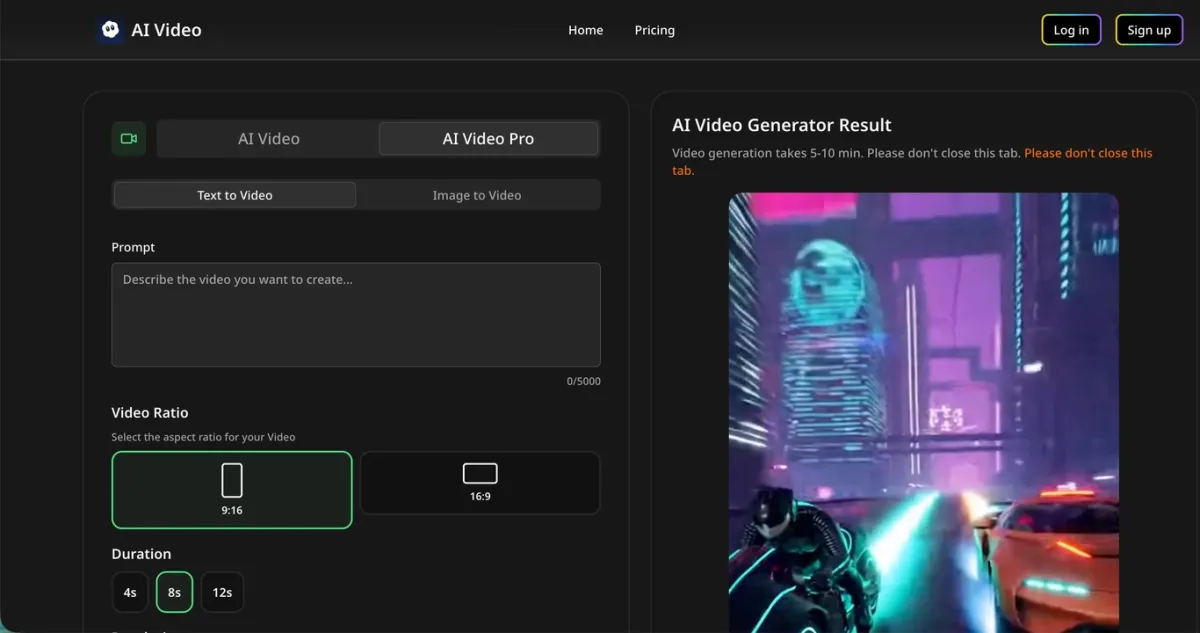
Sora 2 was OpenAI’s video and audio generation model: it aimed to simulate physical consequence (a missed basketball shot rebounds off the backboard) instead of only interpolating plausible frames. That framing mattered for how teams judged “realism” in 2025—less as polish, more as consequence.
Capabilities
Sora 2 launched on September 30, 2025 as a general-purpose system. On the Pro tier it supported up to 12 seconds at 1080p. Complex motion—sports, stunts, multi-character dialogue—often showed stronger physical plausibility than earlier consumer tools. Audio was native in one pass: speech, effects, and ambience together.
The Characters pipeline let approved users place a real person into a scene with likeness and voice after identity and consent steps. Multi-shot behavior could hold environment and lighting across cuts when prompts asked for continuity.
Where it broke down in practice
Sora 2 was not deterministic. Precise prompts still drifted on faces, wardrobe, and small props; hands and fine manipulation were frequent failure points. Teams chasing a specific hero performance often paid in regeneration volume: the $200/month Pro price mattered less than the iteration tax—many passes to reach one shippable clip. Briefs that stressed fast subject motion plus fine detail (our bee test is in that family) were especially likely to burn budget without a guaranteed payoff.
Shutdown and who had to move
OpenAI removed the Sora app and API on March 24, 2026, citing compute cost and pressure around synthetic media. There is no public endpoint for Sora 2 at the time of writing.
Impact was uneven: API and workflow integrations broke outright; subscription users lost a production tool overnight; teams using Characters or social-style distribution had to replace both generation and compliance assumptions. For a practical replacement map, see Sora alternatives.
How to think about migration (vendor-neutral)
You are not choosing “the next Sora.” You are matching constraints: Do you need Google-native procurement and short clips at scale? Vertex-class governance? Longer single-pass files? Rank those, then run your own prompts on shortlists—the side-by-side test above is one data point, not a universal ranking.
Historically, Sora 2 set a bar for physics-forward storytelling that later models are still measured against—even where they differ on price, access, or shutdown risk.
Google Veo 3.1
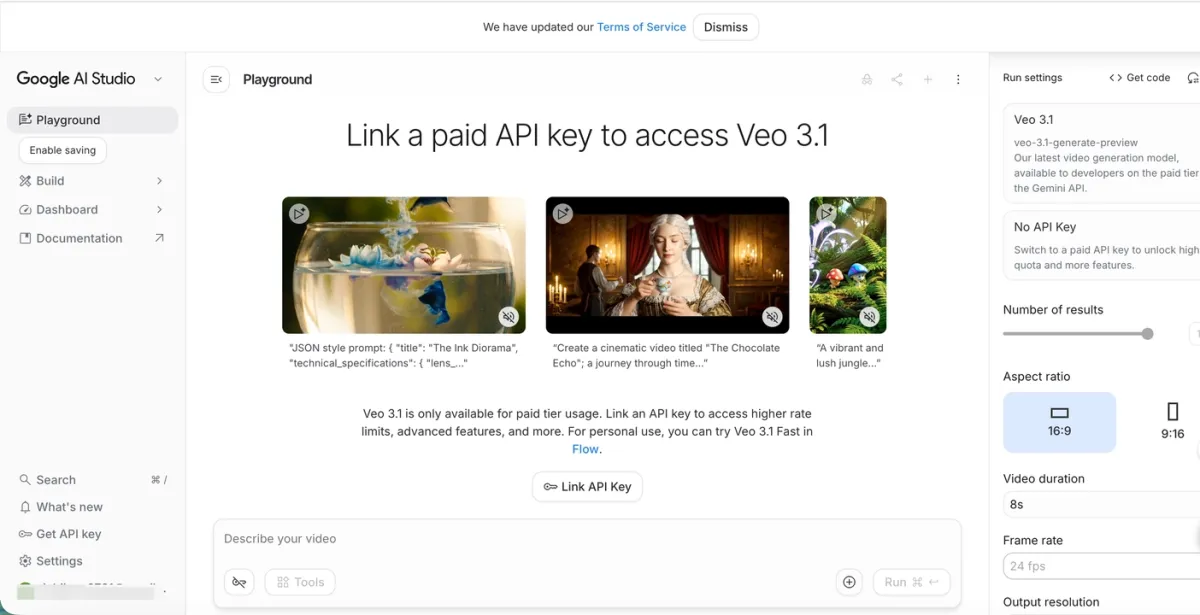
Veo 3.1 is Google’s generative video model for turning prompts (and some visual anchors) into short clips with native audio. Through the Gemini API (since October 2025) it connects to Google AI Studio, Vertex AI, and consumer surfaces such as Flow, the Gemini app, and YouTube Shorts—so “Veo” can mean anything from a quick app trial to a governed enterprise deployment.
Capabilities
Veo 3.1 supports 720p, 1080p, and 4K with 16:9 and 9:16. The default generation is 8 seconds—a good fit for Shorts-style beats and rapid iteration, but a structural constraint for story-driven pieces.
Scene extension is the main way Veo stretches beyond that: each new segment can continue from the last frame of the previous clip, so minute-plus runs are possible as a chain of prompts and reviews, not as one uninterrupted pass. That pattern favors teams comfortable storyboarding, QC-ing, and re-prompting between segments.
Ingredients to Video (up to three reference images) helps lock look or identity across generations—useful when brand assets already exist. First and last frame control targets controlled transitions between two stills, with audio in the same generation.
Audio (dialogue, sfx, ambience) ships with the video. In our bee test, sound was present, but lock-step sync to the fastest on-screen motion was not always convincing—worth validating on your own action-heavy prompts.
Access paths and what they imply
Not every entry point is interchangeable:
- Consumer apps (Gemini / Flow / Shorts) are the fastest way to try Veo-shaped output; terms, rate limits, and export paths differ from API use.
- Google AI Studio / Gemini API suits developers prototyping against Google’s stack.
- Vertex AI is the enterprise route: data handling, billing, and governance hooks matter when legal or procurement already standardized on Google Cloud.
If your organization does not already route production through Google, budget engineering time for auth, billing, and policy review—not just model quality.
Limitations
Eight-second defaults mean longer narratives are a workflow design problem: scene extension works, but it is not the same operational model as multi-shot inside one generation. Teams that need one file with structured internal cuts may prefer that distinction to be explicit in evaluation.
Outside the Google ecosystem, integration overhead is real: you are not only choosing a model—you are choosing how video sits next to storage, identity, and compliance tooling you already pay for.
PixVerse
OpenAI and Google each ship one primary video generator in this comparison (Sora 2 historically, Veo 3.1 today). On PixVerse, V6 covers the same file-based text-to-video job as those models. PixVerse R1 and Mini Apps (such as Ad Master) are different product shapes; they do not replace Sora 2 or Veo 3.1 in a like-for-like benchmark. See the FAQ at the end of this article.
PixVerse V6
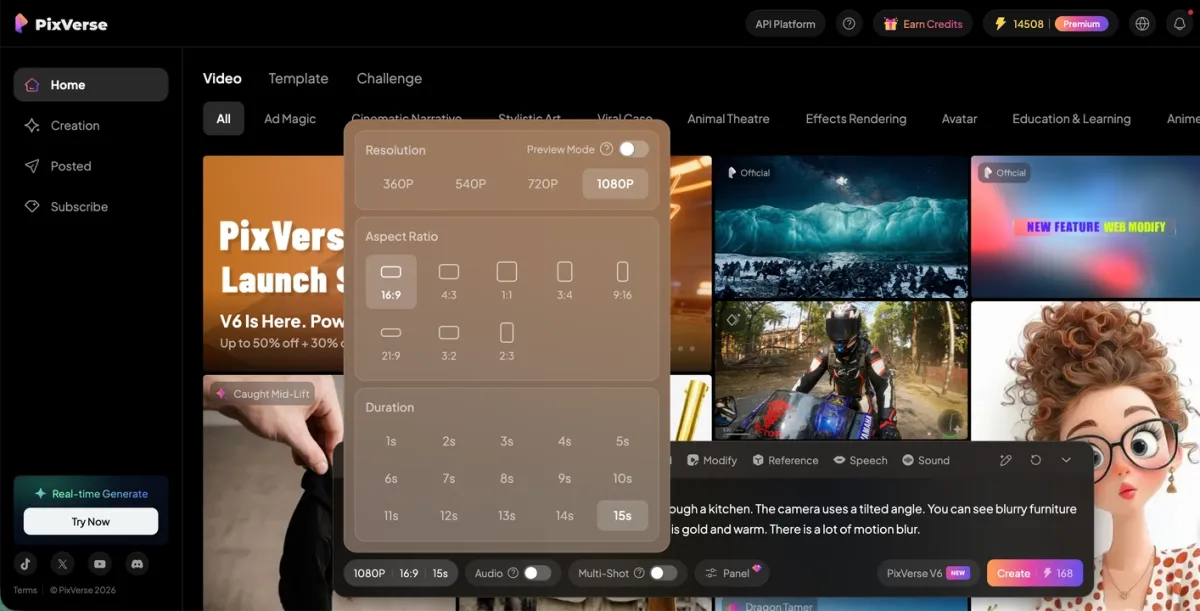
PixVerse V6 (March 30, 2026) is PixVerse’s text-to-video model for downloadable generation—the direct counterpart to Sora-style and Veo-style exports on the platform. For ten-model context beyond this three-way piece, see 2026 AI Video Generator. It targets up to 15 seconds at 1080p in one pass, with a multi-shot engine that keeps shared world state across internal cuts (wide to macro without treating every cut as a brand-new generation). Native audio is generated with motion; text-in-video supports multiple languages; 20+ lens parameters (focal length, aperture, depth of field, chromatic aberration, vignetting, and others) expose camera-style control before render.
Material and motion handling is stronger than earlier PixVerse generations for many briefs—still verify on the shots you actually ship.
Benchmarks and cost snapshot
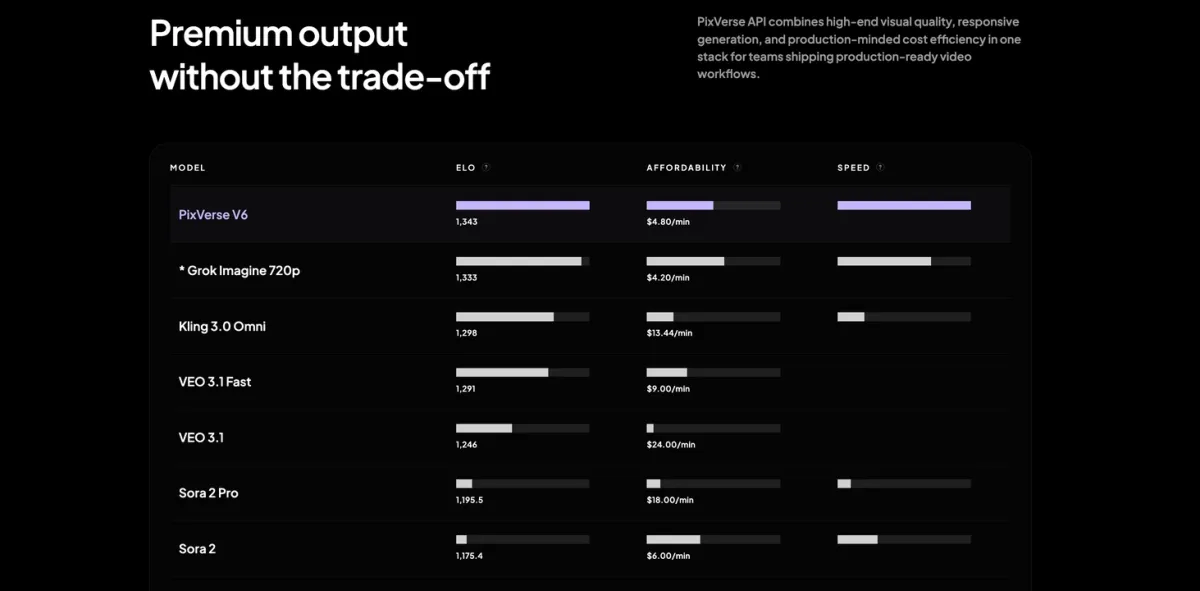
PixVerse maintains an internal leaderboard (ELO, approximate $/minute, and speed). At the time of this article, indicative rows include: PixVerse V6 at ELO 1,343 and $4.80/min; Veo 3.1 Fast at 1,291 / $9.00/min; Veo 3.1 (standard) at 1,246 / $24.00/min; Sora 2 Pro at 1,195.5 / $18.00/min; Sora 2 (standard) at 1,175.4 / $6.00/min. Sora numbers are historical—the service is offline. Use this table as one snapshot, then confirm live pricing and terms on each vendor before you budget.
How teams deploy PixVerse in practice
API routing: Inference providers such as Runware expose PixVerse V6 next to other models so developers can call video through the same stack they use for images—useful when your requirement is multi-model routing, not a single-vendor UI.
Embedded product: Companies such as Perfect Corp (YouCam) integrate generation inside an existing app so users move from stills to short video without leaving a familiar workflow—useful when distribution is consumer beauty or retail, not only a standalone generator page.
These examples show where PixVerse often plugs in; they are not endorsements for every use case.
Developer access
V6 is available on the web and ships a CLI for coding-agent and automation workflows (PixVerse CLI guide). For PixVerse R1 and Mini Apps, see the FAQ below.
Commercial use and operational fit
For teams evaluating these tools for paid production, the decision is not only about output quality. It is also about access path, pricing model, iteration cost, deployment workflow, and whether the product maps cleanly to the job you actually need done.
Veo 3.1 tends to fit when procurement, governance, and deployment already sit inside Google’s stack. PixVerse V6 tends to fit when the bottleneck is longer coherent output, cinematic control, or fewer stitching steps from prompt to finished clip. For live interaction or product-to-ad automation, see the FAQ on PixVerse R1 and Mini Apps. In all cases, confirm current commercial use, moderation, and data handling terms with each vendor before you ship client work.
Where each tool fits (text-to-video and adjacent)
Short-form social clips: Veo 3.1’s 8-second output and vertical 9:16 support cover most social content needs with minimal prompting overhead. PixVerse V6 handles the same formats at 15 seconds for content that needs more story room. Sora 2 is offline.
Campaign hero video: When the asset needs 12-15 seconds with product-consistent lighting across a sequence of shots, V6’s single-pass length and built-in multi-shot logic reduce the iteration cost compared to Veo’s sequential extension approach. Both produce professional output; the difference is how much manual prompting sits between shots.
Multi-shot narrative: Veo 3.1’s scene extension and reference image support handle longer sequences. V6’s multi-shot engine manages character-consistent cuts within a single generation and requires fewer stitching iterations for structured narrative.
High-volume automated production: Veo 3.1 via Vertex AI fits teams already standardized on Google Cloud. PixVerse V6 via API or CLI fits pipelines that need generation as a step inside broader automation (see deployment examples above). Sora 2’s API is offline.
E-commerce ads and live experiences: For SKU-first ad automation or real-time worlds, see the FAQ on PixVerse R1 and Mini Apps (Ad Master)—those workflows compare to legacy production or interactive products, not only to general T2V models.
Beauty, retail, and product visualization: Teams in this space often need faces, packaging, and localized on-screen text to stay stable. Compare V6 and Veo on your hero shots; embedded-app deployments (such as beauty workflows) are one pattern, not a universal proof point.
FAQ
Is Sora still available?
As of March 24, 2026, OpenAI’s Sora app and API are offline. There is no active public endpoint for Sora 2.
How does Veo 3.1 compare to PixVerse V6 for longer content?
Veo 3.1 defaults to 8 seconds; scene extension can reach minute-plus runs as a chain of segments. PixVerse V6 generates up to 15 seconds in one pass and can structure multiple shots inside that pass. Prefer Veo when you already optimize for short beats and Google-native delivery; prefer V6 when you want one file with internal cuts without re-prompting every shot.
What is PixVerse R1?
PixVerse R1 is not a drop-in substitute for Sora 2 or Veo 3.1 if you need a finished MP4 and nothing else. It streams a persistent, interactive world at low latency—including Shared Worlds (multi-user, prompt-driven live sessions) and Personalized Avatars in the April 2026 line. Architecture and roadmap detail live in the R1 article; access today is at realtime.pixverse.ai. Note: Partner and API access for R1 follows the PixVerse R1 Partner Program.
Sora 2 and Veo 3.1 do not aim at this real-time world problem; evaluate R1 only when your product spec requires it.
What is Ad Master (Mini Apps)?
Ad Master (March 31, 2026) is a product-image-to-ad-video Mini App: upload a SKU photo and short description, get layout, voiceover, and subtitles in one automated pass—priced around $2–3 per video depending on plan. It competes with in-house ad ops, not only with general-purpose generators. Open Ad Master.
Can I use these tools for commercial production?
Commercial use depends on each platform’s current tier, API terms, moderation rules, and regional policies. Before paid campaigns or client delivery, verify usage rights and data handling with OpenAI, Google, and PixVerse directly.
Which AI video generator should I test first?
Run a real production brief, not stock demos, through Veo 3.1 and PixVerse V6. Score audio sync, cross-shot consistency, and iteration count. For catalog ads or live-world needs, see the FAQ on Ad Master (Mini Apps) and PixVerse R1 above.
Conclusion
Sora 2 is offline, but it still matters as a reference period for physics-forward clips and native audio in one pass. Veo 3.1 is Google’s live path: short defaults, strong Google surface and API reach, and scene extension when you accept segmented production. PixVerse V6 is the parallel option when single-file length, in-pass multi-shot, and lens-level control matter more than fitting inside Google’s bundle.
For standard downloadable video in 2026, most teams shortlist Veo 3.1 and PixVerse V6, validate both on their own prompts, then decide on ecosystem fit versus clip structure. R1 and Mini Apps for adjacent workflows are covered in the FAQ above. Wider model context lives in the 2026 AI Video Generator piece.