PixVerse R1 Explained: Real-Time AI Video World Model
Learn what PixVerse R1 is, how the real-time AI video world model works, how it differs from AI video generators, and when to use R1, V6, or C1.
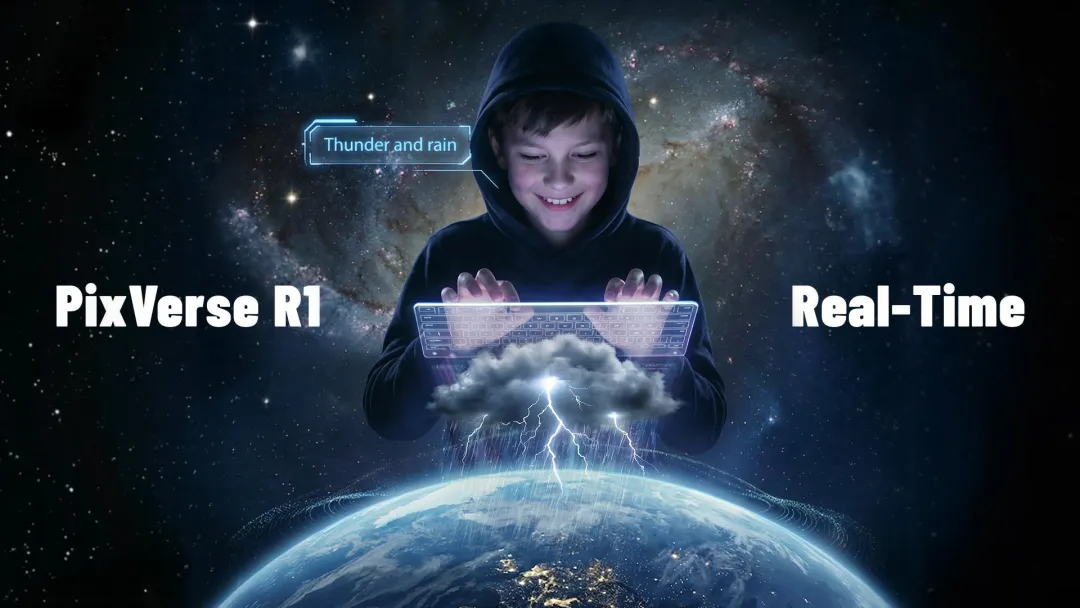
PixVerse R1 is the PixVerse real-time AI video world model for continuous, interactive visual worlds. Instead of rendering a fixed clip and stopping, R1 is designed to keep generating a live audiovisual environment that can respond while the session is running.
The simplest way to understand R1 is this: use PixVerse R1 when the output should behave like a live world; use a standard PixVerse video model when the output should be a finished MP4. If you are making social ads, product videos, cinematic shots, or image-to-video clips, start with PixVerse V6 or PixVerse C1. If you are building an interactive experience that needs continuity, live control, or shared participation, R1 is the PixVerse model to evaluate.
This guide is the R1 hub for readers comparing “real-time AI video,” “AI world model,” “interactive AI video generator,” and “PixVerse R1 API.” It explains what R1 is, how the real-time world model works, what changed after launch, where to try it, and when another PixVerse video model is the better fit. The product context below reflects public PixVerse updates available as of June 28, 2026.
What Is PixVerse R1?
PixVerse R1 is a real-time AI world model for interactive video generation. A text-to-video or image-to-video model turns a prompt into a finished clip. R1 turns a prompt and interaction loop into a running audiovisual environment that can keep evolving while a person or system steers it.
That distinction matters for teams comparing “real-time AI video,” “AI world model,” and “AI video generator.” R1 is not mainly about making a better one-off clip. If a fixed clip is the goal, start with the PixVerse AI video generator; R1 is about reducing the delay between user intent and visual response, so a world can keep changing as people interact with it.
In practical terms, R1 is most relevant when the scene needs to stay live. It fits interactive media, AI-native games, live streaming, XR, simulation, education, shared worlds, and developer prototypes where the next visual state depends on user input instead of a new export.
| If your task is… | Better PixVerse starting point | Why |
|---|---|---|
| Creating a polished social clip, product demo, ad, or cinematic shot | PixVerse V6 or C1 | The goal is a finished video asset that can be downloaded, edited, and published. |
| Exploring a live environment that responds during the session | PixVerse R1 | The goal is continuous real-time video, not a fixed-length render. |
| Building an interactive game, XR scene, training simulator, or live stream layer | PixVerse R1 | The experience depends on low-latency control, continuity, and stateful world behavior. |
| Testing film-style action, VFX, or storyboarding | PixVerse C1 | The job needs shot-level control and cinematic production fit. |
| Automating general text-to-video or image-to-video workflows | PixVerse V6 | The job needs a flexible file-based generation workflow. |
How to Try PixVerse R1
For the live R1 experience, start from world.pixverse.ai. This is the clearest path for users who want to understand R1 as an interactive world rather than as a traditional render workflow.
For teams building products, the R1 partner/API path is the more relevant route. PixVerse has described R1 API access for qualified partners in gaming, streaming, XR, simulation, interactive storytelling, creative tools, and related real-time media workflows. If your team needs an integration rather than a one-off demo, read the R1 API partner update alongside this guide.
What Changed Since Launch
R1 has evolved from a research launch into a clearer real-time product and partner pathway. The core architecture remains the foundation, while later updates added more user-facing and developer-facing context.
| Date | R1 milestone | What changed | Source |
|---|---|---|---|
| January 12, 2026 | R1 launch | PixVerse introduced R1 as a continuous, interactive real-time world model for AI video, built around Omni multimodal processing, autoregressive memory, and an instantaneous response engine. | Launch announcement |
| February 10, 2026 | R1 720p and API partner update | PixVerse described 720p HD generation, integrated audio, interactive storytelling, and limited API access for qualified partners. | R1 API partner update |
| April 1, 2026 | Shared worlds and avatars | PixVerse expanded R1 with personalized avatars, continuous shared worlds, live prompt participation, chat, and no session limit for shared worlds. | Shared worlds update |
Availability, output resolution, session length, and API access can vary by R1 experience and partner program. The research architecture explains the model direction; the live product and API path define what teams can use at a given moment.
Which R1 Page Should You Read?
PixVerse has several R1 articles because R1 moved from launch announcement to product updates and partner access. Use this page as the main explainer, then move to the page that matches your task.
| Reader goal | Best page |
|---|---|
| Understand what R1 is and how it differs from a standard AI video generator | This PixVerse R1 explainer |
| Read the original launch framing and architecture summary | PixVerse Launches R1 |
| Check API access, 720p HD generation, integrated audio, and partner fit | R1 720p and API partner update |
| Learn about shared worlds, avatars, live prompts, and no session limit for shared worlds | PixVerse Updates R1 |
| Compare R1 with Google Genie 3 | Alternative to Google Genie 3: PixVerse R1 |
| Understand how R1 powers interactive gaming architecture | PixVerse Game Engine deep dive |
R1 vs Traditional AI Video Generation
PixVerse R1 should not be evaluated like a standard text-to-video model. It solves a different problem.
| Question | Standard AI video model | PixVerse R1 |
|---|---|---|
| What does it output? | A fixed video clip. | A continuous, interactive visual stream. |
| When can the user intervene? | Before generation, then again after the clip finishes. | During the running session. |
| What matters most? | Prompt quality, visual quality, clip duration, export workflow. | Latency, memory, continuity, interactive control, and session behavior. |
| Best fit | Social clips, ads, cinematic shots, image-to-video, downloadable assets. | AI-native games, live interactive media, shared worlds, simulation, XR, and real-time visual exploration. |
| PixVerse path | Use PixVerse V6 or C1 for file-based generation. | Use world.pixverse.ai or the R1 partner/API path when the workflow needs live interaction. |
For many production tasks, a file-based model is still the right tool. If the goal is a polished social ad, product video, cinematic shot, or downloadable MP4, PixVerse V6 or PixVerse C1 may be the better starting point. R1 becomes relevant when the output needs to keep responding after generation begins.
Use this rule of thumb: if the main deliverable is a file, choose V6 or C1 first. If the main deliverable is an experience that keeps reacting, evaluate R1.
R1, V6, and C1: Choosing the Right PixVerse Model
PixVerse now covers several different video creation jobs. The important question is not which model is “newest,” but which model matches the output you need.
| Model | Primary workflow | Output behavior | Best for |
|---|---|---|---|
| PixVerse R1 | Real-time world generation | Continuous interactive stream | Live worlds, games, XR, simulation, interactive storytelling, shared sessions |
| PixVerse V6 | General AI video generation | Finished video clip | Text-to-video, image-to-video, product videos, social clips, fast creator workflows |
| PixVerse C1 | Film-production oriented generation | Finished cinematic clip | Action, VFX, storyboarding, cinematic continuity, production planning |
Choose R1 when the audience or user needs to influence the scene while it is happening. Choose V6 or C1 when the main deliverable is a finished video file.
How the R1 Real-Time World Model Works
PixVerse R1 combines three research directions: native multimodal processing, autoregressive memory for continuous generation, and an instantaneous response engine for low-latency output. Together, these systems allow R1 to behave less like a render queue and more like a responsive audiovisual environment.
The original research framing described PixVerse R1 as a next-generation real-time world model architected on a native multimodal foundation model. In practical terms, the model is designed to process text, image, video, and audio signals in one system, preserve context over time, and respond fast enough for interactive experiences. Product capabilities, resolution, and API availability should still be checked against the current R1 experience and partner materials before production planning.
Omni: Native Multimodal Foundation Model
Omni is the native multimodal foundation model described in the R1 architecture. Instead of treating text, image, video, and audio as isolated inputs, the model processes them as a unified stream. This is important for real-time worlds because the visual scene, user prompt, audio context, and previous state all influence what should happen next.
- Unified representation: The Omni model is designed to unify text, image, video, and audio into a continuous stream of tokens so different inputs can be handled inside one framework.
- End-to-end training: The architecture is described as training across heterogeneous tasks without intermediate interfaces, a design choice intended to reduce handoff errors between separate systems.
- Native resolution: PixVerse describes native-resolution training as a way to reduce artifacts that can appear when content is repeatedly cropped or resized.
The goal is to learn enough visual, audio, and motion context to keep a generated world plausible as it changes. This should be read as a model design direction, not a guarantee that every generated world will obey real-world physics perfectly.
PixVerse frames Omni as a step toward broader world simulation, while the practical user value is easier to state: R1 is meant to make generated video feel stateful, responsive, and continuous instead of isolated into short render jobs.
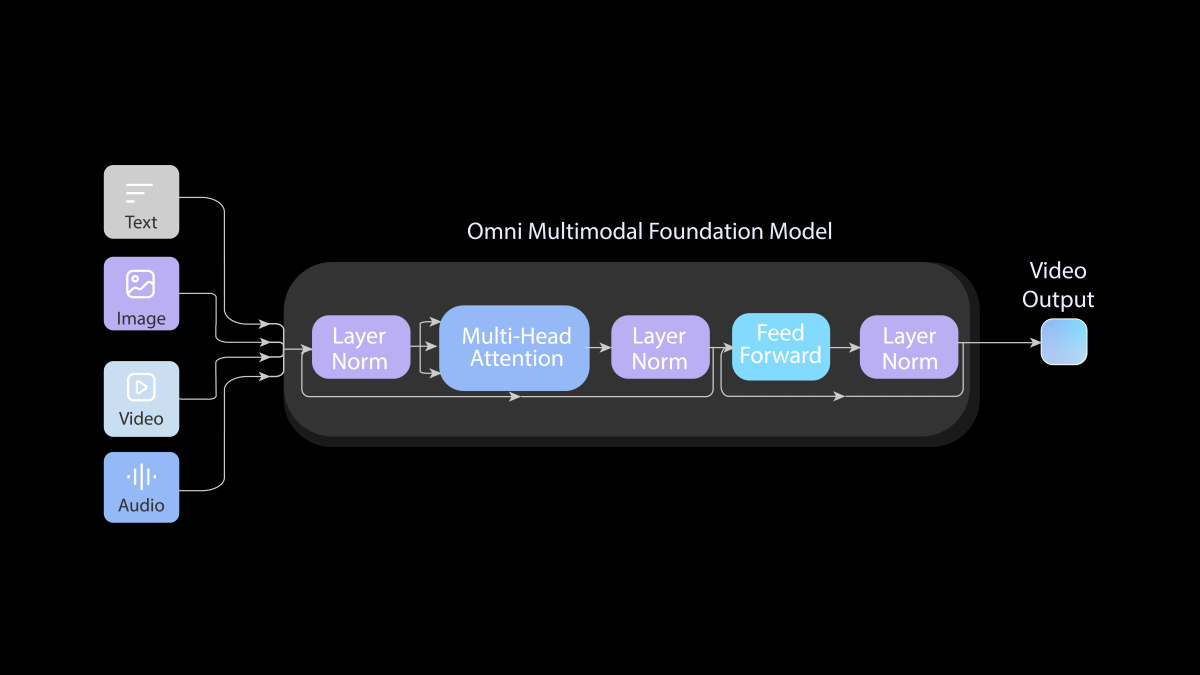
Figure 1. The end-to-end architecture of our Omni Native Multimodal Foundation Model, the unified design enables our Omni-model to accept arbitrary multimodal inputs and generate audio and video at the same time.
Memory: Consistent Infinite Streaming via Autoregressive Mechanism
Unlike standard diffusion-style workflows that are usually framed around finite clips, PixVerse R1 uses autoregressive modeling to support continuous visual streaming. The goal is to keep the world coherent as the session unfolds instead of generating a short clip, ending, and forcing the user to start over.
- Continuous streaming: By formulating video synthesis as an autoregressive process, the model sequentially predicts subsequent frames to support generation beyond a fixed clip boundary.
- Temporal consistency: A memory-augmented attention mechanism conditions the current frame on preceding context, aiming to preserve object, scene, and motion continuity over time.
This is also where the hard research problem lives. Recent interactive video world model research highlights compounding errors and insufficient memory as major challenges for interactive video generation. R1’s memory mechanism is designed around that problem, while still acknowledging that long sessions can accumulate visual or physical inconsistencies.
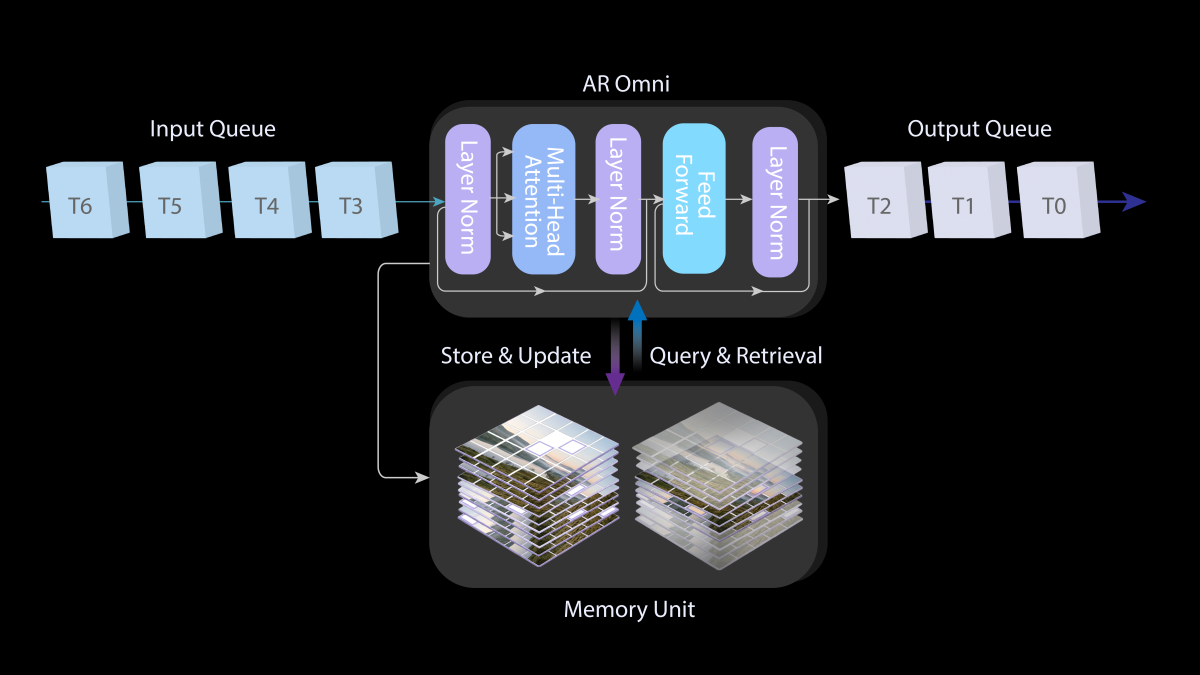
Figure 2. The integrated autoregressive modeling with the Omni foundation model.
Instantaneous Response Engine: Low-Latency Generation
While iterative denoising can support high visual quality, its computational cost can make real-time interaction difficult. PixVerse describes the Instantaneous Response Engine as the part of R1 designed to reduce sampling cost and make low-latency generation practical.
Resolution should be read with context. The January R1 launch described real-time 1080P research capability, while the February partner update described 720p HD generation for the R1 API partner path. For production evaluation, check the current web experience or partner terms rather than assuming one fixed resolution across every R1 surface.
The IRE optimizes the sampling process through the following advancements:
- Temporal trajectory folding: Direct Transport Mapping is used as a structural prior so the network can move toward the clean data distribution with fewer sampling steps.
- Guidance rectification: Conditional guidance is integrated into the student model to reduce separate guidance overhead during generation.
- Adaptive sparse attention: Long-range dependency redundancy is reduced so the computation graph stays lighter during continuous generation.
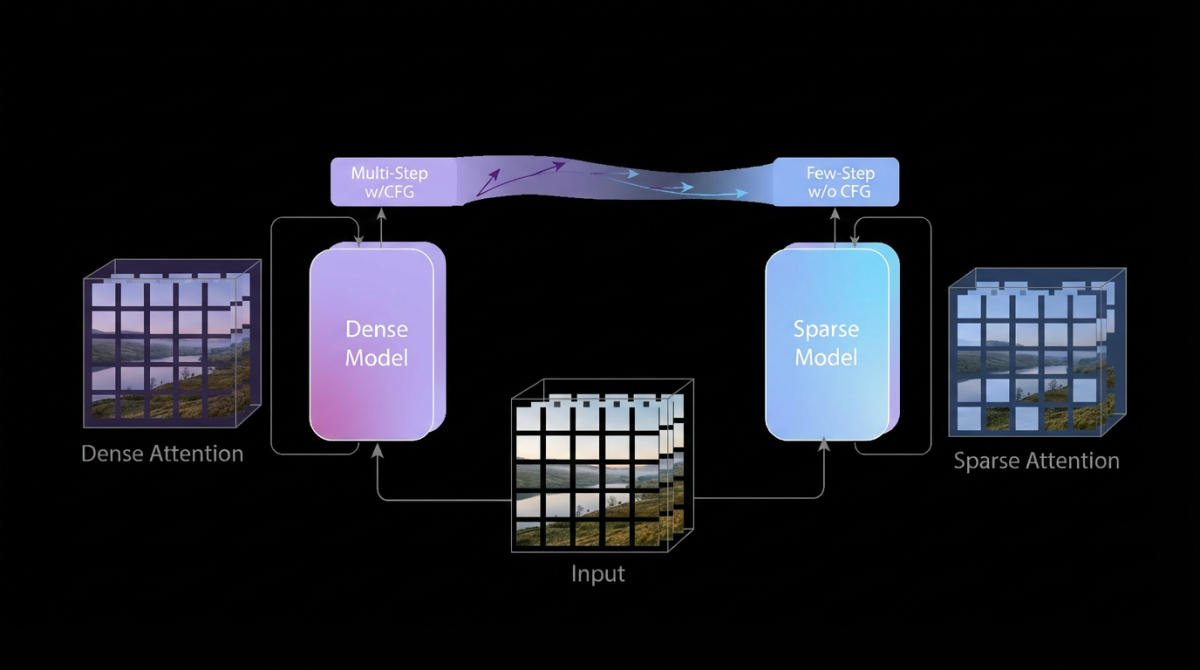
Figure 3. The instantaneous response engine consists of three modules: temporal trajectory folding, guidance rectification and adaptive sparse attention learning.
R1 in the World Model Landscape
The world-model category is moving quickly. Google DeepMind’s Genie 3 pushed broader attention toward real-time interactive environments, promptable world events, and agent research. Newer research systems also explore video-conditioned 4D worlds, longer memory, controllable rollout, and agent training environments.
The useful comparison is not simply “which model looks best.” Teams should ask what the model is for, how it can be accessed, and whether the workflow needs a live world or a finished video file.
| Model or category | Public positioning | Practical takeaway |
|---|---|---|
| PixVerse R1 | Real-time world model for continuous interactive AI video, with web access and a partner/API path. | Strong fit when the project needs a live audiovisual environment that responds during the session. |
| Google Genie 3 | General-purpose world model for interactive environments, promptable world events, and agent research. | Important research signal, especially for world simulation and embodied-agent use cases. |
| Video-conditioned 4D world models | Systems that reconstruct or condition on reference video to support spatial exploration over time. | Useful market signal for spatial consistency, robotics, simulation, and 4D scene understanding. |
| Standard AI video models | File-based text-to-video or image-to-video generation. | Still best for finished clips, marketing videos, cinematic shots, and straightforward publishing workflows. |
This distinction is important for searchers comparing “AI video generator,” “real-time AI video,” and “world model.” R1 belongs to the real-time world model category, not the ordinary render-and-export category.
Practical Use Cases for PixVerse R1
PixVerse R1 is most relevant when a product or creative workflow needs real-time media behavior rather than a finished asset. The strongest use cases share one trait: the scene changes because someone interacts with it.
| Use case | Why R1 fits |
|---|---|
| AI-native games | Environments, scenes, and story beats can respond during play instead of being fully pre-rendered. See the PixVerse Game Engine deep dive for the full MED, GGL, and LCO architecture. |
| Live streaming and shared worlds | Viewers can participate in a world that keeps evolving rather than watching a static output. |
| XR and immersive simulation | Real-time response matters more than producing a conventional clip. |
| Interactive education and training | Scenarios can adapt to learner choices, instructor prompts, or simulation states. |
| Creative ideation | Teams can explore world concepts live before deciding which moments should become finished assets. |
| Developer prototypes | Product teams can test whether a real-time world model belongs in a game, tool, or media product before building a full pipeline. |
For developer and API workflows, R1 is strongest when the product spec includes live interaction. If the spec only asks for high-quality clips, a file-based PixVerse workflow is usually simpler.
R1 is usually not the first choice for straightforward social ads, product clips, cinematic renders, or image-to-video tasks where the final output is a downloadable asset. In those cases, a standard PixVerse video model gives creators a more direct production workflow.
Current Limits and Evaluation Notes
World models are still early. R1 changes the interaction model, but teams should evaluate it with the right expectations.
- Long-horizon consistency can still drift. Over extended sequences, small prediction errors may accumulate and affect object persistence, scene structure, or physical continuity.
- Physics fidelity involves trade-offs. Real-time generation requires efficiency, and that can reduce the precision of some physical behaviors compared with slower offline generation.
- Access path matters. Web experience, shared-world experience, and partner/API access may expose different capabilities, resolutions, and limits.
- R1 is not a replacement for every PixVerse video model. Use R1 for live interaction. Use V6 or C1 when the job is a finished video asset.
- Resolution claims need context. PixVerse launch and research materials discuss high-resolution real-time generation, while product and API updates may define specific available output levels for a given access path.
- Benchmark claims need context. When comparing R1 with other world models, look at session length, interaction type, resolution, audio, access model, and whether results are independently benchmarked.
What to Read Next
- To see the original R1 announcement, read PixVerse Launches R1.
- To evaluate API and partner access, read the R1 720p and API partner update.
- To understand shared worlds, avatars, and live prompt participation, read PixVerse Updates R1.
- To compare R1 with Google Genie 3, read Alternative to Google Genie 3: PixVerse R1.
- To understand how R1 supports interactive gaming, read the PixVerse Game Engine deep dive.
- To choose a standard video generation model, compare PixVerse V6 and PixVerse C1.
- To understand the broader category, read Real-Time AI Video Generation.
Conclusion
PixVerse R1 is PixVerse’s real-time AI video world model for continuous, interactive audiovisual experiences. Its main value is not replacing every AI video generator. Its value is opening a different workflow: a user prompts, the world responds, and the session keeps evolving.
For finished clips, PixVerse V6 and C1 remain better starting points. For live worlds, shared environments, simulation, XR, games, and interactive media products, R1 is the model to evaluate.
FAQ
What is PixVerse R1?
PixVerse R1 is a real-time AI world model for continuous interactive video generation. It uses a native multimodal foundation model, memory-aware autoregressive streaming, and an instantaneous response engine to create a visual world that can respond while it is still running.
Is PixVerse R1 available to try?
PixVerse directs users to the R1 web experience at world.pixverse.ai. Qualified teams can also evaluate the R1 partner/API path, which is intended for production-oriented use cases such as gaming, streaming, XR, simulation, and creative tools.
Is PixVerse R1 a world model?
Yes. PixVerse R1 is positioned as a real-time world model because it generates a continuous, interactive audiovisual environment rather than a single fixed video clip. The world-model framing is important because R1 needs memory, continuity, and low-latency response, not only visual quality.
Is PixVerse R1 the same as an AI video generator?
No. R1 belongs to the AI video generation family, but it solves a different problem from a normal text-to-video or image-to-video generator. A standard AI video generator is best for finished clips; R1 is designed for live, stateful, interactive worlds.
How is R1 different from a normal AI video generator?
A normal AI video generator produces a fixed clip after a prompt. R1 is designed for continuous generation, so the scene can keep evolving and respond to user input during the session. That makes R1 closer to a live world than a downloadable render.
Does PixVerse R1 support audio?
PixVerse’s February 2026 R1 update introduced integrated audio generation, including real-time audio synchronized with visual content. This matters because interactive worlds need sound, ambience, and audiovisual feedback, not only moving images.
Does PixVerse R1 generate 720p or 1080p video?
PixVerse’s January 2026 R1 launch discussed real-time 1080P generation in the research architecture. The February 2026 R1 API partner update described 720p HD output for the partner path. Treat resolution as access-path dependent and verify the current R1 web or partner terms before planning a production workflow.
How is PixVerse R1 different from Google Genie 3?
Both belong to the broader world-model category, but they are positioned differently. Genie 3 is framed by Google DeepMind around interactive environments, promptable world events, and agent research. PixVerse R1 is positioned around PixVerse’s real-time video product experience, shared-world updates, and partner/API access path.
When should I use PixVerse V6 or C1 instead of R1?
Use PixVerse V6 or C1 when you need a finished video clip for social media, advertising, film previsualization, image-to-video, or downloadable content. Use R1 when the experience itself needs to stay live, interactive, continuous, or shared by multiple users.
Does PixVerse R1 have API access?
PixVerse has described limited R1 API access for qualified partners. The API path is most relevant for teams building real-time media products, including gaming, streaming, XR, simulation, interactive education, and creative tools.
Who should use PixVerse R1?
PixVerse R1 is for creators, developers, and teams building experiences that need live control: interactive entertainment, game prototypes, XR demos, shared worlds, simulation, training, or real-time creative exploration. If the goal is a finished clip, start with PixVerse V6 or C1 instead.