Seedance 2.0 Now Available on PixVerse: AI Video from ByteDance
Seedance 2.0 from ByteDance is live on PixVerse with native audio, 9-image reference input, and two speed tiers. Create 4-15s clips at 480p or 720p — try it now.
Introduction
PixVerse now supports Seedance 2.0, ByteDance’s multimodal video model that generates clips with native audio — no post-production sound editing needed. Upload up to 9 reference images directly into your prompt, and choose between Standard (higher fidelity) and Fast (lower cost, quicker turnaround) depending on your project.
Seedance 2.0 joins PixVerse’s growing model library alongside Kling O3, Seedream 5.0 Lite, and other AI video generators — giving you more options for text-to-video creation without switching platforms.
What Is Seedance 2.0?
Seedance 2.0 is built by ByteDance’s Doubao large-model team. It takes text and images as input and generates video output with native audio. The model is designed for commercial advertising, film production, and social media content, with strong detail reproduction and stable character features.
On PixVerse, Seedance 2.0 comes in two tiers:
| Feature | Standard | Fast |
|---|---|---|
| Text-to-Video (T2V) | Yes | Yes |
| Image-to-Video (I2V) | Yes | Yes |
| Transition (first + last frame) | Yes | Yes |
| Image reference (up to 9) | Yes | Yes |
| Native audio | Yes | Yes |
| Resolution | 480p, 720p | 480p, 720p |
| Duration | 4–15 seconds | 4–15 seconds |
Standard and Fast have the same capabilities. The difference is generation quality and speed: Standard produces higher-fidelity output, while Fast costs fewer credits and returns results sooner.
What Can Seedance 2.0 Do?
Text-to-Video and Image-to-Video
Describe a scene in text and Seedance 2.0 generates a video clip. Or upload a starting image and the model animates it into motion. You can also provide both a first frame and a last frame to create a smooth transition between two images.
Image Reference
Upload up to 9 reference images and use them in your prompt with the @image1, @image2 syntax. The model reads visual details from these references — character appearance, product design, environment style — and incorporates them into the generated video. This is useful for maintaining brand consistency or replicating a specific visual style.
What Are the Output Specs?
| Parameter | Options |
|---|---|
| Duration | 4 to 15 seconds (default: 5s) |
| Resolution | 480p or 720p (default: 720p) |
| Aspect ratio | 21:9, 16:9, 4:3, 1:1, 3:4, 9:16 |
| Native audio | On by default — generates sound with the video |
| Image input | Up to 9 reference images (JPG, PNG, WebP, max 30 MB each) |
How Much Does Seedance 2.0 Cost on PixVerse?
Pricing is based on credits per second. The 720p resolution costs 2x the 480p rate.
| Tier | 480p | 720p |
|---|---|---|
| Standard | 15 credits/s | 30 credits/s |
| Fast | 10 credits/s | 20 credits/s |
A 5-second clip at 720p Standard costs 150 credits. The same clip at 720p Fast costs 100 credits.
Launch promotion: For the first 7 days after launch, all Seedance 2.0 generations are 30% off. Ultra members get an additional discount, bringing the effective rate down to 42% of the base price.
How to Generate Video with Seedance 2.0
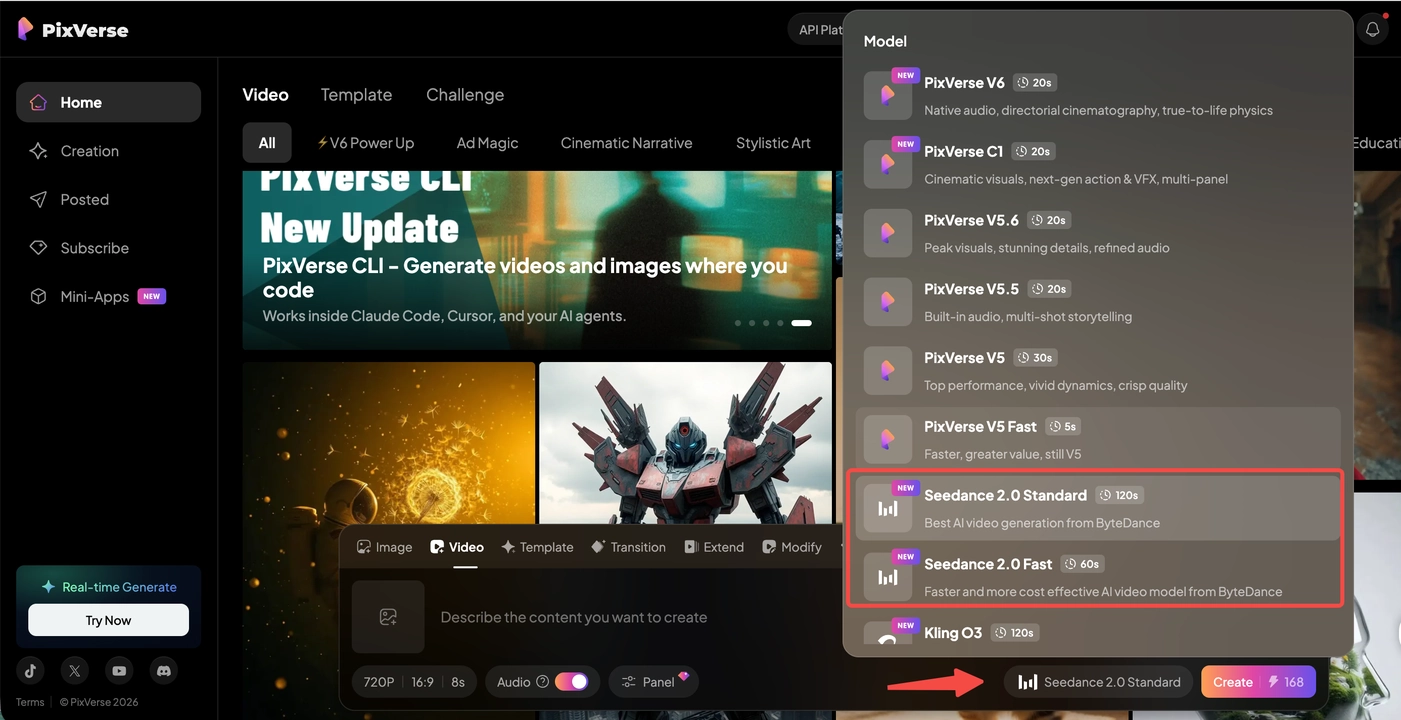
- Sign in to your PixVerse account
- Go to the Video section in the creation panel
- Select Seedance 2.0 Standard or Fast from the model list
- Set your parameters: duration (4–15s), resolution (480p or 720p), and aspect ratio
- Enter your prompt — optionally upload reference images and use
@image1syntax to reference them in your prompt - Click Generate and wait for your result
For image-to-video, upload a starting image. For transition mode, upload both a first frame and a last frame.
When Should You Use Standard vs Fast?
| If your project needs… | Use | Why |
|---|---|---|
| Best visual quality for final output | Standard | Higher fidelity generation |
| Quick drafts and iteration | Fast | Lower cost, faster results |
| Commercial advertising footage | Standard | Detail reproduction matters for ads |
| Social media clips | Fast | Speed and cost are more important |
| Testing prompts and concepts | Fast | Iterate at 10 credits/s instead of 15 |
| Client-facing deliverables | Standard | Maximum quality for presentations |
Start with Fast to test your ideas, then switch to Standard for the final render.
Tips for Better Results
- Use
@image1syntax for references: Upload a reference image and mention it in your prompt like “a woman wearing the outfit from @image1 walking through a park.” The model reads visual details from the reference and applies them to the output. - Start with shorter clips: Generate a 4–5 second test clip first. Once you’re happy with the style and motion, generate a longer version.
- 720p for final output, 480p for drafts: Use 480p to iterate quickly (half the credit cost), then switch to 720p for the final render.
- Audio is on by default: Seedance 2.0 generates audio with every video. If you only need the visual track, turn audio off to keep things clean.
Who Can Access Seedance 2.0 on PixVerse?
Seedance 2.0 video generation is available to Pro, Premium, and Ultra tier members. Ultra members receive a 40% credit discount on all Seedance 2.0 generations (stacks with the launch promotion).
Frequently Asked Questions
What is the difference between Seedance 2.0 Standard and Fast?
Both tiers have the same features: T2V, I2V, transition, image reference, and audio. Standard produces higher-quality output. Fast costs fewer credits and generates faster. Use Fast for iteration and Standard for final renders.
How does the @image1 reference syntax work?
Upload reference images when creating your prompt. Then mention them in your text using @image1, @image2, etc. The model reads visual details from those images and applies them to the generated video. You can use up to 9 reference images.
What is the maximum video duration?
Seedance 2.0 generates clips from 4 to 15 seconds. The default is 5 seconds.
Does Seedance 2.0 support audio?
Yes. Native audio generation is on by default. The model produces synchronized sound — dialogue, effects, ambient — alongside the video. You can turn it off if you only need the visual track.
Is there a launch discount?
Yes. For the first 7 days after launch, all Seedance 2.0 generations are 30% off. Ultra members get an additional 40% discount on top of that, bringing the effective cost to 42% of the base price.
Conclusion
Seedance 2.0 brings multimodal video generation to PixVerse with native audio, image reference, and transition support. Whether you need a quick social clip or a polished ad sequence, both Standard and Fast tiers are ready to use from your PixVerse account today.
Combined with PixVerse’s existing lineup — including our own V6 model, Veo 3.1, Sora 2, and more — you now have an even wider set of generation tools to work with, all in one place.