GPT Image 2 提示词指南:80 个 Prompt、评测与 API 技巧(2026)
查看 80 个可复制的 GPT Image 2 提示词,覆盖广告、海报、产品、角色和视频工作流,并了解 API 说明与实测结论。
这是 GPT Image 2 提示指南和动手回顾,适合首先需要可用提示的创作者:产品广告、海报、缩略图、角色、社交图像、UI 模型、编辑和视频就绪第一帧。
如果您已经知道自己需要什么,请使用以下快速路径:
- 复制提示:请参阅下面的 80 个复制就绪 GPT Image 2 提示示例。
- 查看测试结果:检查动手复习分数和限制。
- 将图像转为视频:遵循 PixVerse 图像转视频工作流程。
当图像需要像设计的资产一样表现时,GPT Image 2 是最强的:可读文本、干净的布局、产品组合、UI 模型、信息图表、可编辑参考和视频就绪的第一帧。当工作依赖于精确的品牌徽标复制、微小的合规副本、专有字体或必须在没有手动质量检查的情况下交付的透明最终资产时,它的可靠性就不太高。
OpenAI于2026年4月21日推出了ChatGPT Images 2.0。创作者经常寻找与GPT Image 2、gpt-image-2或ChatGPT Images 2.0相同的体验。我们首先在发布周对其进行了测试,并于 2026 年 6 月 22 日根据 OpenAI 的官方提示指南、API 定价页面和 ChatGPT Images 帮助文档再次审查了本指南。
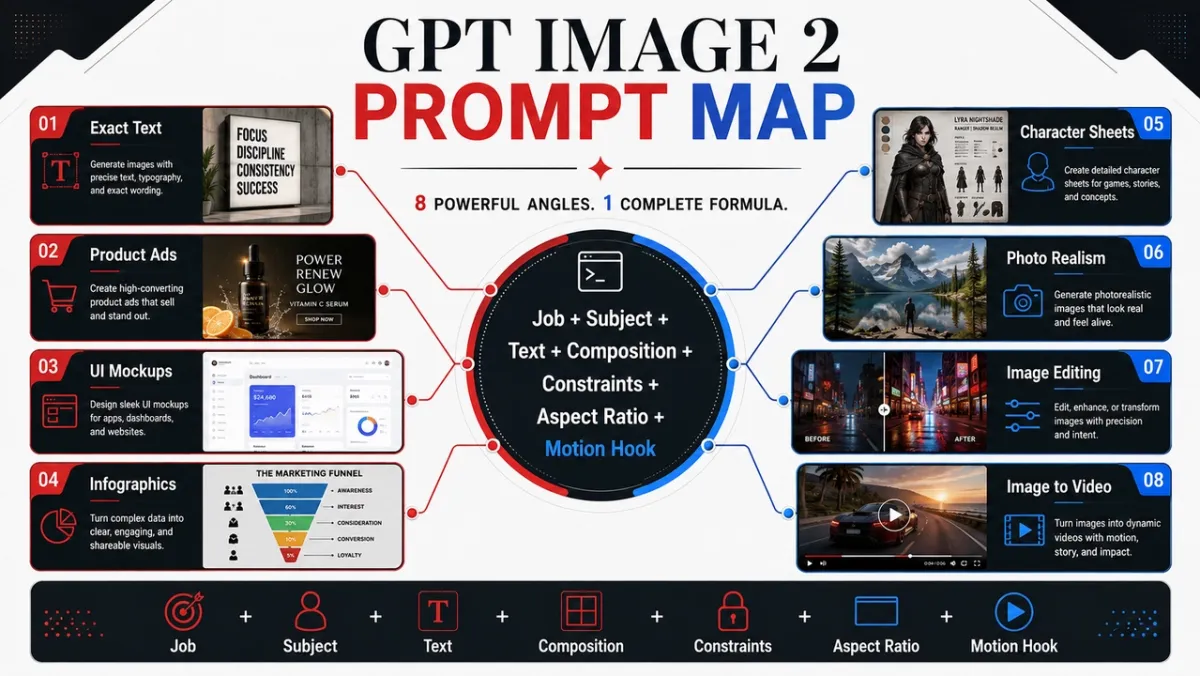
5 GPT Image 2 提示先复制
这五个提示涵盖了本指南中价值最高的用例。每一项都遵循相同的格式:用例、提示、最佳用途和提示。
提示示例1:产品摄影
用例: 电子商务产品英雄形象
迅速的:
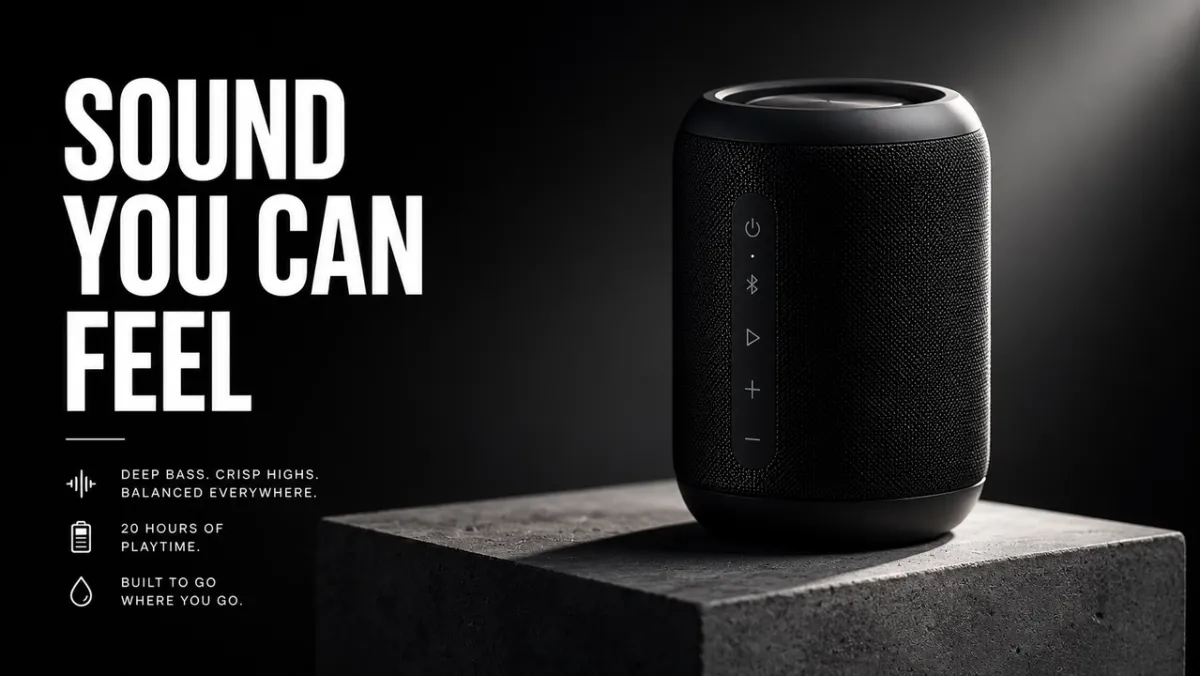
为混凝土底座上的哑光黑色无线扬声器创建优质电子商务英雄形象。该产品位于右侧三分之一处,具有锐利的边缘、逼真的材质纹理、干净的接触阴影和引人注目的边缘光。将左侧三分之一留为标题的负空间。无假品牌标志、无水印、无多余物体。纵横比 16:9。
最适合: 产品列表、付费社交广告、登陆页面英雄图片
提示: 如果您提供参考图像,请添加“准确保留产品形状、颜色、标签和比例”。
提示示例2:AI广告创意
用例: 带有确切文本的活动海报
迅速的:
为虚构的设计工具创建垂直产品发布海报。标题:“创造更快”。副标题:“从提示到活动”。干净的瑞士网格,灰白色背景,黑色排版,一种电蓝色强调形状,强烈的层次结构,只有精确的文本,没有多余的文字,没有水印。纵横比 9:16。
最适合: 广告概念、海报测试、启动图形、社交活动图像
提示: 保持标题文字简短并准确引用。长文本很难清晰地呈现。
提示示例3:字符一致性
用例: 角色参考表
迅速的:
为原创科幻快递员“NOVA”制作专业角色参考表。包括前视图、侧视图和后视图;四种面部表情;夹克、靴子和背包标注;和一个调色板行。在每个视图中保持相同的脸部、发型、服装和比例。干净的白色背景,可读的标签,概念艺术风格。纵横比 16:9。
最适合: 游戏角色、动画参考、品牌吉祥物、故事板
提示: 在每次再生中重复身份锚点:姓名、面孔、发型、服装、调色板和角色。
提示示例 4:缩略图或社交图片
用例: YouTube 缩略图或社交帖子
迅速的:
为有关AI图像提示的视频创建一个大胆的YouTube缩略图。正文:“更好的提示”。显示分屏前后图像结果,左侧是凌乱的提示卡,右侧是精美的营销活动视觉效果。高对比度,清晰的无脸构图,可读的文字,没有假标志,没有多余的文字。纵横比 16:9。
最适合: 缩略图、社交解释器、博客图形、创作者内容
提示: 准确地告诉模型应该出现多少个单词以及它们应该出现在哪里。
提示示例5:图像转视频第一帧
用例: PixVerse 图像到视频的第一帧
迅速的:
为图像到视频剪辑创建电影般的第一帧:一个玻璃香水瓶立在潮湿的黑色石头上,后面有一条细薄的雾带,强烈的前景轮廓,可见的深度层,微妙的反射,相机移动的空白空间,没有手,没有文字,没有水印。纵横比 16:9。
最适合: 产品展示、短广告、音乐视频开场、电影社交剪辑
提示: 在静止图像中添加一种运动提示,例如薄雾、灰尘、蒸汽、织物、屏幕发光或反射。
使用 PixVerse 将您的 GPT Image 2 静态图像转换为视频
如果静态图在动画前还需要准备,PixVerse Mini Apps 集中了图像清理、画幅扩展及其他相关制作任务的专用工作流。
强烈的 GPT Image 2 提示可以创建静止图像。当仍然需要运动、摄像机移动或简短的活动剪辑时,PixVerse 是下一步。
- 使用 GPT Image 2 生成第一帧。
- 将批准的图像上传到PixVerse。
- 添加聚焦动作提示。
- 导出短视频用于测试、广告、社交帖子或产品页面。
运动提示尝试:
- 使用图像作为第一帧。将相机慢慢推向产品,同时雾气在产品后面飘过。保留产品形状、标签、照明和位置。
- 使用图像作为第一帧。添加柔和的手持相机移动、织物在风中移动以及柔和的背景视差。不要改变角色的面孔或服装。
- 使用图像作为第一帧。当相机稍微向左平移时,制作城市灯光一盏一盏亮起的动画。保留所有可读的海报文本。
- 使用图像作为第一帧。在底座上巧妙地旋转产品,添加移动边缘灯,并保持背景清洁。
- 使用图像作为第一帧。添加蒸汽、反射和缓慢的自上而下的摄像机漂移。保持食物形状、盘子位置和颜色。
有关更深入的运动提示结构,请参阅 AI 视频提示指南、图像转视频工具指南 和 AI 视频广告生成器工作流程。
如何编写实际有效的 GPT Image 2 提示
最好的 GPT Image 2 提示不仅仅是描述图片。他们描述了图片需要完成的工作。社交广告的提示应该与产品截图、信息图、UI 屏幕或视频第一帧的提示不同。
可靠的启动模式如下所示:
为[用例]创建[图像类型]。 主要主题:[具体主题和可见细节]。 确切的文本(如果有):“[必须出现的副本]”。 构图:[取景、布局、负空间、主题放置]。 风格和灯光:[视觉语言、媒介、情绪、光线方向]。 约束条件:【不能改变的内容,不能有多余的文字,不能有水印】。 输出格式:[宽高比、透明背景、视频就绪帧].
公式:
主题+视觉风格+构图+照明+细节+约束+输出用例
技巧 1:在风格之前命名工作
从输出类型开始:海报、产品广告、应用程序屏幕、字符表、教育图表、编辑或图像到视频的第一帧。 GPT Image 2在了解成功标准的情况下,更能按照提示进行操作。
弱提示:
酷炫的未来派扬声器,影院级的,高细节。
更好的提示:
为哑光黑色无线扬声器制作优质产品广告。该图片应作为 16:9 的广告活动横幅,产品位于右侧,短标题位于左侧,负空间干净,产品边缘清晰。
第二个提示告诉模型如何判断图像:不仅通过美观,还通过布局、层次结构和可用性。
技能 2:将文本视为锁定资产
如果文本很重要,请将其放在引号中并告诉模型如何渲染它。不要要求“口号”,除非你想让模特发明词语。
使用这个模式:
标题:“你能感觉到的声音”。逐字呈现标题。没有多余的文字,没有重复的文字,没有假标志。粗体白色无衬线字体,位于构图左侧,可从远处读取。
对于长副本,请在提示中将文本拆分为单独的行。如果结果拼错了某个单词,请使用更少的文本、更大的字体和更严格的“仅精确文本”语言重新生成。
技能 3:为模型提供相机和布局
GPT Image 2 可以遵循构图线索,但需要明确说明。添加相机距离、角度、拍摄对象位置、负空间和纵横比。
有用的短语:
- 产品纹理、手、脸、材料、标签的特写。
- 广角镜头适用于环境、故事场景、城市海报和视频框架。
- 自上而下适用于食品、桌面场景、平铺、包装套件。
- 左三分之一/右三分之一用于具有文字和产品平衡的广告布局。
- 干净的网格用于 UI 模型、字符表、图表和信息图表。
技巧 4:用三句话写编辑
当编辑提示将更改、锁定元素和物理真实感分开时,效果最好。
用老式自行车替换停放的汽车。 准确保护房屋、栅栏、车道、景观、照明方向、摄像角度和一天中的时间。 将自行车比例、接触阴影和透视与现有场景相匹配。
这种模式比“让它看起来更好”更强,因为它告诉 GPT Image 2 哪里允许创造力,哪里不允许。
技巧 5:当图像将变成视频时添加动作提示
如果静态图像将成为 PixVerse 图像到视频源,则提示深度和运动准备就绪。要求前景、中景、背景、干净的主体轮廓和一个可见的运动提示:灰尘、织物、头发、雨、反射、车辆运动、旋转产品或相机推动路径。
而不是:
沙漠中的宇航员。
使用:
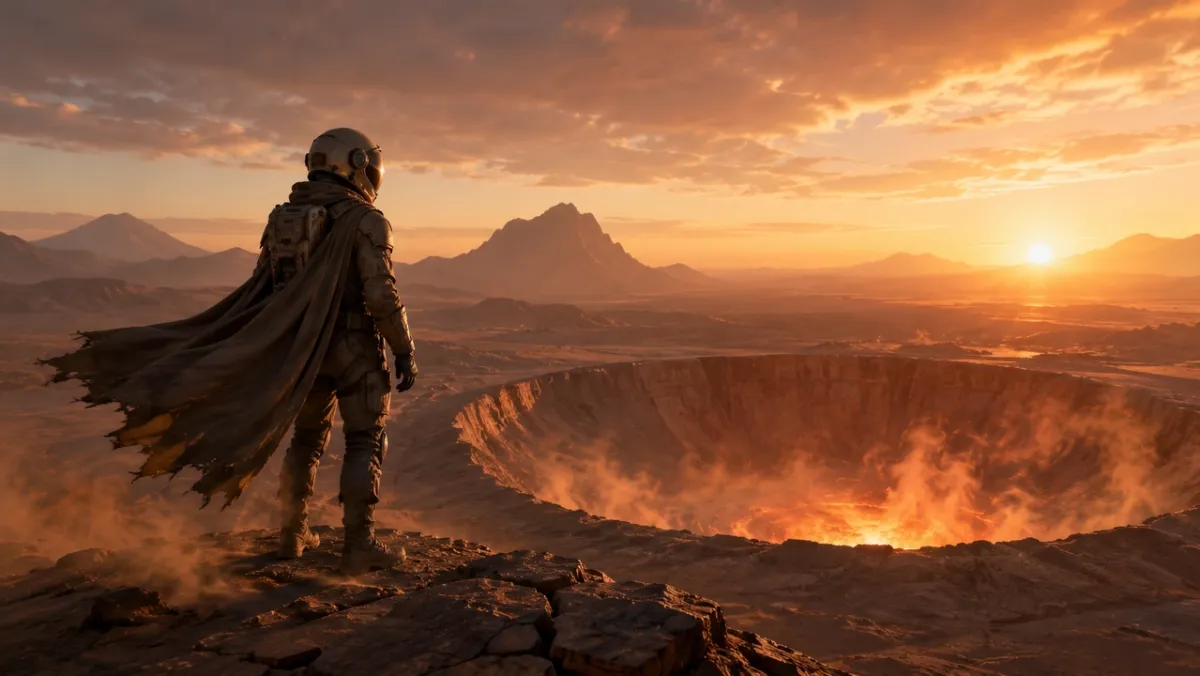
图像到视频剪辑的电影第一帧:黎明时分,一名孤独的宇航员站在发光的沙漠火山口边缘,斗篷和灰尘准备在风中移动,强烈的前景轮廓,清晰的深度层次和温暖的地平线光。
GPT Image 2 提示库:80 个可复制的示例
下面的每个角度都包含十个提示。每组中的第一个提示是视觉示例的最佳候选,因为它强调角度要展示的功能;其他提示是纯文本示例,您可以复制、改编和测试。
| 提示模块 | 提示号码 | 最适合 |
|---|---|---|
| 产品摄影及AI广告创意提示 | 21-30日 | 产品列表、付费广告、电子商务英雄图片、包装模型 |
| 标志和文字渲染提示 | 11-20日 | 海报、菜单板、缩略图、专辑封面、精确标题测试 |
| 字符一致性提示 | 41-50 | 角色表、吉祥物、游戏资产、表情行 |
| 海报、缩略图和电影场景提示 | 1-10 | 英雄形象、社论剧照、大气场景、视觉吸引力 |
| 社交媒体图像和信息图提示 | 31-40 | 博客视觉效果、解释、比较图形、可共享的教育资产 |
| UI样机提示 | 51-60 | 应用程序屏幕、仪表板、社交资料、产品 UI 概念 |
| 风格转移和叙事艺术提示 | 61-70 | 漫画、故事板、编辑艺术、概念探索 |
| 图像到视频第一帧提示 | 71-80 | PixVerse 运动工作流程、产品展示、编辑、多参考源帧 |
1. 海报、缩略图和电影场景提示
此角度最适合拍摄肖像、社论图片、生活场景以及需要考虑光照和真实感的氛围剧照。
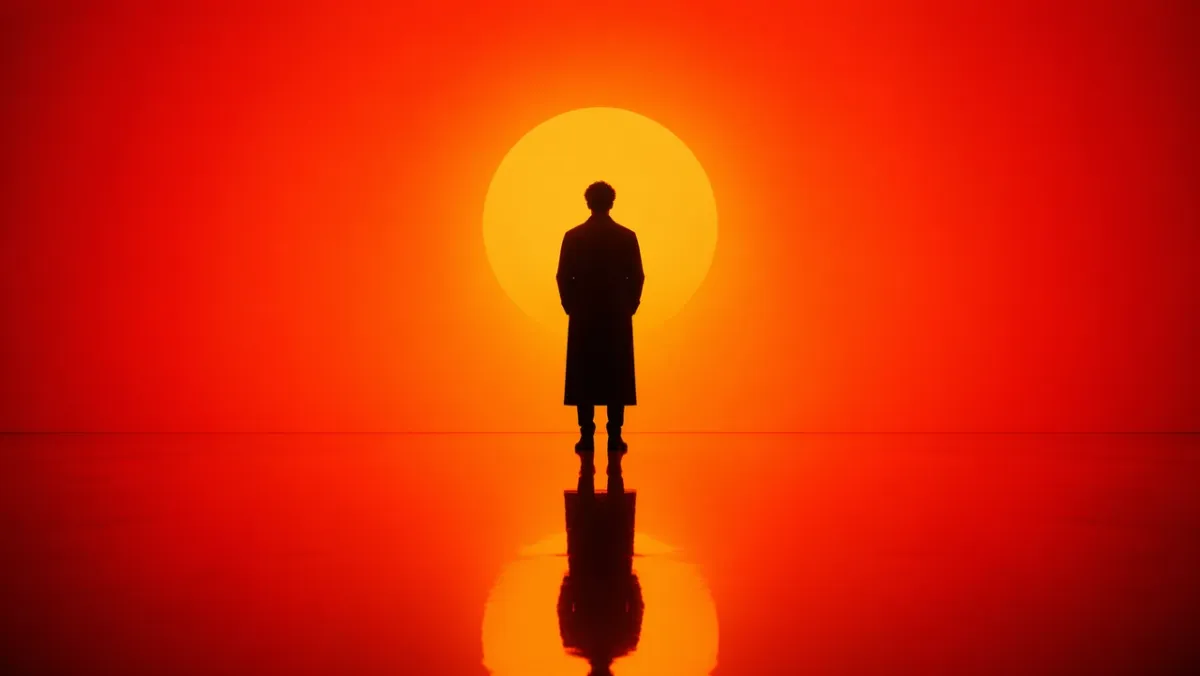
提示1:
生成一个站在强烈的橙色到红色渐变环境中的孤独人物的电影肖像。背后强烈的轮廓照明、深沉的阴影对比、反光的光滑地板反映了人物的轮廓。对称构图,最小的布景设计,没有背景杂乱。气氛沉思而有力,就像科幻电影中的剧照一样。纵横比 16:9。
提示2:
雨后首尔真实的街景。花店在蓝色时刻关门小店,潮湿的路面倒影,温暖的店铺光线,疲惫的自然姿势,50mm的纪实感,逼真的皮肤纹理,没有魅力的姿势,没有水印。纵横比 3:2。
提示3:
风化的手在划伤的木桌上修理旧胶片相机的特写镜头。相机左侧的窗户光、可见的灰尘、黄铜和黑色皮革纹理、浅景深、安静的车间氛围、逼真、无文字叠加。纵横比 4:3。
提示4:
小雪期间北欧安静的过夜列车站台。一名穿着长外套的旅行者站在温暖的车站灯下,在冷空气中呼吸清晰可见,火车窗户在背景中发光,电影般的现实主义,克制的调色板,35毫米纪录片的感觉,没有文字。纵横比 16:9。
提示5:
一张自上而下的社论食物照片,深色陶瓷盘上的手工面条,蒸汽上升,筷子倾斜放置,破旧的木桌,柔和的侧光,逼真的油光泽和纹理,没有品牌,没有文字覆盖。纵横比 4:5。
提示6:
陶瓷艺术家在陶轮上修整粘土碗的逼真纪实风格肖像。中特写,手和旋转粘土清晰聚焦,带有天然污渍的围裙,柔和的车间窗光,背景中摆着未完成的碗的架子,诚实的纹理,没有魅力修饰,没有文字。纵横比 3:2。
提示7:
夏季暴风雨过后的一座小山城的宽幅电影剧照。墨绿的松树上雾气缭绕,小屋的窗户里出现温暖的灯光,潮湿的道路倒影引向中心,远处一个人撑着伞行走,自然的尺度,现实的氛围,没有文字。纵横比 16:9。
提示8:
放在折叠的亚麻布上的老式手表的逼真特写镜头。可见的拉丝金属,表壳上的微小划痕,可读但虚构的表盘标记,柔和的定向晨光,浅景深,精致的编辑产品照片氛围,没有真正的品牌徽标。纵横比 4:5。
提示9:
深夜一个小型建筑工作室的坦率室内场景。两位设计师在台灯、附近的咖啡杯、逼真的阴影、实用的工作空间杂乱、平静的专注情绪、35 毫米胶片外观、无文字覆盖下查看泡沫模型和打印的平面图。纵横比 16:9。
提示10:
黄昏时分,穿着简单奶油色外套的模特站在地铁入口附近的自然时尚社论图片。路灯开始发光,柔和的城市背景,逼真的织物褶皱,放松的姿势,与眼睛水平的取景,微妙的胶片颗粒,没有可见的品牌名称,没有文字。纵横比 2:3。
要寻找的内容: 结果应该具有可信的光线方向、物理上合理的反射或阴影以及自然的主体姿势。如果图像看起来过于精美,请添加更多纪实细节并删除模糊的质量语言。
2. 标志和文字渲染提示
当提示将文本视为设计要求而不是装饰时,GPT Image 2 最强。
提示11:
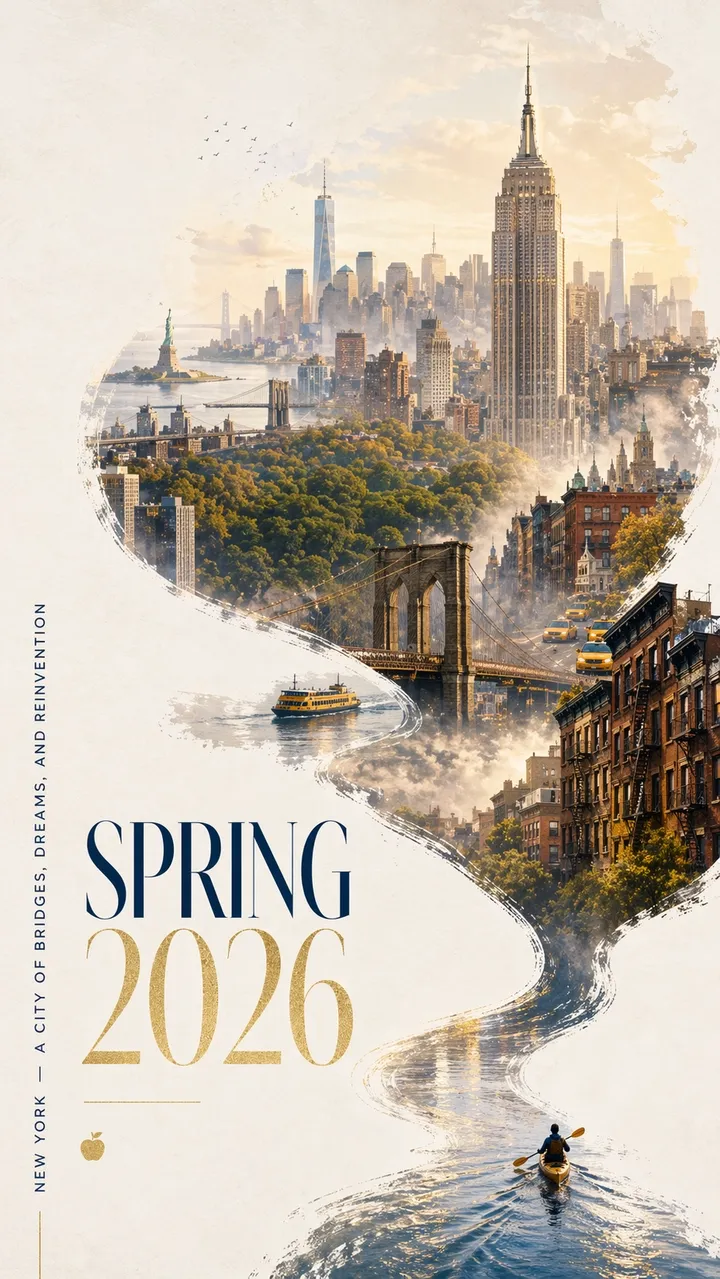
纽约 2026 年春季引人注目的城市海报,采用大胆的现代设计和优雅的庆祝气氛。干净的灰白色纹理背景与宽敞的负空间。右下角,一艘微型皮划艇划过一条狭窄的反光水带。尾流以动态的书法曲线向上扫过,逐渐变成哈德逊河,然后变成梦幻般的曼哈顿手绘全景。在流动的河流形状的构图内:帝国大厦、布鲁克林大桥、中央公园的天篷、世贸中心一号大楼、褐砂石屋顶、黄色出租车、港口渡轮和软距离的自由女神像。柔和的晨雾,金色的春光,海军蓝和金色的微妙点缀。左下角优雅的字体写着“SPRING 2026”,还有垂直标语“NEW YORK - A CITY OF BRIDGES, DREAMS, AND REINVENTION”。文字必须清晰且构图优美。没有多余的话。优质图形设计,宽高比 9:16。
提示12:
为名为“FRAME 2026”的虚构设计会议创建垂直发布海报。大标题:“FRAME 2026”。副标题:“用机器想象力进行设计”。干净的瑞士网格,灰白色背景,黑色排版,一种红色几何口音,宽敞的负空间,完全清晰的文本,没有多余的文字,没有水印。纵横比 9:16。
提示13:
创建一个名为“SOFT SIGNALS”的简约专辑封面。艺术家姓名:“MIRA VALE”。居中排版,柔和的蓝纸纹理,无线电塔的小银线插图,优雅的间距,没有多余的文字,没有徽标,宽高比 1:1。
提示14:
制作一张书店橱窗海报,用大衬线字体写着“慢慢阅读”。较小的一行:“春季阅读周”。温暖的傍晚街道反射在玻璃上,奶油色的纸质感,可读的排版,没有多余的文字,没有水印。纵横比 4:5。
提示15:
制作一张题为“OBJECTS OF TOMORROW”的博物馆展览海报。副标题:“2026 年的设计史”。灰白纸上的黑色文本,中心有一个抽象的镀铬物体,干净的现代主义布局,只有精确可读的文本,没有假标志。纵横比 9:16。
提示16:
创建一个垂直音乐节海报,标题为“AFTERLIGHT SESSIONS”。较小的文字:“6 月 12 日至 14 日”。使用深海军蓝背景、一盏发光的圆形舞台灯、优雅的浓缩无衬线字体、平衡的负空间、仅精确的文本、没有多余的文字、没有水印。纵横比 9:16。
提示17:
创建一个干净的咖啡馆菜单板,标题为“早晨菜单”。正好包含四种商品:“ESPRESSO”、“抹茶拿铁”、“CARDAMOM BUN”、“COLD BREW”。温暖的奶油色背景,黑色衬线类型,简单的分隔线,从远处可读,没有价格,没有额外的项目。纵横比 4:5。
提示18:
为虚构的跑步俱乐部创建方形社交活动图形。主要文本:“奔跑河流”。第二行:“周六上午 7 点”。大胆的动态排版,抽象的河流线,明亮的绿色和黑色调色板,清晰的层次结构,没有多余的文字,没有真正的标志。纵横比 1:1。
提示 19:
为名为“安静的机器”的虚构小说创作书籍封面。作者姓名:“埃琳娜·罗”。极简主义封面,带有小银色机械鸟剪影,哑光黑色背景,精致的版式,仅精确的文本,没有出版商徽标,没有额外的副本。纵横比 2:3。
提示20:
制作一张题为“提出更好的问题”的课堂海报。包括三行短句:“观察”、“解释”、“测试”。友好的编辑设计,柔和的黄色背景,简单的线条图标,高对比度可读的文本,没有多余的文字,没有水印。纵横比 4:5。
要寻找的内容: 每个字母都应该可读。如果模型添加了额外的单词,请将副本重述为“仅精确文本”,并将提示中的每一行放在自己的行上。
3、产品摄影与AI广告创意提示
使用这个角度进行活动视觉效果、英雄镜头、社交广告、电子商务模型和产品故事讲述。
提示21:
混凝土底座上哑光黑色无线扬声器的优质产品广告。标题:“你能感觉到的声音”。右侧产品,左侧粗体白色字体,戏剧性的边缘光,干净的阴影,奢华的科技运动风格,锐利的产品边缘,无假冒品牌标志,无水印。纵横比 16:9。
提示22:
磨砂玻璃上的社论护肤精华照片。半透明瓶子,简单标签写着“LUMA SERUM”,柔和的漫射光,浅绿色背景,高端美妆宣传风格,标签文字锐利,反光干净,无多余道具,长宽比4:5。
提示23:
黄金时段山间小道上的耐用旅行瓶的方形社交广告。口号:“为长远而建”。产品在前景中清晰可见,自然握持,温暖的阳光,下三分之一的文字清晰易读,没有多余的文字,宽高比 1:1。
提示24:
纯白背景无线耳机干净的电商产品照片。直角,清晰的轮廓,微妙的接触阴影,可见的耳垫纹理,无文字,无标志,无道具,高分辨率的产品摄影。纵横比 1:1。
提示25:
陶瓷咖啡杯的广告牌式营销视觉效果。标题:“早晨,重新加热”。前景很大的产品,温暖的厨房窗光,柔和的蒸汽,左上角的粗体可读字体,没有多余的副本,没有水印。纵横比 16:9。
提示26:
极简主义徒步背包放在石壁架上的优质电子商务英雄形象。以产品为中心,前袋和肩带可见,柔和的高山晨光,干净的阴影,没有人,没有标志,没有文字覆盖,逼真的尼龙纹理和拉链细节。纵横比 1:1。
提示27:
磨砂玻璃保湿罐的精美护肤活动图片。标题:“罐子里的平静”。右下产品,淡蓝色背景,柔和的水反射,清晰的标签区域,没有假冒品牌,优雅的白色排版,没有多余的文字。纵横比 4:5。
提示28:
打开充电盒中哑光白色无线耳机的电影产品照片。深木炭背景,薄边缘光,下面微妙的反射,干净的广告标题负空间,没有徽标,没有文字,产品边缘清晰。纵横比 16:9。
提示29:
一个名为“NOVA OATS”的虚构格兰诺拉麦片品牌的方形零食包装模型。展示一个袋子直立在浅色木质表面上,标签文字清晰,底部周围有燕麦和干果,温暖的自然光,优质但平易近人的包装设计,没有多余的品牌。纵横比 1:1。
提示30:
奢华珠宝产品拍摄的银戒指,深色天鹅绒表面上镶有小蓝色宝石。宏观细节,逼真的金属反射,左上方柔和的聚光灯,干净的阴影,没有手,没有文字,没有水印,产品与背景清晰分离。纵横比 4:5。
要寻找什么: 产品应该仍然是视觉英雄。如果模型发明了太多包装细节,请在使用参考图像时指定“普通包装”或“准确保留输入产品”。
4. 社交媒体图像和信息图提示
此角度对于需要可读标签的图表、解释器、工作流程图、图表、课堂视觉效果和博客插图很有用。
提示31:
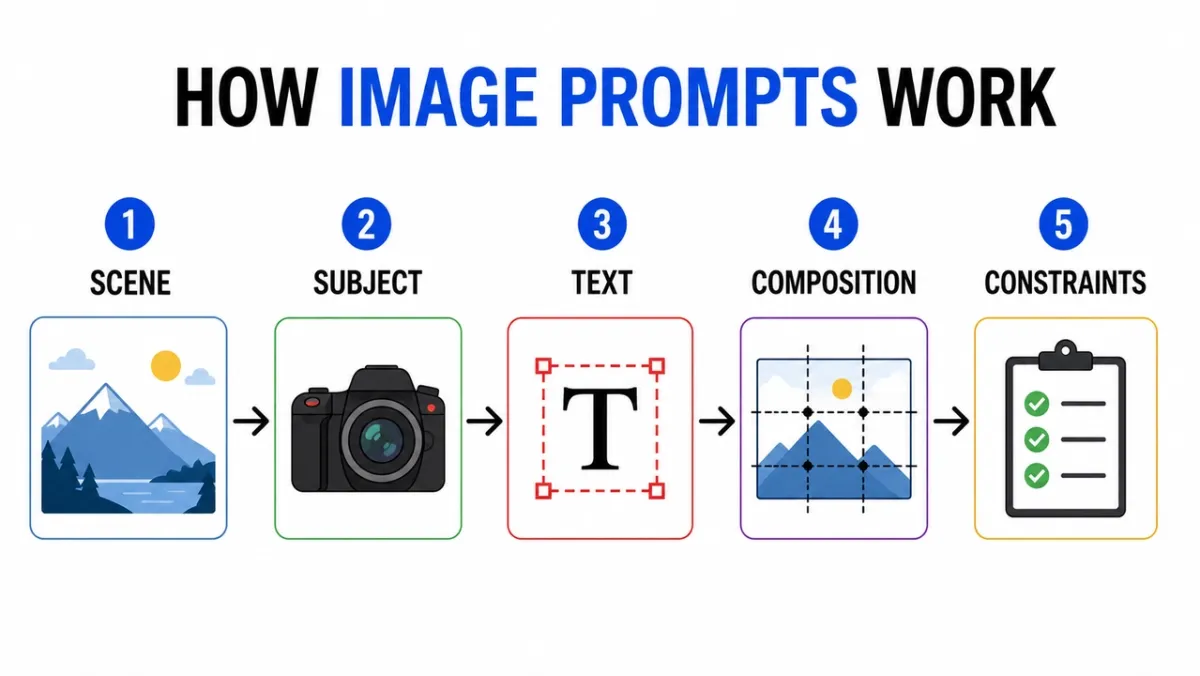
创建一个标题为“图像提示如何工作”的干净信息图。五个标记步骤:“场景”、“主题”、“文本”、“构图”、“约束”。平面编辑图标、步骤之间的箭头、高对比度、白色背景、可读的无衬线标签、一致的间距、没有额外的文本、没有水印。纵横比 16:9。
提示32:
显示相机镜头各层的教育图。包括标记部件:“前部元件”、“光圈”、“对焦组”、“图像传感器”。干净的剖面图,白色背景,教科书风格,清晰的引导线,可读的标签,没有杂乱的装饰。纵横比 16:9。
提示33:
标题为“海报提示与产品提示”的比较信息图。两列,六行,简洁的标签,中性背景,黑色文本,蓝色强调线,专业的博客图形风格,所有副本可读,没有多余的文字。纵横比 16:9。
提示34:
创建一个标题为“如何制作冷萃咖啡”的分步教学视觉效果。带有短标签的五个图示步骤:“研磨”、“浸泡”、“过滤”、“倒入”、“上菜”。温暖的大地色调,清晰的箭头,一致的图标风格,可读的文字,没有多余的文字。纵横比 16:9。
提示35:
创建一个清晰的比较图表,标题为“AI IMAGE WORKFLOW”。三栏:“草稿”、“优化”、“动画”。使用简单的图标,短标签,高对比度,宽大的间距,白色背景,专业的博客图形风格,所有文本可读。纵横比 16:9。
提示36:
创建一个清晰的时间线信息图,标题为“从提示到海报”。五个阶段:“简介”、“布局”、“正文”、“审阅”、“导出”。水平流、简单的编号圆圈、蓝色和黑色口音调色板、高对比度标签、没有额外的文本、没有水印。纵横比 16:9。
提示37:
创建一个标题为“参考图像角色”的教育图表。三张标签卡:“主题”、“风格”、“背景”。显示简单的图像缩略图、指向最终输出帧的箭头、清晰的标签、白色背景、一致的间距、无额外文本。纵横比 16:9。
提示38:
创建一个标题为“哪个图像提示?”的决策树。分支:“文本”、“产品”、“场景”、“编辑”。使用干净的方框和箭头、可读的无衬线字体、最小的灰色背景、一种绿色强调色、没有多余的文字、没有杂乱的装饰。纵横比 16:9。
提示39:
创建一个标题为“生成之前”的安全检查表信息图。四项检查:“权利”、“隐私”、“文字”、“品牌”。使用简单的勾选图标,简洁的标签,白色背景,专业的SaaS帮助中心风格,高对比度,没有多余的文案。纵横比 4:5。
提示40:
创建一个名为“图像编辑提示”的视觉解释器。三个堆叠行:“更改”、“保留”、“匹配”。包括每行的微小示例图标、干净的引导线、可读的标签、克制的颜色、没有额外的文本、没有水印。纵横比 16:9。
要寻找的内容: 首先检查标签。如果视觉很美但文字错误,输出就无法使用。对于密集图表,减少标签数量并重新生成。
5. 字符一致性提示
角色表很有用,因为它们将身份、服装、调色板和表情压缩到一个参考框架中。
提示41:
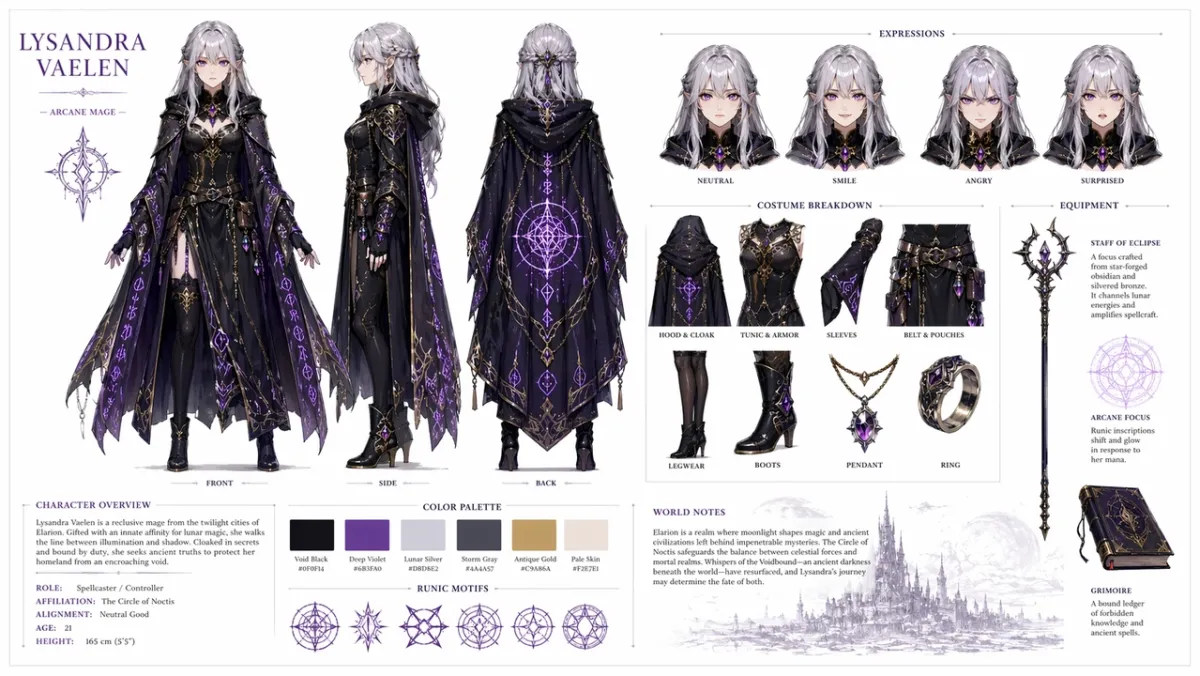
为原创奇幻角色扮演角色创建专业角色参考表:一位年轻的女法师,银色头发,紫罗兰色眼睛,穿着带有发光符文图案的华丽深色斗篷。包括在干净的白色背景上:显示正面、侧面和背面的三视图周转;面部表情变化表现出中性、微笑、愤怒和惊讶;服装和装备的详细分类;调色板样本行;以及简洁的排版中简短的世界建设笔记。有组织的网格布局,概念艺术风格,高分辨率。纵横比 16:9。
提示42:
为名为“NOVA”的原创角色创建科幻信使角色表。包括正面、侧面和背面视图、四种面部表情、夹克和背包标注、调色板样本、干净的白色背景、可读标签、所有视图中一致的面部和夹克。纵横比 16:9。
提示43:
为穿着绿色雨衣的小森林帮工制作儿童读物人物表。包括表情行、道具行、行走姿势、挥手姿势、调色板、简单易读的注释、柔和的插图风格,没有多余的字符。纵横比 16:9。
提示44:
为名为“REI”的原创角色创建赛博朋克侦探角色表。包括前视图、侧视图、后视图、三种表情、风衣标注、设备道具、霓虹调色板、干净的标签、一致的面部和发型。纵横比 16:9。
提示45:
为友好的机器人面包师创建吉祥物参考表。包括全身姿势、三种面部表情、围裙细节、糕点道具、调色板样本、简单的周转、干净的白色背景、可读的标签。纵横比 16:9。
提示46:
为原创沙漠侦察兵“KAI”制作手游角色表。包括正面、侧面和背面视图、三种动作姿势、围巾和实用腰带标注、调色板样本、可读标签、一致的面部和服装、干净的灰白色背景。纵横比 16:9。
提示47:
为名为“MARN”的原创角色创建一个舒适的幻想村庄商人角色表。包括全身前视图、侧视图、带灯笼和分类帐的道具排、四种表达研究、织物纹理标注、温暖的调色板、干净的网格布局、可读的注释。纵横比 16:9。
提示48:
创建科幻维护无人机设计表。包括顶视图、侧视图和前视图、传感器小细节面板、着陆脚、工具臂、电池组和警示灯。干净的技术概念艺术布局、中性背景、可读标签、一致的工业设计。纵横比 16:9。
提示49:
为一位名为“MILO”的原创教室发明家创建儿童动画角色表。包括一个站立姿势、一个思考姿势、一个兴奋姿势、表情排、背包和笔记本道具、明亮但克制的调色板、可读的标签、没有多余的字符。纵横比 16:9。
提示 50:
为原创赛博朋克信使创建战术服装参考表。包括正面、背面和侧面视图、夹克标注、鞋子细节、邮差包细节、色样、三个剪影姿势、清晰的标签文本、一致的发型和不同视图的脸部。纵横比 16:9。
要寻找的内容: 相同的面孔、服装和调色板应该在各个视图中保留下来。如果侧视图改变了服装,则以更强的“保留”语言重新生成。
6. UI 模型和社交截图提示
当您需要一个现实的应用程序概念、仪表板、社交资料或看起来足够结构化以便与团队讨论的产品 UI 时,这个角度就很有效。
提示51:
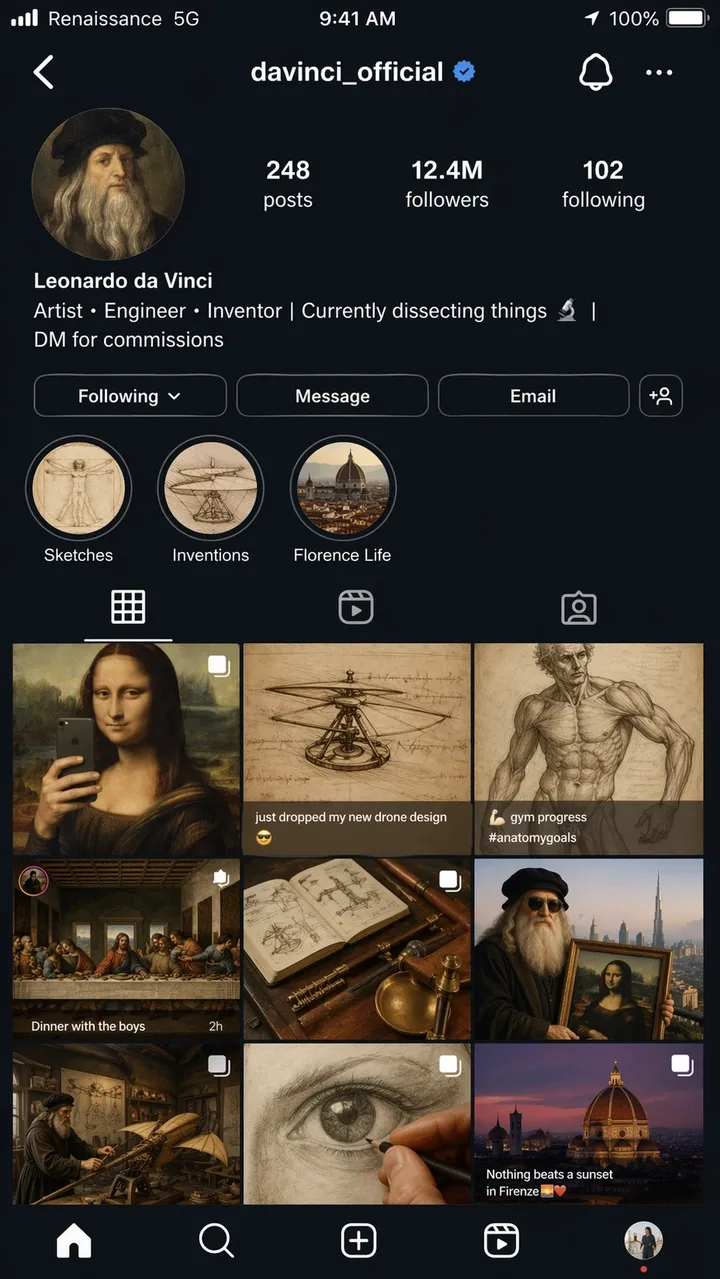
莱昂纳多·达·芬奇虚构的 Instagram 个人资料页面的超现实 iPhone 屏幕截图,用户名@davinci_official,仿佛他是 2026 年的现代影响者。个人资料照片是文艺复兴时期的圆形裁剪自画像。简介如下:“艺术家、工程师、发明家 | 目前正在解剖东西 | 网格显示 9 个帖子:《蒙娜丽莎》被重新设计为镜子自拍照、标题为“刚刚放弃我的新无人机设计”的直升机草图、作为健身房进度照片发布的解剖学研究、作为晚宴团体照片上演的《最后的晚餐》以及其他不合时宜的创意混搭。关注者数量:1240 万。故事亮点标记为“草图”、“发明”和“佛罗伦萨生活”。完整的 iOS 状态栏,载体文本为“文艺复兴” 5G”、电池图标和当前时间。深色模式 UI 贯穿始终。逼真的屏幕截图质量,宽高比 9:16。
提示52:
一个名为“LUMA”的虚构习惯应用程序的真实移动入门屏幕。标题:“建设更美好的日子”。按钮:“立即开始”和“查看演示”。干净的 iOS 风格布局、柔和的白色背景、蓝色强调、可读的 UI 文本,直接显示在手机框架内。纵横比 9:16。
提示53:
用于电子商务分析工具的桌面 SaaS 仪表板。左侧边栏、收入、订单、转化率的顶级 KPI 卡、折线图和顶级产品表。干净的白色界面,真实的间距,可读的标签,没有真正的品牌名称。纵横比 16:9。
提示54:
一个名为“SKYLINE”的虚构应用程序的真实移动天气应用程序屏幕。当前城市:“里斯本”。标题温度:“22C”。风、湿度、紫外线和日落卡片。平静的蓝色界面,可读的标签,iPhone 框架,没有真正的应用程序品牌。纵横比 9:16。
提示55:
餐厅预订应用程序屏幕显示预订确认。餐厅名称:“北桌”。日期:“6 月 18 日”。时间:“晚上 7:30”。聚会人数:“4 位客人”。顶部温暖的社论美食照片,干净的 CTA 按钮,上面写着“添加到日历”,可读的 UI 文本。纵横比 9:16。
提示56:
适用于虚构创作者工作室的真实桌面分析仪表板。左侧导航栏、观看次数、观看时间、收入和新关注者的顶部卡片、折线图和活动表格。干净的白色用户界面,蓝色强调,可读标签,实用的间距,没有真正的品牌名称。纵横比 16:9。
提示57:
名为“TrailCart”的虚构户外装备店的移动结账屏幕。显示产品缩略图、数量步进、送货地址卡、折扣字段、总价以及显示“下订单”的 CTA 按钮。现代 iOS 风格,可读的 UI 文本,没有真正的徽标。纵横比 9:16。
提示58:
提示库应用程序的平板电脑 UI 模型。显示标有“海报”、“产品”、“UI”和“编辑”的选项卡。主面板包括三张提示卡,其中包含简短的预览文本、复制按钮和类别芯片。界面简洁,易读性高,没有真正的品牌名称。纵横比 4:3。
提示59:
虚构 AI 图像工具的 SaaS 设置屏幕。标有“模型”、“质量”、“纵横比”、“参考图像”和“安全”的部分。使用切换开关、下拉菜单、滑块和清晰的“保存”按钮。安静的专业用户界面,可读的标签,没有杂乱的装饰。纵横比 16:9。
提示60:
一个虚构的京都之旅的移动旅行行程应用程序屏幕。标题写着“京都周末”。 “第一天”、“第二天”、“寺庙漫步”和“晚餐”卡片。柔和的中性用户界面,真实的间距,小地图预览,可读的文本,没有真正的应用程序品牌。纵横比 9:16。
要寻找什么: 布局应该感觉像一个真实的界面,而不是装饰海报。检查导航标签、按钮文本、图标间距以及屏幕层次结构是否可用。
7.风格转移和叙事艺术提示
简短的叙述提示测试 GPT Image 2 是否可以通过视觉笑话、多面板讲故事和场景中的小文本进行推理。
提示61:
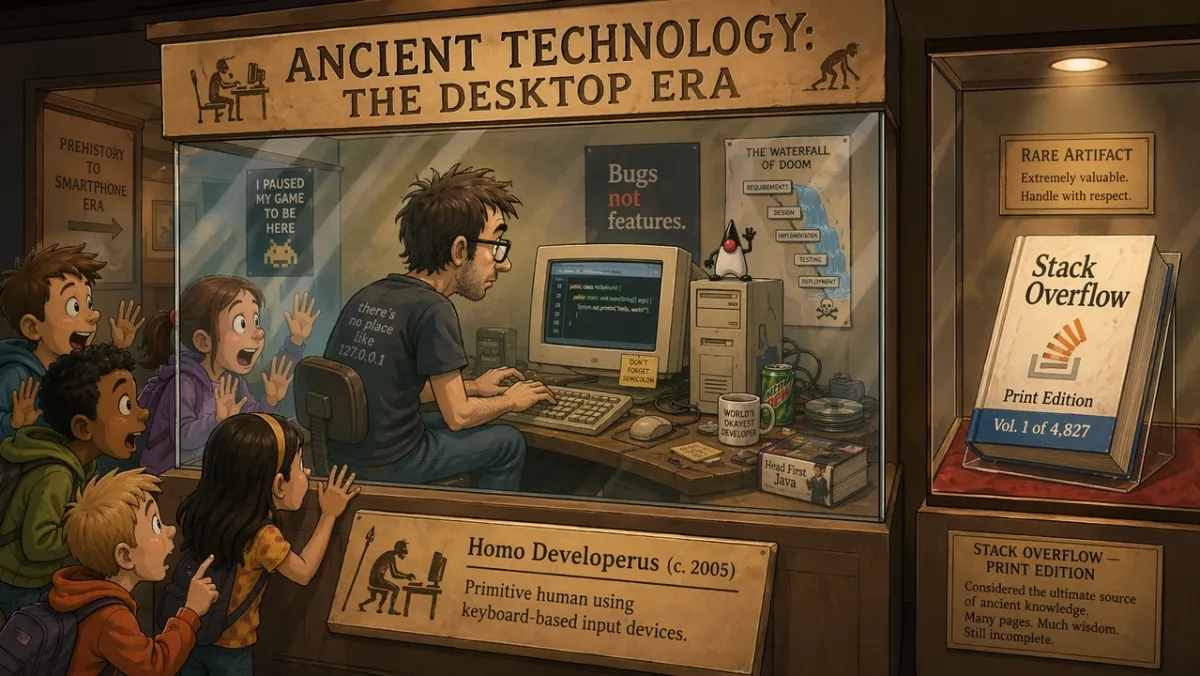
在题为“古代技术:桌面时代”的博物馆展览中,玻璃展示柜中的程序员正在 CRT 显示器上现场演示编码,而学生们则惊讶地将脸贴在玻璃上。展览标语牌上写着:“Homo Developerus (c. 2005) - 使用基于键盘的输入设备的原始人类。”附近的第二个展示柜展示了一本标有“Stack Overflow - Print Edition,Vol. 1 of 4,827”的实体书。 2D卡通插画风格,温馨的博物馆灯光,幽默怀旧的基调。纵横比 16:9。
提示62:
名为“早晨例行公事”的四格漫画。面板 1:警报响起。第 2 幅:人物煮咖啡。第 3 幅:角色坐下来工作。第 4 幅:角色已经在桌子上睡着了。温暖简约的插画风格,富有表现力的人物,可读的标题,没有多余的文字。纵横比 16:9。
提示63:
有关创意自动化的文章的单个社论插图。设计师和人工智能助理在一张大桌子上布置纸质故事板,柔和的工作室灯光,微妙的幽默,现代杂志插图风格,没有可见的品牌标志,没有文字。纵横比 3:2。
提示64:
标题为“THE MORNING HerALD”的报纸头版风格插图。主标题:“城市批准屋顶花园”。两栏布局,一个逼真的市议会照片区,经典的大版设计,可读的报头和标题,没有额外的文章文字。纵横比 4:5。
提示65:
关于机器人学习绘画的两幅漫画。第 1 幅:机器人仔细研究空白画布。图2:机器人自豪地展示了一幅凌乱但迷人的画作。温暖的工作室灯光,富有表现力的肢体语言,没有气泡,简单的标题:“第一次尝试”。纵横比 16:9。
提示66:
名为“THE DEADLINE”的三版社论漫画。面板一:设计师平静地打开一个空白文件。面板2:时钟向前跳动,便签贴满了桌子。第三部分:设计师展示了一张精美的海报,带有令人惊讶的浮雕。极简表现力的插图风格,可读的标题,没有气泡。纵横比 16:9。
提示67:
一幅关于创意焦点的超现实主义杂志插图:一个人坐在一张小桌子旁,桌子漂浮在一个安静的图书馆里,里面有发光的窗户,每个窗户都展示着不同的未完成的想法。柔和的电影灯光,深思熟虑的情绪,干净的构图,没有明显的品牌标志,没有文字。纵横比 3:2。
提示68:
产品发布预告片的四面板故事板。第 1 幅:桌子上的封闭盒子。图 2:从盒子漏出的光。第 3 幅:双手抬起盖子。小组 4:发光的产品轮廓显露出来。没有可读的品牌,没有对话,电影般的灯光,清晰的面板边框。纵横比 16:9。
提示69:
一个幽默的博物馆立体模型,标题为“第一次小组聊天”。展示聚集在石碑周围的古老人物,上面雕刻着消息气泡,温暖的博物馆灯光,有趣的社论插图,只有可读的标题,没有额外的文字。纵横比 16:9。
提示70:
分屏叙事海报显示创意迭代“之前”和“之后”。左侧:凌乱的素描墙和粗糙的笔记。右侧:干净、抛光的竞选板。现代编辑插图,强烈对比,没有徽标,除了“之前”和“之后”之外没有多余的文字。纵横比 16:9。
要寻找的内容: 场景应该以视觉方式传达想法。如果笑话完全依赖于文字,请简化设置并使肢体动作更清晰。
8. 图像到视频第一帧提示和参考编辑
这个角度是 GPT Image 2 变得不仅仅是第一遍发生器的地方。它对于产品剪切、服装交换、背景更改、基于参考的编辑以及为运动设计的静止帧非常有用。
提示71:
为图像到视频剪辑创建电影般的第一帧:黎明时分,一名孤独的宇航员站在发光的沙漠火山口边缘,斗篷和灰尘准备在风中移动,强烈的前景轮廓,清晰的深度图层,温暖的地平线光,无文本,无水印。纵横比 16:9。
提示72:
使用图1作为产品照片,图2作为背景风格参考。将产品放入图 2 中的场景中。准确保留产品形状、标签文本、比例、颜色和材料。匹配灯光、比例、阴影和透视。请勿重新设计产品。没有额外的徽标或水印。
提示73:
从输入的产品图像中删除背景。输出透明背景,轮廓清晰、边缘干净、无光晕、无边缘。准确保留瓶子几何形状、瓶盖形状、标签文本、标签颜色和打印清晰度。不要改变比例。
提示74:
仅更改输入图像中的天气和照明。让场景看起来像冬天的夜晚,下着小雪。准确地保留人物、建筑物、标志、摄像机角度、物体放置和构图。保持所有可读文本不变。
提示75:
图1是要保存的人。图 2 是夹克参考。图 3 是靴子参考。使用图 2 和图 3 中的服装为图 1 中的人物着装。准确保留脸部、体型、姿势、手、背景、相机角度和灯光。仅更换衣服。
提示76:
使用输入的产品照片作为锁定主体。将产品放在干净的大理石浴室柜台上,晨窗光线柔和。准确保留产品形状、标签文本、瓶盖颜色、比例和材料。匹配接触阴影、比例和透视。请勿添加额外的标签、徽标或道具。
提示77:
为图像到视频剪辑创建电影般的第一帧:一个玻璃香水瓶站在潮湿的黑色石头上,一条细薄的雾带在其后面移动。以产品为中心,轮廓强烈,前景和背景深度清晰,无手,无文字,无水印。纵横比 16:9。
提示78:
通过仅将背景更改为干净的暖灰色编辑工作室背景来编辑输入肖像。准确保留面部、头发、服装、姿势、肤色、拍摄角度、灯光方向和表情。自然地匹配新的背景阴影和深度。
提示79:
使用图 1 作为房间照片,使用图 2 作为墙壁艺术参考。将图 2 中的艺术品添加到图 1 中的空墙上。准确保留家具、地板、窗光、相机角度、色彩平衡和房间布局。匹配框架比例、透视和墙壁阴影。
提示80:
为产品展示创建一个视频就绪的第一帧:桌子上有一个封闭的哑光黑盒子,从接缝处泄漏出薄薄的蓝光,光束中可见灰尘颗粒,相机位置低且靠近,强深度层,用于运动的空白空间,没有文本,没有徽标。纵横比 16:9。
要寻找的内容: 对于编辑,只有锁定的详细信息保持锁定状态,输出才会成功。对于视频就绪帧,检查主体分离、前景/背景深度以及场景是否为 PixVerse 提供运动空间。
GPT Image 2 评测:测试结果和分数
测试和更新:2026 年 6 月 23 日。
此评论部分特意位于提示库之后,因为大多数登陆此页面的读者首先需要示例。评论仍然很重要:当文本、结构和指令遵循比松散的视觉探索更重要时,GPT Image 2 非常有用。
| 审核维度 | 得分(1-5) | 我们在实际测试中看到了什么 |
|---|---|---|
| 文本准确性 | 4 | 当引用确切的副本时,大标题、短标签、海报标题、菜单项、信息图步骤和简单的 UI 标签更容易控制。微小的法律副本和密集的段落仍然需要仔细审查。 |
| 字符一致性 | 3 | 角色表、表情行、服装标注和调色板样本可用作参考,但面部、比例和服装细节可能会在侧视图和后视图中漂移。 |
| 风格控制 | 4 | 当提示指定用例、布局、媒介、照明和约束而不是仅堆叠样式关键字时,模型很好地遵循了广泛的视觉方向。 |
| 产品真实感 | 4 | 产品广告布局、活动负空间、干净的表面和产品优先的构图很强大,但真正的标签、徽标、包装几何形状和受监管的声明仍然需要手动质量检查。 |
| 编辑能力 | 3 | “更改、保留、匹配”模式比广泛的编辑请求效果更好,但选择边界、透明背景输出和准确的产品保留仍然需要审查。 |
| 搜索问题 | 实用答案 |
|---|---|
| 最适合 | 精确文本海报、产品广告概念、UI 模型、信息图表、字符表、参考编辑和图像到视频的第一帧。 |
| 主要限制 | 微小的文本、精确的品牌标记、专有字体、合法副本、复杂的透明背景交付内容和锁定的产品标签仍然需要审查。 |
| API 可用性 | 使用 OpenAI 的 gpt-image-2 API 路线进行开发人员工作流程。 ChatGPT Images 2.0 访问和 API 计费是单独的路径。 |
| API注释 | 截至 2026 年 6 月 22 日,OpenAI 列出了图像输入、缓存图像输入、图像输出、文本输入和缓存文本输入的 GPT-Image-2 代币定价。 |
| 视频工作流程 | 如果图像稍后可能成为图像到视频源,则提示清晰的主题边缘、深度层和一个运动提示。 |
| 可供比较的替代方案 | 使用 Nano Banana 2 进行快速真实感测试,使用 Midjourney 进行风格化探索,在批准后仍需要成为视频资产时使用 PixVerse。 |
我们如何测试 GPT Image 2
我们在肖像、文本较多的海报、产品风格的构图、角色表、UI 模型和实验性叙事场景中测试了 GPT Image 2。目标不是产生基准分数;而是产生基准分数。这是为了看看设计师、营销人员或创作者是否可以使用经过轻微编辑的输出,而不是从头开始重建资产。
| 测试区 | 提示示例 | 我们检查了什么 |
|---|---|---|
| 肖像和电影剧照 | 12 | 照明控制、皮肤纹理、反射、情绪和场景一致性。 |
| 海报和版式布局 | 14 | 标题拼写、多行文本、层次结构、负空间和品牌般的润色。 |
| 角色和概念表 | 9 | 多视图一致性、服装细节、调色板对齐和标签准确性。 |
| UI 和社交模型 | 8 | 布局真实、文字小、图标间距、提要网格和屏幕截图可信度。 |
| 实验提示 | 10+ | 幽默、叙事推理、物体放置和小标题准确性。 |
模式很明确:GPT Image 2 比关键字链更奖励精确的摘要。当提示命名一项工作并定义成功时,该模型倾向于保留结构。当提示要求没有约束的漂亮图像时,结果仍然可以看起来很漂亮,但更难重用。
按用例查看结果
| 使用案例 | 什么效果好 | 还需要审查什么 |
|---|---|---|
| 文字渲染 | 当引用确切的副本时,大标题、短标签、海报标题、菜单项、信息图步骤和简单的 UI 标签更容易控制。 | 微小的法律文案、密集的段落、程式化的字体和重复的单词仍然可能会产生偏差。保持副本简短并检查每一个字母。 |
| 产品图片 | GPT Image 2 很好地处理了产品广告布局、活动负空间、干净的表面和产品优先的构图。 | 真实的标签、徽标、包装几何形状和受监管的声明应手动检查或从批准的资产中合成。 |
| 用户界面模型 | 当提示命名真实的界面元素时,移动屏幕、仪表板、卡片、按钮、菜单和类似应用程序的层次结构看起来似乎很合理。 | 将输出视为概念模型,而不是生产 UI。小标签、图标对齐和精确数据通常需要清理。 |
| 字符一致性 | 角色表、表情行、服装标注和调色板样本可作为创意参考。 | 面孔、服装细节和比例可能会因视图而变化。如果侧视图或后视图发生漂移,则重复身份锚并重新生成。 |
| 图像到视频的第一帧 | 具有前景、中景、背景和一个运动提示的宽帧为 PixVerse 提供了更多可用的源材料。 | 过度拥挤的图像、繁重的文本和模糊的运动提示使后期的视频生成变得更加困难。 |
| 编辑和合成 | “更改、保留、匹配”提示模式比广泛的编辑请求效果更好。 | 选择边界、透明背景输出、精确的产品保存和精细的细节仍然需要 QA。 |
对于型号比较,有用的区别不是品牌与品牌。 GPT Image 2 的行为更像是通信密集型图像的结构化设计助手。 Midjourney 对于风格化探索和艺术指导广度仍然有用。 Nano Banana 2 是照片真实感、材质细节和快速视觉迭代的有力对比点。当静态图像必须成为剪辑、广告、产品展示或故事镜头时,PixVerse 是下一个工作流程层。
常见GPT Image 2提示错误
- 要求准确性,但不提供精确的副本。 如果图像需要文本,请准确写出文本并说明它应该出现的位置。
- 用每一个可能的细节重载一个提示。 从核心场景开始,然后一次细化一个变量。
- 在编辑过程中忘记不变量。 告诉模型哪些内容必须保持不变:身份、背景、姿势、照明、产品形状、标签文本或相机角度。
- 使用装饰性词语来完成功能性任务。“美丽”并不会使标签可读。使用“清晰的标签文本”、“干净的字距调整”和“从远处可读”等短语。
- 跳过纵横比。 好的方形图像可能无法作为垂直广告或视频缩略图。
- 将徽标视为通用文本。 GPT Image 2 可以设计徽标概念,但确切的品牌标记通常应由批准的品牌资产组合而成。
GPT Image 2 API 和定价说明
OpenAI 的 API 定价页面 列出了基于代币定价的 GPT-Image-2。截至 2026 年 6 月 22 日,列出的费率为:
| 物品 | 标价 |
|---|---|
| 图像输入 | 8.00 美元/100 万代币 |
| 缓存图像输入 | 2.00 美元/100 万代币 |
| 图像输出 | 30.00 美元/100 万代币 |
| 文字输入 | 5.00 美元/100 万代币 |
| 缓存文本输入 | 1.25 美元/100 万代币 |
实际生成成本取决于提示长度、参考图像、输出大小、缓存、质量和您使用的访问路径。如果您使用 ChatGPT 而不是 API,则计划限制和配额与 API 令牌定价是分开的。如果您正在构建可重复的应用程序或批处理工作流程,OpenAI 的 GPT 图像生成模型提示指南 也值得一读。
对于询问 GPT Image 2 是否免费或 GPT Image 2 API 费用多少的搜索者来说,这种区别很重要。 ChatGPT Images 2.0 可用性、ChatGPT 计划配额、OpenAI API 计费和 PixVerse 积分是单独的商业路径。对于大批量工作,请比较重试后每个已接受资产的成本,而不仅仅是一代尝试的列出价格。
| 工作流程选择 | 实用提示和设置建议 |
|---|---|
| 文字较多的海报或图表 | 每个图像使用更少的文字,引用精确的副本,指定层次结构,并在预算允许的情况下使用更高的质量设置。 |
| 产品照片 | 锁定产品形状、标签、颜色、材质、拍摄角度。如果使用引用,请在每次编辑时重复保留列表。 |
| 用户界面模型 | 将屏幕描述为已交付的界面:导航、卡片、按钮、状态、标签和间距。避免概念艺术语言。 |
| 多参考编辑 | 按角色标记每个图像:主题、风格、背景、服装、产品或材料参考。 |
| 批量生成 | 比较每个接受图像的成本,而不仅仅是每次尝试的成本。如果需要多次重试,那么便宜的运行并不便宜。 |
| PixVerse制作 | 生成或导入静态图像,然后在资产需要运动、摄像机移动或活动变体时使用图像转视频。 |
对于决定是使用 API 优先图像工作流程还是创建者工作流程的团队来说,实际问题不仅仅是“GPT Image 2 能否制作静态图像?”这也是“静止图像获得批准后会发生什么?”如果您想比较首次通过的图像质量,请参阅我们的 GPT Image 2 与 Nano Banana 2 相同提示测试 。如果您需要从终端或 AI 代理工作流程自动生成,PixVerse CLI 指南 涵盖了从命令行管道生成图像和视频。
详细的 PixVerse 图像到视频工作流程
一旦 GPT Image 2 图像获得批准,您就可以将其视为视频的第一帧。重要的部分是在制作静止图像之前对其进行准备。视频模型不会神奇地修复拼写错误的海报文本、扭曲的产品标签或看起来已经错误的 UI 模型。
1. 生成静止图像作为第一帧
如果您知道图像可能会成为剪辑,请在图像提示中添加运动准备状态。要求清晰的拍摄对象边缘、前景和背景深度、相机路径以及一种可以移动的物理线索:织物、灰尘、蒸汽、雨水、头发、屏幕发光、产品反射或移动光源。
不要只提示产品海报,而是提示可以成为视频开场框架的产品海报:
为混凝土底座上的哑光黑色扬声器创建 16:9 的活动第一帧。 保持扬声器右侧清晰,左侧留有干净的负空间。 在光束中添加柔软的灰尘和微妙的蓝色 LED 光芒,稍后可以制作动画。 没有多余的文字,没有假标志,没有水印。
2. 添加动作之前检查图像
像检查最终设计文件一样检查静止图像。查看拼写、产品几何形状、标签、手、面孔、UI 对齐、声明和权限敏感元素。如果源图像未通过任何这些检查,请在移动到视频之前重新生成或编辑静态图像。
3. 编写单独的动作提示
视频提示不应重复整个图像提示。它应该描述什么在移动,什么保持锁定。
使用图像作为第一帧。 摄像机慢慢地推向演讲者。 蓝色 LED 亮起,灰尘穿过光束,背景反射略有变化。 保留扬声器的形状、材料、位置和所有可见的设计细节。 请勿添加新文字、徽标、手或额外产品。
4. 仅在静止图像工作后才进行动画处理
如果您使用的是 PixVerse,您可以在应用程序中生成 GPT Image 2 图像或导入完成的图像,然后使用图像转视频来添加动作。使用 图像到视频 从静止图像中直接进行运动,使用 PixVerse V6 实现更广泛的 15 秒创意工作流程,并在镜头需要更多电影参考控制时使用 C1。
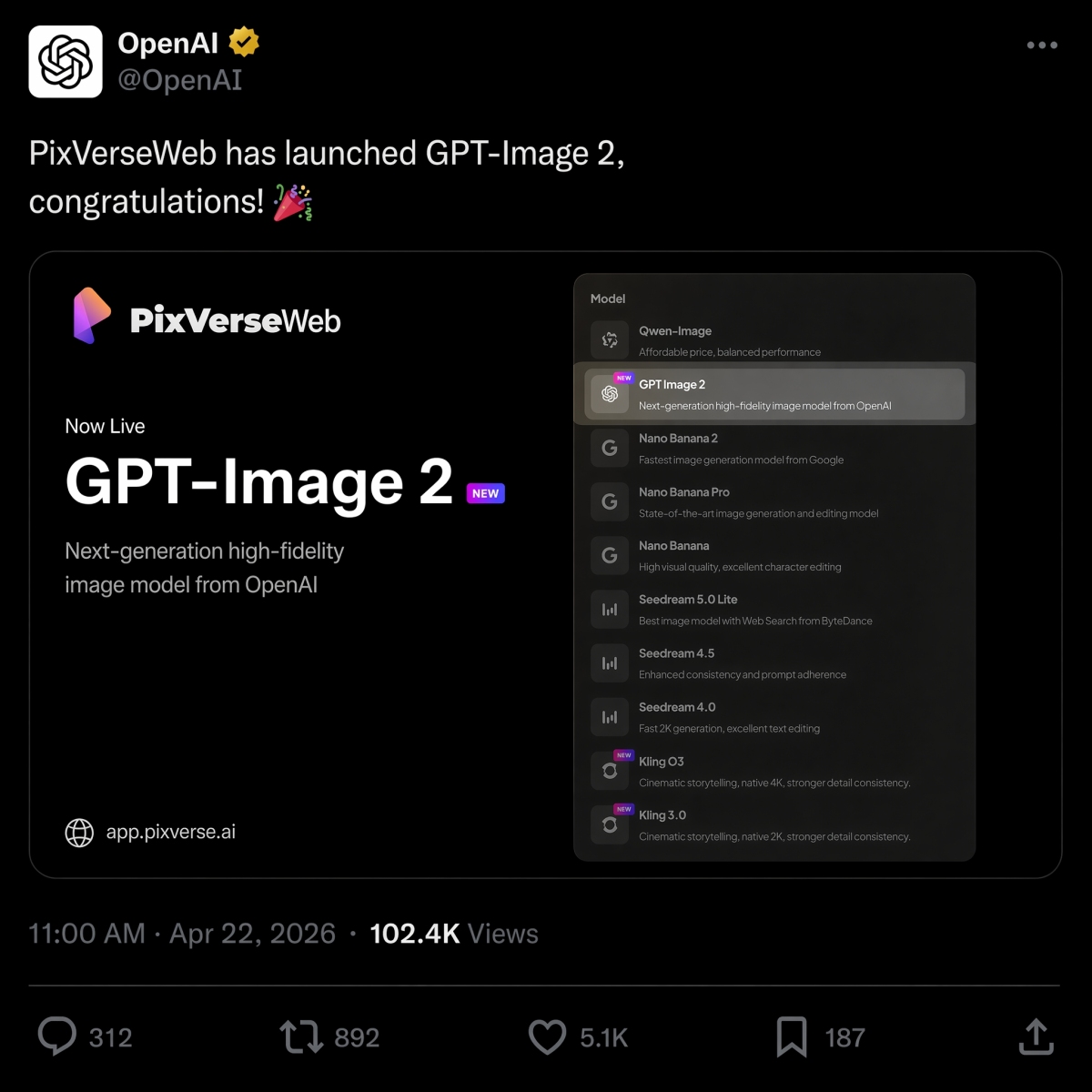
2026 年 4 月 22 日,PixVerse 推出了 GPT Image 2 作为文本转图像选项,加入了 Nano Banana 2、Seedream 和型号阵容中的HappyHorse 1.0。
如果您在同一简介中决定选择 OpenAI 和 Google 图像模型,请参阅我们的GPT Image 2 与 Nano Banana 2 比较,了解相同提示的并排结果。
如果您的即时工作主要与视频有关,我们的最佳图像到视频 AI 工具指南 解释了如何在静态图像准备好后选择正确的运动工作流程。
尝试PixVerse:打开PixVerse应用程序。
常问问题
最好的 GPT Image 2 提示是什么?
最好的 GPT Image 2 提示描述了清晰的制作工作,而不仅仅是视觉风格。强烈的提示通常包括主题、输出类型、准确的文本(如果需要)、构图、照明、约束、宽高比和最终用例。产品广告、精确文本海报、字符表、UI 模型、信息图表和图像到视频的第一帧都是特别好的提示类别。
如何编写更好的 GPT Image 2 提示?
使用这个公式:主题+视觉风格+构图+照明+细节+约束+输出用例。告诉 GPT Image 2 图像需要做什么,引用准确的文本,指定布局和长宽比,并列出不能更改的内容。对于编辑,请将更改、锁定的元素和真实性要求分开。
GPT Image 2 适合产品图片吗?
是的。 GPT Image 2 对于产品广告概念、电子商务英雄图像、包装模型、产品剪纸和活动视觉效果非常有用。在广告或产品列表中使用输出之前,产品团队仍应检查产品几何形状、标签文本、受监管的声明、徽标和包装细节。
GPT Image 2可以创建带有文字的图像吗?
是的,GPT Image 2 可以创建具有可读文本的图像,尤其是短标题、标签、海报、菜单项、信息图步骤和 UI 标签。为了获得最佳结果,请将确切的文本放在引号中,指定其出现位置,保持副本简短,并添加诸如“仅精确文本”、“无多余单词”和“无重复文本”等约束。
如何将GPT Image 2图片转为视频?
首先生成或批准静态图像,然后将其上传到 PixVerse 图像转视频。编写一个单独的动作提示来描述什么移动以及什么保持锁定。好的运动提示会提到相机运动、主题保留、背景运动以及限制,例如没有新文本、没有新徽标和没有额外产品。
GPT Image 2 与 Nano Banana 2:哪个更好?
GPT Image 2 通常更适合结构化设计输出,例如文本较多的海报、图表、UI 模型、可编辑的视觉简报和图像到视频的第一帧。当真实感、材质细节和快速视觉迭代更重要时,Nano Banana 2 值得比较。请参阅 GPT Image 2 与 Nano Banana 2 比较 以获取相同提示的结果。
GPT Image 2 与 ChatGPT Images 2.0 相同吗?
对于搜索意图来说,是的。许多用户使用 GPT Image 2、gpt-image-2 和 ChatGPT Images 2.0 来描述 OpenAI 较新的 ChatGPT 图像生成体验。 OpenAI 面向产品的名称是 ChatGPT Images 2.0,而 gpt-image-2 是开发人员和创建者在讨论 API 工作流程时经常使用的模型风格短语。
GPT Image 2 是免费的吗?API 的费用是多少?
OpenAI 帮助将 ChatGPT Images 2.0 列为在所有层上可用,但计划配额和 API 计费是分开的。截至 2026 年 6 月 22 日,OpenAI 以每 100 万代币 30.00 美元的价格列出 GPT-Image-2 图像输出;实际成本取决于提示长度、参考、输出大小、质量和缓存。