GPT Image 2 Prompt Rehberi: 80 Prompt, İnceleme ve API İpuçları (2026)
Reklam, poster, ürün, karakter ve video iş akışları için kopyalanabilir 80 GPT Image 2 promptunu, API notlarını ve test sonuçlarını inceleyin.
Bu, öncelikle kullanılabilir istemlere ihtiyaç duyan yaratıcılar için bir GPT Image 2 bilgi istemi kılavuzu ve uygulamalı incelemedir: ürün reklamları, posterler, küçük resimler, karakterler, sosyal görseller, kullanıcı arayüzü maketleri, düzenlemeler ve videoya hazır ilk kareler.
Neye ihtiyacınız olduğunu zaten biliyorsanız aşağıdaki hızlı yolları kullanın:
- İstemleri kopyala: aşağıdaki 80 kopyalamaya hazır GPT Image 2 istem örneklerine bakın.
- Test sonuçlarına bakın: Uygulamalı inceleme puanlarını ve sınırlamalarını kontrol edin.
- Görüntüleri videoya dönüştürün: PixVerse görüntüden videoya iş akışını izleyin.
GPT Image 2, görüntünün tasarlanmış bir varlık gibi davranması gerektiğinde en güçlüsüdür: okunabilir metin, temiz düzenler, ürün kompozisyonları, kullanıcı arayüzü maketleri, infografikler, düzenlenebilir referanslar ve videoya hazır ilk kareler. İş, marka logosunun tam olarak çoğaltılmasına, küçük uyumluluk kopyasına, özel yazı tiplerine veya manuel QA olmadan gönderilmesi gereken şeffaf bir nihai varlığa bağlı olduğunda daha az güvenilir olur.
OpenAI, 21 Nisan 2026’da ChatGPT Images 2.0’yu tanıttı. İçerik oluşturucular genellikle GPT Image 2, gpt-image-2 veya ChatGPT Images 2.0 ile aynı deneyimi ararlar. İlk olarak lansman haftasında test ettik ve bu kılavuzu 22 Haziran 2026’da OpenAI’nun resmi yönlendirme kılavuzu, API fiyatlandırma sayfası ve ChatGPT Görüntüleri yardım belgelerine göre yeniden inceledik.
Görüntünün animasyondan önce hazırlanması gerekiyorsa PixVerse Mini Apps, görsel temizleme, kare genişletme ve ilgili üretim görevleri için odaklı iş akışlarını bir araya getirir.
5 GPT Image 2 Önce Kopyalama İstemi
Bu beş bilgi istemi, bu kılavuzdaki en yüksek değere sahip kullanım örneklerini kapsar. Her biri aynı formatı izler: kullanım senaryosu, bilgi istemi, en iyisi ve ipucu.
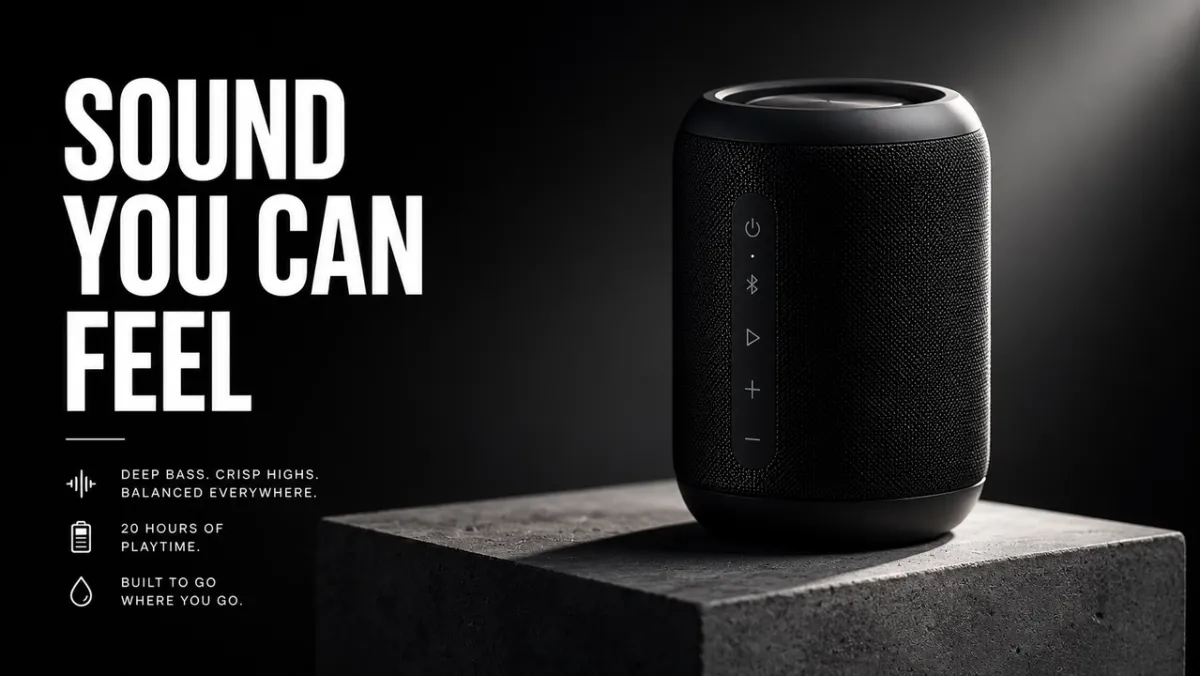
İstem Örneği 1: Ürün Fotoğrafçılığı
Kullanım örneği: E-ticaret ürün kahramanı resmi
İstem:
Beton bir kaide üzerinde mat siyah kablosuz hoparlör için birinci sınıf bir e-ticaret kahramanı görüntüsü oluşturun. Ürün, keskin kenarlar, gerçekçi malzeme dokusu, temiz temas gölgesi ve etkileyici çerçeve ışığıyla sağ üçte birlik kısımda yer alır. Sol üçüncüyü başlık için negatif alan olarak bırakın. Sahte marka logosu yok, filigran yok, ekstra nesne yok. En boy oranı 16:9.
En iyisi: Ürün listelemeleri, ücretli sosyal reklamlar, açılış sayfası kahraman resimleri
İpucu: Referans görseli sağlarsanız “ürünün şeklini, rengini, etiketini ve oranlarını tam olarak koruyun” ifadesini ekleyin.
Bilgi İstemi Örneği 2: AI Reklam Öğesi
Kullanım örneği: Tam metin içeren kampanya posteri
İstem:
Kurgusal bir tasarım aracı için dikey bir ürün lansman posteri oluşturun. Başlık: “DAHA HIZLI YARATIN”. Alt başlık: “İSTEMDEN KAMPANYAYA”. Temiz İsviçre ızgarası, kirli beyaz arka plan, siyah tipografi, elektrik mavisi vurgulu şekil, güçlü hiyerarşi, yalnızca tam metin, fazladan kelime yok, filigran yok. En boy oranı 9:16.
En iyi kullanım alanları: Reklam konseptleri, poster testleri, lansman grafikleri, sosyal kampanya görselleri
İpucu: Başlık metnini kısa tutun ve tam olarak alıntı yapın. Uzun metnin temiz bir şekilde işlenmesi daha zordur.
İstem Örneği 3: Karakter Tutarlılığı
Kullanım örneği: Karakter referans sayfası
İstem:
“NOVA” adlı orijinal bir bilim kurgu kuryesi için profesyonel bir karakter referans sayfası oluşturun. Ön, yan ve arka görünümleri ekleyin; dört yüz ifadesi; ceket, çizme ve sırt çantası belirtme çizgileri; ve bir renk paleti satırı. Her görünümde aynı yüzü, saç stilini, kıyafeti ve oranları koruyun. Temiz beyaz arka plan, okunabilir etiketler, konsept sanat stili. En boy oranı 16:9.
En iyi kullanım alanları: Oyun karakterleri, animasyon referansları, marka maskotları, storyboard’lar
İpucu: Her yenilemede kimlik referanslarını tekrarlayın: ad, yüz, saç modeli, kıyafet, renk paleti ve rol.
Bilgi İstemi Örneği 4: Küçük Resim veya Sosyal Resim
Kullanım örneği: YouTube küçük resmi veya sosyal gönderi
İstem:
AI görüntü yönlendirmeyle ilgili bir video için kalın bir YouTube küçük resmi oluşturun. Ana metin: “DAHA İYİ İSTEKLER”. Solda dağınık bir bilgi kartı ve sağda gösterişli bir kampanya görseli bulunan, bölünmüş ekranda önceki ve sonraki görsel sonucunu gösterin. Yüksek kontrast, net yüz içermeyen kompozisyon, okunabilir metin, sahte logo yok, ekstra kelime yok. En boy oranı 16:9.
En iyisi: Küçük resimler, sosyal açıklayıcılar, blog grafikleri, içerik oluşturucu içeriği
İpucu: Modele tam olarak kaç kelimenin görünmesi gerektiğini ve nereye gitmeleri gerektiğini söyleyin.
İstem Örneği 5: Görüntüden Videoya İlk Kare
Kullanım örneği: PixVerse görüntüden videoya ilk kare
İstem:
Görüntüden videoya klip için sinematik bir ilk kare oluşturun: ıslak siyah taşın üzerinde duran bir cam parfüm şişesi, arkasında ince bir sis şeridi, güçlü ön plan silueti, görünür derinlik katmanları, ince yansıma, kamera hareketi için boş alan, el yok, metin yok, filigran yok. En boy oranı 16:9.
En iyi kullanım alanları: Ürün tanıtımları, kısa reklamlar, müzik videosu açılışları, sinematik sosyal klipler
İpucu: Hareketsiz görüntüye sis, toz, buhar, kumaş, ekran parlaması veya yansımalar gibi bir hareket işareti ekleyin.
GPT Image 2 Fotoğrafınızı PixVerse ile Videoya Dönüştürün
Güçlü bir GPT Image 2 istemi hareketsiz görüntüyü oluşturabilir. PixVerse, hâlâ harekete, kamera hareketine veya kısa bir kampanya klibine ihtiyaç duyulduğunda bir sonraki adımdır.
- GPT Image 2 ile bir ilk kare oluşturun.
- Onaylanan görüntüyü PixVerse’ya yükleyin.
- Odaklanmış bir hareket istemi ekleyin.
- Test, reklamlar, sosyal paylaşımlar veya ürün sayfaları için kısa bir videoyu dışa aktarın.
Hareket şunu denemenizi ister:
- Resmi ilk kare olarak kullanın. Arkasında sis süzülürken kamerayı yavaşça ürüne doğru itin. Ürünün şeklini, etiketini, aydınlatmasını ve konumunu koruyun.
- Resmi ilk kare olarak kullanın. Hafif bir el kamerası hareketi, rüzgarda hareket eden kumaş ve yumuşak arka plan paralaksını ekleyin. Karakterin yüzünü veya kıyafetini değiştirmeyin.
- Resmi ilk kare olarak kullanın. Kamera hafifçe sola dönerken şehir ışıklarının birer birer açılmasını canlandırın. Okunabilir tüm poster metnini koruyun.
- Resmi ilk kare olarak kullanın. Ürünü kaide üzerinde hafifçe döndürün, hareketli bir kenar ışığı ekleyin ve arka planı temiz tutun.
- Resmi ilk kare olarak kullanın. Buhar, yansımalar ve yukarıdan aşağıya yavaş kamera kayması ekleyin. Yiyeceğin şeklini, tabak konumunu ve rengini koruyun.
Daha derin hareket istemi yapısı için AI video istem kılavuzu, görüntüden videoya araç kılavuzu ve AI video reklam oluşturucu iş akışı’ya bakın.
Aslında İşe Yarayan GPT Image 2 İstemleri Nasıl Yazılır
En iyi GPT Image 2 istemleri yalnızca bir resmi tanımlamaz. Resmin yapması gereken işi anlatırlar. Sosyal reklam istemi, ürün kesiti, infografik, kullanıcı arayüzü ekranı veya videonun ilk karesi isteminden farklı şekilde okunmalıdır.
Güvenilir bir başlangıç modeli şuna benzer:
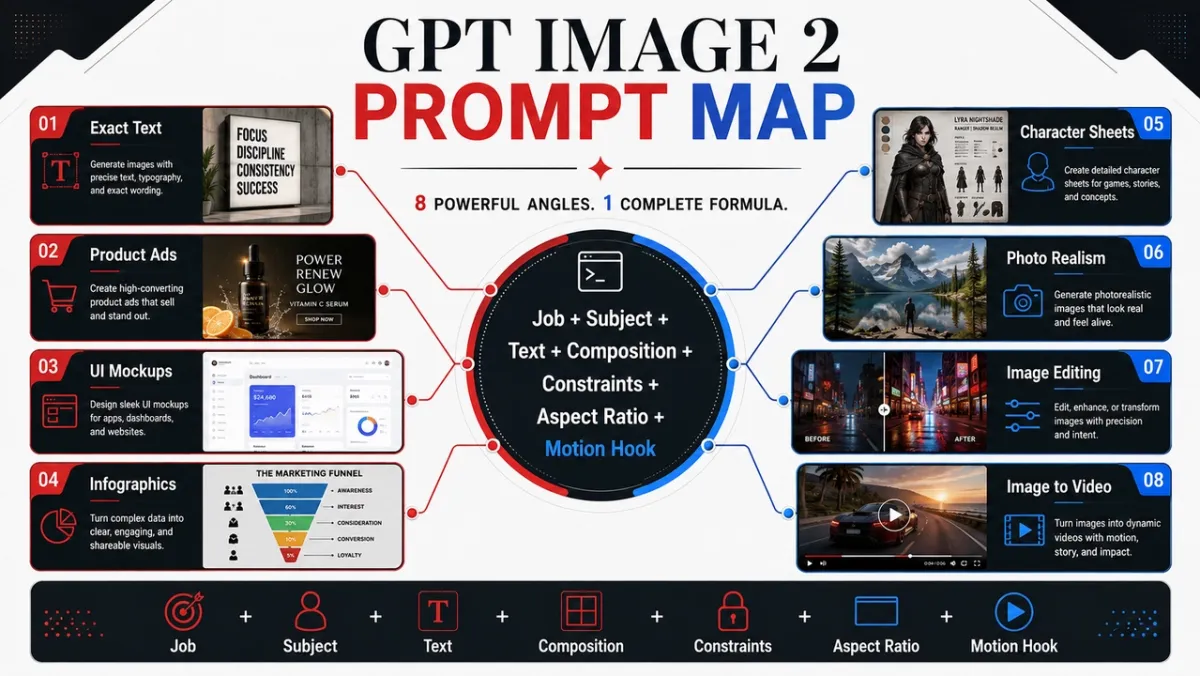
[Kullanım senaryosu] için [görüntü türü] oluşturun. Ana konu: [belirli konu ve görünür ayrıntılar]. Varsa tam metin: “[görünmesi gereken kopya]”. Kompozisyon: [çerçeveleme, düzen, negatif alan, konu yerleştirme]. Stil ve aydınlatma: [görsel dil, ortam, ruh hali, ışık yönü]. Kısıtlamalar: [neler değişmemeli, fazladan kelime yok, filigran yok]. Çıkış formatı: [en boy oranı, şeffaf arka plan, videoya hazır çerçeve].
Formül:
Konu + görsel stil + kompozisyon + aydınlatma + ayrıntılar + kısıtlamalar + çıktı kullanım durumu
Beceri 1: Stilden Önce İşe Ad Verin
Çıktı türüyle başlayın: poster, ürün reklamı, uygulama ekranı, karakter sayfası, eğitim şeması, düzenleme veya görüntüden videoya ilk kare. GPT Image 2, başarı standardını anladığında istemi takip etme konusunda daha iyi olur.
Zayıf istem:
Harika bir fütüristik hoparlör, sinematik, yüksek ayrıntı.
Daha iyi istem:
Mat siyah kablosuz hoparlör için birinci sınıf bir ürün reklamı oluşturun. Resim, sağda ürün, solda kısa bir başlık, temiz negatif alan ve keskin ürün kenarları olacak şekilde 16:9 kampanya banner’ı olarak çalışmalıdır.
İkinci komut, modele görüntünün nasıl değerlendirileceğini anlatır: yalnızca güzelliğe göre değil, düzen, hiyerarşi ve kullanılabilirliğe göre de.
Beceri 2: Metne Kilitli Bir Varlık Gibi Davranmak
Metin önemliyse onu tırnak içine alın ve modele nasıl oluşturulacağını anlatın. Modelin sözcükler icat etmesini istemiyorsanız “slogan” istemeyin.
Bu modeli kullanın:
Başlık: “HİSSEDEBİLECEĞİNİZ SES”. Başlığı aynen aktarın. Fazladan kelime yok, yinelenen metin yok, sahte logo yok. Kalın beyaz sans-serif yazı tipi, kompozisyonun sol tarafı, uzaktan okunabilir.
Uzun kopyalama için metni istemde ayrı satırlara bölün. Sonuç olarak bir sözcük yanlış yazılırsa, daha az metin, daha büyük tür ve daha katı “yalnızca tam metin” diliyle yeniden oluşturun.
Beceri 3: Modele Bir Kamera ve Düzen Verme
GPT Image 2 kompozisyon ipuçlarını takip edebilir ancak bunların açıkça belirtilmesi gerekir. Kamera mesafesini, açısını, nesne yerleşimini, negatif alanı ve en boy oranını ekleyin.
Yararlı ifadeler:
- Ürün dokusu, eller, yüzler, malzemeler ve etiketler için yakın çekim.
- Ortamlar, hikaye sahneleri, şehir posterleri ve videoya hazır kareler için geniş çekim.
- Yiyecek, masa sahneleri, düz döşemeler, paketleme kitleri için yukarıdan aşağıya.
- Metin ve ürün dengesi içeren reklam düzenleri için sol üçüncü / sağ üçüncü.
- Kullanıcı arayüzü modelleri, karakter sayfaları, diyagramlar ve infografikler için temiz kılavuz.
Beceri 4: Düzenlemeleri Üç Cümleyle Yazma
Düzenleme istemleri, değişikliği, kilitli öğeleri ve fiziksel gerçekçiliği ayırdıklarında en iyi sonucu verir.
Park etmiş arabayı eski bir bisikletle değiştirin. Evi, çitleri, araba yolunu, çevre düzenlemesini, aydınlatma yönünü, kamera açısını ve günün saatini tam olarak koruyun. Bisiklet ölçeğini, temas gölgesini ve perspektifi mevcut sahneyle eşleştirin.
Bu kalıp “bunu daha iyi göster”den daha güçlüdür çünkü GPT Image 2’ya yaratıcılığa nerede izin verildiğini ve nerede izin verilmediğini söyler.
Beceri 5: Görüntü Videoya Dönüştüğünde Hareket İpuçları Ekleme
Hareketsiz görüntü bir PixVerse görüntüden videoya kaynağı haline gelecekse derinlik ve harekete hazır olma isteğinde bulunun. Ön plan, orta plan, arka plan, net bir konu silüeti ve görünür bir hareket işareti isteyin: toz, kumaş, saç, yağmur, yansıma, araç hareketi, dönen ürün veya kamera itme yolu.
Bunun yerine:
Çölde bir astronot.
Kullanımı:
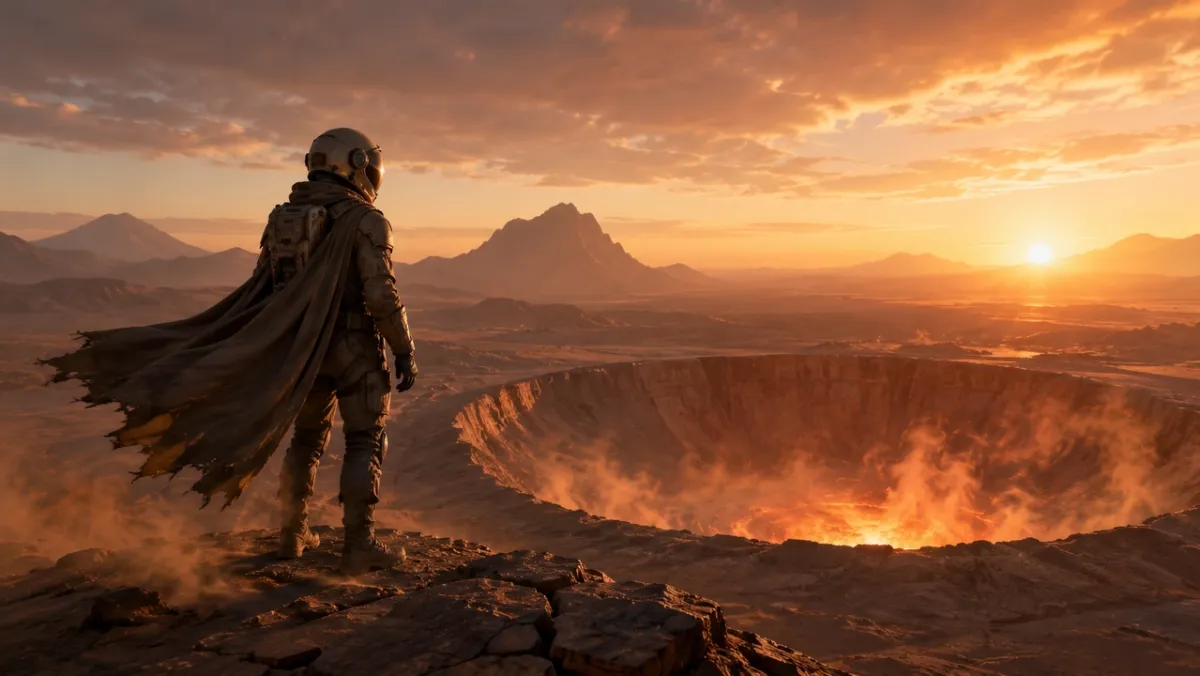
Görüntüden videoya klip için sinematik bir ilk kare: Şafakta parlayan bir çöl kraterinin kenarında duran yalnız bir astronot, rüzgarda hareket etmeye hazır pelerin ve toz, ön plandaki güçlü siluet, net derinlik katmanları ve sıcak ufuk ışığı.
GPT Image 2 Bilgi İstemi Kitaplığı: 80 Kopyalamaya Hazır Örnek
Aşağıdaki her açı on istem içerir. Her gruptaki ilk ipucu, görsel bir örnek için en iyi adaydır çünkü açının göstermesi amaçlanan yeteneği vurgular; diğer istemler kopyalayabileceğiniz, uyarlayabileceğiniz ve test edebileceğiniz salt metin örnekleridir.
| İstem modülü | İstem numaraları | Şunun için en iyisi: |
|---|---|---|
| Ürün fotoğrafçılığı ve AI reklam yaratıcı istemleri | 21-30 | Ürün listelemeleri, ücretli reklamlar, e-ticaret kahramanı görselleri, ambalaj maketleri |
| Logo ve metin oluşturma istemleri | 11-20 | Posterler, menü panoları, küçük resimler, albüm kapakları, tam başlık testleri |
| Karakter tutarlılığı istemleri | 41-50 | Karakter sayfaları, maskotlar, oyun varlıkları, ifade satırları |
| Poster, küçük resim ve sinematik sahne istemleri | 1-10 | Kahraman görüntüleri, editoryal fotoğraflar, atmosferik sahneler, görsel kancalar |
| Sosyal medya görseli ve infografik istemleri | 31-40 | Blog görselleri, açıklayıcılar, karşılaştırma grafikleri, paylaşılabilir eğitim varlıkları |
| Kullanıcı arayüzü maketi istemleri | 51-60 | Uygulama ekranları, kontrol panelleri, sosyal profiller, ürün kullanıcı arayüzü konseptleri |
| Stil aktarımı ve anlatı sanatı yönlendirmeleri | 61-70 | Çizgi romanlar, hikaye panelleri, editoryal sanat, konsept araştırması |
| Görüntüden videoya ilk kare istemleri | 71-80 | PixVerse hareket iş akışları, ürün gösterimleri, düzenlemeler, çoklu referanslı kaynak çerçeveleri |
1. Poster, Küçük Resim ve Sinematik Sahne İstemleri
Bu açı, aydınlatmanın ve gerçekçiliğin önemli olduğu portreler, editoryal görüntüler, yaşam tarzı sahneleri ve atmosferik fotoğraflar için en iyisidir.
İstem 1:
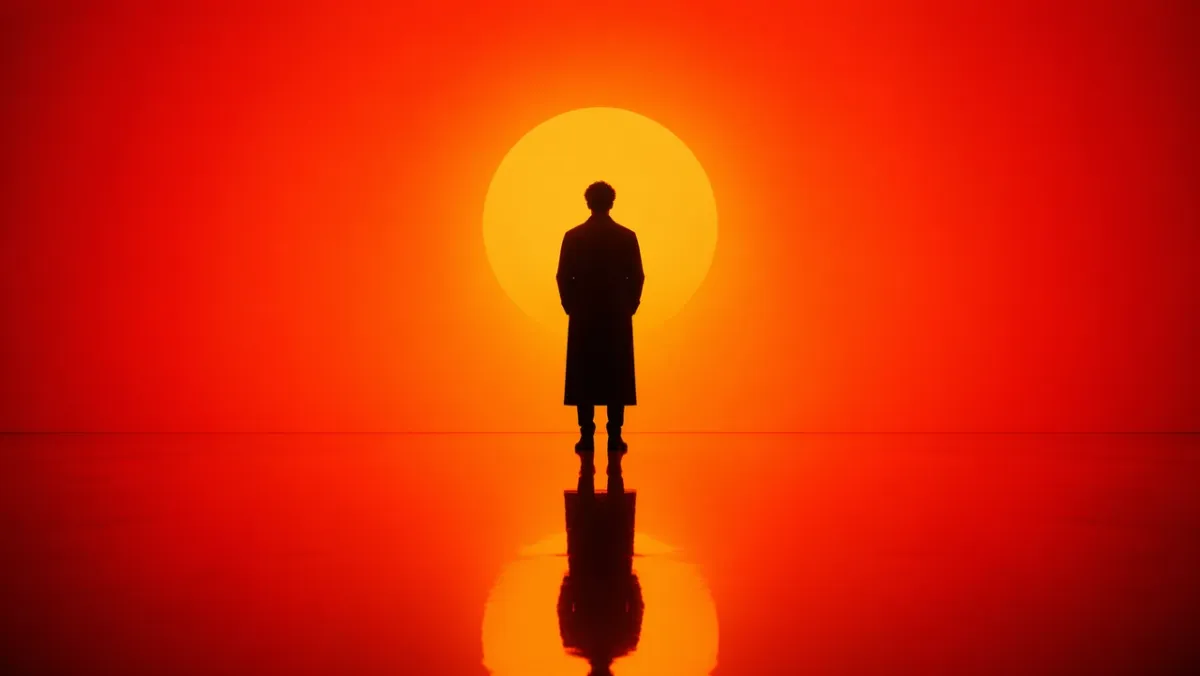
Yoğun turuncudan kırmızıya geçişli bir ortamda duran yalnız bir figürün sinematik portresini oluşturun. Arkadan güçlü siluet aydınlatması, derin gölge kontrastı, figürü yansıtan yansıtıcı parlak zemin. Simetrik kompozisyon, minimal set tasarımı, arka plan karmaşası yok. Ruh hali, bir bilim kurgu filminden bir kare gibi düşünceli ve güçlü. En boy oranı 16:9.
İstem 2:
Yağmurdan sonra Seul’de samimi, fotogerçekçi bir sokak sahnesi. Bir çiçekçi mavi saatte küçük bir dükkânı kapatıyor, ıslak kaldırım yansımaları, sıcak mağaza ışığı, yorgun doğal duruş, 50 mm’lik belgesel hissi, gerçekçi cilt dokusu, gösterişli poz yok, filigran yok. En boy oranı 3:2.
İstem 3:
Çizilmiş ahşap bir masa üzerinde eski bir film kamerasını tamir eden yıpranmış ellerin yakın çekimi. Kameranın solundan gelen pencere ışığı, görünür toz, pirinç ve siyah deri dokusu, sığ alan derinliği, sessiz atölye havası, fotogerçekçi, metin kaplaması yok. En boy oranı 4:3.
İstem 4:
Hafif kar yağışı sırasında Kuzey Avrupa’da sessiz bir gece tren platformu. Uzun paltolu bir yolcu, sıcak bir istasyon lambasının altında duruyor, soğuk havada nefesi görülebiliyor, arka planda parlayan tren pencereleri, sinematik gerçekçilik, ölçülü renk paleti, 35 mm belgesel hissi, metin yok. En boy oranı 16:9.
İstem 5:
Koyu seramik bir tabakta el yapımı eriştelerin, yükselen buharın, belirli bir açıyla duran yemek çubuklarının, yıpranmış ahşap masanın, yumuşak yan ışığın, gerçekçi yağlı parlaklık ve dokunun, markalamanın, metin kaplamasının bulunmadığı yukarıdan aşağıya editoryal yemek fotoğrafı. En boy oranı 4:5.
İstem 6:
Çömlek çarkında kilden bir kaseyi süsleyen bir seramik sanatçısının gerçekçi belgesel tarzı portresi. Orta yakın çekim, keskin odakta eller ve dönen kil, doğal lekeli önlük, yumuşak atölye penceresi ışığı, arka planda tamamlanmamış kase rafları, dürüst doku, gösterişli rötuş yok, metin yok. En boy oranı 3:2.
İstem 7:
Yaz fırtınasının ardından küçük bir dağ kasabasının geniş sinematik görüntüsü. Koyu yeşil çam ağaçlarından sis yükseliyor, kulübelerin pencerelerinde sıcak ışıklar beliriyor, ıslak yol yansımaları merkeze doğru ilerliyor, uzakta şemsiyeyle yürüyen bir kişi, doğal ölçek, gerçekçi atmosfer, metin yok. En boy oranı 16:9.
İstem 8:
Katlanmış keten bir kumaşın üzerinde duran vintage bir kol saatinin yakın çekim, fotogerçekçi çekimi. Görünür fırçalanmış metal, kasada küçük çizikler, okunabilir ancak kurgusal saat kadranı işaretleri, yumuşak yönlü sabah ışığı, sığ alan derinliği, rafine editoryal ürün fotoğrafı havası, gerçek marka logoları yok. En boy oranı 4:5.
İstem 9:
Gece geç saatlerde küçük bir mimarlık stüdyosunun samimi bir iç mekan sahnesi. İki tasarımcı köpük modelleri ve baskılı kat planlarını bir masa lambasının altında, yakındaki kahve fincanlarını, gerçekçi gölgeleri, kullanışlı çalışma alanı karmaşasını, sakin odaklı ruh halini, 35 mm film görünümünü, metin kaplamasının olmadığını inceliyor. En boy oranı 16:9.
İstem 10:
Alacakaranlıkta metro girişinin yanında duran sade krem rengi paltolu bir modelin doğal moda editoryal görüntüsü. Parıldamaya başlayan sokak lambaları, sessiz şehir arka planı, gerçekçi kumaş kıvrımları, rahat duruş, göz hizasında çerçeveleme, ince film greni, görünür marka adı yok, metin yok. En boy oranı 2:3.
Nelere bakmalı: Sonuç inandırıcı bir ışık yönüne, fiziksel olarak makul yansımalara veya gölgelere ve doğal bir konu pozuna sahip olmalıdır. Görüntü çok gösterişli görünüyorsa, daha fazla belgesel ayrıntısı ekleyin ve belirsiz kaliteli dili kaldırın.
2. Logo ve Metin Oluşturma İstemleri
GPT Image 2, istem metni dekorasyon olarak değil, tasarım gereksinimi olarak ele aldığında en güçlüsüdür.
İstem 11:
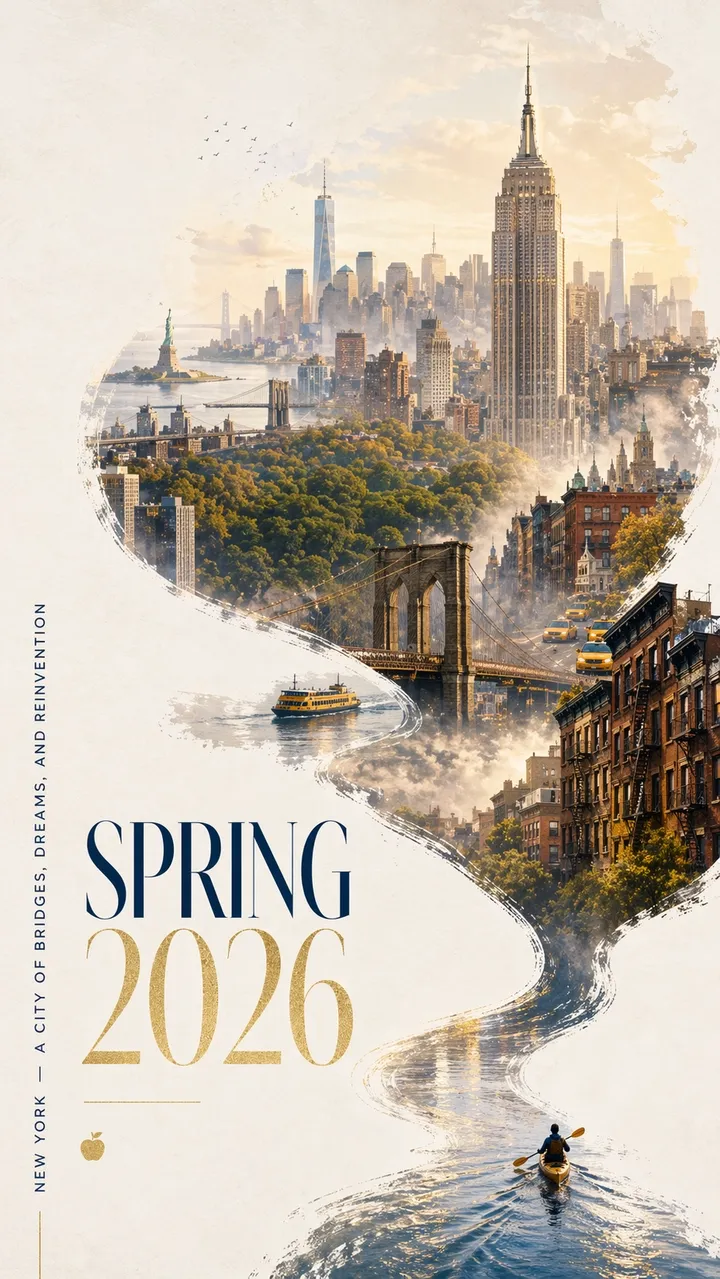
Cesur ve çağdaş bir tasarıma ve zarif bir kutlama havasına sahip, New York için çarpıcı bir İlkbahar 2026 şehir posteri. Kirli beyaz dokulu arka planı cömert negatif alanla temizleyin. Minyatür bir kanocu sağ alt köşede dar bir yansıtıcı su şeridi üzerinde kürek çekiyor. Dalga, dinamik bir kaligrafik eğriyle yukarıya doğru uzanıyor, yavaş yavaş Hudson Nehri’ne ve ardından Manhattan’ın rüya gibi elle boyanmış bir panoramasına dönüşüyor. Akan nehir şeklindeki kompozisyonun içinde: Empire State Binası, Brooklyn Köprüsü, Central Park’ın gölgesi, Tek Dünya Ticaret Merkezi, kumtaşı çatılar, sarı taksiler, liman feribotları ve kısa mesafedeki Özgürlük Anıtı. Yumuşak sabah sisi, altın rengi bahar ışığı, lacivert ve altın renginde ince vurgular. Sol alt taraftaki zarif tipografide “BAHAR 2026” yazıyor ve dikey slogan “NEW YORK - KÖPRÜLER, HAYALLER VE YENİDEN KEŞİF ŞEHRİ”. Metin keskin ve güzel bir şekilde oluşturulmuş olmalıdır. Fazladan kelime yok. Üstün grafik tasarım, en boy oranı 9:16.
İstem 12:
“FRAME 2026” adlı kurgusal bir tasarım konferansı için dikey bir lansman posteri oluşturun. Büyük başlık: “ÇERÇEVE 2026”. Alt başlık: “MAKİNE HAYAL GÜCÜYLE TASARIM”. Temiz İsviçre ızgarası, kirli beyaz arka plan, siyah tipografi, kırmızı geometrik vurgu, cömert negatif alan, mükemmel okunabilir metin, fazladan kelime yok, filigran yok. En boy oranı 9:16.
İstem 13:
“YUMUŞAK SİNYALLER” başlıklı minimalist bir albüm kapağı oluşturun. Sanatçı adı: “MİRA VALE”. Ortalanmış tipografi, yumuşak mavi kağıt dokusu, radyo kulesinin küçük gümüş çizgili çizimi, zarif aralık, fazladan metin yok, logo yok, en boy oranı 1:1.
İstem 14:
Büyük serif tipinde “DAHA FAZLA YAVAŞ OKUYUN” yazan bir kitapçı vitrini posteri oluşturun. Daha küçük satır: “BAHAR OKUMA HAFTASI”. Camdaki sıcak akşam sokak yansımaları, krem kağıt dokusu, okunabilir tipografi, fazladan kelime yok, filigran yok. En boy oranı 4:5.
İstem 15:
“Yarının Nesneleri” başlıklı bir müze sergi posteri hazırlayın. Alt başlık: “2026’NIN TASARIM TARİHİ”. Kirli beyaz kağıt üzerinde siyah metin, ortada bir soyut krom nesne, temiz modernist düzen, yalnızca tam olarak okunabilir metin, sahte logolar yok. En boy oranı 9:16.
İstem 16:
Tam başlığı “AFTERLIGHT SESSIONS” olan dikey bir müzik festivali posteri oluşturun. Daha küçük metin: “12-14 HAZİRAN”. Koyu lacivert bir arka plan, parlak dairesel bir sahne ışığı, zarif, yoğunlaştırılmış sans-serif tipografi, dengeli negatif alan, yalnızca tam metin, fazladan kelime veya filigran kullanmayın. En boy oranı 9:16.
İstem 17:
“SABAH MENÜSÜ” başlıklı temiz bir kafe menü panosu oluşturun. Tam olarak dört öğe ekleyin: “ESPRESSO”, “MATCHA LATTE”, “KAKULE ÇÖZÜMÜ”, “SOĞUK BREW”. Sıcak krem zemin, siyah serif yazı, basit bölücü çizgiler, uzaktan okunabilir, fiyat yok, ekstra eşya yok. En boy oranı 4:5.
İstem 18:
Kurgusal bir koşu kulübü için kare şeklinde bir sosyal kampanya grafiği oluşturun. Ana metin: “Nehri Çalıştırın”. İkincil satır: “CUMARTESİ 07:00”. Cesur kinetik tipografi, soyut nehir çizgisi, parlak yeşil ve siyah palet, net hiyerarşi, ekstra metin yok, gerçek logo yok. En boy oranı 1:1.
İstem 19:
“SESSİZ MAKİNE” başlıklı kurgusal bir roman için kitap kapağı oluşturun. Yazar adı: “ELENA ROWE”. Küçük gümüş renkli mekanik kuş silueti, mat siyah arka plan, rafine tipografi, yalnızca tam metin, yayıncı logosu ve ekstra kopya içermeyen minimalist kapak. En boy oranı 2:3.
İstem 20:
“DAHA İYİ SORULAR SORUN” başlıklı bir sınıf posteri oluşturun. Üç kısa satır ekleyin: “Gözlemle”, “Açıkla”, “Test”. Kullanıcı dostu editoryal tasarım, yumuşak sarı arka plan, basit çizgi simgeleri, yüksek kontrastlı okunabilir metin, fazladan kelime yok, filigran yok. En boy oranı 4:5.
Nelere dikkat edilmeli: Her harf okunabilir olmalıdır. Model fazladan sözcükler eklerse kopyayı “yalnızca tam metin” olarak yeniden belirtin ve her satırı istemde kendi satırına yerleştirin.
3. Ürün Fotoğrafçılığı ve Yapay Zeka Reklam Yaratıcı İstemleri
Kampanya görselleri, kahraman çekimleri, sosyal reklamlar, e-ticaret maketleri ve ürün hikaye anlatımı için bu açıyı kullanın.
İstem 21:
Beton bir kaide üzerinde mat siyah kablosuz hoparlörün birinci sınıf ürün reklamı. Başlık: “HİSSEDEBİLECEĞİNİZ SES”. Sağda ürün, solda koyu beyaz yazı, dramatik çerçeve ışığı, net gölge, lüks teknoloji kampanya stili, keskin ürün kenarları, sahte marka logosu yok, filigran yok. En boy oranı 16:9.
İstem 22:
Buzlu cam üzerinde editoryal cilt bakımı serumu fotoğrafı. “LUMA SERUM” yazan basit bir etikete sahip yarı saydam bir şişe, yumuşak dağınık ışık, soluk yeşil arka plan, üst düzey güzellik kampanyası stili, etiket metni keskin, temiz yansıma, ekstra destek yok, en boy oranı 4:5.
İstem 23:
Altın saatte bir dağ yolunda dayanıklı bir seyahat şişesi için kare sosyal reklam. Slogan: “UZUN YOL İÇİN ÜRETİLDİ”. Ürün ön planda açıkça görülüyor, doğal tutma yeri, sıcak güneş ışığı, alt üçte birlik kısımda net okunabilir metin, ekstra kelime yok, en boy oranı 1:1.
İstem 24:
Saf beyaz bir arka plan üzerinde kablosuz kulaklığın temiz bir e-ticaret ürünü fotoğrafı. Düz açı, net siluet, hafif temas gölgesi, görünür kulak yastığı dokusu, metin yok, logo yok, aksesuar yok, yüksek çözünürlüklü ürün fotoğrafı. En boy oranı 1:1.
İstem 25:
Seramik kahve fincanı için billboard tarzı kampanya görseli. Başlık: “SABAHLAR, YENİDEN ISITILDI”. Ürün ön planda büyük, mutfak penceresinin sıcak ışığı, yumuşak buhar, sol üstte kalın okunabilir yazı, fazladan kopya yok, filigran yok. En boy oranı 16:9.
İstem 26:
Taş bir çıkıntının üzerindeki minimalist bir yürüyüş sırt çantasını gösteren birinci sınıf bir e-ticaret kahramanı görüntüsü. Ürün ortalanmış, ön cep ve askılar görünür, yumuşak dağ sabah ışığı, net gölge, kimse yok, logo yok, metin kaplaması yok, gerçekçi naylon doku ve fermuar detayları. En boy oranı 1:1.
İstem 27:
Buzlu cam nemlendirici kavanozu için cilalanmış bir cilt bakımı kampanyası görseli. Başlık: “KAVANOZDA SAKİN”. Sağ altta ürün, soluk mavi arka plan, yumuşak su yansımaları, sahte marka içermeyen net etiket alanı, zarif beyaz tipografi, fazladan kelime yok. En boy oranı 4:5.
İstem 28:
Açık şarj kutusunda mat beyaz kablosuz kulaklıkların sinematik ürün fotoğrafı. Koyu kömür rengi arka plan, ince çerçeve ışığı, alttan hafif yansıma, kampanya başlığı için temiz negatif alan, logo yok, metin yok, keskin ürün kenarları. En boy oranı 16:9.
İstem 29:
“NOVA OATS” adlı kurgusal bir granola markası için kare atıştırmalık ambalaj maketi. Açık renkli bir ahşap yüzey üzerinde dik duran bir poşeti, keskin etiket metnini, tabanın etrafında yulaf ve kurutulmuş meyveyi, sıcak doğal ışığı, birinci sınıf ancak ulaşılabilir ambalaj tasarımını, ekstra markaların bulunmadığını gösterin. En boy oranı 1:1.
İstem 30:
Koyu kadife yüzey üzerinde küçük mavi taşlı gümüş yüzükten oluşan lüks mücevher ürünü fotoğrafı. Makro ayrıntı, gerçekçi metal yansımaları, sol üstten yumuşak spot ışığı, temiz gölge, el yok, metin yok, filigran yok, ürün arka plandan açıkça ayrılmış. En boy oranı 4:5.
Nelere dikkat edilmeli: Ürün görsel kahraman olarak kalmalıdır. Model çok fazla paketleme detayı icat ediyorsa, referans görseli kullanırken “düz paketleme” veya “girilen ürünü tam olarak koruyun” seçeneğini belirtin.
4. Sosyal Medya İmajı ve İnfografik Uyarıları
Bu açı, okunabilir etiketlere ihtiyaç duyan diyagramlar, açıklayıcılar, iş akışı haritaları, çizelgeler, sınıf görselleri ve blog çizimleri için kullanışlıdır.
İstem 31:
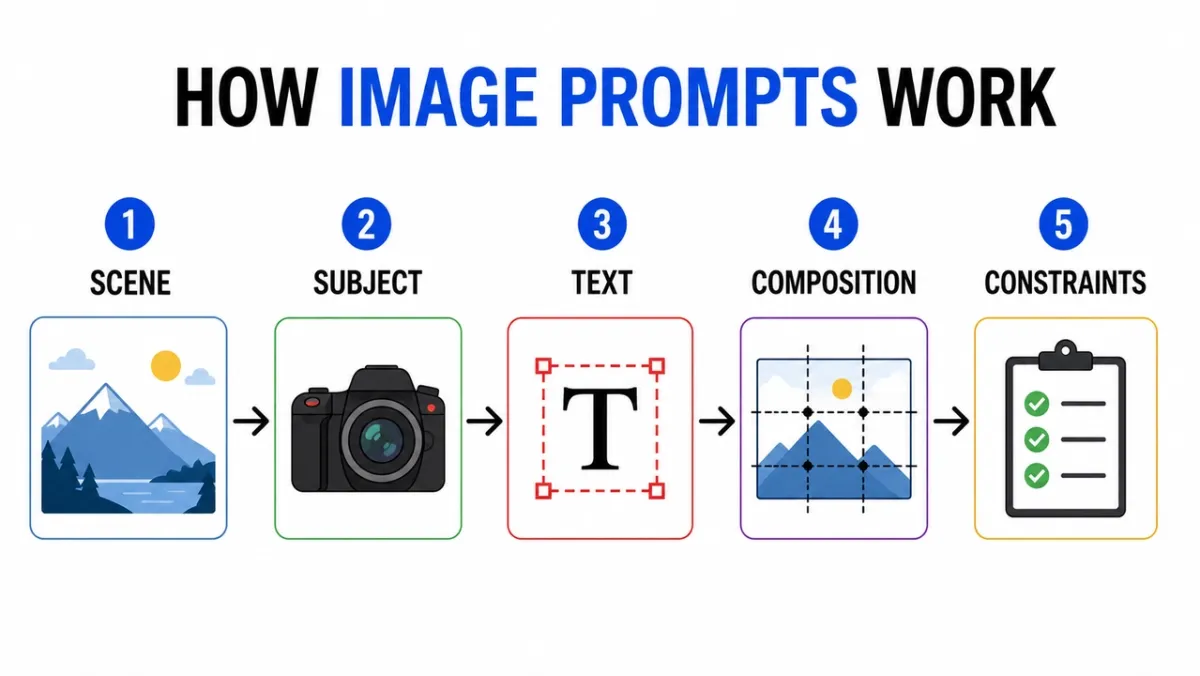
“GÖRÜNTÜ İSTEKLERİ NASIL ÇALIŞIR” başlıklı temiz bir infografik oluşturun. Beş etiketli adım: “Sahne”, “Konu”, “Metin”, “Kompozisyon”, “Kısıtlamalar”. Düz editoryal simgeler, adımlar arasındaki oklar, yüksek kontrast, beyaz arka plan, okunabilir sans-serif etiketleri, tutarlı aralık, fazladan metin yok, filigran yok. En boy oranı 16:9.
İstem 32:
Kamera merceğinin katmanlarını gösteren eğitim diyagramı. Etiketli parçaları ekleyin: “Ön Eleman”, “Diyafram”, “Odak Grubu”, “Görüntü Sensörü”. Temiz kesit illüstrasyon, beyaz arka plan, ders kitabı stili, net lider çizgileri, okunabilir etiketler, dekoratif dağınıklık yok. En boy oranı 16:9.
İstem 33:
“POSTER İSTEMİ VE ÜRÜN İSTEMİ” başlıklı karşılaştırma infografik. İki sütun, altı satır, kısa etiketler, nötr arka plan, siyah metin, mavi vurgu çizgileri, profesyonel blog grafik stili, tümü kopyayla okunabilir, fazladan metin yok. En boy oranı 16:9.
İstem 34:
“SOĞUK DEMLEME NASIL YAPILIR” başlıklı adım adım eğitim görseli oluşturun. Kısa etiketlerle resimli beş adım: “Öğütme”, “Dik”, “Filtreleme”, “Dökme”, “Servis Etme”. Sıcak toprak tonları, net oklar, tutarlı simge stili, okunabilir metin, fazladan kelime yok. En boy oranı 16:9.
İstem 35:
“AI IMAGE İŞ AKIŞI” başlıklı temiz bir karşılaştırma tablosu oluşturun. Üç sütun: “Taslak”, “Hassaslaştır”, “Canlandır”. Basit simgeler, kısa etiketler, yüksek kontrast, cömert boşluklar, beyaz arka plan, profesyonel blog grafik stili ve tüm metinlerin okunabilir olmasını kullanın. En boy oranı 16:9.
İstem 36:
“İSTEMDEN POSTERE” başlıklı temiz bir zaman çizelgesi infografik oluşturun. Beş aşama: “Kısa”, “Düzen”, “Metin”, “İnceleme”, “Dışa Aktarma”. Yatay akış, basit numaralı daireler, mavi ve siyah vurgu paleti, yüksek kontrastlı etiketler, fazladan metin yok, filigran yok. En boy oranı 16:9.
İstem 37:
“REFERANS GÖRÜNTÜ ROLLERİ” başlıklı bir eğitim şeması oluşturun. Üç etiketli kart: “Konu”, “Stil”, “Arka Plan”. Basit görsel küçük resimlerini, okları tek bir çıktı karesinde gösterin, net etiketler, beyaz arka plan, tutarlı aralıklar, fazladan metin yok. En boy oranı 16:9.
İstem 38:
“HANGİ GÖRÜNTÜ İSTEMİ?” başlıklı bir karar ağacı oluşturun. Dallar: “Metin”, “Ürün”, “Sahne”, “Düzenle”. Temiz kutular ve oklar, okunabilir sans-serif tipografi, minimum gri arka plan, tek yeşil vurgu rengi, fazladan kelime yok, dekoratif dağınıklık kullanmayın. En boy oranı 16:9.
İstem 39:
“ÜRETMEDEN ÖNCE” başlıklı bir güvenlik kontrol listesi infografik oluşturun. Dört kontrol: “Haklar”, “Gizlilik”, “Metin”, “Marka”. Basit kontrol simgelerini, kısa etiketleri, beyaz arka planı, profesyonel SaaS yardım merkezi stilini, yüksek kontrastı kullanın, ekstra kopyaya gerek yok. En boy oranı 4:5.
İstem 40:
“GÖRÜNTÜ DÜZENLEME İSTEMİ” başlıklı görsel bir açıklayıcı oluşturun. Üç yığılmış satır: “Değiştir”, “Koru”, “Eşleştir”. Her satır için küçük örnek simgeler, temiz öncü çizgiler, okunabilir etiketler, ölçülü renkler ekleyin, fazladan metin yok, filigran yok. En boy oranı 16:9.
Nelere dikkat edilmeli: Önce etiketleri kontrol edin. Eğer görsel güzel fakat kelimeler yanlışsa çıktı kullanılamaz. Yoğun grafikler için etiket sayısını azaltın ve yeniden oluşturun.
5. Karakter Tutarlılığı İstemleri
Karakter sayfaları kimliği, gardırobu, paleti ve ifadeleri tek bir referans çerçevesine sıkıştırdıkları için kullanışlıdır.
İstem 41:
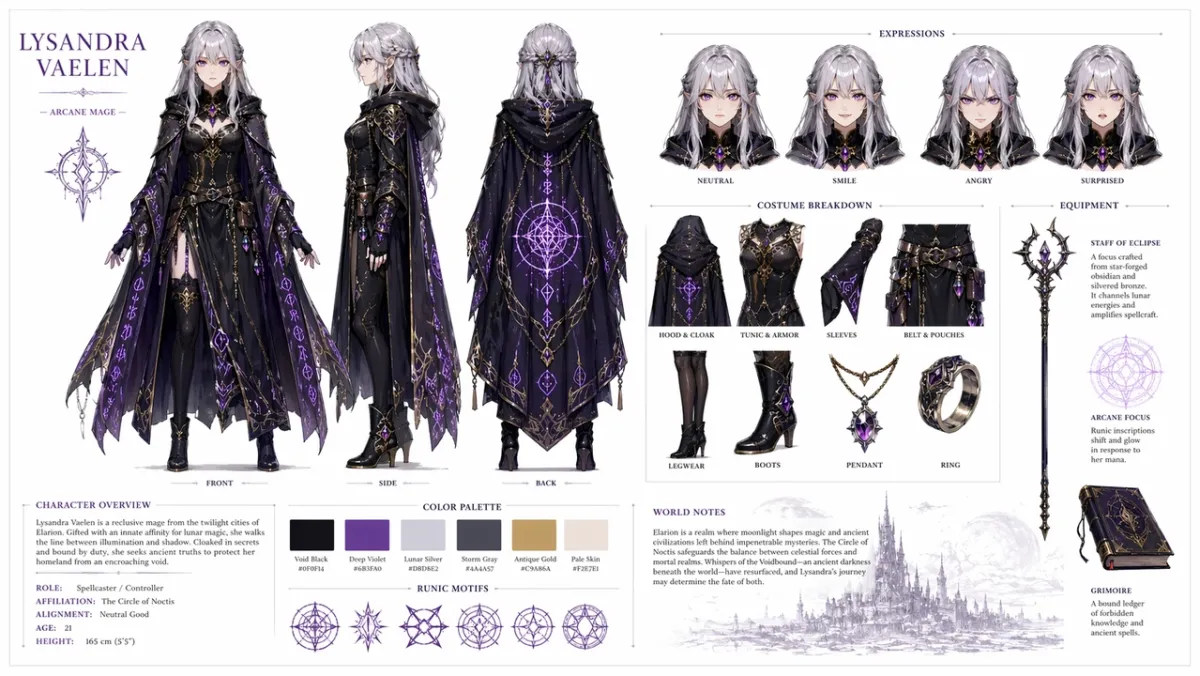
Orijinal bir fantastik RPG karakteri için profesyonel bir karakter referans sayfası oluşturun: gümüş saçlı ve mor gözlü, parlak rune desenleri olan süslü koyu bir pelerin giyen genç bir kadın büyücü. Temiz beyaz bir arka plana şunu ekleyin: ön, yan ve arka tarafı gösteren üç görünümlü bir dönüş; nötr, gülümseyen, kızgın ve şaşırmış yüz ifadeleri; kostüm ve ekipman parçalarının ayrıntılı dökümü; bir renk paleti örneği satırı; ve temiz tipografiyle dünya inşa eden kısa notlar. Organize ızgara düzeni, konsept sanat stili, yüksek çözünürlük. En boy oranı 16:9.
İstem 42:
“NOVA” adlı orijinal karakter için bir bilim kurgu kurye karakter sayfası oluşturun. Tüm görünümlerde ön, yan ve arka görünümleri, dört yüz ifadesini, ceket ve sırt çantası açıklamalarını, renk paleti örneklerini, temiz beyaz arka planı, okunabilir etiketleri, tutarlı yüz ve ceketi ekleyin. En boy oranı 16:9.
İstem 43:
Yeşil yağmurluklu küçük bir orman yardımcısı için bir çocuk kitabı karakter sayfası oluşturun. İfade satırını, destek satırını, yürüme pozunu, el sallama pozunu, renk paletini, basit okunabilir notları, yumuşak illüstrasyon stilini içerir, ekstra karakter içermez. En boy oranı 16:9.
İstem 44:
“REI” adlı orijinal karakter için siberpunk dedektif karakter sayfası oluşturun. Ön görünüm, yan görünüm, arka görünüm, üç ifade, trençkot açıklamaları, cihaz aksesuarları, neon renk paleti, temiz etiketler, tutarlı yüz ve saç stilini ekleyin. En boy oranı 16:9.
İstem 45:
Dost canlısı bir robot fırıncı için bir maskot referans sayfası oluşturun. Tam vücut pozu, üç yüz ifadesi, önlük detayları, pasta malzemeleri, renk paleti örnekleri, basit geri dönüş, temiz beyaz arka plan, okunabilir etiketler ekleyin. En boy oranı 16:9.
İstem 46:
“KAI” adlı orijinal çöl izci için bir mobil oyun karakter sayfası oluşturun. Ön, yan ve arka görünümler, üç hareketli poz, atkı ve yardımcı kemer açıklamaları, renk paleti örnekleri, okunabilir etiketler, tutarlı yüz ve kıyafet, temiz kirli beyaz arka plan içerir. En boy oranı 16:9.
İstem 47:
“MARN” adlı orijinal bir karakter için rahat bir fantastik köy tüccar karakter sayfası oluşturun. Tam gövde ön görünümü, yan görünüm, fener ve ledli destek sırası, dört ifade çalışması, kumaş dokusu belirtme çizgileri, sıcak renk paleti, temiz ızgara düzeni, okunabilir notlar içerir. En boy oranı 16:9.
İstem 48:
Bir bilim kurgu bakım drone tasarım sayfası oluşturun. Üst, yan ve ön görünümleri, sensörler için küçük ayrıntılı panelleri, iniş ayaklarını, alet kolunu, pil paketini ve uyarı ışıklarını içerir. Temiz teknik konsept-sanat düzeni, nötr arka plan, okunabilir etiketler, tutarlı endüstriyel tasarım. En boy oranı 16:9.
İstem 49:
“MILO” adlı orijinal sınıf mucidi için çocuklara yönelik bir animasyon karakter sayfası oluşturun. Bir ayakta durma pozu, bir düşünme pozu, bir heyecanlı poz, ifade sırası, sırt çantası ve defter aksesuarları, parlak ama ölçülü bir palet, okunabilir etiketler, fazladan karakter içermeyen bir poz ekleyin. En boy oranı 16:9.
İstem 50:
Orijinal bir siberpunk kurye için taktiksel bir kostüm referans sayfası oluşturun. Ön, arka ve yan görünümleri, ceket açıklamalarını, ayakkabı detayını, postacı çantası detayını, renk örneklerini, üç siluet pozunu, net etiket metnini, tutarlı saç stilini ve tüm görünümlerde yüzü ekleyin. En boy oranı 16:9.
Nelere dikkat edilmeli: Görünümlerde aynı yüz, kostüm ve renk paleti aynı olmalıdır. Yan görünüm kıyafeti değiştirirse, daha güçlü bir “koru” diliyle yenileyin.
6. Kullanıcı Arayüzü Modeli ve Sosyal Ekran Görüntüsü İstemleri
Bu açı, bir ekiple tartışabilecek kadar yapılandırılmış görünen gerçekçi bir uygulama konseptine, kontrol paneline, sosyal profile veya ürün kullanıcı arayüzüne ihtiyacınız olduğunda işe yarar.
İstem 51:
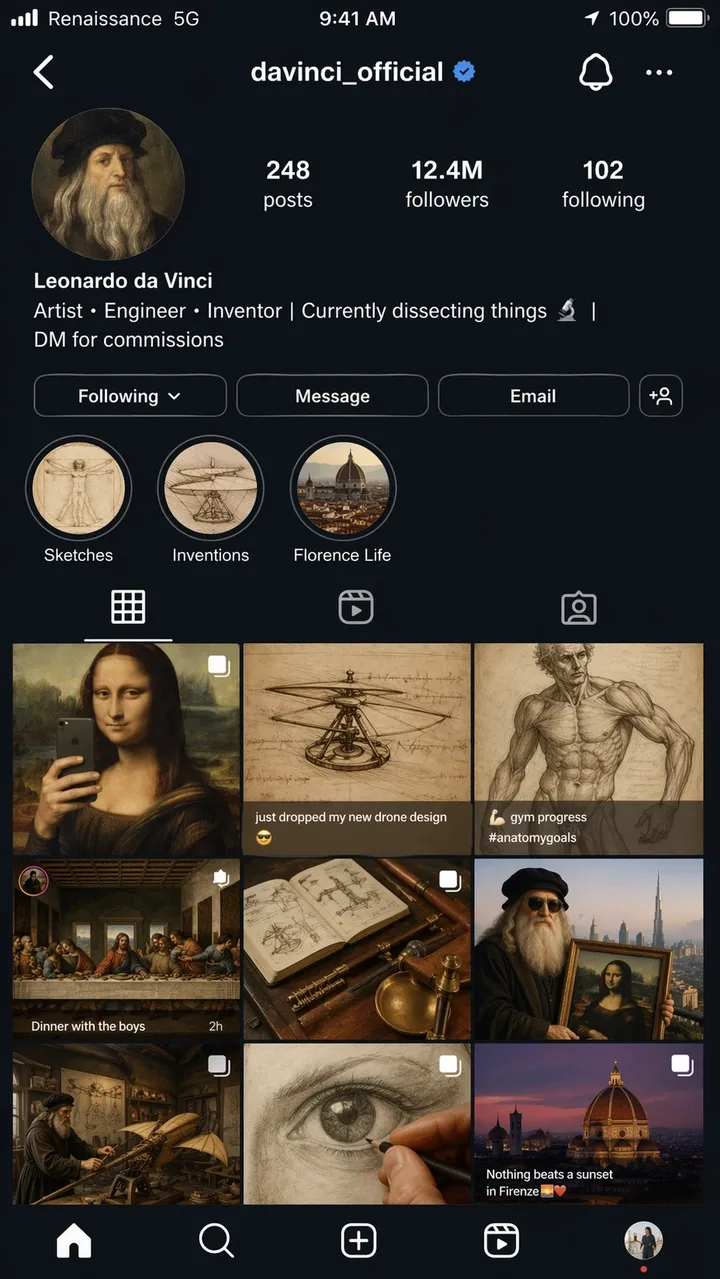
Kullanıcı adı @davinci_official olan Leonardo da Vinci’nin sanki 2026’daki modern bir fenomenmiş gibi kurgusal bir Instagram profil sayfasının hiper gerçekçi bir iPhone ekran görüntüsü. Profil fotoğrafı, daire şeklinde kesilmiş bir Rönesans otoportresidir. Biyografisinde şunlar yazıyor: “Sanatçı, Mühendis, Mucit | Şu anda bir şeyleri parçalara ayırıyorum | Siparişler için DM”. Izgarada 9 gönderi gösteriliyor: ayna selfiesi olarak yeniden çerçevelenmiş Mona Lisa, “yeni drone tasarımımı düşürdüm” başlıklı bir helikopter taslağı, spor salonunda ilerleme fotoğrafı olarak yayınlanan bir anatomi çalışması, akşam yemeği partisi grup çekimi olarak sahnelenen Son Akşam Yemeği ve diğer yaratıcı anakronik karışımlar. Takipçi sayısı: 12,4 milyon. Taslaklar, İcatlar ve Floransa Hayatı etiketli hikayenin öne çıkanları. “Rönesans” yazan taşıyıcı metin içeren eksiksiz iOS durum çubuğu 5G”, pil simgesi ve geçerli saat. Genel olarak karanlık mod kullanıcı arayüzü. Fotogerçekçi ekran görüntüsü kalitesi, en boy oranı 9:16.
İstem 52:
“LUMA” adlı kurgusal bir alışkanlık uygulaması için gerçekçi bir mobil başlangıç ekranı. Başlık: “DAHA İYİ GÜNLER İNŞA EDİN”. Düğmeler: “Şimdi başlayın” ve “Demoyu görüntüle”. Temiz iOS tarzı düzen, yumuşak beyaz arka plan, mavi vurgu, okunabilir kullanıcı arayüzü metni, telefon çerçevesinin içinde doğrudan gösteriliyor. En boy oranı 9:16.
İstem 53:
Bir e-ticaret analiz aracı için Masaüstü SaaS kontrol paneli. Sol kenar çubuğu, Gelir, Siparişler, Dönüşüm Oranı için en iyi KPI kartları, çizgi grafik ve en iyi ürünler tablosu. Temiz beyaz arayüz, gerçekçi aralıklar, okunabilir etiketler, gerçek marka adları yok. En boy oranı 16:9.
İstem 54:
“SKYLINE” adlı kurgusal bir uygulama için gerçekçi bir mobil hava durumu uygulaması ekranı. Şu anki şehir: “Lizbon”. Başlık sıcaklığı: “22C”. Rüzgar, Nem, UV ve Gün Batımı Kartları. Sakin mavi arayüz, okunabilir etiketler, iPhone çerçevesi, gerçek bir uygulama markası yok. En boy oranı 9:16.
İstem 55:
Rezervasyon onayını gösteren bir restoran rezervasyon uygulaması ekranı. Restoranın adı: “Kuzey Masası”. Tarih: “18 Haziran”. Saat: “19:30”. Parti büyüklüğü: “4 misafir”. Üstte sıcak haber amaçlı yemek fotoğrafı, “Takvime ekle” yazan temiz CTA düğmesi, okunabilir kullanıcı arayüzü metni. En boy oranı 9:16.
İstem 56:
Kurgusal bir içerik oluşturucu stüdyosu için gerçekçi bir masaüstü analiz panosu. Sol gezinme, Görüntülemeler, İzlenme Süresi, Gelir ve Yeni Takipçiler için en iyi kartlar, çizgi grafik ve kampanya tablosu. Temiz beyaz kullanıcı arayüzü, mavi vurgu, okunabilir etiketler, pratik aralıklar, gerçek marka isimleri yok. En boy oranı 16:9.
İstem 57:
“TrailCart” adlı kurgusal bir dış mekan malzemeleri mağazası için mobil ödeme ekranı. Ürün küçük resmini, miktar adımlayıcısını, teslimat adresi kartını, indirim alanını, toplam fiyatı ve “Sipariş ver” yazan bir CTA düğmesini gösterin. Modern iOS stili, okunabilir kullanıcı arayüzü metni, gerçek logolar yok. En boy oranı 9:16.
İstem 58:
Hızlı kitaplık uygulaması için bir tablet kullanıcı arayüzü modeli. “Posterler”, “Ürünler”, “Kullanıcı Arayüzü” ve “Düzenlemeler” etiketli sekmeleri gösterin. Ana panel, kısa önizleme metni, kopyalama düğmeleri ve kategori çipleri içeren üç bilgi istemi kartı içerir. Temiz arayüz, yüksek okunabilirlik, gerçek marka isimleri yok. En boy oranı 4:3.
İstem 59:
Kurgusal bir yapay zeka görüntü aracı için SaaS ayarları ekranı. “Model”, “Kalite”, “En Boy Oranı”, “Referans Görseller” ve “Güvenlik” etiketli bölümler. Geçiş düğmelerini, açılır menüleri, kaydırıcıları ve anlaşılır bir Kaydet düğmesini kullanın. Sessiz profesyonel kullanıcı arayüzü, okunabilir etiketler, dekoratif karmaşa yok. En boy oranı 16:9.
İstem 60:
Kyoto’ya kurgusal bir gezi için mobil seyahat güzergahı uygulaması ekranı. Başlıkta “Kyoto Hafta Sonu” yazıyor. “1. Gün”, “2. Gün”, “Tapınak Yürüyüşü” ve “Akşam Yemeği” kartları. Yumuşak nötr kullanıcı arayüzü, gerçekçi aralık, küçük harita önizlemesi, okunabilir metin, gerçek uygulama markası yok. En boy oranı 9:16.
Nelere dikkat edilmeli: Düzen, dekoratif bir poster değil, gerçek bir arayüz gibi görünmelidir. Gezinme etiketlerini, düğme metnini, simge aralığını ve ekran hiyerarşisinin kullanılabilir olup olmadığını kontrol edin.
7. Stil Aktarımı ve Anlatı Sanatı İstemleri
Kısa anlatım istemleri, GPT Image 2’nun görsel şakalar, çok panelli hikaye anlatımı ve sahne içindeki küçük metinler aracılığıyla mantık yürütüp yürütemediğini test eder.
İstem 61:
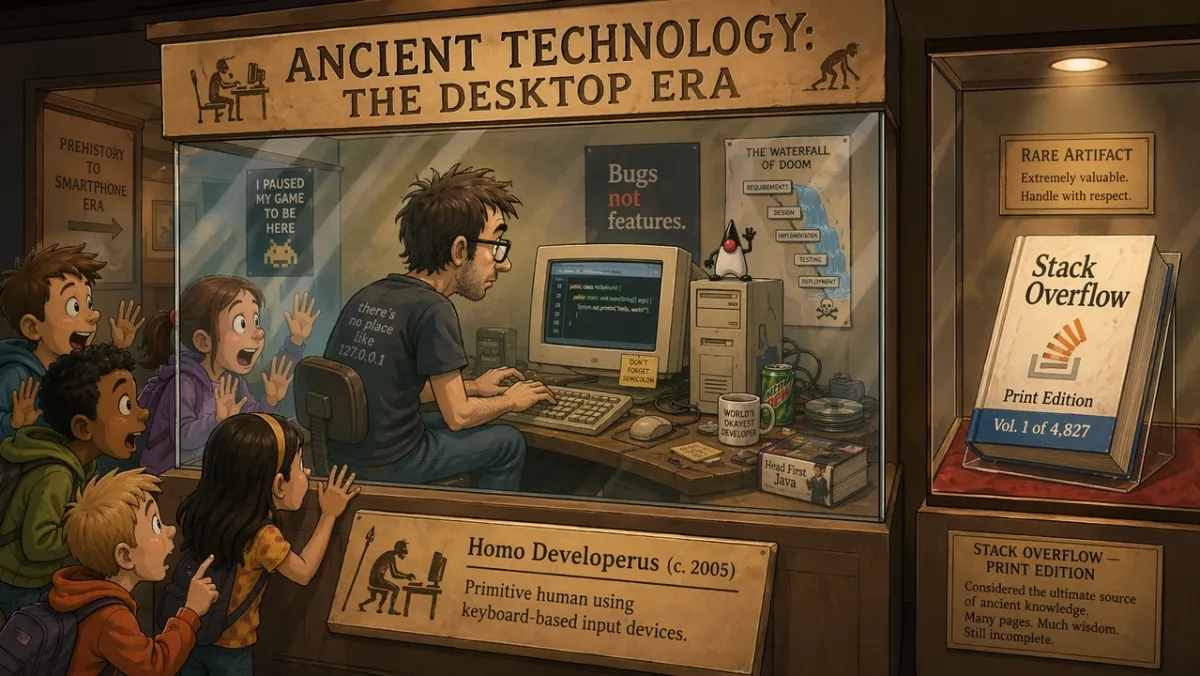
“Antik Teknoloji: Masaüstü Çağı” başlıklı bir müze sergisinde, cam vitrindeki bir programcı, CRT monitörde kodlamayı canlı olarak gösterirken, şaşkın okul çocukları yüzlerini cama bastırıyor. Sergi pankartında şunlar yazıyor: “Homo Developerus (c. 2005) - Klavye tabanlı giriş cihazlarını kullanan ilkel insan.” Yakındaki ikinci bir vitrinde “Stack Overflow - Print Edition, Cilt 1 / 4,827” etiketli fiziksel bir kitap gösteriliyor. 2D karikatür illüstrasyon stili, sıcak müze aydınlatması, esprili ve nostaljik ton. En boy oranı 16:9.
İstem 62:
“SABAH RUTİNİ” başlıklı dört panelli bir çizgi roman. Panel 1: alarm çalar. Panel 2: karakter kahve yapıyor. Panel 3: karakter çalışmak için oturuyor. Panel 4: Karakter zaten masada uyuyor. Sıcak minimal illüstrasyon stili, etkileyici karakter, okunabilir başlık, fazladan metin yok. En boy oranı 16:9.
İstem 63:
Yaratıcı otomasyonla ilgili bir makale için tek bir editoryal illüstrasyon. Bir tasarımcı ve bir yapay zeka asistanı, büyük bir masa üzerinde kağıt storyboard’ları düzenliyor, yumuşak stüdyo ışığı, ince mizah, modern dergi illüstrasyon stili, görünür marka logosu yok, metin yok. En boy oranı 3:2.
İstem 64:
“THE MORNING HERALD” başlıklı gazete ön sayfa stili illüstrasyon. Ana başlık: “ŞEHİR ÇATI BAHÇELERİNİ ONAYLADI”. İki sütunlu düzen, bir fotogerçekçi belediye meclisi fotoğraf alanı, klasik geniş sayfa tasarımı, okunabilir künye ve başlık, ekstra makale metni yok. En boy oranı 4:5.
İstem 65:
Resim yapmayı öğrenen bir robotu anlatan iki panelli bir çizgi roman. Panel 1: Robot dikkatlice boş bir tuvali inceliyor. Panel 2: Robot, dağınık ama büyüleyici bir tabloyu gururla gösteriyor. Sıcak stüdyo aydınlatması, etkileyici vücut dili, konuşma baloncuğu yok, basit başlık: “İLK GİRİŞİM”. En boy oranı 16:9.
İstem 66:
“THE DEADLINE” başlıklı üç panelli editoryal çizgi roman. Panel 1: Bir tasarımcı sakin bir şekilde boş bir dosya açar. Panel 2: Saat ileri atlıyor ve masayı yapışkan notlar kaplıyor. Panel 3: Tasarımcı şaşırtıcı bir rahatlama içeren gösterişli bir poster sunuyor. Minimal ifade stili, okunabilir başlık, konuşma balonu yok. En boy oranı 16:9.
İstem 67:
Yaratıcı odaklanmayla ilgili gerçeküstü bir dergi illüstrasyonu: Bir kişi, parlayan pencerelerden oluşan sessiz bir kütüphanede yüzen küçük bir masada oturuyor, her pencere farklı bir tamamlanmamış fikir gösteriyor. Yumuşak sinematik ışıklandırma, düşünceli bir ruh hali, temiz kompozisyon, görünür marka logosu yok, metin yok. En boy oranı 3:2.
İstem 68:
Ürün lansmanı teaser’ı için dört panelli storyboard. Panel 1: Masanın üzerindeki kapalı kutu. Panel 2: kutudan ışık sızıyor. Panel 3: eller kapağı kaldırıyor. Panel 4: parlayan ürün silueti ortaya çıktı. Okunabilir bir marka yok, diyalog yok, sinematik aydınlatma, net panel sınırları. En boy oranı 16:9.
İstem 69:
“İLK GRUP SOHBETİ” başlıklı mizahi bir müze dioraması. Taş tabletlerin etrafında toplanmış, üzerlerine mesaj baloncukları oyulmuş eski görünümlü figürleri, sıcak müze aydınlatmasını, eğlenceli editoryal illüstrasyonları, yalnızca okunabilir başlığı, fazladan metni göstermeyin. En boy oranı 16:9.
İstem 70:
Yaratıcı yinelemenin “öncesi” ve “sonrasını” gösteren bölünmüş ekranlı anlatım posteri. Sol taraf: dağınık eskiz duvarı ve kaba notlar. Sağ taraf: temiz cilalı kampanya panosu. Modern editoryal illüstrasyon, güçlü kontrast, logo yok, “ÖNCE” ve “SONRA” dışında fazladan kelime yok. En boy oranı 16:9.
Neye bakılmalı: Sahne fikri görsel olarak iletmelidir. Şaka tamamen metne bağlıysa kurulumu basitleştirin ve fiziksel eylemi daha net hale getirin.
8. Görüntüden Videoya İlk Kare İstemleri ve Referans Düzenlemeleri
Bu açı, GPT Image 2’nun bir ilk geçiş jeneratöründen daha fazlası haline geldiği yerdir. Ürün kesmeleri, kıyafet değişimleri, arka plan değişiklikleri, referansa dayalı düzenlemeler ve hareket için tasarlanmış sabit çerçeveler için kullanışlıdır.
İstem 71:
Görüntüden videoya klip için sinematik bir ilk kare oluşturun: Şafakta parlayan bir çöl kraterinin kenarında duran yalnız bir astronot, rüzgarda hareket etmeye hazır pelerin ve toz, güçlü ön plan silueti, net derinlik katmanları, sıcak ufuk ışığı, metin yok, filigran yok. En boy oranı 16:9.
İstem 72:
Ürün fotoğrafı olarak Resim 1’i ve arka plan stili referansı olarak Resim 2’yi kullanın. Ürünü Resim 2’deki sahneye yerleştirin. Ürünün şeklini, etiket metnini, oranlarını, rengini ve malzemesini tam olarak koruyun. Aydınlatmayı, ölçeği, gölgeyi ve perspektifi eşleştirin. Ürünü yeniden şekillendirmeyin. Ekstra logo veya filigran yok.
İstem 73:
Girilen ürün görselinden arka planı kaldırın. Net silüet, net kenarlar, haleler ve saçaklar olmadan şeffaf bir arka plan çıktısı alın. Şişe geometrisini, kapak şeklini, etiket metnini, etiket renklerini ve baskı keskinliğini tam olarak koruyun. Oranları değiştirmeyin.
İstem 74:
Giriş görüntüsünde yalnızca hava durumunu ve aydınlatmayı değiştirin. Sahnenin hafif kar yağışlı bir kış akşamı gibi görünmesini sağlayın. İnsanları, binaları, tabelaları, kamera açısını, nesne yerleşimini ve kompozisyonu tam olarak koruyun. Okunabilir metnin tamamını değiştirmeden tutun.
İstem 75:
Resim 1 korunması gereken kişiyi göstermektedir. Resim 2 ceket referansıdır. Resim 3 bot referansıdır. Resim 1’deki kişiyi, Resim 2 ve 3’teki kıyafetleri kullanarak giydirin. Yüzü, vücut şeklini, pozu, elleri, arka planı, kamera açısını ve ışıklandırmayı tam olarak koruyun. Yalnızca giysiyi değiştirin.
İstem 76:
Girilen ürün fotoğrafını kilitli konu olarak kullanın. Ürünü yumuşak sabah pencere ışığı alan temiz mermer banyo tezgahının üzerine yerleştirin. Ürün şeklini, etiket metnini, kapak rengini, orantıları ve malzemeyi tam olarak koruyun. Temas gölgesini, ölçeğini ve perspektifini eşleştirin. Fazladan etiket, logo veya aksesuar eklemeyin.
İstem 77:
Görüntüden videoya klip için sinematik bir ilk kare oluşturun: arkasında ince bir sis şeridi hareket ederken ıslak siyah taşın üzerinde duran bir cam parfüm şişesi. Ürün merkezli, güçlü siluet, net ön plan ve arka plan derinliği, el yok, metin yok, filigran yok. En boy oranı 16:9.
İstem 78:
Yalnızca arka planı sıcak gri renkte temiz bir editoryal stüdyo arka planına değiştirerek giriş portresini düzenleyin. Yüzü, saçı, kıyafeti, pozu, cilt tonunu, kamera açısını, ışık yönünü ve ifadeyi tam olarak koruyun. Yeni arka plan gölgesini ve derinliğini doğal bir şekilde eşleştirin.
İstem 79:
Resim 1’i oda fotoğrafı olarak ve Resim 2’yi duvar resmi referansı olarak kullanın. Resim 2’deki çizimi Resim 1’deki boş duvara ekleyin. Mobilyaları, zemini, pencere ışığını, kamera açısını, renk dengesini ve oda düzenini aynen koruyun. Çerçeve ölçeğini, perspektifi ve duvar gölgesini eşleştirin.
İstem 80:
Ürün tanıtımı için videoya hazır bir ilk kare oluşturun: masa üzerinde kapalı mat siyah bir kutu, dikişten sızan ince mavi ışık, ışında görünen toz parçacıkları, alçak ve yakın konumlandırılmış kamera, güçlü derinlik katmanları, hareket için boş alan, metin yok, logo yok. En boy oranı 16:9.
Nelere dikkat edilmeli: Düzenlemeler için çıktı yalnızca kilitli ayrıntılar kilitli kaldığında başarılı olur. Videoya hazır kareler için konu ayrımını, ön plan/arka plan derinliğini ve sahnenin PixVerse’ya hareket alanı sağlayıp sağlamadığını kontrol edin.
GPT Image 2 İncelemesi: Test Sonuçları ve Puanlar
Test edildi ve güncellendi: 23 Haziran 2026.
Bu inceleme bölümü kasıtlı olarak bilgi istemi kitaplığından sonradır çünkü bu sayfaya gelen çoğu okuyucunun önce örneklere ihtiyacı vardır. İnceleme hala önemlidir: GPT Image 2, metin, yapı ve talimat takibinin gevşek görsel incelemeden daha önemli olduğu durumlarda kullanışlıdır.
| Boyutu inceleyin | Puan (1-5) | Uygulamalı testlerde gördüklerimiz |
|---|---|---|
| Metin doğruluğu | 4 | Tam kopya alıntılandığında büyük başlıkları, kısa etiketleri, poster başlıklarını, menü öğelerini, infografik adımları ve basit kullanıcı arayüzü etiketlerini kontrol etmek daha kolaydı. Küçük yasal kopyalar ve yoğun paragrafların hâlâ dikkatli bir şekilde incelenmesi gerekiyor. |
| Karakter tutarlılığı | 3 | Karakter sayfaları, ifade satırları, kostüm açıklamaları ve palet örnekleri referans olarak faydalıydı ancak yüzler, oranlar ve kostüm detayları yan ve arka görünümlerde farklılık gösterebilir. |
| Stil kontrolü | 4 | İstemde yalnızca stil anahtar kelimeleri istiflemek yerine kullanım durumu, düzen, ortam, aydınlatma ve kısıtlamalar adlandırıldığında model geniş görsel yönü iyi bir şekilde takip etti. |
| Ürün gerçekçiliği | 4 | Ürün reklamı düzenleri, kampanya negatif alanı, temiz yüzeyler ve ürün öncelikli kompozisyonlar güçlüydü ancak gerçek etiketler, logolar, ambalaj geometrisi ve düzenlemeye tabi iddialar hâlâ manuel QA’ya ihtiyaç duyuyor. |
| Düzenleme yeteneği | 3 | “Değiştir, koru, eşleştir” modeli, geniş düzenleme isteklerinden daha iyi sonuç verdi, ancak seçim sınırlarının, şeffaf arka plan çıktısının ve ürünün tam olarak korunmasının hâlâ incelenmesi gerekiyor. |
| Arama sorusu | Pratik cevap |
|---|---|
| Şunun için en iyisi: | Tam metin posterler, ürün reklam konseptleri, kullanıcı arayüzü maketleri, infografikler, karakter sayfaları, referans düzenlemeleri ve görselden videoya ilk kareler. |
| Ana sınırlamalar | Küçük metinler, tam marka işaretleri, özel yazı tipleri, yasal kopyalar, karmaşık şeffaf arka planlı teslimatlar ve kilitli ürün etiketleri hâlâ incelenmeye ihtiyaç duyuyor. |
| API kullanılabilirliği | Geliştirici iş akışları için OpenAI’nun gpt-image-2 API rotasını kullanın. ChatGPT Images 2.0 erişimi ve API faturalandırması ayrı yollardır. |
| API notları | 22 Haziran 2026 itibarıyla OpenAI, görüntü girişi, önbelleğe alınmış görüntü girişi, görüntü çıkışı, metin girişi ve önbelleğe alınmış metin girişi için GPT-Image-2 token fiyatlandırmasını listeliyor. |
| Video iş akışı | Görüntü daha sonra görüntüden videoya kaynak haline gelebilirse temiz nesne kenarları, derinlik katmanları ve bir hareket işareti isteyin. |
| Karşılaştırılacak alternatifler | Hızlı fotogerçekçi testler için Nano Banana 2’yu, stilize keşif için Midjourney’yu ve onaylananın hâlâ bir video varlığı olması gerektiğinde PixVerse’yu kullanın. |
GPT Image 2’yu Nasıl Test Ettik?
GPT Image 2’yu portreler, metin ağırlıklı posterler, ürün tarzı kompozisyonlar, karakter sayfaları, kullanıcı arayüzü maketleri ve deneysel anlatım sahneleri üzerinde test ettik. Amaç, kıyaslama düzeyinde puanlar üretmek değildi; bir tasarımcının, pazarlamacının veya içerik oluşturucunun, varlığı sıfırdan yeniden oluşturmak yerine çıktıyı hafif düzenlemelerle kullanıp kullanamayacağını görmekti.
| Test alanı | Örnek istemler | Neyi kontrol ettik |
|---|---|---|
| Portreler ve sinematik fotoğraflar | 12 | Aydınlatma kontrolü, cilt dokusu, yansımalar, ruh hali ve sahne tutarlılığı. |
| Poster ve tipografi düzenleri | 14 | Başlık yazımı, çok satırlı metin, hiyerarşi, negatif boşluk ve marka benzeri cila. |
| Karakter ve konsept sayfaları | 9 | Çoklu görünüm tutarlılığı, kostüm ayrıntıları, palet hizalaması ve etiket doğruluğu. |
| Kullanıcı arayüzü ve sosyal modeller | 8 | Düzen gerçekçiliği, küçük metin, simge aralığı, besleme ızgaraları ve ekran görüntüsünün inandırıcılığı. |
| Deneysel istemler | 10+ | Mizah, anlatısal akıl yürütme, nesne yerleştirme ve küçük altyazıların doğruluğu. |
Model açıktı: GPT Image 2, anahtar kelime zincirlerinden çok hassas özetleri ödüllendiriyor. Bilgi istemi bir işi adlandırdığında ve başarıyı tanımladığında, model yapıyı koruma eğilimindedir. İstem, kısıtlamalar olmadan güzel bir görüntü istediğinde sonuç yine de parlak görünebilir, ancak yeniden kullanılması daha zordur.
Sonuçları Kullanım Senaryosuna Göre İnceleyin
| Kullanım örneği | Ne işe yaradı | Hala incelenmesi gerekenler |
|---|---|---|
| Metin oluşturma | Tam kopya alıntılandığında büyük başlıkları, kısa etiketleri, poster başlıklarını, menü öğelerini, infografik adımları ve basit kullanıcı arayüzü etiketlerini kontrol etmek daha kolaydı. | Küçük yasal metinler, yoğun paragraflar, stilize edilmiş yazı tipleri ve tekrarlanan kelimeler yine de sürüklenebilir. Kopyayı kısa tutun ve her harfi kontrol edin. |
| Ürün görselleri | GPT Image 2, ürün reklam düzenlerini, kampanya negatif alanını, temiz yüzeyleri ve ürün öncelikli kompozisyonları iyi bir şekilde ele aldı. | Gerçek etiketler, logolar, ambalaj geometrisi ve düzenlemeye tabi iddialar manuel olarak kontrol edilmeli veya onaylanmış varlıklardan birleştirilmelidir. |
| Kullanıcı arayüzü maketleri | Mobil ekranlar, kontrol panelleri, kartlar, düğmeler, menüler ve uygulama benzeri hiyerarşi, komut istemi gerçek arayüz öğelerini adlandırdığında makul görünüyordu. | Çıktıları üretim kullanıcı arayüzü olarak değil, konsept maketleri olarak değerlendirin. Küçük etiketlerin, simge hizalamasının ve tam verilerin sıklıkla temizlenmesi gerekir. |
| Karakter tutarlılığı | Karakter sayfaları, ifade satırları, kostüm açıklamaları ve palet renk örnekleri, yaratıcı referanslar olarak faydalıydı. | Yüzler, kostüm detayları ve oranlar görünümlere göre değişebilir. Kimlik bağlantılarını tekrarlayın ve yan veya arka görünümler kayarsa yeniden oluşturun. |
| Görüntüden videoya ilk kareler | Ön plan, orta plan, arka plan ve bir hareket işaretine sahip geniş çerçeveler, PixVerse’ya daha kullanışlı kaynak malzeme sağladı. | Aşırı kalabalık görüntüler, ağır metinler ve belirsiz hareket ipuçları, daha sonra video oluşturmayı zorlaştırır. |
| Düzenleme ve birleştirme | “Değiştir, koru, eşleştir” istem modeli, geniş düzenleme isteklerinden daha iyi sonuç verdi. | Seçim sınırları, şeffaf arka plan çıktısı, tam ürün koruması ve ince ayrıntılar hala kalite güvencesi gerektirir. |
Model karşılaştırması için yararlı olan ayrım marka ve marka değildir. GPT Image 2, iletişim ağırlıklı görüntüler için daha çok yapılandırılmış bir tasarım asistanı gibi davranır. Midjourney, stilize keşif ve sanat yönetimi kapsamı için kullanışlı olmaya devam ediyor. Nano Banana 2, fotogerçekçilik, malzeme detayı ve hızlı görsel yineleme için güçlü bir karşılaştırma noktasıdır. PixVerse, hareketsiz görüntünün bir klip, reklam, ürün gösterimi veya hikaye çekimi haline gelmesi gerektiğinde bir sonraki iş akışı katmanıdır.
Yaygın GPT Image 2 Uyarı Hataları
- Tam kopyasını vermeden doğruluğunu istemek. Görselde metin gerekiyorsa metni aynen yazın ve nerede görünmesi gerektiğini söyleyin.
- Bir istemi mümkün olan her ayrıntıyla aşırı yükleme. Temel sahneyle başlayın, ardından her seferinde bir değişkeni iyileştirin.
- Düzenlemeler sırasında değişmezleri unutma. Modele neyin değişmeden kalması gerektiğini söyleyin: kimlik, arka plan, poz, aydınlatma, ürün şekli, etiket metni veya kamera açısı.
- İşlevsel görevler için dekoratif nitelikli kelimelerin kullanılması. “Güzel” etiketi okunabilir yapmaz. “Keskin etiket metni”, “temiz karakter aralığı” ve “uzaktan okunabilir” gibi ifadeler kullanın.
- En boy oranı atlanıyor. İyi bir kare resim, dikey reklam veya video küçük resmi olarak başarısız olabilir.
- Logoları genel metin gibi işlemek. GPT Image 2, logo konseptleri tasarlayabilir ancak tam marka işaretleri genellikle onaylanmış marka varlıklarından oluşturulmalıdır.
GPT Image 2 API ve Fiyatlandırma Notları
OpenAI’nun API fiyatlandırma sayfası, belirteç tabanlı fiyatlandırma ile GPT-Image-2’yu listeler. 22 Haziran 2026 itibarıyla listelenen fiyatlar şöyledir:
| Öğe | Listelenen fiyat |
|---|---|
| Görüntü girişi | 8,00 ABD doları / 1 milyon jeton |
| Önbelleğe alınmış görüntü girişi | 2,00 ABD doları / 1 milyon jeton |
| Görüntü çıkışı | 30,00 ABD doları / 1 milyon jeton |
| Metin girişi | 5,00 ABD doları / 1 milyon jeton |
| Önbelleğe alınmış metin girişi | 1,25 ABD doları / 1 milyon jeton |
Gerçek oluşturma maliyeti bilgi istemi uzunluğuna, referans görüntülere, çıktı boyutuna, önbelleğe almaya, kaliteye ve kullandığınız erişim yoluna bağlıdır. API yerine ChatGPT kullanıyorsanız plan sınırları ve kotalar, API token fiyatlandırmasından ayrıdır. OpenAI’nun GPT Görüntü Oluşturma Modelleri Bilgi İsteme Kılavuzu, tekrarlanabilir bir uygulama veya toplu iş akışı oluşturuyorsanız da okumaya değer.
Bu ayrım, GPT Image 2’nun ücretsiz olup olmadığını veya GPT Image 2 API’sinin maliyetini soran araştırmacılar için önemlidir. ChatGPT Images 2.0 kullanılabilirliği, ChatGPT planı kotaları, OpenAI API faturalandırması ve PixVerse kredileri ayrı ticari yollardır. Yüksek hacimli işler için yalnızca bir üretim girişiminin listelenen fiyatını değil, yeniden denemelerden sonra kabul edilen varlık başına maliyeti karşılaştırın.
| İş akışı seçimi | Pratik bilgi istemi ve ayar önerileri |
|---|---|
| Metin ağırlıklı posterler veya diyagramlar | Görsel başına daha az kelime kullanın, tam metni alıntılayın, hiyerarşiyi belirtin ve bütçe izin verdiğinde daha yüksek kalite ayarı kullanın. |
| Ürün fotoğrafları | Ürünün şeklini, etiketini, rengini, malzemesini ve kamera açısını kilitleyin. Referans kullanıyorsanız koruma listesini her düzenlemede tekrarlayın. |
| Kullanıcı arayüzü maketleri | Ekranı, gönderilen bir arayüz olarak tanımlayın: gezinme, kartlar, düğmeler, durumlar, etiketler ve boşluklar. Konsept sanatı dilinden kaçının. |
| Çoklu referans düzenlemeleri | Her görseli role göre etiketleyin: konu, stil, arka plan, kıyafet, ürün veya malzeme referansı. |
| Toplu üretim | Yalnızca deneme başına maliyeti değil, kabul edilen görüntü başına maliyeti de karşılaştırın. Daha ucuz bir çalıştırma, birçok yeniden denemeye ihtiyaç duyuyorsa daha ucuz değildir. |
| PixVerse üretimi | Durağan görüntüyü oluşturun veya içe aktarın, ardından varlığın harekete, kamera hareketine veya kampanya değişkenlerine ihtiyacı olduğunda görüntüden videoya özelliğini kullanın. |
API öncelikli görüntü iş akışını mı yoksa yaratıcı iş akışını mı kullanmaya karar veren ekipler için pratik soru yalnızca “GPT Image 2 hareketsiz görüntüyü oluşturabilir mi?” değildir. Aynı zamanda “Hareketsiz görüntü onaylandıktan sonra ne olur?” İlk geçiş görüntü kalitesini karşılaştırmak istiyorsanız GPT Image 2 ve Nano Banana 2 aynı istem testimize bakın. Bir terminalden veya yapay zeka aracısı iş akışından otomatik oluşturmaya ihtiyacınız varsa PixVerse CLI kılavuzu, komut satırı ardışık düzenlerinden görüntü ve video oluşturmayı kapsar.
Ayrıntılı PixVerse Görüntüden Videoya İş Akışı
GPT Image 2 görüntüsü onaylandıktan sonra bunu videonun ilk karesi olarak değerlendirebilirsiniz. Önemli olan, hareketsiz görüntüyü canlandırmadan önce hazırlamaktır. Bir video modeli, yanlış yazılmış poster metnini, çarpık bir ürün etiketini veya zaten yanlış görünen bir kullanıcı arayüzü modelini sihirli bir şekilde düzeltmez.
1. Fotoğrafı ilk kare olarak oluşturun
Görüntünün bir klibe dönüşebileceğini biliyorsanız görüntü istemine harekete hazır olma özelliği ekleyin. Net nesne kenarları, ön plan ve arka plan derinliği, bir kamera yolu ve hareket edebilen bir fiziksel işaret isteyin: kumaş, toz, buhar, yağmur, saç, ekran parlaması, ürün yansıması veya değişen bir ışık kaynağı.
Yalnızca bir ürün posteri istemek yerine, video açılış çerçevesi haline gelebilecek bir ürün posteri isteyin:
Beton bir kaide üzerinde mat siyah bir hoparlör için 16:9 kampanyanın ilk çerçevesini oluşturun. Sol tarafta temiz negatif alan olacak şekilde hoparlörü sağ tarafta keskin tutun. Işık huzmesine yumuşak toz ekleyin ve daha sonra canlanabilecek ince mavi bir LED parıltısı ekleyin. Fazladan metin yok, sahte logo yok, filigran yok.
2. Hareket eklemeden önce görüntüyü inceleyin
Hareketsiz görüntüyü son tasarım dosyası gibi kontrol edin. Yazım, ürün geometrisi, etiketler, eller, yüzler, kullanıcı arayüzü hizalaması, hak talepleri ve haklara duyarlı öğelere bakın. Kaynak görüntü bu kontrollerden herhangi birinde başarısız olursa, videoya geçmeden önce sabit görüntüyü yeniden oluşturun veya düzenleyin.
3. Ayrı bir hareket istemi yazın
Video istemi, görüntü isteminin tamamını tekrarlamamalıdır. Neyin hareket ettiğini, neyin kilitli kaldığını açıklamalıdır.
Resmi ilk kare olarak kullanın. Kamera yavaşça hoparlöre doğru ilerler. Mavi LED yanar, toz ışık huzmesi boyunca hareket eder ve arka plan yansıması hafifçe kayar. Hoparlörün şeklini, malzemesini, konumunu ve görünen tüm tasarım ayrıntılarını koruyun. Yeni metin, logo, el veya ekstra ürün eklemeyin.
4. Yalnızca hareketsiz çalışma sonrasında canlandırın
PixVerse kullanıyorsanız uygulamada GPT Image 2 görüntüleri oluşturabilir veya bitmiş bir görüntüyü içe aktarabilir, ardından hareket eklemek için görüntüden videoya özelliğini kullanabilirsiniz. Durağan bir görüntüden doğrudan hareket için görüntüden videoya, daha geniş 15 saniyelik yaratıcı iş akışları için PixVerse V6 ve çekimin daha fazla sinematik referans kontrolü gerektirdiği durumlarda C1 seçeneğini kullanın.
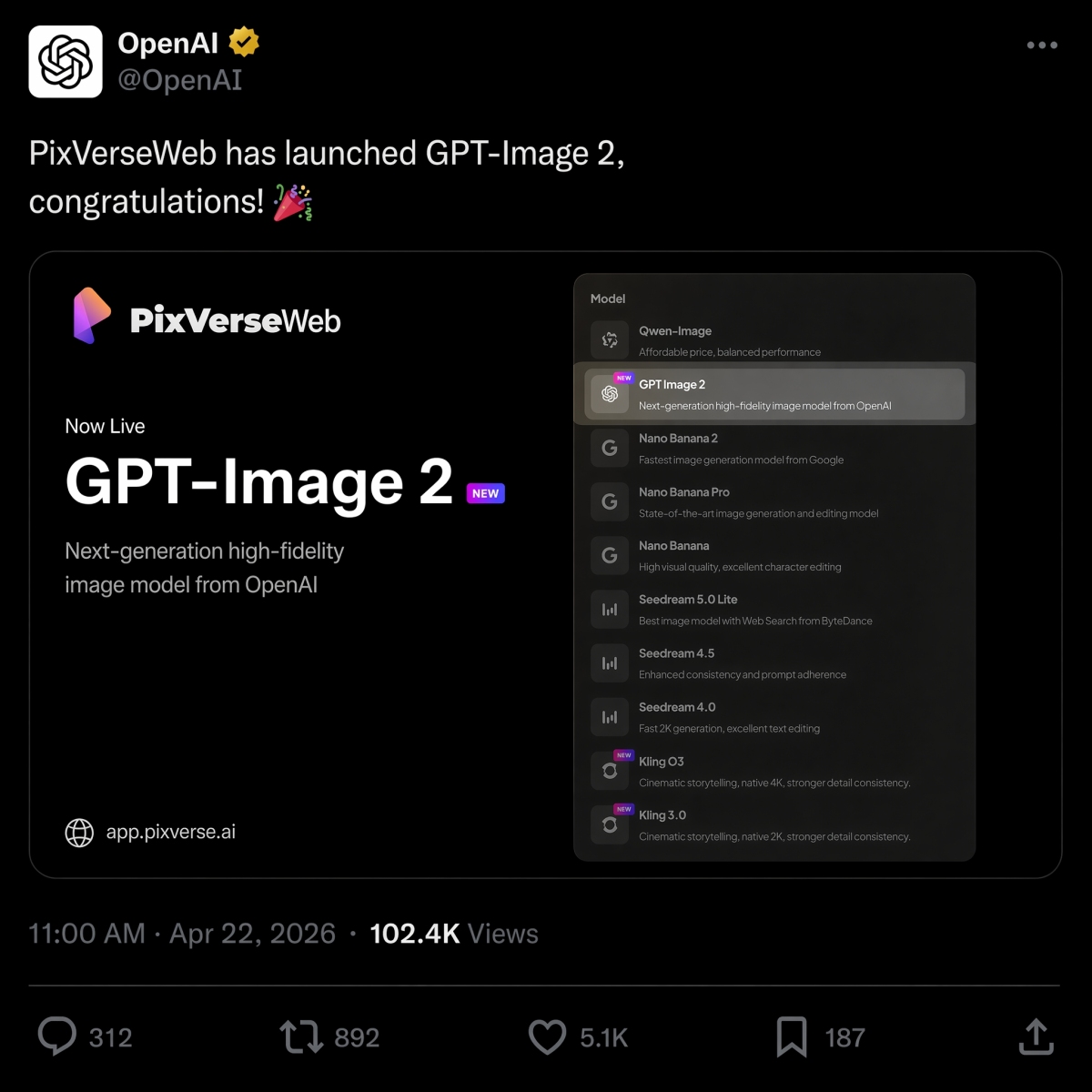
22 Nisan 2026’da, PixVerse, metinden görüntüye seçeneği olarak GPT Image 2’yu piyasaya sürdü ve Nano Banana 2, Seedream ve Model serisinde HappyHorse 1.0.
Aynı özet için OpenAI ve Google görsel modelleri arasında karar veriyorsanız aynı istemlerden yan yana sonuçlar için GPT Image 2 ve Nano Banana 2 karşılaştırmamıza bakın.
Hızlı çalışmanız çoğunlukla videoyla ilgiliyse, en iyi görüntüden videoya yapay zeka araç kılavuzumuz, hareketsiz görüntü hazır olduktan sonra doğru hareket iş akışının nasıl seçileceğini açıklar.
PixVerse’yu deneyin: PixVerse uygulamasını açın.
SSS
En iyi GPT Image 2 istemleri nelerdir?
En iyi GPT Image 2 istemleri yalnızca görsel bir stili değil, net bir üretim işini tanımlar. Güçlü istemler genellikle konuyu, çıktı türünü, gerekiyorsa tam metni, kompozisyonu, aydınlatmayı, kısıtlamaları, en boy oranını ve son kullanım durumunu içerir. Ürün reklamları, tam metin posterler, karakter sayfaları, kullanıcı arayüzü maketleri, infografikler ve görselden videoya ilk kareler, başlangıç için özellikle iyi bilgi istemi kategorileridir.
GPT Image 2 istemlerini nasıl daha iyi yazarım?
Şu formülü kullanın: konu artı görsel stil artı kompozisyon artı ışıklandırma artı ayrıntılar artı kısıtlamalar artı çıktı kullanım durumu. GPT Image 2’ya görüntünün ne yapması gerektiğini söyleyin, tam metni alıntılayın, düzeni ve en boy oranını belirtin ve nelerin değişmemesi gerektiğini listeleyin. Düzenlemeler için değişikliği, kilitli öğeleri ve gerçekçilik gereksinimlerini ayırın.
GPT Image 2 ürün görselleri için iyi midir?
Evet. GPT Image 2, ürün reklam konseptleri, e-ticaret kahraman görselleri, ambalaj maketleri, ürün kesitleri ve kampanya görselleri için kullanışlıdır. Ürün ekipleri, çıktıyı reklamlarda veya ürün listelemelerinde kullanmadan önce ürün geometrisini, etiket metnini, düzenlemeye tabi iddiaları, logoları ve paketleme ayrıntılarını incelemelidir.
GPT Image 2 metin içeren görüntüler oluşturabilir mi?
Evet, GPT Image 2, özellikle kısa başlıklar, etiketler, posterler, menü öğeleri, infografik adımlar ve kullanıcı arayüzü etiketleri gibi okunabilir metinlere sahip görüntüler oluşturabilir. En iyi sonuçları elde etmek için, metnin tamamını tırnak içine alın, nerede görüneceğini belirtin, metni kısa tutun ve “yalnızca tam metin”, “fazladan kelime yok” ve “yinelenen metin yok” gibi kısıtlamalar ekleyin.
GPT Image 2 görüntülerini videolara nasıl dönüştürebilirim?
Önce hareketsiz görüntüyü oluşturun veya onaylayın, ardından bunu PixVerse görüntüden videoya yükleyin. Neyin hareket ettiğini, neyin kilitli kaldığını açıklayan ayrı bir hareket istemi yazın. İyi hareket; kamera hareketi, konunun korunması, arka plan hareketi ve yeni metin, yeni logo ve ekstra ürün olmaması gibi kısıtlamalardan bahseder.
GPT Image 2 ve Nano Banana 2: hangisi daha iyi?
GPT Image 2 genellikle metin ağırlıklı posterler, diyagramlar, kullanıcı arayüzü maketleri, düzenlenebilir görsel özetler ve görüntüden videoya ilk kareler gibi yapılandırılmış tasarım çıktıları için daha iyidir. Nano Banana 2, fotogerçekçilik, malzeme detayı ve hızlı görsel yinelemenin daha önemli olduğu durumlarda karşılaştırmaya değerdir. Aynı istem sonuçları için GPT Image 2 ve Nano Banana 2 karşılaştırması’ya bakın.
GPT Image 2, ChatGPT Images 2.0 ile aynı mıdır?
Arama amacı için evet. Birçok kullanıcı, OpenAI’nun daha yeni ChatGPT görüntü oluşturma deneyimini tanımlamak için GPT Image 2, gpt-image-2 ve ChatGPT Images 2.0 kullanıyor. OpenAI’nun ürüne yönelik adı ChatGPT Images 2.0’dur; gpt-image-2 ise geliştiricilerin ve yaratıcıların API iş akışlarını tartışırken sıklıkla kullandıkları model tarzı ifadedir.
GPT Image 2 ücretsiz mi ve API’nin maliyeti ne kadar?
OpenAI Yardım, ChatGPT Images 2.0’yu tüm katmanlarda kullanılabilir olarak listeler ancak plan kotaları ve API faturalandırması ayrıdır. 22 Haziran 2026 itibarıyla OpenAI, GPT-Image-2 görüntü çıktısını 1 milyon token başına 30,00 ABD doları olarak listeliyor; gerçek maliyet bilgi istemi uzunluğuna, referanslara, çıktı boyutuna, kaliteye ve önbelleğe almaya bağlıdır.