Guía de prompts de GPT Image 2: 80 prompts, review y tips de API (2026)
Explora 80 prompts listos para copiar de GPT Image 2 para anuncios, posters, productos, personajes y flujos de video, con notas de API y pruebas.
Esta es una guía de mensajes GPT Image 2 y una revisión práctica para creadores que primero necesitan mensajes útiles: anuncios de productos, carteles, miniaturas, personajes, imágenes sociales, maquetas de interfaz de usuario, ediciones y primeros cuadros listos para video.
Utilice las rutas rápidas a continuación si ya sabe lo que necesita:
- Copiar mensajes: consulte los 80 ejemplos de mensajes GPT Image 2 listos para copiar a continuación.
- Vea los resultados de las pruebas: consulte las puntuaciones y limitaciones de las revisiones prácticas.
- Convierta imágenes en video: siga el flujo de trabajo de imagen a video PixVerse.
GPT Image 2 es más fuerte cuando la imagen debe comportarse como un activo diseñado: texto legible, diseños limpios, composiciones de productos, maquetas de interfaz de usuario, infografías, referencias editables y primeros cuadros listos para video. Es menos confiable cuando el trabajo depende de la reproducción exacta del logotipo de la marca, una pequeña copia de cumplimiento, fuentes patentadas o un activo final transparente que debe enviarse sin control de calidad manual.
OpenAI presentó ChatGPT Images 2.0 el 21 de abril de 2026. Los creadores suelen buscar la misma experiencia que GPT Image 2, gpt-image-2 o ChatGPT Images 2.0. Lo probamos por primera vez durante la semana de lanzamiento y revisamos esta guía nuevamente el 22 de junio de 2026 con la guía de indicaciones oficial de OpenAI, la página de precios de API y la documentación de ayuda de ChatGPT Images.
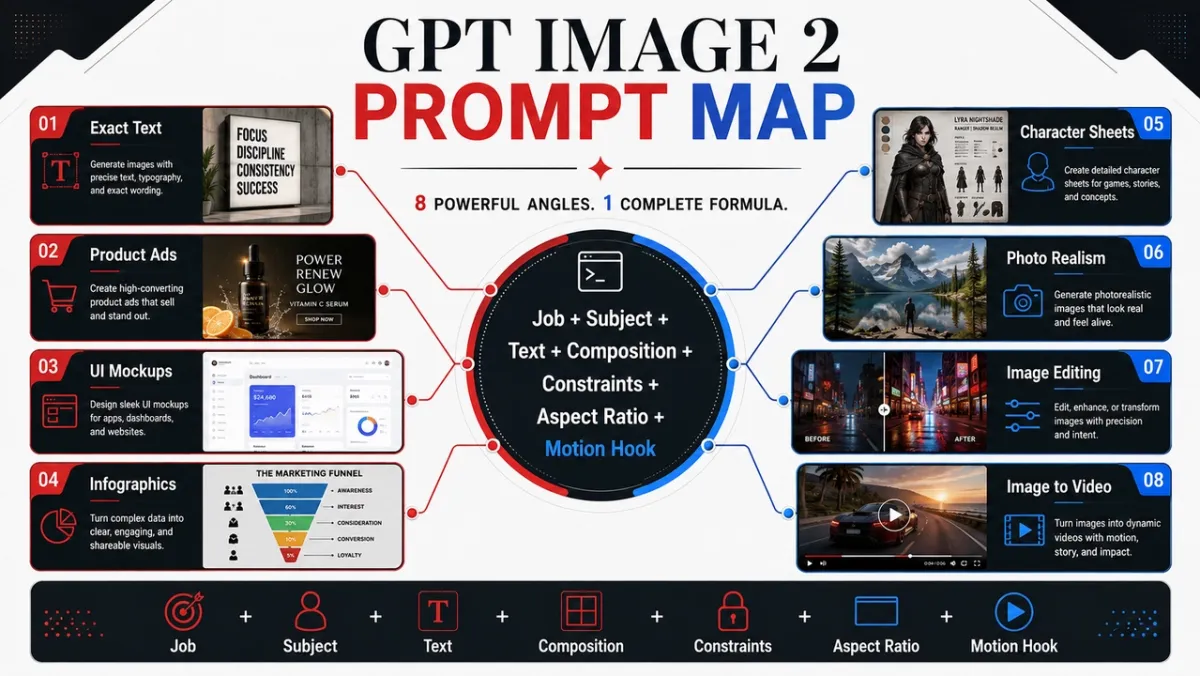
5 indicaciones de GPT Image 2 para copiar primero
Estas cinco indicaciones cubren los casos de uso de mayor valor en esta guía. Cada uno sigue el mismo formato: caso de uso, mensaje, mejor y consejo.
Ejemplo de mensaje 1: fotografía de producto
Caso de uso: Imagen principal del producto de comercio electrónico
Inmediato:
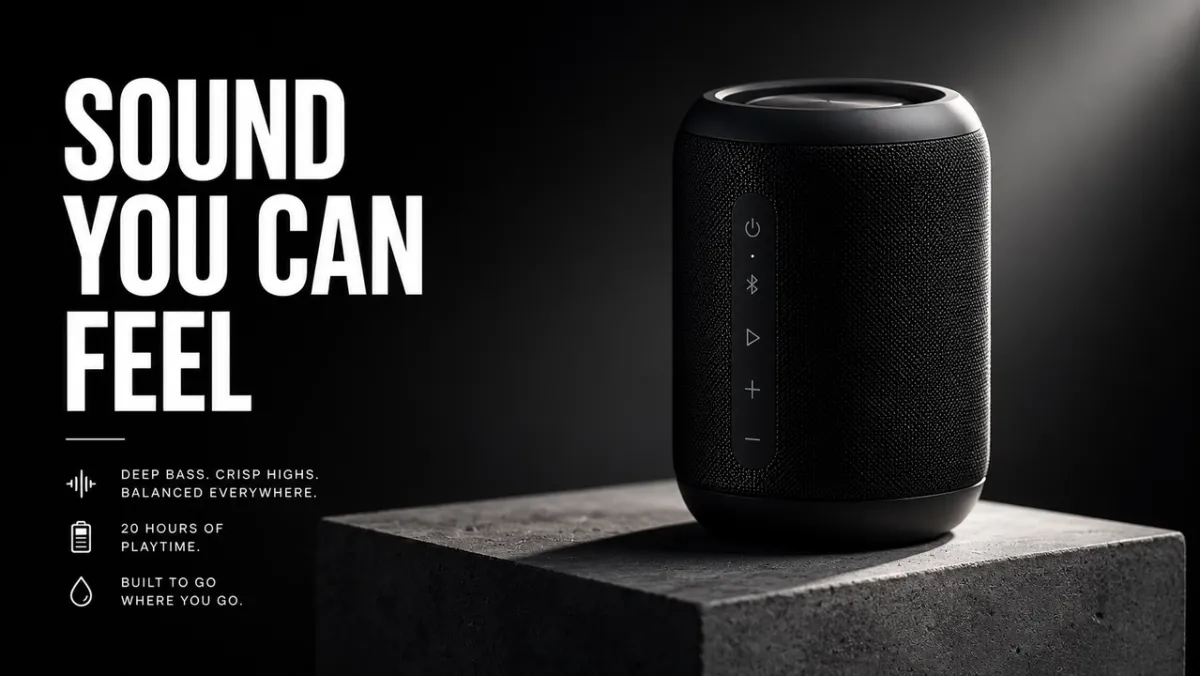
Cree una imagen destacada de comercio electrónico premium para un altavoz inalámbrico negro mate sobre un pedestal de concreto. El producto se ubica en el tercio derecho con bordes nítidos, textura de material realista, sombra de contacto limpia y una espectacular luz de borde. Deje el tercio izquierdo como espacio negativo para un título. Sin logotipo de marca falso, sin marca de agua, sin objetos adicionales. Relación de aspecto 16:9.
Ideal para: Listados de productos, anuncios sociales pagados, imágenes destacadas de páginas de destino
Consejo: Si proporcionas una imagen de referencia, agrega “conservar exactamente la forma, el color, la etiqueta y las proporciones del producto”.
Ejemplo de mensaje 2: creatividad publicitaria de IA
Caso de uso: Afiche de campaña con texto exacto
Inmediato:
Crear un cartel vertical de lanzamiento de producto para una herramienta de diseño ficticia. Titular: “CREA MÁS RÁPIDO”. Subtítulo: “DEL INDICADOR A LA CAMPAÑA”. Cuadrícula suiza limpia, fondo blanquecino, tipografía negra, una forma con acento en azul eléctrico, jerarquía fuerte, solo texto exacto, sin palabras adicionales, sin marca de agua. Relación de aspecto 9:16.
Ideal para: Conceptos publicitarios, pruebas de carteles, gráficos de lanzamiento, imágenes de campañas sociales.
Consejo: Mantenga el texto del título breve y cítelo exactamente. El texto largo es más difícil de representar limpiamente.
Ejemplo de mensaje 3: coherencia de caracteres
Caso de uso: Hoja de referencia de personajes
Inmediato:
Crea una hoja de referencia de personaje profesional para un mensajero de ciencia ficción original llamado “NOVA”. Incluya vistas frontal, lateral y posterior; cuatro expresiones faciales; rótulos de chaqueta, botas y mochila; y una fila de paleta de colores. Mantenga el mismo rostro, peinado, vestimenta y proporciones en todas las vistas. Fondo blanco limpio, etiquetas legibles, estilo de arte conceptual. Relación de aspecto 16:9.
Mejor para: Personajes de juegos, referencias de animación, mascotas de marcas, guiones gráficos
Consejo: Repite los anclajes de identidad en cada regeneración: nombre, rostro, peinado, vestimenta, paleta de colores y rol.
Ejemplo de mensaje 4: miniatura o imagen social
Caso de uso: Miniatura de YouTube o publicación social
Inmediato:
Cree una miniatura en negrita de YouTube para un vídeo sobre las indicaciones de imágenes de IA. Texto principal: “MEJORES AVISOS”. Muestre un resultado de imagen de antes y después en pantalla dividida, con una tarjeta de mensaje desordenada a la izquierda y una imagen de campaña pulida a la derecha. Alto contraste, composición clara y sin rostros, texto legible, sin logotipos falsos ni palabras adicionales. Relación de aspecto 16:9.
Ideal para: Miniaturas, explicaciones sociales, gráficos de blogs y contenido para creadores.
Consejo: Dígale al modelo exactamente cuántas palabras deben aparecer y dónde deben ir.
Ejemplo de mensaje 5: primer fotograma de imagen a vídeo
Caso de uso: Primer fotograma de imagen a vídeo PixVerse
Inmediato:
Cree un primer fotograma cinematográfico para un clip de imagen a vídeo: un frasco de perfume de vidrio sobre una piedra negra húmeda, una fina cinta de niebla detrás, una fuerte silueta en primer plano, capas de profundidad visibles, un reflejo sutil, un espacio vacío para el movimiento de la cámara, sin manos, sin texto, sin marca de agua. Relación de aspecto 16:9.
Ideal para: Revelaciones de productos, anuncios cortos, inauguraciones de vídeos musicales, clips sociales cinematográficos.
Consejo: Agregue una señal de movimiento en la imagen fija, como niebla, polvo, vapor, tela, brillo de la pantalla o reflejos.
Convierta su imagen fija GPT Image 2 en un vídeo con PixVerse
Si la imagen fija necesita preparación antes de animarse, PixVerse Mini Apps reúne flujos específicos para limpieza de imágenes, expansión de encuadre y tareas de producción relacionadas.
Un fuerte mensaje GPT Image 2 puede crear la imagen fija. PixVerse es el siguiente paso cuando aún se necesita movimiento, movimiento de cámara o un breve clip de campaña.
- Genera un primer fotograma con GPT Image 2.
- Cargue la imagen aprobada en PixVerse.
- Agregue un mensaje de movimiento enfocado.
- Exporte un vídeo corto para pruebas, anuncios, publicaciones en redes sociales o páginas de productos.
Indicaciones de movimiento para probar:
- Utilice la imagen como primer fotograma. Empuje lentamente la cámara hacia el producto mientras la niebla flota detrás de ella. Preservar la forma, etiqueta, iluminación y posición del producto.
- Utilice la imagen como primer fotograma. Agregue un suave movimiento de cámara en mano, tela moviéndose con el viento y un suave paralaje de fondo. No cambies la cara ni el atuendo del personaje.
- Utilice la imagen como primer fotograma. Anima las luces de la ciudad encendiéndose una por una mientras la cámara se desplaza ligeramente hacia la izquierda. Conserve todo el texto legible del cartel.
- Utilice la imagen como primer fotograma. Gire sutilmente el producto sobre el pedestal, agregue una luz de borde móvil y mantenga limpio el fondo.
- Utilice la imagen como primer fotograma. Agregue vapor, reflejos y una lenta deriva de la cámara de arriba hacia abajo. Conserva la forma, la posición del plato y el color de los alimentos.
Para una estructura de motion prompts más profunda, consulte la guía de prompts de video con IA, la guía de herramientas de imagen a video y el workflow de generador de anuncios de video con IA.
Cómo escribir mensajes GPT Image 2 que realmente funcionen
Las mejores indicaciones de GPT Image 2 no se limitan a describir una imagen. Describen el trabajo que debe hacer la imagen. Un aviso para un anuncio social debe leerse de manera diferente a un aviso para un recorte de producto, una infografía, una pantalla de interfaz de usuario o el primer fotograma de un video.
Un patrón inicial confiable se ve así:
Crear [tipo de imagen] para [caso de uso]. Asunto principal: [tema específico y detalles visibles]. Texto exacto, en su caso: “[copia que debe aparecer]”. Composición: [encuadre, disposición, espacio negativo, ubicación del sujeto]. Estilo e iluminación: [lenguaje visual, medio, ambiente, dirección de la luz]. Restricciones: [lo que no debe cambiar, sin palabras adicionales, sin marca de agua]. Formato de salida: [relación de aspecto, fondo transparente, fotograma listo para vídeo].
Fórmula:
Tema + estilo visual + composición + iluminación + detalles + restricciones + caso de uso de salida
Habilidad 1: nombrar el trabajo antes que el estilo
Comience con el tipo de salida: póster, anuncio de producto, pantalla de aplicación, hoja de personaje, diagrama educativo, edición o primer fotograma de imagen a video. GPT Image 2 sigue mejor las indicaciones cuando comprende el estándar de éxito.
Aviso débil:
Un genial altavoz futurista, cinematográfico y con gran nivel de detalle.
Mejor mensaje:
Crear un anuncio de producto premium para un altavoz inalámbrico negro mate. La imagen debe funcionar como un banner de campaña de 16:9, con el producto a la derecha, un título corto a la izquierda, un espacio negativo limpio y bordes nítidos del producto.
El segundo mensaje le dice al modelo cómo se juzgará la imagen: no sólo por su belleza, sino también por su diseño, jerarquía y usabilidad.
Habilidad 2: tratar el texto como un activo bloqueado
Si el texto es importante, colóquelo entre comillas y dígale al modelo cómo renderizarlo. No pidas “un eslogan” a menos que quieras que el modelo invente palabras.
Utilice este patrón:
Título: “SONIDO QUE PUEDES SENTIR”. Represente el titular palabra por palabra. Sin palabras adicionales, sin texto duplicado, sin logotipos falsos. Letra sans-serif blanca y negrita, lado izquierdo de la composición, legible desde lejos.
Para una copia larga, divida el texto en líneas separadas en el mensaje. Si el resultado escribe mal una palabra, genere con menos texto, tipografía más grande y un lenguaje más estricto de “solo texto exacto”.
Habilidad 3: Dale al modelo una cámara y un diseño
GPT Image 2 puede seguir las pautas de composición, pero necesita que se indiquen claramente. Agregue la distancia de la cámara, el ángulo, la ubicación del sujeto, el espacio negativo y la relación de aspecto.
Frases útiles:
- Primer plano de la textura del producto, manos, caras, materiales y etiquetas.
- Toma amplia para entornos, escenas de historias, carteles de ciudades y fotogramas listos para vídeo.
- De arriba hacia abajo para comida, escenas de escritorio, planos y kits de embalaje.
- Tercero izquierdo/tercero derecho para diseños de anuncios con texto y saldo de producto.
- Cuadrícula limpia para maquetas de interfaz de usuario, hojas de personajes, diagramas e infografías.
Habilidad 4: escribir ediciones en tres oraciones
Las indicaciones de edición funcionan mejor cuando separan el cambio, los elementos bloqueados y el realismo físico.
Reemplazar el auto estacionado por una bicicleta antigua. Conserve exactamente la casa, la cerca, el camino de entrada, el paisaje, la dirección de la iluminación, el ángulo de la cámara y la hora del día. Haga coincidir la escala de la bicicleta, la sombra de contacto y la perspectiva con la escena existente.
Ese patrón es más fuerte que “hacer que esto se vea mejor” porque le dice a GPT Image 2 dónde se permite la creatividad y dónde no.
Habilidad 5: Agregar señales de movimiento cuando la imagen se convierta en video
Si la imagen fija se convertirá en una fuente de imagen a video PixVerse, solicite profundidad y preparación para el movimiento. Solicite un primer plano, un medio plano, un fondo, una silueta limpia del sujeto y una señal de movimiento visible: polvo, tela, cabello, lluvia, reflejo, movimiento de un vehículo, producto giratorio o la trayectoria de una cámara.
En lugar de:
Un astronauta en el desierto.
Usar:
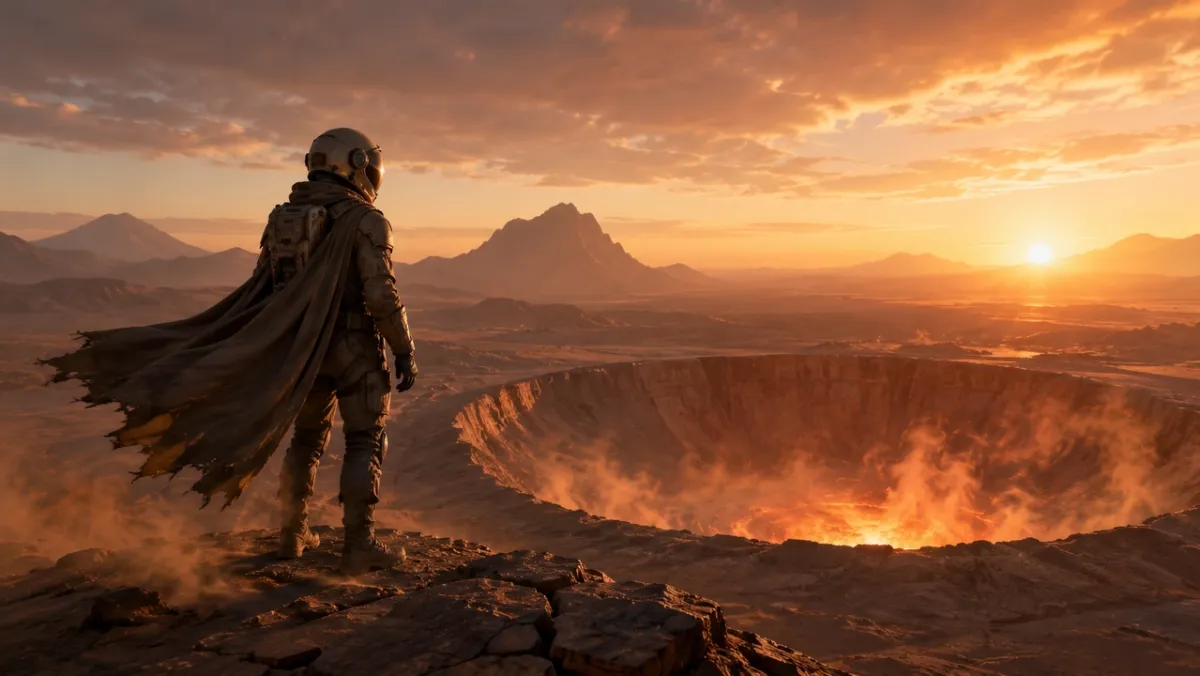
Un primer fotograma cinematográfico para un clip de imagen a video: un astronauta solitario parado en el borde de un cráter resplandeciente en el desierto al amanecer, una capa y polvo listos para moverse con el viento, una silueta fuerte en primer plano, capas de profundidad claras y una luz cálida en el horizonte.
Biblioteca de indicaciones GPT Image 2: 80 ejemplos listos para copiar
Cada ángulo a continuación incluye diez indicaciones. La primera indicación de cada grupo es la mejor candidata para un ejemplo visual porque enfatiza la capacidad que el ángulo debe demostrar; las otras indicaciones son ejemplos de solo texto que puede copiar, adaptar y probar.
| módulo de aviso | Números de aviso | Lo mejor para |
|---|---|---|
| Fotografía de productos e indicaciones creativas de anuncios con IA | 21-30 | Listados de productos, anuncios pagados, imágenes destacadas de comercio electrónico, maquetas de envases |
| Mensajes de representación de logotipo y texto | 11-20 | Pósteres, tableros de menú, miniaturas, portadas de álbumes, pruebas exactas de titulares. |
| Indicaciones de coherencia de personajes | 41-50 | Hojas de personajes, mascotas, elementos del juego, filas de expresiones. |
| Avisos de carteles, miniaturas y escenas cinematográficas | 1-10 | Imágenes de héroes, fotografías editoriales, escenas atmosféricas, ganchos visuales. |
| Imágenes de redes sociales e indicaciones infográficas. | 31-40 | Imágenes de blog, explicaciones, gráficos comparativos, recursos educativos para compartir |
| Indicaciones de maqueta de interfaz de usuario | 51-60 | Pantallas de aplicaciones, paneles, perfiles sociales, conceptos de interfaz de usuario de productos |
| Transferencia de estilo y sugerencias de arte narrativo. | 61-70 | Cómics, paneles de historias, arte editorial, exploración de conceptos. |
| Mensajes del primer fotograma de imagen a vídeo | 71-80 | PixVerse flujos de trabajo en movimiento, revelaciones de productos, ediciones, fotogramas de origen de referencias múltiples |
1. Avisos de carteles, miniaturas y escenas cinematográficas
Este ángulo es mejor para retratos, imágenes editoriales, escenas de estilo de vida y fotografías atmosféricas donde la iluminación y el realismo son importantes.
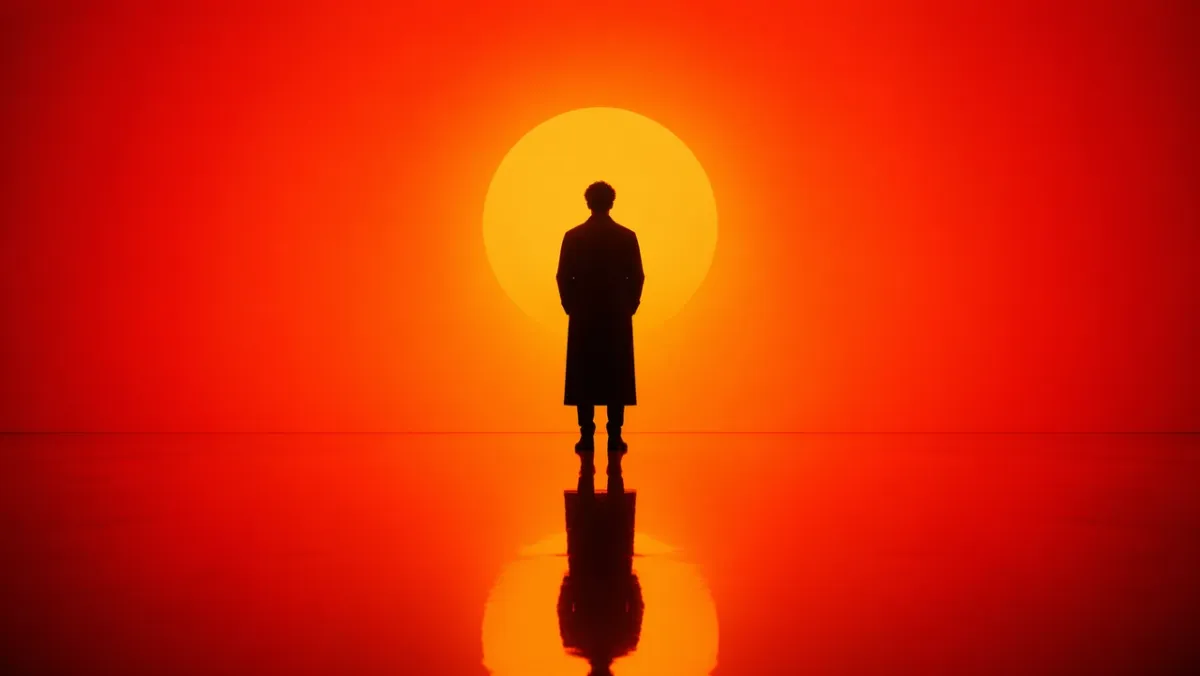
Pregunta 1:
Genera un retrato cinematográfico de una figura solitaria parada en un intenso entorno degradado de naranja a rojo. Fuerte iluminación de silueta desde atrás, profundo contraste de sombras, piso brillante reflectante que refleja la figura. Composición simétrica, escenografía minimalista, sin desorden de fondo. El ambiente es contemplativo y poderoso, como un fotograma de una película de ciencia ficción. Relación de aspecto 16:9.
Pregunta 2:
Una escena callejera fotorrealista y sincera en Seúl después de la lluvia. Una floristería cierra una pequeña tienda a la hora azul, reflejos en el pavimento húmedo, luz cálida en la tienda, postura natural cansada, sensación de documental de 50 mm, textura de piel realista, sin pose glamorosa, sin marca de agua. Relación de aspecto 3:2.
Pregunta 3:
Primer plano de manos desgastadas reparando una vieja cámara de cine en un escritorio de madera rayado. Luz de la ventana desde la izquierda de la cámara, polvo visible, textura de latón y cuero negro, poca profundidad de campo, ambiente tranquilo de taller, fotorrealista, sin superposición de texto. Relación de aspecto 4:3.
Pregunta 4:
Una tranquila plataforma de tren nocturno en el norte de Europa durante las nevadas ligeras. Un viajero con un abrigo largo se encuentra bajo una cálida lámpara de la estación, se puede ver el aliento en el aire frío, las ventanas del tren brillan en el fondo, realismo cinematográfico, paleta de colores sobria, sensación de documental de 35 mm, sin texto. Relación de aspecto 16:9.
Pregunta 5:
Una fotografía editorial de comida, de arriba hacia abajo, de fideos hechos a mano en un plato de cerámica oscura, vapor subiendo, palillos apoyados en ángulo, mesa de madera desgastada, luz lateral suave, brillo y textura de aceite realistas, sin marca, sin superposición de texto. Relación de aspecto 4:5.
Pregunta 6:
Un retrato realista de estilo documental de un ceramista recortando un cuenco de arcilla en un torno de alfarero. Primer plano medio, manos y arcilla hilando en un enfoque nítido, delantal con manchas naturales, luz suave de la ventana del taller, estantes de cuencos sin terminar en el fondo, textura honesta, sin retoques glamorosos, sin texto. Relación de aspecto 3:2.
Pregunta 7:
Una amplia imagen cinematográfica de un pequeño pueblo de montaña después de una tormenta de verano. La niebla se eleva desde los pinos de color verde oscuro, aparecen luces cálidas en las ventanas de las cabañas, los reflejos de la carretera mojada conducen hacia el centro, una persona caminando con un paraguas en la distancia, escala natural, atmósfera realista, sin texto. Relación de aspecto 16:9.
Pregunta 8:
Un primer plano fotorrealista de un reloj de pulsera antiguo apoyado sobre un paño de lino doblado. Metal cepillado visible, pequeños rayones en la caja, marcas legibles pero ficticias en la esfera del reloj, suave luz direccional de la mañana, poca profundidad de campo, ambiente refinado de fotografía editorial del producto, sin logotipos de marcas reales. Relación de aspecto 4:5.
Pregunta 9:
Una escena interior sincera de un pequeño estudio de arquitectura a altas horas de la noche. Dos diseñadores revisan modelos de espuma y planos de planta impresos debajo de una lámpara de escritorio, tazas de café cerca, sombras realistas, espacios de trabajo prácticos, un ambiente tranquilo y concentrado, apariencia de película de 35 mm, sin superposición de texto. Relación de aspecto 16:9.
Pregunta 10:
Una imagen editorial de moda natural de una modelo con un sencillo abrigo color crema parada cerca de la entrada del metro al anochecer. Las farolas comienzan a brillar, un fondo de ciudad apagado, pliegues de tela realistas, postura relajada, encuadre a la altura de los ojos, grano sutil de la película, sin marcas visibles, sin texto. Relación de aspecto 2:3.
Qué buscar: El resultado debe tener una dirección de luz creíble, reflejos o sombras físicamente plausibles y una pose natural del sujeto. Si la imagen parece demasiado pulida, agregue más detalles documentales y elimine el lenguaje de calidad vago.
2. Avisos de representación de logotipos y textos
GPT Image 2 es más fuerte cuando el mensaje trata el texto como un requisito de diseño, no como decoración.
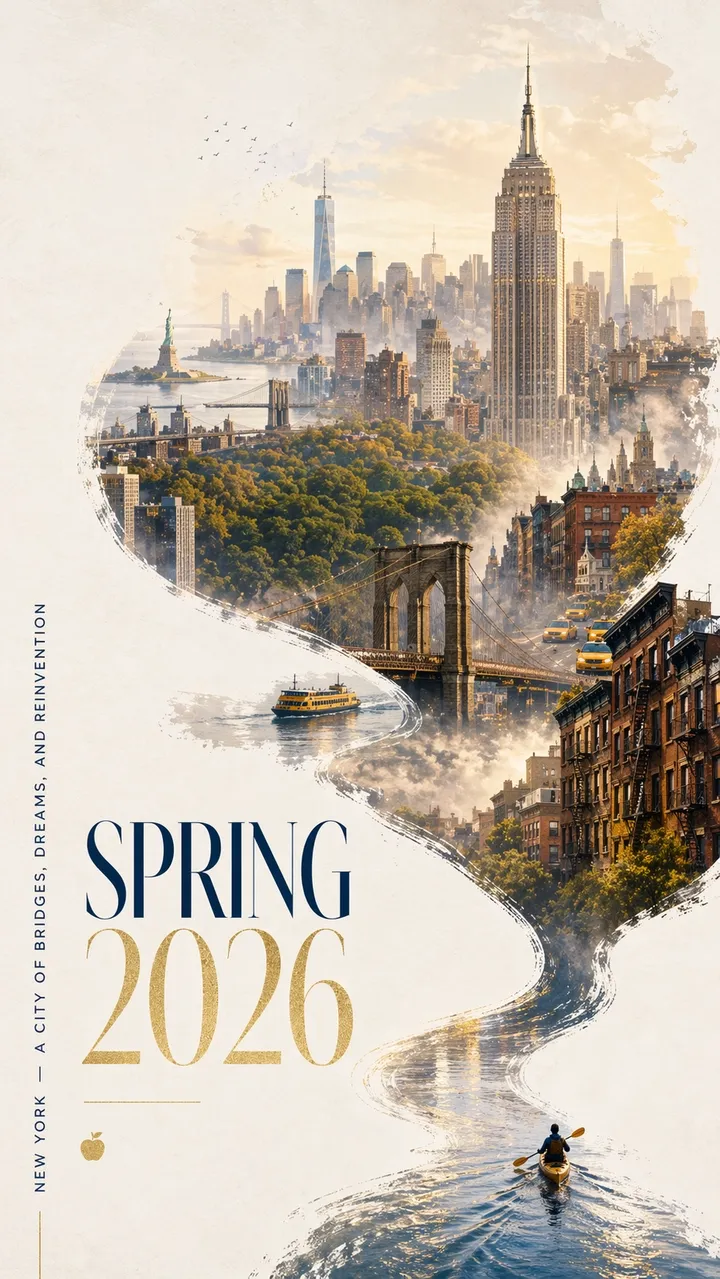
Pregunta 11:
Un llamativo póster de la ciudad de Nueva York para la primavera de 2026 con un diseño atrevido y contemporáneo y un elegante ambiente de celebración. Limpie el fondo texturizado blanquecino con un generoso espacio negativo. Un kayakista en miniatura rema a través de una estrecha franja de agua reflectante en la esquina inferior derecha. La estela se eleva en una curva caligráfica dinámica, transformándose gradualmente en el río Hudson y luego en un panorama de ensueño pintado a mano de Manhattan. Dentro de la composición que fluye en forma de río: el Empire State Building, el puente de Brooklyn, el dosel de Central Park, el One World Trade Center, los tejados de piedra rojiza, los taxis amarillos, los ferries del puerto y la Estatua de la Libertad a una distancia suave. Suave niebla matinal, luz dorada de primavera, sutiles acentos en azul marino y dorado. La tipografía elegante en la parte inferior izquierda dice “PRIMAVERA 2026” con un eslogan vertical “NUEVA YORK - UNA CIUDAD DE PUENTES, SUEÑOS Y REINVENCIÓN”. El texto debe ser nítido y bellamente compuesto. Sin palabras adicionales. Diseño gráfico premium, relación de aspecto 9:16.
Pregunta 12:
Crear un cartel de lanzamiento vertical para una conferencia de diseño ficticia llamada “FRAME 2026”. Titular grande: “MARCO 2026”. Subtítulo: “DISEÑANDO CON IMAGINACIÓN DE MÁQUINA”. Cuadrícula suiza limpia, fondo blanquecino, tipografía negra, un acento geométrico rojo, espacio negativo generoso, texto perfectamente legible, sin palabras adicionales, sin marca de agua. Relación de aspecto 9:16.
Pregunta 13:
Crea una portada de álbum minimalista titulada “SOFT SIGNALS”. Nombre del artista: “MIRA VALE”. Tipografía centrada, textura de papel azul apagado, pequeña ilustración plateada de una torre de radio, espaciado elegante, sin texto adicional, sin logotipo, relación de aspecto 1:1.
Pregunta 14:
Cree un cartel en el escaparate de una librería que diga “LEER MÁS LENTAMENTE” en letra serif grande. Línea más pequeña: “SEMANA DE LECTURA DE PRIMAVERA”. Cálidos reflejos de la calle en el cristal, textura de papel crema, tipografía legible, sin palabras adicionales, sin marca de agua. Relación de aspecto 4:5.
Pregunta 15:
Crear un cartel de exposición en el museo titulado “OBJETOS DEL MAÑANA”. Subtítulo: “UNA HISTORIA DEL DISEÑO DE 2026”. Texto negro sobre papel blanquecino, un objeto cromado abstracto en el centro, diseño modernista limpio, texto exactamente legible únicamente, sin logotipos falsos. Relación de aspecto 9:16.
Pregunta 16:
Crea un cartel vertical de festival de música con el título exacto “AFTERLIGHT SESSIONS”. Texto más pequeño: “12-14 DE JUNIO”. Utilice un fondo azul marino intenso, una luz de escenario circular brillante, una elegante tipografía sans-serif condensada, espacio negativo equilibrado, solo texto exacto, sin palabras adicionales, sin marca de agua. Relación de aspecto 9:16.
Pregunta 17:
Cree un tablero de menú de cafetería limpio titulado “MENÚ DE LA MAÑANA”. Incluya exactamente cuatro elementos: “ESPRESSO”, “MATCHA LATTE”, “CARDAMOM BUN”, “COLD BREW”. Fondo crema cálido, tipo serif negro, líneas divisorias simples, legible a distancia, sin precios, sin elementos adicionales. Relación de aspecto 4:5.
Pregunta 18:
Crear un gráfico cuadrado de campaña social para un club de corredores ficticio. Texto principal: “CORRE EL RÍO”. Línea secundaria: “SÁBADO 7 AM”. Tipografía cinética atrevida, línea de río abstracta, paleta verde y negra brillante, jerarquía clara, sin texto adicional, sin logotipos reales. Relación de aspecto 1:1.
Pregunta 19:
Crear la portada de un libro para una novela de ficción titulada “LA MÁQUINA SILENCIOSA”. Nombre del autor: “ELENA ROWE”. Portada minimalista con una pequeña silueta de pájaro mecánico plateado, fondo negro mate, tipografía refinada, solo texto exacto, sin logotipos del editor, sin copia adicional. Relación de aspecto 2:3.
Pregunta 20:
Cree un cartel en el aula titulado “HAGA MEJORES PREGUNTAS”. Incluya tres líneas cortas: “Observar”, “Explicar”, “Prueba”. Diseño editorial amigable, fondo amarillo suave, íconos de líneas simples, texto legible de alto contraste, sin palabras adicionales, sin marca de agua. Relación de aspecto 4:5.
Qué buscar: Cada letra debe ser legible. Si el modelo agrega palabras adicionales, reformule la copia como “solo texto exacto” y coloque cada línea en su propia línea en el mensaje.
3. Fotografía de producto y mensajes creativos publicitarios con IA
Utilice este ángulo para imágenes de campañas, fotografías de héroes, anuncios sociales, maquetas de comercio electrónico y narraciones de productos.
Pregunta 21:
Un anuncio de producto premium para un altavoz inalámbrico negro mate sobre un pedestal de concreto. Titular: “SONIDO QUE PUEDES SENTIR”. Producto a la derecha, tipografía blanca en negrita a la izquierda, luz espectacular en el borde, sombra limpia, estilo de campaña de tecnología de lujo, bordes nítidos del producto, sin logotipo de marca falso ni marca de agua. Relación de aspecto 16:9.
Pregunta 22:
Foto editorial de suero para el cuidado de la piel sobre vidrio esmerilado. Una botella translúcida con una etiqueta simple que dice “LUMA SERUM”, luz suave y difusa, fondo verde pálido, estilo de campaña de belleza de alta gama, texto de etiqueta nítido, reflejo limpio, sin accesorios adicionales, relación de aspecto 4:5.
Pregunta 23:
Anuncio social cuadrado para una botella de viaje duradera en un sendero de montaña en la hora dorada. Lema: “CONSTRUIDO PARA EL LARGO CAMINO”. Producto claramente visible en primer plano, agarre natural de la mano, luz solar cálida, texto legible y nítido en el tercio inferior, sin palabras adicionales, relación de aspecto 1:1.
Mensaje 24:
Una fotografía limpia de un producto de comercio electrónico de auriculares inalámbricos sobre un fondo blanco puro. Ángulo recto, silueta nítida, sombra de contacto sutil, textura visible de las almohadillas para los oídos, sin texto, sin logotipo, sin accesorios, fotografía de producto de alta resolución. Relación de aspecto 1:1.
Pregunta 25:
Un visual de campaña estilo valla publicitaria para una taza de café de cerámica. Titular: “MAÑANAS, RECALENTADAS”. Producto grande en primer plano, luz cálida de la ventana de la cocina, vapor suave, tipografía legible en negrita en la parte superior izquierda, sin copia adicional, sin marca de agua. Relación de aspecto 16:9.
Pregunta 26:
Una imagen destacada de comercio electrónico premium de una mochila de senderismo minimalista sobre una cornisa de piedra. Centrado en el producto, bolsillo frontal y correas visibles, suave luz alpina de la mañana, sombra limpia, sin persona, sin logotipo, sin superposición de texto, textura de nailon realista y detalles de cremallera. Relación de aspecto 1:1.
Pregunta 27:
Una imagen refinada de una campaña de cuidado de la piel para un frasco de crema hidratante de vidrio esmerilado. Titular: “CALMA EN UN FRASCO”. Producto en la parte inferior derecha, fondo azul pálido, reflejos suaves en el agua, área de etiqueta nítida sin marca falsa, tipografía blanca elegante, sin palabras adicionales. Relación de aspecto 4:5.
Pregunta 28:
Una fotografía cinematográfica de un producto con auriculares inalámbricos de color blanco mate en un estuche de carga abierto. Fondo de carbón oscuro, luz de borde fino, reflejo sutil debajo, espacio negativo limpio para un titular de campaña, sin logotipo, sin texto, bordes nítidos del producto. Relación de aspecto 16:9.
Pregunta 29:
Una maqueta de empaque de refrigerio cuadrado para una marca ficticia de granola llamada “NOVA OATS”. Muestre una bolsa en posición vertical sobre una superficie de madera clara, etiqueta con texto nítido, avena y frutos secos alrededor de la base, luz natural cálida, diseño de empaque premium pero accesible, sin marcas adicionales. Relación de aspecto 1:1.
Mensaje 30:
Foto de un producto de joyería de lujo de un anillo de plata con una pequeña piedra azul sobre una superficie de terciopelo oscuro. Detalle macro, reflejos metálicos realistas, foco suave desde la parte superior izquierda, sombra limpia, sin manos, sin texto, sin marca de agua, producto claramente separado del fondo. Relación de aspecto 4:5.
Qué buscar: El producto debe seguir siendo el héroe visual. Si el modelo inventa demasiados detalles del empaque, especifique “empaquetado sencillo” o “conserve exactamente el producto de entrada” cuando utilice una imagen de referencia.
4. Imagen de redes sociales e indicaciones infográficas
Este ángulo es útil para diagramas, explicaciones, mapas de flujo de trabajo, gráficos, elementos visuales para el aula e ilustraciones de blogs que necesitan etiquetas legibles.
Pregunta 31:
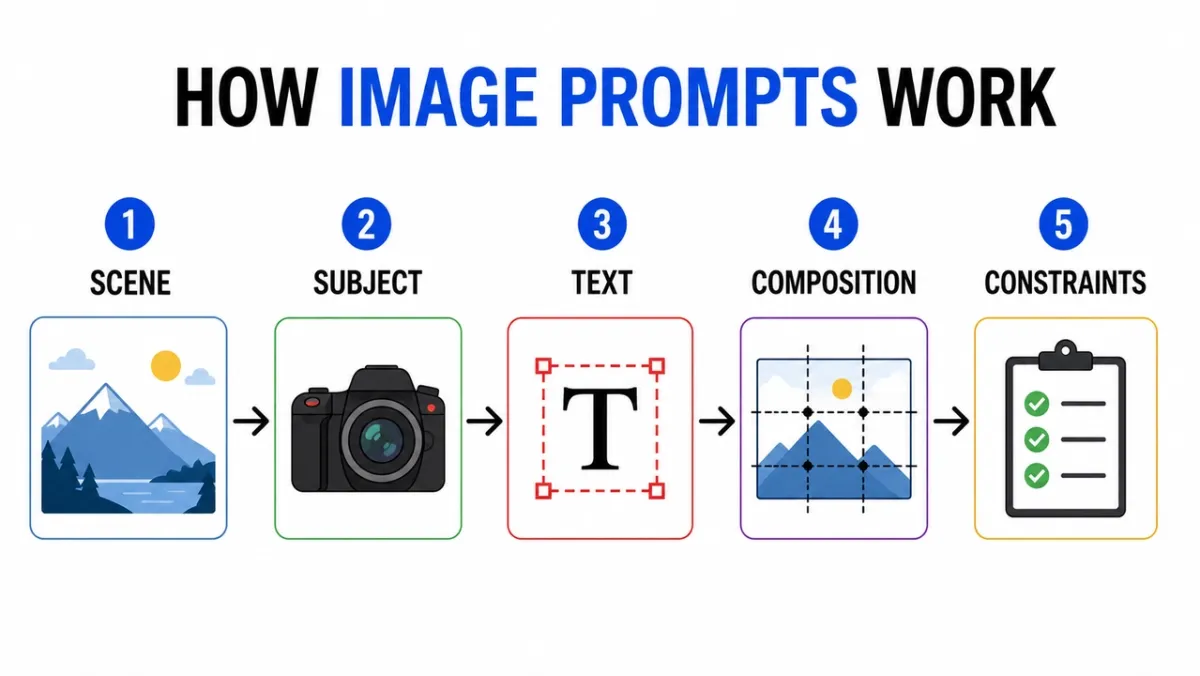
Cree una infografía limpia titulada “CÓMO FUNCIONAN LAS INDICACIONES DE IMAGEN”. Cinco pasos etiquetados: “Escena”, “Asunto”, “Texto”, “Composición”, “Restricciones”. Íconos editoriales planos, flechas entre pasos, alto contraste, fondo blanco, etiquetas sans-serif legibles, espaciado consistente, sin texto adicional, sin marca de agua. Relación de aspecto 16:9.
Pregunta 32:
Diagrama educativo que muestra las capas de la lente de una cámara. Incluya piezas etiquetadas: “Elemento frontal”, “Apertura”, “Grupo de enfoque”, “Sensor de imagen”. Ilustración en corte limpio, fondo blanco, estilo de libro de texto, líneas guía claras, etiquetas legibles, sin desorden decorativo. Relación de aspecto 16:9.
Pregunta 33:
Infografía comparativa titulada “POSTER PROMPT VS PRODUCT PROMPT”. Dos columnas, seis filas, etiquetas concisas, fondo neutro, texto negro, líneas decorativas en azul, estilo gráfico de blog profesional, todo legible en copia, sin texto adicional. Relación de aspecto 16:9.
Pregunta 34:
Cree una imagen instructiva paso a paso titulada “CÓMO HACER BREW FRÍO”. Cinco pasos ilustrados con etiquetas cortas: “Moler”, “Empinar”, “Filtro”, “Verter”, “Servir”. Tonos tierra cálidos, flechas claras, estilo de ícono consistente, texto legible, sin palabras adicionales. Relación de aspecto 16:9.
Pregunta 35:
Cree un cuadro comparativo limpio titulado “FLUJO DE TRABAJO DE IMAGEN AI”. Tres columnas: “Borrador”, “Refinar”, “Animar”. Utilice íconos simples, etiquetas cortas, alto contraste, espacios generosos, fondo blanco, estilo gráfico de blog profesional y todo el texto legible. Relación de aspecto 16:9.
Pregunta 36:
Cree una infografía de línea de tiempo limpia titulada “DEL INDICADOR AL CARTEL”. Cinco etapas: “Breve”, “Diseño”, “Texto”, “Revisión”, “Exportar”. Flujo horizontal, círculos numerados simples, paleta de acento azul y negro, etiquetas de alto contraste, sin texto adicional ni marca de agua. Relación de aspecto 16:9.
Pregunta 37:
Crear un diagrama educativo titulado “ROLES DE IMAGEN DE REFERENCIA”. Tres tarjetas etiquetadas: “Asunto”, “Estilo”, “Fondo”. Muestre miniaturas de imágenes simples, flechas en un marco de salida final, etiquetas claras, fondo blanco, espaciado constante y sin texto adicional. Relación de aspecto 16:9.
Pregunta 38:
Cree un árbol de decisión titulado “¿QUÉ IMAGEN PREGUNTA?”. Ramas: “Texto”, “Producto”, “Escena”, “Editar”. Utilice cuadros y flechas limpios, tipografía sans-serif legible, fondo gris mínimo, un color de acento verde, sin palabras adicionales ni desorden decorativo. Relación de aspecto 16:9.
Pregunta 39:
Cree una infografía de lista de verificación de seguridad titulada “ANTES DE GENERAR”. Cuatro controles: “Derechos”, “Privacidad”, “Texto”, “Marca”. Utilice íconos de verificación simples, etiquetas concisas, fondo blanco, estilo de centro de ayuda SaaS profesional, alto contraste y sin copias adicionales. Relación de aspecto 4:5.
Pregunta 40:
Cree una explicación visual titulada “MENÚ DE EDICIÓN DE IMÁGENES”. Tres filas apiladas: “Cambiar”, “Conservar”, “Coincidir”. Incluya pequeños íconos de ejemplo para cada fila, líneas guía limpias, etiquetas legibles, colores restringidos, sin texto adicional ni marcas de agua. Relación de aspecto 16:9.
Qué buscar: Primero revise las etiquetas. Si lo visual es hermoso pero las palabras son incorrectas, el resultado no se puede utilizar. Para gráficos densos, reduzca la cantidad de etiquetas y vuelva a generarlos.
5. Indicaciones de coherencia de caracteres
Las hojas de personajes son útiles porque comprimen la identidad, el vestuario, la paleta y las expresiones en un marco de referencia.
Pregunta 41:
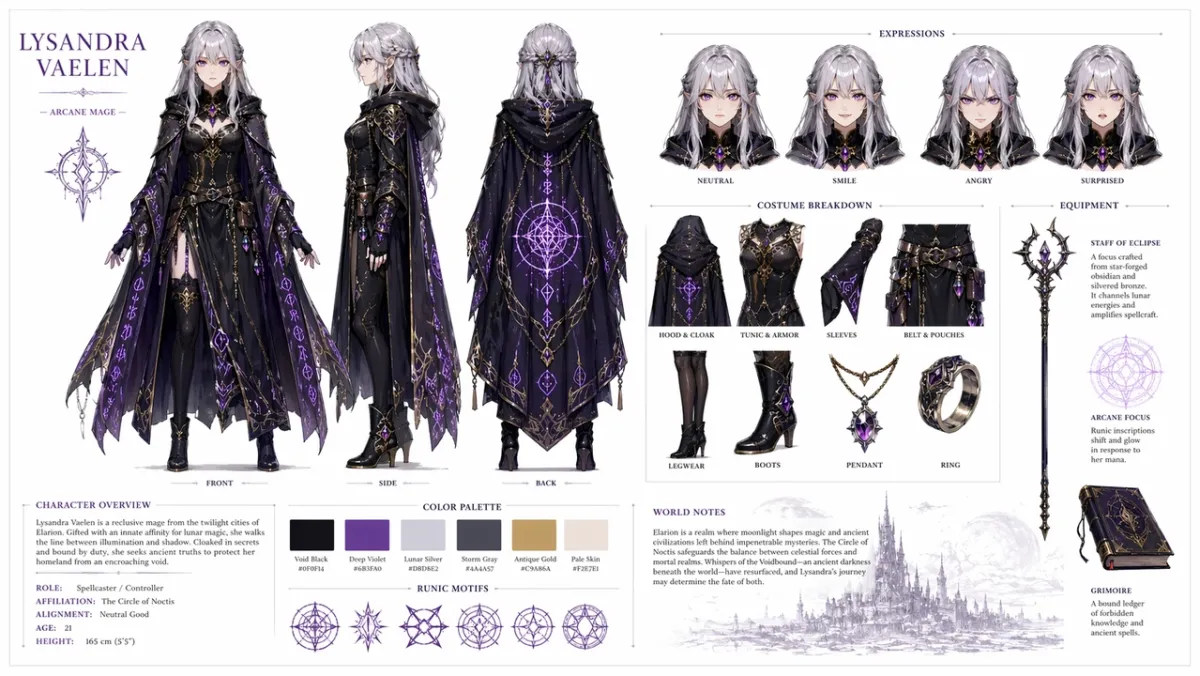
Crea una hoja de referencia de personaje profesional para un personaje de RPG de fantasía original: una joven maga con cabello plateado y ojos violetas, vestida con una capa oscura ornamentada con patrones de runas brillantes. Incluya sobre un fondo blanco limpio: un giro de tres vistas que muestra el frente, el costado y la parte posterior; variaciones de expresiones faciales que muestran neutralidad, sonrisa, enojo y sorpresa; desgloses detallados de piezas de vestuario y equipo; una fila de muestras de paleta de colores; y breves notas sobre la construcción del mundo en tipografía limpia. Diseño de cuadrícula organizado, estilo de arte conceptual, alta resolución. Relación de aspecto 16:9.
Pregunta 42:
Crea una hoja de personaje de mensajería de ciencia ficción para un personaje original llamado “NOVA”. Incluya vistas frontal, lateral y posterior, cuatro expresiones faciales, leyendas de chaqueta y mochila, muestras de paleta de colores, fondo blanco limpio, etiquetas legibles, cara y chaqueta consistentes en todas las vistas. Relación de aspecto 16:9.
Pregunta 43:
Crea una hoja de personaje de un libro infantil para un pequeño ayudante del bosque con un impermeable verde. Incluye fila de expresión, fila de accesorios, pose para caminar, pose para saludar, paleta de colores, notas simples y legibles, estilo de ilustración suave, sin caracteres adicionales. Relación de aspecto 16:9.
Pregunta 44:
Crea una hoja de personaje de detective cyberpunk para un personaje original llamado “REI”. Incluya vista frontal, vista lateral, vista posterior, tres expresiones, leyendas de gabardina, accesorios de dispositivos, paleta de colores neón, etiquetas limpias, rostro y peinado consistentes. Relación de aspecto 16:9.
Pregunta 45:
Crea una hoja de referencia de mascota para un simpático robot panadero. Incluya pose de cuerpo completo, tres expresiones faciales, detalles de delantal, accesorios de pastelería, muestras de paleta de colores, cambios simples, fondo blanco limpio y etiquetas legibles. Relación de aspecto 16:9.
Pregunta 46:
Crea una hoja de personaje de juego móvil para un explorador del desierto original llamado “KAI”. Incluye vistas frontal, lateral y trasera, tres poses de acción, menciones de bufandas y cinturones utilitarios, muestras de paleta de colores, etiquetas legibles, rostro y vestimenta consistentes y un fondo blanquecino limpio. Relación de aspecto 16:9.
Pregunta 47:
Crea una acogedora hoja de personaje de comerciante de un pueblo de fantasía para un personaje original llamado “MARN”. Incluye vista frontal de cuerpo completo, vista lateral, fila de accesorios con linterna y libro de contabilidad, cuatro estudios de expresión, notas de textura de tela, paleta de colores cálidos, diseño de cuadrícula limpio y notas legibles. Relación de aspecto 16:9.
Pregunta 48:
Crear una hoja de diseño de drones de mantenimiento de ciencia ficción. Incluya vistas superior, lateral y frontal, pequeños paneles de detalles para sensores, pies de aterrizaje, brazo de herramienta, paquete de baterías y luces de advertencia. Diseño de arte conceptual técnico limpio, fondo neutro, etiquetas legibles, diseño industrial consistente. Relación de aspecto 16:9.
Pregunta 49:
Crea una hoja de personaje de animación infantil para un inventor original del aula llamado “MILO”. Incluya una pose de pie, una pose de pensamiento, una pose emocionada, una fila de expresión, accesorios para mochila y cuaderno, una paleta brillante pero sobria, etiquetas legibles y sin caracteres adicionales. Relación de aspecto 16:9.
Pregunta 50:
Crea una hoja de referencia de vestuario táctico para un mensajero cyberpunk original. Incluya vistas frontal, posterior y lateral, leyendas de chaquetas, detalles de zapatos, detalles de bolsos tipo mensajero, muestras de color, tres poses de silueta, texto de etiqueta nítido, peinado y rostro consistentes en todas las vistas. Relación de aspecto 16:9.
Qué buscar: El mismo rostro, disfraz y paleta de colores deben sobrevivir en todas las vistas. Si la vista lateral cambia el atuendo, regenere con un lenguaje más fuerte de “preservar”.
6. Maqueta de interfaz de usuario y mensajes de captura de pantalla sociales
Este ángulo funciona cuando necesita un concepto de aplicación realista, un panel de control, un perfil social o una interfaz de usuario de producto que parezca lo suficientemente estructurado como para discutirlo con un equipo.
Pregunta 51:
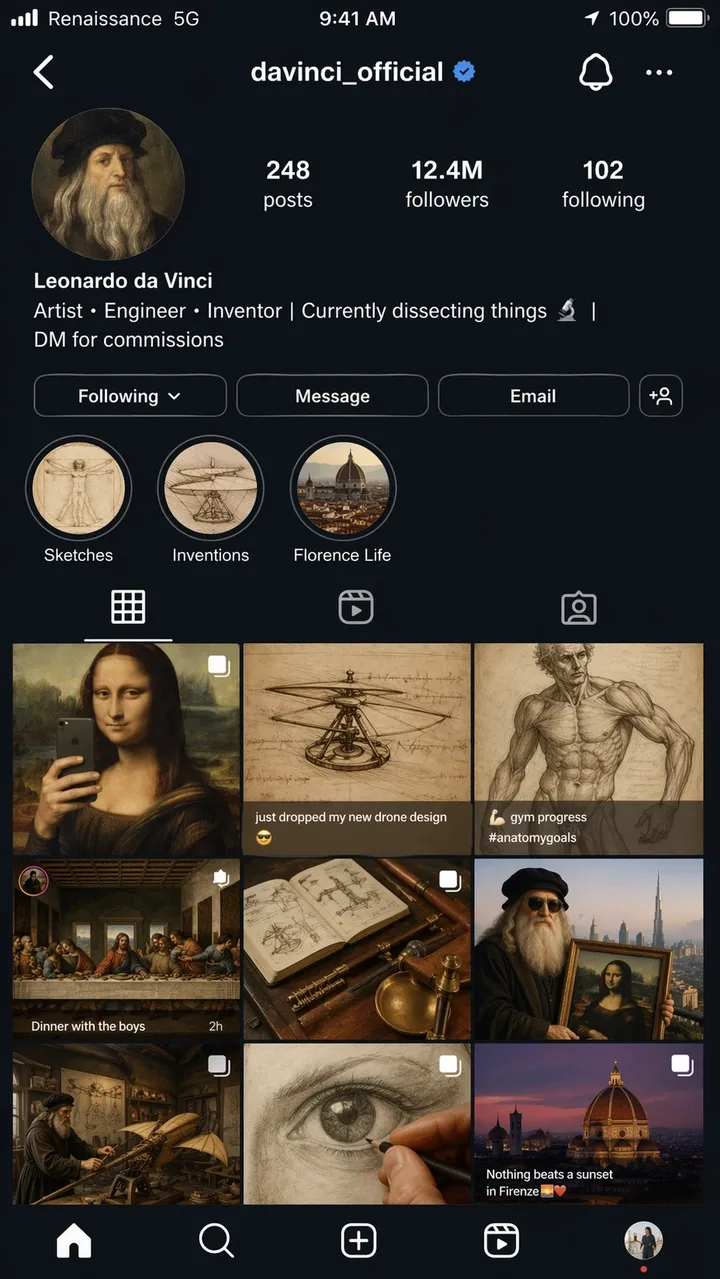
Una captura de pantalla hiperrealista de iPhone de una página de perfil ficticia de Instagram de Leonardo da Vinci, nombre de usuario @davinci_official, como si fuera un influencer moderno en 2026. La foto de perfil es un autorretrato renacentista en un círculo. La biografía dice: “Artista, ingeniero, inventor | Actualmente diseccionando cosas | DM para comisiones”. La cuadrícula muestra 9 publicaciones: la Mona Lisa reencuadrada como una selfie en el espejo, un boceto de un helicóptero con la leyenda “acabo de dejar caer mi nuevo diseño de dron”, un estudio de anatomía publicado como una foto de progreso en el gimnasio, La Última Cena representada como una foto grupal de una cena y otras combinaciones creativas y anacrónicas. Recuento de seguidores: 12,4 millones. Historias destacadas etiquetadas como Bocetos, Invenciones y Florence Life. Barra de estado completa de iOS con texto portador que dice “Renacimiento”. 5G”, ícono de batería y hora actual. Interfaz de usuario en modo oscuro en todas partes. Calidad de captura de pantalla fotorrealista, relación de aspecto 9:16.
Pregunta 52:
Una pantalla de incorporación móvil realista para una aplicación de hábitos ficticia llamada “LUMA”. Titular: “CONSTRUYE MEJORES DÍAS”. Botones: “Empezar ahora” y “Ver demostración”. Diseño limpio estilo iOS, fondo blanco suave, acento azul, texto de interfaz de usuario legible, mostrado directamente dentro del marco de un teléfono. Relación de aspecto 9:16.
Pregunta 53:
Panel de escritorio SaaS para una herramienta de análisis de comercio electrónico. Barra lateral izquierda, tarjetas de KPI principales para ingresos, pedidos, tasa de conversión, un gráfico de líneas y una tabla de productos principales. Interfaz blanca y limpia, espaciado realista, etiquetas legibles, sin marcas reales. Relación de aspecto 16:9.
Pregunta 54:
Una pantalla realista de aplicación meteorológica móvil para una aplicación ficticia llamada “SKYLINE”. Ciudad actual: “Lisboa”. Temperatura del titular: “22C”. Tarjetas para viento, humedad, rayos UV y puesta de sol. Interfaz azul tranquila, etiquetas legibles, marco de iPhone, sin marca de aplicación real. Relación de aspecto 9:16.
Pregunta 55:
Una pantalla de la aplicación de reservas de restaurantes que muestra la confirmación de la reserva. Nombre del restaurante: “Mesa Norte”. Fecha: “18 de junio”. Hora: “7:30 p. m.”. Tamaño del grupo: “4 invitados”. Cálida foto editorial de comida en la parte superior, botón CTA limpio que dice “Agregar al calendario”, texto de interfaz de usuario legible. Relación de aspecto 9:16.
Pregunta 56:
Un panel de análisis de escritorio realista para un estudio de creadores ficticio. Navegación izquierda, tarjetas superiores para Vistas, Tiempo de reproducción, Ingresos y Nuevos seguidores, un gráfico de líneas y una tabla de campaña. Interfaz de usuario blanca y limpia, acento azul, etiquetas legibles, espaciado práctico, sin marcas reales. Relación de aspecto 16:9.
Pregunta 57:
Una pantalla de pago móvil para una tienda ficticia de artículos para actividades al aire libre llamada “TrailCart”. Muestra la miniatura del producto, el indicador de cantidad, la tarjeta de dirección de envío, el campo de descuento, el precio total y un botón de CTA que dice “Realizar pedido”. Estilo iOS moderno, texto de interfaz de usuario legible, sin logotipos reales. Relación de aspecto 9:16.
Pregunta 58:
Una maqueta de interfaz de usuario de tableta para una aplicación de biblioteca rápida. Muestre las pestañas denominadas “Pósteres”, “Productos”, “UI” y “Ediciones”. El panel principal incluye tres tarjetas de mensajes con texto breve de vista previa, botones de copia y fichas de categorías. Interfaz limpia, alta legibilidad, sin marcas reales. Relación de aspecto 4:3.
Pregunta 59:
Una pantalla de configuración de SaaS para una herramienta de imágenes de IA ficticia. Secciones denominadas “Modelo”, “Calidad”, “Relación de aspecto”, “Imágenes de referencia” y “Seguridad”. Utilice alternadores, menús desplegables, controles deslizantes y un botón Guardar claro. Interfaz de usuario profesional silenciosa, etiquetas legibles y sin desorden decorativo. Relación de aspecto 16:9.
Mensaje 60:
La pantalla de una aplicación de itinerario de viaje móvil para un viaje ficticio a Kioto. El encabezado dice “Fin de semana de Kioto”. Tarjetas para el “Día 1”, “Día 2”, “Caminata por el templo” y “Cena”. Interfaz de usuario suave y neutra, espaciado realista, vista previa de mapa pequeño, texto legible, sin marca de aplicación real. Relación de aspecto 9:16.
Qué buscar: El diseño debe parecer una interfaz real, no un póster decorativo. Verifique las etiquetas de navegación, el texto de los botones, el espaciado de los íconos y si la jerarquía de la pantalla es utilizable.
7. Transferencia de estilo y sugerencias de arte narrativo
Las indicaciones narrativas breves prueban si GPT Image 2 puede razonar a través de chistes visuales, narraciones de varios paneles y texto pequeño dentro de una escena.
Pregunta 61:
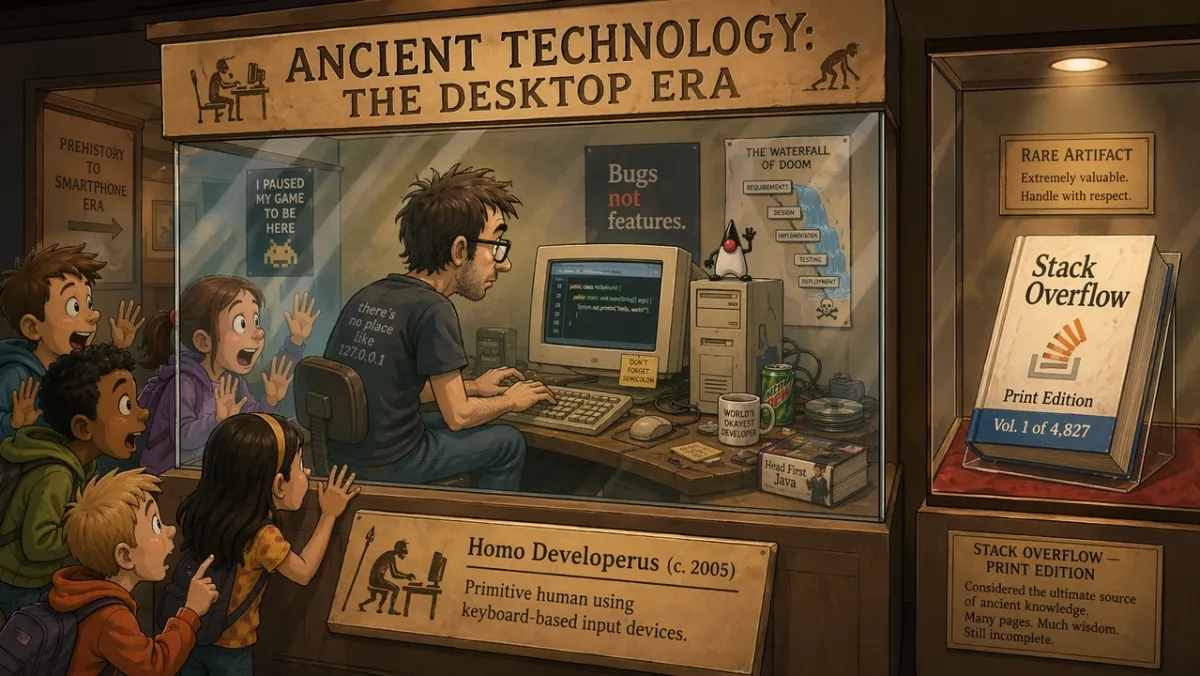
Dentro de una exposición del museo titulada “Tecnología antigua: la era del escritorio”, un programador en una vitrina de cristal hace una demostración en vivo de codificación en un monitor CRT mientras unos escolares asombrados presionan sus rostros contra el cristal. El cartel de la exhibición dice: “Homo Developerus (c. 2005): humano primitivo que utiliza dispositivos de entrada basados en teclado”. Una segunda vitrina cercana muestra un libro físico con la etiqueta “Stack Overflow - Print Edition, Vol. 1 of 4,827”. Estilo de ilustración de dibujos animados en 2D, iluminación cálida de museo, tono humorístico y nostálgico. Relación de aspecto 16:9.
Pregunta 62:
Una tira cómica de cuatro paneles titulada “RUTINA MAÑANA”. Panel 1: suena la alarma. Panel 2: el personaje prepara café. Panel 3: el personaje se sienta a trabajar. Panel 4: el personaje ya está dormido en el escritorio. Estilo de ilustración cálido y minimalista, carácter expresivo, título legible, sin texto adicional. Relación de aspecto 16:9.
Pregunta 63:
Una única ilustración editorial para un artículo sobre automatización creativa. Un diseñador y un asistente de IA organizan guiones gráficos en papel sobre una mesa grande, luz suave de estudio, humor sutil, estilo de ilustración de revista moderno, sin logotipos de marca visibles, sin texto. Relación de aspecto 3:2.
Pregunta 64:
Una ilustración estilo portada de periódico titulada “THE MORNING HERALD”. Titular principal: “CIUDAD APRUEBA JARDINES EN LA AZOTEA”. Diseño de dos columnas, un área fotorrealista de fotografías del ayuntamiento, diseño clásico de hoja ancha, cabecera y título legibles, sin texto de artículo adicional. Relación de aspecto 4:5.
Pregunta 65:
Un cómic de dos paneles sobre un robot que aprende a pintar. Panel 1: el robot estudia detenidamente un lienzo en blanco. Panel 2: el robot muestra con orgullo un cuadro desordenado pero encantador. Iluminación cálida de estudio, lenguaje corporal expresivo, sin bocadillos, título sencillo: “PRIMER INTENTO”. Relación de aspecto 16:9.
Pregunta 66:
Un cómic editorial de tres paneles titulado “THE DEADLINE”. Panel 1: un diseñador abre tranquilamente un archivo en blanco. Panel 2: el reloj salta hacia adelante y notas adhesivas cubren el escritorio. Panel 3: el diseñador presenta un cartel pulido con relieve sorprendido. Estilo de ilustración mínimo y expresivo, título legible, sin bocadillos. Relación de aspecto 16:9.
Pregunta 67:
Una ilustración surrealista de una revista sobre el enfoque creativo: una persona sentada en un pequeño escritorio flotando en una tranquila biblioteca de ventanas brillantes, cada ventana muestra una idea diferente sin terminar. Iluminación cinematográfica suave, ambiente reflexivo, composición limpia, sin logotipos de marca visibles ni texto. Relación de aspecto 3:2.
Pregunta 68:
Un guión gráfico de cuatro paneles para un avance del lanzamiento del producto. Panel 1: caja cerrada sobre una mesa. Panel 2: luz saliendo de la caja. Panel 3: manos levantando la tapa. Panel 4: se revela la silueta brillante del producto. Sin marca legible, sin diálogo, iluminación cinematográfica, bordes de panel claros. Relación de aspecto 16:9.
Pregunta 69:
Un diorama humorístico de museo titulado “EL PRIMER CHAT DE GRUPO”. Muestre figuras de aspecto antiguo reunidas alrededor de tablillas de piedra con burbujas de mensajes talladas encima, una cálida iluminación de museo, una divertida ilustración editorial, un título legible únicamente, sin texto adicional. Relación de aspecto 16:9.
Pregunta 70:
Un póster narrativo en pantalla dividida que muestra el “antes” y el “después” de la iteración creativa. Lado izquierdo: pared de bocetos desordenada y notas aproximadas. Lado derecho: tablero de campaña limpio y pulido. Ilustración editorial moderna, fuerte contraste, sin logotipos, sin palabras adicionales más allá de “ANTES” y “DESPUÉS”. Relación de aspecto 16:9.
Qué buscar: La escena debe comunicar la idea visualmente. Si el chiste depende completamente del texto, simplifique la configuración y aclare la acción física.
8. Mensajes de primer fotograma y ediciones de referencia de imagen a vídeo
Este ángulo es donde GPT Image 2 se convierte en algo más que un generador de primer paso. Es útil para recortes de productos, intercambios de vestimenta, cambios de fondo, ediciones basadas en referencias y fotogramas fijos diseñados para movimiento.
Pregunta 71:
Cree un primer fotograma cinematográfico para un clip de imagen a vídeo: un astronauta solitario parado en el borde de un brillante cráter del desierto al amanecer, capa y polvo listos para moverse con el viento, silueta fuerte en primer plano, capas de profundidad claras, luz cálida en el horizonte, sin texto, sin marca de agua. Relación de aspecto 16:9.
Pregunta 72:
Utilice la Imagen 1 como fotografía del producto y la Imagen 2 como referencia de estilo de fondo. Coloque el producto en la escena de la Imagen 2. Conserve exactamente la forma del producto, el texto de la etiqueta, las proporciones, el color y el material. Combina iluminación, escala, sombra y perspectiva. No cambie el estilo del producto. Sin logotipos ni marcas de agua adicionales.
Pregunta 73:
Elimine el fondo de la imagen del producto de entrada. Genere un fondo transparente con una silueta nítida, bordes limpios, sin halos ni flecos. Conserve exactamente la geometría de la botella, la forma de la tapa, el texto de la etiqueta, los colores de la etiqueta y la nitidez de la impresión. No cambie las proporciones.
Pregunta 74:
Cambie solo el clima y la iluminación en la imagen de entrada. Haga que la escena parezca una tarde de invierno con ligeras nevadas. Conserve exactamente las personas, los edificios, las señales, el ángulo de la cámara, la ubicación de los objetos y la composición. Mantenga todo el texto legible sin cambios.
Pregunta 75:
La imagen 1 es la persona a preservar. La imagen 2 es la referencia de la chaqueta. La imagen 3 es la referencia de las botas. Vista a la persona de la Imagen 1 con la ropa de las Imágenes 2 y 3. Conserve exactamente la cara, la forma del cuerpo, la pose, las manos, el fondo, el ángulo de la cámara y la iluminación. Reemplace solo la ropa.
Pregunta 76:
Utilice la foto del producto ingresado como tema bloqueado. Coloque el producto en la encimera de un baño de mármol limpio con una suave luz de ventana por la mañana. Conserve exactamente la forma del producto, el texto de la etiqueta, el color de la tapa, las proporciones y el material. Haga coincidir la sombra, la escala y la perspectiva del contacto. No agregue etiquetas, logotipos ni accesorios adicionales.
Pregunta 77:
Cree un primer fotograma cinematográfico para un clip de imagen a vídeo: un frasco de perfume de vidrio sobre una piedra negra húmeda mientras una fina cinta de niebla se mueve detrás de él. Centrado en el producto, silueta fuerte, primer plano y profundidad de fondo claros, sin manos, sin texto, sin marca de agua. Relación de aspecto 16:9.
Pregunta 78:
Edite el retrato de entrada cambiando solo el fondo a un fondo de estudio editorial limpio en gris cálido. Conserve exactamente el rostro, el cabello, la ropa, la pose, el tono de piel, el ángulo de la cámara, la dirección de la iluminación y la expresión. Combina la nueva sombra y profundidad del fondo de forma natural.
Pregunta 79:
Utilice la Imagen 1 como foto de la habitación y la Imagen 2 como referencia del arte de la pared. Agregue la obra de arte de la Imagen 2 a la pared vacía en la Imagen 1. Conserve exactamente los muebles, el piso, la luz de la ventana, el ángulo de la cámara, el equilibrio de color y el diseño de la habitación. Haga coincidir la escala del marco, la perspectiva y la sombra de la pared.
Mensaje 80:
Cree un primer fotograma listo para video para la presentación de un producto: una caja negra mate cerrada sobre una mesa, una fina luz azul que se escapa de la costura, partículas de polvo visibles en el haz, cámara colocada baja y cerca, capas de profundidad fuertes, espacio vacío para movimiento, sin texto, sin logotipo. Relación de aspecto 16:9.
Qué buscar: Para las ediciones, la salida se realiza correctamente solo si los detalles bloqueados permanecen bloqueados. Para cuadros listos para video, verifique la separación de los sujetos, la profundidad del primer plano y del fondo y si la escena PixVerse deja espacio para el movimiento.
Revisión de GPT Image 2: resultados y puntuaciones de las pruebas
Probado y actualizado: 23 de junio de 2026.
Esta sección de revisión está intencionalmente después de la biblioteca de mensajes porque la mayoría de los lectores que llegan a esta página necesitan ejemplos primero. La revisión sigue siendo importante: GPT Image 2 es útil cuando el texto, la estructura y el seguimiento de instrucciones son más importantes que la exploración visual vaga.
| Dimensión de revisión | Puntuación (1-5) | Lo que vimos en las pruebas prácticas. |
|---|---|---|
| Precisión del texto | 4 | Los titulares grandes, las etiquetas breves, los títulos de los carteles, los elementos del menú, los pasos infográficos y las etiquetas simples de la interfaz de usuario eran más fáciles de controlar cuando se citaba la copia exacta. Los pequeños textos legales y los párrafos densos aún necesitan una revisión cuidadosa. |
| Consistencia del carácter | 3 | Las hojas de personajes, las filas de expresiones, las leyendas de vestuario y las muestras de paleta fueron útiles como referencias, pero los rostros, las proporciones y los detalles del vestuario pueden variar en las vistas lateral y posterior. |
| Control de estilo | 4 | El modelo siguió bien una dirección visual amplia cuando el mensaje nombraba el caso de uso, el diseño, el medio, la iluminación y las restricciones en lugar de solo apilar palabras clave de estilo. |
| Realismo del producto | 4 | Los diseños de los anuncios de productos, el espacio negativo de las campañas, las superficies limpias y las composiciones que dan prioridad al producto eran sólidos, pero las etiquetas, los logotipos, la geometría de los envases y los reclamos regulados reales aún necesitan un control de calidad manual. |
| Capacidad de edición | 3 | El patrón “cambiar, conservar, igualar” funcionó mejor que las solicitudes de edición amplias, pero aún es necesario revisar los límites de selección, la salida con fondo transparente y la preservación exacta del producto. |
| Pregunta de búsqueda | Respuesta practica |
|---|---|
| Lo mejor para | Pósteres con texto exacto, conceptos de anuncios de productos, maquetas de interfaz de usuario, infografías, hojas de personajes, ediciones de referencia y primeros fotogramas para conversión de imagen a vídeo. |
| Principales limitaciones | El texto pequeño, las marcas exactas, las fuentes patentadas, los textos legales, los entregables complejos con fondo transparente y las etiquetas de productos bloqueadas aún necesitan revisión. |
| Disponibilidad de API | Utilice la ruta API gpt-image-2 de OpenAI para flujos de trabajo de desarrolladores. El acceso a ChatGPT Images 2.0 y la facturación API son caminos separados. |
| Notas API | A partir del 22 de junio de 2026, OpenAI enumera los precios del token GPT-Image-2 para entrada de imágenes, entrada de imágenes en caché, salida de imágenes, entrada de texto y entrada de texto en caché. |
| Flujo de trabajo de vídeo | Solicite bordes limpios del sujeto, capas de profundidad y una señal de movimiento si la imagen puede convertirse en una fuente de imagen a video más adelante. |
| Alternativas para comparar | Utilice Nano Banana 2 para pruebas fotorrealistas rápidas, Midjourney para exploración estilizada y PixVerse cuando lo aprobado aún necesita convertirse en un recurso de video. |
Cómo probamos GPT Image 2
Probamos GPT Image 2 en retratos, carteles con mucho texto, composiciones de estilo de producto, hojas de personajes, maquetas de interfaz de usuario y escenas narrativas experimentales. El objetivo no era producir puntuaciones de referencia; era para ver si un diseñador, comercializador o creador podía utilizar el resultado con ediciones ligeras en lugar de reconstruir el activo desde cero.
| Área de prueba | Indicaciones de muestra | lo que comprobamos |
|---|---|---|
| Retratos y fotogramas cinematográficos. | 12 | Control de iluminación, textura de la piel, reflejos, estado de ánimo y consistencia de la escena. |
| Diseños de carteles y tipografía. | 14 | Ortografía de titulares, texto de varias líneas, jerarquía, espacio negativo y pulido similar al de la marca. |
| Fichas de personajes y conceptos. | 9 | Coherencia de múltiples vistas, detalles del vestuario, alineación de la paleta y precisión de las etiquetas. |
| UI y maquetas sociales | 8 | Realismo en el diseño, texto pequeño, espaciado entre iconos, cuadrículas de feeds y credibilidad de las capturas de pantalla. |
| Indicaciones experimentales | 10+ | Humor, razonamiento narrativo, ubicación de objetos y precisión en los subtítulos. |
El patrón era claro: GPT Image 2 premia los resúmenes precisos más que las cadenas de palabras clave. Cuando el mensaje nombra un trabajo y define el éxito, el modelo tiende a preservar la estructura. Cuando el mensaje solicita una imagen hermosa sin restricciones, el resultado aún puede verse pulido, pero es más difícil de reutilizar.
Revisar resultados por caso de uso
| Caso de uso | lo que funcionó bien | Lo que aún necesita revisión |
|---|---|---|
| Representación de texto | Los titulares grandes, las etiquetas breves, los títulos de los carteles, los elementos del menú, los pasos infográficos y las etiquetas simples de la interfaz de usuario eran más fáciles de controlar cuando se citaba la copia exacta. | Los textos legales pequeños, los párrafos densos, las fuentes estilizadas y las palabras repetidas aún pueden desviarse. Mantenga la copia breve y revise cada letra. |
| Imágenes del producto | GPT Image 2 manejó bien los diseños de anuncios de productos, el espacio negativo de la campaña, las superficies limpias y las composiciones que dan prioridad al producto. | Las etiquetas, los logotipos, la geometría del embalaje y las afirmaciones reguladas reales deben comprobarse manualmente o componerse a partir de activos aprobados. |
| maquetas de interfaz de usuario | Las pantallas móviles, los paneles, las tarjetas, los botones, los menús y la jerarquía similar a la de aplicaciones parecían plausibles cuando el mensaje nombraba elementos reales de la interfaz. | Trate los resultados como maquetas de conceptos, no como interfaz de usuario de producción. Las etiquetas pequeñas, la alineación de los iconos y los datos exactos a menudo necesitan limpieza. |
| Consistencia del carácter | Las hojas de personajes, las filas de expresiones, las leyendas de disfraces y las muestras de paleta fueron útiles como referencias creativas. | Los rostros, los detalles del vestuario y las proporciones pueden cambiar según las vistas. Repita los anclajes de identidad y regenere si las vistas laterales o traseras se desvían. |
| Primeros fotogramas de imagen a vídeo | Los fotogramas amplios con primer plano, medio plano, fondo y una señal de movimiento le dieron a PixVerse material fuente más utilizable. | Las imágenes superpobladas, el texto pesado y las señales de movimiento ambiguas dificultan la generación posterior de vídeos. |
| Edición y composición | El patrón de solicitud “cambiar, conservar, hacer coincidir” funcionó mejor que las solicitudes de edición amplias. | Los límites de selección, la salida con fondo transparente, la preservación exacta del producto y los detalles finos aún requieren control de calidad. |
Para comparar modelos, la distinción útil no es marca versus marca. GPT Image 2 se comporta más como un asistente de diseño estructurado para imágenes con mucha comunicación. Midjourney sigue siendo útil para la exploración estilizada y la amplitud de la dirección de arte. Nano Banana 2 es un fuerte punto de comparación para el fotorrealismo, el detalle de los materiales y la iteración visual rápida. PixVerse es la siguiente capa del flujo de trabajo cuando la imagen fija debe convertirse en un clip, un anuncio, una revelación de producto o una toma de una historia.
Errores comunes al indicar GPT Image 2
- Pedir precisión sin dar una copia exacta. Si la imagen necesita texto, escribe el texto exactamente y di dónde debe aparecer.
- Sobrecargar un mensaje con todos los detalles posibles. Comience con la escena principal y luego refine una variable a la vez.
- Olvidar invariantes durante las ediciones. Dígale al modelo qué debe permanecer sin cambios: identidad, fondo, pose, iluminación, forma del producto, texto de la etiqueta o ángulo de la cámara.
- Usar palabras decorativas de calidad para tareas funcionales. “Hermoso” no hace que una etiqueta sea legible. Utilice frases como “texto de etiqueta nítido”, “interletraje limpio” y “legible a distancia”.
- Omitir relación de aspecto. Una buena imagen cuadrada puede no funcionar como anuncio vertical o miniatura de video.
- Tratar los logotipos como texto genérico. GPT Image 2 puede diseñar conceptos de logotipos, pero las marcas de marca exactas generalmente deben estar compuestas a partir de activos de marca aprobados.
API GPT Image 2 y notas de precios
La página de precios API de OpenAI enumera GPT-Image-2 con precios basados en tokens. Al 22 de junio de 2026, las tarifas listadas son:
| Artículo | Precio listado |
|---|---|
| Entrada de imagen | $8,00 / 1 millón de tokens |
| Entrada de imagen en caché | $2.00 / 1 millón de tokens |
| Salida de imagen | $30.00 / 1 millón de tokens |
| Entrada de texto | $5.00 / 1 millón de tokens |
| Entrada de texto en caché | $1,25 / 1 millón de tokens |
El costo de generación real depende de la longitud del mensaje, las imágenes de referencia, el tamaño de salida, el almacenamiento en caché, la calidad y la ruta de acceso que utilice. Si utiliza ChatGPT en lugar de la API, los límites y las cuotas del plan son independientes del precio de los tokens de API. También vale la pena leer la Guía de indicaciones de modelos de generación de imágenes GPT de OpenAI si está creando una aplicación repetible o un flujo de trabajo por lotes.
Esa distinción es importante para los buscadores que preguntan si GPT Image 2 es gratuito o cuánto cuesta la API GPT Image 2. La disponibilidad de ChatGPT Images 2.0, las cuotas del plan ChatGPT, la facturación de API de OpenAI y los créditos de PixVerse son rutas comerciales independientes. Para trabajos de gran volumen, compare el costo por activo aceptado después de los reintentos, no solo el precio listado de un intento de generación.
| Elección del flujo de trabajo | Consejos prácticos y de configuración |
|---|---|
| Pósteres o diagramas con mucho texto | Utilice menos palabras por imagen, cite una copia exacta, especifique la jerarquía y utilice una configuración de mayor calidad cuando el presupuesto lo permita. |
| Fotos del producto | Bloquee la forma del producto, la etiqueta, el color, el material y el ángulo de la cámara. Si utiliza referencias, repita la lista de conservación en cada edición. |
| maquetas de interfaz de usuario | Describe la pantalla como una interfaz enviada: navegación, tarjetas, botones, estados, etiquetas y espaciado. Evite el lenguaje de arte conceptual. |
| Ediciones de referencias múltiples | Etiquete cada imagen por función: tema, estilo, fondo, vestimenta, producto o referencia material. |
| Generación por lotes | Compare el costo por imagen aceptada, no solo el costo por intento. Una ejecución más barata no lo es si necesita muchos reintentos. |
| Producción PixVerse | Genere o importe la imagen fija y luego use la conversión de imagen a video cuando el recurso necesite movimiento, movimiento de cámara o variantes de campaña. |
Para los equipos que deciden si utilizar un flujo de trabajo de imágenes basado en API o un flujo de trabajo de creador, la pregunta práctica no es solo “¿Puede GPT Image 2 crear la imagen fija?” También es “¿Qué sucede después de que se aprueba la imagen fija?” Si desea comparar la calidad de imagen del primer paso, consulte nuestra prueba del mismo mensaje GPT Image 2 vs Nano Banana 2. Si necesita una generación automatizada desde un flujo de trabajo de terminal o agente de IA, la guía CLI PixVerse cubre la generación de imágenes y videos desde canales de línea de comandos.
Flujo de trabajo detallado de imagen a vídeo PixVerse
Una vez que se aprueba la imagen GPT Image 2, puede tratarla como un primer cuadro para el video. Lo importante es preparar el alambique antes de animarlo. Un modelo de vídeo no arreglará mágicamente el texto de un cartel mal escrito, una etiqueta de producto deformada o una maqueta de interfaz de usuario que ya se ve mal.
1. Genera la imagen fija como primer fotograma.
Si sabe que la imagen puede convertirse en un clip, agregue preparación para el movimiento al mensaje de imagen. Solicite bordes claros del sujeto, profundidad de primer plano y fondo, una trayectoria de la cámara y una señal física que pueda moverse: tela, polvo, vapor, lluvia, cabello, brillo de la pantalla, reflejo del producto o una fuente de luz cambiante.
En lugar de solicitar solo un póster de producto, solicite un póster de producto que pueda convertirse en un cuadro de apertura de video:
Cree un primer fotograma de campaña de 16:9 para un altavoz negro mate sobre un pedestal de hormigón. Mantenga el altavoz nítido en el lado derecho con un espacio negativo limpio en el izquierdo. Agregue polvo suave al haz de luz y un sutil brillo LED azul que podría animarse más tarde. Sin texto adicional, sin logotipo falso, sin marca de agua.
2. Revisa la imagen antes de agregar movimiento.
Verifique la imagen fija como si fuera un archivo de diseño final. Observe la ortografía, la geometría del producto, las etiquetas, las manos, las caras, la alineación de la interfaz de usuario, los reclamos y los elementos sensibles a los derechos. Si la imagen de origen no supera alguna de esas comprobaciones, regenere o edite la imagen fija antes de pasar al vídeo.
3. Escribe un mensaje de movimiento por separado.
El mensaje de vídeo no debe repetir el mensaje de imagen completo. Debe describir qué se mueve y qué permanece bloqueado.
Utilice la imagen como primer fotograma. La cámara se acerca lentamente hacia el hablante. El LED azul se enciende, el polvo se mueve a través del haz de luz y el reflejo del fondo cambia ligeramente. Conserve la forma, el material, la posición y todos los detalles de diseño visibles del altavoz. No agregue texto nuevo, logotipos, manos ni productos adicionales.
4. Animar sólo después de que la imagen fija funcione.
Si está utilizando PixVerse, puede generar imágenes GPT Image 2 en la aplicación o importar una imagen terminada y luego usar imagen a video para agregar movimiento. Utilice imagen a video para movimiento directo desde una imagen fija, PixVerse V6 para flujos de trabajo creativos más amplios de 15 segundos y C1 cuando la toma necesita más control de referencia cinematográfica.
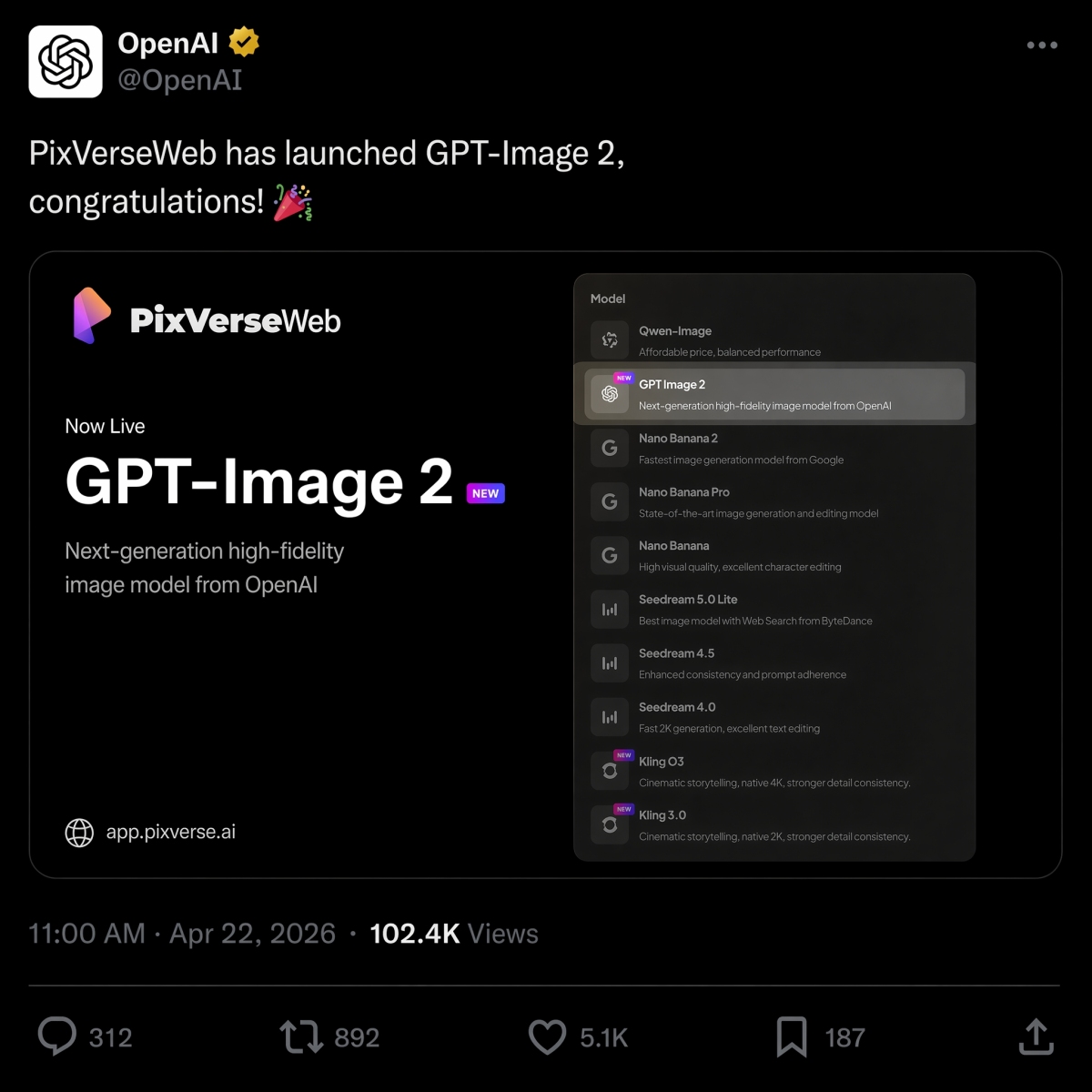
El 22 de abril de 2026, PixVerse lanzó GPT Image 2 como una opción de conversión de texto a imagen, uniéndose a Nano Banana 2, Seedream y HappyHorse 1.0 en la línea de modelos.
Si está decidiendo entre OpenAI y los modelos de imágenes de Google para el mismo resumen, consulte nuestra Comparación GPT Image 2 vs Nano Banana 2 para obtener resultados en paralelo de mensajes idénticos.
Si su trabajo rápido se trata principalmente de video, nuestra mejor guía de herramientas de IA de imagen a video explica cómo elegir el flujo de trabajo de movimiento correcto una vez que la imagen fija esté lista.
Pruebe PixVerse: abra la aplicación PixVerse.
Preguntas frecuentes
¿Cuáles son las mejores indicaciones de GPT Image 2?
Las mejores indicaciones de GPT Image 2 describen un trabajo de producción claro, no solo un estilo visual. Las indicaciones potentes suelen incluir el tema, el tipo de salida, el texto exacto si es necesario, la composición, la iluminación, las restricciones, la relación de aspecto y el caso de uso final. Los anuncios de productos, los carteles con texto exacto, las hojas de personajes, las maquetas de la interfaz de usuario, las infografías y los primeros fotogramas de imagen a vídeo son categorías especialmente buenas para empezar.
¿Cómo escribo mejores mensajes GPT Image 2?
Utilice esta fórmula: tema más estilo visual más composición más iluminación más detalles más restricciones más caso de uso de salida. Dígale a GPT Image 2 qué debe hacer la imagen, cite el texto exacto, especifique el diseño y la relación de aspecto y enumere lo que no debe cambiar. Para ediciones, separe el cambio, los elementos bloqueados y los requisitos de realismo.
¿GPT Image 2 es bueno para imágenes de productos?
Sí. GPT Image 2 es útil para conceptos de anuncios de productos, imágenes destacadas de comercio electrónico, maquetas de envases, recortes de productos y elementos visuales de campañas. Los equipos de productos aún deben revisar la geometría del producto, el texto de las etiquetas, las afirmaciones reguladas, los logotipos y los detalles del empaque antes de utilizar el resultado en anuncios o listados de productos.
¿Puede GPT Image 2 crear imágenes con texto?
Sí, GPT Image 2 puede crear imágenes con texto legible, especialmente titulares cortos, etiquetas, carteles, elementos de menú, pasos infográficos y etiquetas de interfaz de usuario. Para obtener mejores resultados, coloque el texto exacto entre comillas, especifique dónde aparece, mantenga el texto breve y agregue restricciones como “solo texto exacto”, “sin palabras adicionales” y “sin texto duplicado”.
¿Cómo convierto imágenes GPT Image 2 en videos?
Primero genere o apruebe la imagen fija y luego cárguela en PixVerse de imagen a video. Escriba una indicación de movimiento separada que describa qué se mueve y qué permanece bloqueado. Las buenas indicaciones de movimiento mencionan el movimiento de la cámara, la preservación del sujeto, el movimiento del fondo y restricciones como la ausencia de texto nuevo, logotipos nuevos y productos adicionales.
GPT Image 2 vs Nano Banana 2: ¿cuál es mejor?
GPT Image 2 suele ser mejor para resultados de diseño estructurados, como carteles con mucho texto, diagramas, maquetas de interfaz de usuario, resúmenes visuales editables y primeros fotogramas de imagen a vídeo. Vale la pena comparar Nano Banana 2 cuando el fotorrealismo, el detalle del material y la iteración visual rápida son más importantes. Consulte la comparación GPT Image 2 con Nano Banana 2 para obtener los mismos resultados.
¿GPT Image 2 es lo mismo que ChatGPT Images 2.0?
Para intención de búsqueda, sí. Muchos usuarios utilizan GPT Image 2, gpt-image-2 y ChatGPT Images 2.0 para describir la nueva experiencia de generación de imágenes ChatGPT de OpenAI. El nombre del producto OpenAI es ChatGPT Images 2.0, mientras que gpt-image-2 es la frase de estilo modelo que los desarrolladores y creadores suelen utilizar cuando hablan de flujos de trabajo API.
¿GPT Image 2 es gratuito y cuánto cuesta la API?
La ayuda de OpenAI enumera ChatGPT Images 2.0 como disponible en todos los niveles, pero las cuotas del plan y la facturación de API son independientes. A partir del 22 de junio de 2026, OpenAI enumera la salida de imágenes de GPT-Image-2 a $30,00 por 1 millón de tokens; El costo real depende de la longitud del mensaje, las referencias, el tamaño de salida, la calidad y el almacenamiento en caché.