Best AI Video Ad Generator in 2026: One Photo to a Full Commercial
Compare 3 AI video ad tools on PixVerse: Ad Master turns one photo into a 32-second commercial, V6 gives full creative control at 1080p, and the API automates bulk generation.
Quick answer: The right AI video ad tool depends on how much creative control you need and how many videos you produce.
- Ad Master — Upload one product photo, enter a few selling points, and get a 32-second commercial with voiceover, captions, and music. No editing required. Best for e-commerce sellers who need volume.
- PixVerse V6 — Write a text prompt to direct every shot, camera angle, and scene transition. 15-second clips at 1080p with built-in audio. Best for brand campaigns and hero ads.
- PixVerse API — Programmatic access for bulk generation. Send product images and text via API, receive finished videos via webhook. Best for platforms and teams managing 100+ SKUs.
All three are available on PixVerse with free credits to start. No shooting, no editing software, no production crew.
An AI video ad generator is a tool that turns product images, text descriptions, or URLs into finished video ads without a camera, studio, or editing software. You provide the input, and the AI handles scene creation, camera movement, voiceover, captions, and rendering. The best tools in this category let you go from a single product photo to a platform-ready ad in minutes.
In this guide, we compare several approaches to AI video ad generation, with a focus on three tools available on PixVerse: Ad Master for one-click product ads, PixVerse V6 for custom creative control, and the PixVerse API for automated generation at scale. We also look at how other platforms handle similar tasks so you can find the right fit for your workflow.
What Should You Look for in an AI Video Ad Generator?
Not all AI video tools are built for advertising. A tool that produces beautiful cinematic B-roll may not generate the voiceover, captions, or aspect ratios you need for a TikTok ad. Here is what actually matters when choosing an AI video ads generator for commercial use:
- Low input barrier: A single product photo and a few lines of text should be enough. You should not need a full media kit to produce a usable ad creative.
- Voiceover and captions: Ads on social platforms need spoken narration and on-screen text. The tool should generate both automatically, not require a separate audio production step.
- Platform-ready formats: You need 9:16 for TikTok and Instagram Reels, 16:9 for YouTube pre-roll, and 1:1 for feed posts. The tool should support multiple aspect ratios natively.
- Resolution for paid placements: 720p is the minimum for most ad networks. 1080p is better for product close-ups and marketplace listing videos.
- Speed and cost at scale: If you manage hundreds of SKUs, the tool needs to be fast and cost-effective per video. Batch generation or API access becomes essential.
- Commercial usage rights: Make sure the output is cleared for commercial use in paid ads, not just personal projects.
How Do AI Video Ad Generators Compare?
The AI ad video generator landscape in 2026 splits into a few distinct categories. Some tools focus on avatar-based spokesperson videos, others generate cinematic footage from prompts, and some are built specifically for product advertising. Here is how the main approaches break down:
| Approach | Best for | Example tools | Key strength |
|---|---|---|---|
| Product ad generators | E-commerce listings, product showcase ads | Ad Master, Creatify | One-click workflow from product image to finished ad with voiceover |
| General video models | Custom scenes, brand storytelling, B-roll | PixVerse V6, Runway, Kling | Full creative control over visuals, camera, and scene composition |
| Avatar/UGC platforms | Spokesperson ads, testimonial-style content | Synthesia, HeyGen | AI-generated human presenters reading a script |
| API-first platforms | Bulk generation, platform integrations | PixVerse API, Creatify API | Programmatic access for large catalogs |
Each approach solves a different problem. Product ad generators minimize input and maximize speed. General video models give you creative flexibility. Avatar platforms create talking-head content. And API services let you automate everything.
The rest of this article focuses on the tools available through PixVerse, since it covers three of these four categories on a single platform.
Best AI Video Ad Generator: Ad Master (Best for Fast Product Ads)
Ad Master is the fastest path from a product photo to a finished commercial on PixVerse. It lives inside the Mini-Apps section and is built specifically for product marketing. If you need an AI video ads generator that works from a single product photo, this is where to start.
Highlights: Why Ad Master Works as an AI Video Ad Generator
Creating product videos the traditional way is expensive and slow. Here is what sellers and brands face today:
- Long production cycles: A single product video typically takes days from concept to final cut. When you manage hundreds of SKUs, that timeline makes full catalog coverage impossible.
- High production costs: Hiring models, booking a studio, shooting, and editing a 30-second clip can cost hundreds to thousands of dollars per video. For small and mid-size sellers, that budget simply does not exist.
- Slow creative iteration: Testing different angles or selling points means going back to the drawing board each time. By the time a new version is ready, the market has moved on.
- Image-only listings lose sales: Product pages with video convert significantly better than image-only pages. Research shows that listings with video generate an average of 24% higher sales than those without. Yet most sellers still rely on static images because video production is out of reach.
Ad Master solves these problems by compressing the entire production pipeline into a single step: upload one photo, type a few words, and get a finished 32-second commercial with voiceover, captions, and background music.
Unlike general-purpose text-to-video tools that require detailed prompt writing, Ad Master is designed for people who are not video professionals. Three features set it apart:
- Minimal input required: You only need one clear product photo. A white-background product shot works best, but even a casual snapshot is accepted. The AI analyzes the image, associates it with relevant scenes and models, and generates a complete video automatically.
- Free-form text input: The selling points field accepts any natural language. You can enter product features, target audience notes, or even general creative preferences like “outdoor setting” or “warm lighting.” No prompt engineering skills needed.
- Bilingual output: Ad Master supports both English and Chinese voiceover and captions, which makes it practical for cross-border e-commerce teams selling on international marketplaces.
Each generation produces a 32-second video ad with AI-generated scenes matched to your product category, voiceover narration, synced captions, and professional camera work including close-ups, transitions, and product reveals. The credit cost is fixed per video, so you always know the price before you generate.
How to Use Ad Master as an AI Ad Video Generator
For this example, the entire input was:
Step 1 — Upload one product photo:
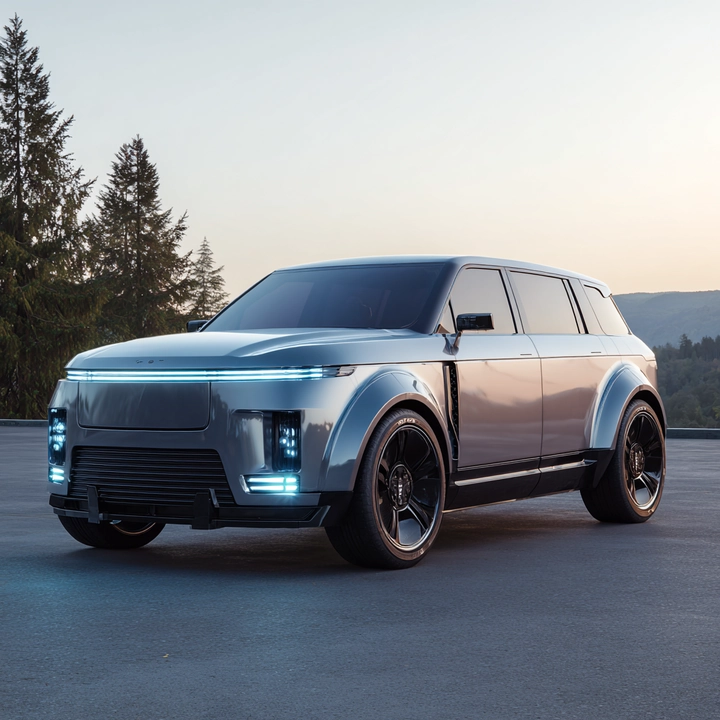
Step 2 — Fill in the text fields:
- Product Name: Electric SUV
- Product Selling Points: Aerodynamic body, full LED headlights, panoramic glass roof
Step 3 — Click Generate.
No scene descriptions, no camera directions, no storyboard. Ad Master took that one photo and those few words and generated this 32-second commercial:
The AI automatically decided the creative direction: an extreme close-up pan across the headlights, a tracking shot on a highway at speed, an aerial sweep showing the roofline, and a final hero shot in a studio setting. It chose the scenes, the camera angles, the lighting, the transitions, and the background music on its own.
Use case: From hundreds of SKUs to full video coverage
The problem: A mid-size e-commerce brand sells 500 products across Amazon, TikTok Shop, and its own Shopify store. Only 30 products have video listings. The rest rely on static images, and those listings consistently underperform in both search ranking and conversion rate. Hiring a production team to shoot all 500 would cost tens of thousands of dollars and take months.
How Ad Master helps: The marketing team uploads the existing product photos one by one, enters a product name and two to three selling points for each, and clicks Generate. Each video takes minutes to produce. In a single week, the team creates video ads for their entire catalog without booking a single shoot.
The result: Full video coverage across all listings, higher conversion rates on product pages, and enough budget left over to A/B test multiple selling point variations for the top performers. When a new product launches, the team generates the first ad within minutes of receiving the product sample photo.
Best AI Video Ad Generator: PixVerse V6 (Best for Creative Control)
Ad Master is built for speed and volume. But not every ad can be generated from a single photo and a product description. Brand campaigns, fashion lookbooks, and hero ads for social platforms often require a specific scene, a particular visual mood, or precise camera movement that automated tools cannot deliver.
PixVerse V6 is a general-purpose AI video generation model that gives creative teams full directorial control. It supports text-to-video, image-to-video, and multi-shot generation with up to 1080p output at 15 seconds per clip, plus built-in audio synthesis.
Highlights: Why PixVerse V6 Is a Best AI Video Generator for Ads Choice
Even with a budget, traditional video production creates friction at every stage:
- Model casting and studio booking: A single fashion video shoot requires coordinating talent, wardrobe, location, and crew. Lead times of weeks are common, and rescheduling is expensive.
- Fragmented footage: Before V6, AI video tools could only produce short 3-5 second clips. Stitching them together often caused visible style shifts mid-video, destroying the professional feel.
- Separate audio production: Generating visuals is only half the job. Traditional workflows require a second pass for sound design, background music, and voiceover, each with its own tools and costs.
- Format rework for every platform: A 16:9 YouTube ad needs to be manually re-cropped for 9:16 TikTok and 1:1 Instagram. Each crop risks cutting off key visual elements.
V6 addresses each of these bottlenecks with specific capabilities:
- 15-second 1080p single-pass generation: No more stitching short clips. V6 maintains temporal stability from the first frame to the last, producing fluid, high-fidelity output that mirrors traditional cinematography. This eliminates the motion artifacts that plagued earlier AI video tools.
- Multi-shot storytelling engine: V6 manages transitions between different camera angles (wide, medium, close-up) while keeping the environment and subject consistent across cuts. You can direct a sequence that moves from a studio setting to an outdoor location and back, and the lighting and character appearance stay aligned.
- Integrated audio generation: Background music and sound effects are generated alongside the video in one pass. No separate audio tools, no library subscriptions, no manual syncing.
- Native multi-format output: Set the aspect ratio before generation (16:9, 9:16, 1:1, 4:3, and more). The AI adjusts the focal point for each format, so you get distribution-ready assets without manual cropping.
Comparison: Ad Master vs. PixVerse V6 for AI Video Ads
| Ad Master | PixVerse V6 | |
|---|---|---|
| Input required | 1 product photo + selling points | Text prompt or image + detailed description |
| Output duration | Fixed at 32 seconds | Up to 15 seconds per clip |
| Creative control | Automated (AI decides scenes) | Manual (you direct every shot) |
| Voiceover | Built-in, automatic | Not included (add separately) |
| Captions | Built-in, automatic | Not included (add separately) |
| Pricing | Fixed credit cost per video | Credits based on duration and resolution |
| Best for | High-volume product ads | Hero ads, brand campaigns, A/B testing |
| Learning curve | Minimal | Moderate (prompt writing skills help) |
For detailed credit costs per second by resolution and model, see the PixVerse Platform pricing page. As a reference, V6 charges 7 credits per second at 540p without audio and 23 credits per second at 1080p with audio.
How to Use PixVerse V6 as an AI Video Ads Generator
With V6, you write a text prompt that describes exactly what you want to see. Here is an example of a prompt and the video it produced:
Prompt: “A young woman wearing a light blue gingham shirt dress stands in a photography studio with a dark blue backdrop, holding a brown leather handbag. The camera starts on a medium full shot, then slowly pushes in to frame her upper body before cutting to an extreme close-up of the fabric texture and buttons. The scene transitions to a beach with blue sky and ocean waves, where the same model walks as her dress flows in the wind. Back in the studio, she turns to show the back of the dress with a waist tie, then spins to face the camera with the skirt fanning out in a full circle. Studio lighting with softboxes, photorealistic, vertical 9:16 format.”
Notice the difference from Ad Master. With V6, you control the scene transitions (studio to beach and back), the camera framing (full shot, push-in, extreme close-up of fabric), the model actions (walking, turning, spinning), and the visual style (studio lighting, photorealistic). The output follows your creative direction shot by shot.
Use case: Building a brand campaign without a production crew
The problem: A fashion brand is preparing a seasonal campaign for a new dress collection. The creative brief calls for studio shots, an outdoor beach scene, and fabric close-ups. Traditionally, this means booking a model, a photographer, a videographer, a studio, and a beach location. The estimated cost is several thousand dollars per look, and the timeline is three weeks from concept to final deliverables.
How V6 helps: The creative director writes a single prompt describing the full sequence: studio opening shot, fabric detail close-up, beach lifestyle scene, back view spin, and final hero pose. V6 generates the entire 15-second video in one pass at 1080p, with consistent model appearance across all scene transitions. The team generates the same concept in 16:9 for YouTube and 9:16 for TikTok Reels without re-shooting or re-cropping.
The result: The campaign goes from brief to finished hero video in hours instead of weeks. The team uses the budget savings to test three different visual styles for A/B testing on paid social. When the client requests a last-minute change to the beach scene, the director rewrites two sentences in the prompt and regenerates in minutes.
Best AI Video Ad Generator: PixVerse API (Best for Bulk Automation)
Ad Master and V6 work well when a person is generating videos one at a time through the web interface. But some businesses need something different: programmatic access that lets their own systems generate videos automatically, without anyone clicking a button.
PixVerse offers a dedicated API service for exactly this purpose. It gives developers access to the same generation capabilities available in the web app, including text-to-video, image-to-video, multiple model options, and customizable output parameters.
Highlights: Why PixVerse API Fits AI Video Ad Generation at Scale
For teams managing large catalogs or running high-volume ad operations, the manual approach hits a wall:
- Repetitive human labor: When you have 1,000 products and each needs a video, having a person upload images and type selling points one by one is not scalable. The work is repetitive, error-prone, and expensive in staff hours.
- Inconsistent quality and timing: Different team members produce different quality levels. Videos for new product launches get delayed because the content team is still working through the backlog.
- No integration with existing systems: Most e-commerce platforms and ad management tools have APIs. If your video generation tool does not, it becomes a manual bottleneck in an otherwise automated pipeline.
- Creative fatigue: Teams that produce hundreds of ad creatives per month eventually run out of fresh angles. Automated variation generation can produce more versions for testing without burning out the creative team.
The PixVerse Platform API addresses these pain points with:
- Text-to-video and image-to-video generation triggered by your own systems
- Multiple model options including PixVerse V6 and additional models available on the platform
- Batch processing for generating videos across your entire SKU list in parallel
- Webhook callbacks so your system knows when each video is ready for download
- Customizable parameters for duration, resolution, aspect ratio, and audio settings
How to Use PixVerse API for Bulk AI Video Ad Generation
The simplest workflow is straightforward: connect your product upload flow to the API, send the product image and description as soon as a new item is created, and receive the finished video through a webhook when generation is complete. This makes it possible to publish video-enabled listings without asking your team to generate assets manually one by one.
Use case: Automating listing videos for a marketplace
The problem: An e-commerce marketplace hosts 10,000 sellers. Most sellers only have product photos and short text descriptions. The marketplace wants to offer video listings to improve engagement and conversion, but asking each seller to produce their own videos results in low adoption and inconsistent quality.
How the API helps: The platform engineering team integrates the PixVerse API into the seller dashboard. When a seller uploads a new product, the system automatically sends the product image and description to the API. A finished video ad is returned via webhook and attached to the listing without any manual intervention from the seller.
The result: Video coverage across the marketplace grows from under 5% to over 60% within months. Sellers see higher click-through rates on video-enabled listings. The marketplace differentiates itself from competitors by offering AI video as a built-in feature rather than a third-party add-on. The engineering team uses the API’s batch endpoint to backfill videos for existing listings during off-peak hours.
Visit platform.pixverse.ai to explore the documentation and request access. The API uses a credit-based pricing model, and volume discounts are available for enterprise clients.
Which AI Video Ad Tool Should You Pick?
| If you need… | Recommended tool | Why |
|---|---|---|
| Quick product ads from a single photo | Ad Master | Fastest path from image to finished ad with voiceover and captions |
| Custom scenes with specific creative direction | PixVerse V6 | Full control over visuals, camera, and multi-shot narrative |
| Automated generation for 100+ products | PixVerse API | Programmatic access, batch processing, webhook integration |
| AI spokesperson or talking-head ads | Synthesia or HeyGen | Avatar-based platforms designed for presenter-style content |
| UGC-style ad creatives at speed | Creatify | URL-to-video workflow optimized for performance marketing |
| E-commerce listing videos on a tight budget | Ad Master | Low input required, fixed credit cost per video |
| Campaign hero videos with brand storytelling | PixVerse V6 | Multi-shot generation with consistent visual identity |
There is no single best tool for every situation. The right choice depends on your content type, production volume, and how much creative control you need.
What Are the Best Practices for AI Video Ads by Platform?
Different ad platforms have different requirements. Here is how to optimize your AI ad video output for each:
TikTok and Instagram Reels
- Use 9:16 vertical format
- Keep videos under 15 seconds for higher completion rates
- Enable captions (most viewers watch without sound)
- Lead with the product in the first 2 seconds
YouTube Pre-Roll and In-Feed
- Use 16:9 horizontal format
- 15 seconds is the standard for skippable ads
- Include a clear call-to-action in the final frame
- Higher resolution (1080p) matters more here since viewers watch on larger screens
Amazon and Marketplace Listings
- Use 1:1 square or 16:9 horizontal depending on the platform
- Focus on product close-ups and detail shots
- Keep voiceover focused on features and benefits, not storytelling
- Multiple short clips (one per product angle) often outperform a single longer video
Meta (Facebook and Instagram Feed)
- 1:1 square performs well in feeds
- First 3 seconds are critical for stopping the scroll
- Captions are essential since autoplay is muted by default
- Test multiple versions with different selling points to find what resonates
Common Mistakes to Avoid with AI Video Ad Generators
Even the best tools produce poor results when used incorrectly. Here are the most frequent issues and how to fix them:
The output looks generic and could be for any product
Cause: Vague or overly short input text. Entering just “red dress” gives the AI almost nothing to work with.
Fix: Be specific about what makes your product different. Instead of “red dress,” write “fitted red satin cocktail dress with a V-neckline, designed for evening events.” The more detail you provide, the more relevant the AI-generated scenes will be.
The same video does not perform well across all platforms
Cause: Using a single video format for TikTok, YouTube, and Amazon. Each platform has different pacing, aspect ratio, and viewer behavior expectations.
Fix: Generate platform-specific versions. Use 9:16 vertical with fast pacing and captions for TikTok. Use 16:9 horizontal with a clear CTA for YouTube. Use 1:1 square with product close-ups for Amazon. Ad Master supports all three ratios natively, and V6 lets you specify the format before generation.
AI-generated scenes do not match the actual product
Cause: The product image is low quality, poorly lit, or includes distracting background elements. The AI misinterprets the product category or shape.
Fix: Use a well-lit product photo on a white or solid-color background. Make sure the product fills most of the frame. If the AI still generates mismatched scenes, try a different angle of the product or add more descriptive text in the selling points field.
Generated videos feel repetitive after producing many ads
Cause: Using the same selling points and product angle for every generation. The AI will produce similar creative directions for similar inputs.
Fix: Vary your selling points across generations. For one batch, emphasize materials and craftsmanship. For another, focus on use cases and lifestyle scenarios. For a third, highlight price value or seasonal relevance. This gives the AI different creative signals and produces more diverse output for A/B testing.
Frequently Asked Questions
Do AI video ads convert better than static images?
Yes. When used well, product video often outperforms image-only listings. Industry figures commonly cite ~24% higher sales for pages with video versus static images alone on major e-commerce platforms—video shows motion, scale, and texture and holds attention longer than a carousel.
How does AI ad video cost compare to traditional production?
Traditional shoots often cost hundreds to thousands of dollars per clip after talent, studio, and post. Ad Master on PixVerse keeps per-video cost to roughly a few dollars equivalent with fixed credits per output. PixVerse V6 scales with duration and resolution; see the PixVerse Platform pricing page (for example, a 5-second 540p clip without audio uses fewer credits than a 15-second 1080p clip with audio).
What are quick tips for better results with AI video ad generators?
- Use a clean, well-lit product photo on a plain background.
- Write selling points, not generic descriptions—your text shapes voiceover and scenes.
- On V6, iterate at 720p to save credits, then render winners at 1080p; Ad Master uses fixed credits per video.
- Add captions—Meta for Business reports captions can lift view time by an average of 12%.
- If the first output misses, rewrite the copy before regenerating.
Is there a free AI video ad generator on PixVerse?
Yes. PixVerse offers free credits to registered users. If you are looking for a free AI ad video generator to test before paying, this is the easiest way to start. For users searching phrases like AI video ads generator free, the practical answer is the same: use the free credits to test Ad Master and PixVerse V6 before upgrading. No credit card is required to sign up. Visit app.pixverse.ai to create a free account and start generating.
What is an AI video ads generator?
An AI video ad generator, or AI video ads generator, is software that automatically creates video advertisements from minimal inputs like product images, text descriptions, or URLs. It replaces the traditional production process of filming, editing, and post-production with AI-driven scene generation, voiceover synthesis, and caption rendering.
Can I use AI-generated video ads for paid campaigns?
Videos generated on PixVerse can be used for commercial purposes including paid advertising. You can download watermark-free versions with a paid plan and use them across any ad platform including Meta, TikTok, YouTube, and Amazon.
What is the difference between Ad Master and general AI video generators?
Ad Master is purpose-built for product advertising. You upload one photo, enter selling points, and get a finished ad with voiceover and captions. General AI video generators like PixVerse V6 or Runway require more detailed prompts and produce raw video footage that you then need to edit, add audio to, and format for your target platform.
Can I generate AI video ads in bulk?
Yes. The PixVerse API lets you generate videos programmatically. You can submit generation requests with product images and text, and receive finished videos via webhook callbacks. This is ideal for e-commerce businesses with large product catalogs that need listing videos at scale.
What aspect ratios and resolutions are available?
Ad Master supports 9:16 (vertical), 16:9 (horizontal), and 1:1 (square) formats at 720p or 1080p, with a fixed output of 32 seconds per video. PixVerse V6 supports the same aspect ratios plus additional options like 4:3, with clips up to 15 seconds. Choose the format based on your target ad platform.
How do AI video ads compare to traditionally produced ads?
AI-generated ads are faster and cheaper to produce, making them practical for covering entire product catalogs. Traditional production still offers more control over lighting, talent, and brand-specific aesthetics. Many teams use AI ads for high-volume product listings and marketplace content, while reserving traditional production for flagship campaigns.
Do I need any video editing skills to use AI ad generators?
No. Ad Master requires zero video editing skills. You upload a photo, type selling points, and the tool handles the entire production including scene composition, voiceover, captions, and music. PixVerse V6 requires prompt writing ability rather than editing skills. You describe what you want to see in text, and the AI generates it. Neither tool requires you to install any editing software.
How long does it take to generate an AI video ad?
Ad Master typically generates a 32-second commercial within a few minutes. PixVerse V6 generates a 15-second clip in roughly 1-3 minutes depending on resolution and server load. Both are significantly faster than traditional production, which takes days to weeks from concept to final delivery.
Conclusion
Choosing the best AI video generator for ads depends on what you are making and how many videos you need. For fast, one-click product ads, Ad Master handles everything from a single photo. For custom creative work, PixVerse V6 gives you full control over scenes and camera direction. For bulk generation and platform integration, the PixVerse API connects to your existing systems.
All three tools are available on PixVerse with a free tier to get started. If you need avatar-based presenter videos or UGC-style creatives, tools like Synthesia, HeyGen, and Creatify are also worth evaluating for those specific use cases.
Start by identifying your highest-volume ad need, pick the tool that matches, and generate your first batch. You can always expand to additional tools as your workflow grows.