Panduan Prompt GPT Image 2: 80 Prompt, Ulasan dan Tips API (2026)
Jelajahi 80 prompt GPT Image 2 siap salin untuk iklan, poster, produk, karakter, dan workflow video, plus catatan API dan hasil uji.
Ini adalah panduan cepat GPT Image 2 dan ulasan langsung untuk pembuat konten yang membutuhkan petunjuk yang dapat digunakan terlebih dahulu: iklan produk, poster, gambar mini, karakter, gambar sosial, maket UI, pengeditan, dan bingkai pertama yang siap untuk video.
Gunakan jalur cepat di bawah ini jika Anda sudah mengetahui apa yang Anda perlukan:
- Perintah penyalinan: lihat 80 contoh perintah GPT Image 2 siap salin di bawah.
- Lihat hasil tes: periksa skor ulasan langsung dan batasannya.
- Ubah gambar menjadi video: ikuti alur kerja gambar-ke-video PixVerse.
GPT Image 2 paling kuat ketika gambar harus berperilaku seperti aset yang dirancang: teks yang dapat dibaca, tata letak yang bersih, komposisi produk, maket UI, infografis, referensi yang dapat diedit, dan bingkai pertama yang siap untuk video. Hal ini kurang dapat diandalkan jika pekerjaan bergantung pada reproduksi logo merek yang tepat, salinan kepatuhan yang kecil, font yang dimiliki, atau aset akhir transparan yang harus dikirimkan tanpa QA manual.
OpenAI memperkenalkan ChatGPT Images 2.0 pada tanggal 21 April 2026. Kreator sering kali menelusuri pengalaman yang sama seperti GPT Image 2, gpt-image-2, atau ChatGPT Images 2.0. Kami pertama kali mengujinya selama minggu peluncuran dan meninjau panduan ini lagi pada tanggal 22 Juni 2026 berdasarkan panduan resmi OpenAI, halaman harga API, dan dokumentasi bantuan Gambar ChatGPT.
Jika gambar diam memerlukan persiapan sebelum dianimasikan, PixVerse Mini Apps mengelompokkan alur kerja terfokus untuk pembersihan gambar, perluasan frame, dan tugas produksi terkait.
5 Perintah GPT Image 2 untuk Menyalin Terlebih Dahulu
Kelima petunjuk ini mencakup kasus penggunaan bernilai tertinggi dalam panduan ini. Masing-masing mengikuti format yang sama: use case, prompt, best for, dan tip.
Contoh Cepat 1: Fotografi Produk
Kasus penggunaan: Gambar pahlawan produk e-niaga
Permintaan:
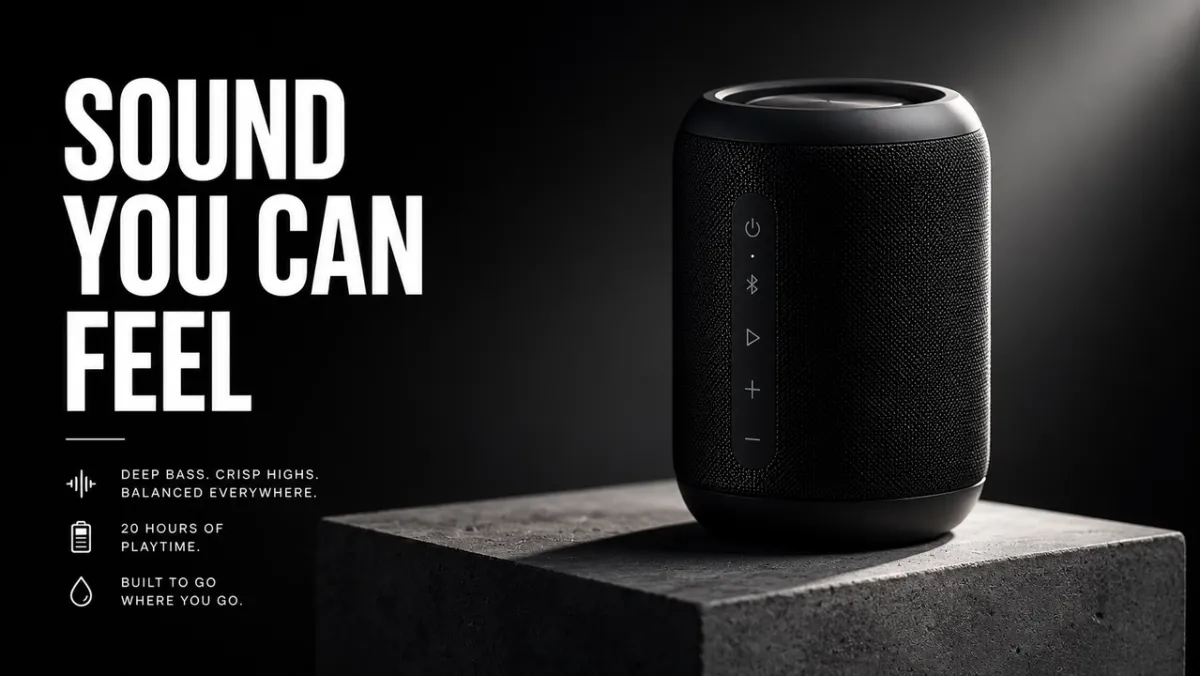
Buat gambar pahlawan e-niaga premium untuk speaker nirkabel hitam matte di atas alas beton. Produk berada di sepertiga kanan dengan tepi tajam, tekstur bahan realistis, bayangan kontak bersih, dan cahaya tepi dramatis. Biarkan sepertiga kiri sebagai ruang negatif untuk judul. Tidak ada logo merek palsu, tidak ada tanda air, tidak ada objek tambahan. Rasio aspek 16:9.
Terbaik untuk: Daftar produk, iklan sosial berbayar, gambar pahlawan laman landas
Tips: Jika Anda memberikan gambar referensi, tambahkan “pertahankan bentuk, warna, label, dan proporsi produk dengan tepat”.
Contoh Cepat 2: Materi Iklan AI
Kasus penggunaan: Poster kampanye dengan teks yang sama persis
Permintaan:
Buat poster peluncuran produk vertikal untuk alat desain fiksi. Judul: “BUAT LEBIH CEPAT”. Subjudul: “DARI PROMPT KE KAMPANYE”. Kotak Swiss bersih, latar belakang putih pucat, tipografi hitam, satu bentuk aksen biru elektrik, hierarki kuat, hanya teks persis, tanpa kata tambahan, tanpa tanda air. Rasio aspek 9:16.
Terbaik untuk: Konsep iklan, pengujian poster, grafik peluncuran, gambar kampanye sosial
Tips: Buat teks judul tetap singkat dan kutip dengan tepat. Teks panjang lebih sulit dirender dengan rapi.
Contoh Cepat 3: Konsistensi Karakter
Kasus penggunaan: Lembar referensi karakter
Permintaan:
Buat lembar referensi karakter profesional untuk kurir fiksi ilmiah asli bernama “NOVA”. Sertakan tampilan depan, samping, dan belakang; empat ekspresi wajah; info jaket, sepatu bot, dan ransel; dan baris palet warna. Pertahankan wajah, gaya rambut, pakaian, dan proporsi yang sama di setiap tampilan. Latar belakang putih bersih, label yang dapat dibaca, gaya seni konsep. Rasio aspek 16:9.
Terbaik untuk: Karakter game, referensi animasi, maskot merek, papan cerita
Tips: Ulangi penanda identitas di setiap regenerasi: nama, wajah, gaya rambut, pakaian, palet warna, dan peran.
Contoh Cepat 4: Gambar Mini atau Gambar Sosial
Kasus penggunaan: Thumbnail YouTube atau postingan sosial
Permintaan:
Buat gambar mini YouTube tebal untuk video tentang permintaan gambar AI. Teks utama: “PROMPT LEBIH BAIK”. Tampilkan hasil gambar sebelum dan sesudah dalam layar terpisah, dengan kartu perintah yang berantakan di sebelah kiri dan visual kampanye yang sempurna di sebelah kanan. Kontras tinggi, komposisi jelas tanpa wajah, teks mudah dibaca, tidak ada logo palsu, tidak ada kata tambahan. Rasio aspek 16:9.
Terbaik untuk: Gambar kecil, penjelasan sosial, grafik blog, konten pembuat
Tips: Beri tahu model berapa banyak kata yang harus muncul dan ke mana kata tersebut harus ditempatkan.
Contoh Cepat 5: Bingkai Pertama Gambar-ke-Video
Kasus penggunaan: Frame pertama untuk gambar-ke-video PixVerse
Permintaan:
Buat bingkai sinematik pertama untuk klip gambar-ke-video: botol parfum kaca berdiri di atas batu hitam basah, pita tipis kabut di belakangnya, siluet latar depan yang kuat, lapisan kedalaman yang terlihat, pantulan halus, ruang kosong untuk pergerakan kamera, tanpa tangan, tanpa teks, tanpa tanda air. Rasio aspek 16:9.
Terbaik untuk: Pengungkapan produk, iklan pendek, pembukaan video musik, klip sosial sinematik
Tips: Tambahkan satu isyarat gerakan pada gambar diam, seperti kabut, debu, uap, kain, cahaya layar, atau pantulan.
Ubah Foto GPT Image 2 Anda menjadi Video dengan PixVerse
Perintah GPT Image 2 yang kuat dapat membuat gambar diam. PixVerse adalah langkah selanjutnya ketika masih membutuhkan gerakan, pergerakan kamera, atau klip kampanye pendek.
- Hasilkan frame pertama dengan GPT Image 2.
- Unggah gambar yang disetujui ke PixVerse.
- Tambahkan perintah gerakan terfokus.
- Ekspor video pendek untuk pengujian, iklan, postingan sosial, atau halaman produk.
Perintah gerakan untuk mencoba:
- Gunakan gambar sebagai bingkai pertama. Dorong kamera secara perlahan ke arah produk sementara kabut melayang di belakangnya. Pertahankan bentuk, label, pencahayaan, dan posisi produk.
- Gunakan gambar sebagai bingkai pertama. Tambahkan gerakan kamera genggam yang lembut, kain yang bergerak tertiup angin, dan paralaks latar belakang yang lembut. Jangan mengubah wajah atau pakaian karakter.
- Gunakan gambar sebagai bingkai pertama. Menganimasikan lampu kota yang menyala satu per satu sementara kamera bergerak sedikit ke kiri. Pertahankan semua teks poster yang dapat dibaca.
- Gunakan gambar sebagai bingkai pertama. Putar produk secara halus pada alasnya, tambahkan lampu tepi yang bergerak, dan jaga kebersihan latar belakang.
- Gunakan gambar sebagai bingkai pertama. Tambahkan uap, pantulan, dan gerakan kamera dari atas ke bawah yang lambat. Pertahankan bentuk, posisi piring, dan warna makanan.
Untuk struktur prompt gerakan yang lebih dalam, lihat panduan prompt video AI, panduan alat gambar-ke-video, dan workflow pembuat iklan video AI.
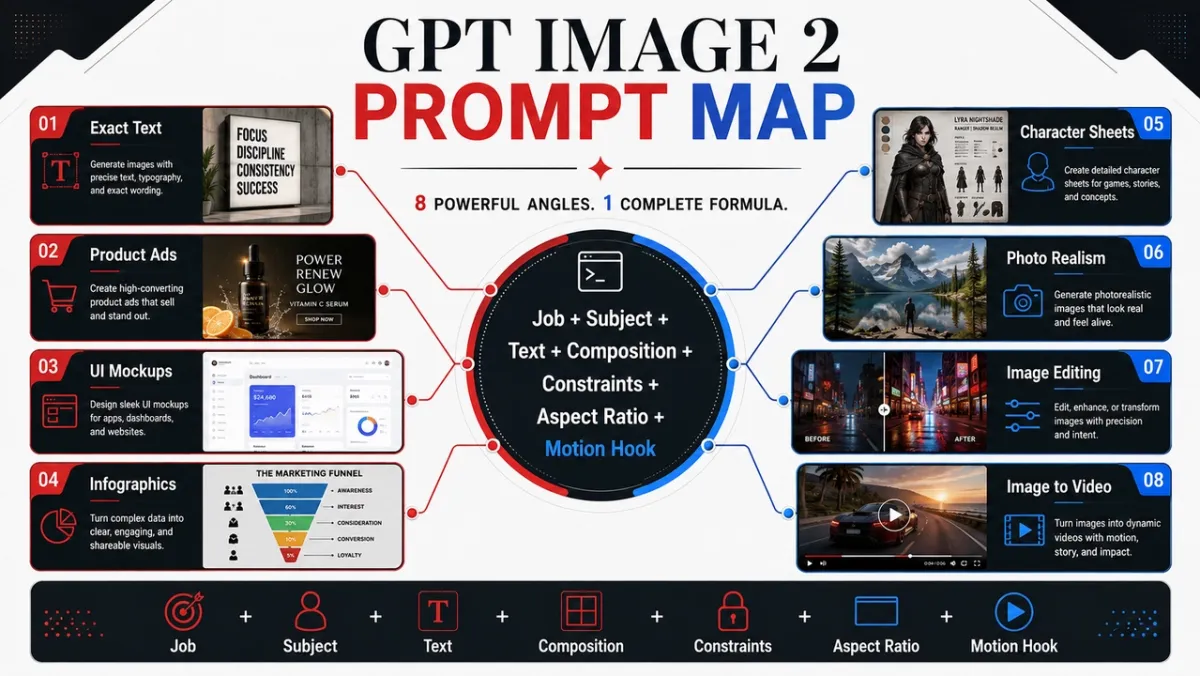
Cara Menulis Perintah GPT Image 2 yang Benar-benar Berfungsi
Perintah GPT Image 2 terbaik tidak hanya mendeskripsikan gambar. Mereka menggambarkan pekerjaan yang perlu dilakukan oleh gambar tersebut. Perintah untuk iklan sosial harus dibaca secara berbeda dari perintah untuk potongan produk, infografis, layar UI, atau frame pertama untuk video.
Pola awal yang dapat diandalkan terlihat seperti ini:
Buat [jenis gambar] untuk [kasus penggunaan]. Subjek utama: [subjek spesifik dan detail yang terlihat]. Teks persisnya, jika ada: “[salinan yang harus muncul]”. Komposisi: [pembingkaian, tata letak, ruang negatif, penempatan subjek]. Gaya dan pencahayaan: [bahasa visual, medium, suasana hati, arah cahaya]. Batasan: [yang tidak boleh diubah, tidak ada kata tambahan, tidak ada tanda air]. Format keluaran: [rasio aspek, latar belakang transparan, bingkai siap video].
Rumus:
Subjek + gaya visual + komposisi + pencahayaan + detail + batasan + kasus penggunaan keluaran
Keahlian 1: Sebutkan Pekerjaan Sebelum Gayanya
Mulailah dengan jenis keluaran: poster, iklan produk, layar aplikasi, lembar karakter, diagram pendidikan, edit, atau bingkai pertama gambar-ke-video. GPT Image 2 lebih baik dalam mengikuti perintah ketika memahami standar keberhasilan.
Perintah yang lemah:
Speaker futuristik yang keren, sinematik, detail tinggi.
Perintah yang lebih baik:
Buat iklan produk premium untuk speaker nirkabel hitam matte. Gambar harus berfungsi sebagai spanduk kampanye 16:9, dengan produk di sebelah kanan, judul pendek di sebelah kiri, ruang negatif yang bersih, dan tepi produk yang tajam.
Prompt kedua memberi tahu model bagaimana gambar akan dinilai: tidak hanya berdasarkan keindahan, tetapi juga berdasarkan tata letak, hierarki, dan kegunaan.
Keahlian 2: Perlakukan Teks Seperti Aset Terkunci
Jika teks penting, beri tanda kutip dan beri tahu model cara merendernya. Jangan meminta “slogan” kecuali Anda ingin modelnya menciptakan kata-kata.
Gunakan pola ini:
Judul: “SUARA YANG DAPAT ANDA RASAKAN”. Tampilkan judulnya kata demi kata. Tidak ada kata tambahan, tidak ada teks duplikat, tidak ada logo palsu. Jenis sans-serif putih tebal, sisi kiri komposisi, dapat dibaca dari jarak jauh.
Untuk salinan yang panjang, pisahkan teks menjadi beberapa baris terpisah di prompt. Jika hasilnya salah mengeja sebuah kata, buat ulang dengan teks yang lebih sedikit, jenis huruf yang lebih besar, dan bahasa “hanya teks persis” yang lebih ketat.
Keahlian 3: Memberikan Model Kamera dan Tata Letak
GPT Image 2 dapat mengikuti isyarat komposisi, namun perlu dinyatakan dengan jelas. Tambahkan jarak kamera, sudut, penempatan subjek, ruang negatif, dan rasio aspek.
Frase yang berguna:
- Close-up untuk tekstur produk, tangan, wajah, bahan, label.
- Foto lebar untuk lingkungan, adegan cerita, poster kota, dan bingkai siap video.
- Top-down untuk makanan, pemandangan meja, flat-lay, perlengkapan pengemasan.
- Kiri ketiga / kanan ketiga untuk tata letak iklan dengan teks dan keseimbangan produk.
- Kotak bersih untuk maket UI, lembar karakter, diagram, dan infografis.
Keahlian 4: Tulis Suntingan dalam Tiga Kalimat
Perintah pengeditan bekerja paling baik ketika memisahkan perubahan, elemen yang dikunci, dan realisme fisik.
Ganti mobil yang diparkir dengan sepeda antik. Pertahankan rumah, pagar, jalan masuk, lanskap, arah pencahayaan, sudut kamera, dan waktu dengan tepat. Cocokkan skala sepeda, bayangan kontak, dan perspektif dengan pemandangan yang ada.
Pola tersebut lebih kuat daripada “membuat ini terlihat lebih baik” karena pola ini memberi tahu GPT Image 2 di mana kreativitas diperbolehkan dan di mana tidak.
Keahlian 5: Tambahkan Isyarat Gerakan Saat Gambar Akan Menjadi Video
Jika gambar diam akan menjadi sumber gambar-ke-video PixVerse, minta kedalaman dan kesiapan gerakan. Mintalah latar depan, tengah tanah, latar belakang, siluet subjek yang bersih, dan satu isyarat gerakan yang terlihat: debu, kain, rambut, hujan, pantulan, pergerakan kendaraan, produk yang berputar, atau jalur dorong kamera.
Dari pada:
Seorang astronot di gurun.
Gunakan:
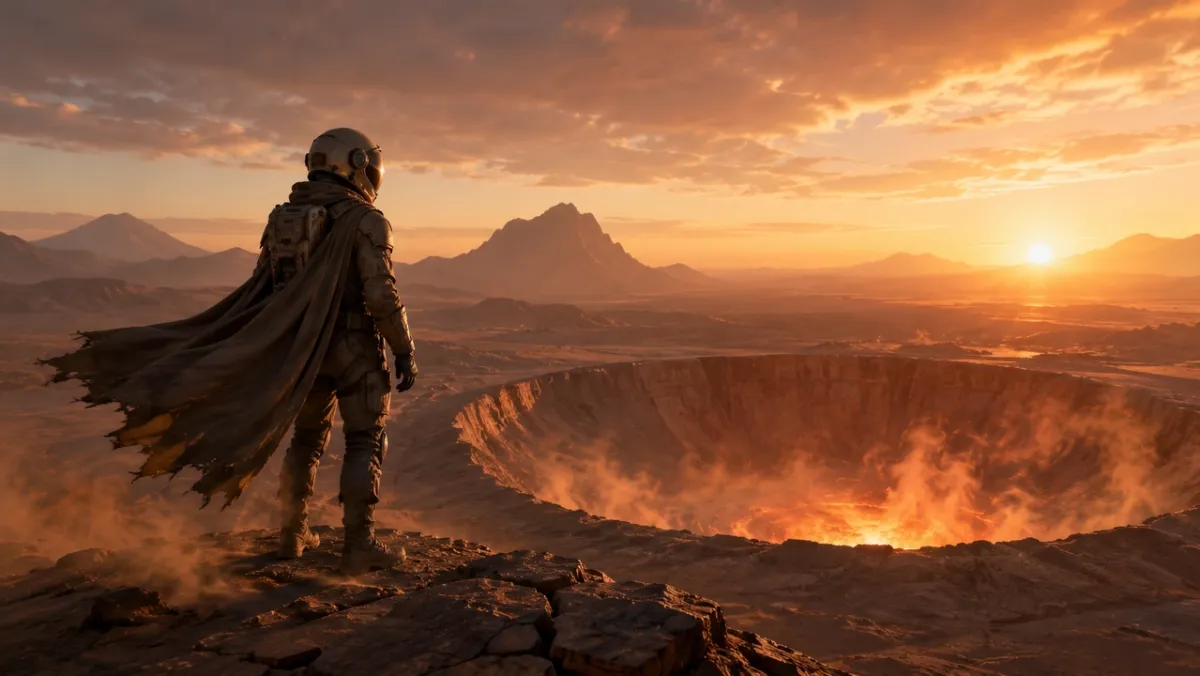
Bingkai sinematik pertama untuk klip gambar-ke-video: seorang astronot yang berdiri sendirian di tepi kawah gurun yang bersinar saat fajar, tanjung dan debu yang siap bergerak tertiup angin, siluet latar depan yang kuat, lapisan kedalaman yang jernih, dan cahaya cakrawala yang hangat.
Perpustakaan Prompt GPT Image 2: 80 Contoh Siap Salin
Setiap sudut di bawah mencakup sepuluh petunjuk. Perintah pertama di setiap kelompok adalah kandidat terbaik untuk contoh visual karena menekankan kemampuan yang ingin ditunjukkan oleh sudut; petunjuk lainnya adalah contoh teks saja yang dapat Anda salin, adaptasi, dan uji.
| Modul cepat | Nomor cepat | Terbaik untuk |
|---|---|---|
| Fotografi produk dan petunjuk kreatif iklan AI | 21-30 | Daftar produk, iklan berbayar, gambar pahlawan e-niaga, maket kemasan |
| Perintah rendering logo dan teks | 11-20 | Poster, papan menu, thumbnail, sampul album, tes judul yang tepat |
| Konsistensi karakter diminta | 41-50 | Lembar karakter, maskot, aset permainan, baris ekspresi |
| Poster, thumbnail, dan petunjuk adegan sinematik | 1-10 | Citra pahlawan, gambar diam editorial, pemandangan atmosfer, kaitan visual |
| Gambar media sosial dan petunjuk infografis | 31-40 | Visual blog, penjelasan, grafik perbandingan, aset pendidikan yang dapat dibagikan |
| Perintah mockup UI | 51-60 | Layar aplikasi, dasbor, profil sosial, konsep UI produk |
| Transfer gaya dan petunjuk seni naratif | 61-70 | Komik, panel cerita, seni editorial, eksplorasi konsep |
| Perintah frame pertama gambar-ke-video | 71-80 | Alur kerja gerak PixVerse, pengungkapan produk, pengeditan, bingkai sumber multi-referensi |
1. Poster, Gambar Kecil, dan Perintah Adegan Sinematik
Sudut ini paling cocok untuk potret, gambar editorial, pemandangan gaya hidup, dan gambar diam atmosfer yang mengutamakan pencahayaan dan realisme.
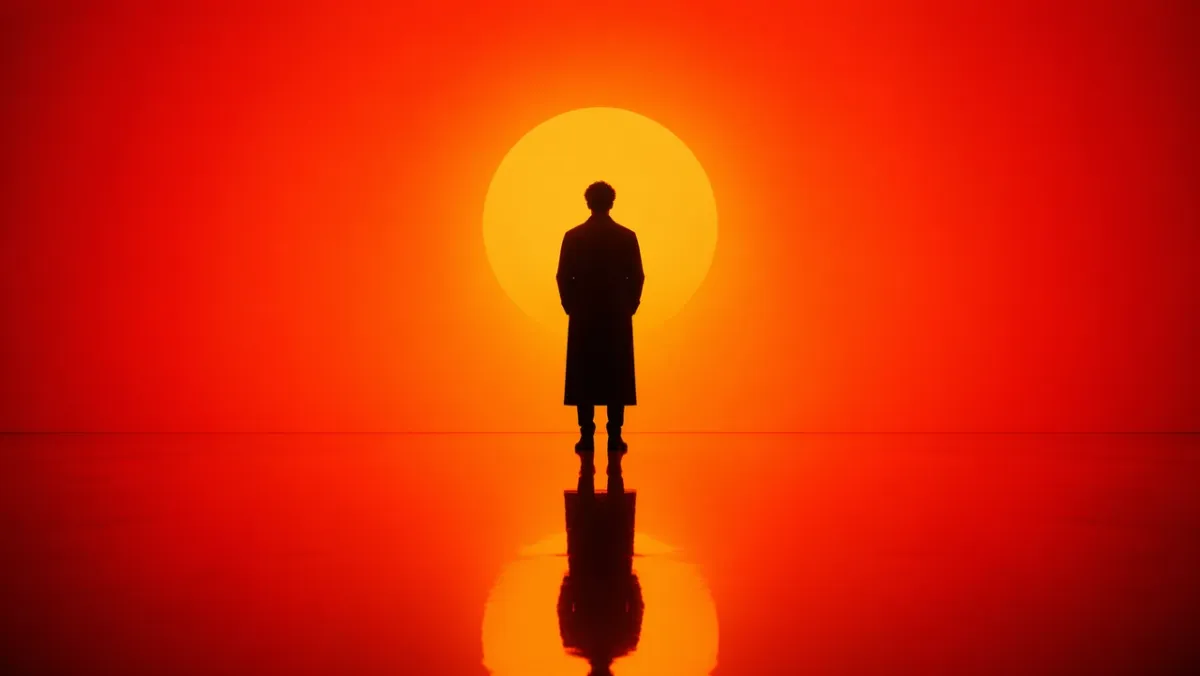
Permintaan 1:
Hasilkan potret sinematik dari sosok sendirian yang berdiri di lingkungan gradien oranye hingga merah yang intens. Pencahayaan siluet yang kuat dari belakang, kontras bayangan yang dalam, lantai mengkilap yang reflektif mencerminkan sosok tersebut. Komposisi simetris, desain set minimal, tanpa latar belakang yang berantakan. Suasananya kontemplatif dan kuat, seperti potongan gambar dari film fiksi ilmiah. Rasio aspek 16:9.
Permintaan 2:
Pemandangan jalanan fotorealistik candid di Seoul setelah hujan. Seorang penjual bunga menutup toko kecil pada jam biru, pantulan trotoar basah, lampu toko yang hangat, postur alami yang lelah, nuansa dokumenter 50mm, tekstur kulit yang realistis, tanpa pose glamor, tanpa tanda air. Rasio aspek 3:2.
Permintaan 3:
- Tampilan jarak dekat dari tangan-tangan lapuk yang sedang memperbaiki kamera film tua di atas meja kayu yang tergores. Cahaya jendela dari kiri kamera, debu terlihat, tekstur kuningan dan kulit hitam, kedalaman bidang dangkal, suasana bengkel tenang, fotorealistik, tanpa hamparan teks. Rasio aspek 4:3.*
Permintaan 4:
Peron kereta semalaman yang tenang di Eropa utara saat salju tipis. Seorang pelancong berjaket panjang berdiri di bawah lampu stasiun yang hangat, napas terlihat di udara dingin, jendela kereta api bersinar di latar belakang, realisme sinematik, palet warna terkendali, nuansa dokumenter 35mm, tanpa teks. Rasio aspek 16:9.
Permintaan 5:
Foto makanan editorial dari atas ke bawah berupa mie buatan tangan di atas piring keramik gelap, uap mengepul, sumpit diletakkan miring, meja kayu usang, lampu samping lembut, kilau dan tekstur minyak realistis, tanpa merek, tanpa hamparan teks. Rasio aspek 4:5.
Permintaan 6:
Potret realistis bergaya dokumenter tentang seorang seniman keramik yang sedang memotong mangkuk tanah liat di atas roda tembikar. Close-up sedang, tangan dan tanah liat yang berputar dalam fokus yang tajam, celemek dengan noda alami, cahaya jendela bengkel yang lembut, rak mangkuk yang belum selesai di latar belakang, tekstur yang jujur, tanpa sentuhan glamor, tanpa teks. Rasio aspek 3:2.
Permintaan 7:
Foto sinematik luas dari kota pegunungan kecil setelah badai musim panas. Kabut muncul dari pohon pinus hijau tua, cahaya hangat muncul di jendela pondok, pantulan jalan basah mengarah ke tengah, satu orang berjalan dengan payung di kejauhan, skala alami, suasana realistis, tanpa teks. Rasio aspek 16:9.
Permintaan 8:
Foto fotorealistik jarak dekat dari jam tangan antik yang diletakkan di atas kain linen yang dilipat. Logam yang disikat terlihat, goresan kecil pada casing, tanda tampilan jam yang dapat dibaca namun fiktif, cahaya pagi terarah yang lembut, kedalaman bidang yang dangkal, suasana foto produk editorial yang halus, tidak ada logo merek asli. Rasio aspek 4:5.
Permintaan 9:
Pemandangan dalam ruangan yang terang dari sebuah studio arsitektur kecil pada larut malam. Dua desainer meninjau model busa dan denah lantai tercetak di bawah lampu meja, cangkir kopi di dekatnya, bayangan realistis, ruang kerja yang praktis berantakan, suasana hati yang tenang dan terfokus, tampilan film 35mm, tanpa hamparan teks. Rasio aspek 16:9.
Permintaan 10:
Gambar editorial fesyen natural dari seorang model dengan mantel krem sederhana berdiri di dekat pintu masuk kereta bawah tanah saat senja. Lampu jalan mulai menyala, latar belakang kota yang tidak bersuara, lipatan kain yang realistis, postur tubuh yang santai, bingkai setinggi mata, butiran film yang halus, tidak ada nama merek yang terlihat, tidak ada teks. Rasio aspek 2:3.
Apa yang harus diperhatikan: Hasilnya harus memiliki arah cahaya yang dapat dipercaya, pantulan atau bayangan yang dapat dipercaya secara fisik, dan pose subjek yang natural. Jika gambar terlihat terlalu halus, tambahkan lebih banyak detail dokumenter dan hilangkan bahasa kualitas yang tidak jelas.
2. Perintah Rendering Logo dan Teks
GPT Image 2 paling kuat ketika prompt memperlakukan teks sebagai persyaratan desain, bukan dekorasi.
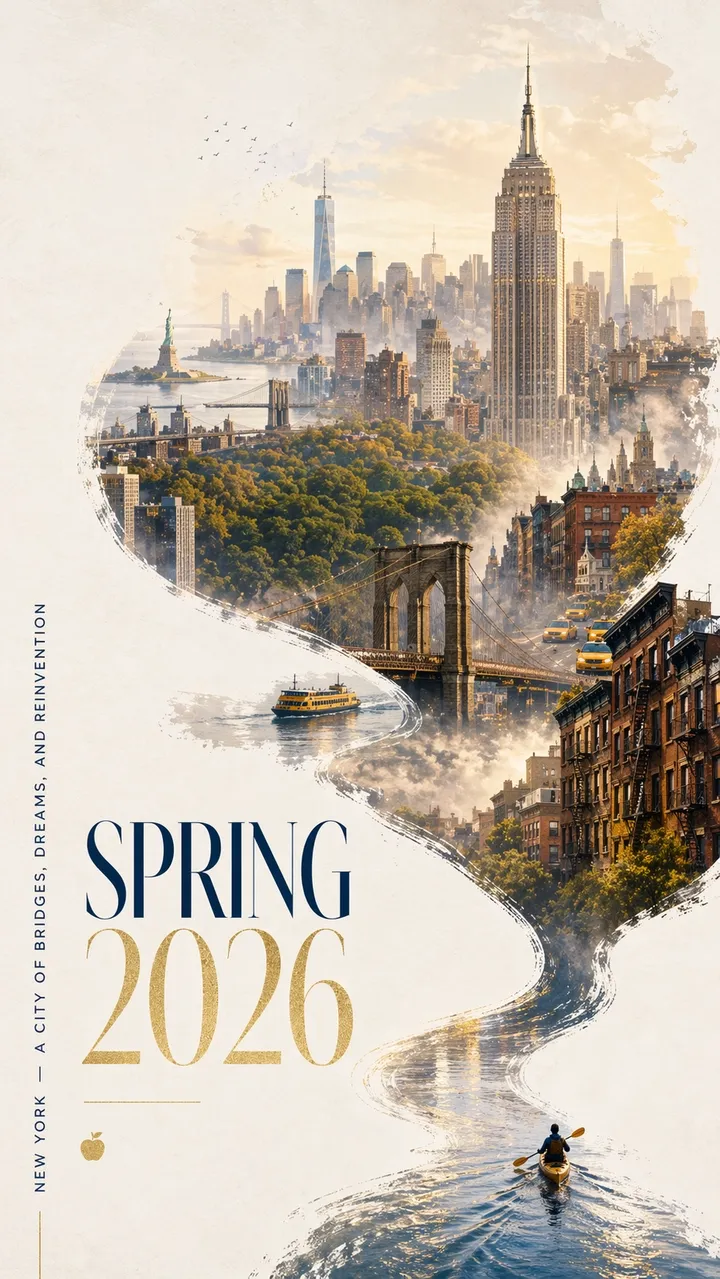
Permintaan 11:
Poster kota Musim Semi 2026 yang mencolok untuk New York dengan desain kontemporer yang berani dan suasana perayaan yang elegan. Bersihkan latar belakang bertekstur putih pucat dengan ruang negatif yang luas. Miniatur pembuat kayak mendayung melintasi pita sempit berisi air yang memantulkan cahaya di pojok kanan bawah. Gelombangnya menyapu ke atas dalam kurva kaligrafi yang dinamis, secara bertahap berubah menjadi Sungai Hudson dan kemudian menjadi panorama Manhattan yang dilukis dengan tangan seperti mimpi. Di dalam komposisi berbentuk sungai yang mengalir: Empire State Building, Jembatan Brooklyn, kanopi Central Park, One World Trade Center, atap batu coklat, taksi kuning, feri pelabuhan, dan Patung Liberty dalam jarak dekat. Kabut pagi yang lembut, cahaya musim semi keemasan, aksen halus warna biru laut dan emas. Tipografi elegan di kiri bawah bertuliskan “SPRING 2026” dengan slogan vertikal “NEW YORK - A CITY OF BRIDGES, DREAMS, AND REINVENTION”. Teks harus tajam dan tersusun indah. Tidak ada kata tambahan. Desain grafis premium, rasio aspek 9:16.
Permintaan 12:
Buat poster peluncuran vertikal untuk konferensi desain fiksi yang disebut “FRAME 2026”. Judul besar: “FRAME 2026”. Subjudul : “DESAIN DENGAN IMAJINASI MESIN”. Kotak Swiss yang bersih, latar belakang putih pucat, tipografi hitam, satu aksen geometris merah, ruang negatif yang luas, teks yang dapat dibaca dengan sempurna, tanpa kata tambahan, tanpa tanda air. Rasio aspek 9:16.
Permintaan 13:
Buat cover album minimalis bertajuk “SOFT SIGNALS”. Nama artis: “MIRA VALE”. Tipografi terpusat, tekstur kertas biru kalem, ilustrasi garis perak kecil menara radio, spasi elegan, tanpa teks tambahan, tanpa logo, rasio aspek 1:1.
Permintaan 14:
Buat poster etalase toko buku bertuliskan “BACA LEBIH LANJUT” dengan huruf serif besar. Baris yang lebih kecil: “MINGGU BACAAN MUSIM SEMI”. Refleksi jalanan malam yang hangat di kaca, tekstur kertas krem, tipografi yang mudah dibaca, tanpa kata tambahan, tanpa tanda air. Rasio aspek 4:5.
Permintaan 15:
Membuat poster pameran museum bertajuk “OBJEK TOMORROW”. Subjudul: “SEJARAH DESAIN TAHUN 2026”. Teks hitam di atas kertas putih pucat, satu objek krom abstrak di tengah, tata letak modernis bersih, hanya teks yang dapat dibaca persis, tidak ada logo palsu. Rasio aspek 9:16.
Permintaan 16:
Buat poster festival musik vertikal dengan judul yang tepat “SESI CAHAYA”. Teks yang lebih kecil: “12-14 JUNI”. Gunakan latar belakang biru laut yang dalam, satu lampu panggung melingkar yang bersinar, tipografi sans-serif kental yang elegan, ruang negatif yang seimbang, teks persis saja, tanpa kata tambahan, tanpa tanda air. Rasio aspek 9:16.
Permintaan 17:
Buat papan menu kafe bersih bertajuk “MENU PAGI”. Sertakan empat item: “ESPRESSO”, “MATCHA LATTE”, “CARDAMOM BUN”, “COLD BREW”. Latar belakang krem hangat, tipe serif hitam, garis pembatas sederhana, dapat dibaca dari kejauhan, tanpa harga, tanpa item tambahan. Rasio aspek 4:5.
Permintaan 18:
Buat grafik kampanye sosial persegi untuk klub lari fiksi. Teks utama: “JALANKAN SUNGAI”. Baris kedua: “SABTU 07.00”. Tipografi kinetik tebal, garis sungai abstrak, palet hijau terang dan hitam, hierarki jelas, tanpa teks tambahan, tanpa logo asli. Rasio aspek 1:1.
Permintaan 19:
Membuat sampul buku untuk novel fiksi berjudul “THE QUIET MACHINE”. Nama penulis: “ELENA ROWE”. Sampul minimalis dengan siluet burung mekanis kecil berwarna perak, latar belakang hitam matte, tipografi halus, hanya teks persis, tanpa logo penerbit, tanpa salinan tambahan. Rasio aspek 2:3.
Permintaan 20:
Buat poster kelas berjudul “ASK BETTER QUESTIONS”. Sertakan tiga baris pendek: “Amati”, “Jelaskan”, “Uji”. Desain editorial ramah, latar belakang kuning lembut, ikon garis sederhana, teks kontras tinggi yang dapat dibaca, tanpa kata tambahan, tanpa tanda air. Rasio aspek 4:5.
Apa yang harus dicari: Setiap surat harus dapat dibaca. Jika model menambahkan kata-kata tambahan, nyatakan ulang salinan tersebut sebagai “hanya teks persis” dan letakkan setiap baris pada barisnya sendiri di prompt.
3. Fotografi Produk dan Anjuran Kreatif Iklan AI
Gunakan sudut ini untuk visual kampanye, foto pahlawan, iklan sosial, maket e-niaga, dan penceritaan produk.
Permintaan 21:
Iklan produk premium untuk speaker nirkabel hitam matte di atas alas beton. Judul: “SUARA YANG BISA ANDA RASAKAN”. Produk di sebelah kanan, tipe putih tebal di sebelah kiri, lampu pelek dramatis, bayangan bersih, gaya kampanye teknologi mewah, tepi produk tajam, tidak ada logo merek palsu, tidak ada tanda air. Rasio aspek 16:9.
Permintaan 22:
Foto serum perawatan kulit editorial pada kaca buram. Botol tembus pandang dengan label sederhana bertuliskan “LUMA SERUM”, cahaya lembut menyebar, latar belakang hijau pucat, gaya kampanye kecantikan kelas atas, teks label tajam, pantulan bersih, tanpa alat peraga tambahan, rasio aspek 4:5.
Permintaan 23:
Iklan sosial persegi untuk botol perjalanan tahan lama di jalur pegunungan pada jam emas. Tagline: “DIBANGUN UNTUK JALAN PANJANG”. Produk terlihat jelas di latar depan, genggaman tangan alami, sinar matahari hangat, teks yang mudah dibaca di sepertiga bagian bawah, tanpa kata tambahan, rasio aspek 1:1.
Permintaan 24:
Foto produk e-commerce bersih berupa headphone nirkabel dengan latar belakang putih bersih. Sudut lurus, siluet tajam, bayangan kontak halus, tekstur bantalan telinga terlihat, tanpa teks, tanpa logo, tanpa alat peraga, fotografi produk resolusi tinggi. Rasio aspek 1:1.
Permintaan 25:
Visual kampanye bergaya billboard untuk cangkir kopi keramik. Judul: “PAGI, DIPANASKAN”. Produk besar di latar depan, lampu jendela dapur hangat, uap lembut, huruf tebal yang dapat dibaca di kiri atas, tanpa salinan tambahan, tanpa tanda air. Rasio aspek 16:9.
Permintaan 26:
Gambar pahlawan ecommerce premium berupa tas ransel hiking minimalis di atas langkan batu. Produk terpusat, saku depan dan tali terlihat, cahaya pagi alpine lembut, bayangan bersih, tidak ada orang, tidak ada logo, tidak ada hamparan teks, tekstur nilon realistis, dan detail ritsleting. Rasio aspek 1:1.
Permintaan 27:
Gambar kampanye perawatan kulit yang dipoles untuk toples pelembab kaca buram. Judul: “TENANG DALAM JAR”. Produk di kanan bawah, latar belakang biru pucat, pantulan air lembut, area label tajam tanpa merek palsu, tipografi putih elegan, tanpa kata tambahan. Rasio aspek 4:5.
Permintaan 28:
Foto produk sinematik earbud nirkabel berwarna putih matte dalam wadah pengisi daya terbuka. Latar belakang arang gelap, tepi tipis tipis, pantulan halus di bawahnya, ruang negatif bersih untuk judul kampanye, tanpa logo, tanpa teks, tepi produk tajam. Rasio aspek 16:9.
Permintaan 29:
Mockup kemasan makanan ringan persegi untuk merek granola fiksi bernama “NOVA OATS”. Tunjukkan satu kantong berdiri tegak di atas permukaan kayu ringan, teks label tajam, oat dan buah kering di sekitar alasnya, cahaya alami yang hangat, desain kemasan premium namun mudah didekati, tanpa merek tambahan. Rasio aspek 1:1.
Permintaan 30:
Produk perhiasan mewah berupa cincin perak dengan batu biru kecil di permukaan beludru gelap. Detail makro, pantulan logam realistis, sorotan lembut dari kiri atas, bayangan bersih, tanpa tangan, tanpa teks, tanpa tanda air, produk terpisah jelas dari latar belakang. Rasio aspek 4:5.
Yang perlu diperhatikan: Produk harus tetap menjadi pahlawan visual. Jika model membuat terlalu banyak detail kemasan, tentukan “kemasan polos” atau “pertahankan produk masukan dengan tepat” saat menggunakan gambar referensi.
4. Gambar Media Sosial dan Anjuran Infografis
Sudut ini berguna untuk diagram, penjelasan, peta alur kerja, bagan, visual kelas, dan ilustrasi blog yang memerlukan label yang dapat dibaca.
Permintaan 31:
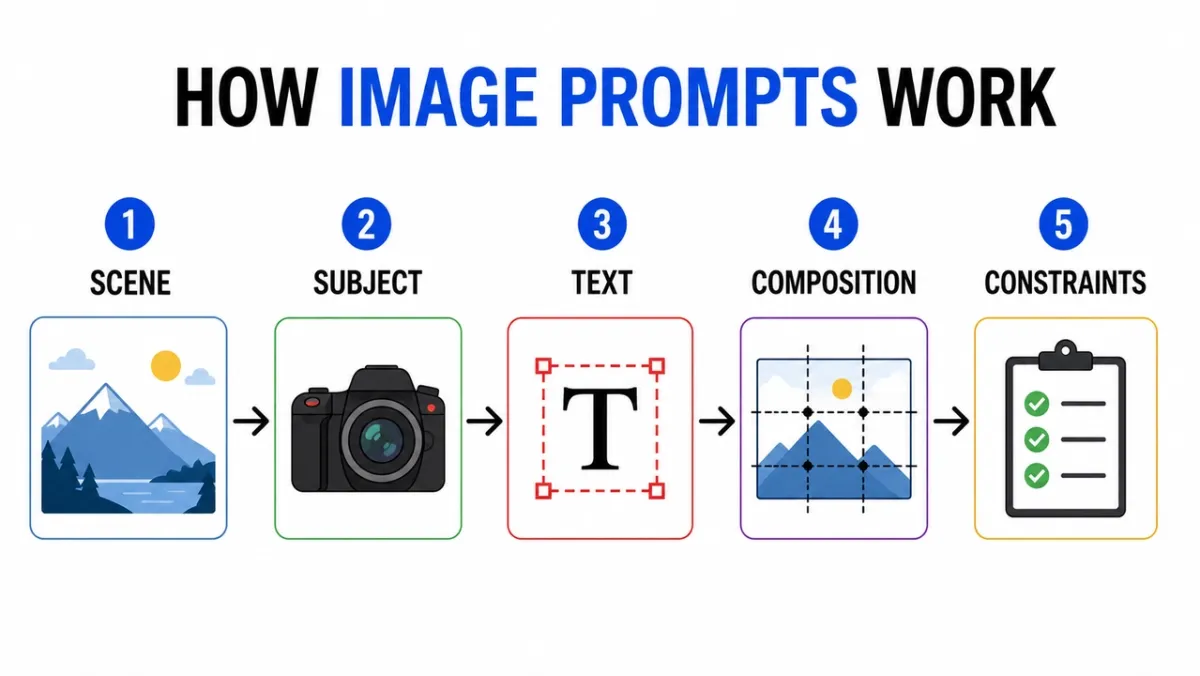
Buat infografis bersih berjudul “BAGAIMANA PROMPT GAMBAR BEKERJA”. Lima langkah berlabel: “Adegan”, “Subjek”, “Teks”, “Komposisi”, “Batasan”. Ikon editorial datar, panah antar langkah, kontras tinggi, latar belakang putih, label sans-serif yang dapat dibaca, spasi konsisten, tanpa teks tambahan, tanpa tanda air. Rasio aspek 16:9.
Permintaan 32:
Diagram pendidikan yang menunjukkan lapisan lensa kamera. Sertakan bagian berlabel: “Elemen Depan”, “Apertur”, “Grup Fokus”, “Sensor Gambar”. Ilustrasi potongan bersih, latar belakang putih, gaya buku teks, garis pemimpin jelas, label mudah dibaca, tidak ada kekacauan dekoratif. Rasio aspek 16:9.
Permintaan 33:
Infografis perbandingan bertajuk “POSTER PROMPT VS PROMPT PRODUK”. Dua kolom, enam baris, label ringkas, latar belakang netral, teks hitam, garis aksen biru, gaya grafis blog profesional, semua salinan dapat dibaca, tanpa teks tambahan. Rasio aspek 16:9.
Permintaan 34:
Buat visual instruksi langkah demi langkah berjudul “CARA MEMBUAT COLD BREW”. Lima langkah bergambar dengan label pendek: “Grind”, “Steep”, “Filter”, “Pour”, “Serve”. Nada bumi yang hangat, panah yang jelas, gaya ikon yang konsisten, teks yang dapat dibaca, tanpa kata tambahan. Rasio aspek 16:9.
Permintaan 35:
Buat bagan perbandingan bersih berjudul “AI IMAGE WORKFLOW”. Tiga kolom: “Draf”, “Perbaiki”, “Animate”. Gunakan ikon sederhana, label pendek, kontras tinggi, spasi lebar, latar belakang putih, gaya grafis blog profesional, semua teks dapat dibaca. Rasio aspek 16:9.
Permintaan 36:
Buat infografis timeline bersih berjudul “FROM PROMPT TO POSTER”. Lima tahap: “Singkat”, “Tata Letak”, “Teks”, “Review”, “Ekspor”. Aliran horizontal, lingkaran bernomor sederhana, palet aksen biru dan hitam, label kontras tinggi, tanpa teks tambahan, tanpa tanda air. Rasio aspek 16:9.
Permintaan 37:
Buat diagram pendidikan berjudul “PERAN GAMBAR REFERENSI”. Tiga kartu berlabel: “Subjek”, “Gaya”, “Latar Belakang”. Tampilkan thumbnail gambar sederhana, panah ke dalam satu bingkai keluaran akhir, label jelas, latar belakang putih, spasi konsisten, tanpa teks tambahan. Rasio aspek 16:9.
Permintaan 38:
Buat pohon keputusan berjudul “PROMPT GAMBAR YANG MANA?”. Cabang: “Teks”, “Produk”, “Adegan”, “Edit”. Gunakan kotak dan panah yang bersih, tipografi sans-serif yang mudah dibaca, latar belakang abu-abu minimal, satu warna aksen hijau, tanpa kata tambahan, tanpa hiasan dekoratif. Rasio aspek 16:9.
Permintaan 39:
Buat infografis checklist keselamatan bertajuk “SEBELUM ANDA MENGHASILKAN”. Empat pemeriksaan: “Hak”, “Privasi”, “Teks”, “Merek”. Gunakan ikon centang sederhana, label ringkas, latar belakang putih, gaya pusat bantuan SaaS profesional, kontras tinggi, tanpa salinan tambahan. Rasio aspek 4:5.
Permintaan 40:
Buat penjelasan visual berjudul “PROMPT PENGEDITAN GAMBAR”. Tiga baris bertumpuk: “Ubah”, “Pertahankan”, “Cocokkan”. Sertakan ikon contoh kecil untuk setiap baris, garis pemimpin yang bersih, label yang mudah dibaca, warna yang terkendali, tanpa teks tambahan, tanpa tanda air. Rasio aspek 16:9.
Apa yang harus dicari: Periksa label terlebih dahulu. Jika visualnya indah tetapi kata-katanya salah, maka outputnya tidak bisa digunakan. Untuk bagan yang padat, kurangi jumlah label dan buat ulang.
5. Anjuran Konsistensi Karakter
Lembar karakter berguna karena menyatukan identitas, lemari pakaian, palet, dan ekspresi ke dalam satu kerangka acuan.
Permintaan 41:
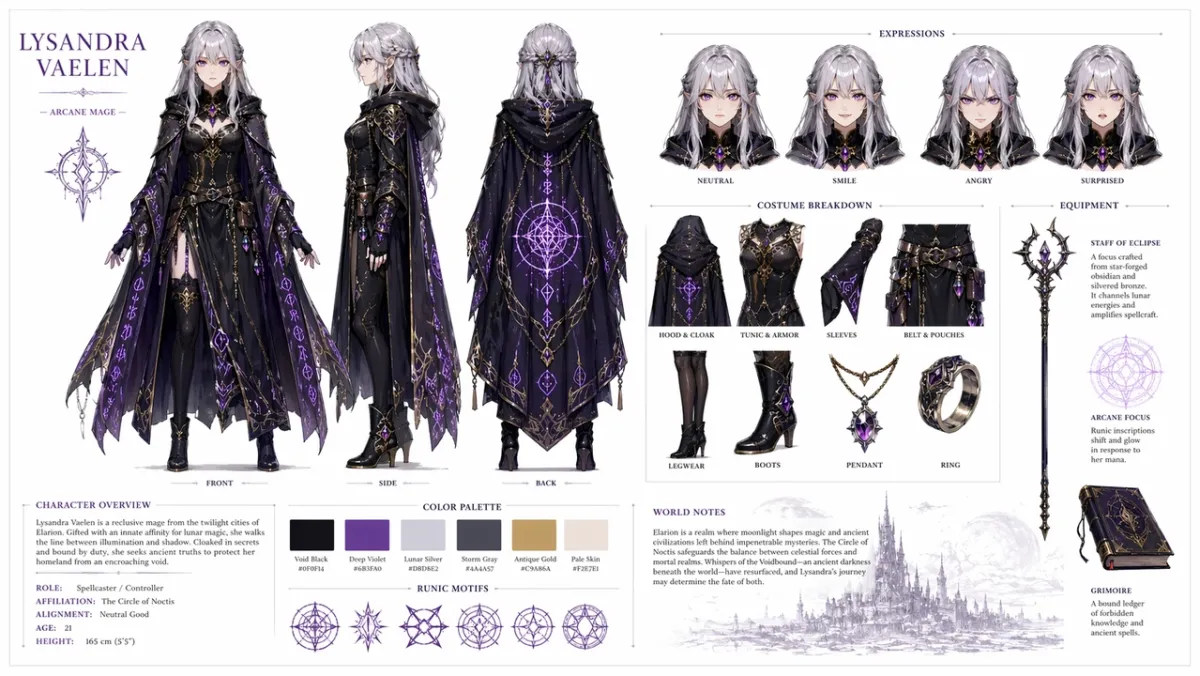
Buat lembar referensi karakter profesional untuk karakter RPG fantasi orisinal: penyihir wanita muda dengan rambut perak dan mata ungu, mengenakan jubah gelap berornamen dengan pola rune bercahaya. Sertakan pada latar belakang putih bersih: perputaran tiga tampilan yang menampilkan depan, samping, dan belakang; variasi ekspresi wajah yang menunjukkan netral, tersenyum, marah, dan terkejut; rincian detail kostum dan perlengkapan; baris contoh palet warna; dan catatan singkat pembangunan dunia dalam tipografi yang bersih. Tata letak kisi terorganisir, gaya seni konsep, resolusi tinggi. Rasio aspek 16:9.
Permintaan 42:
Buat lembar karakter kurir fiksi ilmiah untuk karakter asli bernama “NOVA”. Sertakan tampilan depan, samping, dan belakang, empat ekspresi wajah, info jaket dan ransel, contoh palet warna, latar belakang putih bersih, label yang mudah dibaca, wajah dan jaket yang konsisten di semua tampilan. Rasio aspek 16:9.
Permintaan 43:
Buat lembar karakter buku anak-anak untuk pembantu hutan kecil berjas hujan hijau. Sertakan baris ekspresi, baris penyangga, pose berjalan, pose melambai, palet warna, catatan sederhana yang mudah dibaca, gaya ilustrasi lembut, tanpa karakter tambahan. Rasio aspek 16:9.
Permintaan 44:
Buat lembar karakter detektif cyberpunk untuk karakter asli bernama “REI”. Termasuk tampak depan, tampak samping, tampak belakang, tiga ekspresi, info jas hujan, alat peraga perangkat, palet warna neon, label bersih, wajah dan gaya rambut yang konsisten. Rasio aspek 16:9.
Permintaan 45:
Buat lembar referensi maskot untuk robot pembuat roti yang ramah. Sertakan pose seluruh tubuh, tiga ekspresi tampilan wajah, detail celemek, alat peraga kue, contoh palet warna, penyelesaian sederhana, latar belakang putih bersih, label yang dapat dibaca. Rasio aspek 16:9.
Permintaan 46:
Buat lembar karakter game seluler untuk pramuka gurun asli bernama “KAI”. Sertakan tampilan depan, samping, dan belakang, tiga pose aksi, keterangan syal dan sabuk utilitas, contoh palet warna, label yang dapat dibaca, wajah dan pakaian yang konsisten, latar belakang putih bersih. Rasio aspek 16:9.
Permintaan 47:
Buat lembar karakter pedagang desa fantasi yang nyaman untuk karakter asli bernama “MARN”. Sertakan tampak depan seluruh tubuh, tampak samping, baris penyangga dengan lentera dan buku besar, empat studi ekspresi, info tekstur kain, palet warna hangat, tata letak kotak bersih, catatan yang mudah dibaca. Rasio aspek 16:9.
Permintaan 48:
Buat lembar desain drone pemeliharaan fiksi ilmiah. Termasuk tampilan atas, samping, dan depan, panel detail kecil untuk sensor, kaki pendaratan, lengan perkakas, unit baterai, dan lampu peringatan. Tata letak seni konsep teknis yang bersih, latar belakang netral, label yang mudah dibaca, desain industri yang konsisten. Rasio aspek 16:9.
Permintaan 49:
Buat lembar karakter animasi anak-anak untuk penemu kelas asli bernama “MILO”. Sertakan satu pose berdiri, satu pose berpikir, satu pose bersemangat, barisan ekspresi, alat peraga ransel dan buku catatan, palet cerah namun terkendali, label yang mudah dibaca, tanpa karakter tambahan. Rasio aspek 16:9.
Permintaan 50:
Buat lembar referensi kostum taktis untuk kurir cyberpunk asli. Sertakan tampak depan, belakang, dan samping, keterangan jaket, detail sepatu, detail tas kurir, contoh warna, pose tiga siluet, teks label yang tajam, gaya rambut yang konsisten, dan tampilan wajah di seluruh tampilan. Rasio aspek 16:9.
Apa yang harus diperhatikan: Wajah, kostum, dan palet warna yang sama harus tetap ada di seluruh tampilan. Jika tampilan samping mengubah pakaian, buat ulang dengan bahasa “lestarikan” yang lebih kuat.
6. Mockup UI dan Perintah Tangkapan Layar Sosial
Sudut ini berfungsi saat Anda memerlukan konsep aplikasi, dasbor, profil sosial, atau UI produk yang realistis yang terlihat cukup terstruktur untuk didiskusikan dengan tim.
Permintaan 51:
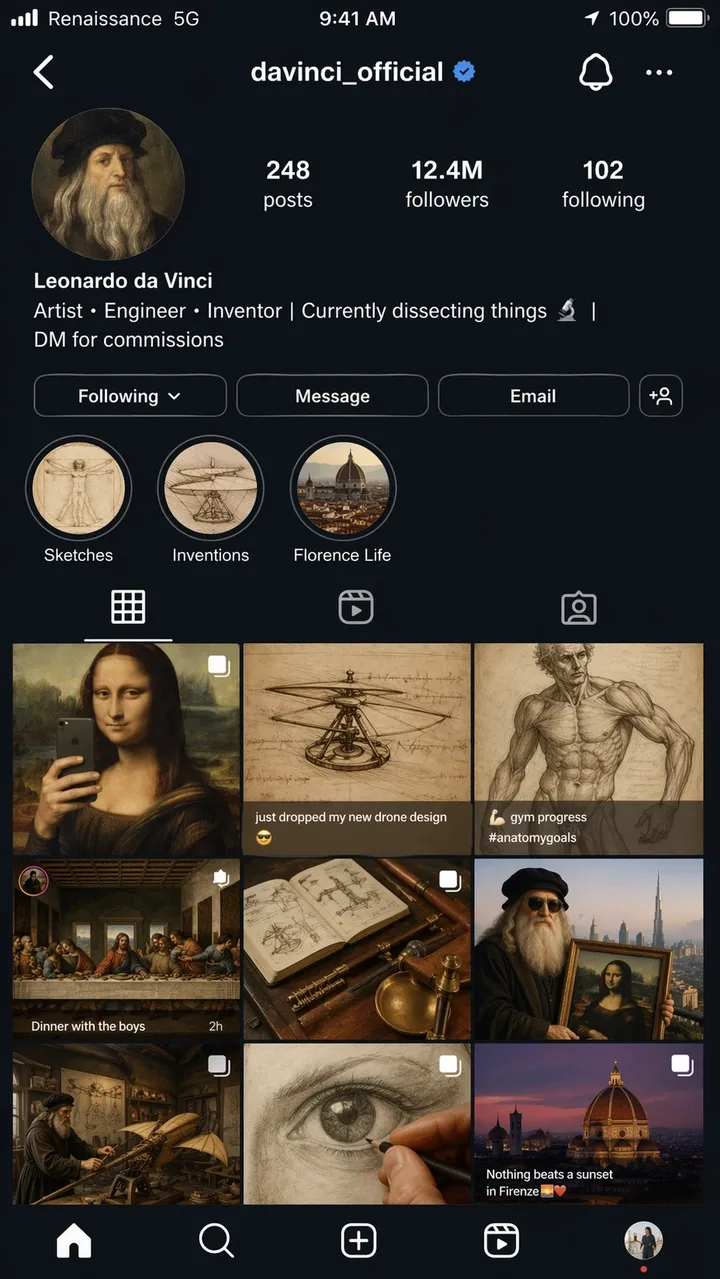
Tangkapan layar iPhone yang sangat realistis dari halaman profil Instagram fiksi Leonardo da Vinci, nama pengguna @davinci_official, seolah-olah dia adalah seorang influencer modern pada tahun 2026. Foto profil adalah potret diri Renaisans dalam potongan lingkaran. Bio berbunyi: “Artis, Insinyur, Penemu | Saat ini sedang membedah sesuatu | DM untuk komisi”. Kotak tersebut menampilkan 9 postingan: Mona Lisa yang dibingkai ulang sebagai selfie cermin, sketsa helikopter dengan teks “baru saja menjatuhkan desain drone baru saya”, studi anatomi yang diposting sebagai foto kemajuan gym, Perjamuan Terakhir yang dipentaskan sebagai foto grup pesta makan malam, dan mashup anakronistik kreatif lainnya. Jumlah pengikut: 12,4 juta. Sorotan cerita berlabel Sketsa, Penemuan, dan Kehidupan Florence. Bilah status iOS lengkap dengan teks operator bertuliskan “Renaissance 5G”, baterai ikon, dan waktu saat ini. Seluruh UI mode gelap. Kualitas tangkapan layar fotorealistik, rasio aspek 9:16.
Permintaan 52:
Layar orientasi seluler yang realistis untuk aplikasi kebiasaan fiksi yang disebut “LUMA”. Judul: “BANGUN HARI YANG LEBIH BAIK”. Tombol: “Mulai sekarang” dan “Lihat demo”. Tata letak gaya iOS yang bersih, latar belakang putih lembut, aksen biru, teks UI yang mudah dibaca, ditampilkan langsung di dalam bingkai ponsel. Rasio aspek 9:16.
Permintaan 53:
Dasbor SaaS Desktop untuk alat analisis e-niaga. Bilah sisi kiri, kartu KPI teratas untuk Pendapatan, Pesanan, Rasio Konversi, diagram garis, dan tabel produk unggulan. Antarmuka putih bersih, spasi realistis, label dapat dibaca, tanpa nama merek asli. Rasio aspek 16:9.
Permintaan 54:
Layar aplikasi cuaca seluler yang realistis untuk aplikasi fiksi bernama “SKYLINE”. Kota saat ini: “Lisbon”. Suhu utama: “22C”. Kartu untuk Angin, Kelembaban, UV, dan Matahari Terbenam. Antarmuka biru yang tenang, label yang dapat dibaca, bingkai iPhone, tanpa branding aplikasi nyata. Rasio aspek 9:16.
Permintaan 55:
Layar aplikasi pemesanan restoran menampilkan konfirmasi reservasi. Nama Restoran: “Meja Utara”. Tanggal: “18 Juni”. Waktu: “19:30”. Ukuran pesta: “4 tamu”. Foto makanan editorial yang hangat di atas, tombol CTA bersih bertuliskan “Tambahkan ke kalender”, teks UI yang dapat dibaca. Rasio aspek 9:16.
Permintaan 56:
Dasbor analitik desktop yang realistis untuk studio pembuat fiksi. Navigasi kiri, kartu teratas untuk Penayangan, Waktu Tontonan, Pendapatan, dan Pengikut Baru, diagram garis, dan tabel kampanye. UI putih bersih, aksen biru, label mudah dibaca, spasi praktis, tanpa nama merek asli. Rasio aspek 16:9.
Permintaan 57:
Layar pembayaran seluler untuk toko perlengkapan luar ruangan fiksi bernama “TrailCart”. Tampilkan thumbnail produk, stepper kuantitas, kartu alamat pengiriman, kolom diskon, harga total, dan tombol CTA bertuliskan “Lakukan pemesanan”. Gaya iOS modern, teks UI yang dapat dibaca, tanpa logo asli. Rasio aspek 9:16.
Permintaan 58:
Mockup UI tablet untuk aplikasi perpustakaan cepat. Tampilkan tab berlabel “Poster”, “Produk”, “UI”, dan “Suntingan”. Panel utama mencakup tiga kartu prompt dengan teks pratinjau singkat, tombol salin, dan chip kategori. Antarmuka bersih, keterbacaan tinggi, tidak ada nama merek asli. Rasio aspek 4:3.
Permintaan 59:
Layar pengaturan SaaS untuk alat gambar AI fiksi. Bagian berlabel “Model”, “Kualitas”, “Rasio Aspek”, “Gambar Referensi”, dan “Keamanan”. Gunakan tombol alih, tarik-turun, penggeser, dan tombol Simpan yang jelas. UI profesional yang tenang, label yang mudah dibaca, tidak ada kekacauan dekoratif. Rasio aspek 16:9.
Permintaan 60:
Layar aplikasi rencana perjalanan seluler untuk perjalanan fiksi ke Kyoto. Headernya bertuliskan “Akhir Pekan Kyoto”. Kartu untuk “Hari 1”, “Hari 2”, “Jalan di Kuil”, dan “Makan Malam”. UI netral yang lembut, spasi realistis, pratinjau peta kecil, teks yang dapat dibaca, tanpa branding aplikasi nyata. Rasio aspek 9:16.
Apa yang harus dicari: Tata letaknya harus terasa seperti antarmuka nyata, bukan poster dekoratif. Periksa label navigasi, teks tombol, spasi ikon, dan apakah hierarki layar dapat digunakan.
7. Transfer Gaya dan Anjuran Seni Narasi
Perintah naratif singkat menguji apakah GPT Image 2 dapat bernalar melalui lelucon visual, pengisahan cerita multi-panel, dan teks kecil di dalam sebuah adegan.
Permintaan 61:
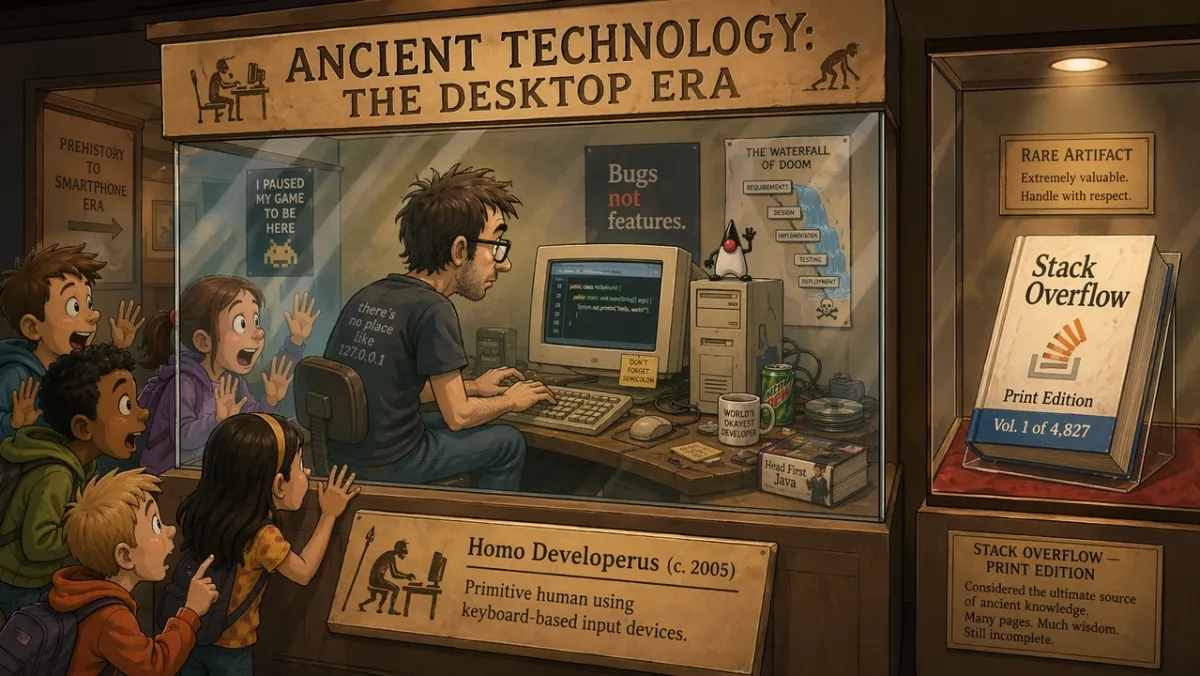
Di dalam pameran museum bertajuk “Teknologi Kuno: Era Desktop”, seorang programmer dalam etalase kaca mendemonstrasikan pengkodean secara langsung pada monitor CRT sementara anak-anak sekolah yang takjub menempelkan wajah mereka ke kaca. Plakat pameran berbunyi: “Homo Developerus (c. 2005) - Manusia primitif yang menggunakan perangkat input berbasis keyboard.” Etalase kedua di dekatnya memperlihatkan buku fisik berlabel “Stack Overflow - Edisi Cetak, Vol. 1 dari 4.827”. Gaya ilustrasi kartun 2D, pencahayaan museum yang hangat, nada lucu dan nostalgia. Rasio aspek 16:9.
Permintaan 62:
Komik strip empat panel berjudul “RUTIN PAGI”. Panel 1: alarm berbunyi. Panel 2: karakter membuat kopi. Panel 3: karakter duduk untuk bekerja. Panel 4: karakter sudah tertidur di meja. Gaya ilustrasi minimal yang hangat, karakter ekspresif, judul mudah dibaca, tanpa teks tambahan. Rasio aspek 16:9.
Permintaan 63:
Ilustrasi editorial tunggal untuk artikel tentang otomatisasi materi iklan. Seorang desainer dan asisten AI menyusun papan cerita kertas di atas meja besar, cahaya studio lembut, humor halus, gaya ilustrasi majalah modern, tidak ada logo merek yang terlihat, tidak ada teks. Rasio aspek 3:2.
Permintaan 64:
Ilustrasi gaya halaman depan surat kabar berjudul “THE MORNING HERALD”. Judul utama: “KOTA MENYETUJUI TAMAN ATAP”. Tata letak dua kolom, satu area foto dewan kota yang fotorealistik, desain lembar lebar klasik, judul dan judul utama yang mudah dibaca, tanpa teks artikel tambahan. Rasio aspek 4:5.
Permintaan 65:
Komik dua panel tentang robot yang belajar melukis. Panel 1: robot mempelajari kanvas kosong dengan cermat. Panel 2: robot dengan bangga memperlihatkan lukisan yang berantakan namun menawan. Pencahayaan studio yang hangat, bahasa tubuh yang ekspresif, tanpa gelembung ucapan, judul sederhana: “UPAYA PERTAMA”. Rasio aspek 16:9.
Permintaan 66:
Komik editorial tiga panel berjudul “THE DEADLINE”. Panel 1: seorang desainer dengan tenang membuka file kosong. Panel 2: jam melompat maju dan catatan tempel menutupi meja. Panel 3: desainer menyajikan poster yang dipoles dengan kelegaan yang mengejutkan. Gaya ilustrasi ekspresif minimal, judul mudah dibaca, tidak ada gelembung ucapan. Rasio aspek 16:9.
Permintaan 67:
Ilustrasi majalah surealis tentang fokus kreatif: seseorang duduk di meja kecil yang mengambang di perpustakaan yang tenang dengan jendela-jendela bercahaya, setiap jendela menampilkan ide berbeda yang belum selesai. Pencahayaan sinematik yang lembut, suasana hati yang penuh perhatian, komposisi yang bersih, tidak ada logo merek yang terlihat, tidak ada teks. Rasio aspek 3:2.
Permintaan 68:
Storyboard empat panel untuk teaser peluncuran produk. Panel 1: kotak tertutup di atas meja. Panel 2: lampu bocor dari kotak. Panel 3: tangan mengangkat tutupnya. Panel 4: siluet produk yang bersinar terungkap. Tidak ada merek yang dapat dibaca, tidak ada dialog, pencahayaan sinematik, batas panel yang jelas. Rasio aspek 16:9.
Permintaan 69:
Diorama museum lucu bertajuk “THE FIRST GROUP CHAT”. Perlihatkan sosok-sosok kuno yang berkumpul di sekitar loh batu dengan gelembung pesan yang diukir di atasnya, pencahayaan museum yang hangat, ilustrasi editorial yang lucu, hanya judul yang dapat dibaca, tanpa teks tambahan. Rasio aspek 16:9.
Permintaan 70:
Poster naratif layar terpisah yang menampilkan iterasi kreatif “sebelum” dan “sesudah”. Sisi kiri: dinding sketsa berantakan dan catatan kasar. Sisi kanan: papan kampanye yang dipoles bersih. Ilustrasi editorial modern, kontras kuat, tanpa logo, tanpa kata tambahan selain “SEBELUM” dan “SETELAH”. Rasio aspek 16:9.
Apa yang harus diperhatikan: Adegan harus mengkomunikasikan ide secara visual. Jika lelucon bergantung sepenuhnya pada teks, sederhanakan pengaturannya dan buat tindakan fisiknya lebih jelas.
8. Perintah dan Pengeditan Referensi Bingkai Pertama Gambar-ke-Video
Sudut inilah yang menjadikan GPT Image 2 lebih dari sekadar generator lintasan pertama. Ini berguna untuk potongan produk, pertukaran pakaian, perubahan latar belakang, pengeditan berbasis referensi, dan bingkai foto yang dirancang untuk gerakan.
Permintaan 71:
Buat bingkai sinematik pertama untuk klip gambar-ke-video: seorang astronot berdiri sendirian di tepi kawah gurun yang bersinar saat fajar, tanjung dan debu siap bergerak tertiup angin, siluet latar depan yang kuat, lapisan kedalaman yang jernih, cahaya cakrawala yang hangat, tanpa teks, tanpa tanda air. Rasio aspek 16:9.
Permintaan 72:
Gunakan Gambar 1 sebagai foto produk dan Gambar 2 sebagai referensi gaya latar belakang. Tempatkan produk ke dalam adegan dari Gambar 2. Pertahankan bentuk produk, teks label, proporsi, warna, dan bahan dengan tepat. Cocokkan pencahayaan, skala, bayangan, dan perspektif. Jangan menata ulang produk. Tidak ada logo atau tanda air tambahan.
Permintaan 73:
Hapus background dari gambar produk masukan. Menghasilkan latar belakang transparan dengan siluet tajam, tepi bersih, tanpa lingkaran cahaya, tanpa pinggiran. Pertahankan geometri botol, bentuk tutup, teks label, warna label, dan ketajaman cetakan dengan tepat. Jangan mengubah proporsi.
Permintaan 74:
Ubah hanya cuaca dan pencahayaan pada gambar masukan. Jadikan pemandangan tampak seperti malam musim dingin dengan hujan salju ringan. Pertahankan orang, bangunan, rambu, sudut kamera, penempatan objek, dan komposisi secara tepat. Jaga agar semua teks yang dapat dibaca tidak berubah.
Permintaan 75:
Gambar 1 adalah orang yang ingin dilestarikan. Gambar ke 2 adalah referensi jaket. Gambar 3 adalah referensi sepatu bot. Dandani orang dari Gambar 1 menggunakan pakaian dari Gambar 2 dan 3. Pertahankan wajah, bentuk tubuh, pose, tangan, latar belakang, sudut kamera, dan pencahayaan dengan tepat. Ganti pakaiannya saja.
Permintaan 76:
Gunakan foto produk masukan sebagai subjek yang dikunci. Tempatkan produk di meja kamar mandi marmer yang bersih dengan cahaya jendela pagi yang lembut. Pertahankan bentuk produk, teks label, warna tutup, proporsi, dan bahan dengan tepat. Cocokkan bayangan kontak, skala, dan perspektif. Jangan menambahkan label, logo, atau alat peraga tambahan.
Permintaan 77:
Buat bingkai sinematik pertama untuk klip gambar-ke-video: botol parfum kaca berdiri di atas batu hitam basah saat pita tipis kabut bergerak di belakangnya. Berpusat pada produk, siluet kuat, kedalaman latar depan dan latar belakang jelas, tanpa tangan, tanpa teks, tanpa tanda air. Rasio aspek 16:9.
Permintaan 78:
Edit potret masukan dengan hanya mengubah latar belakang menjadi latar studio editorial bersih dalam warna abu-abu hangat. Pertahankan wajah, rambut, pakaian, pose, warna kulit, sudut kamera, arah pencahayaan, dan ekspresi dengan tepat. Cocokkan bayangan dan kedalaman latar belakang baru secara alami.
Permintaan 79:
Gunakan Gambar 1 sebagai foto ruangan dan Gambar 2 sebagai referensi seni dinding. Tambahkan karya seni dari Gambar 2 ke dinding kosong di Gambar 1. Pertahankan furnitur, lantai, cahaya jendela, sudut kamera, keseimbangan warna, dan tata letak ruangan dengan tepat. Cocokkan skala bingkai, perspektif, dan bayangan dinding.
Permintaan 80:
Buat bingkai pertama yang siap video untuk pengungkapan produk: kotak hitam matte tertutup di atas meja, cahaya biru tipis bocor dari jahitannya, partikel debu terlihat dalam sorotan, kamera diposisikan rendah dan dekat, lapisan kedalaman yang kuat, ruang kosong untuk bergerak, tanpa teks, tanpa logo. Rasio aspek 16:9.
Apa yang harus dicari: Untuk pengeditan, output hanya berhasil jika detail yang dikunci tetap terkunci. Untuk frame siap video, periksa pemisahan subjek, kedalaman latar depan/latar belakang, dan apakah pemandangan memberikan ruang bagi PixVerse untuk bergerak.
Ulasan GPT Image 2: Hasil Tes dan Skor
Diuji dan diperbarui: 23 Juni 2026.
Bagian ulasan ini sengaja ditempatkan setelah perpustakaan cepat karena sebagian besar pembaca yang membuka halaman ini memerlukan contoh terlebih dahulu. Tinjauan tetap penting: GPT Image 2 berguna ketika teks, struktur, dan mengikuti instruksi lebih penting daripada eksplorasi visual yang longgar.
| Dimensi ulasan | Skor (1-5) | Apa yang kami lihat dalam tes langsung |
|---|---|---|
| Akurasi teks | 4 | Judul besar, label pendek, judul poster, item menu, langkah infografis, dan label UI sederhana lebih mudah dikontrol saat salinan persisnya dikutip. Salinan legal yang kecil dan paragraf yang padat masih perlu ditinjau dengan cermat. |
| Konsistensi karakter | 3 | Lembar karakter, baris ekspresi, info kostum, dan contoh palet berguna sebagai referensi, tetapi wajah, proporsi, dan detail kostum dapat berpindah dari tampilan samping dan belakang. |
| Kontrol gaya | 4 | Model mengikuti arah visual yang luas dengan baik ketika perintah menyebutkan kasus penggunaan, tata letak, media, pencahayaan, dan batasan, bukan hanya kata kunci gaya bertumpuk. |
| Realisme produk | 4 | Tata letak iklan produk, ruang negatif kampanye, permukaan bersih, dan komposisi yang mengutamakan produk sudah kuat, namun label, logo, geometri kemasan, dan klaim yang diatur sebenarnya masih memerlukan QA manual. |
| Kemampuan mengedit | 3 | Pola “ubah, pertahankan, cocokkan” berfungsi lebih baik daripada permintaan edit luas, namun batasan pemilihan, keluaran latar belakang transparan, dan pelestarian produk yang tepat masih perlu ditinjau. |
| Pertanyaan pencarian | Jawaban praktis |
|---|---|
| Terbaik untuk | Poster teks persis, konsep iklan produk, maket UI, infografis, lembar karakter, pengeditan referensi, dan bingkai pertama untuk gambar-ke-video. |
| Batasan utama | Teks kecil, tanda merek yang tepat, font kepemilikan, salinan legal, hasil akhir dengan latar belakang transparan yang rumit, dan label produk yang terkunci masih perlu ditinjau. |
| Ketersediaan API | Gunakan rute API gpt-image-2 OpenAI untuk alur kerja pengembang. Akses ChatGPT Images 2.0 dan penagihan API adalah jalur terpisah. |
| Catatan API | Mulai 22 Juni 2026, OpenAI mencantumkan harga token GPT-Image-2 untuk input gambar, input gambar dalam cache, output gambar, input teks, dan input teks dalam cache. |
| Alur kerja video | Meminta tepi subjek yang bersih, lapisan kedalaman, dan satu isyarat gerakan jika nanti gambar dapat menjadi sumber gambar-ke-video. |
| Alternatif untuk membandingkan | Gunakan Nano Banana 2 untuk pengujian fotorealistik cepat, Midjourney untuk eksplorasi bergaya, dan PixVerse saat yang disetujui masih perlu dijadikan aset video. |
Bagaimana Kami Menguji GPT Image 2
Kami menguji GPT Image 2 di seluruh potret, poster berisi teks, komposisi gaya produk, lembar karakter, maket UI, dan adegan naratif eksperimental. Tujuannya bukan untuk menghasilkan nilai standar; hal ini untuk melihat apakah seorang desainer, pemasar, atau pencipta dapat menggunakan keluarannya dengan sedikit pengeditan daripada membangun kembali aset dari awal.
| Daerah ujian | Contoh petunjuknya | Apa yang kami periksa |
|---|---|---|
| Potret dan gambar diam sinematik | 12 | Kontrol pencahayaan, tekstur kulit, pantulan, suasana hati, dan konsistensi pemandangan. |
| Tata letak poster dan tipografi | 14 | Ejaan judul, teks multi-baris, hierarki, spasi negatif, dan polesan mirip merek. |
| Lembar karakter dan konsep | 9 | Konsistensi multi-tampilan, detail kostum, penyelarasan palet, dan akurasi label. |
| Maket UI dan sosial | 8 | Realisme tata letak, teks kecil, spasi ikon, kisi umpan, dan kredibilitas tangkapan layar. |
| Petunjuk eksperimental | 10+ | Humor, penalaran naratif, penempatan objek, dan akurasi teks kecil. |
Polanya jelas: GPT Image 2 lebih menghargai ringkasan yang tepat daripada rantai kata kunci. Saat perintah memberi nama tugas dan mendefinisikan keberhasilan, model cenderung mempertahankan struktur. Saat perintah meminta gambar yang indah tanpa kendala, hasilnya masih terlihat bagus, namun lebih sulit untuk digunakan kembali.
Tinjau Hasil berdasarkan Kasus Penggunaan
| Kasus penggunaan | Apa yang berhasil dengan baik | Yang masih perlu ditinjau |
|---|---|---|
| Render teks | Judul besar, label pendek, judul poster, item menu, langkah infografis, dan label UI sederhana lebih mudah dikontrol saat salinan persisnya dikutip. | Salinan legal yang kecil, paragraf padat, font bergaya, dan kata-kata yang diulang-ulang masih bisa melayang. Buat salinan tetap pendek dan periksa setiap huruf. |
| Gambar produk | GPT Image 2 menangani tata letak iklan produk, ruang negatif kampanye, permukaan bersih, dan komposisi yang mengutamakan produk dengan baik. | Label asli, logo, geometri kemasan, dan klaim yang diatur harus diperiksa secara manual atau digabungkan dari aset yang disetujui. |
| Maket UI | Layar seluler, dasbor, kartu, tombol, menu, dan hierarki mirip aplikasi tampak masuk akal ketika perintah menyebutkan elemen antarmuka sebenarnya. | Perlakukan keluaran sebagai maket konsep, bukan UI produksi. Label kecil, perataan ikon, dan data yang tepat sering kali perlu dibersihkan. |
| Konsistensi karakter | Lembar karakter, baris ekspresi, info kostum, dan contoh palet berguna sebagai referensi kreatif. | Wajah, detail kostum, dan proporsi dapat berubah tergantung tampilan. Ulangi jangkar identitas dan buat ulang jika tampilan samping atau belakang menyimpang. |
| Bingkai pertama gambar-ke-video | Bingkai lebar dengan latar depan, tengah, latar belakang, dan satu isyarat gerakan memberi PixVerse materi sumber yang lebih berguna. | Gambar yang terlalu padat, teks yang berat, dan isyarat gerakan yang ambigu membuat pembuatan video selanjutnya menjadi lebih sulit. |
| Mengedit dan mengomposisi | Pola perintah “ubah, pertahankan, cocokkan” berfungsi lebih baik daripada permintaan edit luas. | Batasan pemilihan, keluaran dengan latar belakang transparan, pelestarian produk yang tepat, dan detail halus masih memerlukan QA. |
Untuk perbandingan model, perbedaan yang berguna bukanlah merek versus merek. GPT Image 2 berperilaku lebih seperti asisten desain terstruktur untuk gambar yang banyak berkomunikasi. Midjourney tetap berguna untuk eksplorasi bergaya dan pengarahan seni yang luas. Nano Banana 2 adalah titik perbandingan yang kuat untuk fotorealisme, detail material, dan iterasi visual yang cepat. PixVerse adalah lapisan alur kerja berikutnya ketika gambar diam harus menjadi klip, iklan, pengungkapan produk, atau cuplikan cerita.
Kesalahan Umum yang Mendorong GPT Image 2
- Meminta keakuratan tanpa memberikan salinan persisnya. Jika gambar memerlukan teks, tulis teks dengan tepat dan sebutkan di mana gambar tersebut akan muncul.
- Membebani satu perintah dengan setiap detail yang memungkinkan. Mulailah dengan adegan inti, lalu sempurnakan variabel satu per satu.
- Melupakan invarian selama pengeditan. Beri tahu model apa yang tidak boleh diubah: identitas, latar belakang, pose, pencahayaan, bentuk produk, teks label, atau sudut kamera.
- Menggunakan kata-kata dekoratif berkualitas untuk tugas fungsional. “Cantik” tidak membuat label mudah dibaca. Gunakan frasa seperti “teks label tajam”, “kerning bersih”, dan “dapat dibaca dari jarak jauh”.
- Melewati rasio aspek. Gambar persegi yang bagus mungkin gagal sebagai iklan vertikal atau gambar mini video.
- Memperlakukan logo seperti teks umum. GPT Image 2 dapat mendesain konsep logo, namun tanda merek yang tepat biasanya harus digabungkan dari aset merek yang disetujui.
API GPT Image 2 dan Catatan Harga
Halaman harga API OpenAI mencantumkan GPT-Image-2 dengan harga berbasis token. Per tanggal 22 Juni 2026, tarif yang tercantum adalah:
| Barang | Harga yang tercantum |
|---|---|
| masukan gambar | $8,00 / 1 juta token |
| Masukan gambar dalam cache | $2,00 / 1 juta token |
| Keluaran gambar | $30,00 / 1 juta token |
| Masukan teks | $5,00 / 1 juta token |
| Masukan teks dalam cache | $1,25 / 1 juta token |
Biaya pembuatan sebenarnya bergantung pada panjang prompt, gambar referensi, ukuran keluaran, cache, kualitas, dan jalur akses yang Anda gunakan. Jika Anda menggunakan ChatGPT dan bukan API, batas paket dan kuota terpisah dari harga token API. Panduan Prompt Model Pembuatan Gambar OpenAI GPT juga layak dibaca jika Anda membuat aplikasi berulang atau alur kerja batch.
Perbedaan itu penting bagi pencari yang menanyakan apakah GPT Image 2 gratis atau berapa biaya API GPT Image 2. Ketersediaan ChatGPT Images 2.0, kuota paket ChatGPT, penagihan API OpenAI, dan kredit PixVerse merupakan jalur komersial terpisah. Untuk pekerjaan bervolume tinggi, bandingkan biaya per aset yang diterima setelah percobaan ulang, bukan hanya harga yang tercantum untuk satu upaya pembuatan.
| Pilihan alur kerja | Saran praktis dan saran pengaturan |
|---|---|
| Poster atau diagram berisi teks | Gunakan lebih sedikit kata per gambar, kutip salinan persisnya, tentukan hierarki, dan gunakan pengaturan kualitas yang lebih tinggi jika anggaran memungkinkan. |
| Foto produk | Kunci bentuk produk, label, warna, bahan, dan sudut kamera. Jika menggunakan referensi, ulangi daftar simpan pada setiap pengeditan. |
| Maket UI | Jelaskan layar sebagai antarmuka yang dikirimkan: navigasi, kartu, tombol, status, label, dan spasi. Hindari bahasa seni konsep. |
| Pengeditan multi-referensi | Beri label setiap gambar berdasarkan peran: subjek, gaya, latar belakang, pakaian, produk, atau referensi bahan. |
| Generasi batch | Bandingkan biaya per gambar yang diterima, bukan hanya biaya per upaya. Proses yang lebih murah tidak berarti lebih murah jika memerlukan banyak percobaan ulang. |
| Produksi PixVerse | Buat atau impor gambar diam, lalu gunakan gambar-ke-video saat aset memerlukan gerakan, pergerakan kamera, atau varian kampanye. |
Untuk tim yang memutuskan apakah akan menggunakan alur kerja gambar yang mengutamakan API atau alur kerja pembuat, pertanyaan praktisnya bukan hanya “Dapatkah GPT Image 2 membuat gambar diam?” Ini juga merupakan “Apa yang terjadi setelah gambar diam disetujui?” Jika Anda ingin membandingkan kualitas gambar lintasan pertama, lihat pengujian cepat GPT Image 2 vs Nano Banana 2 kami. Jika Anda memerlukan pembuatan otomatis dari terminal atau alur kerja agen AI, PixVerse CLI guide mencakup pembuatan gambar dan video dari pipeline baris perintah.
Alur Kerja Gambar-ke-Video PixVerse yang Terperinci
Setelah gambar GPT Image 2 disetujui, Anda dapat memperlakukannya sebagai frame pertama untuk video. Bagian yang penting adalah mempersiapkan still sebelum Anda menganimasikannya. Model video tidak akan secara ajaib memperbaiki teks poster yang salah eja, label produk yang menyimpang, atau mockup UI yang sudah terlihat salah.
1. Hasilkan gambar diam sebagai bingkai pertama
Jika Anda tahu bahwa gambar dapat menjadi klip, tambahkan kesiapan gerakan ke perintah gambar. Mintalah tepi subjek yang jelas, kedalaman latar depan dan latar belakang, jalur kamera, dan satu isyarat fisik yang dapat bergerak: kain, debu, uap, hujan, rambut, cahaya layar, pantulan produk, atau sumber cahaya yang berpindah.
Daripada hanya meminta poster produk, mintalah poster produk yang dapat menjadi bingkai pembuka video:
Buat bingkai pertama kampanye 16:9 untuk speaker hitam matte di atas alas beton. Jaga agar speaker tetap tajam di sisi kanan dengan ruang negatif bersih di sebelah kiri. Tambahkan debu lembut pada sorotan cahaya dan cahaya LED biru halus yang dapat bernyawa nantinya. Tidak ada teks tambahan, tidak ada logo palsu, tidak ada tanda air.
2. Tinjau gambar sebelum menambahkan gerakan
Periksa gambar diam seperti file desain akhir. Perhatikan ejaan, geometri produk, label, tangan, wajah, penyelarasan UI, klaim, dan elemen sensitif hak. Jika gambar sumber gagal dalam salah satu pemeriksaan tersebut, buat ulang atau edit gambar diam sebelum dipindahkan ke video.
3. Tulis perintah gerakan terpisah
Prompt video tidak boleh mengulangi keseluruhan prompt gambar. Ini harus menjelaskan apa yang bergerak dan apa yang tetap terkunci.
Gunakan gambar sebagai bingkai pertama. Kamera perlahan mendorong ke arah speaker. LED biru menyala, debu bergerak melalui berkas cahaya, dan pantulan latar belakang sedikit bergeser. Pertahankan bentuk speaker, material, posisi, dan semua detail desain yang terlihat. Jangan menambahkan teks, logo, tangan, atau produk tambahan baru.
4. Animasikan hanya setelah still berfungsi
Jika Anda menggunakan PixVerse, Anda dapat membuat gambar GPT Image 2 di aplikasi atau mengimpor gambar yang sudah jadi, lalu menggunakan gambar-ke-video untuk menambahkan gerakan. Gunakan gambar-ke-video untuk gerakan langsung dari gambar diam, PixVerse V6 untuk alur kerja kreatif 15 detik yang lebih luas, dan C1 saat pengambilan gambar memerlukan lebih banyak kontrol referensi sinematik.
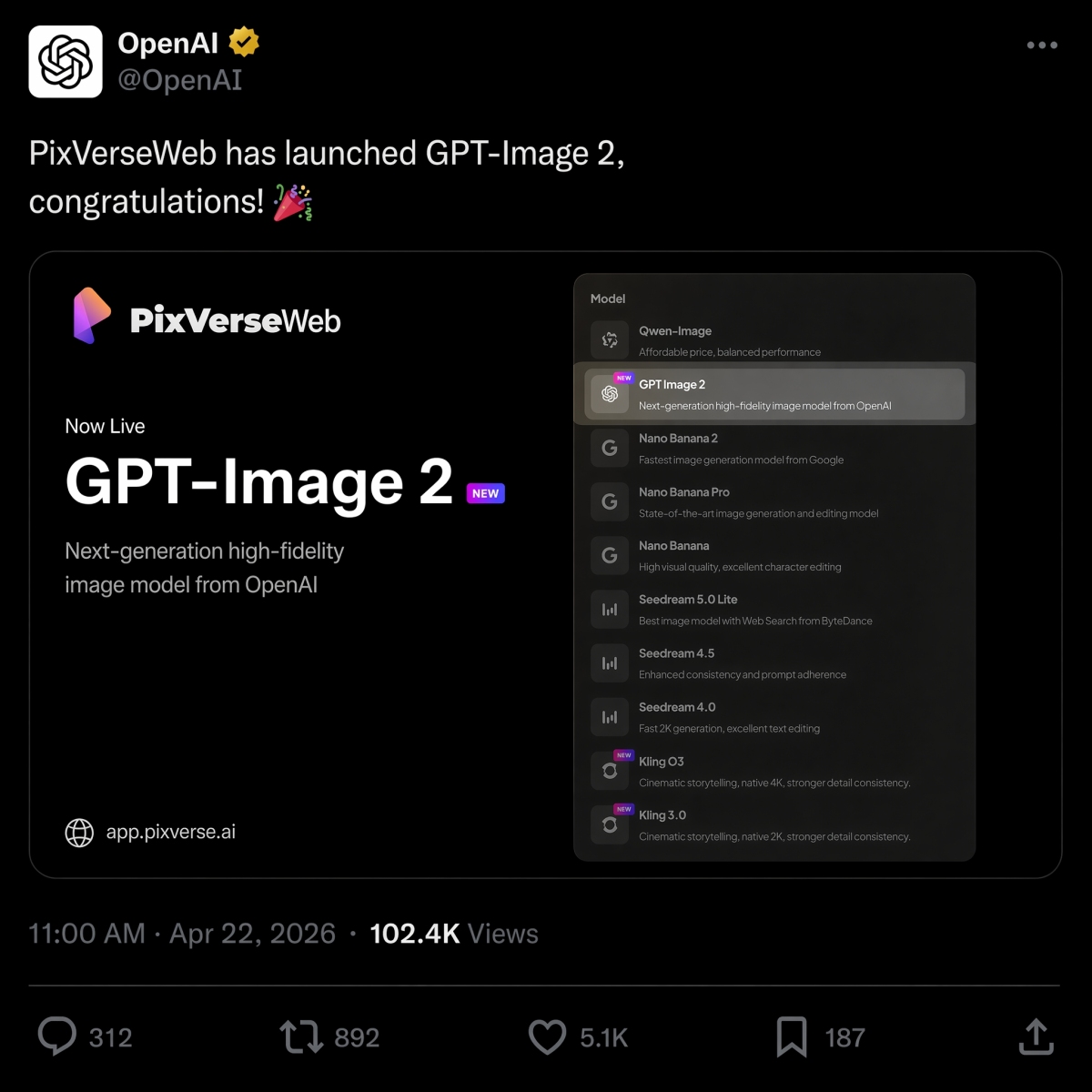
Pada tanggal 22 April 2026, PixVerse meluncurkan GPT Image 2 sebagai opsi teks-ke-gambar, bergabung dengan Nano Banana 2, Seedream, dan HappyHorse 1.0 dalam jajaran model.
Jika Anda memutuskan antara OpenAI dan model gambar Google untuk ringkasan yang sama, lihat perbandingan GPT Image 2 vs Nano Banana 2 kami untuk hasil berdampingan dari petunjuk yang sama.
Jika pekerjaan cepat Anda sebagian besar berkaitan dengan video, [panduan alat AI gambar-ke-video terbaik] kami (https://pixverse.ai/id/blog/best-image-to-video-ai-tool) menjelaskan cara memilih alur kerja gerakan yang tepat setelah gambar diam siap.
Coba PixVerse: buka aplikasi PixVerse.
Pertanyaan Umum
Apa perintah GPT Image 2 terbaik?
Perintah GPT Image 2 terbaik menggambarkan pekerjaan produksi yang jelas, bukan hanya gaya visual. Perintah kuat biasanya mencakup subjek, jenis keluaran, teks persis jika diperlukan, komposisi, pencahayaan, batasan, rasio aspek, dan kasus penggunaan akhir. Iklan produk, poster dengan teks persis, lembar karakter, maket UI, infografis, dan bingkai pertama gambar-ke-video adalah kategori cepat yang bagus untuk memulai.
Bagaimana cara menulis perintah GPT Image 2 yang lebih baik?
Gunakan rumus ini: subjek ditambah gaya visual ditambah komposisi ditambah pencahayaan ditambah detail ditambah batasan ditambah kasus penggunaan keluaran. Beri tahu GPT Image 2 apa yang perlu dilakukan gambar, kutip teks persisnya, tentukan tata letak dan rasio aspek, dan buat daftar apa yang tidak boleh diubah. Untuk pengeditan, pisahkan perubahan, elemen yang dikunci, dan persyaratan realisme.
Apakah GPT Image 2 bagus untuk gambar produk?
Ya. GPT Image 2 berguna untuk konsep iklan produk, gambar pahlawan e-niaga, maket kemasan, potongan produk, dan visual kampanye. Tim produk tetap harus meninjau geometri produk, teks label, klaim yang diatur, logo, dan detail kemasan sebelum menggunakan hasilnya dalam iklan atau listingan produk.
Bisakah GPT Image 2 membuat gambar dengan teks?
Ya, GPT Image 2 dapat membuat gambar dengan teks yang mudah dibaca, terutama judul pendek, label, poster, item menu, langkah infografis, dan label UI. Untuk hasil terbaik, masukkan teks yang sama persis dalam tanda kutip, tentukan di mana teks tersebut muncul, buat salinan tetap singkat, dan tambahkan batasan seperti “hanya teks persis”, “tidak ada kata tambahan”, dan “tidak ada teks duplikat”.
Bagaimana cara mengubah gambar GPT Image 2 menjadi video?
Buat atau setujui gambar diam terlebih dahulu, lalu unggah ke PixVerse image-to-video. Tulis perintah gerakan terpisah yang menjelaskan apa yang bergerak dan apa yang tetap terkunci. Perintah gerakan yang baik menyebutkan pergerakan kamera, pelestarian subjek, gerakan latar belakang, dan batasan seperti tidak ada teks baru, tidak ada logo baru, dan tidak ada produk tambahan.
GPT Image 2 vs Nano Banana 2: mana yang lebih baik?
GPT Image 2 biasanya lebih baik untuk keluaran desain terstruktur seperti poster berisi teks, diagram, maket UI, ringkasan visual yang dapat diedit, dan bingkai pertama gambar-ke-video. Nano Banana 2 layak dibandingkan ketika fotorealisme, detail material, dan iterasi visual yang cepat lebih penting. Lihat perbandingan GPT Image 2 vs Nano Banana 2 untuk hasil yang sama cepatnya.
Apakah GPT Image 2 sama dengan ChatGPT Images 2.0?
Untuk maksud pencarian, ya. Banyak pengguna menggunakan GPT Image 2, gpt-image-2, dan ChatGPT Images 2.0 untuk mendeskripsikan pengalaman pembuatan gambar ChatGPT terbaru dari OpenAI. Nama produk OpenAI adalah ChatGPT Images 2.0, sedangkan gpt-image-2 adalah frasa gaya model yang sering digunakan pengembang dan pembuat konten saat mendiskusikan alur kerja API.
Apakah GPT Image 2 gratis, dan berapa biaya API-nya?
Bantuan OpenAI mencantumkan ChatGPT Images 2.0 tersedia di semua tingkatan, namun kuota paket dan penagihan API terpisah. Pada tanggal 22 Juni 2026, OpenAI mencantumkan keluaran gambar GPT-Image-2 dengan harga $30,00 per 1 juta token; biaya sebenarnya bergantung pada panjang prompt, referensi, ukuran keluaran, kualitas, dan cache.