Guide de prompts GPT Image 2 : 80 prompts, avis et conseils API (2026)
Découvrez 80 prompts GPT Image 2 prêts à copier pour publicités, posters, produits, personnages et workflows vidéo, avec notes API et tests.
Il s’agit d’un guide d’invite GPT Image 2 et d’un examen pratique destiné aux créateurs qui ont d’abord besoin d’invites utilisables : annonces de produits, affiches, vignettes, personnages, images sociales, maquettes d’interface utilisateur, modifications et premières images prêtes pour la vidéo.
Utilisez les chemins rapides ci-dessous si vous savez déjà ce dont vous avez besoin :
- Copier les invites : consultez les 80 exemples d’invites GPT Image 2 prêtes à être copiées ci-dessous.
- Consultez les résultats des tests : vérifiez les scores et les limites des examens pratiques.
- Transformez des images en vidéo : suivez le flux de travail image-vidéo PixVerse.
GPT Image 2 est plus puissant lorsque l’image doit se comporter comme un élément conçu : texte lisible, mises en page claires, compositions de produits, maquettes d’interface utilisateur, infographies, références modifiables et premières images prêtes pour la vidéo. Il est moins fiable lorsque le travail dépend de la reproduction exacte du logo de la marque, d’une petite copie conforme, de polices propriétaires ou d’un actif final transparent qui doit être expédié sans contrôle qualité manuel.
OpenAI a introduit ChatGPT Images 2.0 le 21 avril 2026. Les créateurs recherchent souvent la même expérience que GPT Image 2, gpt-image-2 ou ChatGPT Images 2.0. Nous l’avons testé pour la première fois au cours de la semaine de lancement et avons réexaminé ce guide le 22 juin 2026 par rapport au guide d’invite officiel de OpenAI, à la page de tarification de l’API et à la documentation d’aide des images ChatGPT.
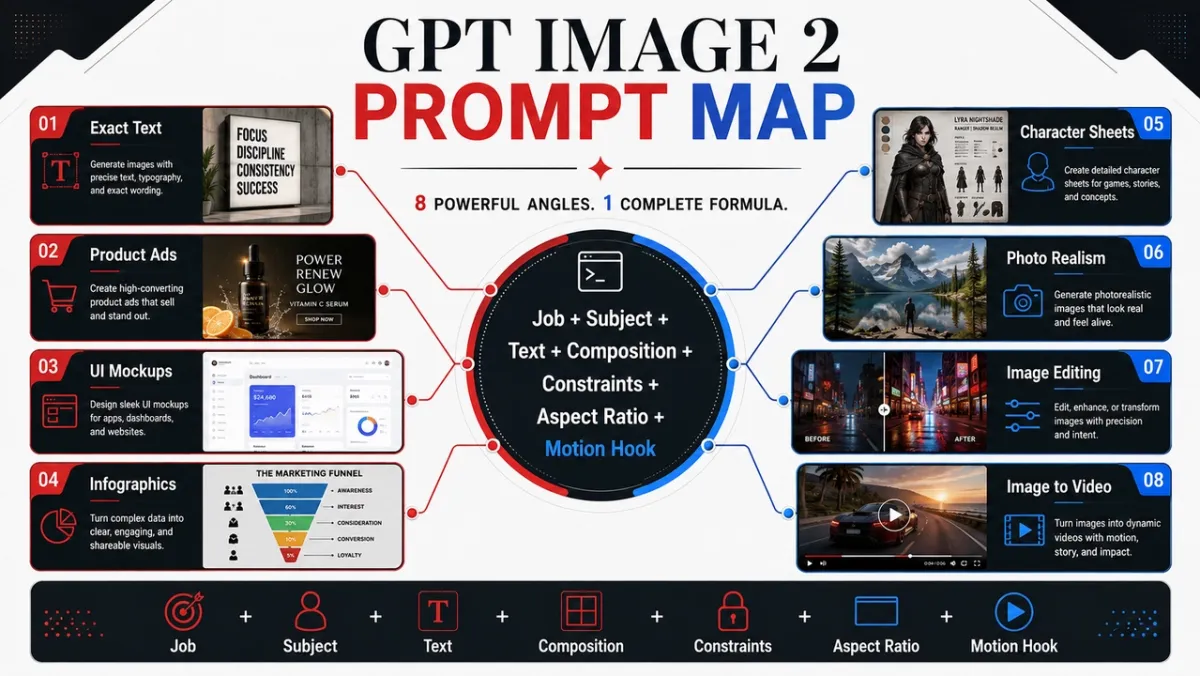
5 GPT Image 2 invite à copier en premier
Ces cinq invites couvrent les cas d’utilisation les plus intéressants de ce guide. Chacun suit le même format : cas d’utilisation, invite, meilleur pour et astuce.
Exemple d’invite 1 : Photographie de produit
Cas d’utilisation : Image du héros du produit de commerce électronique
Rapide:
Créez une image de héros de commerce électronique haut de gamme pour un haut-parleur sans fil noir mat sur un socle en béton. Le produit se trouve sur le tiers droit avec des bords nets, une texture de matériau réaliste, une ombre de contact nette et une lumière de bord spectaculaire. Laissez le tiers gauche comme espace négatif pour un titre. Pas de faux logo de marque, pas de filigrane, pas d’objets supplémentaires. Format d’image 16:9.
Idéal pour : Listes de produits, publicités sociales payantes, images de héros de page de destination
Conseil : Si vous fournissez une image de référence, ajoutez “préserver exactement la forme, la couleur, l’étiquette et les proportions du produit”.
Exemple d’invite 2 : création publicitaire IA
Cas d’utilisation : Affiche de campagne avec texte exact
Rapide:
Créez une affiche de lancement de produit verticale pour un outil de conception fictif. Titre : “CRÉER PLUS RAPIDEMENT”. Sous-titre : “DE L’INVITE À LA CAMPAGNE”. Grille suisse épurée, fond blanc cassé, typographie noire, une forme d’accent bleu électrique, forte hiérarchie, texte exact uniquement, pas de mots supplémentaires, pas de filigrane. Format d’image 9:16.
Idéal pour : Concepts publicitaires, tests d’affiches, graphiques de lancement, images de campagnes sociales
Conseil : Gardez le texte du titre court et citez-le exactement. Un texte long est plus difficile à restituer proprement.
Exemple d’invite 3 : Cohérence des caractères
Cas d’utilisation : Feuille de référence des personnages
Rapide:
Créez une feuille de référence de personnage professionnel pour un coursier de science-fiction original nommé « NOVA ». Incluez des vues de face, de côté et de dos ; quatre expressions faciales ; légendes sur les vestes, les bottes et les sacs à dos ; et une rangée de palette de couleurs. Gardez le même visage, la même coiffure, la même tenue et les mêmes proportions dans toutes les vues. Fond blanc propre, étiquettes lisibles, style art conceptuel. Format d’image 16:9.
Idéal pour : Personnages de jeux, références d’animation, mascottes de marque, storyboards
Conseil : Répétez les ancres d’identité à chaque régénération : nom, visage, coiffure, tenue, palette de couleurs et rôle.
Exemple d’invite 4 : vignette ou image sociale
Cas d’utilisation : Miniature YouTube ou publication sur les réseaux sociaux
Rapide:
Créez une vignette YouTube en gras pour une vidéo sur les invites d’image de l’IA. Texte principal : « MEILLEURES INVITES ». Affichez le résultat d’une image avant et après en écran partagé, avec une carte d’invite désordonnée à gauche et un visuel de campagne soigné à droite. Contraste élevé, composition claire sans visage, texte lisible, pas de faux logos, pas de mots supplémentaires. Format d’image 16:9.
Idéal pour : Miniatures, explications sociales, graphiques de blog, contenu de créateur
Conseil : Indiquez au modèle exactement combien de mots doivent apparaître et où ils doivent aller.
Exemple d’invite 5 : première image d’image vers vidéo
Cas d’utilisation : Première image pour la conversion image-vidéo PixVerse
Rapide:
Créez une première image cinématographique pour un clip image-vidéo : une bouteille de parfum en verre posée sur une pierre noire humide, un mince ruban de brume derrière, une forte silhouette au premier plan, des couches de profondeur visibles, une réflexion subtile, un espace vide pour le mouvement de la caméra, pas de mains, pas de texte, pas de filigrane. Format d’image 16:9.
Idéal pour : Dévoilements de produits, courtes publicités, ouvertures de clips vidéo, clips sociaux cinématographiques
Conseil : Ajoutez un signal de mouvement dans l’image fixe, tel que de la brume, de la poussière, de la vapeur, du tissu, de la lueur de l’écran ou des reflets.
Transformez votre photo GPT Image 2 en vidéo avec PixVerse
Une invite GPT Image 2 forte peut créer l’image fixe. PixVerse est la prochaine étape lorsque cela nécessite encore du mouvement, un mouvement de caméra ou un court clip de campagne.
- Générez une première image avec GPT Image 2.
- Téléchargez l’image approuvée sur PixVerse.
- Ajoutez une invite de mouvement ciblée.
- Exportez une courte vidéo à des fins de tests, de publicités, de publications sur les réseaux sociaux ou de pages de produits.
Motion vous invite à essayer :
- Utilisez l’image comme première image. Poussez lentement la caméra vers le produit tandis que la brume dérive derrière elle. Préservez la forme, l’étiquette, l’éclairage et la position du produit.
- Utilisez l’image comme première image. Ajoutez un léger mouvement de caméra portable, un tissu se déplaçant dans le vent et une parallaxe d’arrière-plan douce. Ne changez pas le visage ou la tenue du personnage.
- Utilisez l’image comme première image. Animez les lumières de la ville en les allumant une par une pendant que la caméra effectue un panoramique légèrement vers la gauche. Conservez tout le texte lisible de l’affiche.
- Utilisez l’image comme première image. Faites pivoter subtilement le produit sur le socle, ajoutez une lumière de bord mobile et gardez l’arrière-plan propre.
- Utilisez l’image comme première image. Ajoutez de la vapeur, des reflets et une lente dérive de la caméra descendante. Préservez la forme, la position des assiettes et la couleur des aliments.
Pour une structure de prompt de mouvement plus solide, consultez le guide des prompts vidéo IA, le guide des outils image vers vidéo et le workflow de générateur de publicités vidéo IA.
Comment écrire des invites GPT Image 2 qui fonctionnent réellement
Les meilleures invites GPT Image 2 ne se contentent pas de décrire une image. Ils décrivent le travail que l’image doit faire. Une invite pour une publicité sociale doit se lire différemment d’une invite pour une découpe de produit, une infographie, un écran d’interface utilisateur ou une première image pour une vidéo.
Un modèle de démarrage fiable ressemble à ceci :
Créer [type d’image] pour [cas d’utilisation]. Sujet principal : [sujet spécifique et détails visibles]. Texte exact, le cas échéant : “[copie qui doit apparaître]”. Composition : [cadrage, mise en page, espace négatif, placement du sujet]. Style et éclairage : [langage visuel, support, ambiance, direction de la lumière]. Contraintes : [ce qui ne doit pas changer, pas de mots supplémentaires, pas de filigrane]. Format de sortie : [rapport hauteur/largeur, arrière-plan transparent, image prête pour la vidéo].
Formule:
Sujet + style visuel + composition + éclairage + détails + contraintes + cas d’utilisation de sortie
Compétence 1 : Nommez le travail avant le style
Commencez par le type de sortie : affiche, annonce de produit, écran d’application, feuille de personnage, diagramme pédagogique, modification ou première image d’image en vidéo. GPT Image 2 est plus apte à suivre l’invite lorsqu’il comprend la norme de réussite.
Invite faible :
Un haut-parleur futuriste cool, cinématique et très détaillé.
Meilleure invite :
Créez une annonce de produit premium pour une enceinte sans fil noir mat. L’image doit fonctionner comme une bannière de campagne 16:9, avec le produit à droite, un titre court à gauche, un espace négatif propre et des bords nets du produit.
La deuxième invite indique au modèle comment l’image sera jugée : non seulement en termes de beauté, mais également en termes de mise en page, de hiérarchie et de convivialité.
Compétence 2 : Traiter le texte comme un actif verrouillé
Si le texte est important, mettez-le entre guillemets et indiquez au modèle comment le restituer. Ne demandez pas « un slogan » sauf si vous souhaitez que le modèle invente des mots.
Utilisez ce modèle :
Titre : « UN SON QUE VOUS POUVEZ RESSENTIR ». Rendre le titre textuellement. Pas de mots supplémentaires, pas de texte en double, pas de faux logo. Caractères blancs gras sans empattement, côté gauche de la composition, lisibles de loin.
Pour une copie longue, divisez le texte en lignes distinctes dans l’invite. Si le résultat orthographie mal un mot, régénérez-le avec moins de texte, des caractères plus gros et un langage plus strict « texte exact uniquement ».
Compétence 3 : Donner au modèle une caméra et une mise en page
GPT Image 2 peut suivre des indices de composition, mais il a besoin qu’ils soient clairement indiqués. Ajoutez la distance de la caméra, l’angle, le placement du sujet, l’espace négatif et le rapport hauteur/largeur.
Phrases utiles :
- Gros plan pour la texture du produit, les mains, les visages, les matériaux et les étiquettes.
- Plan large pour les environnements, les scènes d’histoire, les affiches de ville et les cadres prêts pour la vidéo.
- De haut en bas pour la nourriture, les scènes de bureau, les poses à plat et les kits d’emballage.
- Tiers gauche/tiers droit pour les mises en page d’annonces avec texte et solde de produit.
- Grille propre pour les maquettes d’interface utilisateur, les feuilles de personnages, les diagrammes et les infographies.
Compétence 4 : Rédiger des modifications en trois phrases
Les invites d’édition fonctionnent mieux lorsqu’elles séparent la modification, les éléments verrouillés et le réalisme physique.
Remplacez la voiture garée par un vélo vintage. Préservez exactement la maison, la clôture, l’allée, l’aménagement paysager, la direction de l’éclairage, l’angle de la caméra et l’heure de la journée. Faites correspondre l’échelle du vélo, l’ombre de contact et la perspective à la scène existante.
Ce modèle est plus fort que « rendre cela meilleur » car il indique à GPT Image 2 où la créativité est autorisée et où elle ne l’est pas.
Compétence 5 : Ajouter des signaux de mouvement lorsque l’image deviendra vidéo
Si l’image fixe devient une source d’image vers vidéo PixVerse, demandez la profondeur et la préparation au mouvement. Demandez le premier plan, le milieu du plan, l’arrière-plan, une silhouette de sujet nette et un signal de mouvement visible : poussière, tissu, cheveux, pluie, reflet, mouvement du véhicule, produit en rotation ou chemin de poussée de la caméra.
Au lieu de:
Un astronaute dans un désert.
Utiliser:
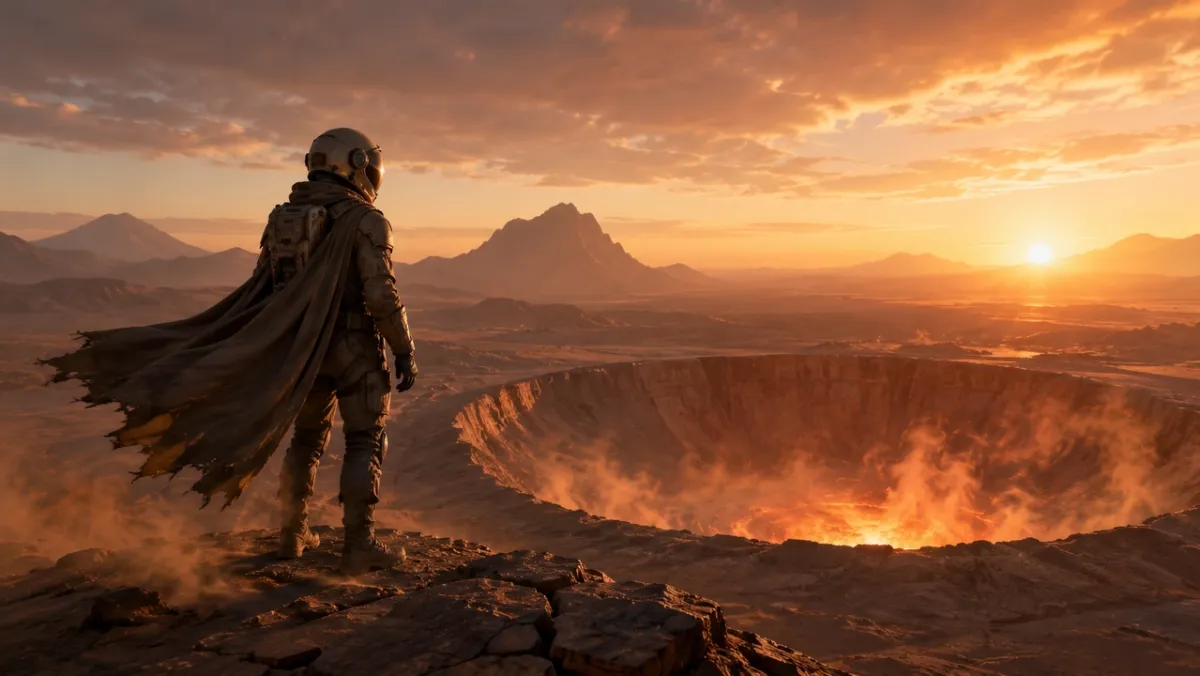
Une première image cinématographique pour un clip image-vidéo : un astronaute solitaire debout au bord d’un cratère désertique brillant à l’aube, une cape et de la poussière prêtes à se déplacer dans le vent, une forte silhouette au premier plan, des couches de profondeur claires et une lumière chaude de l’horizon.
Bibliothèque d’invites GPT Image 2 : 80 exemples prêts à être copiés
Chaque angle ci-dessous comprend dix invites. La première invite de chaque groupe est la meilleure candidate pour un exemple visuel car elle met l’accent sur la capacité que l’angle est censé démontrer ; les autres invites sont des exemples de texte uniquement que vous pouvez copier, adapter et tester.
| Module d’invite | Numéros d’invite | Idéal pour |
|---|---|---|
| Photographie de produits et invites de création publicitaire IA | 21-30 | Listes de produits, publicités payantes, images de héros du commerce électronique, maquettes d’emballage |
| Invites de rendu de logo et de texte | 11-20 | Affiches, tableaux de menu, vignettes, pochettes d’album, tests de titres précis |
| Invites de cohérence des caractères | 41-50 | Feuilles de personnages, mascottes, ressources de jeu, lignes d’expression |
| Affiches, vignettes et invites de scène cinématographique | 1-10 | Images de héros, images fixes éditoriales, scènes atmosphériques, accroches visuelles |
| Image des réseaux sociaux et invites infographiques | 31-40 | Visuels de blog, explicatifs, graphiques de comparaison, ressources pédagogiques partageables |
| Invites de maquette d’interface utilisateur | 51-60 | Écrans d’application, tableaux de bord, profils sociaux, concepts d’interface utilisateur de produit |
| Transfert de style et invites d’art narratif | 61-70 | Bandes dessinées, panneaux d’histoire, art éditorial, exploration de concepts |
| Invites d’image à vidéo pour la première image | 71-80 | Flux de travail de mouvement PixVerse, révélations de produits, modifications, images sources multi-références |
1. Invites d’affiche, de vignette et de scène cinématographique
Cet angle est idéal pour les portraits, les images éditoriales, les scènes de style de vie et les photos d’ambiance où l’éclairage et le réalisme sont importants.
Invite 1 :
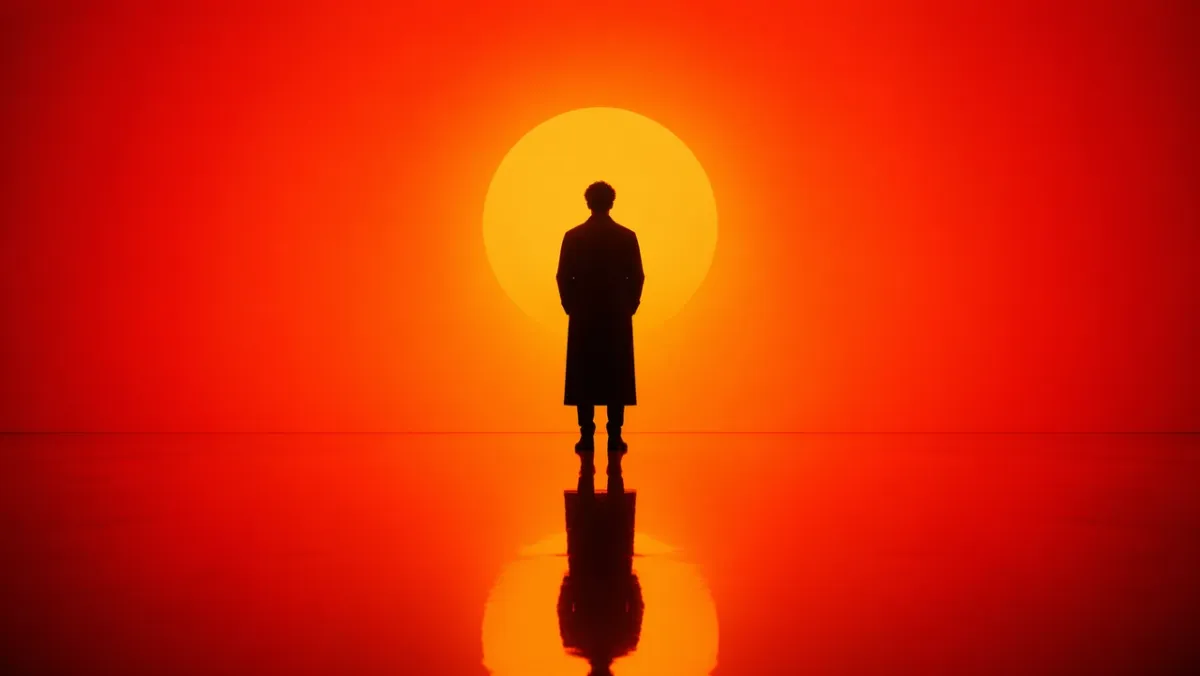
Générez un portrait cinématographique d’une figure solitaire debout dans un environnement dégradé intense orange à rouge. Fort éclairage de la silhouette par derrière, contraste d’ombre profond, sol brillant réfléchissant reflétant la silhouette. Composition symétrique, scénographie minimale, pas d’encombrement en arrière-plan. L’ambiance est contemplative et puissante, comme celle d’un film de science-fiction. Format d’image 16:9.
Invite 2 :
Une scène de rue photoréaliste franche à Séoul après la pluie. Un fleuriste ferme une petite boutique à l’heure bleue, reflets de chaussée mouillée, lumière chaude du magasin, posture naturelle fatiguée, sensation documentaire 50 mm, texture de peau réaliste, pas de pose glamour, pas de filigrane. Rapport hauteur/largeur 3:2.
Invite 3 :
Gros plan de mains abîmées réparant un vieil appareil photo argentique sur un bureau en bois rayé. Lumière de la fenêtre de la caméra à gauche, poussière visible, texture de laiton et de cuir noir, faible profondeur de champ, ambiance d’atelier calme, photoréaliste, pas de superposition de texte. Rapport hauteur/largeur 4:3.
Invite 4 :
Un quai de train de nuit calme en Europe du Nord par temps de neige légère. Un voyageur vêtu d’un long manteau se tient sous une lampe chaude de gare, souffle visible dans l’air froid, fenêtres de train brillant en arrière-plan, réalisme cinématographique, palette de couleurs sobre, sensation documentaire 35 mm, pas de texte. Format d’image 16:9.
Invite 5 :
Une photographie culinaire éditoriale de haut en bas de nouilles faites à la main sur une assiette en céramique sombre, de la vapeur qui monte, des baguettes posées en biais, une table en bois usée, une lumière latérale douce, un éclat et une texture d’huile réalistes, sans marque, sans superposition de texte. Rapport hauteur/largeur 4:5.
Invite 6 :
Un portrait réaliste de style documentaire d’un artiste céramiste taillant un bol d’argile sur un tour de potier. Gros plan moyen, mains et argile en rotation bien nettes, tablier avec des taches naturelles, lumière douce de la fenêtre de l’atelier, étagères de bols inachevés en arrière-plan, texture honnête, pas de retouche glamour, pas de texte. Rapport hauteur/largeur 3:2.
Invite 7 :
Une grande image cinématographique d’une petite ville de montagne après une tempête d’été. La brume s’élève des pins vert foncé, des lumières chaudes apparaissent dans les fenêtres des chalets, les reflets de la route mouillée mènent vers le centre, une personne marchant avec un parapluie au loin, échelle naturelle, atmosphère réaliste, pas de texte. Format d’image 16:9.
Invite 8 :
Un gros plan photoréaliste d’une montre-bracelet vintage posée sur un tissu en lin plié. Métal brossé visible, minuscules rayures sur le boîtier, marquages lisibles mais fictifs du cadran de la montre, lumière matinale douce et directionnelle, faible profondeur de champ, ambiance photo-produit éditoriale raffinée, pas de véritables logos de marque. Rapport hauteur/largeur 4:5.
Invite 9 :
Une scène intérieure franche d’un petit studio d’architecture tard dans la nuit. Deux designers examinent des modèles en mousse et des plans d’étage imprimés sous une lampe de bureau, des tasses de café à proximité, des ombres réalistes, un espace de travail encombré, une ambiance calme et concentrée, un aspect film 35 mm, pas de superposition de texte. Format d’image 16:9.
Invite 10 :
Une image éditoriale de mode naturelle d’un mannequin vêtu d’un simple manteau crème se tenant près d’une entrée de métro au crépuscule. Des lampadaires qui commencent à briller, un fond de ville assourdi, des plis de tissu réalistes, une posture détendue, un cadrage à la hauteur des yeux, un grain de film subtil, aucun nom de marque visible, aucun texte. Rapport hauteur/largeur 2:3.
Ce qu’il faut rechercher : Le résultat doit avoir une direction de la lumière crédible, des reflets ou des ombres physiquement plausibles et une pose naturelle du sujet. Si l’image semble trop soignée, ajoutez plus de détails documentaires et supprimez les termes vagues sur la qualité.
2. Invites de rendu du logo et du texte
GPT Image 2 est plus puissant lorsque l’invite traite le texte comme une exigence de conception et non comme une décoration.
Invite 11 :
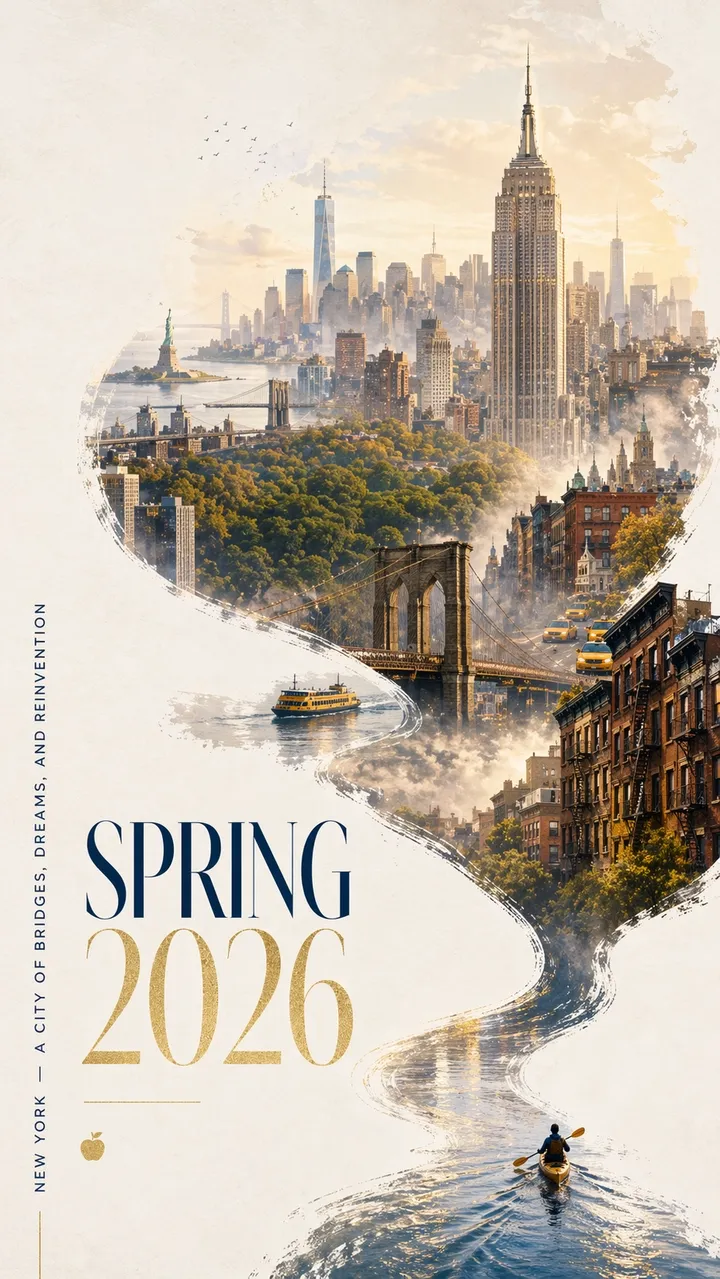
Une superbe affiche urbaine du printemps 2026 pour New York avec un design contemporain audacieux et une ambiance festive élégante. Fond texturé blanc cassé propre avec un espace négatif généreux. Un kayakiste miniature pagaye sur un étroit ruban d’eau réfléchissant dans le coin inférieur droit. Le sillage s’élève selon une courbe calligraphique dynamique, se transformant progressivement en fleuve Hudson, puis en un panorama onirique de Manhattan peint à la main. À l’intérieur de la composition fluide en forme de rivière : l’Empire State Building, le pont de Brooklyn, la verrière de Central Park, le One World Trade Center, les toits en pierre brune, les taxis jaunes, les ferries du port et la Statue de la Liberté au loin. Douce brume matinale, lumière printanière dorée, accents subtils de bleu marine et d’or. La typographie élégante en bas à gauche indique « PRINTEMPS 2026 » avec un slogan vertical « NEW YORK - UNE VILLE DE PONTS, DE RÊVES ET DE RÉINVENTION ». Le texte doit être net et joliment composé. Pas de mots supplémentaires. Conception graphique haut de gamme, format 9:16.
Invite 12 :
Créer une affiche de lancement verticale pour une conférence de design fictive intitulée “FRAME 2026”. Gros titre : « FRAME 2026 ». Sous-titre : “CONCEPTION AVEC L’IMAGINATION MACHINE”. Grille suisse épurée, fond blanc cassé, typographie noire, un accent géométrique rouge, espace négatif généreux, texte parfaitement lisible, pas de mots supplémentaires, pas de filigrane. Format d’image 9:16.
Invite 13 :
Créez une pochette d’album minimaliste intitulée « SOFT SIGNALS ». Nom de l’artiste : “MIRA VALE”. Typographie centrée, texture de papier bleu sourd, illustration en petites lignes argentées d’une tour radio, espacement élégant, pas de texte supplémentaire, pas de logo, rapport hauteur/largeur 1:1.
Invite 14 :
Créez une affiche de vitrine de librairie indiquant « LIRE PLUS LENTEMENT » en gros caractères à empattement. Ligne plus petite : « SEMAINE DE LECTURE DE PRINTEMPS ». Reflets de rue chauds du soir dans le verre, texture du papier crème, typographie lisible, pas de mots supplémentaires, pas de filigrane. Rapport hauteur/largeur 4:5.
Invite 15 :
Créer une affiche d’exposition muséale intitulée “OBJETS DE DEMAIN”. Sous-titre : « UNE HISTOIRE DU DESIGN DE 2026 ». Texte noir sur papier blanc cassé, un objet chromé abstrait au centre, mise en page moderniste épurée, texte lisible avec précision uniquement, pas de faux logos. Format d’image 9:16.
Invite 16 :
Créez une affiche verticale de festival de musique avec le titre exact « AFTERLIGHT SESSIONS ». Texte plus petit : « 12-14 JUIN ». Utilisez un fond bleu marine profond, une lumière de scène circulaire brillante, une élégante typographie condensée sans empattement, un espace négatif équilibré, du texte exact uniquement, pas de mots supplémentaires, pas de filigrane. Format d’image 9:16.
Invite 17 :
Créez un tableau de menu de café propre intitulé “MENU DU MATIN”. Incluez exactement quatre éléments : “ESPRESSO”, “MATCHA LATTE”, “CARDAMOM BUN”, “COLD BREW”. Fond crème chaud, caractères à empattement noirs, lignes de séparation simples, lisible à distance, pas de prix, pas d’éléments supplémentaires. Rapport hauteur/largeur 4:5.
Invite 18 :
Créez un graphique de campagne sociale carré pour un club de course à pied fictif. Texte principal : « COUREZ LA RIVIÈRE ». Ligne secondaire : « SAMEDI 7 AM ». Typographie cinétique audacieuse, ligne de rivière abstraite, palette vert vif et noir, hiérarchie claire, pas de texte supplémentaire, pas de vrais logos. Rapport hauteur/largeur 1:1.
Invite 19 :
Créez une couverture de livre pour un roman de fiction intitulé “LA MACHINE SILENCIEUSE”. Nom de l’auteur : “ELENA ROWE”. Couverture minimaliste avec une petite silhouette d’oiseau mécanique argenté, fond noir mat, typographie raffinée, texte exact uniquement, pas de logos d’éditeur, pas de copie supplémentaire. Rapport hauteur/largeur 2:3.
Invite 20 :
Créez une affiche en classe intitulée « POSEZ DE MEILLEURES QUESTIONS ». Incluez trois lignes courtes : « Observer », « Expliquer », « Test ». Conception éditoriale conviviale, fond jaune doux, icônes de ligne simples, texte lisible à contraste élevé, pas de mots supplémentaires, pas de filigrane. Rapport hauteur/largeur 4:5.
Que rechercher : Chaque lettre doit être lisible. Si le modèle ajoute des mots supplémentaires, reformulez la copie comme « texte exact uniquement » et placez chaque ligne sur sa propre ligne dans l’invite.
3. Photographie de produits et invites de création publicitaire IA
Utilisez cet angle pour les visuels de campagne, les photos de héros, les publicités sociales, les maquettes de commerce électronique et la narration de produits.
Invite 21 :
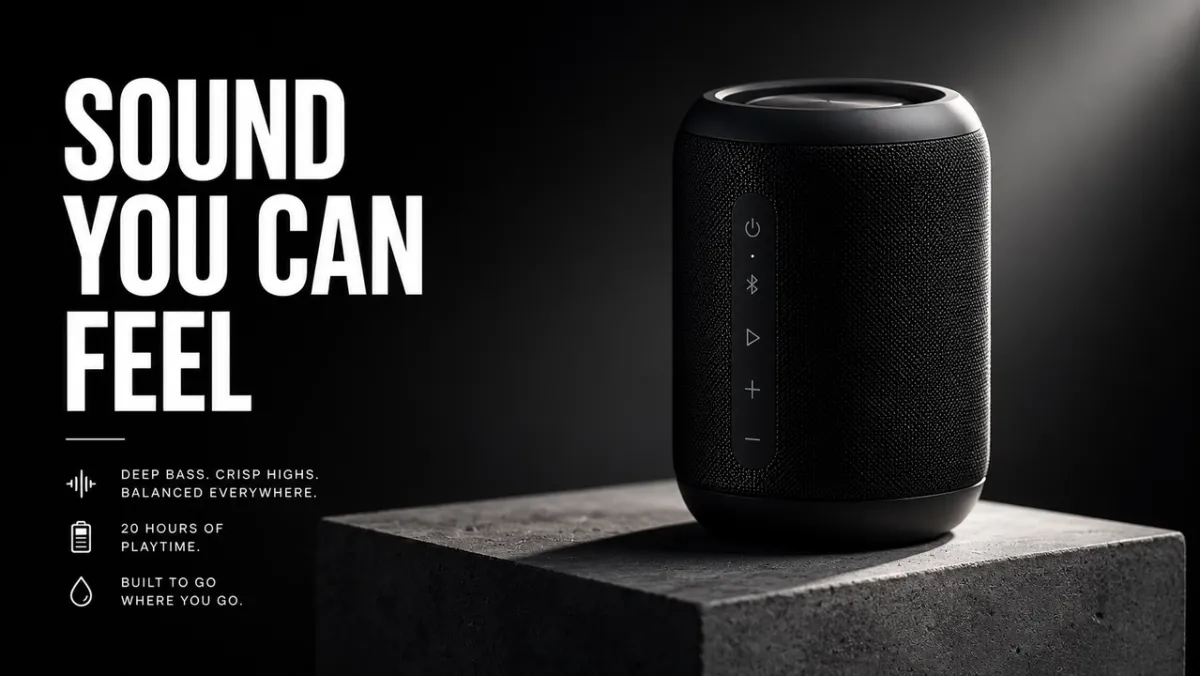
Une publicité de produit premium pour une enceinte sans fil noir mat sur un socle en béton. Titre : « UN SON QUE VOUS POUVEZ RESSENTIR ». Produit à droite, caractères blancs gras à gauche, lumière de jante spectaculaire, ombre nette, style de campagne technologique de luxe, bords nets du produit, pas de faux logo de marque, pas de filigrane. Format d’image 16:9.
Invite 22 :
Photo éditoriale de sérum de soin sur verre dépoli. Un flacon translucide avec une simple étiquette indiquant “LUMA SERUM”, une lumière douce et diffuse, un fond vert pâle, un style de campagne de beauté haut de gamme, un texte d’étiquette net, une réflexion nette, aucun accessoire supplémentaire, un rapport hauteur/largeur 4:5.
Invite 23 :
Publicité sociale carrée pour une bouteille de voyage durable sur un sentier de montagne à l’heure d’or. Slogan : « CONSTRUIT POUR LE LONG CHEMIN ». Produit clairement visible au premier plan, prise en main naturelle, lumière du soleil chaude, texte lisible dans le tiers inférieur, pas de mots supplémentaires, rapport hauteur/largeur 1:1.
Invite 24 :
Une photo épurée d’un produit de commerce électronique représentant des écouteurs sans fil sur un fond blanc pur. Angle droit, silhouette nette, ombre de contact subtile, texture de coussinet d’oreille visible, pas de texte, pas de logo, pas d’accessoires, photographie de produits haute résolution. Rapport hauteur/largeur 1:1.
Invite 25 :
Un visuel de campagne de style panneau d’affichage pour une tasse à café en céramique. Titre : « LES MATINS, RÉCHAUFFÉS ». Produit de grande taille au premier plan, lumière chaude de la fenêtre de la cuisine, vapeur douce, caractères gras lisibles en haut à gauche, pas de copie supplémentaire, pas de filigrane. Format d’image 16:9.
Invite 26 :
Une image de héros du commerce électronique premium d’un sac à dos de randonnée minimaliste sur un rebord en pierre. Centré sur le produit, poche avant et bretelles visibles, douce lumière matinale alpine, ombre nette, aucune personne, aucun logo, aucune superposition de texte, texture en nylon réaliste et détails de la fermeture éclair. Rapport hauteur/largeur 1:1.
Invite 27 :
Une image de campagne de soins de la peau soignée pour un pot de crème hydratante en verre dépoli. Titre : « LE CALME DANS UN POT ». Produit en bas à droite, fond bleu pâle, reflets d’eau doux, zone d’étiquette nette sans fausse marque, typographie blanche élégante, sans mots supplémentaires. Rapport hauteur/largeur 4:5.
Invite 28 :
Une photo cinématographique d’écouteurs sans fil blanc mat dans un étui de chargement ouvert. Fond anthracite foncé, lumière sur le bord fin, reflet subtil en dessous, espace négatif propre pour un titre de campagne, pas de logo, pas de texte, bords nets du produit. Format d’image 16:9.
Invite 29 :
Une maquette d’emballage de collation carrée pour une marque de granola fictive appelée « NOVA OATS ». Présentez un sachet debout sur une surface en bois clair, le texte de l’étiquette est net, de l’avoine et des fruits secs autour de la base, une lumière naturelle chaude, un design d’emballage haut de gamme mais accessible, pas de marques supplémentaires. Rapport hauteur/largeur 1:1.
Invite 30 :
Une photo d’un produit de bijouterie de luxe représentant une bague en argent avec une petite pierre bleue sur une surface de velours foncé. Détail macro, reflets métalliques réalistes, projecteur doux en haut à gauche, ombre nette, pas de mains, pas de texte, pas de filigrane, produit clairement séparé de l’arrière-plan. Rapport hauteur/largeur 4:5.
Que rechercher : Le produit doit rester le héros visuel. Si le modèle invente trop de détails d’emballage, spécifiez « emballage neutre » ou « conserver exactement le produit d’entrée » lorsque vous utilisez une image de référence.
4. Image des médias sociaux et invites infographiques
Cet angle est utile pour les diagrammes, les explicatifs, les cartes de flux de travail, les graphiques, les visuels de classe et les illustrations de blog qui nécessitent des étiquettes lisibles.
Invite 31 :
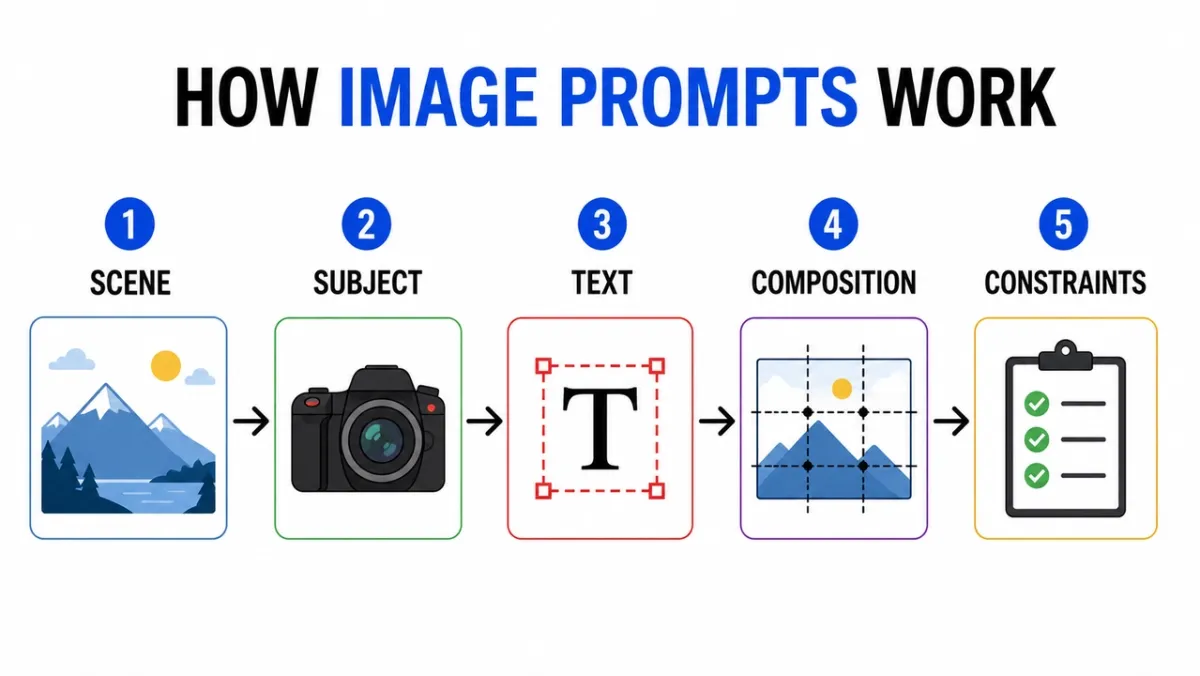
Créez une infographie claire intitulée « COMMENT FONCTIONNENT LES INVITES D’IMAGE ». Cinq étapes étiquetées : “Scène”, “Sujet”, “Texte”, “Composition”, “Contraintes”. Icônes éditoriales plates, flèches entre les étapes, contraste élevé, fond blanc, étiquettes sans empattement lisibles, espacement cohérent, pas de texte supplémentaire, pas de filigrane. Format d’image 16:9.
Invite 32 :
Schéma pédagogique montrant les couches d’un objectif d’appareil photo. Incluez les parties étiquetées : « Élément avant », « Ouverture », « Groupe de mise au point », « Capteur d’image ». Illustration en coupe épurée, fond blanc, style manuel, lignes de repère claires, étiquettes lisibles, pas d’encombrement décoratif. Format d’image 16:9.
Invite 33 :
Infographie comparative intitulée « POSTER PROMPT VS PRODUCT PROMPT ». Deux colonnes, six lignes, des étiquettes concises, un fond neutre, du texte noir, des lignes d’accent bleues, un style graphique de blog professionnel, le tout lisible en copie, sans texte supplémentaire. Format d’image 16:9.
Invite 34 :
Créez un visuel pédagogique étape par étape intitulé « COMMENT FAIRE UNE INFUSION À FROID ». Cinq étapes illustrées avec de courtes étiquettes : “Grind”, “Steep”, “Filter”, “Pour”, “Serve”. Tons terreux chauds, flèches claires, style d’icône cohérent, texte lisible, pas de mots supplémentaires. Format d’image 16:9.
Invite 35 :
Créez un tableau de comparaison propre intitulé « AI IMAGE WORKFLOW ». Trois colonnes : “Brouillon”, “Affiner”, “Animer”. Utilisez des icônes simples, des étiquettes courtes, un contraste élevé, un espacement généreux, un fond blanc, un style graphique de blog professionnel, tout le texte est lisible. Format d’image 16:9.
Invite 36 :
Créez une infographie chronologique claire intitulée « DE L’INVITE À L’AFFICHE ». Cinq étapes : “Brief”, “Mise en page”, “Texte”, “Révision”, “Export”. Flux horizontal, cercles numérotés simples, palette d’accents bleus et noirs, étiquettes à contraste élevé, pas de texte supplémentaire, pas de filigrane. Format d’image 16:9.
Invite 37 :
Créez un schéma pédagogique intitulé « RÔLES DES IMAGES DE RÉFÉRENCE ». Trois cartes étiquetées : « Sujet », « Style », « Fond ». Affichez des vignettes d’images simples, des flèches dans un cadre de sortie final, des étiquettes claires, un fond blanc, un espacement cohérent, aucun texte supplémentaire. Format d’image 16:9.
Invite 38 :
Créez un arbre de décision intitulé « QUELLE INVITE D’IMAGE ? Branches : “Texte”, “Produit”, “Scène”, “Modifier”. Utilisez des cases et des flèches propres, une typographie sans empattement lisible, un fond gris minimal, une couleur d’accent verte, pas de mots supplémentaires, pas d’encombrement décoratif. Format d’image 16:9.
Invite 39 :
Créez une infographie de liste de contrôle de sécurité intitulée « AVANT DE GÉNÉRER ». Quatre vérifications : “Droits”, “Confidentialité”, “Texte”, “Marque”. Utilisez des icônes de vérification simples, des étiquettes concises, un fond blanc, un style de centre d’aide SaaS professionnel, un contraste élevé, aucune copie supplémentaire. Rapport hauteur/largeur 4:5.
Invite 40 :
Créez un explicatif visuel intitulé “IMAGE EDITING PROMPT”. Trois lignes empilées : “Modifier”, “Préserver”, “Match”. Incluez de minuscules exemples d’icônes pour chaque ligne, des lignes de repère épurées, des étiquettes lisibles, des couleurs sobres, aucun texte supplémentaire, aucun filigrane. Format d’image 16:9.
Que rechercher : Vérifiez d’abord les étiquettes. Si le visuel est beau mais que les mots sont faux, le résultat n’est pas utilisable. Pour les graphiques denses, réduisez le nombre d’étiquettes et régénérez-les.
5. Invites de cohérence des caractères
Les feuilles de personnage sont utiles car elles compressent l’identité, la garde-robe, la palette et les expressions dans un seul cadre de référence.
Invite 41 :
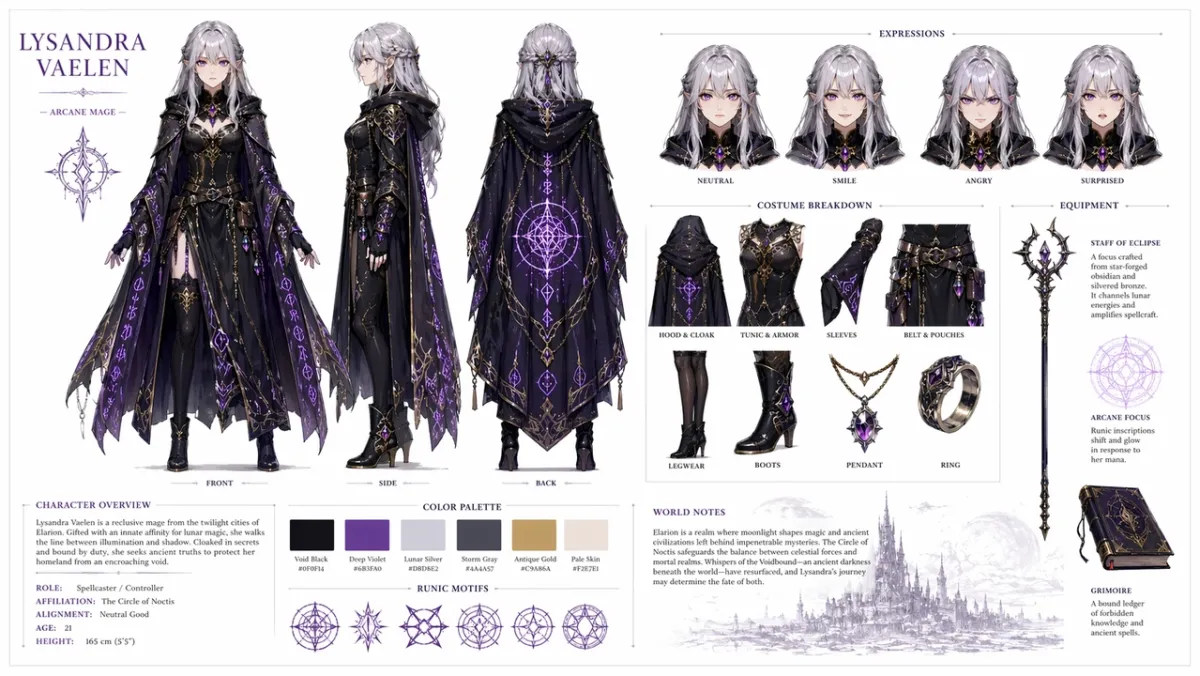
Créez une feuille de référence de personnage professionnel pour un personnage de RPG fantastique original : une jeune mage aux cheveux argentés et aux yeux violets, portant une cape sombre ornée de motifs de runes brillants. Inclure sur un fond blanc épuré : un retournement à trois vues montrant l’avant, le côté et l’arrière ; variations d’expression faciale montrant neutre, souriant, en colère et surpris ; ventilations détaillées des pièces de costumes et d’équipement ; une rangée d’échantillons de palette de couleurs ; et de brèves notes sur la construction du monde dans une typographie épurée. Disposition en grille organisée, style art conceptuel, haute résolution. Format d’image 16:9.
Invite 42 :
Créez une feuille de personnage de courrier de science-fiction pour un personnage original nommé “NOVA”. Incluez des vues de face, de côté et de dos, quatre expressions faciales, des légendes de veste et de sac à dos, des échantillons de palette de couleurs, un fond blanc épuré, des étiquettes lisibles, un visage et une veste cohérents dans toutes les vues. Format d’image 16:9.
Invite 43 :
Créez une feuille de personnage de livre pour enfants pour un petit aide forestier vêtu d’un imperméable vert. Inclut une ligne d’expression, une ligne d’accessoires, une pose de marche, une pose de signe de la main, une palette de couleurs, des notes simples lisibles, un style d’illustration doux, aucun caractère supplémentaire. Format d’image 16:9.
Invite 44 :
Créez une feuille de personnage de détective cyberpunk pour un personnage original nommé “REI”. Inclut une vue de face, une vue de côté, une vue de dos, trois expressions, des légendes de trench-coat, des accessoires d’appareil, une palette de couleurs néon, des étiquettes épurées, un visage et une coiffure cohérents. Format d’image 16:9.
Invite 45 :
Créez une fiche de référence de mascotte pour un robot boulanger sympathique. Inclut une pose du corps entier, trois expressions faciales, des détails sur le tablier, des accessoires de pâtisserie, des échantillons de palette de couleurs, un retournement simple, un fond blanc propre et des étiquettes lisibles. Format d’image 16:9.
Invite 46 :
Créez une feuille de personnage de jeu mobile pour un éclaireur du désert original nommé “KAI”. Incluez des vues de face, de côté et de dos, trois poses d’action, des légendes sur l’écharpe et la ceinture utilitaire, des échantillons de palette de couleurs, des étiquettes lisibles, un visage et une tenue cohérents, un fond blanc cassé propre. Format d’image 16:9.
Invite 47 :
Créez une feuille de personnage de marchand de village fantastique et confortable pour un personnage original nommé “MARN”. Inclut une vue de face de tout le corps, une vue latérale, une rangée d’accessoires avec lanterne et grand livre, quatre études d’expression, des légendes de texture de tissu, une palette de couleurs chaudes, une disposition de grille épurée, des notes lisibles. Format d’image 16:9.
Invite 48 :
Créez une feuille de conception de drone de maintenance de science-fiction. Inclut des vues de dessus, de côté et de face, de petits panneaux détaillés pour les capteurs, les pieds d’atterrissage, le bras d’outil, la batterie et les voyants d’avertissement. Mise en page conceptuelle technique épurée, arrière-plan neutre, étiquettes lisibles, design industriel cohérent. Format d’image 16:9.
Invite 49 :
Créez une feuille de personnage d’animation pour enfants pour un inventeur original de la classe nommé “MILO”. Incluez une pose debout, une pose de réflexion, une pose excitée, une ligne d’expression, des accessoires pour sac à dos et cahier, une palette lumineuse mais sobre, des étiquettes lisibles, aucun personnage supplémentaire. Format d’image 16:9.
Invite 50 :
Créez une feuille de référence de costumes tactiques pour un coursier cyberpunk original. Incluez des vues de face, de dos et de côté, des légendes de veste, des détails de chaussures, des détails de sac messager, des échantillons de couleurs, trois poses de silhouette, un texte d’étiquette net, une coiffure et un visage cohérents dans toutes les vues. Format d’image 16:9.
Que rechercher : Le même visage, le même costume et la même palette de couleurs doivent survivre dans toutes les vues. Si la vue latérale change la tenue, régénérez-vous avec un langage « préserver » plus fort.
6. Maquette d’interface utilisateur et invites de capture d’écran sociales
Cet angle fonctionne lorsque vous avez besoin d’un concept d’application, d’un tableau de bord, d’un profil social ou d’une interface utilisateur de produit réaliste qui semble suffisamment structuré pour en discuter avec une équipe.
Invite 51 :
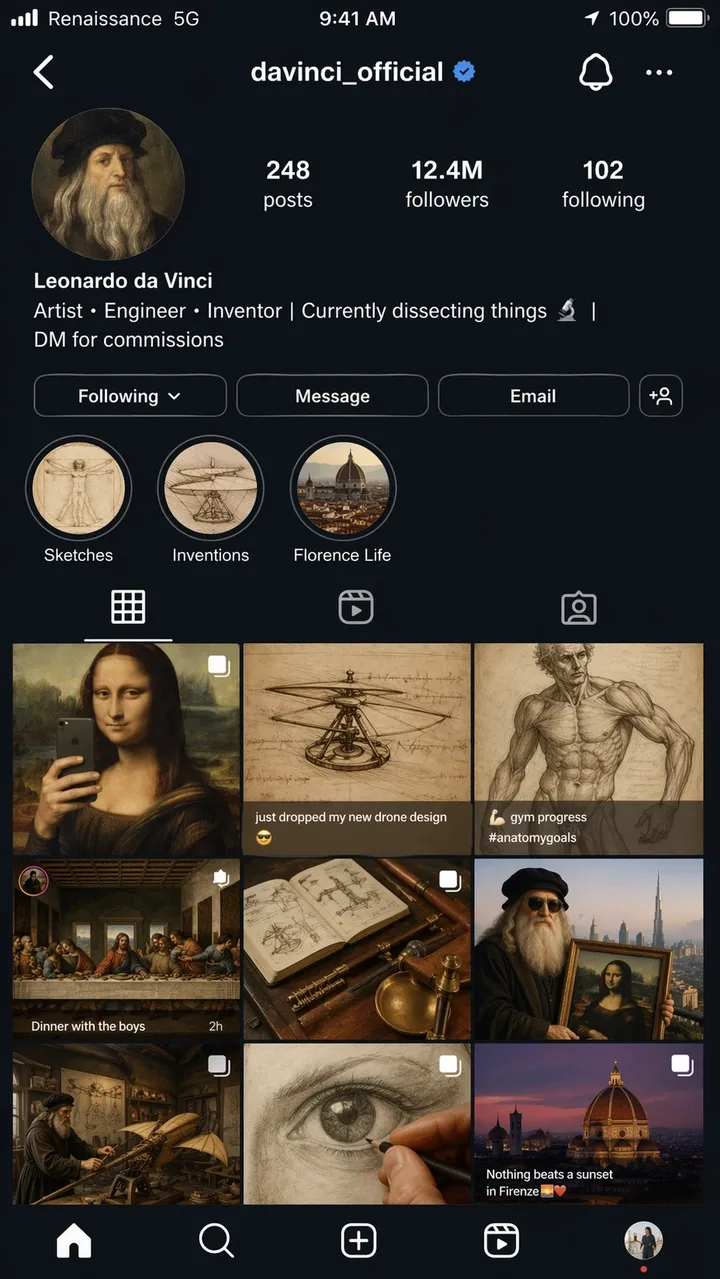
Une capture d’écran hyper réaliste sur iPhone d’une page de profil Instagram fictive de Léonard de Vinci, nom d’utilisateur @davinci_official, comme s’il était un influenceur moderne en 2026. La photo de profil est un autoportrait de la Renaissance dans un cercle. La biographie se lit comme suit : “Artiste, ingénieur, inventeur | Actuellement en train de disséquer les choses | DM pour les commissions”. La grille affiche 9 messages : la Joconde recadrée en selfie miroir, un croquis d’hélicoptère sous-titré “Je viens de laisser tomber mon nouveau design de drone”, une étude d’anatomie publiée sous forme de photo de progression en salle de sport, La Cène mise en scène comme une photo de groupe pour un dîner et d’autres mashups anachroniques créatifs. Nombre d’abonnés : 12,4 millions. Points forts de l’histoire étiquetés Croquis, Inventions et Florence Life. Barre d’état iOS complète avec texte de support indiquant “Renaissance 5G”, batterie icône et heure actuelle de l’interface utilisateur du mode sombre. Qualité de capture d’écran photoréaliste, format 9:16.
Invite 52 :
Un écran d’intégration mobile réaliste pour une application d’habitudes fictive appelée “LUMA”. Titre : « CONSTRUIRE DES JOURS MEILLEURS ». Boutons : “Démarrer maintenant” et “Voir la démo”. Disposition épurée de style iOS, fond blanc doux, accent bleu, texte d’interface utilisateur lisible, affiché directement dans un cadre de téléphone. Format d’image 9:16.
Invite 53 :
Tableau de bord Desktop SaaS pour un outil d’analyse du commerce électronique. Barre latérale gauche, principales cartes KPI pour les revenus, les commandes, le taux de conversion, un graphique linéaire et un tableau des principaux produits. Interface blanche et épurée, espacement réaliste, étiquettes lisibles, pas de vrais noms de marque. Format d’image 16:9.
Invite 54 :
Un écran d’application météo mobile réaliste pour une application fictive appelée “SKYLINE”. Ville actuelle : “Lisbonne”. Température globale : “22C”. Cartes pour le vent, l’humidité, les UV et le coucher du soleil. Interface bleue calme, étiquettes lisibles, cadre iPhone, pas de véritable marque d’application. Format d’image 9:16.
Invite 55 :
Un écran d’application de réservation de restaurant affichant une confirmation de réservation. Nom du restaurant : « Table Nord ». Date : “18 juin”. Heure : “19h30”. Taille du groupe : « 4 invités ». Photo éditoriale chaleureuse en haut, bouton CTA propre indiquant “Ajouter au calendrier”, texte lisible de l’interface utilisateur. Format d’image 9:16.
Invite 56 :
Un tableau de bord d’analyse de bureau réaliste pour un studio de création de fiction. Navigation de gauche, cartes supérieures pour les vues, la durée de visionnage, les revenus et les nouveaux abonnés, un graphique linéaire et un tableau de campagne. Interface utilisateur blanche et épurée, accent bleu, étiquettes lisibles, espacement pratique, pas de vrais noms de marque. Format d’image 16:9.
Invite 57 :
Un écran de paiement mobile pour un magasin d’équipement de plein air fictif appelé “TrailCart”. Affichez la vignette du produit, le module de quantité, la carte d’adresse de livraison, le champ de remise, le prix total et un bouton CTA indiquant « Passer la commande ». Style iOS moderne, texte d’interface utilisateur lisible, pas de vrais logos. Format d’image 9:16.
Invite 58 :
Une maquette d’interface utilisateur pour tablette pour une application de bibliothèque rapide. Afficher les onglets intitulés « Affiches », « Produits », « UI » et « Modifications ». Le panneau principal comprend trois cartes d’invite avec un court texte d’aperçu, des boutons de copie et des puces de catégorie. Interface épurée, haute lisibilité, pas de vrais noms de marque. Rapport hauteur/largeur 4:3.
Invite 59 :
Un écran de paramètres SaaS pour un outil d’image IA fictif. Sections intitulées « Modèle », « Qualité », « Format d’image », « Images de référence » et « Sécurité ». Utilisez des bascules, des listes déroulantes, des curseurs et un bouton Enregistrer clair. Interface utilisateur professionnelle silencieuse, étiquettes lisibles, pas d’encombrement décoratif. Format d’image 16:9.
Invite 60 :
Un écran d’application d’itinéraire de voyage mobile pour un voyage fictif à Kyoto. L’en-tête indique « Week-end de Kyoto ». Cartes pour le « Jour 1 », le « Jour 2 », la « Promenade dans le temple » et le « Dîner ». Interface utilisateur neutre et douce, espacement réaliste, petit aperçu de la carte, texte lisible, pas de véritable marque d’application. Format d’image 9:16.
Que rechercher : La mise en page doit ressembler à une véritable interface et non à une affiche décorative. Vérifiez les étiquettes de navigation, le texte des boutons, l’espacement des icônes et si la hiérarchie des écrans est utilisable.
7. Transfert de style et invites d’art narratif
De courtes invites narratives testent si GPT Image 2 peut raisonner à travers des blagues visuelles, une narration à plusieurs panneaux et un petit texte dans une scène.
Invite 61 :
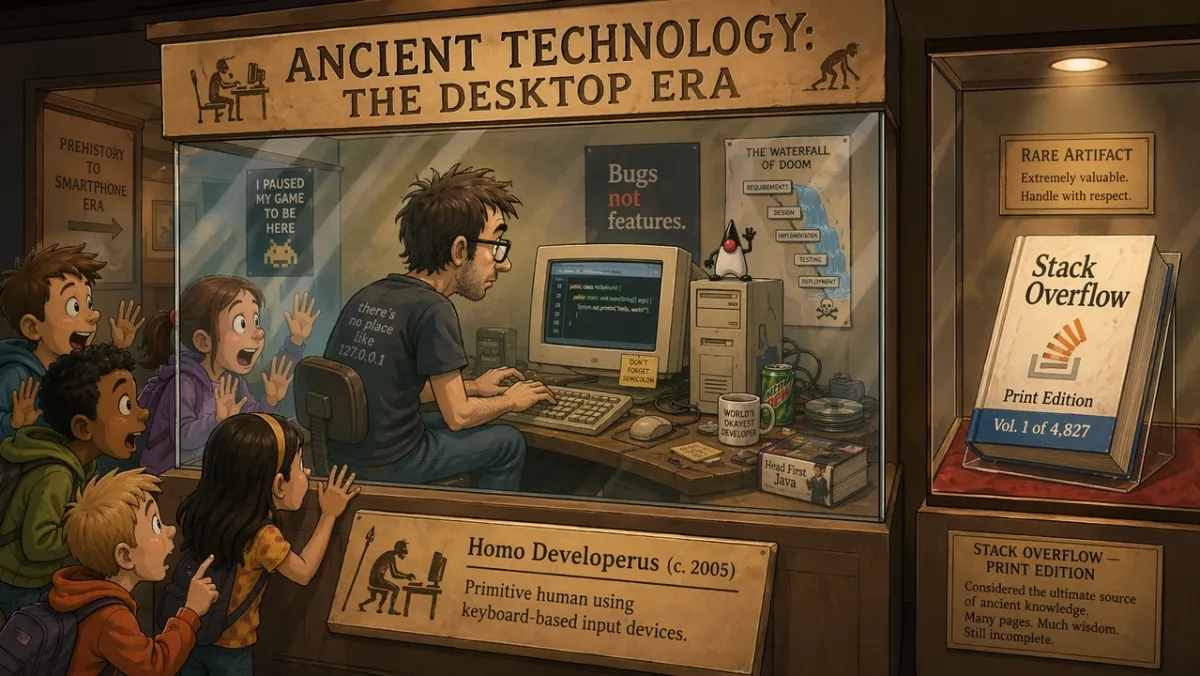
À l’intérieur d’une exposition de musée intitulée « Technologie ancienne : l’ère du bureau », un programmeur dans une vitrine en verre fait une démonstration en direct du codage sur un moniteur CRT tandis que des écoliers étonnés pressent leur visage contre la vitre. La pancarte de l’exposition indique : “Homo Developerus (c. 2005) - Humain primitif utilisant des périphériques de saisie à clavier.” Une deuxième vitrine à proximité présente un livre physique intitulé « Stack Overflow - Print Edition, Vol. 1 of 4,827 ». Style d’illustration de dessin animé 2D, éclairage chaleureux du musée, ton humoristique et nostalgique. Format d’image 16:9.
Invite 62 :
Une bande dessinée de quatre cases intitulée “MORNING ROUTINE”. Panneau 1 : l’alarme se déclenche. Case 2 : le personnage prépare du café. Panneau 3 : le personnage s’assoit pour travailler. Case 4 : le personnage dort déjà au bureau. Style d’illustration minimaliste et chaleureux, caractère expressif, titre lisible, pas de texte supplémentaire. Format d’image 16:9.
Invite 63 :
Une seule illustration éditoriale pour un article sur l’automatisation créative. Un designer et un assistant IA disposent des storyboards papier sur une grande table, une lumière douce en studio, un humour subtil, un style d’illustration de magazine moderne, pas de logos de marque visibles, pas de texte. Rapport hauteur/largeur 3:2.
Invite 64 :
Une illustration de style première page de journal intitulée « THE MORNING HERALD ». Titre principal : « LA VILLE APPROUVE LES JARDINS SUR LES TOIT ». Mise en page sur deux colonnes, une zone photo photoréaliste du conseil municipal, conception grand format classique, en-tête et titre lisibles, pas de texte d’article supplémentaire. Rapport hauteur/largeur 4:5.
Invite 65 :
Une bande dessinée en deux volets sur un robot apprenant à peindre. Panneau 1 : le robot étudie attentivement une toile vierge. Panneau 2 : le robot montre fièrement un tableau brouillon mais charmant. Éclairage chaleureux du studio, langage corporel expressif, pas de bulles, titre simple : “PREMIÈRE TENTATIVE”. Format d’image 16:9.
Invite 66 :
Une bande dessinée éditoriale en trois panneaux intitulée “THE DEADLINE”. Panel 1 : un designer ouvre sereinement un fichier vierge. Panneau 2 : l’horloge avance d’un bond et des notes autocollantes recouvrent le bureau. Panneau 3 : le designer présente une affiche soignée au relief surpris. Style d’illustration expressif minimal, titre lisible, pas de bulles. Format d’image 16:9.
Invite 67 :
Une illustration de magazine surréaliste sur la concentration créative : une personne assise à un petit bureau flottant dans une bibliothèque tranquille de fenêtres lumineuses, chaque fenêtre montrant une idée inachevée différente. Éclairage cinématique doux, ambiance réfléchie, composition épurée, pas de logos de marque visibles, pas de texte. Rapport hauteur/largeur 3:2.
Invite 68 :
Un storyboard à quatre panneaux pour un teaser de lancement de produit. Panneau 1 : boîte fermée sur une table. Panneau 2 : fuite de lumière de la boîte. Panneau 3 : mains soulevant le couvercle. Panel 4 : la silhouette lumineuse du produit révélée. Pas de marque lisible, pas de dialogue, éclairage cinématique, bordures de panneaux claires. Format d’image 16:9.
Invite 69 :
Un diorama de musée humoristique intitulé “LE PREMIER CHAT DE GROUPE”. Montrez des personnages d’apparence ancienne rassemblés autour de tablettes de pierre avec des bulles de message sculptées au-dessus d’eux, un éclairage chaleureux de musée, une illustration éditoriale ludique, un titre lisible uniquement, sans texte supplémentaire. Format d’image 16:9.
Invite 70 :
Une affiche narrative en écran partagé montrant l’itération créative « avant » et « après ». Côté gauche : mur de croquis en désordre et notes brouillons. Côté droit : panneau de campagne propre et poli. Illustration éditoriale moderne, contraste fort, pas de logos, pas de mots supplémentaires au-delà de « AVANT » et « APRÈS ». Format d’image 16:9.
Que rechercher : La scène doit communiquer l’idée visuellement. Si la blague dépend entièrement du texte, simplifiez la configuration et rendez l’action physique plus claire.
8. Invites de première image image vers vidéo et modifications de référence
C’est dans cet angle que GPT Image 2 devient plus qu’un générateur de premier passage. Il est utile pour les découpes de produits, les échanges de tenues, les changements d’arrière-plan, les modifications basées sur des références et les images fixes conçues pour le mouvement.
Invite 71 :
Créez une première image cinématographique pour un clip image-vidéo : un astronaute solitaire se tenant au bord d’un cratère rougeoyant du désert à l’aube, une cape et de la poussière prêtes à se déplacer dans le vent, une forte silhouette au premier plan, des couches de profondeur claires, une lumière chaude de l’horizon, pas de texte, pas de filigrane. Format d’image 16:9.
Invite 72 :
Utilisez l’image 1 comme photo du produit et l’image 2 comme référence de style d’arrière-plan. Placez le produit dans la scène à partir de l’image 2. Conservez exactement la forme du produit, le texte de l’étiquette, les proportions, la couleur et le matériau. Faites correspondre l’éclairage, l’échelle, l’ombre et la perspective. Ne relookez pas le produit. Pas de logos ni de filigrane supplémentaires.
Invite 73 :
Supprimez l’arrière-plan de l’image du produit d’entrée. Obtenez un arrière-plan transparent avec une silhouette nette, des bords nets, sans halos ni franges. Préservez exactement la géométrie de la bouteille, la forme du bouchon, le texte de l’étiquette, les couleurs de l’étiquette et la netteté de l’impression. Ne changez pas les proportions.
Invite 74 :
Modifiez uniquement la météo et l’éclairage dans l’image d’entrée. Faites ressembler la scène à une soirée d’hiver avec de légères chutes de neige. Préservez exactement les personnes, les bâtiments, les panneaux, l’angle de la caméra, l’emplacement des objets et la composition. Gardez tout le texte lisible inchangé.
Invite 75 :
L’image 1 est la personne à préserver. L’image 2 est la référence de la veste. L’image 3 est la référence des bottes. Habillez la personne de l’image 1 en utilisant les vêtements des images 2 et 3. Préservez exactement le visage, la forme du corps, la pose, les mains, l’arrière-plan, l’angle de la caméra et l’éclairage. Remplacez uniquement les vêtements.
Invite 76 :
Utilisez la photo du produit d’entrée comme sujet verrouillé. Placez le produit sur un comptoir de salle de bain en marbre propre avec une douce lumière matinale. Préservez exactement la forme du produit, le texte de l’étiquette, la couleur du capuchon, les proportions et le matériau. Faites correspondre l’ombre du contact, l’échelle et la perspective. N’ajoutez pas d’étiquettes, de logos ou d’accessoires supplémentaires.
Invite 77 :
Créez une première image cinématographique pour un clip image-vidéo : un flacon de parfum en verre posé sur une pierre noire humide alors qu’un mince ruban de brume se déplace derrière lui. Centrée sur le produit, silhouette forte, profondeur de premier plan et d’arrière-plan claire, pas de mains, pas de texte, pas de filigrane. Format d’image 16:9.
Invite 78 :
Modifiez le portrait d’entrée en changeant uniquement l’arrière-plan en un fond de studio éditorial épuré en gris chaud. Préservez exactement le visage, les cheveux, les vêtements, la pose, le teint, l’angle de la caméra, la direction de l’éclairage et l’expression. Faites correspondre naturellement la nouvelle ombre et la nouvelle profondeur d’arrière-plan.
Invite 79 :
Utilisez l’image 1 comme photo de la pièce et l’image 2 comme référence d’art mural. Ajoutez l’œuvre d’art de l’image 2 au mur vide de l’image 1. Préservez exactement les meubles, le sol, l’éclairage des fenêtres, l’angle de la caméra, la balance des couleurs et la disposition de la pièce. Faites correspondre l’échelle du cadre, la perspective et l’ombre du mur.
Invite 80 :
Créez une première image prête pour la vidéo pour la révélation d’un produit : une boîte noire mate fermée sur une table, une fine lumière bleue s’échappant de la couture, des particules de poussière visibles dans le faisceau, une caméra positionnée bas et proche, de fortes couches de profondeur, un espace vide pour le mouvement, pas de texte, pas de logo. Format d’image 16:9.
Que rechercher : Pour les modifications, la sortie réussit uniquement si les détails verrouillés restent verrouillés. Pour les images prêtes pour la vidéo, vérifiez la séparation des sujets, la profondeur du premier plan/arrière-plan et si la scène laisse à PixVerse une marge de mouvement.
Examen GPT Image 2 : résultats et scores des tests
Testé et mis à jour : 23 juin 2026.
Cette section de révision se trouve intentionnellement après la bibliothèque d’invites, car la plupart des lecteurs arrivant sur cette page ont d’abord besoin d’exemples. L’examen compte toujours : GPT Image 2 est utile lorsque le texte, la structure et le suivi des instructions sont plus importants qu’une exploration visuelle lâche.
| Dimension d’examen | Note (1-5) | Ce que nous avons vu lors des tests pratiques |
|---|---|---|
| Exactitude du texte | 4 | Les gros titres, les étiquettes courtes, les titres d’affiches, les éléments de menu, les étapes infographiques et les étiquettes simples de l’interface utilisateur étaient plus faciles à contrôler lorsque la copie exacte était citée. Les petites copies légales et les paragraphes denses nécessitent encore un examen attentif. |
| Cohérence des personnages | 3 | Les feuilles de personnages, les lignes d’expression, les légendes de costumes et les échantillons de palette ont été utiles comme références, mais les visages, les proportions et les détails des costumes peuvent dériver d’une vue de côté à l’autre. |
| Contrôle du style | 4 | Le modèle a bien suivi l’orientation visuelle générale lorsque l’invite a nommé le cas d’utilisation, la mise en page, le support, l’éclairage et les contraintes au lieu de simplement empiler des mots-clés de style. |
| Réalisme du produit | 4 | Les mises en page des publicités de produits, les espaces négatifs de la campagne, les surfaces propres et les compositions axées sur le produit étaient solides, mais les véritables étiquettes, logos, géométrie de l’emballage et allégations réglementées nécessitent toujours une assurance qualité manuelle. |
| Capacité d’édition | 3 | Le modèle « modifier, conserver, faire correspondre » a mieux fonctionné que les demandes de modification générales, mais les limites de sélection, la sortie en arrière-plan transparent et la préservation exacte du produit doivent encore être revues. |
| Question de recherche | Réponse pratique |
|---|---|
| Idéal pour | Affiches en texte exact, concepts publicitaires de produits, maquettes d’interface utilisateur, infographies, feuilles de personnages, modifications de référence et premières images pour la conversion d’image en vidéo. |
| Principales limites | Les petits textes, les marques de marque exactes, les polices propriétaires, les textes légaux, les livrables complexes sur fond transparent et les étiquettes de produits verrouillées doivent encore être révisés. |
| Disponibilité des API | Utilisez la route API gpt-image-2 de OpenAI pour les flux de travail des développeurs. L’accès ChatGPT Images 2.0 et la facturation API sont des chemins distincts. |
| Remarques sur l’API | Depuis le 22 juin 2026, OpenAI répertorie les tarifs des jetons GPT-Image-2 pour l’entrée d’image, l’entrée d’image en cache, la sortie d’image, la saisie de texte et la saisie de texte en cache. |
| Flux de travail vidéo | Demander des bords de sujet nets, des couches de profondeur et un signal de mouvement si l’image peut devenir une source d’image vers vidéo ultérieurement. |
| Alternatives à comparer | Utilisez Nano Banana 2 pour des tests photoréalistes rapides, Midjourney pour une exploration stylisée et PixVerse lorsque l’approbation doit encore devenir un élément vidéo. |
Comment nous avons testé GPT Image 2
Nous avons testé GPT Image 2 sur des portraits, des affiches contenant beaucoup de texte, des compositions de style produit, des feuilles de personnages, des maquettes d’interface utilisateur et des scènes narratives expérimentales. L’objectif n’était pas de produire des scores de référence ; il s’agissait de voir si un concepteur, un spécialiste du marketing ou un créateur pouvait utiliser le résultat avec des modifications légères au lieu de reconstruire l’actif à partir de zéro.
| Zone d’essai | Exemples d’invites | Ce que nous avons vérifié |
|---|---|---|
| Portraits et images cinématographiques | 12 | Contrôle de l’éclairage, texture de la peau, reflets, ambiance et cohérence de la scène. |
| Mises en page d’affiches et de typographies | 14 | Orthographe du titre, texte multiligne, hiérarchie, espace négatif et finition semblable à celle d’une marque. |
| Fiches de personnages et de concepts | 9 | Cohérence multi-vues, détails des costumes, alignement des palettes et précision des étiquettes. |
| Maquettes d’interface utilisateur et sociales | 8 | Réalisme de mise en page, petit texte, espacement des icônes, grilles de flux et crédibilité des captures d’écran. |
| Invites expérimentales | 10+ | Humour, raisonnement narratif, placement d’objets et précision des petites légendes. |
Le schéma était clair : GPT Image 2 récompense davantage les briefs précis que les chaînes de mots clés. Lorsque l’invite nomme un travail et définit le succès, le modèle tend à préserver la structure. Lorsque l’invite demande une belle image sans contraintes, le résultat peut toujours paraître soigné, mais il est plus difficile à réutiliser.
Examiner les résultats par cas d’utilisation
| Cas d’utilisation | Ce qui a bien fonctionné | Ce qui reste à revoir |
|---|---|---|
| Rendu du texte | Les gros titres, les étiquettes courtes, les titres d’affiches, les éléments de menu, les étapes infographiques et les étiquettes simples de l’interface utilisateur étaient plus faciles à contrôler lorsque la copie exacte était citée. | De minuscules textes juridiques, des paragraphes denses, des polices stylisées et des mots répétés peuvent encore dériver. Gardez une copie courte et vérifiez chaque lettre. |
| Images de produits | GPT Image 2 a bien géré la mise en page des annonces de produits, l’espace négatif de la campagne, les surfaces propres et les compositions axées sur le produit. | Les véritables étiquettes, logos, géométries d’emballage et allégations réglementées doivent être vérifiés manuellement ou composés à partir d’actifs approuvés. |
| Maquettes d’interface utilisateur | Les écrans mobiles, les tableaux de bord, les cartes, les boutons, les menus et la hiérarchie de type application semblaient plausibles lorsque l’invite nommait de vrais éléments d’interface. | Traitez les résultats comme des maquettes de concept et non comme une interface utilisateur de production. Les petites étiquettes, l’alignement des icônes et les données exactes nécessitent souvent un nettoyage. |
| Cohérence des personnages | Les feuilles de personnages, les lignes d’expressions, les légendes de costumes et les échantillons de palette ont été utiles comme références créatives. | Les visages, les détails des costumes et les proportions peuvent changer d’une vue à l’autre. Répétez les ancrages d’identité et régénérez-les si les vues latérales ou arrière dérivent. |
| Premières images image-vidéo | Des images larges avec premier plan, milieu de plan, arrière-plan et un signal de mouvement ont donné à PixVerse un matériel source plus utilisable. | Les images surchargées, les textes lourds et les signaux de mouvement ambigus rendent la génération vidéo ultérieure plus difficile. |
| Édition et composition | Le modèle d’invite « modifier, conserver, faire correspondre » fonctionnait mieux que les demandes de modification générales. | Les limites de sélection, la sortie sur fond transparent, la préservation exacte du produit et la précision des détails nécessitent toujours un contrôle qualité. |
Pour comparer des modèles, la distinction utile n’est pas entre marque et marque. GPT Image 2 se comporte davantage comme un assistant de conception structuré pour les images à forte communication. Midjourney reste utile pour l’exploration stylisée et l’étendue de la direction artistique. Nano Banana 2 est un point de comparaison solide pour le photoréalisme, les détails des matériaux et l’itération visuelle rapide. PixVerse est la couche de flux de travail suivante lorsque l’image fixe doit devenir un clip, une publicité, une révélation de produit ou une photo d’histoire.
Erreurs courantes d’invite GPT Image 2
- Demander l’exactitude sans donner une copie exacte. Si l’image a besoin de texte, écrivez le texte exactement et dites où il doit apparaître.
- Surcharge d’une invite avec tous les détails possibles. Commencez par la scène principale, puis affinez une variable à la fois.
- Oublier les invariants lors des modifications. Indiquez au modèle ce qui doit rester inchangé : l’identité, l’arrière-plan, la pose, l’éclairage, la forme du produit, le texte de l’étiquette ou l’angle de la caméra.
- Utiliser des mots de qualité décorative pour des tâches fonctionnelles. « Beau » ne rend pas une étiquette lisible. Utilisez des expressions telles que « texte d’étiquette net », « crénage propre » et « lisible à distance ».
- Rapport hauteur/largeur ignoré. Une bonne image carrée peut échouer en tant que publicité verticale ou miniature vidéo.
- Traitement des logos comme du texte générique. GPT Image 2 peut concevoir des concepts de logo, mais les marques de marque exactes doivent généralement être composées d’actifs de marque approuvés.
API GPT Image 2 et notes de tarification
Page de tarification API de OpenAI répertorie GPT-Image-2 avec une tarification basée sur des jetons. Au 22 juin 2026, les tarifs affichés sont :
| Article | Prix affiché |
|---|---|
| Saisie d’images | 8,00 $ / 1 million de jetons |
| Entrée d’image en cache | 2,00 $ / 1 million de jetons |
| Sortie d’image | 30,00 $ / 1 million de jetons |
| Saisie de texte | 5,00 $ / 1 million de jetons |
| Saisie de texte en cache | 1,25 $ / 1 million de jetons |
Le coût de génération réel dépend de la longueur de l’invite, des images de référence, de la taille de sortie, de la mise en cache, de la qualité et du chemin d’accès que vous utilisez. Si vous utilisez ChatGPT plutôt que l’API, les limites et les quotas du plan sont distincts de la tarification des jetons API. Guide d’invite des modèles de génération d’images GPT de OpenAI vaut également la peine d’être lu si vous créez une application reproductible ou un flux de travail par lots.
Cette distinction est importante pour les chercheurs qui se demandent si GPT Image 2 est gratuit ou combien coûte l’API GPT Image 2. La disponibilité de ChatGPT Images 2.0, les quotas du plan ChatGPT, la facturation de l’API OpenAI et les crédits PixVerse sont des voies commerciales distinctes. Pour les travaux à volume élevé, comparez le coût par actif accepté après les tentatives, et pas seulement le prix indiqué pour une tentative de génération.
| Choix du flux de travail | Invite pratique et conseils de configuration |
|---|---|
| Affiches ou diagrammes contenant beaucoup de texte | Utilisez moins de mots par image, citez une copie exacte, spécifiez la hiérarchie et utilisez un paramètre de qualité supérieure lorsque le budget le permet. |
| Photos du produit | Verrouillez la forme, l’étiquette, la couleur, le matériau et l’angle de la caméra du produit. Si vous utilisez des références, répétez la liste de conservation à chaque modification. |
| Maquettes d’interface utilisateur | Décrivez l’écran comme une interface livrée : navigation, cartes, boutons, états, étiquettes et espacement. Évitez le langage de l’art conceptuel. |
| Modifications multi-références | Étiquetez chaque image par rôle : sujet, style, arrière-plan, tenue, produit ou référence matérielle. |
| Génération par lots | Comparez le coût par image acceptée, et pas seulement le coût par tentative. Une exécution moins chère ne l’est pas si elle nécessite de nombreuses tentatives. |
| Production PixVerse | Générez ou importez l’image fixe, puis utilisez la conversion image-vidéo lorsque l’élément nécessite un mouvement, un mouvement de caméra ou des variantes de campagne. |
Pour les équipes qui décident d’utiliser un flux de travail d’image basé sur l’API ou un flux de travail de création, la question pratique n’est pas seulement « GPT Image 2 peut-il créer l’image fixe ? » Il s’agit également de “Que se passe-t-il une fois l’image fixe approuvée ?” Si vous souhaitez comparer la qualité d’image au premier passage, consultez notre test GPT Image 2 vs Nano Banana 2 à même invite. Si vous avez besoin d’une génération automatisée à partir d’un flux de travail de terminal ou d’agent IA, le guide CLI PixVerse couvre la génération d’images et de vidéos à partir de pipelines de ligne de commande.
Flux de travail détaillé d’image vers vidéo PixVerse
Une fois l’image GPT Image 2 approuvée, vous pouvez la traiter comme une première image pour la vidéo. L’important est de préparer l’alambic avant de l’animer. Un modèle vidéo ne corrigera pas comme par magie un texte d’affiche mal orthographié, une étiquette de produit déformée ou une maquette d’interface utilisateur qui semble déjà fausse.
1. Générez l’image fixe comme première image
Si vous savez que l’image peut devenir un clip, ajoutez la préparation au mouvement à l’invite de l’image. Demandez des bords de sujet clairs, une profondeur de premier plan et d’arrière-plan, un chemin de caméra et un signal physique qui peut bouger : tissu, poussière, vapeur, pluie, cheveux, lueur de l’écran, reflet d’un produit ou source de lumière changeante.
Au lieu de demander uniquement une affiche de produit, demandez une affiche de produit qui peut devenir une image d’ouverture de la vidéo :
Créez une première image de campagne 16:9 pour une enceinte noir mat sur un socle en béton. Gardez le haut-parleur net sur le côté droit avec un espace négatif propre sur la gauche. Ajoutez de la poussière douce dans le faisceau lumineux et une subtile lueur LED bleue qui pourrait s’animer plus tard. Pas de texte supplémentaire, pas de faux logo, pas de filigrane.
2. Vérifiez l’image avant d’ajouter du mouvement
Vérifiez l’image fixe comme un fichier de conception finale. Examinez l’orthographe, la géométrie du produit, les étiquettes, les mains, les visages, l’alignement de l’interface utilisateur, les revendications et les éléments sensibles aux droits. Si l’image source échoue à l’une de ces vérifications, régénérez ou modifiez l’image fixe avant de passer à la vidéo.
3. Écrivez une invite de mouvement distincte
L’invite vidéo ne doit pas répéter l’intégralité de l’invite d’image. Il doit décrire ce qui bouge et ce qui reste verrouillé.
Utilisez l’image comme première image. La caméra se dirige lentement vers le haut-parleur. La LED bleue s’allume, la poussière se déplace à travers le faisceau lumineux et la réflexion de l’arrière-plan se décale légèrement. Préservez la forme, le matériau, la position et tous les détails de conception visibles de l’enceinte. N’ajoutez pas de nouveaux textes, logos, mains ou produits supplémentaires.
4. Animer uniquement après que l’image continue à fonctionner
Si vous utilisez PixVerse, vous pouvez générer des images GPT Image 2 dans l’application ou importer une image finie, puis utiliser l’image vers la vidéo pour ajouter du mouvement. Utilisez image vers vidéo pour un mouvement direct à partir d’une image fixe, PixVerse V6 pour des flux de travail créatifs plus larges de 15 secondes et C1 lorsque la prise de vue nécessite un contrôle de référence plus cinématographique.
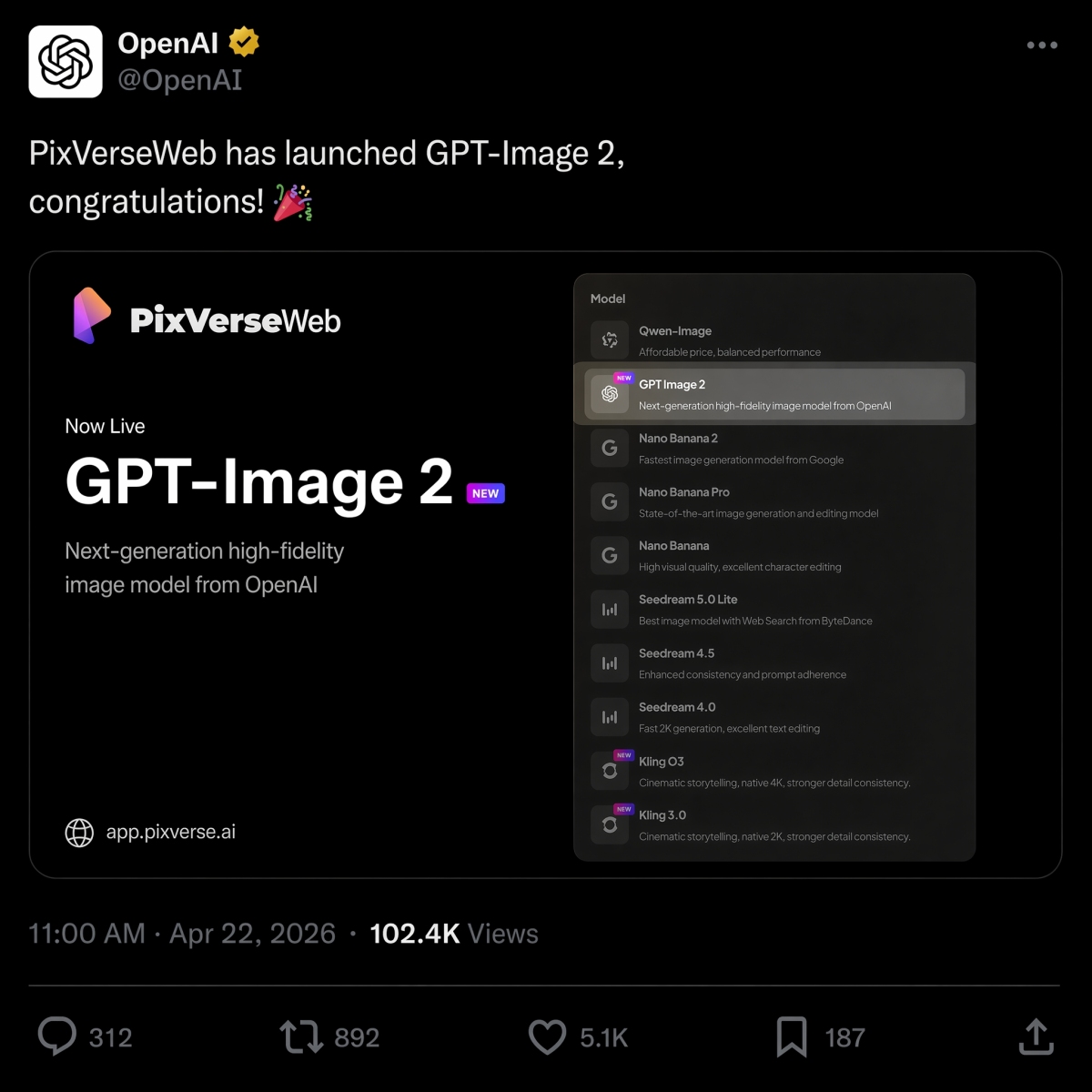
Le 22 avril 2026, PixVerse a lancé GPT Image 2 en tant qu’option de conversion texte-image, rejoignant ainsi Nano Banana 2, Seedream et HappyHorse 1.0 dans la gamme de modèles.
Si vous décidez entre les modèles d’image OpenAI et Google pour le même brief, consultez notre Comparaison GPT Image 2 vs Nano Banana 2 pour obtenir des résultats côte à côte à partir d’invites identiques.
Si votre travail rapide concerne principalement la vidéo, notre meilleur guide d’outils d’IA d’image vers vidéo explique comment choisir le flux de travail de mouvement approprié une fois l’image fixe prête.
Essayez PixVerse : ouvrez l’application PixVerse.
Si l’image fixe doit être préparée avant l’animation, les Mini Apps PixVerse regroupent des workflows ciblés pour le nettoyage d’image, l’extension du cadre et les tâches de production associées.
FAQ
Quelles sont les meilleures invites GPT Image 2 ?
Les meilleures invites GPT Image 2 décrivent un travail de production clair, pas seulement un style visuel. Les invites fortes incluent généralement le sujet, le type de sortie, le texte exact si nécessaire, la composition, l’éclairage, les contraintes, les proportions et le cas d’utilisation final. Les publicités de produits, les affiches en texte exact, les feuilles de personnage, les maquettes d’interface utilisateur, les infographies et les premières images d’image en vidéo sont des catégories d’invites particulièrement utiles pour commencer.
Comment puis-je écrire de meilleures invites GPT Image 2 ?
Utilisez cette formule : sujet plus style visuel plus composition plus éclairage plus détails plus contraintes plus cas d’utilisation de sortie. Dites à GPT Image 2 ce que l’image doit faire, citez le texte exact, spécifiez la mise en page et les proportions, et répertoriez ce qui ne doit pas changer. Pour les modifications, séparez la modification, les éléments verrouillés et les exigences de réalisme.
Le GPT Image 2 est-il adapté aux images de produits ?
Oui. GPT Image 2 est utile pour les concepts publicitaires de produits, les images de héros du commerce électronique, les maquettes d’emballage, les découpes de produits et les visuels de campagne. Les équipes produit doivent toujours examiner la géométrie du produit, le texte de l’étiquette, les allégations réglementées, les logos et les détails de l’emballage avant d’utiliser le résultat dans des publicités ou des listes de produits.
GPT Image 2 peut-il créer des images avec du texte ?
Oui, GPT Image 2 peut créer des images avec du texte lisible, en particulier des titres courts, des étiquettes, des affiches, des éléments de menu, des étapes d’infographie et des étiquettes d’interface utilisateur. Pour de meilleurs résultats, mettez le texte exact entre guillemets, spécifiez où il apparaît, gardez le texte court et ajoutez des contraintes telles que « texte exact uniquement », « pas de mots supplémentaires » et « pas de texte en double ».
Comment transformer des images GPT Image 2 en vidéos ?
Générez ou approuvez d’abord l’image fixe, puis téléchargez-la sur l’image vers la vidéo PixVerse. Écrivez une invite de mouvement distincte qui décrit ce qui bouge et ce qui reste verrouillé. Les bonnes invites de mouvement mentionnent le mouvement de la caméra, la préservation du sujet, le mouvement de l’arrière-plan et des contraintes telles qu’aucun nouveau texte, aucun nouveau logo et aucun produit supplémentaire.
GPT Image 2 vs Nano Banana 2 : quel est le meilleur ?
GPT Image 2 est généralement meilleur pour les sorties de conception structurées telles que les affiches contenant beaucoup de texte, les diagrammes, les maquettes d’interface utilisateur, les résumés visuels modifiables et les premières images d’image en vidéo. Nano Banana 2 vaut la peine d’être comparé lorsque le photoréalisme, les détails des matériaux et l’itération visuelle rapide comptent davantage. Voir la comparaison GPT Image 2 vs Nano Banana 2 pour des résultats identiques.
GPT Image 2 est-il identique à ChatGPT Images 2.0 ?
Pour l’intention de recherche, oui. De nombreux utilisateurs utilisent GPT Image 2, gpt-image-2 et ChatGPT Images 2.0 pour décrire la nouvelle expérience de génération d’images ChatGPT de OpenAI. Le nom du produit OpenAI est ChatGPT Images 2.0, tandis que gpt-image-2 est l’expression de style modèle que les développeurs et les créateurs utilisent souvent lorsqu’ils discutent des flux de travail d’API.
GPT Image 2 est-il gratuit et combien coûte l’API ?
L’aide de OpenAI répertorie ChatGPT Images 2.0 comme étant disponible sur tous les niveaux, mais les quotas du plan et la facturation des API sont distincts. Depuis le 22 juin 2026, OpenAI répertorie la sortie d’image GPT-Image-2 à 30,00 $ par million de jetons ; le coût réel dépend de la longueur de l’invite, des références, de la taille de la sortie, de la qualité et de la mise en cache.