Runway Aleph 2.0 Alternatives: Edit Footage or Generate Assets
Compare Runway Aleph 2.0 alternatives by workflow: editing footage, generating product videos, building AI ads, and scaling video production.
If you are searching for Runway Aleph 2.0 alternatives, you probably are not starting from zero. You may have tried Aleph, liked how it can edit an existing video from a single frame, and seen how useful it is for changing backgrounds, products, lighting, or visual style without rebuilding the whole clip.
But once you move from a demo to a real project, the question changes. Maybe you need to create product videos from images, generate multiple ad variations, build short social clips from prompts, test different styles quickly, or connect video generation into a repeatable API workflow. In those cases, the best alternative is not simply “another Runway clone.” It depends on whether your job is editing existing footage, generating new assets, producing ads, or scaling a video workflow.
For most creators and marketing teams, Runway Aleph 2.0 is strongest when you already have footage to edit, while PixVerse is a stronger alternative when you need to generate product videos, ad creatives, image-to-video clips, and campaign-ready assets from scratch.
This Runway Aleph alternatives guide is based on current product documentation, public pricing pages, creator feedback patterns, and practical workflow fit as of May 26, 2026. The goal is not to pretend there is one permanent winner. AI video tools change fast. The useful question is: which tool gets your next production job closest to finished with the least wasted time, credits, and manual repair?
What Is Runway Aleph 2.0 and Why Look for Alternatives?
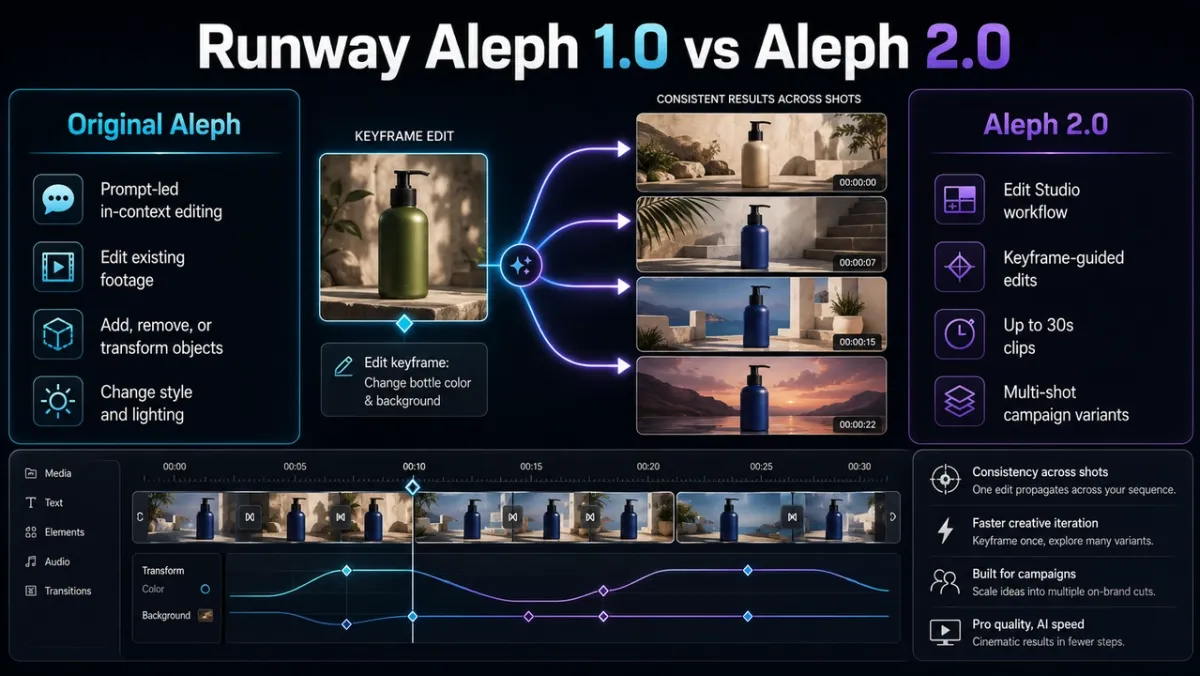
Runway positions Aleph 2.0 as an upgraded in-context video editing model inside Edit Studio. The official product page describes a workflow where you edit one frame and Aleph 2.0 applies the change through the rest of the video while preserving what you did not ask to change. Runway also says Aleph 2.0 supports longer clips and multi-shot sequences, with edits such as changing product color, replacing a background, removing objects, restyling footage, tightening a product shot, or creating seasonal versions of an ad.
For focused visual cleanup before animating, use the image region editor. The difference from the original Aleph is mostly workflow maturity and production scope. Runway’s July 2025 Aleph research launch introduced the core idea: an in-context video model that can edit an input video by adding, removing, or transforming objects, generating new angles, and changing style or lighting. Aleph 2.0 moves that idea into a more guided editing experience. Instead of relying only on prompt-driven video transformation, Edit Studio lets the user edit a keyframe, then uses that edited frame as the visual target for the rest of the clip.
| Area | Original Aleph | Aleph 2.0 |
|---|---|---|
| Core idea | In-context video editing for existing clips | Upgraded in-context editing inside Edit Studio |
| Main control method | Prompt-led edits on an input video | Keyframe edit plus prompt guidance |
| Production fit | Strong demo of video-to-video editing | More practical for longer clips, campaign variants, and multi-shot edits |
| Clip handling | Focused on transforming existing footage | Runway says clips can be up to 30 seconds at 1080p in Edit Studio |
| Best use | Proving that existing footage can be transformed | Iterating real ad, product, social, and production clips with fewer shot-by-shot edits |
That makes Aleph 2.0 highly relevant when your source video is already good. If you filmed a product demo, generated a strong AI clip, or have a social ad that mostly works, Aleph can be a smart way to avoid a full reshoot. It is especially useful for:
- Localized changes inside existing footage, such as color, wardrobe, product, lighting, weather, background, or VFX.
- Short ad and social variations where the base motion, framing, and timing should stay intact.
- Creative teams that want to preview a keyframe before committing credits to a full video edit.
- Runway users already working inside Gen-4.5, Gen-4, Act-Two, editor projects, and Runway storage.
There are also real constraints. The Runway Edit Studio guide says uploaded videos must be longer than 2 seconds and shorter than 30 seconds, use a conventional aspect ratio, be between 480p and 1080p, run at 24 to 30 FPS, and contain no more than 10 cuts or shot changes. The same guide lists Aleph 2.0 at 28 credits per second, with a 56-credit minimum. That means a 10-second Aleph 2.0 edit costs 280 credits before keyframe image iterations, while a full 30-second edit costs 840 credits. By comparison, the Runway pricing page lists 625 monthly credits on Standard and 2,250 monthly credits on Pro when billed annually. In other words, Aleph is powerful, but it is still an editing workflow with input rules and credit planning.
The most practical limitation is strategic: Aleph 2.0 starts from footage you already have. If you do not have the source clip, if you need dozens of product videos from still images, or if your team needs ad variants from product assets and selling points, an editing-first workflow may not be the fastest path.
How We Evaluated Runway Aleph Alternatives for AI Video Workflows
Search results for “Runway Aleph 2.0 alternative” are still young because Aleph 2.0 launched recently, and many pages are either launch news, thin tool directories, or broad “Runway alternative” lists that do not separate editing from generation. That difference matters. A useful comparison should not compare logos; it should compare jobs.
We evaluated each tool against six production questions:
| Evaluation factor | Why it matters |
|---|---|
| Starting asset | Does the workflow begin with existing footage, a product photo, a prompt, a script, or a timeline project? |
| Output type | Does it produce edited footage, new video, product ads, social clips, cinematic shots, or timeline-ready assets? |
| Control | Can you guide products, characters, camera, audio, captions, references, or scene continuity? |
| Speed to usable draft | How many steps usually happen before a team has something reviewable? |
| Cost and scale | Are credits, duration limits, export rules, API pricing, or subscription tiers clear enough for repeated use? |
| Public feedback pattern | What do users tend to praise or complain about in reviews, forums, and creator discussions? |
This is also how high-quality review content should work: provide useful detail, explain tradeoffs, show why a recommendation fits a specific use case, and avoid simply rewriting a vendor’s product page. Google’s high-quality review guidance recommends evaluating from a user’s perspective, explaining what sets options apart, covering benefits and drawbacks, and sharing decision-making factors. For this article, “best” always means “best for a defined job.”
Best Runway Aleph 2.0 Alternatives: Quick Comparison
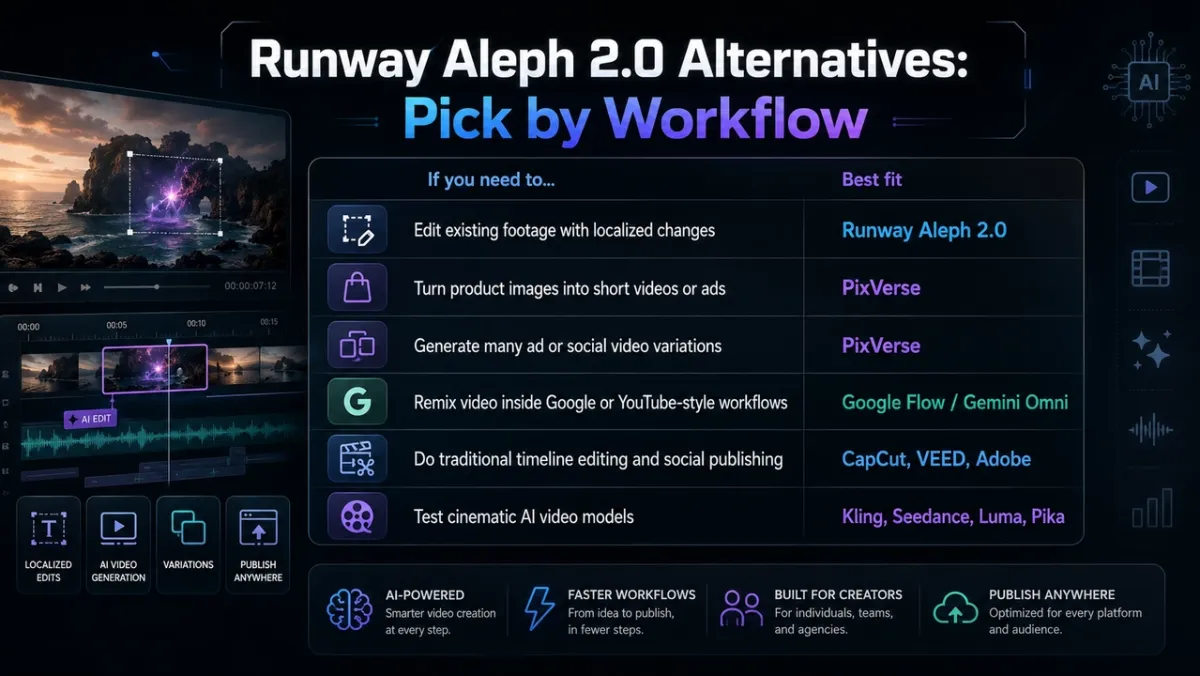
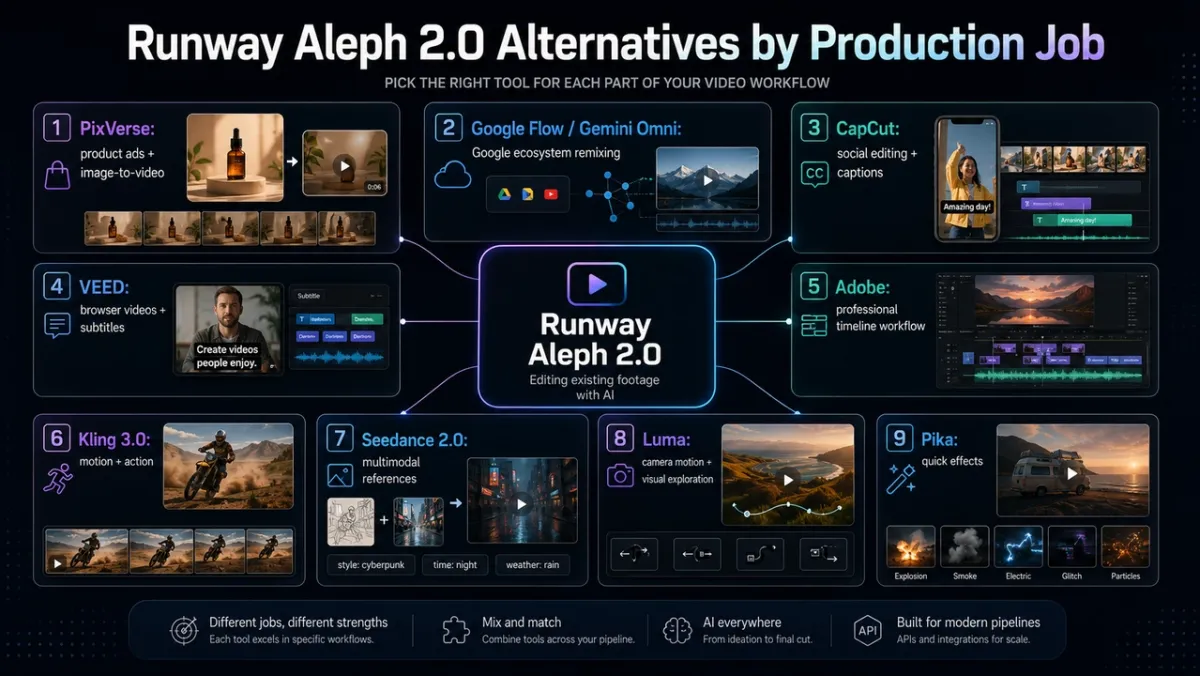
| Tool | Best for | What it can replace | Main watch-out |
|---|---|---|---|
| PixVerse | Product videos, image-to-video, ad creative, social assets, API workflows | Runway when the goal is generation from assets rather than editing existing footage | Product accuracy and claims still need human review |
| Google Flow / Gemini Omni | Google ecosystem video creation, conversational iteration, Flow projects | Runway when the team wants Google-style scene building and agentic iteration | Subscription tier, region, and model access vary |
| CapCut | Social editing, captions, templates, creator publishing | Runway when the real job is finishing and publishing short-form content | Not a direct in-context video editing model |
| VEED | Browser-based social videos, subtitles, avatars, stock-led short videos | Runway for simple marketing videos and lightweight editing | Gen-AI Studio uses stock clips rather than generating original AI footage |
| Adobe Firefly / Premiere | Professional timeline editing, licensed assets, generative extend, production handoff | Runway for post-production teams already in Adobe workflows | Heavier workflow and subscription ecosystem |
| Kling 3.0 | Motion realism, action, physical movement, multi-shot cinematic tests | Runway when motion and action are the core test | Credits, queue time, and consistency still need testing |
| Seedance 2.0 | Multimodal references, native audio-video generation, cinematic motion | Runway when rich references and audio-video output matter | IP, likeness, and access issues require careful policy review |
| Luma | Camera motion, visual exploration, image-to-video, Ray-style cinematic tests | Runway for atmospheric shots and environment B-roll | Less structured for product-ad workflows |
| Pika | Fast stylized effects, playful social experiments, quick transformations | Runway for lightweight creative exploration | Credit limits and output consistency can frustrate heavier users |
1. PixVerse: Best Runway Aleph 2.0 Alternative for Product Videos and AI Video Ads
For a product-first starting point, Ad Master turns a product image and selling points into an ad draft. Teams comparing campaign workflows can also use the PixVerse Marketing Hub to explore practical marketing use cases before committing to a production route.
Best fit: Ecommerce teams, growth marketers, agencies, and creators who need new product videos, ad creatives, and image-to-video clips rather than edits to existing footage.
PixVerse is the strongest Runway Aleph 2.0 alternative when the real task is not “edit this footage” but “make usable video from the assets we already have.” Aleph is most natural when you have a video clip to transform. PixVerse is more natural when you have a product photo, a campaign idea, a prompt, or a repeatable ad workflow.
The PixVerse official site positions PixVerse around text/image to video, AI templates, lip sync and audio, video editing, multi-frame control, character reference, and API workflows. For this comparison, the important point is not feature count. It is workflow fit: PixVerse starts closer to product images, campaign inputs, and new asset generation, while Aleph starts closer to an existing clip that needs a controlled edit.
For model-level evidence, the PixVerse V6 docs list text-to-video, image-to-video, first-and-last-frame transition, and video extension, with 1 to 15 second generation and up to 1080p. The PixVerse AI video ad generator guide also describes Ad Master as a workflow where a user uploads a product image, adds a product name and selling points, and generates a commercial-style video with scenes, voiceover, captions, and music.
Hands-on workflow impression: If Aleph feels like a powerful “change this video” tool, PixVerse feels more like a “make the video we need” workspace. For a DTC brand, marketplace seller, or agency, that difference is important: the first usable draft can start from a product image and selling points, not from a filmed or generated source clip.
User feedback pattern: Public creator feedback around PixVerse commonly praises fast image-to-video experiments, accessible generation, and social-friendly outputs. The recurring caution is the same caution that applies to all AI video tools: prompts can miss, credits can be spent on retries, and product accuracy must be reviewed before an ad goes live. That is why PixVerse works best with a simple test log: product image, prompt, model, duration, resolution, result quality, and notes for the next variant.
Pros:
- Better starting point than Aleph when the user has product photos, prompts, brand assets, or storyboards rather than finished footage.
- Strong fit for product videos, short ads, social clips, catalog coverage, and campaign variants.
- V6 supports text-to-video, image-to-video, transition, extension, up to 15 seconds, and up to 1080p in official docs.
- Structured ad workflows make it easier to start from product inputs rather than open-ended prompts.
Cons:
- Like any AI video system, product shape, logo accuracy, claims, voiceover, and captions still need human review.
- Higher resolution, audio, longer duration, and multiple retries increase credit use.
- A broad creation platform may feel more complex than a single-purpose editing tool for users who only need one small video change.
Choose PixVerse when: you have product images, selling points, or campaign briefs and need new video assets. Keep Aleph in the stack when you already have a strong clip and only need to change part of it.
2. Google Flow / Gemini Omni for Google-Centered Runway Aleph Alternative Workflows
Best fit: Creators and teams already using Google AI subscriptions, Flow projects, Veo-style filmmaking, or Google media workflows.
Google Flow is not a direct Aleph clone, but it is one of the most relevant alternatives for creators who want a broader AI filmmaking environment. Google’s Flow launch post describes Flow as an AI filmmaking tool designed around Veo, Imagen, and Gemini. It emphasizes ingredients, scene consistency, camera controls, Scenebuilder, asset management, and Flow TV for learning from generated clips and prompts.
The more recent Google Flow update adds Gemini Omni, Flow Agent, custom Flow Tools, and mobile apps. Google describes Omni Flash as a model that can create from any input starting with video, combine Gemini intelligence with generative media models, support conversational iteration, and improve character consistency by preserving identity and voice across scenes.
User experience pattern: Flow’s biggest appeal is not just output quality. It is the integrated Google creative environment: assets, prompts, scene building, AI assistance, and mobile access. For teams already paying for Google AI plans, that can reduce tool switching. The tradeoff is that Flow availability, features, and limits can vary by subscription tier, platform, and region. Google says this directly in its Flow update footnote, so production teams should verify access before planning a campaign around it.
Pros:
- Strong fit for creators who want conversational iteration and scene building.
- Useful when a project depends on Google models, Google AI plans, or Flow asset organization.
- Gemini Omni adds a clearer answer to video-based iteration and character consistency.
- Flow Agent can help with brainstorming, variations, batch edits, and project organization.
Cons:
- Access and limits vary by Google AI subscription tier, platform, and region.
- Less directly built around ecommerce product-photo-to-ad workflows than PixVerse.
- Teams outside the Google ecosystem may not want another platform-specific workspace.
Choose Google Flow / Gemini Omni when: your project lives in Google tools, you want AI-assisted creative planning, or you need conversational video remixing more than product-ad generation.
3. CapCut for Social Editing After Runway Aleph or AI Video Generation
Best fit: TikTok, Reels, Shorts, creator videos, quick captions, templates, trend-driven edits, and mobile-first social publishing.
CapCut is an alternative only if your real problem is finishing and publishing short-form content. It is not the closest technical alternative to Aleph 2.0, because Aleph edits visual content inside footage through generative changes. CapCut is stronger as a practical editor: templates, captions, text-to-speech, social formats, background removal, voice tools, and fast exports.
The CapCut AI video editor page highlights AI avatars, templates, one-click video generation, brainstorming, script creation, voiceover, captions, background music, and exports. It also positions CapCut for marketing videos, dynamic social content, and learning tutorials. That makes it useful after a PixVerse, Runway, Kling, or Luma generation: bring the best clip into CapCut, add captions, trim pacing, adjust the hook, and publish in the right format.
User feedback pattern: CapCut is popular because it meets creators where they work: mobile, social, templates, captions, and quick turnaround. The tradeoff is that template-heavy videos can feel generic, and professional teams may outgrow the workflow when they need detailed review, licensing, team asset management, or advanced post-production.
Pros:
- Fast path from clip to social-ready video.
- Strong caption, template, audio, and mobile editing workflow.
- Good for repackaging AI-generated clips into TikTok, Reels, and Shorts.
- Easier for non-editors than professional timeline tools.
Cons:
- Not a direct replacement for in-context video editing like Aleph 2.0.
- Template-driven outputs can look familiar unless the creator customizes pacing and design.
- Better for finishing and publishing than for generating product-specific footage from scratch.
Choose CapCut when: the generated clip is already good and you need subtitles, cuts, music, stickers, text overlays, aspect-ratio exports, or creator-style pacing.
4. VEED for Browser-Based AI Video Editing and Subtitle Workflows
Best fit: Short marketing videos, explainers, subtitles, avatars, stock-assisted social content, and browser-based editing.
VEED is useful when a team wants a simple browser workflow for turning a script or idea into a short social video. It is not the same category as Aleph 2.0, and the distinction is important. VEED’s Gen-AI Studio help guide says the tool combines avatars, stock visuals, subtitles, music, text-to-speech, and editing tools to create polished short videos. It also states that Gen-AI Studio uses stock clips and does not generate AI videos.
That last detail is valuable. VEED can be a good marketing workflow, but it is not the tool to pick if you need a new AI-generated product scene, a visual restyle of real footage, or a cinematic image-to-video test. It is closer to a structured video builder with AI assistance.
User feedback pattern: Users tend to like VEED when the job is simple: subtitles, browser editing, script-to-video, avatars, and quick sharing. Public complaints often cluster around export reliability, support, plan limits, and AI features not meeting expectations for more complex edits. The lesson is to use VEED for the jobs it is built for, not as a general AI video model replacement.
Pros:
- Browser-first workflow with low setup friction.
- Strong fit for subtitles, scripts, avatars, music, and short social videos.
- Helpful for teams that need simple marketing videos without a full editing suite.
- Good companion tool for polishing clips generated elsewhere.
Cons:
- Gen-AI Studio uses stock clips rather than generating original AI video footage.
- Not a close match for Aleph-style video-to-video editing.
- Complex visual edits and product-specific generation should happen in another tool first.
Choose VEED when: you need a fast browser editor for scripts, subtitles, avatars, and social packaging rather than a generative video editor.
5. Adobe Firefly / Premiere for Professional AI Video Editing
Best fit: Professional editors, agencies, media teams, brand-safe workflows, licensed assets, and post-production pipelines.
Adobe is a strong Aleph alternative when your team thinks in timelines, assets, review cycles, and production handoff. Adobe’s April 2026 video update says Firefly Video Editor can combine generated clips, music, and uploaded footage in a multi-track browser timeline, with text or timeline editing, audio cleanup, Adobe Stock integration, and a path into Premiere. Adobe also says Firefly includes many model options, including Kling 3.0, Kling 3.0 Omni, Veo 3.1, and Runway Gen-4.5 inside Firefly.
For traditional editors, Generative Extend in Premiere is the most relevant AI editing feature. Adobe describes it as a Firefly-powered tool that adds generated frames to help time edits, hold reactions, extend room tone or sound effects, and cover transitions. Adobe also states that the media used for Generative Extend is not used to train Adobe’s AI models and is used only for that extension task.
User experience pattern: Adobe is not the fastest casual tool, but it is often the safer choice for teams with established editing pipelines. The major advantage is workflow trust: timelines, media management, licensed stock, review, and Creative Cloud handoff. The tradeoff is that Adobe can feel heavy if a creator only wants to generate a few short clips.
Pros:
- Strong fit for professional editing and production handoff.
- Firefly Video Editor connects generated content, uploaded footage, Stock assets, and Premiere.
- Generative Extend solves a common editor problem: adding just enough frames or room tone to make a cut work.
- Better aligned with brand, agency, and enterprise workflows than many lightweight generators.
Cons:
- More complex than a single AI video generator.
- Not the fastest option for simple product ad variants.
- Users need to understand which work belongs in Firefly, Premiere, Express, or another Adobe app.
Choose Adobe when: your team already edits in Premiere, needs licensed media workflows, or wants AI generation to sit inside a professional post-production stack.
6. Kling 3.0 for AI Motion, Action Scenes, and Video Generation Tests
Best fit: Sports, dance, action, dynamic camera movement, physical interaction, and cinematic motion tests.
Kling is a strong alternative when the project depends on movement rather than localized editing. According to the Kling 3.0 launch announcement, Kling 3.0 includes Video 3.0, Video 3.0 Omni, Image 3.0, and Image 3.0 Omni. The release describes upgrades in consistency, photorealistic output, up to 15-second duration, native audio generation across several languages, multimodal input and output, text-to-video, image-to-video, reference-to-video, and in-video editing.
For Aleph users, Kling is worth testing when you do not need to preserve an existing shot but need a new clip with believable motion. Think sprinting, dancing, fighting, fast camera movement, product motion, or physical interaction between subjects.
User feedback pattern: Creator discussions often praise Kling when motion lands well, especially for action and dynamic scenes. The common complaints are practical: credits, queue time, quality variance, and identity consistency across multiple scenes. In a production workflow, Kling is best treated as a motion test model rather than a one-click final editor.
Pros:
- Strong candidate for physical action and motion realism.
- Supports multimodal and in-video editing workflows in the 3.0 model series.
- Native audio and longer short-form output make it useful for cinematic testing.
- Good benchmark when comparing how models handle bodies, camera movement, and physics.
Cons:
- Cost and latency can become frustrating during repeated tests.
- Character and product consistency should be tested before production use.
- Not as directly structured for ecommerce ad generation as PixVerse Ad Master.
Choose Kling when: the main creative risk is movement, not captions, timeline edits, or product-ad structure.
7. Seedance 2.0 for Multimodal AI Video Generation
Best fit: Reference-rich prompts, cinematic scenes, audio-video output, complex motion, and multimodal creative packages.
Seedance 2.0 is another strong model to compare against Runway when the goal is generation rather than editing. The ByteDance Seedance 2.0 launch post says the model supports text, image, audio, and video inputs, with multimodal references and editing capabilities. It also describes 15-second multi-shot audio-video output, video extension, editing capabilities, physical motion improvements, and two-channel audio output.
That makes Seedance useful for richer creative briefs. Instead of giving the model one sentence, a team can test how it responds to references for composition, camera language, motion rhythm, audio, props, or storyboards. For teams that liked Aleph because it can understand context, Seedance is interesting because it brings context into generation.
User feedback pattern: Seedance 2.0 generated strong public attention because its cinematic and motion outputs can look impressive. At the same time, it has attracted copyright, likeness, and policy scrutiny around unauthorized celebrity or IP-style outputs. For business use, that means Seedance should be tested with owned, licensed, or clearly authorized assets and prompts.
Pros:
- Strong multimodal reference support across text, image, audio, and video.
- Useful for 15-second, multi-shot, audio-video creative tests.
- Good fit for cinematic ideas, motion, storytelling, and reference-driven prompts.
- Editing and extension capabilities make it more than a pure prompt-to-video model.
Cons:
- Access, pricing, moderation, and platform availability can vary.
- Legal and brand-safety review is important when prompts involve recognizable people, characters, styles, or IP.
- Product accuracy and multi-subject consistency still need validation before paid campaigns.
Choose Seedance when: you need a high-context generation test with references, motion, audio, and scene logic.
8. Luma for Camera Motion and Image-to-Video Exploration
Best fit: Atmospheric shots, camera tests, environment B-roll, image-to-video exploration, and visual ideation.
Luma is less of an Aleph replacement and more of a creative exploration tool. It is useful when a creator has a reference image or mood frame and wants to test camera motion, lighting, spatial atmosphere, or cinematic texture. Luma’s pricing page lists Luma and third-party image and video models, commercial use on paid plans, guest collaborator access, and model-level credit costs for Ray3.14, Ray3.14 HDR, Seedance 2.0, Kling Omni, Kling 3.0, and other models.
For Aleph users, Luma makes sense when the goal is not to edit a real clip but to explore a scene direction. A creative director might use it to test a product mood shot, a location texture, or an environment transition before generating or editing final assets elsewhere.
User feedback pattern: Luma is often praised for visual atmosphere and camera movement when the source image is strong. Users are less satisfied when they expect strict product preservation, exact multi-shot control, or a full ad workflow. Treat it as a visual exploration engine and it is useful; treat it as a structured campaign production system and it can feel indirect.
Pros:
- Strong fit for image-to-video exploration and camera movement.
- Good for environment shots, concept frames, product mood clips, and visual direction tests.
- Paid plans include commercial use and collaborator access.
- Multi-model pricing page helps compare credit costs across Luma and third-party models.
Cons:
- Less structured than PixVerse for product ads and campaign variants.
- Product identity and exact detail preservation need careful review.
- May require another editor for captions, platform exports, or campaign packaging.
Choose Luma when: you need to explore a visual direction, camera move, or cinematic mood from a reference image.
9. Pika for Quick AI Video Effects and Lightweight Experiments
Best fit: Short social experiments, stylized transformations, playful edits, quick image-to-video tests, and creator effects.
Pika is worth testing when the brief is more experimental than operational. It is not the first choice for product catalog scale, deep timeline editing, or API planning, but it can be useful for fast creative effects, transformations, and social-native ideas.
Compared with Aleph, Pika feels lighter and more effects-driven. That can be useful if you are trying to make a scroll-stopping clip, test an unusual visual joke, or explore several transformations quickly. It is less useful if you need strict control over a product logo, exact continuity across many shots, or a documented production pipeline.
User feedback pattern: Public creator comments often praise Pika’s speed and playful creative energy, while heavier users complain about credits, free-tier limits, and inconsistent control. That feedback suggests a simple rule: use Pika for idea exploration and effects testing, then move serious production into a workflow with clearer review and cost planning.
Pros:
- Fast, approachable way to test stylized social ideas.
- Good for short creative effects and playful transformations.
- Useful for creators who want a lightweight prompt-and-effect workflow.
- Can be a helpful secondary model in a broader AI video testing stack.
Cons:
- Not ideal for exact product, character, or brand consistency.
- Free and low-tier credit limits can disappear quickly during experimentation.
- Less suitable for API-scale production and structured ad generation.
Choose Pika when: you need fast creative sparks, not a controlled product-video production system.
How to Choose the Best Runway Aleph Alternative with Real Assets
Do not choose an Aleph alternative from a demo reel. Demo clips are usually selected after multiple attempts, and they rarely show the failed generations, credit cost, editing time, or policy issues behind the final result. A more reliable test is to run the same controlled brief across the tools you are actually considering, then score the outputs against the job you need to finish.
Use three real inputs instead of abstract prompts:
| Input | Why it is useful | Tools to test first |
|---|---|---|
| A 10-second existing product or lifestyle clip | Tests whether the tool can change one element while preserving motion, subject identity, lighting, and timing | Runway Aleph 2.0, Adobe, PixVerse editing workflows |
| One clean product image plus three selling points | Tests whether the tool can create a useful ad or product video without source footage | PixVerse, Google Flow, Kling, Seedance, Luma |
| A 9:16 social video brief with hook, audience, and CTA | Tests whether the tool can create or finish a campaign-ready short-form asset | PixVerse, CapCut, VEED, Adobe |
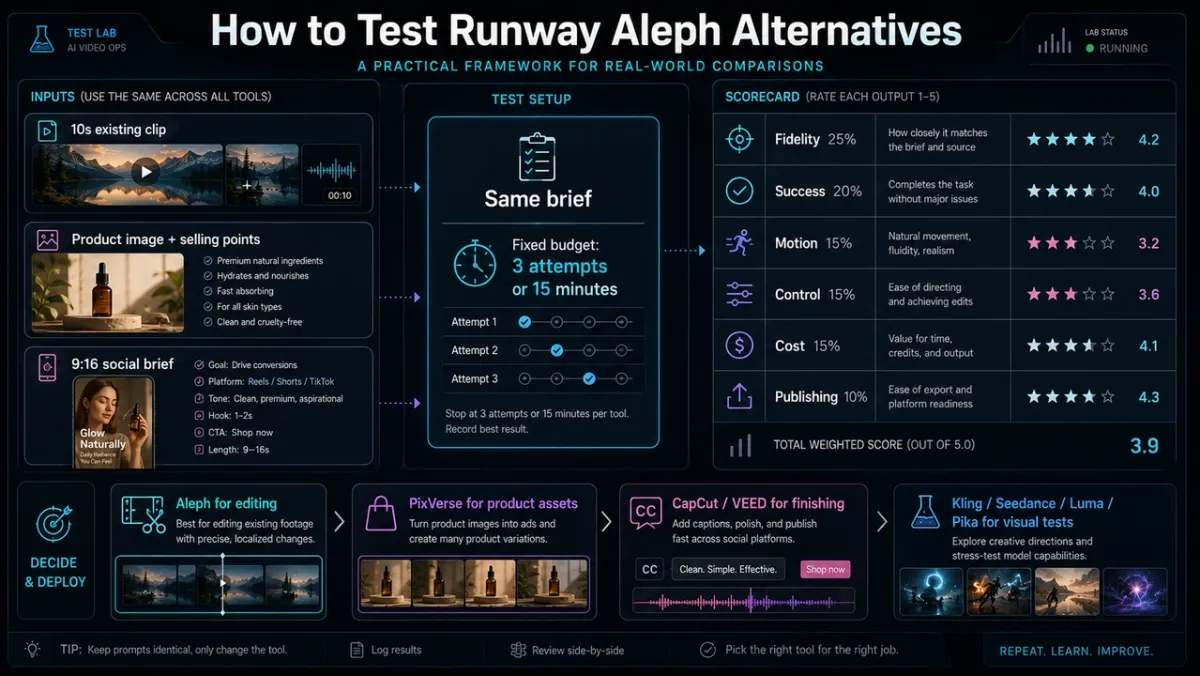
The scoring should be practical, not academic. A beautiful clip is not the winner if the product color changes, the logo melts, the caption is wrong, or the third retry costs more than the asset is worth. For each tool, score the best output after a fixed budget such as three attempts or 15 minutes.
| Score category | Weight | What to check |
|---|---|---|
| Product or subject fidelity | 25% | Does the product, person, logo, clothing, object shape, or scene identity stay recognizable? |
| Edit or generation success | 20% | Did the intended edit or generated scene actually happen without breaking the clip? |
| Temporal consistency and motion | 15% | Are hands, faces, objects, shadows, and camera moves stable across frames? |
| Control and retry burden | 15% | How many prompt edits, keyframe fixes, or regenerations were needed? |
| Cost and speed | 15% | How many credits, seconds, queue waits, exports, or manual steps did the usable result require? |
| Publishing readiness | 10% | Is the output in the right aspect ratio, resolution, caption style, rights posture, and review state? |
This framework usually changes the decision. Aleph may win the existing-footage edit because the source clip is already strong. PixVerse may win the product-image and ad-variation tests because it starts from product assets and campaign inputs. CapCut or VEED may win the publishing test because the finishing workflow is faster. Kling, Seedance, Luma, or Pika may win one visual test but still lose the full workflow if the retry burden, policy risk, or handoff cost is too high.
Final Verdict: Best Runway Aleph Alternative for Editing vs Generation
Runway Aleph 2.0 deserves the attention it is getting. It is one of the clearest examples of where AI video editing is going: keep the footage, change the part that blocks the project, and avoid a reshoot. If your job is to edit existing footage with localized changes, Aleph should stay on your shortlist.
But many people searching for a Runway Aleph 2.0 alternative are not only trying to edit footage. They are trying to produce more video. They need product ads from images, social clips from prompts, campaign variations, storyboard-to-video tests, API workflows, or a practical way to turn assets into finished marketing content. For those jobs, PixVerse is the strongest first alternative because it begins closer to how creators, ecommerce teams, and growth marketers actually work.
The best stack may include more than one tool. Use Aleph when you already have the footage. Use PixVerse when you need to generate new product videos, ads, and campaign-ready assets. Use CapCut, VEED, or Adobe when the job becomes editing and publishing. Use Kling, Seedance, Luma, or Pika when you are testing model-specific visual styles, motion, or creative effects.
Frequently Asked Questions
What is the best Runway Aleph 2.0 alternative?
The best Runway Aleph 2.0 alternative depends on the job. PixVerse is the strongest alternative for product videos, image-to-video clips, ad creatives, social assets, and API-scale generation. Google Flow is strong for Google ecosystem video workflows. Adobe is strong for professional editing. CapCut and VEED are better for social finishing. Kling, Seedance, Luma, and Pika are useful for cinematic or experimental model testing.
Is PixVerse better than Runway Aleph 2.0?
PixVerse is better when you need to generate new videos from product images, prompts, references, or campaign briefs. Runway Aleph 2.0 is better when you already have footage and need to make localized edits while preserving the rest of the clip. The practical answer is workflow-based: use Aleph for editing existing footage and PixVerse for generating new campaign assets.
Can PixVerse edit videos like Aleph 2.0?
PixVerse supports video editing, multi-frame control, character reference, transitions, lip sync, sound effects, and API workflows, but Aleph 2.0 is more specifically positioned around in-context editing of existing footage through Edit Studio. If your exact task is “change this existing clip,” Aleph is a direct fit. If your task is “make a new product video or ad from assets,” PixVerse is usually the better starting point.
Which Runway Aleph alternative is best for ecommerce product videos?
PixVerse is the best fit for ecommerce product videos because it supports image-to-video workflows, product-oriented ad creation, campaign variants, and API planning. The PixVerse Ad Master workflow is especially relevant when a team starts from a product photo and selling points rather than filmed footage.
Which Runway Aleph alternative is best for traditional video editing?
Adobe Premiere / Firefly is the best fit for professional timeline editing, while CapCut and VEED are better for lightweight social editing. Adobe is stronger for production handoff, licensed assets, generative extend, and detailed post-production. CapCut and VEED are faster for subtitles, templates, avatars, and social exports.
Which Runway Aleph alternative is best for cinematic AI video tests?
Kling, Seedance, Luma, and Pika are all worth testing, but for different reasons. Kling is strong for motion and action. Seedance is strong for multimodal references and audio-video generation. Luma is strong for camera motion and atmospheric reference-image exploration. Pika is strong for quick stylized effects and short social experiments.
Is there a free Runway Aleph 2.0 alternative?
Some tools offer free access, trials, or limited credits, but high-quality AI video generation is compute-heavy, so “free” usually means lower resolution, watermarks, limited monthly credits, slower queues, or personal-use restrictions. The safest approach is to use free credits for prompt testing, then pay only for the tool that performs well on your actual footage, product images, or campaign brief.
Which Runway Aleph alternative should agencies use?
Agencies should choose by client workflow. For ecommerce and performance marketing clients, PixVerse should be tested first because it is better aligned with product videos and ad variation workflows. For film, brand-world, or experimental campaign concepting, Runway, Kling, Seedance, or Luma may be useful. For final social packaging, CapCut, VEED, and Adobe are often better finishing tools than primary generation tools.
Teams that need to keep assets, prompts, and generated clips organized in one shared workspace can use PixVerse Canvas.