GPT Image 2 Prompt Guide: 80 Prompts, Review und API-Tipps (2026)
Entdecken Sie 80 kopierfertige GPT Image 2 Prompts für Anzeigen, Poster, Produkte, Figuren und Video-Workflows plus API-Notizen und Praxistests.
Dies ist ein GPT Image 2-Prompt-Leitfaden und eine praktische Rezension für Entwickler, die zunächst brauchbare Prompts benötigen: Produktanzeigen, Poster, Miniaturansichten, Charaktere, soziale Bilder, UI-Mockups, Bearbeitungen und videofähige erste Frames.
Verwenden Sie die folgenden Schnellpfade, wenn Sie bereits wissen, was Sie benötigen:
- Eingabeaufforderungen kopieren: Sehen Sie sich unten die 80 Beispiele für kopierbereite GPT Image 2-Eingabeaufforderungen an.
- Sehen Sie sich die Testergebnisse an: Sehen Sie sich die Ergebnisse und Einschränkungen der praktischen Testberichte an.
- Verwandeln Sie Bilder in Videos: Folgen Sie dem PixVerse-Bild-zu-Video-Workflow.
GPT Image 2 ist am stärksten, wenn sich das Bild wie ein entworfenes Asset verhalten muss: lesbarer Text, saubere Layouts, Produktkompositionen, UI-Mockups, Infografiken, bearbeitbare Referenzen und videofähige erste Frames. Es ist weniger zuverlässig, wenn der Auftrag von einer exakten Reproduktion des Markenlogos, einer winzigen Konformitätskopie, proprietären Schriftarten oder einem transparenten Endprodukt abhängt, das ohne manuelle Qualitätssicherung versendet werden muss.
OpenAI hat am 21. April 2026 ChatGPT Images 2.0 eingeführt. Entwickler suchen oft nach der gleichen Erfahrung wie GPT Image 2, gpt-image-2 oder ChatGPT Images 2.0. Wir haben es zum ersten Mal während der Einführungswoche getestet und diesen Leitfaden am 22. Juni 2026 erneut anhand des offiziellen Anleitungsleitfadens, der API-Preisseite und der Hilfedokumentation zu ChatGPT-Bildern von OpenAI überprüft.
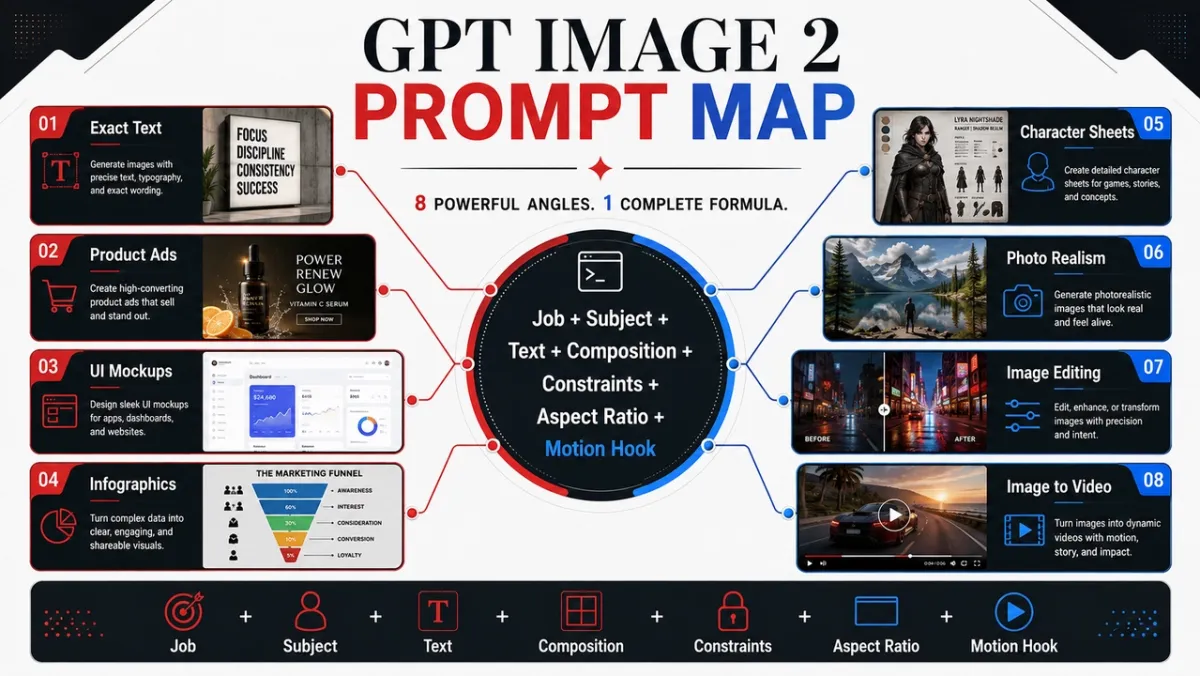
5 GPT Image 2 fordert zum Kopieren auf
Diese fünf Eingabeaufforderungen decken die Anwendungsfälle mit dem höchsten Wert in diesem Handbuch ab. Jeder folgt dem gleichen Format: Anwendungsfall, Eingabeaufforderung, Beste für und Tipp.
Prompt-Beispiel 1: Produktfotografie
Anwendungsfall: E-Commerce-Produktheldenbild
Eingabeaufforderung:
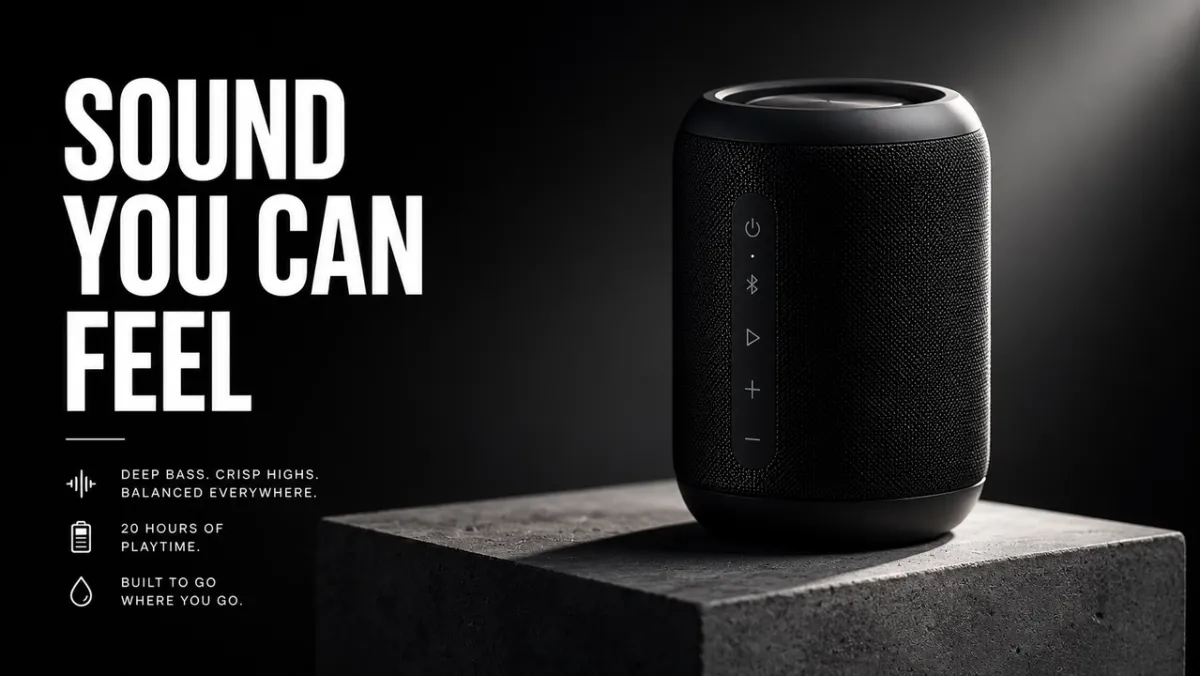
Erstellen Sie ein Premium-E-Commerce-Heldenbild für einen mattschwarzen kabellosen Lautsprecher auf einem Betonsockel. Das Produkt befindet sich im rechten Drittel mit scharfen Kanten, realistischer Materialtextur, klarem Kontaktschatten und dramatischem Randlicht. Lassen Sie das linke Drittel als negativen Platz für eine Überschrift. Kein gefälschtes Markenlogo, kein Wasserzeichen, keine zusätzlichen Objekte. Seitenverhältnis 16:9.
Am besten geeignet für: Produktlisten, bezahlte soziale Anzeigen, Landingpage-Hero-Bilder
Tipp: Wenn Sie ein Referenzbild bereitstellen, fügen Sie „Form, Farbe, Etikett und Proportionen des Produkts genau beibehalten“ hinzu.
Eingabeaufforderungsbeispiel 2: KI-Anzeigenkreativ
Anwendungsfall: Kampagnenplakat mit exaktem Text
Eingabeaufforderung:
Erstellen Sie ein vertikales Produkteinführungsplakat für ein fiktives Designtool. Überschrift: „SCHNELLER ERSTELLEN“. Untertitel: „VOM PROMPT ZUR KAMPAGNE“. Sauberes Schweizer Raster, cremefarbener Hintergrund, schwarze Typografie, eine leuchtend blaue Akzentform, starke Hierarchie, nur exakter Text, keine zusätzlichen Wörter, kein Wasserzeichen. Seitenverhältnis 9:16.
Am besten geeignet für: Anzeigenkonzepte, Postertests, Startgrafiken, Bilder sozialer Kampagnen
Tipp: Halten Sie den Überschriftentext kurz und zitieren Sie ihn genau. Langer Text lässt sich schwieriger sauber wiedergeben.
Eingabeaufforderungsbeispiel 3: Zeichenkonsistenz
Anwendungsfall: Zeichenreferenzblatt
Eingabeaufforderung:
Erstellen Sie ein professionelles Charakter-Referenzblatt für einen Original-Science-Fiction-Kurier namens „NOVA“. Schließen Sie Vorder-, Seiten- und Rückansichten ein; vier Gesichtsausdrücke; Beschreibungen zu Jacken, Stiefeln und Rucksäcken; und eine Farbpalettenzeile. Behalten Sie in jeder Ansicht das gleiche Gesicht, die gleiche Frisur, das gleiche Outfit und die gleichen Proportionen bei. Sauberer weißer Hintergrund, lesbare Etiketten, Konzeptkunststil. Seitenverhältnis 16:9.
Am besten geeignet für: Spielfiguren, Animationsreferenzen, Markenmaskottchen, Storyboards
Tipp: Wiederholen Sie die Identitätsanker bei jeder Regeneration: Name, Gesicht, Frisur, Outfit, Farbpalette und Rolle.
Eingabeaufforderungsbeispiel 4: Miniaturansicht oder soziales Bild
Anwendungsfall: YouTube-Thumbnail oder Social-Media-Beitrag
Eingabeaufforderung:
Erstellen Sie ein fettgedrucktes YouTube-Miniaturbild für ein Video über KI-Bildaufforderung. Haupttext: „BESSERE PROMPTS“. Zeigen Sie ein Vorher-Nachher-Bildergebnis mit geteiltem Bildschirm an, mit einer unordentlichen Aufforderungskarte auf der linken Seite und einem ausgefeilten Kampagnenbild auf der rechten Seite. Hoher Kontrast, klare, gesichtsfreie Komposition, lesbarer Text, keine gefälschten Logos, keine zusätzlichen Wörter. Seitenverhältnis 16:9.
Am besten geeignet für: Miniaturansichten, soziale Erklärungen, Blog-Grafiken, Erstellerinhalte
Tipp: Sagen Sie dem Modell genau, wie viele Wörter erscheinen sollen und wohin sie gehören sollen.
Eingabeaufforderungsbeispiel 5: Erstes Bild-zu-Video-Bild
Anwendungsfall: Erster Frame für PixVerse Bild-zu-Video
Eingabeaufforderung:
Erstellen Sie ein filmisches erstes Bild für einen Bild-zu-Video-Clip: eine gläserne Parfümflasche, die auf nassem schwarzem Stein steht, ein dünnes Nebelband dahinter, starke Silhouette im Vordergrund, sichtbare Tiefenschichten, subtile Reflexion, leerer Raum für Kamerabewegungen, keine Hände, kein Text, kein Wasserzeichen. Seitenverhältnis 16:9.
Am besten geeignet für: Produktpräsentationen, Kurzanzeigen, Eröffnungen von Musikvideos, filmische Social-Media-Clips
Tipp: Fügen Sie dem Standbild einen Bewegungshinweis hinzu, z. B. Nebel, Staub, Dampf, Stoff, Bildschirmglanz oder Reflexionen.
Verwandeln Sie Ihr GPT Image 2-Standbild mit PixVerse in ein Video
Eine starke GPT Image 2-Eingabeaufforderung kann das Standbild erstellen. PixVerse ist der nächste Schritt, wenn noch Bewegung, Kamerabewegung oder ein kurzer Kampagnenclip benötigt wird.
- Erzeugen Sie einen ersten Frame mit GPT Image 2.
- Laden Sie das genehmigte Bild auf PixVerse hoch.
- Fügen Sie eine fokussierte Bewegungsaufforderung hinzu.
- Exportieren Sie ein kurzes Video zum Testen, für Anzeigen, Social-Media-Beiträge oder Produktseiten.
Motion fordert zum Ausprobieren auf:
- Verwenden Sie das Bild als erstes Bild. Schieben Sie die Kamera langsam in Richtung des Produkts, während dahinter Nebel weht. Behalten Sie Produktform, Etikett, Beleuchtung und Position bei.
- Verwenden Sie das Bild als erstes Bild. Fügen Sie eine sanfte Bewegung der Handkamera, sich im Wind bewegende Stoffe und eine weiche Hintergrundparallaxe hinzu. Ändere nicht das Gesicht oder Outfit des Charakters.
- Verwenden Sie das Bild als erstes Bild. Animieren Sie die Lichter der Stadt, die nach und nach aufleuchten, während die Kamera leicht nach links schwenkt. Behalten Sie den gesamten lesbaren Postertext bei.
- Verwenden Sie das Bild als erstes Bild. Drehen Sie das Produkt subtil auf dem Sockel, fügen Sie ein bewegliches Randlicht hinzu und halten Sie den Hintergrund sauber.
- Verwenden Sie das Bild als erstes Bild. Fügen Sie Dampf, Reflexionen und eine langsame Kamerafahrt von oben nach unten hinzu. Behalten Sie die Form, Tellerposition und Farbe der Speisen bei.
Eine tiefergehende Struktur der Bewegungsaufforderung finden Sie im AI-Videoaufforderungsleitfaden, im Bild-zu-Video-Tool-Leitfaden und im AI-Videoanzeigen-Generator-Workflow.
So schreiben Sie GPT Image 2-Eingabeaufforderungen, die tatsächlich funktionieren
Die besten GPT Image 2-Eingabeaufforderungen beschreiben nicht nur ein Bild. Sie beschreiben die Aufgabe, die das Bild erfüllen muss. Eine Aufforderung für eine soziale Anzeige sollte anders lauten als eine Aufforderung für einen Produktausschnitt, eine Infografik, einen UI-Bildschirm oder ein erstes Bild für ein Video.
Ein verlässliches Startmuster sieht so aus:
Erstellen Sie [Bildtyp] für [Anwendungsfall]. Hauptthema: [spezifisches Thema und sichtbare Details]. Genauer Text, falls vorhanden: „[Kopie, die erscheinen muss]“. Komposition: [Rahmen, Layout, Negativraum, Motivplatzierung]. Stil und Beleuchtung: [Bildsprache, Medium, Stimmung, Lichtrichtung]. Einschränkungen: [was sich nicht ändern darf, keine zusätzlichen Wörter, kein Wasserzeichen]. Ausgabeformat: [Seitenverhältnis, transparenter Hintergrund, videofertiger Rahmen].
Formel:
Thema + visueller Stil + Komposition + Beleuchtung + Details + Einschränkungen + Ausgabe-Anwendungsfall
Fähigkeit 1: Benennen Sie den Job vor dem Stil
Beginnen Sie mit dem Ausgabetyp: Poster, Produktanzeige, App-Bildschirm, Charakterblatt, Lerndiagramm, Bearbeitung oder erstes Bild-zu-Video-Bild. GPT Image 2 kann der Aufforderung besser folgen, wenn es den Erfolgsstandard versteht.
Schwache Eingabeaufforderung:
Ein cooler, futuristischer Lautsprecher, filmisch, mit hoher Detailtreue.
Bessere Eingabeaufforderung:
Erstellen Sie eine Premium-Produktanzeige für einen mattschwarzen kabellosen Lautsprecher. Das Bild sollte als 16:9-Kampagnenbanner funktionieren, mit dem Produkt auf der rechten Seite, einer kurzen Überschrift auf der linken Seite, sauberem Negativbereich und scharfen Produktkanten.
Die zweite Eingabeaufforderung teilt dem Modell mit, wie das Bild beurteilt wird: nicht nur nach Schönheit, sondern auch nach Layout, Hierarchie und Benutzerfreundlichkeit.
Fähigkeit 2: Behandeln Sie Text wie ein gesperrtes Asset
Wenn Text wichtig ist, setzen Sie ihn in Anführungszeichen und teilen Sie dem Modell mit, wie er gerendert werden soll. Fragen Sie nicht nach einem „Slogan“, es sei denn, Sie möchten, dass das Model Wörter erfindet.
Verwenden Sie dieses Muster:
Überschrift: „KLANG, DEN SIE FÜHLEN KÖNNEN“. Geben Sie die Überschrift wörtlich wieder. Keine zusätzlichen Wörter, kein doppelter Text, kein gefälschtes Logo. Kräftige, weiße, serifenlose Schrift, linke Seite der Komposition, aus der Ferne lesbar.
Teilen Sie für lange Kopien den Text in der Eingabeaufforderung in separate Zeilen auf. Wenn das Ergebnis ein Wort falsch schreibt, führen Sie die Neugenerierung mit weniger Text, größerer Schrift und einer strengeren „Nur exakter Text“-Sprache durch.
Fähigkeit 3: Geben Sie dem Modell eine Kamera und ein Layout
GPT Image 2 kann Kompositionshinweisen folgen, diese müssen jedoch klar angegeben werden. Fügen Sie Kameraabstand, Winkel, Motivplatzierung, Negativraum und Seitenverhältnis hinzu.
Nützliche Sätze:
- Nahaufnahme für Produkttextur, Hände, Gesichter, Materialien, Etiketten.
- Weitwinkelaufnahme für Umgebungen, Geschichtenszenen, Stadtplakate und videofähige Rahmen.
- Von oben nach unten für Lebensmittel, Schreibtischszenen, Flatlays, Verpackungssets.
- Linkes Drittel / Rechtes Drittel für Anzeigenlayouts mit Text- und Produktbalance.
- Sauberes Raster für UI-Modelle, Charakterblätter, Diagramme und Infografiken.
Fähigkeit 4: Änderungen in drei Sätzen schreiben
Bearbeitungsaufforderungen funktionieren am besten, wenn sie die Änderung, die gesperrten Elemente und den physischen Realismus trennen.
Ersetzen Sie das geparkte Auto durch ein Oldtimer-Fahrrad. Behalten Sie Haus, Zaun, Auffahrt, Landschaftsgestaltung, Beleuchtungsrichtung, Kamerawinkel und Tageszeit genau bei. Passen Sie die Fahrradwaage, den Kontaktschatten und die Perspektive an die vorhandene Szene an.
Dieses Muster ist stärker als „das besser aussehen lassen“, weil es GPT Image 2 sagt, wo Kreativität erlaubt ist und wo nicht.
Fähigkeit 5: Fügen Sie Bewegungshinweise hinzu, wenn das Bild zum Video wird
Wenn das Standbild zu einer PixVerse Bild-zu-Video-Quelle wird, fragen Sie nach Tiefe und Bewegungsbereitschaft. Fragen Sie nach Vordergrund, Mittelgrund, Hintergrund, einer sauberen Motivsilhouette und einem sichtbaren Bewegungshinweis: Staub, Stoff, Haare, Regen, Spiegelung, Fahrzeugbewegung, rotierendes Produkt oder einen Kamera-Schiebeweg.
Statt:
Ein Astronaut in einer Wüste.
Verwendung:
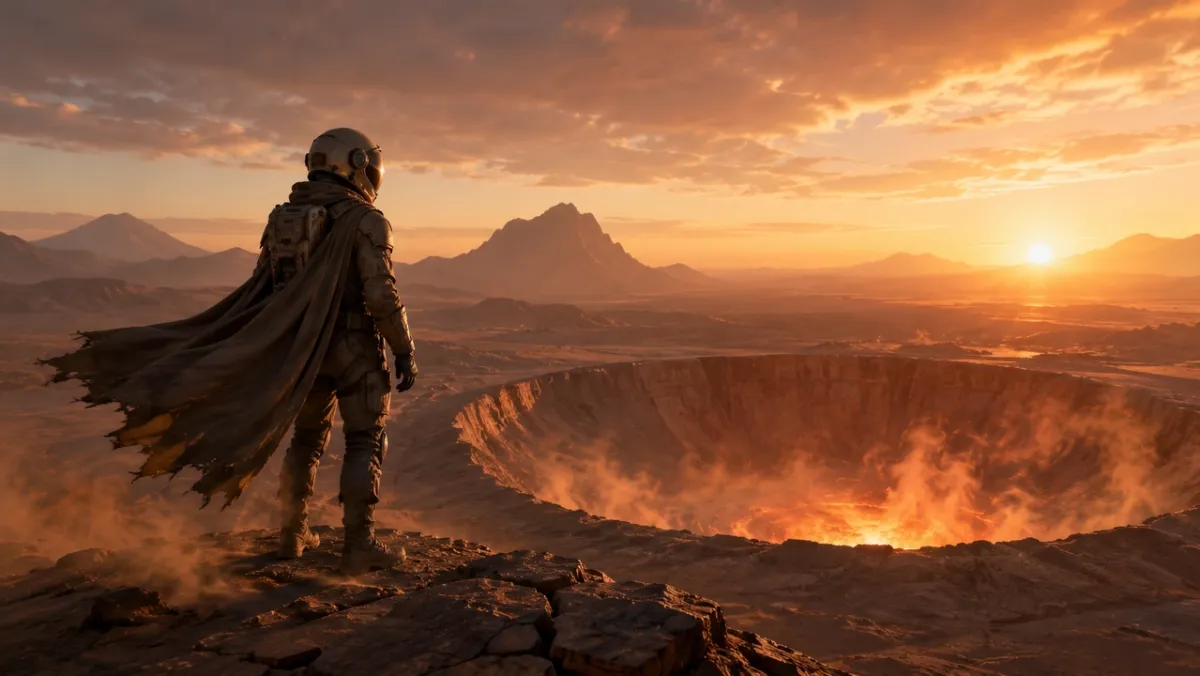
Ein erstes filmisches Bild für einen Bild-zu-Video-Clip: ein einsamer Astronaut, der im Morgengrauen am Rand eines leuchtenden Wüstenkraters steht, Kap und Staub bereit, sich im Wind zu bewegen, starke Silhouette im Vordergrund, klare Tiefenschichten und warmes Horizontlicht.
GPT Image 2-Eingabeaufforderungsbibliothek: 80 kopierfertige Beispiele
Jeder Winkel unten enthält zehn Eingabeaufforderungen. Die erste Eingabeaufforderung in jeder Gruppe ist der beste Kandidat für ein visuelles Beispiel, da sie die Fähigkeit hervorhebt, die dieser Winkel demonstrieren soll. Bei den anderen Eingabeaufforderungen handelt es sich um reine Textbeispiele, die Sie kopieren, anpassen und testen können.
| Prompt-Modul | Schnelle Zahlen | Am besten für |
|---|---|---|
| Produktfotografie und kreative Anregungen für KI-Anzeigen | 21-30 | Produktlisten, bezahlte Anzeigen, E-Commerce-Heldenbilder, Verpackungsmodelle |
| Eingabeaufforderungen zur Logo- und Textwiedergabe | 11-20 | Poster, Menütafeln, Miniaturansichten, Albumcover, genaue Schlagzeilentests |
| Eingabeaufforderungen zur Zeichenkonsistenz | 41-50 | Charakterbögen, Maskottchen, Spielressourcen, Ausdrucksreihen |
| Poster, Miniaturansichten und Filmszenen-Eingabeaufforderungen | 1-10 | Heldenbilder, redaktionelle Standbilder, stimmungsvolle Szenen, visuelle Aufhänger |
| Social-Media-Bild und Infografik-Eingabeaufforderungen | 31-40 | Blog-Visuals, Erklärungen, Vergleichsgrafiken, gemeinsam nutzbare Bildungsressourcen |
| UI-Mockup-Eingabeaufforderungen | 51-60 | App-Bildschirme, Dashboards, soziale Profile, Produkt-UI-Konzepte |
| Stiltransfer und narrative Kunstanregungen | 61-70 | Comics, Story-Panels, redaktionelle Kunst, Konzepterkundung |
| Eingabeaufforderungen für den ersten Bild-zu-Video-Bildwechsel | 71-80 | PixVerse Bewegungsworkflows, Produktpräsentationen, Bearbeitungen, Multi-Referenz-Quellbilder |
1. Poster-, Miniaturansicht- und Filmszenen-Eingabeaufforderungen
Dieser Winkel eignet sich am besten für Porträts, redaktionelle Bilder, Lifestyle-Szenen und stimmungsvolle Standbilder, bei denen es auf Beleuchtung und Realismus ankommt.
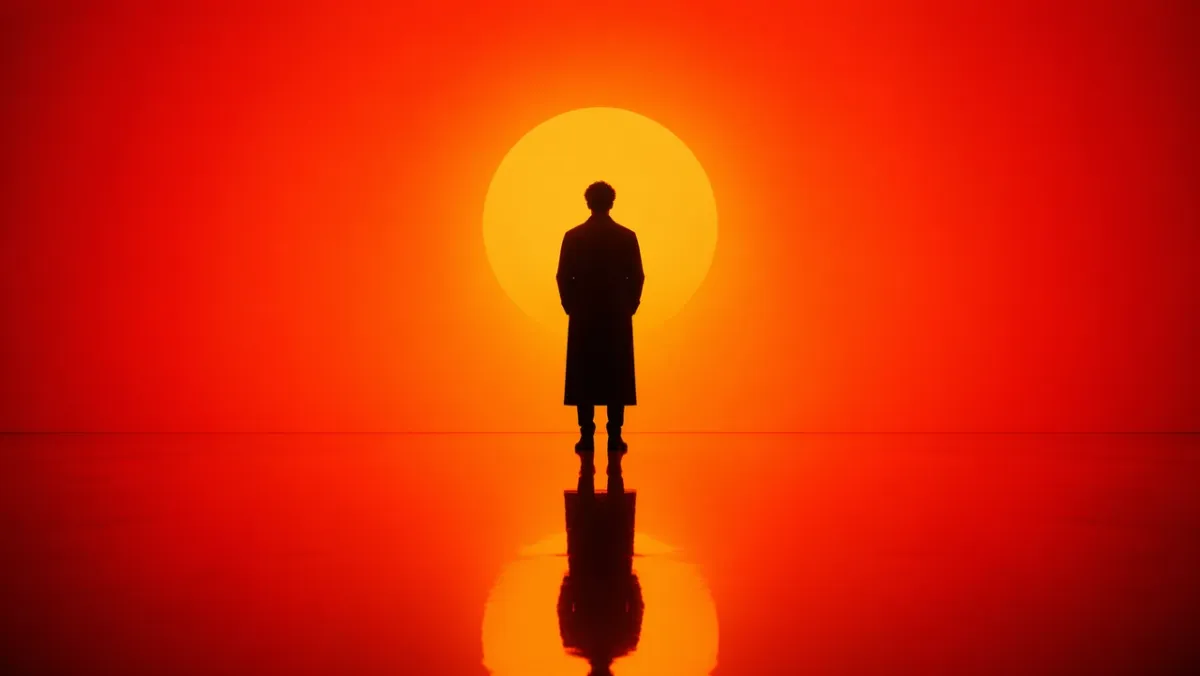
Eingabeaufforderung 1:
Erstellen Sie ein filmisches Porträt einer einzelnen Figur, die in einer Umgebung mit intensivem Orange-zu-Rot-Farbverlauf steht. Starke Silhouettenbeleuchtung von hinten, tiefer Schattenkontrast, reflektierender, glänzender Boden, der die Figur widerspiegelt. Symmetrische Komposition, minimales Bühnenbild, kein Durcheinander im Hintergrund. Die Stimmung ist besinnlich und kraftvoll, wie ein Standbild aus einem Science-Fiction-Film. Seitenverhältnis 16:9.
Eingabeaufforderung 2:
Eine ehrliche fotorealistische Straßenszene in Seoul nach dem Regen. Ein Florist schließt einen kleinen Laden zur blauen Stunde, nasse Straßenreflexionen, warmes Ladenlicht, müde natürliche Haltung, 50-mm-Dokumentationsgefühl, realistische Hautstruktur, keine Glamour-Pose, kein Wasserzeichen. Seitenverhältnis 3:2.
Eingabeaufforderung 3:
Nahaufnahme von verwitterten Händen, die auf einem zerkratzten Holzschreibtisch eine alte Filmkamera reparieren. Fensterlicht von der Kamera links, sichtbarer Staub, Textur aus Messing und schwarzem Leder, geringe Schärfentiefe, ruhige Werkstattstimmung, fotorealistisch, keine Textüberlagerung. Seitenverhältnis 4:3.
Eingabeaufforderung 4:
Ein ruhiger Nachtzugsteig in Nordeuropa bei leichtem Schneefall. Ein Reisender im langen Mantel steht unter einer warmen Bahnhofslampe, der Atem ist in der kalten Luft sichtbar, die Zugfenster leuchten im Hintergrund, filmischer Realismus, zurückhaltende Farbpalette, 35-mm-Dokumentarfilm-Feeling, kein Text. Seitenverhältnis 16:9.
Eingabeaufforderung 5:
Ein redaktionelles Food-Foto von oben nach unten mit handgemachten Nudeln auf einem dunklen Keramikteller, Dampf steigt auf, Essstäbchen liegen schräg, abgenutzter Holztisch, weiches Seitenlicht, realistischer Ölglanz und Textur, kein Branding, keine Textüberlagerung. Seitenverhältnis 4:5.
Eingabeaufforderung 6:
Ein realistisches Porträt im Dokumentarfilmstil eines Keramikkünstlers, der eine Tonschale auf einer Töpferscheibe bearbeitet. Mittlere Nahaufnahme, Hände und sich drehender Ton in scharfer Schärfe, Schürze mit natürlichen Flecken, sanftes Werkstattfensterlicht, Regale mit unfertigen Schüsseln im Hintergrund, ehrliche Textur, keine Glamour-Retusche, kein Text. Seitenverhältnis 3:2.
Eingabeaufforderung 7:
Ein großes filmisches Standbild einer kleinen Bergstadt nach einem Sommersturm. Nebel steigt aus dunkelgrünen Kiefern, warme Lichter erscheinen in den Fenstern der Hütte, nasse Straßenreflexionen führen in Richtung Zentrum, eine Person geht mit einem Regenschirm in der Ferne, natürlicher Maßstab, realistische Atmosphäre, kein Text. Seitenverhältnis 16:9.
Eingabeaufforderung 8:
Eine fotorealistische Nahaufnahme einer Vintage-Armbanduhr, die auf einem gefalteten Leinentuch ruht. Sichtbares gebürstetes Metall, winzige Kratzer auf dem Gehäuse, lesbare, aber fiktive Markierungen auf dem Zifferblatt, sanftes gerichtetes Morgenlicht, geringe Schärfentiefe, raffinierte redaktionelle Produktfotostimmung, keine echten Markenlogos. Seitenverhältnis 4:5.
Eingabeaufforderung 9:
Eine ehrliche Innenszene eines kleinen Architekturstudios spät in der Nacht. Zwei Designer begutachten Schaumstoffmodelle und gedruckte Grundrisse unter einer Schreibtischlampe, Kaffeetassen in der Nähe, realistische Schatten, praktische Unordnung am Arbeitsplatz, ruhige, konzentrierte Stimmung, 35-mm-Film-Look, keine Textüberlagerung. Seitenverhältnis 16:9.
Eingabeaufforderung 10:
Ein natürliches Mode-Redaktionsbild eines Models in einem einfachen cremefarbenen Mantel, das in der Abenddämmerung in der Nähe eines U-Bahn-Eingangs steht. Straßenlaternen beginnen zu leuchten, gedämpfter Stadthintergrund, realistische Stofffalten, entspannte Haltung, Bildausschnitt auf Augenhöhe, subtile Filmkörnung, keine sichtbaren Markennamen, kein Text. Seitenverhältnis 2:3.
Worauf Sie achten sollten: Das Ergebnis sollte eine glaubwürdige Lichtrichtung, physikalisch plausible Reflexionen oder Schatten und eine natürliche Pose des Motivs aufweisen. Wenn das Bild zu poliert aussieht, fügen Sie weitere dokumentarische Details hinzu und entfernen Sie vage Qualitätsausdrücke.
2. Eingabeaufforderungen für die Darstellung von Logos und Texten
GPT Image 2 ist am stärksten, wenn die Eingabeaufforderung Text als Designanforderung und nicht als Dekoration behandelt.
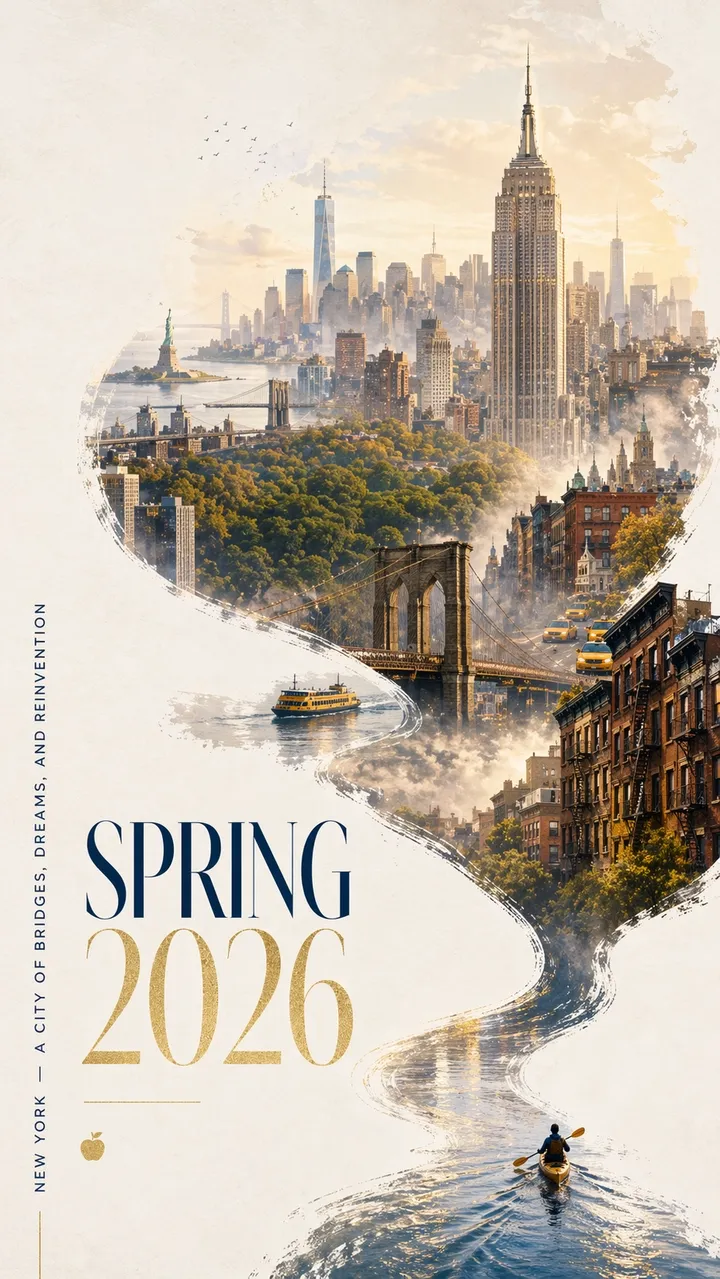
Eingabeaufforderung 11:
Ein auffälliges Stadtplakat für New York im Frühjahr 2026 mit einem gewagten zeitgenössischen Design und einer eleganten Feierstimmung. Sauberer, cremefarbener, strukturierter Hintergrund mit großzügigem Negativraum. In der unteren rechten Ecke paddelt ein Miniaturkajakfahrer über ein schmales Band aus spiegelndem Wasser. Das Kielwasser zieht in einer dynamischen kalligrafischen Kurve nach oben und verwandelt sich allmählich in den Hudson River und dann in ein traumhaftes handgemaltes Panorama von Manhattan. Im Inneren der fließenden, flussförmigen Komposition: das Empire State Building, die Brooklyn Bridge, die Überdachung des Central Park, das One World Trade Center, Sandsteindächer, gelbe Taxis, Hafenfähren und die Freiheitsstatue in sanfter Ferne. Sanfter Morgennebel, goldenes Frühlingslicht, dezente Akzente in Marine und Gold. In der eleganten Typografie unten links steht „SPRING 2026“ mit einem vertikalen Slogan „NEW YORK – A CITY OF BRIDGES, DREAMS, AND REINVENTION“. Der Text muss scharf und schön verfasst sein. Keine zusätzlichen Worte. Premium-Grafikdesign, Seitenverhältnis 9:16.
Eingabeaufforderung 12:
Erstellen Sie ein vertikales Startplakat für eine fiktive Designkonferenz mit dem Titel „FRAME 2026“. Große Überschrift: „FRAME 2026“. Untertitel: „GESTALTEN MIT MASCHINENVORSTELLUNG“. Sauberes Schweizer Raster, cremefarbener Hintergrund, schwarze Typografie, ein roter geometrischer Akzent, großzügiger Negativraum, perfekt lesbarer Text, keine zusätzlichen Wörter, kein Wasserzeichen. Seitenverhältnis 9:16.
Eingabeaufforderung 13:
Erstellen Sie ein minimalistisches Albumcover mit dem Titel „SOFT SIGNALS“. Künstlername: „MIRA VALE“. Zentrierte Typografie, gedämpfte blaue Papierstruktur, kleine silberne Linienillustration eines Funkturms, elegante Abstände, kein zusätzlicher Text, kein Logo, Seitenverhältnis 1:1.
Eingabeaufforderung 14:
Erstellen Sie ein Schaufensterplakat mit der Aufschrift „WEITER LESEN“ in großer Serifenschrift. Kleinere Zeile: „FRÜHLINGSLESEWOCHE“. Warme abendliche Straßenreflexionen im Glas, cremefarbene Papierstruktur, lesbare Typografie, keine zusätzlichen Wörter, kein Wasserzeichen. Seitenverhältnis 4:5.
Eingabeaufforderung 15:
Erstellen Sie ein Museumsausstellungsplakat mit dem Titel „OBJECTS OF TOMORROW“. Untertitel: „A DESIGN HISTORY OF 2026“. Schwarzer Text auf cremefarbenem Papier, ein abstraktes Chromobjekt in der Mitte, klares modernistisches Layout, nur exakt lesbarer Text, keine gefälschten Logos. Seitenverhältnis 9:16.
Eingabeaufforderung 16:
Erstellen Sie ein vertikales Musikfestival-Poster mit der genauen Überschrift „AFTERLIGHT SESSIONS“. Kleinerer Text: „12.-14. JUNI“. Verwenden Sie einen tiefblauen Hintergrund, ein leuchtendes kreisförmiges Bühnenlicht, eine elegante, komprimierte serifenlose Typografie, einen ausgewogenen Negativraum, nur exakten Text, keine zusätzlichen Wörter, kein Wasserzeichen. Seitenverhältnis 9:16.
Eingabeaufforderung 17:
Erstellen Sie eine übersichtliche Café-Menütafel mit dem Titel „MORGENMENÜ“. Fügen Sie genau vier Artikel hinzu: „ESPRESSO“, „MATCHA LATTE“, „CARDAMOM BUN“, „COLD BREW“. Warmer cremefarbener Hintergrund, schwarze Serifenschrift, einfache Trennlinien, aus der Ferne lesbar, keine Preise, keine zusätzlichen Artikel. Seitenverhältnis 4:5.
Eingabeaufforderung 18:
Erstellen Sie eine quadratische Grafik für eine soziale Kampagne für einen fiktiven Laufverein. Haupttext: „RUN THE RIVER“. Nebenzeile: „SAMSTAG 7 UHR“. Kräftige kinetische Typografie, abstrakte Flusslinie, leuchtende Grün- und Schwarzpalette, klare Hierarchie, kein zusätzlicher Text, keine echten Logos. Seitenverhältnis 1:1.
Eingabeaufforderung 19:
Erstellen Sie ein Buchcover für einen Roman mit dem Titel „THE QUIET MACHINE“. Autorenname: „ELENA ROWE“. Minimalistisches Cover mit einer kleinen silbernen mechanischen Vogelsilhouette, mattschwarzem Hintergrund, raffinierter Typografie, nur exakter Text, keine Verlagslogos, kein zusätzliches Exemplar. Seitenverhältnis 2:3.
Eingabeaufforderung 20:
Erstellen Sie ein Klassenzimmerplakat mit dem Titel „BESSERE FRAGEN STELLEN“. Fügen Sie drei kurze Zeilen ein: „Beobachten“, „Erklären“, „Testen“. Freundliches redaktionelles Design, sanfter gelber Hintergrund, einfache Liniensymbole, gut lesbarer Text mit hohem Kontrast, keine zusätzlichen Wörter, kein Wasserzeichen. Seitenverhältnis 4:5.
Worauf Sie achten sollten: Jeder Buchstabe sollte lesbar sein. Wenn das Modell zusätzliche Wörter hinzufügt, formulieren Sie die Kopie erneut als „Nur exakter Text“ und fügen Sie jede Zeile in der Eingabeaufforderung in eine eigene Zeile ein.
3. Produktfotografie und kreative KI-Werbeaufforderungen
Nutzen Sie diesen Blickwinkel für Kampagnenvisualisierungen, Heldenfotos, soziale Anzeigen, E-Commerce-Modelle und Produkt-Storytelling.
Eingabeaufforderung 21:
Eine Premium-Produktanzeige für einen mattschwarzen kabellosen Lautsprecher auf einem Betonsockel. Überschrift: „KLANG, DEN SIE FÜHLEN KÖNNEN“. Produkt rechts, kräftige weiße Schrift links, dramatisches Randlicht, klarer Schatten, Luxus-Tech-Kampagnenstil, scharfe Produktkanten, kein gefälschtes Markenlogo, kein Wasserzeichen. Seitenverhältnis 16:9.
Eingabeaufforderung 22:
Redaktionelles Hautpflegeserumfoto auf Milchglas. Eine durchscheinende Flasche mit einem einfachen Etikett mit der Aufschrift „LUMA SERUM“, sanftes diffuses Licht, hellgrüner Hintergrund, hochwertiger Beauty-Kampagnenstil, scharfer Etikettentext, klare Reflexion, keine zusätzlichen Requisiten, Seitenverhältnis 4:5.
Eingabeaufforderung 23:
Quadratische Social-Werbung für eine langlebige Reiseflasche auf einem Bergweg zur goldenen Stunde. Slogan: „GEBAUT FÜR DEN LANGEN WEG“. Produkt deutlich im Vordergrund sichtbar, natürlicher Handgriff, warmes Sonnenlicht, klar lesbarer Text im unteren Drittel, keine zusätzlichen Wörter, Seitenverhältnis 1:1.
Eingabeaufforderung 24:
Ein sauberes E-Commerce-Produktfoto von kabellosen Kopfhörern auf einem reinweißen Hintergrund. Gerader Winkel, klare Silhouette, subtiler Kontaktschatten, sichtbare Ohrpolstertextur, kein Text, kein Logo, keine Requisiten, hochauflösende Produktfotografie. Seitenverhältnis 1:1.
Eingabeaufforderung 25:
Ein Kampagnenvisual im Plakatstil für eine Kaffeetasse aus Keramik. Schlagzeile: „MORGEN, AUFGEWÄRMT“. Produkt groß im Vordergrund, warmes Küchenfensterlicht, weicher Dampf, fette, lesbare Schrift oben links, keine zusätzliche Kopie, kein Wasserzeichen. Seitenverhältnis 16:9.
Eingabeaufforderung 26:
Ein Premium-E-Commerce-Heldenbild eines minimalistischen Wanderrucksacks auf einem Steinvorsprung. Produktzentriert, Vordertasche und Träger sichtbar, sanftes alpines Morgenlicht, klarer Schatten, keine Person, kein Logo, keine Textüberlagerung, realistische Nylonstruktur und Reißverschlussdetails. Seitenverhältnis 1:1.
Eingabeaufforderung 27:
Ein ausgefeiltes Bild einer Hautpflegekampagne für ein Feuchtigkeitscremeglas aus Milchglas. Überschrift: „CALM IN A JAR“. Produkt unten rechts, hellblauer Hintergrund, sanfte Wasserreflexionen, klarer Etikettenbereich ohne gefälschte Marke, elegante weiße Typografie, keine zusätzlichen Wörter. Seitenverhältnis 4:5.
Eingabeaufforderung 28:
Ein filmisches Produktfoto von mattweißen kabellosen Ohrhörern in einem offenen Ladeetui. Dunkler anthrazitfarbener Hintergrund, dünnes Randlicht, subtile Reflexion darunter, sauberer Negativraum für eine Kampagnenüberschrift, kein Logo, kein Text, scharfe Produktkanten. Seitenverhältnis 16:9.
Eingabeaufforderung 29:
Ein quadratisches Snack-Verpackungsmodell für eine fiktive Müslimarke namens „NOVA OATS“. Zeigen Sie einen aufrecht stehenden Beutel auf einer hellen Holzoberfläche, scharfen Etikettentext, Haferflocken und Trockenfrüchte am Boden, warmes natürliches Licht, hochwertiges, aber ansprechendes Verpackungsdesign, keine zusätzlichen Marken. Seitenverhältnis 1:1.
Eingabeaufforderung 30:
Eine Aufnahme eines Luxusschmuckprodukts mit einem Silberring mit einem kleinen blauen Stein auf einer dunklen Samtoberfläche. Makrodetails, realistische Metallreflexionen, sanfter Scheinwerfer von oben links, klarer Schatten, keine Hände, kein Text, kein Wasserzeichen, Produkt klar vom Hintergrund getrennt. Seitenverhältnis 4:5.
Worauf Sie achten sollten: Das Produkt sollte der visuelle Held bleiben. Wenn das Modell zu viele Verpackungsdetails erfindet, geben Sie bei Verwendung eines Referenzbilds „einfache Verpackung“ oder „Das Eingabeprodukt genau beibehalten“ an.
4. Social-Media-Bild- und Infografik-Eingabeaufforderungen
Dieser Blickwinkel eignet sich für Diagramme, Erläuterungen, Arbeitsablaufkarten, Diagramme, Unterrichtsmaterial und Blog-Illustrationen, die lesbare Beschriftungen benötigen.
Eingabeaufforderung 31:
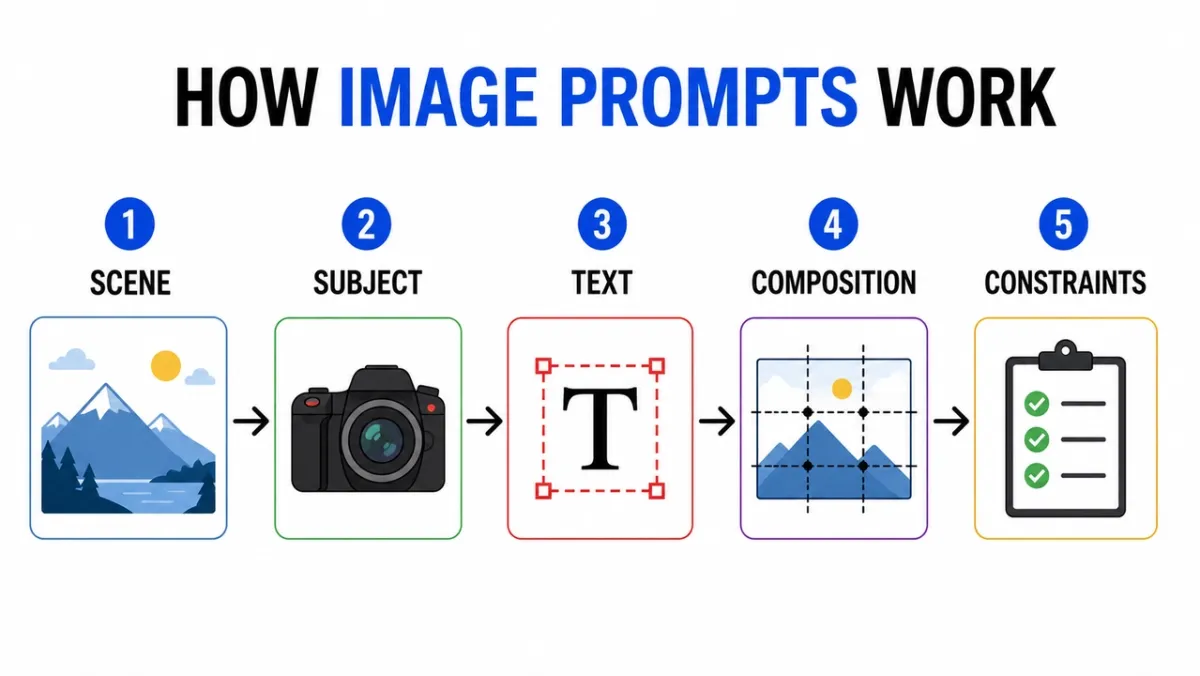
Erstellen Sie eine übersichtliche Infografik mit dem Titel „WIE BILDAUFFORDERUNGEN FUNKTIONIEREN“. Fünf beschriftete Schritte: „Szene“, „Thema“, „Text“, „Komposition“, „Einschränkungen“. Flache redaktionelle Symbole, Pfeile zwischen den Schritten, hoher Kontrast, weißer Hintergrund, lesbare serifenlose Etiketten, einheitliche Abstände, kein zusätzlicher Text, kein Wasserzeichen. Seitenverhältnis 16:9.
Eingabeaufforderung 32:
Pädagogisches Diagramm, das die Schichten eines Kameraobjektivs zeigt. Beschriftete Teile einbeziehen: „Frontelement“, „Blende“, „Fokusgruppe“, „Bildsensor“. Saubere Ausschnittillustration, weißer Hintergrund, Lehrbuchstil, klare Führungslinien, lesbare Beschriftungen, kein dekoratives Durcheinander. Seitenverhältnis 16:9.
Eingabeaufforderung 33:
Vergleichsinfografik mit dem Titel „POSTER PROMPT VS PRODUCT PROMPT“. Zwei Spalten, sechs Zeilen, prägnante Beschriftungen, neutraler Hintergrund, schwarzer Text, blaue Akzentlinien, professioneller Blog-Grafikstil, alle Texte lesbar, kein zusätzlicher Text. Seitenverhältnis 16:9.
Eingabeaufforderung 34:
Erstellen Sie eine Schritt-für-Schritt-Anleitung mit dem Titel „WIE MAN COLD BREW MACHT“. Fünf illustrierte Schritte mit kurzen Beschriftungen: „Grind“, „Steep“, „Filter“, „Pour“, „Serve“. Warme Erdtöne, klare Pfeile, einheitlicher Symbolstil, lesbarer Text, keine zusätzlichen Wörter. Seitenverhältnis 16:9.
Eingabeaufforderung 35:
Erstellen Sie eine übersichtliche Vergleichstabelle mit dem Titel „AI IMAGE WORKFLOW“. Drei Spalten: „Entwurf“, „Verfeinern“, „Animieren“. Verwenden Sie einfache Symbole, kurze Beschriftungen, hohen Kontrast, großzügige Abstände, weißen Hintergrund, einen professionellen Blog-Grafikstil und den gesamten Text lesbar. Seitenverhältnis 16:9.
Eingabeaufforderung 36:
Erstellen Sie eine übersichtliche Zeitleisten-Infografik mit dem Titel „VON DER PROMPT ZUM POSTER“. Fünf Stufen: „Brief“, „Layout“, „Text“, „Review“, „Export“. Horizontaler Fluss, einfache nummerierte Kreise, blaue und schwarze Akzentpalette, kontrastreiche Beschriftungen, kein zusätzlicher Text, kein Wasserzeichen. Seitenverhältnis 16:9.
Eingabeaufforderung 37:
Erstellen Sie ein pädagogisches Diagramm mit dem Titel „REFERENZBILDROLLEN“. Drei beschriftete Karten: „Thema“, „Stil“, „Hintergrund“. Zeigen Sie einfache Miniaturansichten von Bildern, Pfeile in einem endgültigen Ausgaberahmen, klare Beschriftungen, weißen Hintergrund, einheitliche Abstände und keinen zusätzlichen Text an. Seitenverhältnis 16:9.
Eingabeaufforderung 38:
Erstellen Sie einen Entscheidungsbaum mit dem Titel „Welche Bildaufforderung?“. Zweige: „Text“, „Produkt“, „Szene“, „Bearbeiten“. Verwenden Sie klare Kästchen und Pfeile, lesbare serifenlose Typografie, minimalen grauen Hintergrund, eine grüne Akzentfarbe, keine zusätzlichen Wörter, kein dekoratives Durcheinander. Seitenverhältnis 16:9.
Eingabeaufforderung 39:
Erstellen Sie eine Infografik zur Sicherheitscheckliste mit dem Titel „BEVOR SIE GENERIEREN“. Vier Häkchen: „Rechte“, „Datenschutz“, „Text“, „Marke“. Verwenden Sie einfache Häkchensymbole, prägnante Beschriftungen, weißen Hintergrund, professionellen SaaS-Helpcenter-Stil, hohen Kontrast und keine zusätzlichen Kopien. Seitenverhältnis 4:5.
Eingabeaufforderung 40:
Erstellen Sie eine visuelle Erklärung mit dem Titel „AUFFORDERUNG ZUR BILDBEARBEITUNG“. Drei gestapelte Reihen: „Ändern“, „Beibehalten“, „Übereinstimmen“. Fügen Sie winzige Beispielsymbole für jede Zeile, klare Führungslinien, lesbare Beschriftungen, zurückhaltende Farben, keinen zusätzlichen Text und kein Wasserzeichen hinzu. Seitenverhältnis 16:9.
Worauf Sie achten sollten: Überprüfen Sie zuerst die Etiketten. Wenn das Bild schön ist, aber die Worte falsch sind, ist die Ausgabe nicht verwendbar. Reduzieren Sie bei dichten Diagrammen die Anzahl der Beschriftungen und führen Sie eine Neugenerierung durch.
5. Eingabeaufforderungen zur Zeichenkonsistenz
Charakterblätter sind nützlich, weil sie Identität, Garderobe, Palette und Ausdruck in einem Referenzrahmen zusammenfassen.
Eingabeaufforderung 41:
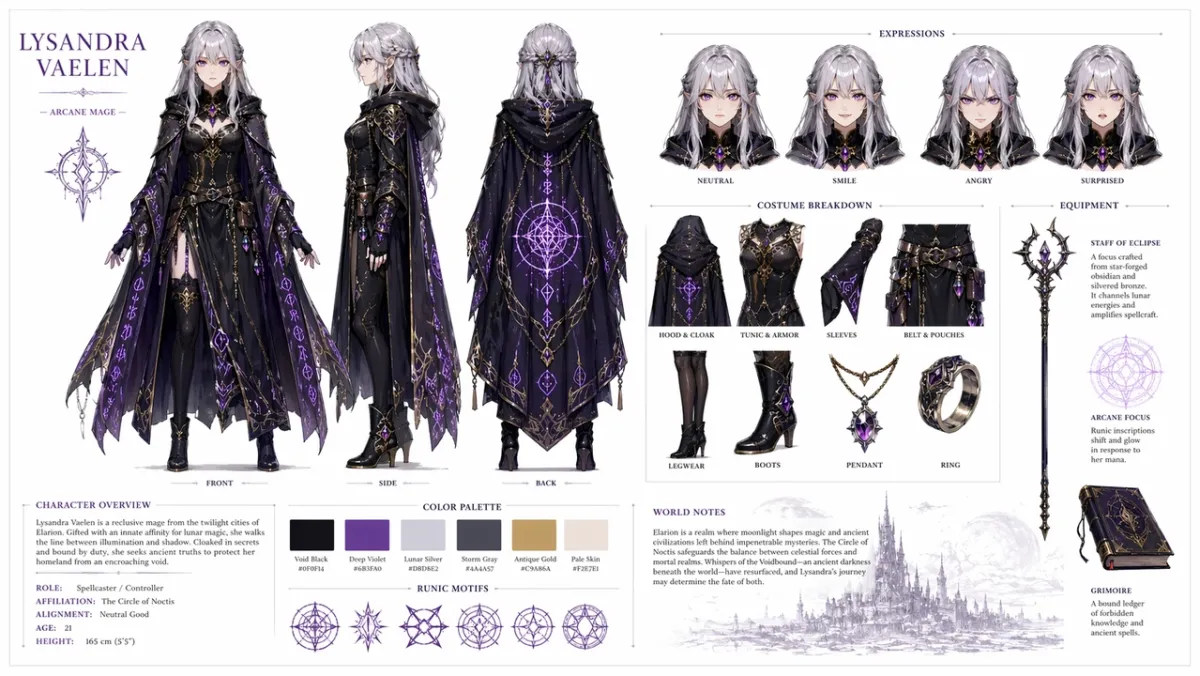
Erstellen Sie ein professionelles Charakter-Referenzblatt für einen originellen Fantasy-RPG-Charakter: eine junge Magierin mit silbernen Haaren und violetten Augen, die einen verzierten dunklen Umhang mit leuchtenden Runenmustern trägt. Fügen Sie auf einem sauberen weißen Hintergrund Folgendes ein: eine dreiseitige Wendedarstellung von vorne, von der Seite und von hinten; Variationen des Gesichtsausdrucks zeigen neutral, lächelnd, wütend und überrascht; detaillierte Aufschlüsselung der Kostüm- und Ausrüstungsteile; eine Reihe von Farbpalettenmustern; und kurze weltbildende Notizen in sauberer Typografie. Organisiertes Rasterlayout, Konzeptkunststil, hohe Auflösung. Seitenverhältnis 16:9.
Eingabeaufforderung 42:
Erstellen Sie einen Science-Fiction-Kurier-Charakterbogen für einen Originalcharakter namens „NOVA“. Berücksichtigen Sie Vorder-, Seiten- und Rückansichten, vier Gesichtsausdrücke, Beschriftungen für Jacken und Rucksäcke, Farbpaletten, einen sauberen weißen Hintergrund, lesbare Beschriftungen und ein einheitliches Gesicht und eine einheitliche Jacke in allen Ansichten. Seitenverhältnis 16:9.
Eingabeaufforderung 43:
Erstellen Sie einen Kinderbuch-Charakterbogen für einen kleinen Waldhelfer in einem grünen Regenmantel. Fügen Sie Ausdrucksreihe, Requisitenreihe, Gehpose, Winkepose, Farbpalette, einfach lesbare Notizen, einen weichen Illustrationsstil und keine zusätzlichen Zeichen hinzu. Seitenverhältnis 16:9.
Eingabeaufforderung 44:
Erstellen Sie ein Cyberpunk-Detektiv-Charakterblatt für einen Originalcharakter namens „REI“. Schließen Sie Vorderansicht, Seitenansicht, Rückansicht, drei Gesichtsausdrücke, Trenchcoat-Beschriftungen, Geräte-Requisiten, Neon-Farbpalette, klare Etiketten, einheitliches Gesicht und Frisur ein. Seitenverhältnis 16:9.
Eingabeaufforderung 45:
Erstellen Sie ein Maskottchen-Referenzblatt für einen freundlichen Roboterbäcker. Dazu gehören Ganzkörperhaltung, drei Gesichtsausdrücke, Schürzendetails, Gebäck-Requisiten, Farbpalettenmuster, einfaches Wenden, sauberer weißer Hintergrund und lesbare Etiketten. Seitenverhältnis 16:9.
Eingabeaufforderung 46:
Erstellen Sie ein Charakterblatt für ein Mobilspiel für einen originalen Wüstenspäher namens „KAI“. Dazu gehören Vorder-, Seiten- und Rückansichten, drei Action-Posen, Schal- und Utility-Gürtel-Hinweise, Farbpaletten, lesbare Beschriftungen, einheitliches Gesicht und Outfit sowie ein sauberer, cremefarbener Hintergrund. Seitenverhältnis 16:9.
Eingabeaufforderung 47:
Erstellen Sie einen gemütlichen Fantasy-Dorf-Händler-Charakterbogen für einen Originalcharakter namens „MARN“. Beinhaltet eine Ganzkörper-Vorderansicht, eine Seitenansicht, eine Requisitenreihe mit Laterne und Hauptbuch, vier Ausdrucksstudien, Beschreibungen der Stofftextur, eine warme Farbpalette, ein klares Rasterlayout und lesbare Notizen. Seitenverhältnis 16:9.
Eingabeaufforderung 48:
Erstellen Sie ein Designblatt für eine Science-Fiction-Wartungsdrohne. Dazu gehören Draufsichten, Seiten- und Vorderansichten, kleine Detailtafeln für Sensoren, Landefüße, Werkzeugarm, Akku und Warnleuchten. Sauberes technisches Konzeptkunst-Layout, neutraler Hintergrund, lesbare Etiketten, einheitliches Industriedesign. Seitenverhältnis 16:9.
Eingabeaufforderung 49:
Erstellen Sie einen Kinderanimations-Charakterbogen für einen ursprünglichen Erfinder im Klassenzimmer namens „MILO“. Berücksichtigen Sie eine stehende Pose, eine denkende Pose, eine aufgeregte Pose, eine Ausdrucksreihe, Rucksack- und Notizbuch-Requisiten, eine helle, aber zurückhaltende Farbpalette, lesbare Beschriftungen und keine zusätzlichen Zeichen. Seitenverhältnis 16:9.
Eingabeaufforderung 50:
Erstellen Sie ein taktisches Kostüm-Referenzblatt für einen originalen Cyberpunk-Kurier. Fügen Sie Vorder-, Rück- und Seitenansichten, Jackenbeschreibungen, Schuhdetails, Umhängetaschendetails, Farbmuster, drei Silhouettenposen, gestochen scharfen Etikettentext, einheitliche Frisur und Gesicht in allen Ansichten hinzu. Seitenverhältnis 16:9.
Worauf Sie achten sollten: Das gleiche Gesicht, Kostüm und die gleiche Farbpalette sollten bei allen Ansichten erhalten bleiben. Wenn die Seitenansicht das Outfit verändert, regenerieren Sie mit stärkerer „Bewahrung“-Sprache.
6. UI-Mockup und soziale Screenshot-Eingabeaufforderungen
Dieser Ansatz funktioniert, wenn Sie ein realistisches App-Konzept, Dashboard, soziales Profil oder eine Produkt-Benutzeroberfläche benötigen, die strukturiert genug aussieht, um mit einem Team besprochen zu werden.
Eingabeaufforderung 51:
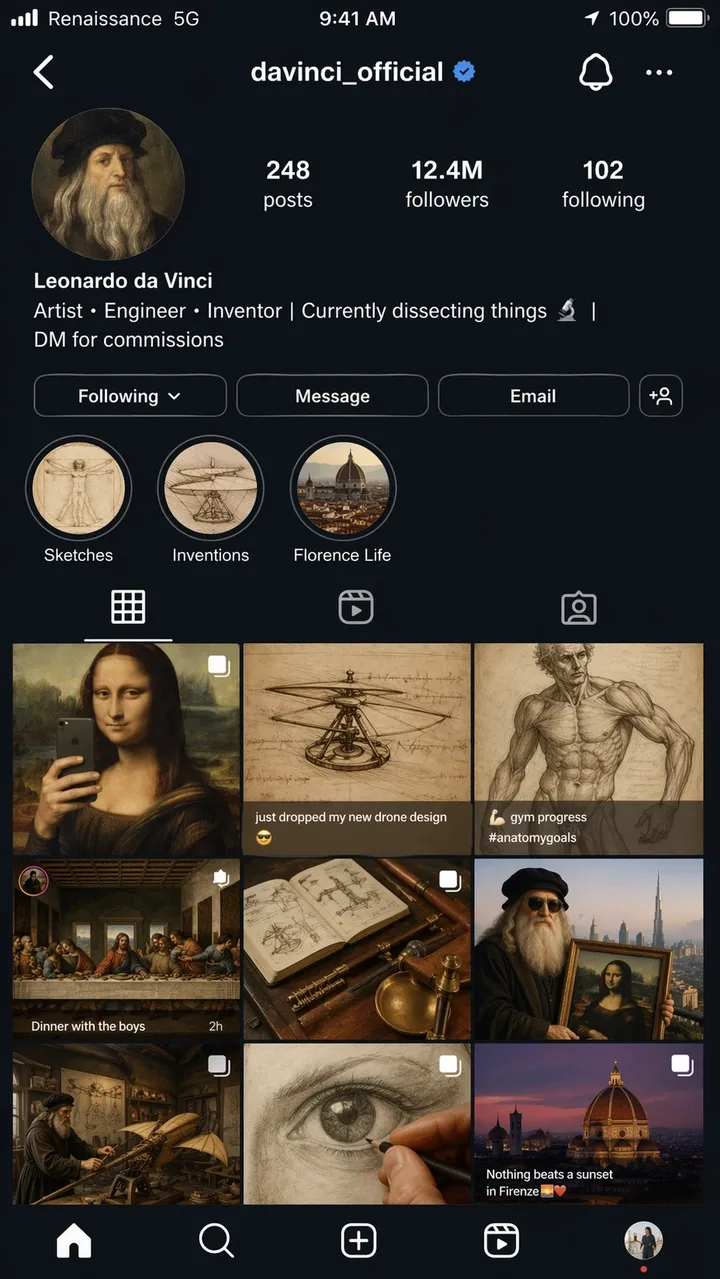
Ein hyperrealistischer iPhone-Screenshot einer fiktiven Instagram-Profilseite für Leonardo da Vinci, Benutzername @davinci_official, als wäre er ein moderner Influencer im Jahr 2026. Das Profilfoto ist ein Renaissance-Selbstporträt in einem Kreisausschnitt. In der Biografie heißt es: „Künstler, Ingenieur, Erfinder.“ | Ich zerlege gerade die Dinge | DM für Provisionen”. Das Raster zeigt 9 Beiträge: die Mona Lisa, umgestaltet als Spiegel-Selfie, eine Helikopterskizze mit der Überschrift „Ich habe gerade mein neues Drohnendesign fallen lassen”, eine Anatomiestudie, die als Fortschrittsfoto im Fitnessstudio gepostet wurde, Das letzte Abendmahl, inszeniert als Gruppenaufnahme einer Dinnerparty, und andere kreative anachronistische Mashups. Followerzahl: 12,4 Mio. Story-Highlights mit der Bezeichnung „Skizzen, Erfindungen und Leben in Florenz“. Vollständige iOS-Statusleiste mit Trägertext mit der Aufschrift „Renaissance“. 5G“, Batteriesymbol und aktuelle Uhrzeit. Benutzeroberfläche im Dunkelmodus durchgehend. Fotorealistische Screenshot-Qualität, Seitenverhältnis 9:16.
Eingabeaufforderung 52:
Ein realistischer mobiler Onboarding-Bildschirm für eine fiktive Gewohnheits-App namens „LUMA“. Überschrift: „BESSERE TAGE BAUEN“. Schaltflächen: „Jetzt starten“ und „Demo ansehen“. Sauberes Layout im iOS-Stil, weicher weißer Hintergrund, blauer Akzent, lesbarer UI-Text, direkt in einem Telefonrahmen angezeigt. Seitenverhältnis 9:16.
Eingabeaufforderung 53:
Desktop-SaaS-Dashboard für ein E-Commerce-Analysetool. Linke Seitenleiste, Top-KPI-Karten für Umsatz, Bestellungen, Conversion-Rate, ein Liniendiagramm und eine Top-Produkttabelle. Saubere weiße Benutzeroberfläche, realistische Abstände, lesbare Beschriftungen, keine echten Markennamen. Seitenverhältnis 16:9.
Eingabeaufforderung 54:
Ein realistischer mobiler Wetter-App-Bildschirm für eine fiktive App namens „SKYLINE“. Aktuelle Stadt: „Lissabon“. Überschrift Temperatur: „22C“. Karten für Wind, Luftfeuchtigkeit, UV und Sonnenuntergang. Ruhige blaue Benutzeroberfläche, lesbare Etiketten, iPhone-Rahmen, kein echtes App-Branding. Seitenverhältnis 9:16.
Eingabeaufforderung 55:
Ein Bildschirm einer Restaurantbuchungs-App mit einer Reservierungsbestätigung. Restaurantname: „North Table“. Datum: „18. Juni“. Uhrzeit: „19:30 Uhr“. Gruppengröße: „4 Gäste“. Oben ein freundliches redaktionelles Food-Foto, klare CTA-Schaltfläche mit der Aufschrift „Zum Kalender hinzufügen“, lesbarer UI-Text. Seitenverhältnis 9:16.
Eingabeaufforderung 56:
Ein realistisches Desktop-Analyse-Dashboard für ein fiktives Creator-Studio. Linke Navigation, obere Karten für Aufrufe, Wiedergabezeit, Umsatz und neue Follower, ein Liniendiagramm und eine Kampagnentabelle. Saubere weiße Benutzeroberfläche, blauer Akzent, lesbare Beschriftungen, praktische Abstände, keine echten Markennamen. Seitenverhältnis 16:9.
Eingabeaufforderung 57:
Ein mobiler Kassenbildschirm für einen fiktiven Outdoor-Ausrüstungsladen namens „TrailCart“. Zeigen Sie die Miniaturansicht des Produkts, die Mengenanzeige, die Lieferadressenkarte, das Rabattfeld, den Gesamtpreis und eine CTA-Schaltfläche mit der Aufschrift „Bestellung aufgeben“ an. Moderner iOS-Stil, lesbarer UI-Text, keine echten Logos. Seitenverhältnis 9:16.
Eingabeaufforderung 58:
Ein Tablet-UI-Mockup für eine Prompt-Bibliotheks-App. Zeigen Sie Registerkarten mit den Bezeichnungen „Poster“, „Produkte“, „Benutzeroberfläche“ und „Bearbeitungen“ an. Das Hauptfenster enthält drei Eingabeaufforderungskarten mit kurzem Vorschautext, Kopierschaltflächen und Kategoriechips. Saubere Benutzeroberfläche, gute Lesbarkeit, keine echten Markennamen. Seitenverhältnis 4:3.
Eingabeaufforderung 59:
Ein SaaS-Einstellungsbildschirm für ein fiktives KI-Bildtool. Abschnitte mit den Bezeichnungen „Modell“, „Qualität“, „Seitenverhältnis“, „Referenzbilder“ und „Sicherheit“. Verwenden Sie Umschalter, Dropdown-Menüs, Schieberegler und eine übersichtliche Schaltfläche „Speichern“. Ruhige, professionelle Benutzeroberfläche, lesbare Beschriftungen, kein dekoratives Durcheinander. Seitenverhältnis 16:9.
Eingabeaufforderung 60:
Ein mobiler Reiseplan-App-Bildschirm für eine fiktive Reise nach Kyoto. In der Kopfzeile steht „Kyoto Weekend“. Karten für „Tag 1“, „Tag 2“, „Temple Walk“ und „Dinner“. Weiche, neutrale Benutzeroberfläche, realistische Abstände, kleine Kartenvorschau, lesbarer Text, kein echtes App-Branding. Seitenverhältnis 9:16.
Worauf Sie achten sollten: Das Layout sollte sich wie eine echte Benutzeroberfläche anfühlen, nicht wie ein dekoratives Poster. Überprüfen Sie Navigationsbeschriftungen, Schaltflächentext, Symbolabstände und ob die Bildschirmhierarchie verwendbar ist.
7. Stiltransfer und narrative Kunstanregungen
Kurze Erzählaufforderungen testen, ob GPT Image 2 durch visuelle Witze, mehrteiliges Storytelling und kleinen Text innerhalb einer Szene argumentieren kann.
Eingabeaufforderung 61:
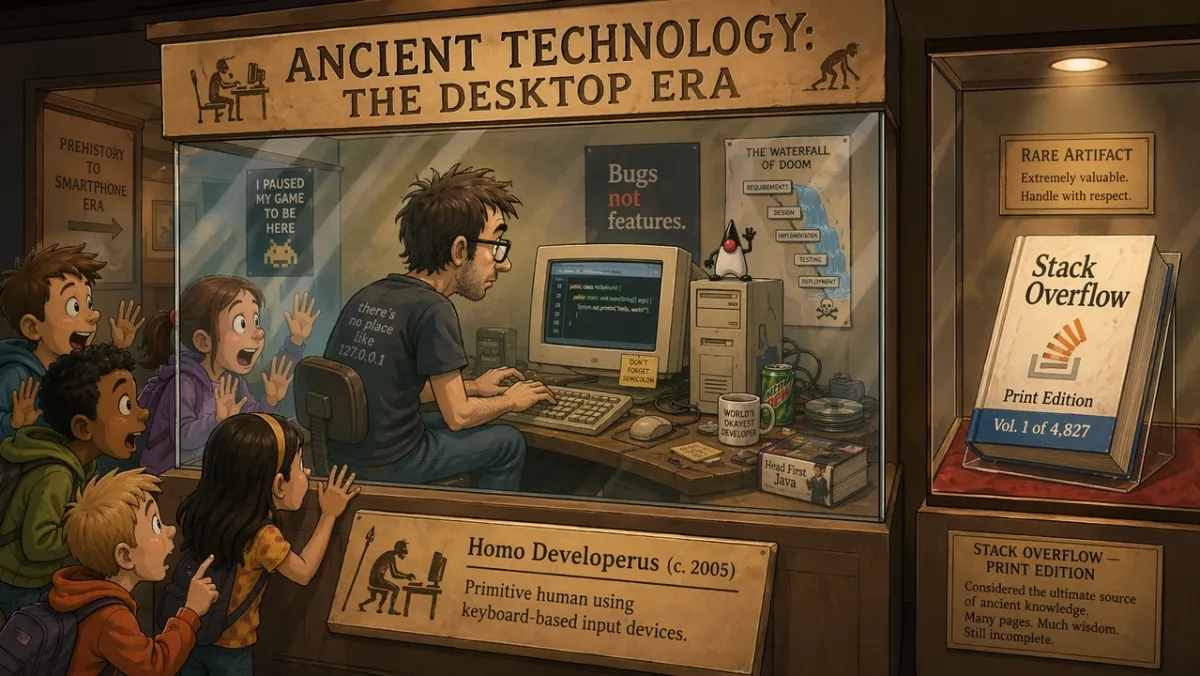
In einer Museumsausstellung mit dem Titel „Ancient Technology: The Desktop Era“ demonstriert ein Programmierer in einer Glasvitrine live das Programmieren auf einem CRT-Monitor, während verblüffte Schulkinder ihre Gesichter gegen das Glas drücken. Auf dem Ausstellungsplakat steht: „Homo Developerus (ca. 2005) – Primitiver Mensch, der tastaturbasierte Eingabegeräte nutzt.“ Eine zweite Vitrine in der Nähe zeigt ein physisches Buch mit der Aufschrift „Stack Overflow – Print Edition, Vol. 1 of 4,827“. 2D-Cartoon-Illustrationsstil, warme Museumsbeleuchtung, humorvoller und nostalgischer Ton. Seitenverhältnis 16:9.
Eingabeaufforderung 62:
Ein vierteiliger Comicstrip mit dem Titel „MORNING ROUTINE“. Panel 1: Alarm geht los. Panel 2: Charakter kocht Kaffee. Panel 3: Charakter setzt sich an die Arbeit. Panel 4: Die Figur schläft bereits am Schreibtisch. Warmer, minimalistischer Illustrationsstil, ausdrucksstarker Charakter, lesbarer Titel, kein zusätzlicher Text. Seitenverhältnis 16:9.
Eingabeaufforderung 63:
Eine einzelne redaktionelle Illustration für einen Artikel über kreative Automatisierung. Ein Designer und ein KI-Assistent arrangieren Papier-Storyboards auf einem großen Tisch, sanftes Studiolicht, subtiler Humor, moderner Zeitschriftenillustrationsstil, keine sichtbaren Markenlogos, kein Text. Seitenverhältnis 3:2.
Eingabeaufforderung 64:
Eine Illustration im Stil einer Zeitungstitelseite mit dem Titel „THE MORNING HERALD“. Hauptüberschrift: „STADT GENEHMIGT DACHGÄRTEN“. Zweispaltiges Layout, ein fotorealistischer Stadtrat-Fotobereich, klassisches Broadsheet-Design, lesbares Impressum und Überschrift, kein zusätzlicher Artikeltext. Seitenverhältnis 4:5.
Eingabeaufforderung 65:
Ein zweiteiliger Comic über einen Roboter, der malen lernt. Panel 1: Der Roboter studiert sorgfältig eine leere Leinwand. Panel 2: Der Roboter zeigt stolz ein chaotisches, aber charmantes Gemälde. Warme Studiobeleuchtung, ausdrucksstarke Körpersprache, keine Sprechblasen, einfacher Titel: „ERSTER VERSUCH“. Seitenverhältnis 16:9.
Eingabeaufforderung 66:
Ein dreiteiliger redaktioneller Comic mit dem Titel „THE DEADLINE“. Panel 1: Ein Designer öffnet ruhig eine leere Datei. Panel 2: Die Uhr springt vorwärts und Haftnotizen bedecken den Schreibtisch. Panel 3: Der Designer präsentiert ein poliertes Poster mit überraschtem Relief. Minimaler, ausdrucksstarker Illustrationsstil, lesbarer Titel, keine Sprechblasen. Seitenverhältnis 16:9.
Eingabeaufforderung 67:
Eine surreale Zeitschriftenillustration über kreative Konzentration: Eine Person sitzt an einem kleinen Schreibtisch und schwebt in einer ruhigen Bibliothek aus leuchtenden Fenstern, wobei jedes Fenster eine andere unvollendete Idee zeigt. Sanfte Kinobeleuchtung, nachdenkliche Stimmung, klare Komposition, keine sichtbaren Markenlogos, kein Text. Seitenverhältnis 3:2.
Eingabeaufforderung 68:
Ein Storyboard mit vier Panels für einen Produkteinführungs-Teaser. Panel 1: geschlossene Box auf einem Tisch. Panel 2: Licht tritt aus der Box aus. Panel 3: Hände heben den Deckel an. Panel 4: leuchtende Produktsilhouette enthüllt. Keine lesbare Marke, keine Dialoge, filmische Beleuchtung, klare Panelränder. Seitenverhältnis 16:9.
Eingabeaufforderung 69:
Ein humorvolles Museumsdiorama mit dem Titel „DER ERSTE GRUPPENCHAT“. Zeigen Sie antik aussehende Figuren, die sich um Steintafeln versammelt haben, mit eingemeißelten Nachrichtenblasen darüber, warme Museumsbeleuchtung, verspielte redaktionelle Illustration, nur lesbarer Titel, kein zusätzlicher Text. Seitenverhältnis 16:9.
Eingabeaufforderung 70:
Ein erzählerisches Poster mit geteiltem Bildschirm, das die kreative Iteration „vor“ und „nachher“ zeigt. Linke Seite: unordentliche Skizzenwand und grobe Notizen. Rechte Seite: sauber polierte Kampagnentafel. Moderne redaktionelle Illustration, starker Kontrast, keine Logos, keine zusätzlichen Wörter außer „VOR“ und „NACH“. Seitenverhältnis 16:9.
Worauf Sie achten sollten: Die Szene sollte die Idee visuell vermitteln. Wenn der Witz ausschließlich auf Text basiert, vereinfachen Sie die Einrichtung und machen Sie die physische Aktion klarer.
8. Bild-zu-Video-Eingabeaufforderungen für den ersten Frame und Referenzbearbeitungen
In diesem Winkel wird GPT Image 2 zu mehr als einem First-Pass-Generator. Es ist nützlich für Produktausschnitte, Outfitwechsel, Hintergrundänderungen, referenzbasierte Bearbeitungen und Standbilder, die für Bewegung konzipiert sind.
Eingabeaufforderung 71:
Erstellen Sie ein filmisches erstes Bild für einen Bild-zu-Video-Clip: ein einsamer Astronaut, der im Morgengrauen am Rand eines leuchtenden Wüstenkraters steht, Kap und Staub bereit, sich im Wind zu bewegen, starke Vordergrundsilhouette, klare Tiefenschichten, warmes Horizontlicht, kein Text, kein Wasserzeichen. Seitenverhältnis 16:9.
Eingabeaufforderung 72:
Verwenden Sie Bild 1 als Produktfoto und Bild 2 als Referenz für den Hintergrundstil. Platzieren Sie das Produkt in der Szene aus Bild 2. Behalten Sie die Produktform, den Etikettentext, die Proportionen, die Farbe und das Material genau bei. Passen Sie Beleuchtung, Maßstab, Schatten und Perspektive an. Gestalten Sie das Produkt nicht neu. Keine zusätzlichen Logos oder Wasserzeichen.
Eingabeaufforderung 73:
Entfernen Sie den Hintergrund vom eingegebenen Produktbild. Geben Sie einen transparenten Hintergrund mit klarer Silhouette, sauberen Kanten, ohne Lichthöfe und ohne Ränder aus. Behalten Sie Flaschengeometrie, Verschlussform, Etikettentext, Etikettenfarben und Druckschärfe exakt bei. Proportionen nicht verändern.
Eingabeaufforderung 74:
Ändern Sie nur das Wetter und die Beleuchtung im Eingabebild. Lassen Sie die Szene wie einen Winterabend mit leichtem Schneefall aussehen. Behalten Sie Personen, Gebäude, Schilder, Kamerawinkel, Objektplatzierung und Komposition genau bei. Lassen Sie den gesamten lesbaren Text unverändert.
Eingabeaufforderung 75:
Bild 1 ist die zu bewahrende Person. Bild 2 ist die Jackenreferenz. Bild 3 ist die Stiefelreferenz. Kleiden Sie die Person aus Bild 1 mit der Kleidung aus den Bildern 2 und 3. Behalten Sie Gesicht, Körperform, Pose, Hände, Hintergrund, Kamerawinkel und Beleuchtung genau bei. Ersetzen Sie nur die Kleidung.
Eingabeaufforderung 76:
Verwenden Sie das eingegebene Produktfoto als gesperrtes Motiv. Stellen Sie das Produkt auf eine saubere Badezimmerablage aus Marmor mit sanftem Morgenlicht am Fenster. Behalten Sie Produktform, Etikettentext, Kappenfarbe, Proportionen und Material exakt bei. Passen Sie Kontaktschatten, Maßstab und Perspektive an. Fügen Sie keine zusätzlichen Etiketten, Logos oder Requisiten hinzu.
Eingabeaufforderung 77:
Erstellen Sie ein filmisches erstes Bild für einen Bild-zu-Video-Clip: eine gläserne Parfümflasche, die auf nassem schwarzem Stein steht, während sich ein dünnes Nebelband dahinter bewegt. Produktzentriert, starke Silhouette, klare Vorder- und Hintergrundtiefe, keine Hände, kein Text, kein Wasserzeichen. Seitenverhältnis 16:9.
Eingabeaufforderung 78:
Bearbeiten Sie das Eingabeporträt, indem Sie nur den Hintergrund in einen sauberen Redaktionsstudio-Hintergrund in warmem Grau ändern. Behalten Sie Gesicht, Haare, Kleidung, Pose, Hautton, Kamerawinkel, Lichtrichtung und Ausdruck genau bei. Passen Sie den neuen Hintergrundschatten und die Tiefe auf natürliche Weise an.
Eingabeaufforderung 79:
Verwenden Sie Bild 1 als Raumfoto und Bild 2 als Wandkunstreferenz. Fügen Sie das Kunstwerk aus Bild 2 der leeren Wand in Bild 1 hinzu. Behalten Sie Möbel, Boden, Fensterlicht, Kamerawinkel, Farbbalance und Raumaufteilung genau bei. Passen Sie Rahmenmaßstab, Perspektive und Wandschatten an.
Eingabeaufforderung 80:
Erstellen Sie ein videofähiges erstes Bild für eine Produktpräsentation: eine geschlossene mattschwarze Box auf einem Tisch, dünnes blaues Licht, das aus der Naht austritt, Staubpartikel im Strahl sichtbar, Kamera niedrig und nah positioniert, starke Tiefenschichten, leerer Raum für Bewegung, kein Text, kein Logo. Seitenverhältnis 16:9.
Worauf Sie achten sollten: Bei Änderungen ist die Ausgabe nur dann erfolgreich, wenn die gesperrten Details gesperrt bleiben. Überprüfen Sie bei videofähigen Bildern die Motivtrennung, die Vorder-/Hintergrundtiefe und ob die Szene Raum für Bewegung bietet.
GPT Image 2-Rezension: Testergebnisse und Ergebnisse
Getestet und aktualisiert: 23. Juni 2026.
Dieser Rezensionsabschnitt folgt absichtlich der Eingabeaufforderungsbibliothek, da die meisten Leser, die auf dieser Seite landen, zunächst Beispiele benötigen. Die Überprüfung ist immer noch wichtig: GPT Image 2 ist nützlich, wenn Text, Struktur und das Befolgen von Anweisungen wichtiger sind als eine lose visuelle Erkundung.
| Bewertungsdimension | Punktzahl (1-5) | Was wir in praktischen Tests gesehen haben |
|---|---|---|
| Textgenauigkeit | 4 | Große Schlagzeilen, kurze Beschriftungen, Postertitel, Menüelemente, Infografikschritte und einfache UI-Beschriftungen waren einfacher zu kontrollieren, wenn die genaue Kopie zitiert wurde. Kleine juristische Texte und dichte Absätze bedürfen noch einer sorgfältigen Prüfung. |
| Charakterkonsistenz | 3 | Charakterblätter, Gesichtsausdrucksreihen, Kostümbeschreibungen und Palettenmuster waren als Referenz nützlich, aber Gesichter, Proportionen und Kostümdetails können sich über Seiten- und Rückansichten hinweg verschieben. |
| Stilkontrolle | 4 | Das Modell folgte der breiten visuellen Ausrichtung gut, als die Eingabeaufforderung den Anwendungsfall, das Layout, das Medium, die Beleuchtung und die Einschränkungen nannte und nicht nur Schlüsselwörter für den Stapelstil. |
| Produktrealismus | 4 | Produktanzeigen-Layouts, Negativflächen für Kampagnen, saubere Oberflächen und produktorientierte Kompositionen waren stark, aber echte Etiketten, Logos, Verpackungsgeometrie und regulierte Werbeaussagen bedürfen immer noch einer manuellen Qualitätssicherung. |
| Bearbeitungsfähigkeit | 3 | Das Muster „Ändern, Bewahren, Abgleichen“ funktionierte besser als umfassende Bearbeitungsanfragen, aber Auswahlgrenzen, transparente Hintergrundausgabe und genaue Produkterhaltung müssen noch überprüft werden. |
| Suchfrage | Praktische Antwort |
|---|---|
| Am besten für | Poster mit exaktem Text, Produktanzeigenkonzepte, UI-Modelle, Infografiken, Charakterblätter, Referenzbearbeitungen und erste Frames für die Bild-zu-Video-Umwandlung. |
| Haupteinschränkungen | Winziger Text, genaue Markenzeichen, proprietäre Schriftarten, legale Kopien, komplexe transparente Hintergrundlieferungen und verschlossene Produktetiketten müssen noch überprüft werden. |
| API-Verfügbarkeit | Verwenden Sie die gpt-image-2-API-Route von OpenAI für Entwickler-Workflows. ChatGPT Images 2.0-Zugriff und API-Abrechnung sind separate Pfade. |
| API-Hinweise | Mit Stand vom 22. Juni 2026 listet OpenAI die GPT-Image-2-Token-Preise für Bildeingabe, zwischengespeicherte Bildeingabe, Bildausgabe, Texteingabe und zwischengespeicherte Texteingabe auf. |
| Video-Workflow | Fordern Sie saubere Motivkanten, Tiefenebenen und einen Bewegungshinweis an, wenn das Bild später zu einer Bild-zu-Video-Quelle werden soll. |
| Alternativen zum Vergleich | Verwenden Sie Nano Banana 2 für schnelle fotorealistische Tests, Midjourney für stilisierte Erkundungen und PixVerse, wenn das genehmigte Bild noch in ein Video-Asset umgewandelt werden muss. |
Wie wir GPT Image 2 getestet haben
Wir haben GPT Image 2 anhand von Porträts, textlastigen Postern, Kompositionen im Produktstil, Charakterblättern, UI-Modellen und experimentellen Erzählszenen getestet. Das Ziel bestand nicht darin, Benchmark-Ergebnisse zu erzielen; Es ging darum, herauszufinden, ob ein Designer, Vermarkter oder Ersteller die Ausgabe mit leichten Bearbeitungen nutzen konnte, anstatt das Asset von Grund auf neu zu erstellen.
| Testbereich | Beispielaufforderungen | Was wir überprüft haben |
|---|---|---|
| Porträts und filmische Standbilder | 12 | Lichtsteuerung, Hautstruktur, Reflexionen, Stimmung und Szenenkonsistenz. |
| Poster- und Typografie-Layouts | 14 | Rechtschreibung der Überschrift, mehrzeiliger Text, Hierarchie, negative Leerzeichen und markenähnliche Politur. |
| Charakter- und Konzeptblätter | 9 | Mehransichtskonsistenz, Kostümdetails, Palettenausrichtung und Etikettengenauigkeit. |
| Benutzeroberfläche und soziale Mockups | 8 | Realistisches Layout, kleiner Text, Symbolabstände, Feed-Raster und Glaubwürdigkeit des Screenshots. |
| Experimentelle Anregungen | 10+ | Humor, narrative Argumentation, Objektplatzierung und Genauigkeit kleiner Bildunterschriften. |
Das Muster war klar: GPT Image 2 belohnt präzise Briefings mehr als Keyword-Ketten. Wenn die Eingabeaufforderung einen Job benennt und den Erfolg definiert, behält das Modell tendenziell die Struktur bei. Wenn die Eingabeaufforderung nach einem schönen Bild ohne Einschränkungen fragt, kann das Ergebnis zwar immer noch ausgefeilt aussehen, die Wiederverwendung ist jedoch schwieriger.
Überprüfen Sie die Ergebnisse nach Anwendungsfall
| Anwendungsfall | Was gut funktioniert hat | Was noch überprüft werden muss |
|---|---|---|
| Textwiedergabe | Große Schlagzeilen, kurze Beschriftungen, Postertitel, Menüelemente, Infografikschritte und einfache UI-Beschriftungen waren einfacher zu kontrollieren, wenn die genaue Kopie zitiert wurde. | Winzige legale Texte, dichte Absätze, stilisierte Schriftarten und wiederholte Wörter können immer noch abdriften. Halten Sie den Text kurz und überprüfen Sie jeden Buchstaben. |
| Produktbilder | GPT Image 2 hat Produktanzeigenlayouts, Negativflächen für Kampagnen, saubere Oberflächen und produktorientierte Kompositionen gut gemeistert. | Echte Etiketten, Logos, Verpackungsgeometrie und regulierte Angaben sollten manuell überprüft oder aus genehmigten Assets zusammengestellt werden. |
| UI-Modelle | Mobile Bildschirme, Dashboards, Karten, Schaltflächen, Menüs und App-ähnliche Hierarchien sahen plausibel aus, wenn in der Eingabeaufforderung echte Schnittstellenelemente genannt wurden. | Behandeln Sie Ausgaben als Konzeptmodelle, nicht als Produktions-UI. Kleine Beschriftungen, Symbolausrichtung und genaue Daten müssen oft bereinigt werden. |
| Charakterkonsistenz | Als kreative Referenzen erwiesen sich Charakterblätter, Gesichtsausdrucksreihen, Kostümbeschreibungen und Farbpaletten als nützliche Referenzen. | Gesichter, Kostümdetails und Proportionen können sich je nach Ansicht ändern. Identitätsanker wiederholen und neu generieren, wenn Seiten- oder Rückansichten abweichen. |
| Erste Bilder von Bild zu Video | Breite Rahmen mit Vordergrund, Mittelgrund, Hintergrund und einem Bewegungshinweis gaben PixVerse mehr nutzbares Quellmaterial. | Überfüllte Bilder, umfangreicher Text und mehrdeutige Bewegungshinweise erschweren die spätere Videoerstellung. |
| Schnitt und Compositing | Das Eingabeaufforderungsmuster „Ändern, Beibehalten, Abgleichen“ funktionierte besser als umfassende Bearbeitungsanfragen. | Auswahlgrenzen, transparente Hintergrundausgabe, exakte Produktkonservierung und feine Details erfordern weiterhin eine Qualitätssicherung. |
Für den Modellvergleich ist die Unterscheidung zwischen Marke und Marke sinnvoll. GPT Image 2 verhält sich eher wie ein strukturierter Design-Assistent für kommunikationsintensive Bilder. Midjourney bleibt für stilisierte Erkundungen und Art-Direction-Breite nützlich. Nano Banana 2 ist ein starker Vergleichspunkt für Fotorealismus, Materialdetails und schnelle visuelle Iteration. PixVerse ist die nächste Workflow-Ebene, wenn das Standbild in einen Clip, eine Anzeige, eine Produktpräsentation oder eine Story-Aufnahme umgewandelt werden muss.
Häufige GPT Image 2 Aufforderungsfehler
- Bitte um Genauigkeit, ohne genaue Kopie anzugeben. Wenn das Bild Text benötigt, schreiben Sie den Text genau und sagen Sie, wo er erscheinen soll.
- Eine Eingabeaufforderung mit allen möglichen Details überladen. Beginnen Sie mit der Kernszene und verfeinern Sie dann jeweils eine Variable.
- Invarianten während der Bearbeitung vergessen. Teilen Sie dem Modell mit, was unverändert bleiben muss: Identität, Hintergrund, Pose, Beleuchtung, Produktform, Etikettentext oder Kamerawinkel.
- Verwendung dekorativer Qualitätswörter für funktionale Aufgaben. „Schön“ macht eine Beschriftung nicht lesbar. Verwenden Sie Ausdrücke wie „scharfer Beschriftungstext“, „sauberes Kerning“ und „aus der Ferne lesbar“.
- Seitenverhältnis wird übersprungen. Ein gutes quadratisches Bild kann als vertikale Anzeige oder Video-Miniaturansicht fehlschlagen.
- Logos werden wie allgemeiner Text behandelt. GPT Image 2 kann Logokonzepte entwerfen, genaue Markenzeichen sollten jedoch normalerweise aus genehmigten Markenwerten zusammengestellt werden.
GPT Image 2 API und Preishinweise
Auf der API-Preisseite von OpenAI ist GPT-Image-2 mit tokenbasierter Preisgestaltung aufgeführt. Mit Stand vom 22. Juni 2026 betragen die aufgeführten Tarife:
| Artikel | Listenpreis |
|---|---|
| Bildeingabe | 8,00 $ / 1 Mio. Token |
| Zwischengespeicherte Bildeingabe | 2,00 $ / 1 Mio. Token |
| Bildausgabe | 30,00 $ / 1 Mio. Token |
| Texteingabe | 5,00 $ / 1 Mio. Token |
| Zwischengespeicherte Texteingabe | 1,25 $ / 1 Mio. Token |
Die tatsächlichen Generierungskosten hängen von der Länge der Eingabeaufforderung, den Referenzbildern, der Ausgabegröße, dem Caching, der Qualität und dem von Ihnen verwendeten Zugriffspfad ab. Wenn Sie ChatGPT anstelle der API verwenden, sind die Planlimits und -kontingente unabhängig von den API-Token-Preisen. Der GPT Image Generation Models Prompting Guide von OpenAI ist auch eine Lektüre wert, wenn Sie eine wiederholbare App oder einen Batch-Workflow erstellen.
Diese Unterscheidung ist für Suchende wichtig, die fragen, ob GPT Image 2 kostenlos ist oder wie viel die GPT Image 2-API kostet. ChatGPT Images 2.0-Verfügbarkeit, ChatGPT-Plankontingente, OpenAI-API-Abrechnung und PixVerse-Guthaben sind separate kommerzielle Pfade. Vergleichen Sie bei großvolumigen Arbeiten die Kosten pro akzeptiertem Asset nach Wiederholungsversuchen und nicht nur den angegebenen Preis für einen Generierungsversuch.
| Workflow-Auswahl | Praktische Eingabeaufforderung und Einstellungshinweise |
|---|---|
| Textlastige Poster oder Diagramme | Verwenden Sie weniger Wörter pro Bild, zitieren Sie eine exakte Kopie, geben Sie eine Hierarchie an und verwenden Sie eine höhere Qualitätseinstellung, wenn das Budget dies zulässt. |
| Produktfotos | Sperren Sie Produktform, Etikett, Farbe, Material und Kamerawinkel. Wenn Sie Referenzen verwenden, wiederholen Sie die Beibehaltungsliste bei jeder Bearbeitung. |
| UI-Modelle | Beschreiben Sie den Bildschirm als mitgelieferte Schnittstelle: Navigation, Karten, Schaltflächen, Zustände, Beschriftungen und Abstände. Vermeiden Sie Konzeptkunstsprache. |
| Bearbeitungen mit mehreren Referenzen | Beschriften Sie jedes Bild nach seiner Rolle: Thema, Stil, Hintergrund, Outfit, Produkt oder Materialreferenz. |
| Batch-Generierung | Vergleichen Sie die Kosten pro akzeptiertem Bild, nicht nur die Kosten pro Versuch. Ein billigerer Lauf ist nicht billiger, wenn viele Wiederholungsversuche erforderlich sind. |
| PixVerse Produktion | Generieren oder importieren Sie das Standbild und verwenden Sie dann Bild-zu-Video, wenn das Asset Bewegung, Kamerabewegung oder Kampagnenvarianten benötigt. |
Für Teams, die entscheiden, ob sie einen API-First-Bild-Workflow oder einen Ersteller-Workflow verwenden möchten, lautet die praktische Frage nicht nur: „Kann GPT Image 2 das Standbild erstellen?“ Es lautet auch „Was passiert, nachdem das Standbild genehmigt wurde?“ Wenn Sie die Bildqualität beim ersten Durchgang vergleichen möchten, sehen Sie sich unseren GPT Image 2 vs. Nano Banana 2-Test mit gleicher Eingabeaufforderung an. Wenn Sie eine automatisierte Generierung über einen Terminal- oder KI-Agent-Workflow benötigen, deckt der PixVerse CLI-Leitfaden die Bild- und Videogenerierung über Befehlszeilen-Pipelines ab.
Detaillierter PixVerse Bild-zu-Video-Workflow
Sobald das GPT Image 2-Bild genehmigt wurde, können Sie es als erstes Bild für das Video behandeln. Der wichtige Teil besteht darin, das Standbild vorzubereiten, bevor Sie es animieren. Ein Videomodell kann falsch geschriebenen Postertext, ein verzerrtes Produktetikett oder ein UI-Mockup, das bereits falsch aussieht, nicht auf magische Weise reparieren.
1. Erzeugen Sie das Standbild als erstes Bild
Wenn Sie wissen, dass das Bild möglicherweise zu einem Clip wird, fügen Sie der Bildaufforderung Bewegungsbereitschaft hinzu. Fragen Sie nach klaren Motivkanten, Vorder- und Hintergrundtiefe, einem Kamerapfad und einem physischen Signal, das sich bewegen kann: Stoff, Staub, Dampf, Regen, Haare, Bildschirmglanz, Produktreflexion oder eine sich verändernde Lichtquelle.
Anstatt nur nach einem Produktplakat zu fragen, fordern Sie ein Produktplakat an, das als Video-Eröffnungsrahmen dienen kann:
Erstellen Sie einen ersten Kampagnenrahmen im 16:9-Format für einen mattschwarzen Lautsprecher auf einem Betonsockel. Halten Sie den Lautsprecher auf der rechten Seite scharf und auf der linken Seite mit sauberem Negativraum. Fügen Sie weichen Staub in den Lichtstrahl und ein dezentes blaues LED-Leuchten ein, das später animieren könnte. Kein zusätzlicher Text, kein gefälschtes Logo, kein Wasserzeichen.
2. Überprüfen Sie das Bild, bevor Sie Bewegung hinzufügen
Überprüfen Sie das Standbild wie eine endgültige Designdatei. Sehen Sie sich Rechtschreibung, Produktgeometrie, Beschriftungen, Hände, Gesichter, UI-Ausrichtung, Ansprüche und rechteempfindliche Elemente an. Wenn das Quellbild eine dieser Prüfungen nicht besteht, erstellen oder bearbeiten Sie das Standbild neu, bevor Sie es auf Video umstellen.
3. Schreiben Sie eine separate Bewegungsaufforderung
Die Videoaufforderung sollte nicht die gesamte Bildaufforderung wiederholen. Es sollte beschreiben, was sich bewegt und was gesperrt bleibt.
Verwenden Sie das Bild als erstes Bild. Die Kamera schiebt sich langsam auf den Lautsprecher zu. Die blaue LED schaltet sich ein, Staub bewegt sich durch den Lichtstrahl und die Hintergrundreflexion verschiebt sich leicht. Behalten Sie Form, Material, Position und alle sichtbaren Designdetails des Lautsprechers bei. Fügen Sie keinen neuen Text, Logos, Hände oder zusätzliche Produkte hinzu.
4. Animieren Sie erst, wenn das Standbild funktioniert
Wenn Sie PixVerse verwenden, können Sie GPT Image 2-Bilder in der App generieren oder ein fertiges Bild importieren und dann Bild-zu-Video verwenden, um Bewegung hinzuzufügen. Verwenden Sie Bild-zu-Video für direkte Bewegung aus einem Standbild, PixVerse V6 für umfassendere kreative 15-Sekunden-Workflows und C1, wenn die Aufnahme eine stärkere Kontrolle der filmischen Referenz erfordert.
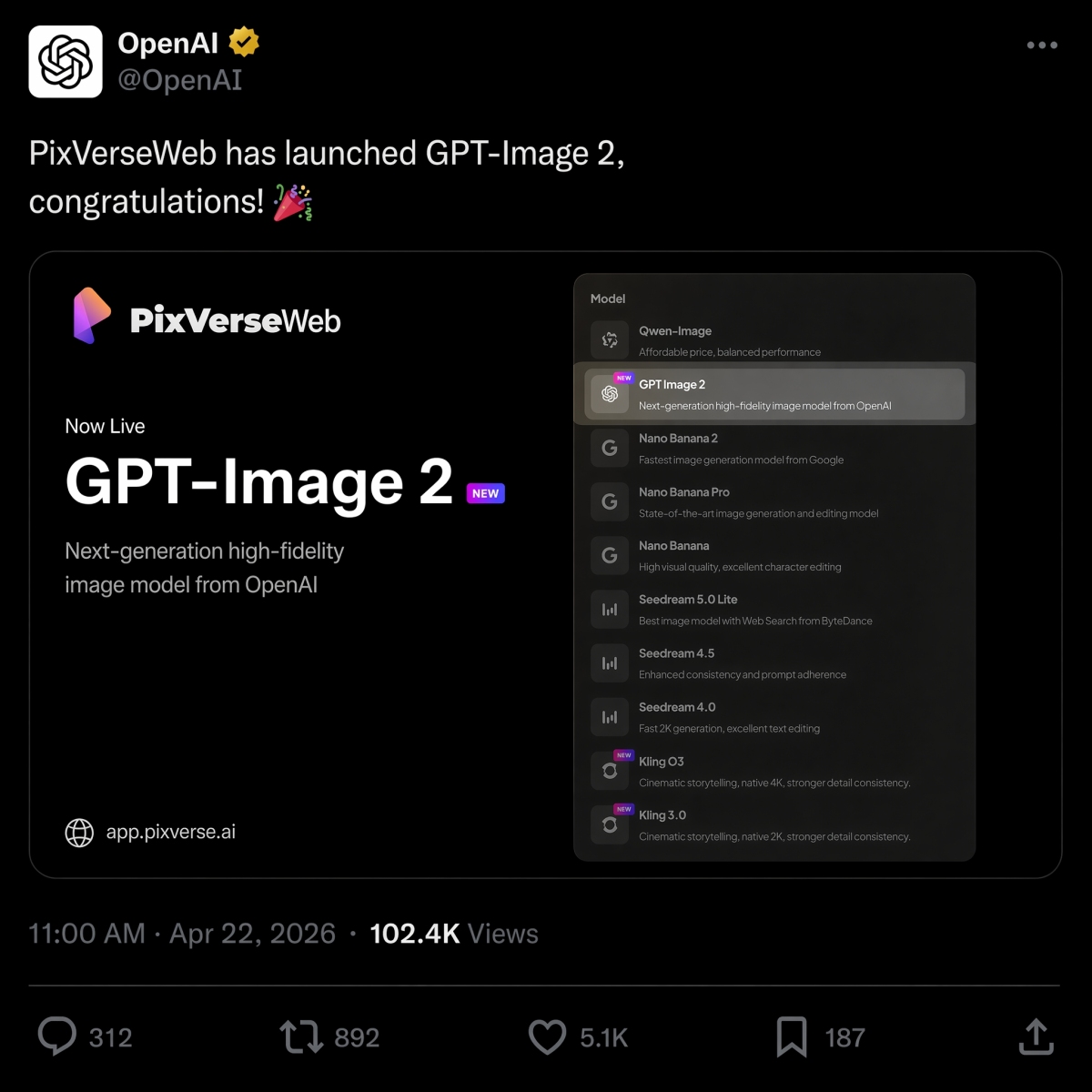
Am 22. April 2026 startete PixVerse GPT Image 2 als Text-zu-Bild-Option und schloss sich damit Nano Banana 2, Seedream und an HappyHorse 1.0 in der Modellpalette.
Wenn Sie sich für denselben Auftrag zwischen OpenAI- und Google-Bildmodellen entscheiden, sehen Sie sich unseren GPT Image 2 vs. Nano Banana 2-Vergleich an, um nebeneinanderliegende Ergebnisse aus identischen Eingabeaufforderungen zu erhalten.
Wenn es bei Ihrer zeitnahen Arbeit hauptsächlich um Videos geht, erklärt unser Leitfaden zum besten Bild-zu-Video-KI-Tool, wie Sie den richtigen Bewegungsworkflow auswählen, nachdem das Standbild fertig ist.
Probieren Sie PixVerse aus: Öffnen Sie die PixVerse-App.
Wenn das Standbild vor der Animation vorbereitet werden muss, bündeln die PixVerse Mini Apps fokussierte Workflows für Bildbereinigung, Frame-Erweiterung und verwandte Produktionsaufgaben.
FAQ
Was sind die besten GPT Image 2-Eingabeaufforderungen?
Die besten GPT Image 2-Eingabeaufforderungen beschreiben einen klaren Produktionsauftrag und nicht nur einen visuellen Stil. Starke Eingabeaufforderungen umfassen in der Regel den Betreff, den Ausgabetyp, bei Bedarf den genauen Text, die Komposition, die Beleuchtung, Einschränkungen, das Seitenverhältnis und den endgültigen Anwendungsfall. Produktanzeigen, Poster mit exaktem Text, Charakterbögen, UI-Mockups, Infografiken und Bild-zu-Video-Erstbilder sind besonders gute Eingabeaufforderungskategorien für den Anfang.
Wie schreibe ich bessere GPT Image 2-Eingabeaufforderungen?
Verwenden Sie diese Formel: Motiv plus visueller Stil plus Komposition plus Beleuchtung plus Details plus Einschränkungen plus Ausgabeanwendungsfall. Sagen Sie GPT Image 2, was das Bild tun soll, geben Sie den genauen Text an, geben Sie Layout und Seitenverhältnis an und listen Sie auf, was sich nicht ändern darf. Trennen Sie bei Bearbeitungen die Änderung, die gesperrten Elemente und die Realismusanforderungen.
Eignet sich GPT Image 2 für Produktbilder?
Ja. GPT Image 2 ist nützlich für Produktanzeigenkonzepte, E-Commerce-Heldenbilder, Verpackungsmodelle, Produktausschnitte und Kampagnenvisualisierungen. Produktteams sollten dennoch die Produktgeometrie, den Etikettentext, die regulierten Angaben, Logos und Verpackungsdetails prüfen, bevor sie die Ergebnisse in Anzeigen oder Produktlisten verwenden.
Kann GPT Image 2 Bilder mit Text erstellen?
Ja, GPT Image 2 kann Bilder mit lesbarem Text erstellen, insbesondere kurze Überschriften, Beschriftungen, Poster, Menüelemente, Infografikschritte und UI-Beschriftungen. Um optimale Ergebnisse zu erzielen, setzen Sie den genauen Text in Anführungszeichen, geben Sie an, wo er erscheint, halten Sie den Text kurz und fügen Sie Einschränkungen wie „nur exakter Text“, „keine zusätzlichen Wörter“ und „kein doppelter Text“ hinzu.
Wie verwandle ich GPT Image 2-Bilder in Videos?
Erstellen oder genehmigen Sie zunächst das Standbild und laden Sie es dann auf PixVerse Bild-zu-Video hoch. Schreiben Sie eine separate Bewegungsaufforderung, die beschreibt, was sich bewegt und was gesperrt bleibt. Gute Bewegungsaufforderungen erwähnen Kamerabewegungen, Motiverhaltung, Hintergrundbewegungen und Einschränkungen wie keinen neuen Text, keine neuen Logos und keine zusätzlichen Produkte.
GPT Image 2 vs. Nano Banana 2: Was ist besser?
GPT Image 2 eignet sich normalerweise besser für strukturierte Designausgaben wie textlastige Poster, Diagramme, UI-Mockups, bearbeitbare visuelle Kurzbeschreibungen und erste Bild-zu-Video-Frames. Nano Banana 2 ist einen Vergleich wert, wenn Fotorealismus, Materialdetails und schnelle visuelle Iteration wichtiger sind. Sehen Sie sich den Vergleich GPT Image 2 vs. Nano Banana 2 für gleichschnelle Ergebnisse an.
Ist GPT Image 2 dasselbe wie ChatGPT Images 2.0?
Für die Suchabsicht, ja. Viele Benutzer verwenden GPT Image 2, gpt-image-2 und ChatGPT Images 2.0, um die neuere ChatGPT-Bildgenerierungserfahrung von OpenAI zu beschreiben. Der produktbezogene Name von OpenAI lautet ChatGPT Images 2.0, während gpt-image-2 der Ausdruck im Modellstil ist, den Entwickler und Ersteller häufig verwenden, wenn sie API-Workflows besprechen.
Ist GPT Image 2 kostenlos und wie viel kostet die API?
In der OpenAI-Hilfe wird ChatGPT Images 2.0 als auf allen Ebenen verfügbar aufgeführt, Plankontingente und API-Abrechnung sind jedoch getrennt. Mit Stand vom 22. Juni 2026 listet OpenAI die Bildausgabe von GPT-Image-2 für 30,00 $ pro 1 Mio. Token auf; Die tatsächlichen Kosten hängen von der Länge der Eingabeaufforderung, den Referenzen, der Ausgabegröße, der Qualität und dem Caching ab.