GPT Image 2プロンプトガイド:80個のプロンプト、レビューとAPIのヒント(2026)
広告、ポスター、商品、キャラクター、動画ワークフロー向けに、すぐ使えるGPT Image 2プロンプト80個とAPIメモ、実測レビューを紹介します。
これは、製品広告、ポスター、サムネイル、キャラクター、ソーシャル イメージ、UI モックアップ、編集、ビデオ対応の最初のフレームなど、使用可能なプロンプトを最初に必要とするクリエイター向けの GPT Image 2 プロンプト ガイドおよび実践レビューです。
必要なものがすでにわかっている場合は、以下のクイック パスを使用してください。
- コピー プロンプト: 以下の 80 個のコピー準備完了 GPT Image 2 プロンプトの例を参照してください。
- テスト結果を参照し、ハンズオン レビューのスコアと制限を確認します。
- 画像をビデオに変換する: PixVerse 画像からビデオへのワークフローに従います。
GPT Image 2 は、読みやすいテキスト、きれいなレイアウト、製品構成、UI モックアップ、インフォグラフィック、編集可能な参照、ビデオ対応の最初のフレームなど、画像がデザインされた資産のように動作する必要がある場合に最も強力です。ジョブがブランドロゴの正確な複製、小さなコンプライアンスコピー、独自のフォント、または手動 QA なしで出荷する必要がある透明な最終資産に依存している場合、信頼性は低くなります。
OpenAI は、2026 年 4 月 21 日に ChatGPT Images 2.0 を導入しました。クリエイターは、GPT Image 2、gpt-image-2、または ChatGPT Images 2.0 と同じエクスペリエンスを検索することがよくあります。最初に発売週にテストし、2026 年 6 月 22 日にこのガイドを OpenAI の公式プロンプト ガイド、API 価格ページ、ChatGPT イメージのヘルプ ドキュメントと照らし合わせて再度見直しました。
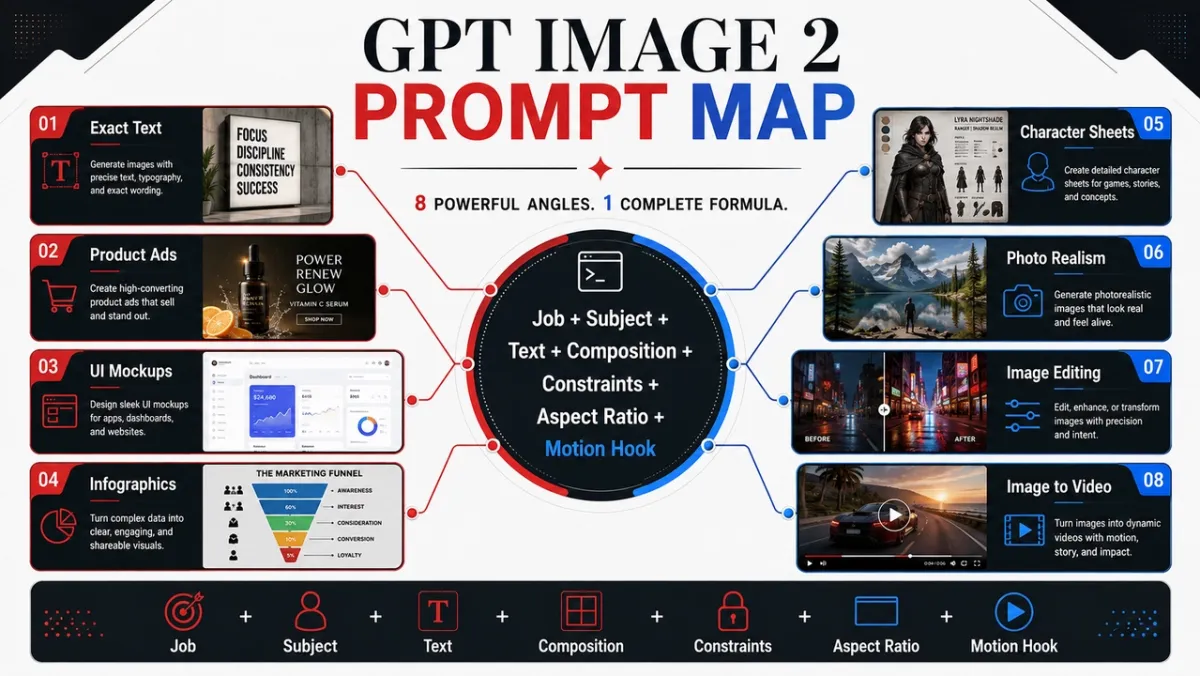
5 GPT Image 2 最初にコピーするように求めるプロンプト
これら 5 つのプロンプトは、このガイドで最も価値の高いユースケースをカバーしています。それぞれは同じ形式 (ユースケース、プロンプト、最適な用途、およびヒント) に従います。
即例 1: 製品写真
使用例: eコマース製品のヒーロー画像
プロンプト:
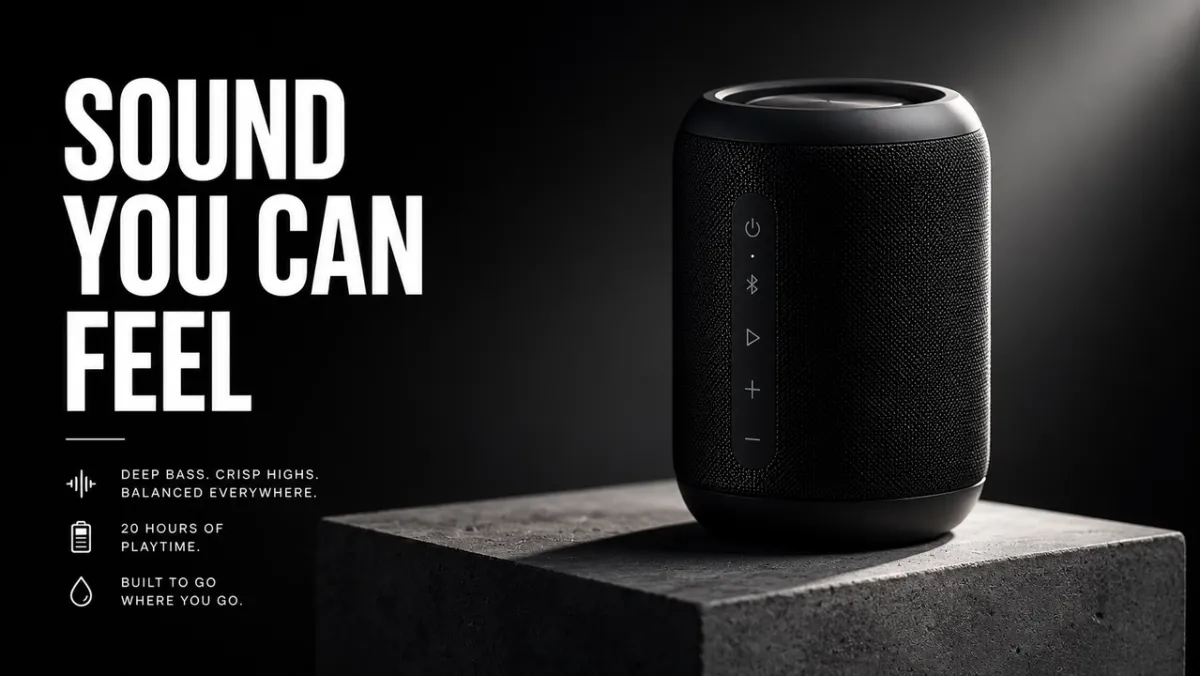
コンクリート台座上のマットブラックのワイヤレス スピーカーのプレミアム e コマース ヒーロー イメージを作成します。この製品は右 3 分の 1 に位置し、シャープなエッジ、リアルなマテリアル テクスチャ、クリーンなコンタクト シャドウ、ドラマチックなリム ライトを備えています。左 3 分の 1 は見出し用のネガティブスペースとして残しておきます。偽のブランドロゴ、透かし、余分な物はありません。アスペクト比 16:9
最適な用途: 製品リスト、有料ソーシャル広告、ランディング ページのヒーロー画像
ヒント: 参照画像を提供する場合は、「製品の形状、色、ラベル、比率を正確に維持する」と追加します。
プロンプト例 2: AI 広告クリエイティブ
使用例: 正確なテキストを含むキャンペーン ポスター
プロンプト:
架空のデザイン ツールの縦型製品発表ポスターを作成します。見出し:「より速く作成」。サブ見出し:「プロンプトからキャンペーンまで」。きれいなスイス グリッド、オフホワイトの背景、黒のタイポグラフィ、1 つのエレクトリック ブルーのアクセント形状、強力な階層、正確なテキストのみ、余分な単語、透かしなし。アスペクト比 9:16
最適な用途: 広告コンセプト、ポスター テスト、ローンチ グラフィック、ソーシャル キャンペーンの画像
ヒント: 見出しテキストは短くし、正確に引用してください。長いテキストをきれいにレンダリングするのは困難です。
プロンプトの例 3: 文字の一貫性
使用例: キャラクターリファレンスシート
プロンプト:
「NOVA」という名前のオリジナル SF 配達員のプロのキャラクター リファレンス シートを作成します。正面、側面、背面のビューを含めます。 4つの表情。ジャケット、ブーツ、バックパックのコールアウト。そしてカラーパレットの行。どのビューでも同じ顔、髪型、服装、プロポーションを維持します。きれいな白い背景、読みやすいラベル、コンセプト アート スタイル。アスペクト比 16:9
最適な用途: ゲームキャラクター、アニメーションリファレンス、ブランドマスコット、ストーリーボード
ヒント: 名前、顔、髪型、服装、カラー パレット、役割など、再生成ごとにアイデンティティ アンカーを繰り返します。
プロンプトの例 4: サムネイルまたはソーシャル画像
使用例: YouTube サムネイルまたはソーシャル投稿
プロンプト:
AI 画像プロンプトに関するビデオの太字の YouTube サムネイルを作成します。本文: 「より良いプロンプト」。分割画面の前後の画像結果を表示します。左側には乱雑なプロンプト カード、右側には洗練されたキャンペーン ビジュアルが表示されます。高コントラスト、顔のない鮮明な構成、読みやすいテキスト、偽のロゴや余分な単語はありません。アスペクト比 16:9
最適な用途: サムネイル、ソーシャル説明、ブログのグラフィック、クリエイターのコンテンツ
ヒント: 出現する単語の数と、単語がどこに移動するかをモデルに正確に指示します。
プロンプトの例 5: 画像からビデオへの最初のフレーム
使用例: PixVerse 画像からビデオへの最初のフレーム
プロンプト:
- 画像からビデオ クリップへの映画のような最初のフレームを作成します。濡れた黒い石の上にガラスの香水瓶が立っており、その後ろに霧の細いリボンがあり、力強い前景のシルエット、目に見える深さのレイヤー、微妙な反射、カメラの動きのための空きスペース、手なし、テキストなし、透かしなしです。アスペクト比 16:9*
最適な用途: 製品発表、短い広告、ミュージック ビデオのオープニング、映画のようなソーシャル クリップ
ヒント: 霧、ほこり、蒸気、布地、画面の輝き、反射などのモーション キューを 1 つ静止画像に追加します。
PixVerse を使用して、GPT Image 2 静止画をビデオに変換します
静止画をアニメーション化する前に準備が必要な場合は、画像のクリーンアップ、画面拡張、関連する制作作業向けのワークフローをまとめた PixVerse Mini Apps を利用できます。
強力な GPT Image 2 プロンプトにより、静止画像を作成できます。 PixVerse は、モーション、カメラの動き、または短いキャンペーン クリップがまだ必要な場合の次のステップです。
- GPT Image 2 で最初のフレームを生成します。
- 承認された画像を PixVerse にアップロードします。
- フォーカスされたモーション プロンプトを追加します。
- テスト、広告、ソーシャル投稿、または製品ページ用に短いビデオをエクスポートします。
モーションは次のことを試行するように促します。
- ※画像を1フレーム目に使用します。ミストが後ろに漂いながら、ゆっくりとカメラを製品に向かって押します。製品の形状、ラベル、照明、位置を保存してください。*
- ※画像を1フレーム目に使用します。手持ちカメラの穏やかな動き、風に揺れる布地、柔らかい背景の視差を追加します。キャラクターの顔や服装を変更しないでください。*
- ※画像を1フレーム目に使用します。カメラがわずかに左にパンしながら、街の明かりが 1 つずつ点灯するアニメーションを作成します。判読可能なポスター テキストをすべて保存します。*
- ※画像を1フレーム目に使用します。製品を台座の上で微妙に回転させ、動くリム ライトを追加して、背景をきれいに保ちます。*
- ※画像を1フレーム目に使用します。蒸気、反射、ゆっくりとしたトップダウンのカメラ ドリフトを追加します。食品の形、皿の位置、色を保ちます*。
モーション プロンプトの詳細な構造については、AI ビデオ プロンプト ガイド 、image-to-video ツール ガイド 、および AI ビデオ広告ジェネレーター ワークフロー を参照してください。
実際に機能する GPT Image 2 プロンプトの書き方
最高の GPT Image 2 プロンプトは、単に画像を説明するだけではありません。これらは、写真が果たすべき役割を説明します。ソーシャル広告のプロンプトは、製品の切り抜き、インフォグラフィック、UI 画面、ビデオの最初のフレームのプロンプトとは異なるものにする必要があります。
信頼できる開始パターンは次のようになります。
[ユースケース]の[画像の種類]を作成します。 主要な主題: [特定の主題と目に見える詳細]。 正確なテキスト (存在する場合): 「[表示されなければならないコピー]」。 構成: [フレーミング、レイアウト、ネガティブスペース、被写体の配置]。 スタイルと照明: [視覚言語、媒体、雰囲気、光の方向]。 制約: [変更してはいけないもの、余分な言葉、透かしを入れない]。 出力形式: [アスペクト比、透明な背景、ビデオ対応フレーム]。
式:
主題 + ビジュアル スタイル + 構図 + 照明 + 詳細 + 制約 + 出力ユースケース
スキル 1: スタイルの前にジョブに名前を付ける
出力タイプから始めます: ポスター、製品広告、アプリ画面、キャラクター シート、教育図、編集、または画像からビデオへの最初のフレーム。 GPT Image 2 は、成功基準を理解している場合、プロンプトに従うのがより上手になります。
弱いプロンプト:
映画のような、高精細なクールな未来的なスピーカー。
より良いプロンプト:
マットブラックのワイヤレススピーカーのプレミアム商品広告を作成します。画像は 16:9 のキャンペーン バナーとして機能し、右側に商品、左側に短い見出し、きれいなネガティブ スペース、シャープな商品エッジが配置されている必要があります。
2 番目のプロンプトは、美しさだけでなく、レイアウト、階層、使いやすさなどによって画像がどのように判断されるかをモデルに伝えます。
スキル 2: テキストをロックされたアセットのように扱う
テキストが重要な場合は、テキストを引用符で囲み、それをレンダリングする方法をモデルに指示します。モデルに言葉を考え出してもらいたくない場合は、「スローガン」を求めないでください。
このパターンを使用します。
見出し:「あなたが感じられるサウンド」。見出しをそのまま表示します。余分な言葉、重複したテキスト、偽のロゴはありません。大胆な白のサンセリフ体、構成の左側、遠くからでも読みやすい。
長いコピーの場合は、プロンプト内でテキストを複数の行に分割します。結果の単語のスペルが間違っている場合は、テキストを減らし、文字を大きくし、より厳密な「正確なテキストのみ」の言語で再生成します。
スキル 3: モデルにカメラとレイアウトを与える
GPT Image 2 は構成キューに従うことができますが、明確に記述されている必要があります。カメラの距離、角度、被写体の配置、ネガティブ スペース、アスペクト比を追加します。
便利なフレーズ:
- 製品の質感、手、顔、素材、ラベルの クローズアップ。
- 環境、ストーリー シーン、都市ポスター、ビデオ対応フレームの ワイド ショット。
- トップダウン:食品、デスクシーン、フラットレイ、梱包キット。
- 左 3 分の 1 / 右 3 分の 1 テキストと商品のバランスを含む広告レイアウト。
- UI モックアップ、キャラクター シート、図、インフォグラフィック用のクリーンなグリッド。
スキル 4: 編集内容を 3 つの文で書く
編集プロンプトは、変更、ロックされた要素、および物理的なリアリズムを分離するときに最も効果的に機能します。
駐車中の車をビンテージ自転車に置き換えます。 家、フェンス、私道、景観、照明の方向、カメラの角度、時刻を正確に保存します。 自転車のスケール、コンタクト シャドウ、遠近感を既存のシーンに合わせます。
このパターンは、創造性が許可される場所と許可されない場所を GPT Image 2 に伝えるため、「見た目を良くする」よりも強力です。
スキル 5: 画像がビデオになるときにモーション キューを追加する
静止画像が PixVerse 画像からビデオへのソースになる場合は、深さとモーションの準備を求めるプロンプトが表示されます。前景、中景、背景、きれいな被写体のシルエット、および目に見えるモーション キュー 1 つ (埃、布地、髪、雨、反射、車両の動き、回転する製品、またはカメラのプッシュ パス) を要求します。
代わりに:
砂漠にいる宇宙飛行士
使用:
画像をビデオに変換するクリップの映画のような最初のフレーム: 夜明けに輝く砂漠のクレーターの端に立つ孤独な宇宙飛行士、風に吹かれて動きそうな岬と塵、力強い前景のシルエット、鮮明な深度レイヤー、暖かい地平線の光。
GPT Image 2 プロンプト ライブラリ: 80 のコピー可能なサンプル
以下の各アングルには 10 個のプロンプトが含まれています。各グループの最初のプロンプトは、角度が実証することを意図している機能を強調しているため、視覚的な例の最良の候補です。他のプロンプトはテキストのみの例であり、コピー、適応、テストできます。
| プロンプトモジュール | プロンプト番号 | こんな方に最適 |
|---|---|---|
| 製品写真と AI 広告クリエイティブのプロンプト | 21-30 | 製品リスト、有料広告、eコマースのヒーロー画像、パッケージのモックアップ |
| ロゴとテキストのレンダリング プロンプト | 11-20 | ポスター、メニューボード、サムネイル、アルバムカバー、正確な見出しテスト |
| 文字の一貫性のプロンプト | 41-50 | キャラクターシート、マスコット、ゲームアセット、表現列 |
| ポスター、サムネイル、映画のシーンのプロンプト | 1-10 | ヒーロー画像、編集用静止画、雰囲気のあるシーン、ビジュアルフック |
| ソーシャルメディアの画像とインフォグラフィックのプロンプト | 31-40 | ブログのビジュアル、説明、比較グラフィック、共有可能な教育資産 |
| UI モックアップのプロンプト | 51-60 | アプリ画面、ダッシュボード、ソーシャル プロファイル、製品 UI コンセプト |
| スタイルの転送と物語アートのプロンプト | 61-70 | コミック、ストーリーパネル、エディトリアルアート、コンセプトの探索 |
| 画像からビデオへの最初のフレームのプロンプト | 71-80 | PixVerse モーション ワークフロー、プロダクト リビール、編集、マルチリファレンス ソース フレーム |
1. ポスター、サムネイル、映画のシーンのプロンプト
この角度は、照明とリアリズムが重要なポートレート、エディトリアル画像、ライフスタイルシーン、雰囲気のある静止画に最適です。
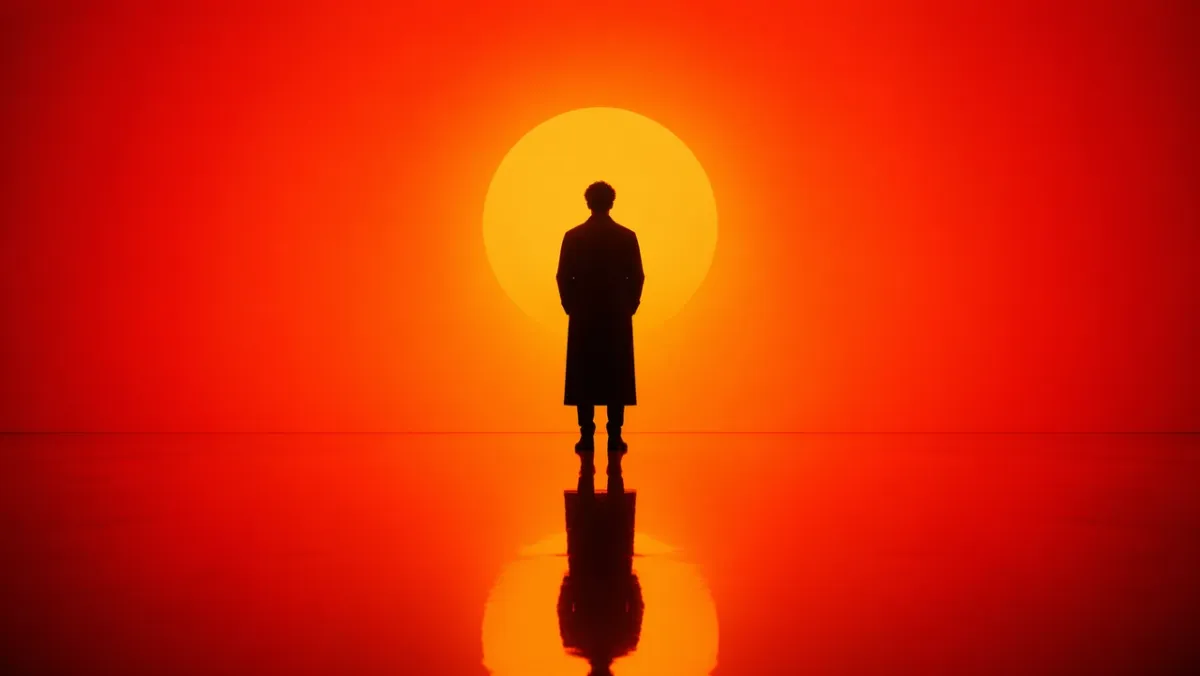
プロンプト 1:
オレンジから赤への強烈なグラデーション環境に立つ孤独な人物の映画のようなポートレートを生成します。後ろからの強いシルエットの照明、深い影のコントラスト、人物を映す反射する光沢のある床。対称的な構成、最小限のセットデザイン、背景の乱雑さなし。雰囲気は瞑想的で力強く、まるで SF 映画の静止画のようです。アスペクト比 16:9
プロンプト 2:
雨上がりのソウルの率直な写実的な街路風景。ブルーアワーに小さな店を閉める花屋、濡れた舗装の反射、温かみのある店の光、疲れた自然な姿勢、50mmのドキュメンタリーの雰囲気、リアルな肌の質感、魅力的なポーズや透かしはありません。アスペクト比 3:2
プロンプト 3:
傷のある木製の机の上で古いフィルムカメラを修理している風化した手のクローズアップ。カメラ左からの窓の光、目に見えるほこり、真鍮と黒の革の質感、浅い被写界深度、静かなワークショップの雰囲気、写実的、テキストオーバーレイなし。アスペクト比 4:3
プロンプト 4:
※小雪の降る北欧の静かな夜行ホーム。ロングコートを着た一人の旅行者が暖かい駅灯の下に立っており、冷たい空気の中で見える吐息、背景に輝く電車の窓、映画のようなリアリズム、抑制されたカラーパレット、35mmのドキュメンタリーのような雰囲気、テキストはありません。アスペクト比 16:9*
プロンプト 5:
暗いセラミック皿の上に手打ち麺を乗せたトップダウンの編集用食品写真、立ち上る湯気、斜めに置かれた箸、使い古された木製のテーブル、柔らかな側面光、リアルな油の光沢と質感、ブランディングなし、テキストオーバーレイなし。アスペクト比 4:5
プロンプト 6:
※陶芸家がろくろで陶鉢を削り出す様子をドキュメンタリー風に描いたリアルなポートレート。中程度のクローズアップ、鮮明な焦点を当てた手と回転する粘土、自然な汚れのあるエプロン、柔らかな工房の窓の光、背景の未完成のボウルの棚、正直な質感、魅力的なレタッチなし、テキストなし。アスペクト比 3:2*
プロンプト 7:
夏の嵐の後の小さな山間の町の広い映画の静止画。濃い緑の松の木から霧が立ち上り、コテージの窓に暖かい光が現れ、濡れた道路の反射が中心に向かって導き、遠くで傘をさして歩く一人の人物、自然なスケール、現実的な雰囲気、テキストはありません。アスペクト比 16:9
プロンプト 8:
折り畳まれたリネン布の上に置かれたビンテージ腕時計の写実的なクローズアップショット。目に見えるつや消しメタル、ケースの小さな傷、判読可能だが架空の時計の文字盤、柔らかい指向性の朝の光、浅い被写界深度、洗練されたエディトリアル製品の写真の雰囲気、本物のブランドロゴはありません。アスペクト比 4:5
プロンプト 9:
深夜の小さな建築スタジオの率直な室内シーン。 2 人のデザイナーが、電気スタンドの下でフォーム モデルと印刷されたフロア プラン、近くにあるコーヒー カップ、現実的な影、実用的なワークスペースの乱雑さ、落ち着いた集中した雰囲気、35 mm フィルムの外観、テキスト オーバーレイなしをレビューします。アスペクト比 16:9
プロンプト 10:
※シンプルなクリームコートを着たモデルが夕暮れ時の地下鉄入口付近に佇むナチュラルファッションのエディトリアルイメージ。輝き始めた街灯、落ち着いた街の背景、リアルな生地の折り目、リラックスした姿勢、目の高さのフレーミング、微妙なフィルム粒子、目に見えるブランド名やテキストはありません。アスペクト比 2:3*
注目すべき点: 結果には、信頼できる光の方向、物理的に妥当な反射または影、および自然な被写体のポーズが含まれている必要があります。画像が洗練されすぎているように見える場合は、ドキュメンタリーの詳細を追加し、漠然とした品質の高い表現を削除します。
2. ロゴとテキストのレンダリング プロンプト
GPT Image 2 は、プロンプトがテキストを装飾ではなくデザイン要件として扱う場合に最も強力です。
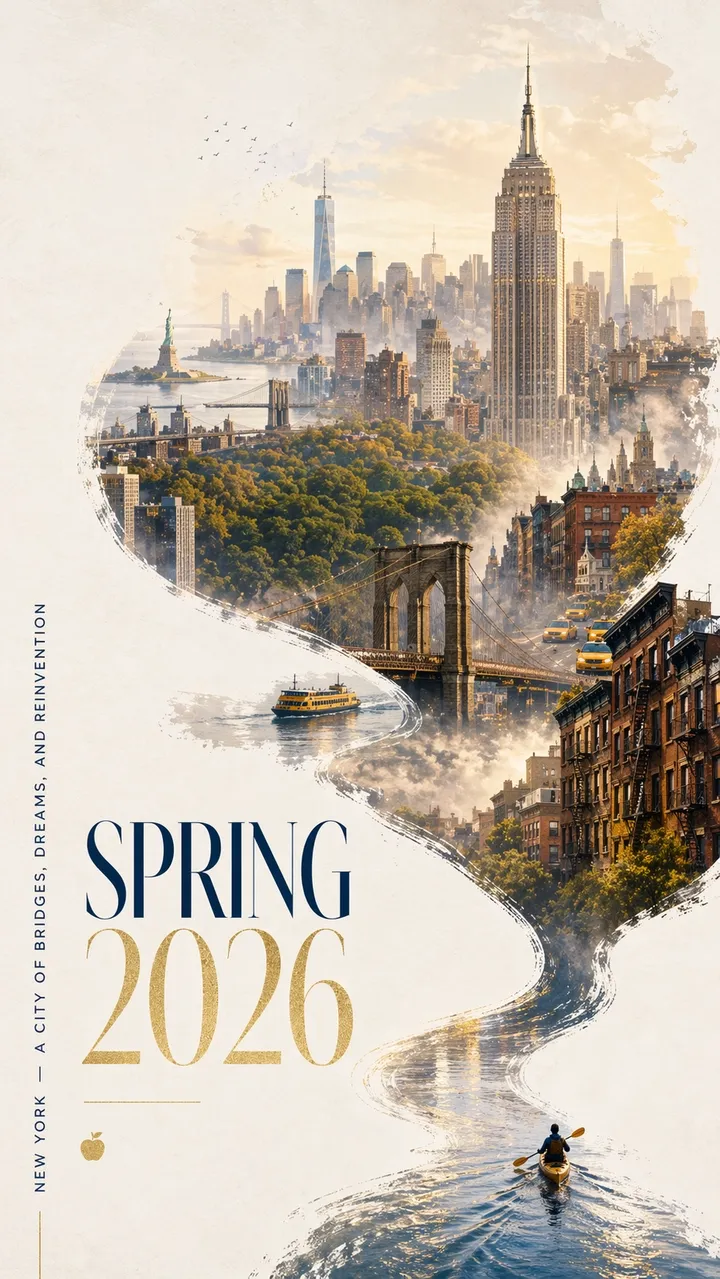
プロンプト 11:
大胆で現代的なデザインとエレガントなお祝いムードを備えた、印象的な 2026 年春のニューヨークの都市ポスター。きれいなオフホワイトのテクスチャ背景と十分なネガティブスペース。ミニチュアのカヤッカーが、右下隅にある反射する水の細いリボンを漕いでいます。航跡はダイナミックなカリグラフィーの曲線を描いて上向きに流れ、徐々にハドソン川に変わり、そして夢のような手描きのマンハッタンのパノラマに変わります。流れる川の形をした構成の内部: エンパイア ステート ビルディング、ブルックリン ブリッジ、セントラル パークの天蓋、ワン ワールド トレード センター、茶色の石造りの屋根、イエロー キャブ、港のフェリー、そして柔らかな距離にある自由の女神。柔らかな朝霧、金色の春の光、ネイビーとゴールドの微妙なアクセント。左下のエレガントなタイポグラフィーには「SPRING 2026」と縦方向のスローガン「NEW YORK - A CITY OF BRIDGES, DREAMS, AND REINVENTION」と書かれています。テキストは鮮明で美しく構成されている必要があります。余計な言葉はいりません。プレミアムグラフィックデザイン、アスペクト比 9:16.
プロンプト 12:
「FRAME 2026」という架空のデザインカンファレンスの縦型発表ポスターを作成します。大きな見出し:「FRAME 2026」。副題は「機械の想像力によるデザイン」。きれいなスイス グリッド、オフホワイトの背景、黒のタイポグラフィ、1 つの赤い幾何学的なアクセント、十分なネガティブ スペース、完全に読みやすいテキスト、余分な単語、透かしはありません。アスペクト比 9:16
プロンプト 13:
「SOFT SIGNALS」というタイトルのミニマルなアルバムジャケットを作成します。アーティスト名:「MIRA VALE」。中央揃えのタイポグラフィ、落ち着いた青い紙のテクスチャ、電波塔の小さな銀線のイラスト、エレガントな間隔、余分なテキストなし、ロゴなし、アスペクト比 1:1。
プロンプト 14:
※大きなセリフ体で「READ MORE SLOWLY」と書かれた書店の店頭ポスターを作成します。細い線:「春の読書週間」。ガラスに映る暖かい夜の街路の反射、クリーム色の紙の質感、読みやすいタイポグラフィ、余分な言葉や透かしはありません。アスペクト比 4:5*
プロンプト 15:
※美術館展示ポスター「OBJECTS OF TOMORROW」を制作。副題は「2026年のデザイン史」。オフホワイトの紙に黒いテキスト、中央に 1 つの抽象的なクロム オブジェクト、クリーンなモダニズム レイアウト、正確に読めるテキストのみ、偽のロゴはありません。アスペクト比 9:16*
プロンプト 16:
「AFTERLIGHT SESSIONS」という正確な見出しを付けた縦型の音楽フェスティバル ポスターを作成します。小さい文字:「6 月 12 ~ 14 日」。深いネイビーの背景、1 つの輝く円形ステージ ライト、エレガントに凝縮されたサンセリフ タイポグラフィ、バランスのとれたネガティブ スペース、正確なテキストのみ、余分な単語や透かしは使用しません。アスペクト比 9:16
プロンプト 17:
※「MORNING MENU」というタイトルのきれいなカフェメニューボードを作成します。 「ESPRESSO」、「MATCHA LATTE」、「CARDAMOM BUN」、「COLD BREW」の4品を正確に入力します。温かみのあるクリーム色の背景、黒のセリフ体、シンプルな区切り線、遠くからでも読みやすい、価格なし、余分な項目なし。アスペクト比 4:5*
プロンプト 18:
架空のランニング クラブ用の正方形のソーシャル キャンペーン グラフィックを作成します。本文:「RUN THE RIVER」。 2 番目の行:「土曜日午前 7 時」。大胆な動的タイポグラフィ、抽象的な川のライン、明るい緑と黒のパレット、明確な階層、余分なテキスト、本物のロゴはありません。アスペクト比 1:1。
プロンプト 19:
架空の小説「THE QUIET MACHINE」のブックカバーを作成します。作者名:「エレナ・ロウ」。小さな銀色の機械的な鳥のシルエットを備えたミニマルな表紙、マットブラックの背景、洗練されたタイポグラフィー、正確なテキストのみ、出版社のロゴ、余分なコピーはありません。アスペクト比 2:3
プロンプト 20:
「ASK BETTER QUESTIONS」というタイトルの教室用ポスターを作成します。 「観察」、「説明」、「テスト」の 3 つの短い行を含めます。フレンドリーなエディトリアル デザイン、柔らかな黄色の背景、シンプルな線のアイコン、ハイ コントラストの読みやすいテキスト、余分な言葉や透かしはありません。アスペクト比 4:5
注意すべき点: すべての文字が読み取れる必要があります。モデルが余分な単語を追加する場合は、コピーを「正確なテキストのみ」として再度記述し、プロンプト内の各行を個別の行に配置します。
3. 製品写真と AI 広告クリエイティブのプロンプト
この角度は、キャンペーンのビジュアル、ヒーロー ショット、ソーシャル広告、電子商取引のモックアップ、製品のストーリーテリングに使用します。
プロンプト 21:
コンクリートの台座に置かれたマットブラックのワイヤレス スピーカーのプレミアム製品広告。見出し:「あなたが感じるサウンド」。右側の製品、左側の大胆なホワイトタイプ、ドラマチックなリムライト、クリーンなシャドウ、高級ハイテクキャンペーンスタイル、シャープな製品エッジ、偽ブランドロゴなし、透かしなし。アスペクト比 16:9
プロンプト 22:
すりガラス上のスキンケア美容液のエディトリアル写真。 「LUMA SERUM」と書かれたシンプルなラベルが付いた半透明のボトル、柔らかな拡散光、淡い緑色の背景、ハイエンドのビューティー キャンペーン スタイル、ラベルのテキストはシャープ、クリーンな反射、余分な小道具なし、アスペクト比 4:5。
プロンプト 23:
ゴールデンアワーの山道での耐久性のあるトラベルボトルの正方形のソーシャル広告。キャッチフレーズ:「長距離用に構築」。製品が前景にはっきりと表示され、自然なハンドグリップ、暖かい日差し、下 3 分の 1 にくっきりと読めるテキスト、余計な言葉はなく、アスペクト比 1:1。
プロンプト 24:
真っ白な背景にワイヤレスヘッドフォンのきれいな電子商取引商品の写真。正面からの角度、鮮明なシルエット、微妙なコンタクト シャドウ、目に見えるイヤー クッションのテクスチャ、テキストなし、ロゴなし、小道具なし、高解像度の製品写真。アスペクト比 1:1。
プロンプト 25:
※陶器製コーヒーカップの看板風キャンペーンビジュアル。見出し:「朝、再熱」。手前に商品が大きく、キッチンの暖かい窓の光、柔らかな蒸気、左上に太字で読みやすい文字、余分なコピーや透かしはありません。アスペクト比 16:9*
プロンプト 26:
石棚の上に置かれたミニマリストのハイキング バックパックのプレミアム e コマース ヒーロー画像。製品中心、フロントポケットとストラップが見える、柔らかなアルプスの朝の光、きれいな影、人物なし、ロゴなし、テキストオーバーレイなし、リアルなナイロンの質感とジッパーのディテール。アスペクト比 1:1。
プロンプト 27:
※すりガラス製保湿ジャーの洗練されたスキンケアキャンペーンイメージ。見出し:「瓶の中の静けさ」。右下の製品、淡い青色の背景、柔らかい水の反射、偽ブランドのない鮮明なラベル領域、エレガントな白いタイポグラフィー、余分な言葉はありません。アスペクト比 4:5*
プロンプト 28:
開いた充電ケースに入ったマットホワイトのワイヤレスイヤホンの映画のような製品写真。濃い木炭の背景、薄いリムライト、その下の微妙な反射、キャンペーン見出し用のきれいなネガティブスペース、ロゴなし、テキストなし、シャープな製品エッジ。アスペクト比 16:9
プロンプト 29:
※架空のグラノーラブランド「NOVA OATS」の四角いスナック菓子のパッケージのモックアップ。明るい木の表面に直立したポーチが 1 つあり、ラベルの文字がシャープで、底部の周りにオーツ麦とドライ フルーツがあり、温かみのある自然光、プレミアムだが親しみやすいパッケージ デザイン、余分なブランドはありません。アスペクト比 1:1。*
プロンプト 30:
ダークベルベットの表面に小さな青い石が付いたシルバーリングを撮影した高級ジュエリー製品です。マクロの詳細、リアルな金属の反射、左上からの柔らかいスポットライト、きれいな影、手なし、テキストなし、透かしなし、製品は背景から明確に分離されています。アスペクト比 4:5
注目すべき点: 製品はビジュアルヒーローであり続ける必要があります。モデルがあまりにも多くのパッケージングの詳細を考案する場合は、参照画像を使用するときに「簡易パッケージング」または「入力された製品を正確に保存する」と指定してください。
4. ソーシャルメディアの画像とインフォグラフィックのプロンプト
この角度は、読みやすいラベルが必要な図、説明、ワークフロー マップ、チャート、教室のビジュアル、ブログのイラストに役立ちます。
プロンプト 31:
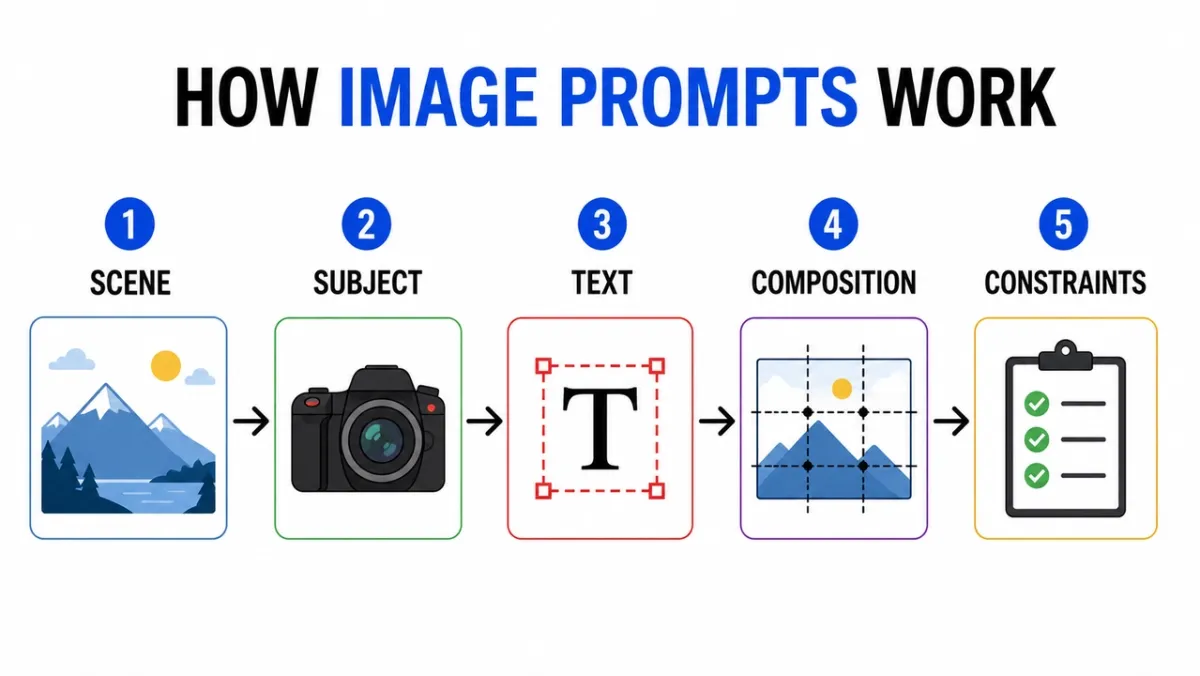
「画像プロンプトの仕組み」というタイトルのわかりやすいインフォグラフィックを作成します。 5 つのラベル付きステップ:「シーン」、「主題」、「テキスト」、「構成」、「制約」。フラットな編集アイコン、ステップ間の矢印、ハイコントラスト、白い背景、読みやすいサンセリフのラベル、一貫した間隔、余分なテキスト、透かしなし。アスペクト比 16:9
プロンプト 32:
カメラのレンズの層を示す教育図。 「フロントエレメント」、「絞り」、「フォーカスグループ」、「イメージセンサー」というラベルの付いた部分が含まれます。きれいな断面図、白い背景、教科書スタイル、明確な引出線、読みやすいラベル、装飾的な乱雑さはありません。アスペクト比 16:9
プロンプト 33:
「ポスター プロンプト VS 製品プロンプト」というタイトルの比較インフォグラフィック。 2 列、6 行、簡潔なラベル、ニュートラルな背景、黒のテキスト、青のアクセント線、プロフェッショナルなブログのグラフィック スタイル、すべてのコピーが読みやすく、余分なテキストはありません。アスペクト比 16:9
プロンプト 34:
「HOW TO MAKE COLD BREW」というタイトルの段階的な説明ビジュアルを作成します。 「挽く」、「蒸す」、「濾す」、「注ぐ」、「提供する」という短いラベルが付いた 5 つの図解されたステップ。温かみのあるアースカラー、明確な矢印、一貫したアイコン スタイル、読みやすいテキスト、余分な言葉はありません。アスペクト比 16:9
プロンプト 35:
「AI IMAGE WORKFLOW」というタイトルのきれいな比較表を作成します。 3 つの列:「ドラフト」、「リファイン」、「アニメーション」。シンプルなアイコン、短いラベル、高コントラスト、十分な間隔、白い背景、プロフェッショナルなブログのグラフィック スタイル、すべてのテキストが読みやすいものを使用します。アスペクト比 16:9
プロンプト 36:
「FROM PROMPT TO POSTER」というタイトルのきれいなタイムライン インフォグラフィックを作成します。 「概要」「レイアウト」「テキスト」「レビュー」「エクスポート」の5段階。水平方向の流れ、シンプルな番号付きの円、青と黒のアクセント パレット、ハイ コントラストのラベル、余分なテキスト、透かしなし。アスペクト比 16:9
プロンプト 37:
「参照画像の役割」というタイトルの教育図を作成します。 3 枚のラベル付きカード:「件名」、「スタイル」、「背景」。シンプルな画像のサムネイル、最終的な 1 つの出力フレームへの矢印、透明なラベル、白い背景、一定の間隔、余分なテキストを表示しません。アスペクト比 16:9
プロンプト 38:
「WHICH IMAGE PROMPT?」というタイトルの決定木を作成します。分岐:「テキスト」、「プロダクト」、「シーン」、「編集」。きれいなボックスと矢印、読みやすいサンセリフのタイポグラフィー、最小限のグレーの背景、緑のアクセント カラー 1 色を使用し、余分な言葉や装飾的な乱雑さを排除します。アスペクト比 16:9
プロンプト 39:
「生成する前に」というタイトルの安全チェックリストのインフォグラフィックを作成します。 「権利」、「プライバシー」、「テキスト」、「ブランド」の 4 つのチェック。シンプルなチェック アイコン、簡潔なラベル、白い背景、プロフェッショナルな SaaS ヘルプ センター スタイル、ハイ コントラスト、余分なコピーを使用しません。アスペクト比 4:5
プロンプト 40:
「画像編集プロンプト」というタイトルのビジュアル説明文を作成します。 3 つの積み上げ行:「Change」、「Preserve」、「Match」。各行に小さなサンプルアイコンが含まれ、きれいな引出線、読みやすいラベル、控えめな色、余分なテキスト、透かしはありません。アスペクト比 16:9
注意すべき点: まずラベルを確認してください。ビジュアルは美しくても言葉が間違っていたら、出力は使えません。グラフが密集している場合は、ラベルの数を減らして再生成します。
5. 文字の一貫性に関するプロンプト
キャラクター シートは、アイデンティティ、ワードローブ、パレット、表現を 1 つの参照フレームに圧縮するため便利です。
プロンプト 41:
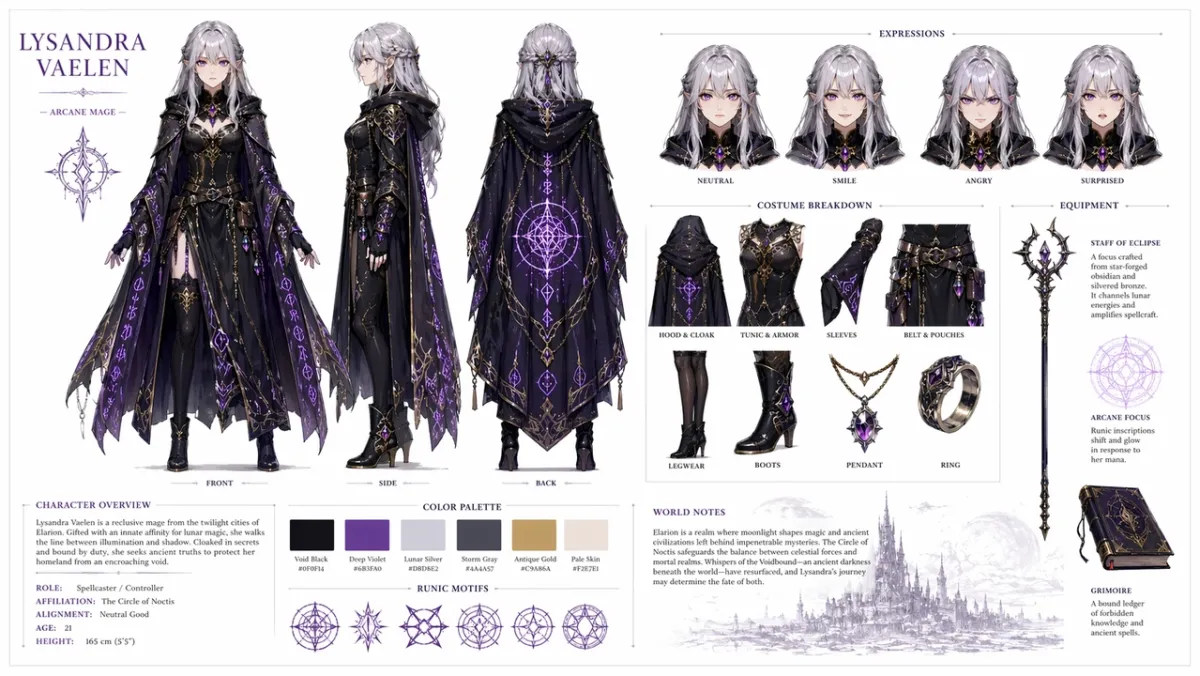
オリジナルのファンタジー RPG キャラクター用のプロのキャラクター リファレンス シートを作成します。銀の髪と紫の目を持ち、輝くルーン模様の華やかな暗いマントを着た若い女性の魔術師です。きれいな白い背景に、正面、側面、背面を示す 3 つのビューのターンアラウンドを含めます。無表情、笑顔、怒り、驚きを示す表情のバリエーション。衣装と装備品の詳細な内訳。カラーパレットのスウォッチ行。きれいなタイポグラフィーで書かれた世界構築に関する簡単なメモ。整理されたグリッド レイアウト、コンセプト アート スタイル、高解像度。アスペクト比 16:9
プロンプト 42:
※オリジナルキャラクター「NOVA」のSF配達員キャラクターシートを作成します。正面、側面、背面のビュー、4 つの表情、ジャケットとバックパックの吹き出し、カラー パレットの見本、きれいな白い背景、読みやすいラベル、すべてのビューで一貫した顔とジャケットが含まれます。アスペクト比 16:9*
プロンプト 43:
緑のレインコートを着た小さな森のお手伝いさんの児童書のキャラクター シートを作成します。表情列、小道具列、歩くポーズ、手を振るポーズ、カラーパレット、シンプルで読みやすいメモ、柔らかいイラストスタイルが含まれ、余分な文字はありません。アスペクト比 16:9
プロンプト 44:
※オリジナルキャラクター「REI」のサイバーパンク探偵キャラクターシートを作成します。正面図、側面図、背面図、3 つの表情、トレンチ コートの吹き出し、デバイスの小道具、ネオン カラー パレット、きれいなラベル、一貫した顔と髪型が含まれます。アスペクト比 16:9*
プロンプト 45:
フレンドリーなロボットパン屋のマスコットリファレンスシートを作成します。全身ポーズ、3 つの顔の表示表現、エプロンの詳細、ペストリーの小道具、カラー パレットの見本、シンプルなターンアラウンド、きれいな白い背景、読みやすいラベルが含まれます。アスペクト比 16:9
プロンプト 46:
※オリジナル砂漠スカウト「KAI」のモバイルゲームキャラクターシートを作成します。正面、側面、背面のビュー、3 つのアクション ポーズ、スカーフとユーティリティ ベルトの吹き出し、カラー パレットの見本、読みやすいラベル、一貫した顔と服装、きれいなオフホワイトの背景が含まれます。アスペクト比 16:9*
プロンプト 47:
※オリジナルキャラクター「MARN」のアットホームなファンタジー村の商人キャラクターシートを作成します。全身の正面図、側面図、ランタンと台帳を備えた小道具の列、4 つの表現の研究、生地のテクスチャの吹き出し、温かみのあるカラー パレット、きれいなグリッド レイアウト、読みやすいメモが含まれます。アスペクト比 16:9*
プロンプト 48:
SF メンテナンス ドローンのデザイン シートを作成します。上面、側面、正面図、センサー、着陸脚、ツール アーム、バッテリー パック、警告灯の詳細パネルが含まれます。クリーンなテクニカルコンセプトアートのレイアウト、ニュートラルな背景、読みやすいラベル、一貫した工業デザイン。アスペクト比 16:9
プロンプト 49:
「MILO」という名前のオリジナル教室発明者用の子供用アニメーション キャラクター シートを作成します。立ちポーズ 1 つ、考えるポーズ 1 つ、興奮したポーズ 1 つ、表情の列、バックパックとノートの小道具、明るく控えめなパレット、読みやすいラベル、余分な文字は含まれません。アスペクト比 16:9
プロンプト 50:
※オリジナルのサイバーパンク配達員の戦術衣装リファレンスシートを作成します。正面、背面、側面のビュー、ジャケットの吹き出し、靴の詳細、メッセンジャー バッグの詳細、色見本、3 つのシルエットのポーズ、鮮明なラベル テキスト、一貫したヘアスタイル、ビュー全体での顔が含まれます。アスペクト比 16:9*
注意すべき点: 同じ顔、衣装、カラーパレットがどのビューでも存続する必要があります。側面図で服装が変更された場合は、より強力な「保存」文言を使用して再生成します。
6. UI モックアップとソーシャル スクリーンショット プロンプト
この角度は、チームで議論できるほど構造的に見える現実的なアプリのコンセプト、ダッシュボード、ソーシャル プロファイル、または製品 UI が必要な場合に機能します。
プロンプト 51:
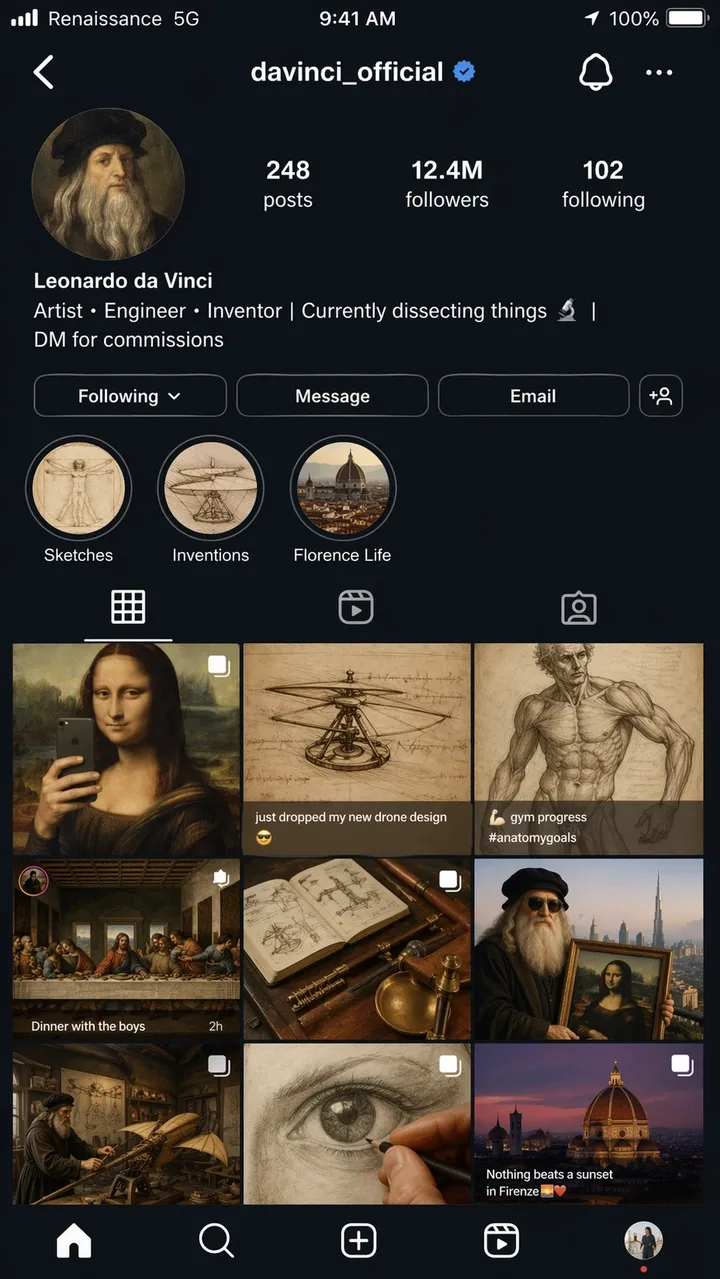
あたかも 2026 年の現代のインフルエンサーであるかのように、レオナルド ダ ヴィンチ (ユーザー名 @davinci_official) の架空の Instagram プロフィール ページの非常にリアルな iPhone スクリーンショット。プロフィール写真は、輪切りにしたルネサンスの自画像です。略歴: 「アーティスト、エンジニア、発明家」 | 現在、物事を分析中 | コミッションはDMまで。グリッドには9つの投稿が表示されます。モナリザを鏡の自撮り写真として再構成し、ヘリコプターのスケッチに「新しいドローンのデザインを落としただけ」とキャプションが付けられ、解剖学の研究がジムの進捗写真として投稿され、最後の晩餐がディナーパーティーのグループショットとして演出され、その他の創造的な時代錯誤的なマッシュアップが表示されます。フォロワー数: 1,240万。ストーリーのハイライトにはスケッチ、発明、フローレンスの生活というラベルが付けられています。完全なiOSステータスバーとキャリアテキストの読み取り「Renaissance 5G」、バッテリー アイコン、および現在の時刻。フォトリアルなスクリーンショットの品質、アスペクト比 9:16。
プロンプト 52:
「LUMA」という架空の習慣アプリのリアルなモバイル オンボーディング画面。見出し:「より良い日々を築く」。ボタン: 「今すぐ開始」と「デモを見る」。すっきりとした iOS スタイルのレイアウト、柔らかな白い背景、青いアクセント、読みやすい UI テキストが、携帯電話のフレーム内にまっすぐに表示されます。アスペクト比 9:16
プロンプト 53:
電子商取引分析ツール用のデスクトップ SaaS ダッシュボード。左側のサイドバー、収益、注文、コンバージョン率の上位 KPI カード、折れ線グラフ、上位製品の表。すっきりとした白いインターフェイス、現実的な間隔、読みやすいラベル、実際のブランド名はありません。アスペクト比 16:9
プロンプト 54:
※架空のアプリ「SKYLINE」のリアルなモバイル天気アプリ画面。現在の都市は「リスボン」。ヘッドライン温度:「22℃」。風、湿度、紫外線、日没のカード。落ち着いたブルーのインターフェイス、読みやすいラベル、iPhone フレーム、実際のアプリのブランディングはありません。アスペクト比 9:16*
プロンプト 55:
※レストラン予約アプリの予約確認画面。店名は「ノーステーブル」。日付:「6月18日」。時間:「午後 7 時 30 分」。パーティー人数:「4名様」上部に温かい編集用の食べ物の写真、「カレンダーに追加」と書かれたきれいな CTA ボタン、読みやすい UI テキスト。アスペクト比 9:16*
プロンプト 56:
架空のクリエイター スタジオの現実的なデスクトップ分析ダッシュボード。左側のナビゲーション、再生回数、総再生時間、収益、新規フォロワーの上部カード、折れ線グラフ、キャンペーン表。すっきりとした白の UI、青のアクセント、読みやすいラベル、実用的な間隔、実際のブランド名はありません。アスペクト比 16:9
プロンプト 57:
※架空のアウトドア用品店「TrailCart」のモバイルレジ画面。製品のサムネイル、数量ステッパー、配送先住所カード、割引フィールド、合計価格、および「注文する」という CTA ボタンを表示します。最新の iOS スタイル、読みやすい UI テキスト、実際のロゴはありません。アスペクト比 9:16*
プロンプト 58:
プロンプト ライブラリ アプリのタブレット UI モックアップ。 「ポスター」、「製品」、「UI」、「編集」というラベルの付いたタブを表示します。メイン パネルには、短いプレビュー テキスト、コピー ボタン、およびカテゴリ チップを含む 3 つのプロンプト カードが含まれています。すっきりしたインターフェイス、高い可読性、実際のブランド名はありません。アスペクト比 4:3
プロンプト 59:
※架空のAI画像ツールのSaaS設定画面。 「モデル」、「品質」、「アスペクト比」、「参照画像」、および「安全性」というラベルの付いたセクション。トグル、ドロップダウン、スライダー、および透明な [保存] ボタンを使用します。静かなプロフェッショナルな UI、読みやすいラベル、装飾的な煩雑さはありません。アスペクト比 16:9*
プロンプト 60:
※架空の京都旅行の携帯旅程表アプリ画面。ヘッダーは「京都週末」。 「1日目」「2日目」「寺院散策」「ディナー」のカード。ソフトでニュートラルな UI、現実的な間隔、小さな地図プレビュー、読みやすいテキスト、実際のアプリのブランディングはありません。アスペクト比 9:16*
注意すべき点: レイアウトは、装飾的なポスターではなく、実際のインターフェイスのように感じられる必要があります。ナビゲーション ラベル、ボタン テキスト、アイコンの間隔、および画面階層が使用可能かどうかを確認します。
7. スタイルの転送とナラティブ アートのプロンプト
短い物語プロンプトは、GPT Image 2 が視覚的なジョーク、複数パネルのストーリーテリング、シーン内の小さなテキストを通じて推論できるかどうかをテストします。
プロンプト 61:
「古代のテクノロジー: デスクトップ時代」と題された博物館の展示物では、ガラスの展示ケースに入ったプログラマーが CRT モニター上でコーディングのライブ デモンストレーションを行っており、驚いた小学生がガラスに顔を押し付けています。展示プラカードには「Homo Developerus (2005年頃) - キーボードベースの入力デバイスを使用する原始人」と書かれています。近くの 2 番目の展示ケースには、「Stack Overflow - Print Edition, Vol. 1 of 4,827」というラベルの付いた物理的な書籍が展示されています。 2D漫画イラストのスタイル、温かみのある美術館の照明、ユーモラスでノスタルジックなトーン。アスペクト比 16:9
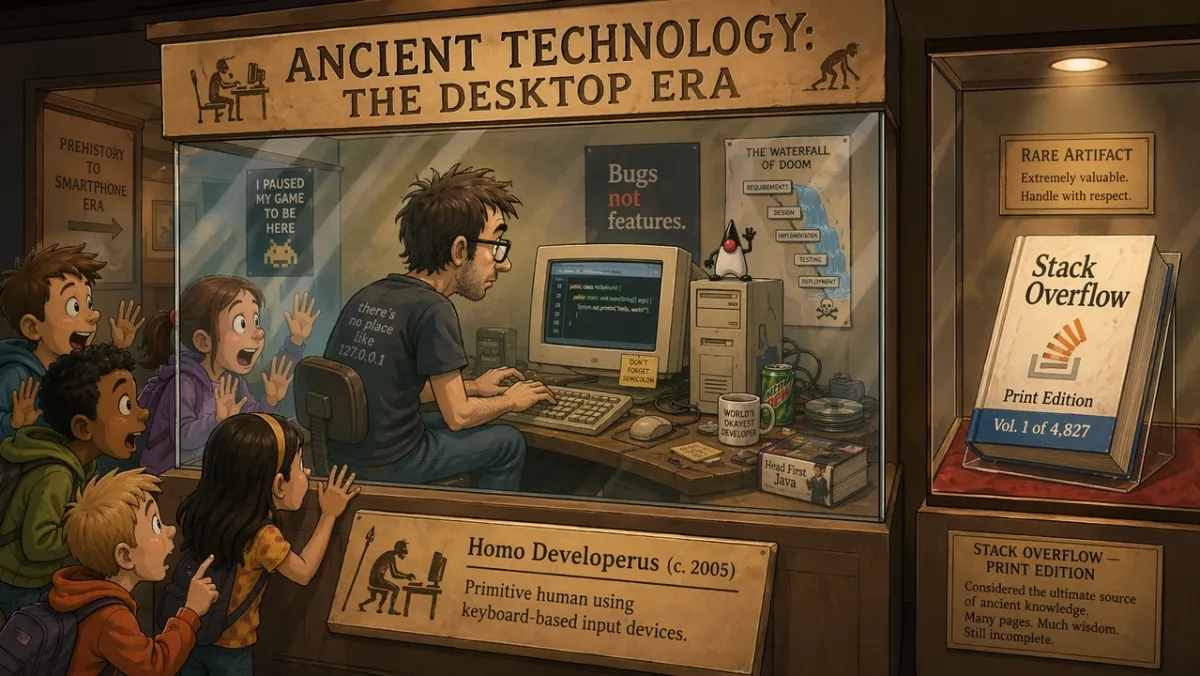
プロンプト 62:
※「MORNING ROUTINE」というタイトルの4コマ漫画です。パネル 1: アラームが鳴ります。パネル 2: キャラクターがコーヒーを作ります。パネル 3: キャラクターは座って仕事をしています。パネル 4: キャラクターはすでに机で眠っています。温かみのあるミニマルなイラストスタイル、表情豊かなキャラクター、読みやすいタイトル、余分なテキストなし。アスペクト比 16:9*
プロンプト 63:
クリエイティブオートメーションに関する記事の 1 つのエディトリアルイラスト。デザイナーと AI アシスタントが大きなテーブルに紙の絵コンテを配置し、スタジオの柔らかな光、微妙なユーモア、モダンな雑誌のイラスト スタイル、目に見えるブランド ロゴやテキストはありません。アスペクト比 3:2
プロンプト 64:
※新聞一面風イラスト「THE MORNING HERALD」。主な見出し:「市が屋上庭園を承認」。 2 列のレイアウト、写実的な市議会の写真領域 1 つ、クラシックな大判デザイン、読みやすいマストヘッドと見出し、余分な記事テキストはありません。アスペクト比 4:5*
プロンプト 65:
※ロボットが絵を描くことを学ぶ2コマ漫画です。パネル 1: ロボットは空白のキャンバスを注意深く調べます。パネル 2: ロボットは乱雑だが魅力的な絵を誇らしげに見せます。スタジオの温かみのある照明、表情豊かなボディランゲージ、吹き出しなし、シンプルなタイトル:「FIRST ATTEMPT」。アスペクト比 16:9*
プロンプト 66:
※編集部3コマ漫画『THE DEADLINE』。パネル 1: デザイナーは静かに空のファイルを開きます。パネル 2: 時計が進み、付箋が机を覆います。パネル 3: デザイナーは、驚きのレリーフを備えた洗練されたポスターを提示します。最小限の表現力のあるイラストスタイル、読みやすいタイトル、吹き出しなし。アスペクト比 16:9*
プロンプト 67:
クリエイティブな焦点に関する超現実的な雑誌のイラスト: 人は、光る窓の静かな図書館に浮かぶ小さな机に座っており、各窓には異なる未完成のアイデアが表示されます。柔らかい映画のような照明、思慮深い雰囲気、すっきりとした構成、目に見えるブランドロゴやテキストはありません。アスペクト比 3:2
プロンプト 68:
製品発売のティーザー用の 4 つのパネルの絵コンテ。パネル 1: テーブル上の閉じたボックス。パネル 2: ボックスから漏れる光。パネル 3: 蓋を持ち上げる手。パネル 4: 光る製品のシルエットが明らかに。判読可能なブランド、会話、映画のような照明、明確なパネルの境界線はありません。アスペクト比 16:9
プロンプト 69:
※「THE FIRST GROUP CHAT」と題されたユーモラスなミュージアムジオラマ。石板の周りに古代のような人物が集まり、その上にメッセージの吹き出しが刻まれている様子、博物館の温かみのある照明、遊び心のあるエディトリアルイラスト、読みやすいタイトルのみで余分なテキストは表示しません。アスペクト比 16:9*
プロンプト 70:
クリエイティブな反復の「前」と「後」を示す分割画面のナラティブ ポスター。左側: 乱雑なスケッチの壁とラフなメモ。右側: きれいに磨かれたキャンペーンボード。モダンなエディトリアルイラスト、強いコントラスト、ロゴなし、「BEFORE」と「AFTER」以外の余分な言葉はありません。アスペクト比 16:9
注目すべき点: シーンはアイデアを視覚的に伝える必要があります。ジョークが完全にテキストに依存している場合は、セットアップを簡素化し、物理的なアクションをより明確にします。
8. 画像からビデオへの最初のフレームのプロンプトと参照編集
この角度では、GPT Image 2 は単なるファーストパス ジェネレーター以上の役割を果たします。これは、製品の切り抜き、服装の交換、背景の変更、参照ベースの編集、およびモーション用に設計された静止フレームに役立ちます。
プロンプト 71:
- 画像をビデオに変換するクリップ用の映画のような最初のフレームを作成します。夜明けに輝く砂漠のクレーターの端に立つ孤独な宇宙飛行士、風に吹かれて動きそうな岬と塵、力強い前景のシルエット、鮮明な深度レイヤー、暖かい地平線の光、テキストなし、透かしなし。アスペクト比 16:9*
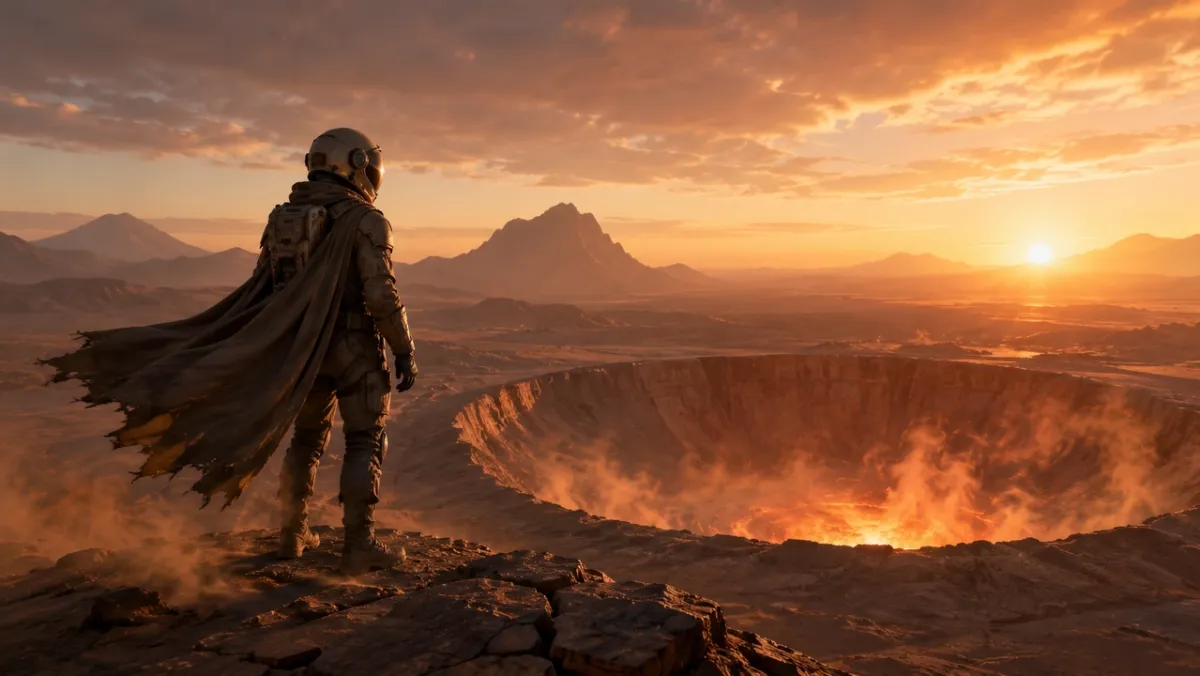
プロンプト 72:
※画像1を商品写真として、画像2を背景スタイルの参考としてご利用ください。製品を画像 2 のシーンに配置します。製品の形状、ラベルのテキスト、比率、色、素材を正確に保持します。照明、スケール、影、遠近感を一致させます。製品のスタイルを変更しないでください。余分なロゴや透かしはありません。*
プロンプト 73:
※入力された商品画像の背景を削除してください。鮮明なシルエット、きれいなエッジ、ハローやフリンジのない透明な背景を出力します。ボトルの形状、キャップの形状、ラベルのテキスト、ラベルの色、印刷の鮮明さを正確に維持します。比率を変更しないでください。*
プロンプト 74:
※入力画像の天候と照明のみを変更します。軽い雪が降る冬の夜のようなシーンを作成します。人物、建物、標識、カメラアングル、オブジェクトの配置、構成を正確に保存します。読みやすいテキストはすべて変更しないでください。*
プロンプト 75:
※画像1は保存対象者です。画像2はジャケット参考です。画像3は参考ブーツです。画像 2 と 3 の衣服を使用して画像 1 の人物に服を着せます。顔、体型、ポーズ、手、背景、カメラの角度、照明を正確に保存します。衣類のみを交換してください。*
プロンプト 76:
※入力された商品写真をロック対象としてご利用ください。朝の窓からの柔らかな光が当たる清潔な大理石のバスルームカウンターに製品を置きます。製品の形状、ラベルのテキスト、キャップの色、比率、素材を正確に保存します。コンタクトの影、スケール、遠近感を一致させます。余分なラベル、ロゴ、小道具を追加しないでください。*
プロンプト 77:
画像からビデオへのクリップ用に映画のような最初のフレームを作成します。濡れた黒い石の上にガラスの香水瓶が立っており、その後ろで霧の細いリボンが動きます。製品中心、力強いシルエット、明確な前景と背景の奥行き、手なし、テキストなし、透かしなし。アスペクト比 16:9
プロンプト 78:
背景のみをウォーム グレーのきれいな編集スタジオの背景に変更して、入力ポートレートを編集します。顔、髪、服装、ポーズ、肌の色、カメラアングル、照明の方向、表情を正確に保存します。新しい背景の影と深さを自然に合わせます。
プロンプト 79:
画像 1 を部屋の写真として、画像 2 を壁アートの参考として使用してください。画像 2 のアートワークを画像 1 の空の壁に追加します。家具、床、窓の光、カメラの角度、カラー バランス、部屋のレイアウトを正確に保存します。フレームのスケール、パース、壁の影を一致させます。
プロンプト 80:
製品公開用にビデオ対応の最初のフレームを作成します。テーブル上の閉じたマットブラックのボックス、継ぎ目から漏れる薄い青い光、ビームの中に見える塵の粒子、低くて近くに配置されたカメラ、強力な深度レイヤー、動きのための空きスペース、テキストなし、ロゴなし。アスペクト比 16:9
注意事項: 編集の場合、ロックされた詳細がロックされたままの場合にのみ出力が成功します。ビデオ対応フレームの場合は、被写体の分離、前景/背景の深度、およびシーンが PixVerse に動きの余地を与えているかどうかを確認します。
GPT Image 2 レビュー: テスト結果とスコア
テストおよび更新: 2026 年 6 月 23 日。
このページにアクセスするほとんどの読者が最初にサンプルを必要とするため、このレビュー セクションは意図的にプロンプト ライブラリの後にあります。レビューは依然として重要です。GPT Image 2 は、大まかな視覚的な探索よりも、テキスト、構造、および従う指示の方が重要な場合に役立ちます。
| 次元の確認 | スコア (1-5) | 実地テストでわかったこと |
|---|---|---|
| テキストの正確さ | 4 | 正確なコピーが引用されている場合、大きな見出し、短いラベル、ポスター タイトル、メニュー項目、インフォグラフィック ステップ、およびシンプルな UI ラベルを制御するのが容易になりました。法定コピーが小さく、内容の濃い段落については、依然として慎重な検討が必要です。 |
| キャラクターの一貫性 | 3 | キャラクター シート、表情の行、衣装の吹き出し、パレットの見本は参考として役立ちましたが、顔、プロポーション、衣装の詳細は側面図と背面図で異なる場合があります。 |
| スタイルコントロール | 4 | プロンプトでスタイルのキーワードを積み重ねるだけでなく、ユースケース、レイアウト、媒体、照明、制約を指定したとき、モデルは広範な視覚的方向によく従っていました。 |
| 製品のリアルさ | 4 | 製品広告のレイアウト、キャンペーンのネガティブスペース、きれいな表面、製品第一の構成は強力でしたが、実際のラベル、ロゴ、パッケージの形状、規制された表示などは依然として手動の QA が必要です。 |
| 編集力 | 3 | 「変更、保存、一致」パターンは広範な編集リクエストよりもうまく機能しましたが、選択範囲、透明な背景出力、正確な製品の保存についてはまだ検討する必要があります。 |
| 質問の検索 | 実際的な答え |
|---|---|
| こんな方に最適 | 正確なテキストのポスター、製品広告コンセプト、UI モックアップ、インフォグラフィック、キャラクター シート、リファレンス編集、画像からビデオへの最初のフレーム。 |
| 主な制限事項 | 小さなテキスト、正確なブランド マーク、独自のフォント、合法的なコピー、複雑な透明な背景の成果物、ロックされた製品ラベルは依然としてレビューが必要です。 |
| API の利用可能性 | 開発者ワークフローには、OpenAI の gpt-image-2 API ルートを使用します。 ChatGPT Images 2.0 アクセスと API 請求は別のパスです。 |
| API ノート | 2026 年 6 月 22 日の時点で、OpenAI には、画像入力、キャッシュされた画像入力、画像出力、テキスト入力、およびキャッシュされたテキスト入力の GPT-Image-2 トークンの価格がリストされています。 |
| ビデオワークフロー | 画像が後で画像からビデオへのソースになる可能性がある場合は、きれいな被写体のエッジ、深度レイヤー、および 1 つのモーション キューを要求します。 |
| 比較する代替案 | 高速の写真のようにリアルなテストには Nano Banana 2 を使用し、様式化された探索には Midjourney を使用し、承認されたものをビデオ アセットにする必要がある場合には PixVerse を使用します。 |
GPT Image 2 のテスト方法
私たちは、ポートレート、テキストの多いポスター、製品スタイルの構成、キャラクター シート、UI モックアップ、実験的な物語シーンで GPT Image 2 をテストしました。目標は、ベンチマークグレードのスコアを生み出すことではありません。デザイナー、マーケティング担当者、クリエイターがアセットを最初から再構築するのではなく、簡単な編集を加えて出力を使用できるかどうかを確認することでした。
| テストエリア | プロンプトのサンプル | 確認した内容 |
|---|---|---|
| ポートレートと映画のような静止画 | 12 | 照明制御、肌の質感、反射、雰囲気、シーンの一貫性。 |
| ポスターとタイポグラフィーのレイアウト | 14 | 見出しのスペル、複数行のテキスト、階層構造、ネガティブスペース、ブランド風の洗練。 |
| キャラクターシートとコンセプトシート | 9 | マルチビューの一貫性、コスチュームの詳細、パレットの位置合わせ、ラベルの正確さ。 |
| UIとソーシャルモックアップ | 8 | レイアウトのリアルさ、小さなテキスト、アイコンの間隔、フィード グリッド、スクリーンショットの信頼性。 |
| 実験的なプロンプト | 10+ | ユーモア、物語的推論、オブジェクトの配置、小さなキャプションの正確さ。 |
パターンは明らかでした。GPT Image 2 は、キーワード チェーンよりも正確な概要に報酬を与えます。プロンプトでジョブに名前を付け、成功を定義すると、モデルは構造を保持する傾向があります。プロンプトが制約のない美しい画像を要求した場合、結果は依然として洗練されているように見えますが、再利用は困難になります。
ユースケース別の結果のレビュー
| ユースケース | うまくいったこと | まだ見直しが必要なもの |
|---|---|---|
| テキストのレンダリング | 正確なコピーが引用されている場合、大きな見出し、短いラベル、ポスター タイトル、メニュー項目、インフォグラフィック ステップ、およびシンプルな UI ラベルを制御するのが容易になりました。 | 小さな法的コピー、密集した段落、様式化されたフォント、繰り返される単語などは依然として漂流する可能性があります。コピーは短くし、すべての文字を確認してください。 |
| 製品画像 | GPT Image 2 は、製品広告のレイアウト、キャンペーンのネガティブ スペース、きれいな表面、製品ファーストの構成をうまく処理しました。 | 実際のラベル、ロゴ、パッケージの形状、および規制対象の表示は、手動でチェックするか、承認された資産から合成する必要があります。 |
| UI モックアップ | モバイル画面、ダッシュボード、カード、ボタン、メニュー、およびアプリのような階層は、プロンプトが実際のインターフェイス要素に名前を付けたときに、もっともらしく見えました。 | 出力を実稼働 UI ではなくコンセプト モックアップとして扱います。小さなラベル、アイコンの配置、正確なデータはクリーンアップが必要になることがよくあります。 |
| キャラクターの一貫性 | キャラクター シート、表情の行、衣装の吹き出し、パレットの見本は、クリエイティブな参考資料として役立ちました。 | 顔、衣装の詳細、プロポーションはビューによって異なる場合があります。側面図または背面図がずれている場合は、アイデンティティ アンカーを繰り返して再生成します。 |
| 画像からビデオへの最初のフレーム | 前景、中景、背景、および 1 つのモーション キューを備えたワイド フレームにより、PixVerse はより使いやすいソース素材を実現しました。 | 過密な画像、重いテキスト、およびあいまいなモーション キューにより、後のビデオ生成が困難になります。 |
| 編集と合成 | 「変更、保存、一致」というプロンプト パターンは、広範な編集リクエストよりもうまく機能しました。 | 選択範囲、透明な背景出力、製品の正確な保存、および細部には依然として QA が必要です。 |
モデルを比較する場合、有用な区別はブランドかブランドかということではありません。 GPT Image 2 は、通信量の多い画像の構造化デザイン アシスタントのように動作します。 Midjourney は、様式化された探索とアートの方向性の幅広さに引き続き役立ちます。 Nano Banana 2 は、フォトリアリズム、マテリアルのディテール、および高速なビジュアル反復の強力な比較ポイントです。 PixVerse は、静止画像をクリップ、広告、製品公開、またはストーリー ショットにする必要がある場合の次のワークフロー レイヤーです。
GPT Image 2 プロンプトでよくある間違い
- 正確なコピーを提供せずに正確性を求める 画像にテキストが必要な場合は、テキストを正確に書き、それが表示される場所を指定します。
- 考えられるすべての詳細を 1 つのプロンプトにオーバーロードします。 コア シーンから始めて、一度に 1 つの変数を調整します。
- 編集中に不変条件を忘れます。 アイデンティティ、背景、ポーズ、照明、製品の形状、ラベルのテキスト、カメラ アングルなど、変更しない必要があるものをモデルに伝えます。
- 機能的なタスクには装飾的な品質の言葉を使用します。 「美しい」だけではラベルが読みやすくなりません。 「シャープなラベルテキスト」、「きれいなカーニング」、「遠くからでも読める」などのフレーズを使用します。
- アスペクト比をスキップします。 適切な正方形の画像は、縦型の広告やビデオのサムネイルとしては機能しない可能性があります。
- ロゴを一般的なテキストのように扱う GPT Image 2 はロゴのコンセプトをデザインできますが、正確なブランド マークは通常、承認されたブランド資産から合成する必要があります。
GPT Image 2 API と価格に関する注意事項
OpenAI の API 価格設定ページ には、トークンベースの価格設定の GPT-Image-2 がリストされています。 2026 年 6 月 22 日現在の表示料金は次のとおりです。
| アイテム | 定価 |
|---|---|
| 画像入力 | $8.00 / 100万トークン |
| キャッシュされた画像入力 | $2.00 / 100万トークン |
| 画像出力 | $30.00 / 100万トークン |
| テキスト入力 | $5.00 / 100万トークン |
| キャッシュされたテキスト入力 | $1.25 / 100万トークン |
実際の生成コストは、プロンプトの長さ、参照イメージ、出力サイズ、キャッシュ、品質、使用するアクセス パスによって異なります。 API ではなく ChatGPT を使用している場合、プランの制限とクォータは API トークンの価格とは別になります。反復可能なアプリまたはバッチ ワークフローを構築している場合は、OpenAI の GPT イメージ生成モデル プロンプト ガイド も読む価値があります。
この区別は、GPT Image 2 が無料かどうか、または GPT Image 2 API の料金がいくらかかるかを尋ねる検索者にとって重要です。 ChatGPT Images 2.0 の可用性、ChatGPT プランのクォータ、OpenAI API の請求、および PixVerse クレジットは別個の商用パスです。大量の作業の場合は、1 世代の試行で表示されている価格だけでなく、再試行後に受け入れられたアセットあたりのコストを比較します。
| ワークフローの選択 | 実践的なプロンプトと設定のアドバイス |
|---|---|
| テキストの多いポスターまたは図 | 画像ごとに使用する単語数を減らし、正確なコピーを引用し、階層を指定し、予算が許せばより高い品質設定を使用します。 |
| 製品写真 | 商品の形状、ラベル、色、素材、カメラアングルをロックします。参照を使用している場合は、編集するたびに保存リストを繰り返します。 |
| UI モックアップ | 画面を出荷時のインターフェイス (ナビゲーション、カード、ボタン、状態、ラベル、間隔) として説明します。コンセプトアートのような言葉遣いは避けてください。 |
| 複数参照の編集 | 各画像に役割(主題、スタイル、背景、衣装、製品、素材参照)ごとにラベルを付けます。 |
| バッチ生成 | 試行ごとのコストだけでなく、承認された画像ごとのコストも比較します。何度も再試行が必要な場合は、より安価な実行でも安くはなりません。 |
| PixVerse 制作 | 静止画像を生成またはインポートし、アセットにモーション、カメラの動き、またはキャンペーンのバリエーションが必要な場合は、画像からビデオへの変換を使用します。 |
API ファーストの画像ワークフローを使用するかクリエイター ワークフローを使用するかを決定するチームにとって、実際的な問題は「GPT Image 2 で静止画像を作成できるか?」ということだけではありません。それは「静止画が承認された後はどうなるのか?」ということです。初回パスの画質を比較したい場合は、GPT Image 2 と Nano Banana 2 の同じプロンプト テスト を参照してください。ターミナルまたは AI エージェント ワークフローからの自動生成が必要な場合は、PixVerse CLI ガイド でコマンド ライン パイプラインからの画像とビデオの生成について説明しています。
PixVerse 画像からビデオへのワークフローの詳細
GPT Image 2 画像が承認されると、それをビデオの最初のフレームとして扱うことができます。重要な部分は、アニメーション化する前に静止画を準備することです。ビデオ モデルでは、ポスター テキストのスペルミス、製品ラベルの歪み、すでに間違っているように見える UI モックアップを魔法のように修正できるわけではありません。
1. 最初のフレームとして静止画を生成します
画像がクリップになる可能性があることがわかっている場合は、画像プロンプトにモーション対応を追加します。明確な被写体のエッジ、前景と背景の深度、カメラ パス、および移動可能な 1 つの物理的手がかり (布地、ほこり、蒸気、雨、髪の毛、画面の輝き、製品の反射、または変化する光源) を要求します。
製品ポスターのみを要求するのではなく、ビデオの開始フレームとなる製品ポスターを要求します。
コンクリート台座上にマット ブラック スピーカー用の 16:9 キャンペーンの最初のフレームを作成します。 スピーカーの右側をシャープに保ち、左側にクリーンなネガティブスペースを確保します。 光線に柔らかい塵を追加し、後でアニメーション化できる微妙な青い LED の輝きを追加します。 余分なテキスト、偽のロゴ、透かしはありません。
2. モーションを追加する前に画像を確認します
最終的なデザインファイルのような静止画を確認してください。スペル、製品の形状、ラベル、手、顔、UI の配置、クレーム、および権利に依存する要素を確認します。ソース画像がこれらのチェックのいずれかに合格しない場合は、ビデオに移動する前に静止画を再生成または編集します。
3. 別のモーション プロンプトを作成する
ビデオ プロンプトは、画像プロンプト全体を繰り返してはいけません。何が移動し、何がロックされたままになるかを説明する必要があります。
※画像を1フレーム目に使用します。 カメラはゆっくりとスピーカーに向かって押し込みます。 青色 LED が点灯し、ほこりが光線の中を移動し、背景の反射がわずかに変化します。 スピーカーの形状、素材、位置、および目に見えるすべてのデザインの詳細を保持します。 新しいテキスト、ロゴ、針、または余分な製品を追加しないでください。*
4. 静止画が機能した後でのみアニメーション化する
PixVerse を使用している場合は、アプリ内で GPT Image 2 画像を生成するか、完成した画像をインポートして、画像からビデオへの変換を使用してモーションを追加できます。静止画からの直接モーションには image-to-video を使用し、より広範な 15 秒のクリエイティブ ワークフローには PixVerse V6 を使用し、ショットにさらに映画的なリファレンス コントロールが必要な場合には C1 を使用します。
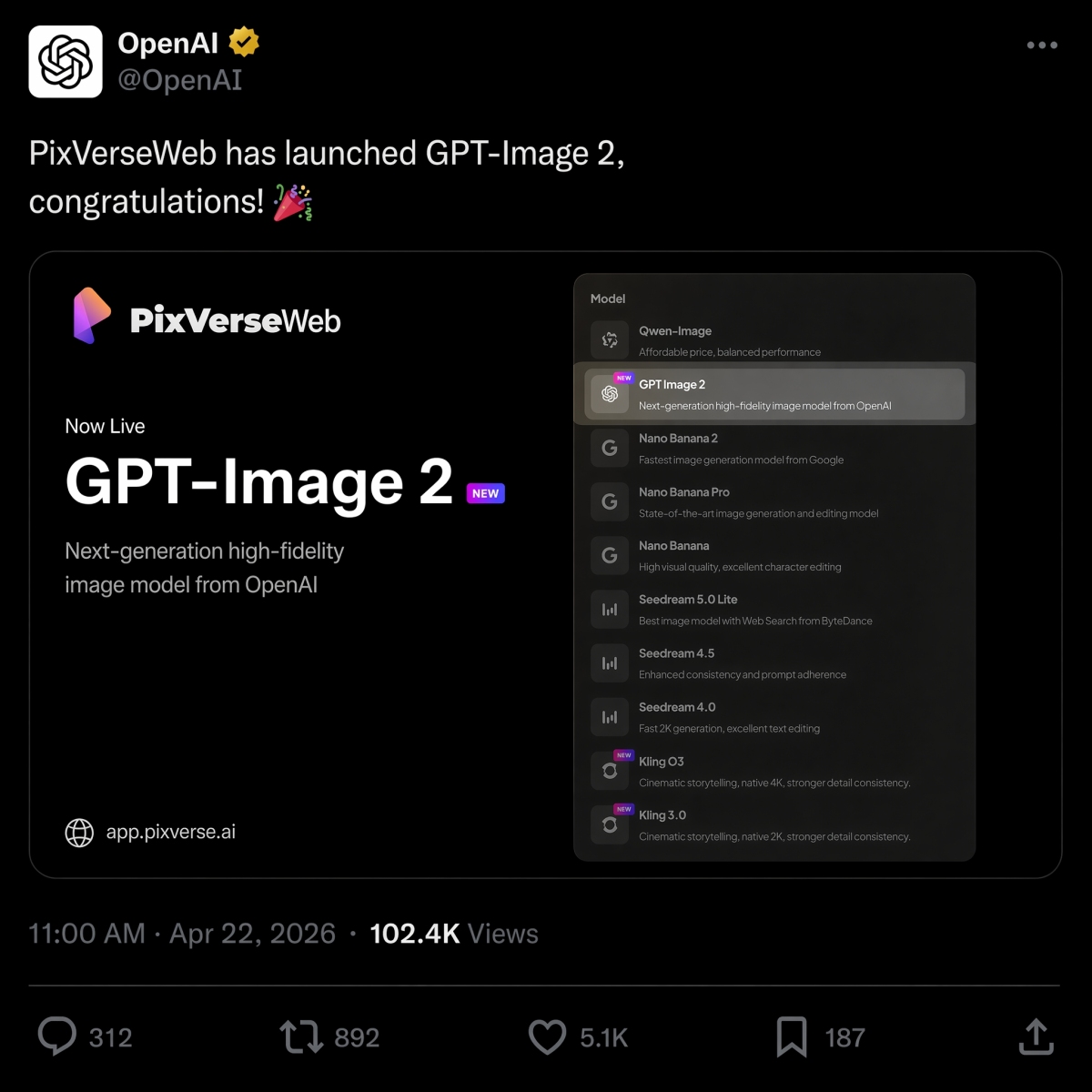
2026 年 4 月 22 日、PixVerse はテキストから画像へのオプションとして GPT Image 2 を開始し、モデル ラインナップに Nano Banana 2、Seedream、HappyHorse 1.0 に加わりました。
同じブリーフに対して OpenAI と Google 画像モデルのどちらを使用するかを決定する場合は、GPT Image 2 と Nano Banana 2 の比較 を参照して、同一のプロンプトからの結果を並べて確認してください。
プロンプトの作業が主にビデオに関するものである場合、当社の 最適な画像からビデオへの AI ツール ガイド では、静止画像の準備ができた後に適切なモーション ワークフローを選択する方法を説明しています。
PixVerse を試してください: PixVerse アプリを開きます。
よくある質問
最良の GPT Image 2 プロンプトは何ですか?
最高の GPT Image 2 プロンプトは、単なるビジュアル スタイルではなく、明確な制作ジョブを説明します。通常、強力なプロンプトには、件名、出力タイプ、必要に応じて正確なテキスト、構成、照明、制約、アスペクト比、および最終的な使用例が含まれます。製品広告、正確なテキストのポスター、キャラクター シート、UI モックアップ、インフォグラフィック、画像からビデオへの最初のフレームは、最初に始めるのに特に適したプロンプト カテゴリです。
より良い GPT Image 2 プロンプトを作成するにはどうすればよいですか?
次の式を使用します: 主題、ビジュアル スタイル、構成、照明、詳細、制約、出力のユースケース。 GPT Image 2 に画像が何をする必要があるかを伝え、正確なテキストを引用し、レイアウトとアスペクト比を指定し、変更してはいけないものをリストします。編集の場合は、変更、ロックされた要素、およびリアリズム要件を分離します。
GPT Image 2 は商品画像に適していますか?
はい。 GPT Image 2 は、製品広告のコンセプト、e コマースのヒーロー画像、パッケージのモックアップ、製品の切り抜き、キャンペーンのビジュアルに役立ちます。製品チームは、広告や製品リストで出力を使用する前に、製品の形状、ラベルのテキスト、規制対象の表示、ロゴ、パッケージの詳細を確認する必要があります。
GPT Image 2 はテキスト付きの画像を作成できますか?
はい、GPT Image 2 は、読みやすいテキスト、特に短い見出し、ラベル、ポスター、メニュー項目、インフォグラフィック ステップ、UI ラベルを含む画像を作成できます。最良の結果を得るには、正確なテキストを引用符で囲み、表示される場所を指定し、コピーを短くし、「正確なテキストのみ」、「余分な単語は禁止」、「重複したテキストは禁止」などの制約を追加します。
GPT Image 2 画像をビデオに変換するにはどうすればよいですか?
最初に静止画像を生成または承認してから、それを PixVerse image-to-video にアップロードします。何が動き、何がロックされたままになるかを説明する別のモーション プロンプトを作成します。良好なモーション プロンプトでは、カメラの動き、被写体の保存、背景の動き、および新しいテキスト、新しいロゴ、余分な製品の禁止などの制約について言及します。
GPT Image 2 と Nano Banana 2: どちらが優れていますか?
通常、GPT Image 2 は、テキストの多いポスター、図、UI モックアップ、編集可能なビジュアル ブリーフ、画像からビデオへの最初のフレームなどの構造化デザイン出力に適しています。フォトリアリズム、マテリアルのディテール、高速な視覚的反復がより重要な場合、Nano Banana 2 を比較する価値があります。同じプロンプトの結果については、GPT Image 2 と Nano Banana 2 の比較 を参照してください。
GPT Image 2 は ChatGPT Images 2.0 と同じですか?
検索意図については、そうです。多くのユーザーは、GPT Image 2、gpt-image-2、および ChatGPT Images 2.0 を使用して、OpenAI の新しい ChatGPT 画像生成エクスペリエンスを説明します。 OpenAI の製品側の名前は ChatGPT Images 2.0 ですが、gpt-image-2 は、開発者や作成者が API ワークフローについて議論するときによく使用するモデル スタイルのフレーズです。
GPT Image 2 は無料ですか? API の料金はいくらですか?
OpenAI ヘルプには、ChatGPT Images 2.0 がすべてのレベルで利用可能であると記載されていますが、プランの割り当てと API の請求は別になっています。 2026 年 6 月 22 日の時点で、OpenAI は GPT-Image-2 画像出力を 100 万トークンあたり 30.00 ドルでリストしています。実際のコストは、プロンプトの長さ、参照、出力サイズ、品質、キャッシュによって異なります。