PixVerse Creator Handbook: Welcome to PixVerse Community!
Complete guide for PixVerse Community Creator Partners - learn about partnership tiers, benefits, earning credits, and how to grow with the PixVerse community.
We’re absolutely thrilled to have you on board as a Community Creator Partner! 🎉
This page is primarily tailored for creators who have received the acceptance email from PixVerse Creator Partnership. It aims to help each creator understand the benefits of PixVerse CPP and the requirements for continuously enjoying these benefits by contributing to our vibrant community.
We sincerely hope that every creator in PixVerse CPP can grow together in the community. Stay tuned for the notification in PixVerse Official Discord and looking forward to witnessing your wonderful journey and mutual progress here!
PixVerse Creator Partnership Tiers & Benefits:
1. Tiers & Benefits
- 💚 Basic Partnership: Pro Membership credits per month.
- 🧡 Pro Partnership: Pro Membership + 20,000 extra credits per month.
- ❤️ Strategic Partnership: Premium Membership + 30,000 extra credits per month.
Note: Extra credits will be issued to each creator’s account on 1st day of every month, starting from the month you officially become a PixVerse Creative Partner.
1.1 Tier Advancement & Growth Opportunities
We believe in rewarding ambition and recognizing excellence. Your tier isn’t just static—it evolves with your achievements.
-
Initial Tier Assessment:
- We will assign you an initial tier in your welcome e-mail based on the information submitted in your form. Our evaluation focuses on 3 key dimensions:
- Depth of PixVerse integration in your work
- Creative potential to highlight our features
- Value added to expanding and enriching the creator community
- We will assign you an initial tier in your welcome e-mail based on the information submitted in your form. Our evaluation focuses on 3 key dimensions:
-
Upgrade Process:
- Monthly Review Window: review every application email at the 1st–5th of every month
- 3 slots for Basic → Pro
- 1 slot for Pro → Strategic
- How to Apply: Submit your latest projects, viral content, or milestones to @Naomi (naomi@pixverse.ai) before the deadline.
- Example of Application E-mail
- Monthly Review Window: review every application email at the 1st–5th of every month
Subject: [Partnership Tier Advancement Application]

Hi Naomi & PixVerse Team,

I'd like to submit my application / recent work for your review. Here's my information:

**Name:** [Your Full Name]
**Discord Member:** [Yes / No] (Discord ID: [YourDiscordID])
**Current CPP Tier:** [Basic / Pro / Strategic]

**Recent Works / Achievements:**
- [Work/Link] – Description
- [Work/Link] – Description

Thank you for your time and support!

Best,
[Your Name]
[PixVerse Account ID / Email]
- Probation & Confirmation: Approved upgrades enter a 30-day probation. Complete it successfully to unlock your new tier benefits.
1.2 🫠 When Could Your CPP Status Be Revoked?
2. General Benefits of all CPP
Every CPP member enjoys access to exclusive perks designed to fuel creativity, growth, and recognition:
| Benefit | Access | Timing |
|---|---|---|
| Early Access to New Features Be among the first to explore PixVerse’s latest features and model updates. Participate in beta tests and receive additional credits for your contributions. | Verified CPP members notified via Discord | Per release |
| Brand Exposure Increase your visibility across PixVerse’s platforms. Engage on social media, participate in international events, and be featured in official press releases as a representative of CPP. | Priority placement on PixVerse platforms + official engagement on social media Stay tuned for additional brand-building opportunities such as exclusive spots in our PR campaigns, editorial interviews, and spotlight columns designed to showcase your unique story and talent. | Per occasion |
| Priority Technical Support CPP members receive dedicated support for any technical challenges, ensuring a seamless and productive experience with PixVerse products. | Submit feedback via #🎉support or 📁test-feedbackFeedback from CPP is prioritized. | On-demand |
| Monthly Membership & Credits Enjoy exclusive membership privileges and access to substantial credits to support your creative projects. | Join Discord → Verify with community manager → Stay active | Monthly |
| Discount Codes for Community Sharing Share PixVerse with your community using special discount codes, designed to help your followers or friends join the experience. | Apply via mora@pixverse.ai Example of application: Subject: [CPP discount code application] - Full Name and Discord ID (e.g., JohnDoe#1234) - Current Partnership Tier of CPP (Basic/Pro/Strategic) - Links to your social media profiles (e.g., Instagram, Twitter, Youtube) | On-demand |
Earning Extra Credits
Is there any chance creator could earn them through extra projects or maybe a makeup assignment? Surly and exclusive to our creator in CCP:
- Participate in themed events on Discord → Win & Earn credits.
- Channel:
Discord🎙 → Early Adopter → 🎗Creator Event
3. Meet the community in Discord
Every CPP member gets a “Creator” role, unlocking access in the Early-Adopter section to:
🎗 Creator Event - Exclusive activities designed just for our CCP creators! Stay tuned and join the fun to earn extra credits—we can’t wait to see you shine!
📁 Monthly Submission - Exclusive channel for our CCP to submit the creations for extra credits.
🏆 Gravity Workshop - A vibrant hub where creators of all partnership tiers come together to collaborate, inspire, and grow.
📋 Test & Feedback - Your voice matters! During beta testing, we’ll gather insights to refine our features. And even outside beta phases, we’re always eager to hear about bugs or ideas to make things better.
Advanced CPP only:
🎟 Omni Workshop - Reserved for Professional Creators and Strategic Partnership members.
💖 Volunteers - Shoutout to our incredible volunteer team! 🎉 They keep our Discord community thriving, answer questions for newbies, and make sure everyone feels welcome. Thank you for pouring your heart into this space!
FAQ:
❓ How should I contribute to the community after joining?
As a PixVerse CPP member, your role goes beyond creating content:
-
Engage actively – participate in discussions and help shape a stronger, more vibrant community. Stay engaged by actively participating in PixVerse’s beta tests and creative challenges event, offering feedback and ideas that help improve the product and model. Every thought you share brings us one step closer to making PixVerse the best it can be.
-
Create with impact – share content and ideas that highlight your creativity and showcase PixVerse’s unique features. Explore PixVerse’s capabilities to create more impactful work, and inspire others to use PixVerse to enhance their creative potential.
-
Grow together with PixVerse – integrate our tools meaningfully and help expand the creator ecosystem.
Excelling in these areas opens doors to long-term, deeper collaboration with PixVerse.
We value:
- Depth of PixVerse integration in your work
- Creative potential to highlight our features
- Value added to expanding and enriching the creator community
The more actively you engage, the more opportunities you’ll have to unlock enhanced partnership perks. From early access to new features to special collaborative projects, we’re here to make your experience both rewarding and enjoyable.
❓ I already hold a membership. How does CPP affect it?
-
If you already had an active PixVerse membership when joining CPP, your benefits will be converted into bonus credits:
- Pro membership → 6,000 credits (for Basic/Pro Partner)
- Premium membership → 15,000 credits (for Strategic Partner)
-
Once your existing subscription ends, CPP benefits will automatically activate within 1–3 business days.
- If you don’t see the benefits applied, contact your community manager on Discord.
- Cancel your original subscription if you want to use CPP benefits exclusively.
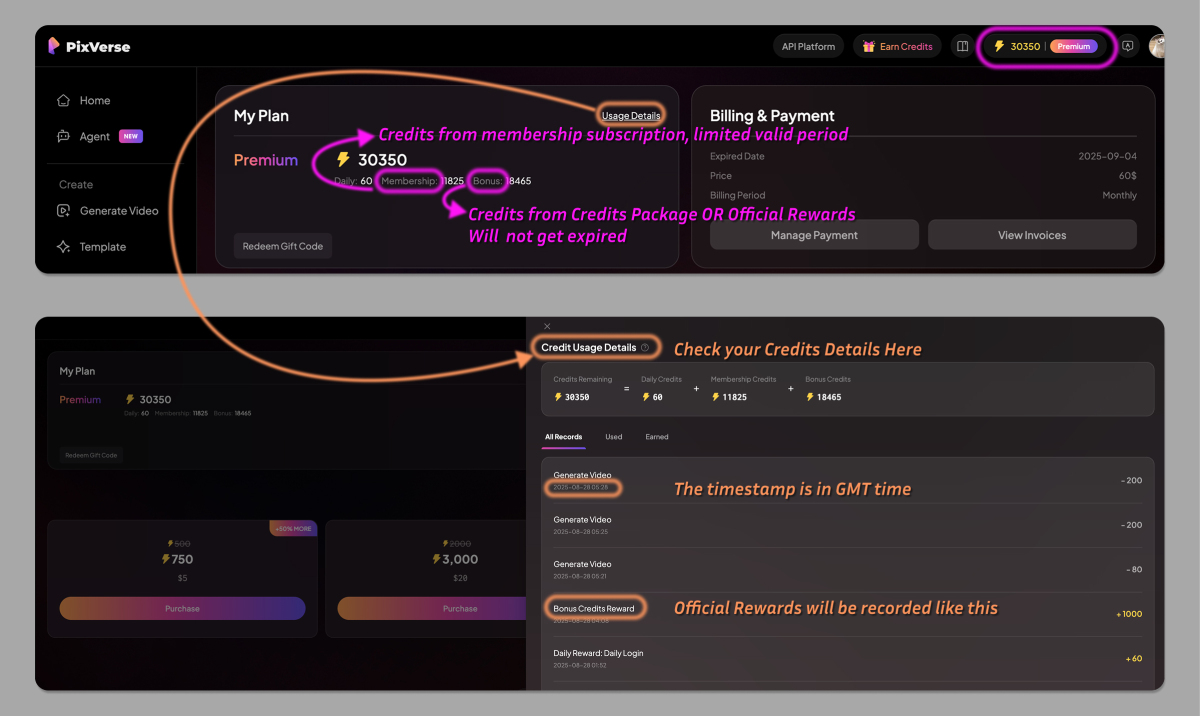
*Bonus credits is aka Purchased Credits, would not get expired as per FAQ - Subscriptions & Billing
❓ Can I highlight “PixVerse CCP” on my social media profile?
- Absolutely! We encourage all creators to proudly display “PixVerse CPP” or “PixVerse Creative Partner” on your profiles.
- Doing so helps our official accounts discover and engage with you, unlocking potential collaboration opportunities.
❓ Where can I check my credits details?
- Go to the PixVerse website/app, click the ”⚡” icon (or Credits Detail on mobile), and check your usage details.
❓ Regarding monthly submission, is there a monthly limit on Post Rewards?
Yes. For the same creator, the total monthly Post Rewards across all platforms are capped at 15,000 credits.
(Bonus rewards don’t count toward this limit—see Does the “Viral Bonus” have a monthly limit?)
❓ How is the “Monthly Total Post Rewards” calculated?
It’s the sum of base rewards per platform:
Example: 2 YouTube videos (4,000 credits) + 8 TikTok posts (8,000 credits) = 12,000 credits. If you post 3 more Instagram posts (3,000 credits), you’ll hit the 15,000 limit. After that, no additional base rewards will be added for new posts that month.
❓ Can I bypass the limit by using multiple accounts?
No. We calculate rewards based on PixVerse Account ID of your CCP application. Post Rewards from multiple accounts you operate will be combined.
❓ Does the “Viral Bonus” have a monthly limit?
No! Post Rewards are base rewards with a cap, while Viral Bonus is an extra reward. They’re independent and stackable for high-quality content.
❓ I operate more than 1 social media channel. Can I add my 2nd channel for Post Rewards and Viral Bonuses?
The rewards for PixVerse CCP are calculated based on your PixVerse Account ID, so any rewards from multiple accounts you operate will be combined.
This means that using more channel won’t allow you to bypass the monthly limit for Post Rewards.
However, you can still earn the Viral Bonus for any content that goes viral, as there is no limit on that.
For further question regarding CPP, feel free to communicate with CPP community manager @Naomi via Discord DM or email (naomi@pixverse.ai)