Best Google Flow Alternatives for AI Video in 2026
Compare the best Google Flow alternatives for free text-to-video, AI filmmaking, storyboards, APIs, social clips, and long-form workflows.
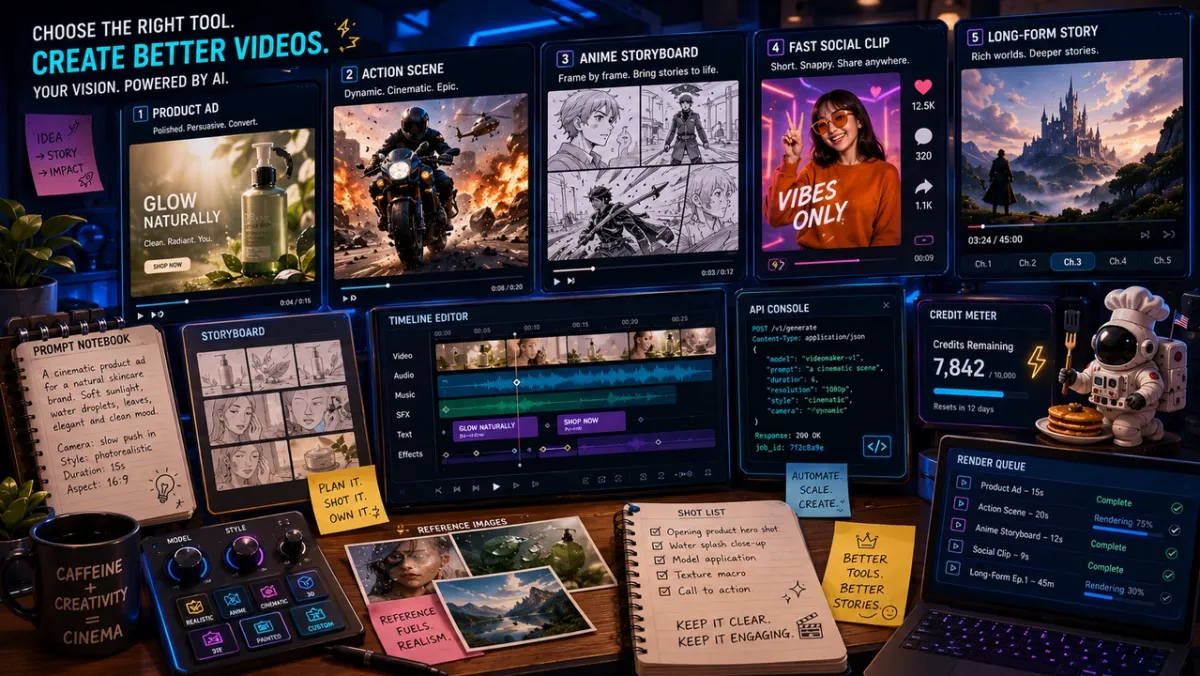
You have the idea. A tiny astronaut chef is flipping pancakes on the moon. The camera pushes in, syrup floats upward, the radio crackles, and you need the whole thing as a short video before your next meeting.
Then the tool question lands: should you open Google Flow, look for a Google Flow alternative, try a Google Flow free alternative, or use a broader AI video platform? The answer depends on whether you need a cinematic text-to-video model, a storyboard workflow, a long-form story builder, a fast social clip generator, or a production API.
This guide compares practical alternatives to Google Flow for AI video creators. It is not a one-tool sales pitch. PixVerse is included because it is a relevant option for text-to-video, image-to-video, storyboarding, and API workflows, but the main goal is to help you choose the right tool for your actual project.
Which Google Flow Do You Mean?
Search results for “Google Flow alternative” are messy because the phrase can mean two different things. The AI Overview layout for this query currently starts by splitting the intent into AI video/filmmaking versus workflow/API automation. That is the right starting point.
| If you mean… | You are probably looking for… | Best direction |
|---|---|---|
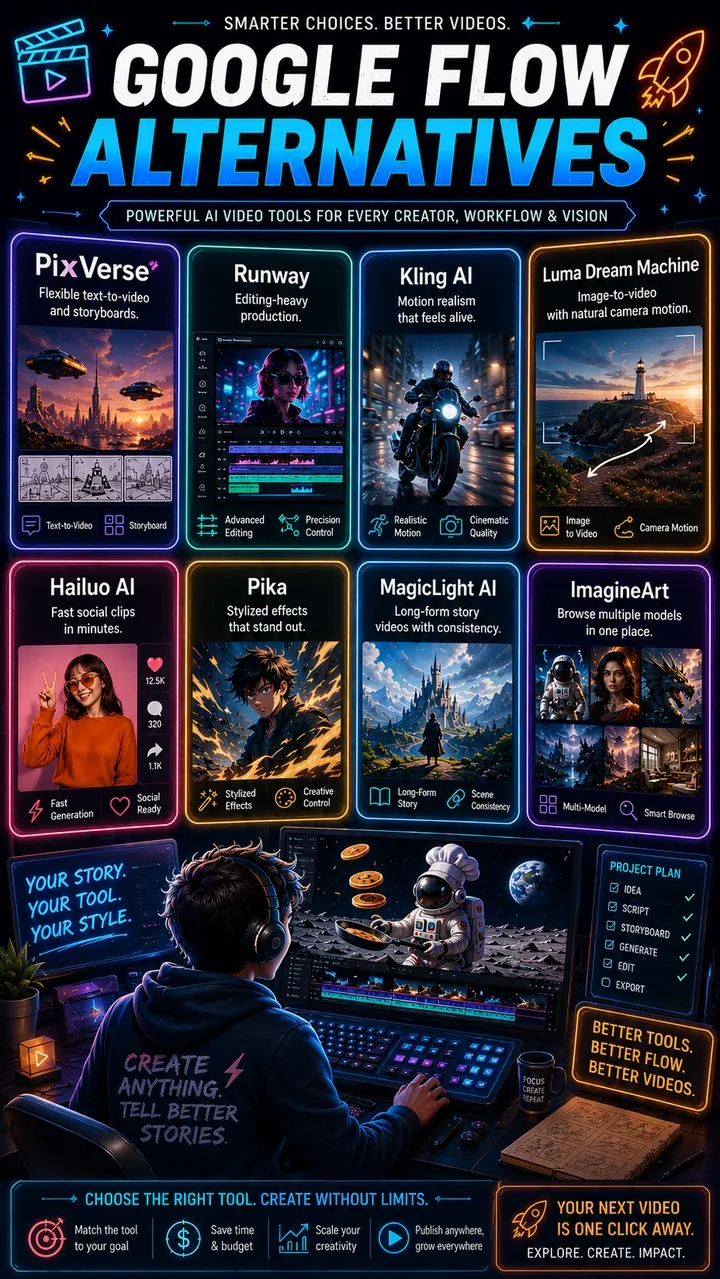
| Google Flow, the AI filmmaking tool | Text-to-video, image-to-video, scene building, camera control, AI storyboarding, native audio | Compare PixVerse, Runway, Kling, Luma, Hailuo, Pika, MagicLight, and ImagineArt |
| Google Cloud Workflows or workflow automation | No-code automations, API orchestration, business process logic | Compare n8n, Make, Gumloop, Zapier, or other automation builders |
This article focuses on the AI video meaning. If you searched “google flow free alternative” or “alternative to google flow text to video,” you are in the right place.
Quick Comparison Table
As of May 21, 2026, Google positions Flow as an AI filmmaking tool designed around Veo, Imagen, and Gemini in its official Flow launch post. Google also updated the Flow family with Gemini Omni, Flow Agent, custom Flow Tools, and mobile apps in its May 2026 Flow update. That makes Flow a strong creative suite, not just a prompt box.
Alternatives matter when you want different model choices, broader access, simpler pricing, different creative controls, script-to-video workflows, or a tool that fits your team better.
| Tool | Best for | Free angle | Where it stands out |
|---|---|---|---|
| PixVerse | Text-to-video, image-to-video, social clips, character consistency, C1 storyboards, API workflows | Free to start in the app; API pricing is credit-based | Multiple PixVerse models and model options in one workspace, 1-15s V6/C1 generation, native audio options, API docs |
| Runway | Cinematic editing and professional post-production workflows | Limited trial or credit-based access | Strong creative suite, editing tools, production-oriented controls |
| Kling AI | Motion realism, human movement, action-heavy clips | Free or trial access varies by region and plan | Strong body motion and physical movement for action prompts |
| Luma Dream Machine | Image-to-video, camera motion, environment shots | Limited free/trial access | Smooth camera moves and visual exploration from reference images |
| Hailuo AI | Fast short-form social clips | Free/trial access varies | Quick generation for simple social prompts |
| Pika | Stylized effects and creator experiments | Free/trial credits vary | Fast effects, transformations, playful social formats |
| MagicLight AI | Script-to-video and long-form story workflows | Free entry point promoted by the platform | Better fit when you need story videos, voices, and longer script structure |
| ImagineArt | Multi-model browsing and AI filmmaking comparison | Free credits promoted by the platform | Useful when the main need is switching among many external models |
8 Google Flow Alternatives Worth Testing
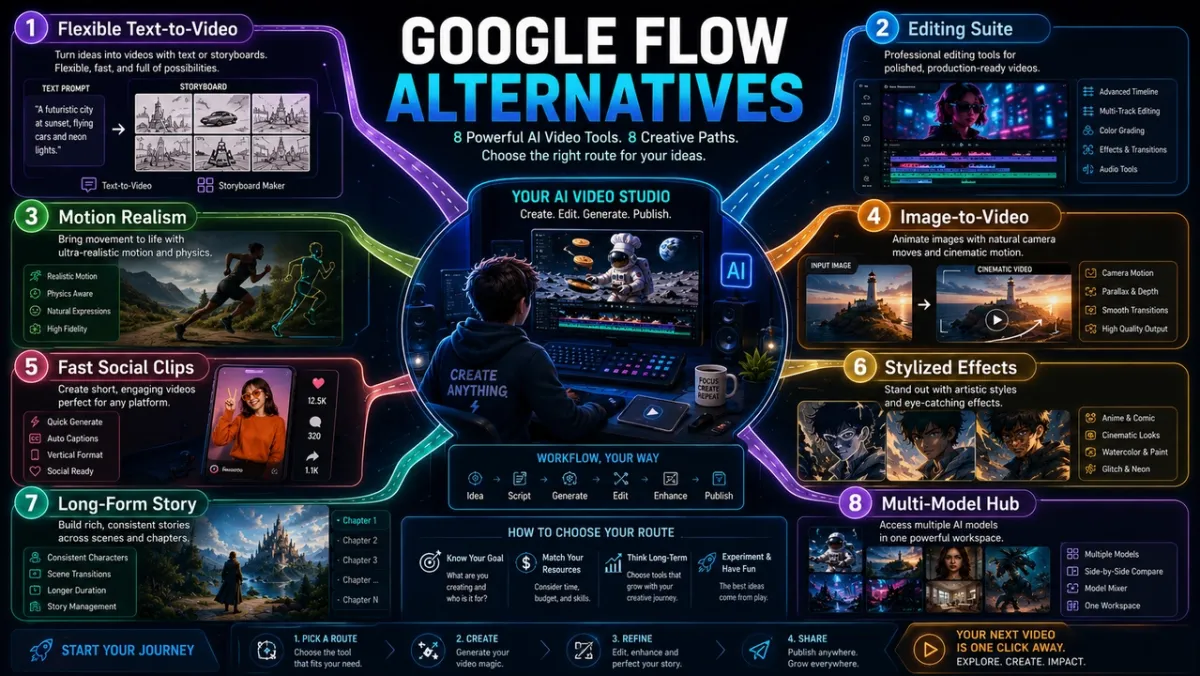
1. PixVerse - Best for Flexible Text-to-Video and Storyboard Workflows
For an agent-led creation workflow inside the same ecosystem, PixVerse Agent can help turn a creative brief into a more guided starting point before you choose a model or generation mode.
Product intro: PixVerse is an AI video generator platform for text-to-video, image-to-video, transition generation, reference workflows, and API-based production. It is most relevant as a Google Flow alternative when you want a broader workspace rather than a Google-only environment.
For general AI video, PixVerse V6 is the flexible default. The official PixVerse V6 docs list text-to-video, image-to-video, first-and-last-frame transition, and video extension support, with 1-15 second duration and 360p, 540p, 720p, and 1080p quality options. Audio generation can be switched on for supported workflows. For cinematic storyboarding, action, fantasy effects, and animation-style sequences, PixVerse C1 is the specialist. The C1 docs describe text-to-video, image-to-video, transition, and reference-to-video support, including multi-panel storyboard-to-video conversion.
Pros:
- Supports multiple video workflows: text-to-video, image-to-video, transition, extension, reference-to-video, lip sync, sound effects, and API use cases.
- V6 is a good fit for everyday creator production, short ads, social clips, and product video drafts.
- C1 is useful when a project starts from storyboards, action choreography, fantasy effects, or anime-style scenes.
- API documentation and credit pricing make production planning easier for teams that need repeatable workflows.
Cons:
- Higher-quality, longer, or audio-enabled generations consume more credits.
- The number of available model options and controls can feel like a lot for beginners who only want one simple prompt box.
- C1 is specialized; it is not always the fastest choice for basic product clips or simple lifestyle videos.
User feedback: Public comments around PixVerse tend to praise fast image-to-video experiments, creative output, and mobile-friendly generation. Product Hunt reviewers also frame it as a useful creative video tool, while some broader web reviews mention typical AI-video issues such as prompt misses, visual distortion, and credit sensitivity.
Why it works as a Google Flow alternative: PixVerse is most useful when you want a flexible production workspace: short text-to-video clips, reference images, storyboard-to-video, audio options, and documented API routes. It is not just a single model replacement; it is a broader creation stack.
2. Runway - Best for Editing-Heavy Creative Teams
Product intro: Runway is one of the most recognized AI video platforms for creators, agencies, and production teams. It combines video generation with editing tools, creative controls, collaboration features, and a workflow that feels closer to a production suite than a simple generator.
Pros:
- Strong creative suite for teams that need generation plus editing.
- Friendly interface for non-technical creators compared with developer-first tools.
- Good fit for ads, concept videos, campaign visuals, and production review workflows.
- Public review pages such as G2 often highlight ease of use, output quality, and feature breadth.
Cons:
- Cost and credit consumption can become painful for frequent iteration.
- Some user reviews mention failed renders, insufficient credits, or inaccurate results.
- It can feel heavier than needed if you only want fast text-to-video clips.
User feedback: User sentiment is split by use case. Production teams and creative professionals often value Runway’s workflow depth. Hobbyists and smaller creators are more likely to complain about cost, credits, and inconsistent generations.
Why it works as a Google Flow alternative: Runway is a strong alternative when Google Flow feels too tied to prompt-to-scene creation and you need a fuller editing environment around generated video.
3. Kling AI - Best for Motion and Physical Action
Product intro: Kling AI is widely discussed for motion realism, character movement, action clips, and cinematic short-form generation. It belongs on the shortlist when the main challenge is believable movement rather than long-form editing or script structure.
Pros:
- Often performs well on human movement, product motion, sports, action, and camera movement.
- Useful for creators testing realistic physical motion in short clips.
- Good fit for social ads, action beats, and image-to-video experiments.
- Kling-focused communities frequently discuss it as a serious option for cinematic motion.
Cons:
- Public user feedback includes complaints about credit expiration, support, prompt misses, and quality changes between model versions.
- Storytelling workflows can require multiple generations and manual stitching.
- It is not always the best fit for talking-head, explainer, or structured brand workflows.
User feedback: Reddit discussions and independent review pages show a divided pattern: users like the video quality and motion when the model lands, but many complain about credits, failed attempts, and unpredictable results.
Why it works as a Google Flow alternative: Kling is worth testing when you are comparing Google Flow against tools that may produce stronger motion for action, product movement, or fast physical scenes.
4. Luma Dream Machine - Best for Image-to-Video and Camera Motion
Product intro: Luma Dream Machine is an AI video generator known for image-to-video, cinematic camera movement, and visually rich scene exploration. It is a good fit when your creative process starts from a strong reference image or mood frame.
Pros:
- Good for turning still images into atmospheric motion tests.
- Often useful for environment shots, product mood clips, concept art, and camera exploration.
- Strong visual discovery tool for creators who want to test movement before building a final edit.
- Recent hands-on reviews frequently frame it as useful for creators exploring spatial and cinematic video.
Cons:
- Interface and workflow can feel less straightforward for some users.
- Long-form or multi-shot storytelling still requires planning and editing outside the generator.
- Results can vary sharply by reference image and prompt specificity.
User feedback: Reviewers tend to praise the visual potential and image-to-video direction, while criticizing workflow friction, inconsistent control, and the need for multiple attempts.
Why it works as a Google Flow alternative: Luma is a strong alternative when your main need is not a Google-style AI studio, but a visual exploration engine for camera movement and reference-driven scenes.
5. Hailuo AI - Best for Fast Social Clips
Product intro: Hailuo AI, associated with MiniMax video generation, is commonly used for fast short-form clips. It is most relevant for creators who need quick social video experiments rather than a heavy editing suite.
Pros:
- Good fit for quick prompt-to-video experiments and short social clips.
- Useful when speed matters more than deep directorial control.
- Can be tested alongside Kling, Pika, and Luma for short-form social workflows.
- Recent review content often focuses on text-to-video, image-to-video, Director Mode, and character consistency tests.
Cons:
- Public community feedback includes concerns about support experience and subscription confidence.
- Less suitable for long-form story structure or precise multi-scene brand continuity.
- Like most AI video tools, it may need several prompt attempts before one output is usable.
User feedback: Feedback is mixed. Some users see promise in the output and speed; others express frustration with support, billing confidence, or inconsistent results.
Why it works as a Google Flow alternative: Hailuo is worth testing if your main goal is fast, lightweight generation for Reels, Shorts, TikTok, and small creative tests.
6. Pika - Best for Effects and Stylized Experiments
Product intro: Pika focuses on fast AI video creation, stylized effects, transformations, and playful social content. It is less about building a formal AI film studio and more about helping creators make surprising short clips quickly.
Pros:
- Strong for effects-led social posts, transitions, and playful transformations.
- Easy entry point for creators who want visually interesting clips without a full production setup.
- Useful for marketing experiments, memes, creator posts, and concept visuals.
- Recent reviews often describe it as intuitive and creator-friendly for quick video ideas.
Cons:
- Not always the best choice for photorealistic cinematic realism or strict character continuity.
- Power users may move to paid tiers quickly.
- Public review sentiment includes complaints about billing, credits, and variable output quality.
User feedback: Users often praise Pika’s creativity and accessibility, but review sites and community discussions also show frustration around subscription value, credits, and inconsistent generations.
Why it works as a Google Flow alternative: Pika is a good alternative when you want fast creative energy, stylized effects, and social-native experimentation instead of a Google-centered filmmaking suite.
7. MagicLight AI - Best for Long-Form Story and Script Workflows
Product intro: MagicLight AI is closer to a script-to-video and story-video platform than a single-shot AI video generator. Its own Google Flow alternative article emphasizes long-form content, scripts, voices, multilingual output, and story-style workflows.
Pros:
- Better suited to long scripts, story videos, explainers, children’s content, and voice-led videos.
- Offers a more guided workflow for people who do not want to assemble every scene manually.
- Useful when the input is already a script rather than a single cinematic prompt.
- Some review pages praise ease of use and the speed of moving from text to finished video.
Cons:
- Public Trustpilot-focused analyses report many negative reviews, especially around support, billing, and expectations.
- Less direct as a replacement for Google Flow’s cinematic clip generation.
- May feel too template-like for creators who want granular camera control.
User feedback: Feedback is polarized. Positive reviews focus on ease and speed for story videos. Negative reviews often focus on support, billing, refund issues, and results that do not meet expectations.
Why it works as a Google Flow alternative: MagicLight is not the closest Google Flow clone. Its value is different: it is useful when the real job is turning scripts into structured videos with narration and scenes.
8. ImagineArt - Best for Multi-Model Browsing
Product intro: ImagineArt positions itself as a multi-model creative platform. Its Google Flow alternatives page emphasizes access to many model families from one login and one credit system, which appeals to creators who do not want to manage several subscriptions.
Pros:
- Strong fit for creators who want to compare many AI image and video models in one place.
- Public Trustpilot summaries praise ease of use, model variety, and creative workflow speed.
- Good for experimentation when you are not yet sure which model family fits your style.
- Can reduce the friction of maintaining multiple separate accounts.
Cons:
- Some users complain about slow video processing, credit consumption, content restrictions, and prompts not being followed.
- A multi-model hub can feel less focused than a dedicated production tool.
- The best output still depends on choosing the right model and prompt, not just the platform.
User feedback: Trustpilot’s AI review summary shows many users praising the interface, model variety, and result quality, while negative reviews mention credits, processing speed, restrictions, and occasional prompt mismatch.
Why it works as a Google Flow alternative: ImagineArt is a useful alternative when the main problem is model lock-in. It lets creators compare different model families without staying inside a single provider’s ecosystem.
Best Free Google Flow Alternative: What “Free” Really Means
When people search “google flow alternative free,” they are not always asking for a zero-cost professional studio. Usually, they want one of three things:
| Free intent | What the user really wants | Best approach |
|---|---|---|
| Try AI video without paying | A few test clips to judge quality | Use Google Flow free credits and compare free or trial access across 2-3 alternatives |
| Make social videos regularly | Recurring credits or low-cost generations | Compare PixVerse, Kling, Hailuo, Pika, Luma, and other current free or trial limits |
| Avoid subscription lock-in | Pay only when a project needs more output | Prefer credit-based tools or platforms with API pricing transparency |
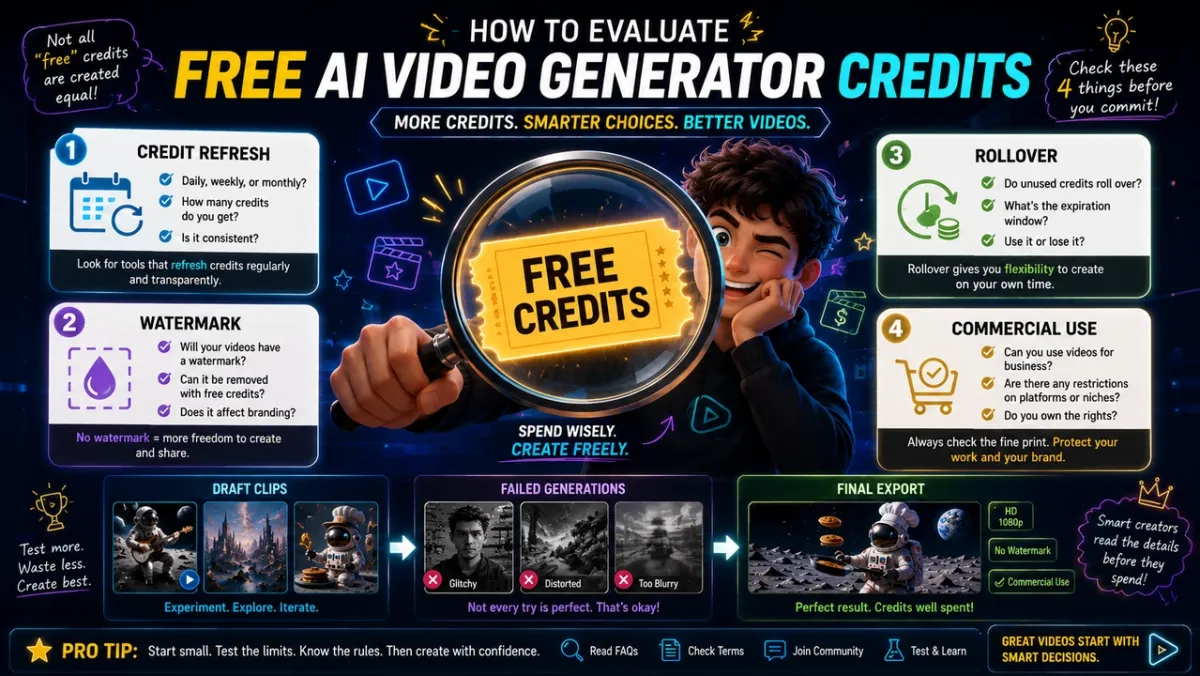
There is no truly unlimited free Google Flow alternative for high-quality AI video. High-resolution video generation costs compute. The practical strategy is to use free credits for prompt testing, generate short drafts first, and reserve paid credits for final candidates. For a broader shortlist of free-credit platforms and open-source tools, see our free AI video generator guide.
For any “free” tool, check the same four details before you commit: how many credits refresh, whether unused credits roll over, whether outputs carry a watermark, and whether commercial use requires a paid plan. PixVerse is useful for cost planning because V6 and C1 pricing is documented by resolution, duration, and audio setting in the model pricing docs, but the same discipline applies to every tool in this list.
Alternative to Google Flow Text to Video: A Better Workflow
If your real query is “alternative to Google Flow text to video,” do not start by comparing logos. Start with the kind of prompt you have.
If You Have Only a Text Prompt
Use a text-to-video tool that matches the shot. PixVerse V6 is a good first pass for flexible creator clips, Pika is useful for stylized effects, Hailuo can work for fast short-form drafts, and Runway is stronger when you need editing around the output. Keep the prompt short, specify the subject, motion, camera, lighting, aspect ratio, and audio. Generate one draft first instead of multiple variations.
Example prompt:
A vertical 9:16 product teaser for a silver travel mug on a rainy cafe table. Slow macro push-in, warm window light, steam rising, soft jazz ambience, realistic reflections, premium lifestyle ad.
Once the motion direction works, refine the details. If the scene needs a second beat, use transition or extension workflows instead of rewriting from scratch.
If You Have a Reference Image
Use image-to-video. This is better for product clips, character references, fashion, real estate, food shots, and visual styles that should not drift too far from the original frame.
Start with the clearest image you have, then write the prompt around motion rather than re-describing the entire object. Let the image anchor the visual identity. Luma, PixVerse, Kling, Hailuo, and Pika are all worth testing for image-to-video, but the right choice depends on whether you need realism, speed, effects, or workflow control.
If You Have a Storyboard
Use a tool that understands structured scenes, not just one prompt. Google Flow’s scene-building tools are useful. PixVerse C1 is especially relevant when your storyboard already exists as panels because C1 can use reference-based generation and multi-panel storyboard-to-video conversion. Runway is also worth considering if your storyboard needs more editing and post-production after generation.
This is one of the clearest PixVerse advantages for artists, anime creators, short drama teams, and video teams working from concept boards.
If You Need an API Workflow
Use a documented developer route. A prompt-to-video workflow becomes a business process once you need batch generation, webhook status checks, balance monitoring, or integration with an internal tool.
Google’s ecosystem has strong developer routes through Google services. PixVerse’s advantage is that its API documentation is directly centered on video generation workflows such as text-to-video, image-to-video, transition, fusion, extend, lip sync, sound effects, and more. Runway, Luma, Kling, and other tools may also provide developer options depending on plan and region, so the API shortlist should be based on your stack, not just model quality.
How to Choose the Right Google Flow Alternative
Use this decision checklist before paying for any tool:
- Start with the output. Do you need a social clip, product ad, storyboard scene, music video, API batch, or long-form story?
- Check the free tier honestly. How many usable clips can you make after failed generations, edits, and upscaling?
- Test your hardest scene. Do not judge a model by landscape demos if your real scene is a talking character or product macro shot.
- Measure iteration cost. The cheapest tool is not always cheaper if it takes ten attempts to get one usable video.
- Confirm rights and terms. Commercial usage, watermarking, data handling, and regional availability can change.
- Avoid single-model lock-in. If your workflow depends on AI video every week, choose a platform or API path that lets you adapt.
FAQs
What is the best Google Flow alternative?
There is no single best Google Flow alternative for every creator. PixVerse is useful for flexible text-to-video, storyboards, and API workflows. Runway is stronger for editing-heavy teams. Kling is strong for motion realism. Luma is strong for image-to-video and camera exploration. MagicLight is useful for script-led story videos.
Is there a free Google Flow alternative?
Yes, but “free” usually means limited credits, trial usage, watermarks, queues, or lower output volume. PixVerse is free to start in the app, and Google Flow itself offers free daily credits. The best approach is to test short drafts for free, then use paid credits only for final outputs.
What is the best alternative to Google Flow text to video?
PixVerse V6, Runway, Hailuo, Pika, and Kling are all worth testing for text-to-video. Pick PixVerse when you want flexible creator workflows and API options, Runway when you need editing around the clip, Hailuo when speed matters, Pika when effects matter, and Kling when motion realism matters.
Is Google Flow free?
Google’s support documentation says users without a Google AI Plus, Pro, or Ultra subscription receive 50 Google Flow credits per day free of charge. Paid Google AI plans receive larger monthly Flow credit allocations. Credit costs vary by model and generation type, so the number of actual clips depends on your settings.
What if I meant Google Flow as workflow automation?
If you meant workflow or API automation rather than AI filmmaking, compare tools such as n8n, Make, Gumloop, Zapier, or Google Cloud Workflows alternatives. This article focuses on Google Flow as the AI video and filmmaking tool.
Is PixVerse better than Google Flow?
It depends on the job. PixVerse is a practical choice when you want text-to-video, image-to-video, storyboarding, API docs, or a non-Google creation workflow. Google Flow is the better choice when you specifically want Google’s Veo, Imagen, Gemini, and Omni experience.
Which Google Flow alternatives have API access?
PixVerse provides API documentation for text-to-video, image-to-video, transition, fusion, extend, lip sync, sound effects, and other video workflows. Google also has developer routes through its own ecosystem. Runway, Kling, Luma, and other tools may offer API access depending on plan and region, so always check current developer documentation.
Can I use Google Flow alternatives commercially?
Commercial use depends on each platform’s current terms, plan, region, and content policy. Before using AI video in ads, client work, ecommerce campaigns, or paid social posts, confirm the licensing and usage terms directly with the platform.
Conclusion
The best Google Flow alternative is not just the tool with the prettiest demo. It is the tool that helps you turn an idea into a usable video with enough control, credits, consistency, and workflow flexibility to keep creating after the first test.
Google Flow is a strong option for creators who want Google’s AI filmmaking ecosystem. PixVerse, Runway, Kling, Luma, Hailuo, Pika, MagicLight, and ImagineArt each solve a different version of the replacement problem.
So try the astronaut pancake shot in two or three tools. Judge the thing that actually matters: which one gets you from “that would be fun” to a clip you can share, pitch, edit, or ship.